Vossor Plus MHF 83 - Navigateur Seecode - Notice d'utilisation et mode d'emploi gratuit
Retrouvez gratuitement la notice de l'appareil Vossor Plus MHF 83 Seecode au format PDF.


| Type de produit | Kit mains-libres Bluetooth pour rétroviseur |
| Alimentation | Batterie Li-Ion rechargeable 3,7 V, 1700 mAh |
| Autonomie en veille | 280 heures |
| Autonomie en communication | 15 heures |
| Haut-parleur | 8 Ω / 1 W |
| Microphone | -62 ± 2 dB |
| Profils Bluetooth | Headset, Handsfree |
| Portée Bluetooth | 10 mètres (classe 2 typique) |
| Fréquence | 2400 – 2483,5 MHz |
| Puissance de transmission | 1,0 dBm typ. |
| Sensibilité du récepteur | -83,0 dBm typ. |
| Suppression de bruit | Oui |
| Annulation d'écho | Oui |
| Affichage de l'ID de l'appelant | Oui |
| Commande vocale | Oui (selon téléphone) |
| Numérotation du dernier numéro | Oui |
| Transfert audio | Oui |
| Volume réglable | Oui |
| Mise en sourdine du micro | Oui |
| Mémoire interne | Flash 8 Mbits, jusqu'à 8 téléphones |
| Température de fonctionnement | -10 à 50 °C |
| Température de stockage | -20 à 70 °C |
| Garantie | 2 ans |
| Accessoires inclus | Adaptateur allume-cigare, manuel |
FOIRE AUX QUESTIONS - Vossor Plus MHF 83 Seecode
Questions des utilisateurs sur Vossor Plus MHF 83 Seecode
0 question sur cet appareil. Repondez a celles que vous connaissez ou posez la votre.
Poser une nouvelle question sur cet appareil
Téléchargez la notice de votre Navigateur au format PDF gratuitement ! Retrouvez votre notice Vossor Plus MHF 83 - Seecode et reprennez votre appareil électronique en main. Sur cette page sont publiés tous les documents nécessaires à l'utilisation de votre appareil Vossor Plus MHF 83 de la marque Seecode.
MODE D'EMPLOI Vossor Plus MHF 83 Seecode
873-080X00A-03

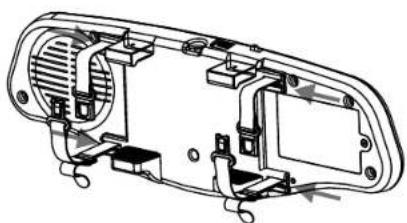
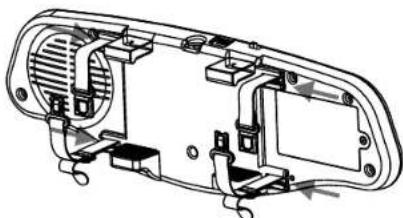
Fixing of the optional safetybelts
- Tum the backside of the mirror to you.
- Push the belts in the four adaptors near the holder, the part with the buckle must be on the upper side of the mirror.
- Adjust the length of the belts at the part with the latch, according to the size of your original reviewmirror.
- Put the Vossor on your mirror and push the latch in the buckle
- To unbuckle it again, just push at the middle of the latch and pull it apart.
Montage der optionalen Sicherungsbänder
- Drehen Sie den Spiegel mit der Rückseite zu sich.
- Schieber den Sie die Halter der Sicherungsbande in die vier Aufnahmen neben dem Halter, der Gurt mit der Schnalle muß auf der Oberseite montiert werden.
- Stellen Sie die Länge der Bänder entsprechend der Grübe Ihrches Originalspiegel ein.
- Befestigen Sie den Vossor auf ihrem Rückspiegel und schiben Sie die Lasche in die Schnalle.
- Um die Verregelung zu lose, drücken Sie auf den mittleren Teil der Schnalle.
Fijación de las correas de seguridad.optionales
Gire el espejo hacíaasted por la parte posterior.
- Haga preso sobre las correas en los quatre adaptadores cercanos al soporte, la parte con la hebbla depear esaba en la parte superior del espejo.
- Ajuste la medía de las correas con el pestillo, de acuerdo con la medía de su retrovisor original.
-Coloque el VOSSOR en su retrovisor y presione el pestillo en la hebilla. - Para desabrochar de nuevo, simplement presione en medio de la hebilla y retirelo .
Monteren van de spiegel met de bijgeleverde riempjes
- Draai de spiegel met de rugzijde maar u toe
- Plaats de metalen stripjes aan de uiteinden van de rempijes in de waarvoorden bestemde 4 openings.
- De 2 sluitingen moet aan de bovenzijde geplaatst worden.
- Stel de lenghte van de Niempjes in op de groote van de originele binnenspiegel.
- Bevestig de VOSSOR Plus aan de originele binnenspiegel en sluit de sluitingen van de riempies.
- Om de sluitingen van de riempjes weeer te openen drukt u op de vergrendeling van de sluitigen waarna dele zaogaan.
English
English
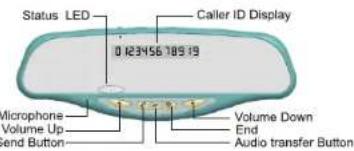
Part Description
Features
Supports handsfree & headset profile
Vossor Plus can be used as a handsfree unit or a headset as the situation demands.
Excellent voice tone
You can have a conversation without noise and feedback.
Caller ID display
You can identify the Caller ID of an incoming call.
Contents
| Preparation |
| Features |
| Part description |
| Button functions and LED status |
How to use
Basic Use 5
Charging battery with Cigar lighter adapter 5
Setting up VOSSOR PLUS 5 Options for new supply
Rearing with a Bluetooth mobile phone 7
Call Functions 8
Power on 8
Poweroff 8
Speaker Volume control /Microphone gain adjust 8
Microphone muting 8
Last number/Voice dialing 8
-Answering a call 9
Ending/Rejecting a Call 9
Transferring audio 9
Call Waiting 9
Reference
Trouble Shooting 10
Precautions. 11
Specifications 12
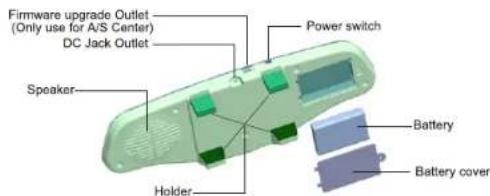
Included Acessories

Cigarette lighter adaptor

Manual

Battery Rechargeable Li-Ion
English
English
Button functions and LED status
| Functions | VOSSOR Status | How to use Button | Support Profile | |
| Handsfree | Headset | |||
| Pairing mode | BT not Connected | Press and Hold | Y | Y |
| Searching | BT not Connected | Press | Y | Y |
| Voice dialing(Only when user's mobile phone supports this function.) | Press and Hold | Y | Y | |
| Answering a Call | Ringing | Press | Y | Y |
| Rejecting A call | Ringing | Press | Y | N |
| Ending a Call | Talking | Press | Y | Y |
| Transferring audio(Mirror to Handset) | Talking | Press | Y | N |
| Transferring audio(Handset to Mirror) | Talking | Press | Y | N |
| Last number Called | Press | Y | N | |
| Call waiting | Talking | Press | Y | N |
| Volume Increase | Press | Y | Y | |
| Volume decrease | Press | Y | Y | |
| Microphone Mute | Talking | Press | Y | Y |
| Power ON | Switch | Y | Y | |
| Power Off | Switch | Y | Y |
LED Status
| LED | Status | VOSSOR Status |
| Blue LED | Flashing | Searching Paired devices |
| Blue LED | Light on | Bluetooth connected |
| Red LED | Flashing | Low battery |
| Blue+Red LED | Flashing Alternately | Paring mode |
English
English
Options for power supply
Basic Use
The battery is not charged when it is first delivered to the user. Charge the battery with the provided charger before using VOSSOR PLUS.
Charging the battery with Cigar lighter adapter
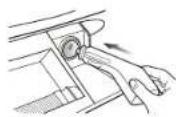
- Connect the Cigar lighter adapter to a power outlet.
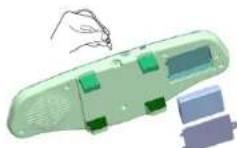
- Connect the Cigar lighter adapter to DC power Jack of Vossor Plus.

Tips
- It takes about 4 hours to fully charge the battery.
Setting up VOSSOR PLUS
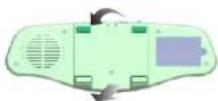
First, place the upper holder of VOSSOR PLUS to the top side of the rear-view mirror in your car. Push MHF83 closely to the mirror and place the lower holder of VOSSOR PLUS to fit completely.

Tips
Place VOSSOR PLUS in the center of the rear-view mirror in your car. If not, the sound could be diminished.
Option1 VOSSOR PLUS+Battery(inside)
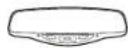
Option2 VOSSOR PLUS+Battery+Cigar lighter

English
English
Pairing with a Bluetooth mobile phone
After pairing the Bluetooth mobile phone with VOSSOR PLUS, you can use it as a handsfree unit.
- Power on, turn on the Power switch.
- Press the END button for more than 2 seconds. When Blue LED flashing slowly (every 4 seconds).
*The blue LED and red LED will flash alternately.

- From the handset, search for and register the name "SEECODE" of VOSSOR PLUS. Please refer to the user's manual of the handset. Enter "0000" when a pincode (or postcode) is requested. *when the pairing is completed, the VOSSOR PLUS will display "CONN".

Tips
Pairing can be done with up to a maximum of 8 handsets.
VOSSOR PLUS stores up to 8 different phones in memory.
- Keep in mind that the latest phone number removes the earliest one when the memory is full.
- Priority is given to the most recently connected handset.
- If you want to change the handset priority, try to connect VOSSOR PLUS from the handset.
- If the latest connected handset supports handfree profile, VOSSOR PLUS is connected automatically to the handset when the power is on.
If your mobil phone doesn't support the automatic reconnect, just switch off the vossor+ and switch it on again, it will then connect with the paired mobile phone.
Call Functions
Power on
Turn on the Power switch.
Power off
Turn off the Power switch.
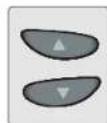
Speaker Volume control
*For higheryolume, press▲ button.
*For lower volume, press button.
Microphone gain adjust
During call press volume up for more than 2s will set to High.
During call press volume up for more than 2s will set to Low.
Microphone mute
Press SEND and Audio Transfer button Simultaneously.
Last number/Voice dialing
PressSEND button
*You can re-dial the latest number by pressing this button.
(In the case of some handsets, voice dialing initiates)
*You can activate the voice dialing by holding this button.

Answering a call
Press SEND button to answer a call.
*You can have a conversation through VOSSOR PLUS.
Ending/Rejecting a call
Press END button to end/reject a call.
English
English

Troubleshooting
VOSSOR PLUS does not turn on.

Whether the battery of VOSSOR PLUS is fully charged.
Charge the battery.

Whether the Power cable is inserted properly.
Insert cable again.

Whether the Power switch is turned on.
Turn on Power switch.
Transferring audio
VOSSOR PLUS To Handset : Press Audio Transfer button of VOSSOR PLUS while you are talking.
*It can be transferred to the handset without ending a call.

Can not have a conversation through VOSSOR PLUS.

Whether the handset supports handfree profile.
In order to have a conversation through VOSSOR PLUS, a Bluetooth handset that supports handfree profile is required.

Whether the battery of Vossor Plus is low.
Charge the battery.
Handset To VOSSOR PLUS: Press Audio Transfer button of VOSSOR PLUS while you are talking.
*It can be transferred to VOSSOR PLUS without ending a call.

Can not pair VOSSOR PLUS with the Bluetooth device.

Whether the VOSSOR PLUS is in pairing mode.
Press and Hold End button to enter pairing mode.
No sound from the speaker.

Whether the volume status is at lower level.
Press the Volume up button.
English
English
Precautions
Do not drop the unit from high places.
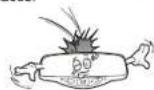
Do not expose directly to the water, alcohol, benzene, etc. for cleaning.
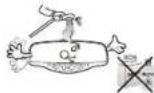
Do not disassemble the battery.
*It may cause an explosion.
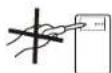
Keep the device away from humidity & dust.
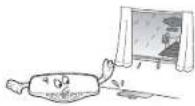
Do not modify, repair nor take apart at discretion.
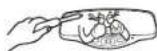
Do not expose directly to flammables.
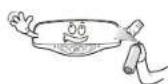
Do not place nor keep the unit near the flammables.
*It may cause an explosion.

Do not place heavy objects on the device.

Keep away from high heat.

*Changes or modifications not expressly approved by the party responsible for compliance could void the
user's authority to operate the equipment.
The device may explode if the battery is replaced incorrectly.
Dispose of batteries according to local regulations. Do not dispose as household waste.
This device complies with part 15 of FCC Rules. Operation is subject to the following two conditions:
(1). This device may not cause harmful interference and
(2). This device must accept any interference received, including interference that may cause undesired operation.
FCC RF Radiation Exposure Statement
The equipments complies with FCC radiation exposure limits set forth for an uncontrolled environment. End users must follow the specific operating instructions for satisfying RF exposure compliance. This transmitter must not be co-located or operating in conjunction with any other antenna or transmitter.
Specifications
| Function | Description |
| Battery | 3.7V, 1700mAh Li-Ion |
| Speaker | 8 Ω/1W(Normal) |
| MIC | -62 +/- 2dB |
| Power Consumption | Max 250mA |
| Cigar Lighter Jack OUT : | 5V/650mA |
| Frequency range | 2400MHz to 2483.5MHz |
| Modulation Method | GFSK, 1Mbps, 0.5BT Gaussian |
| Transmission Power | Typ. 1.0dBm |
| Hopping | 1600 hops/sec 1MHz channel space |
| RX. Sensitivity | Typ. -83.0dBm |
| Built in Memory | Flash memory(8MBit) |
| Operating Temperature | -10~50°C |
| Storage Temperature | -20~70°C |
| Noise suppression | Yes |
| Echo Cancellation | Yes |
| Supported Profile | Headset and Handsfree |
| Standby Time | 280 hours |
| Talking Time | 15 hours |
Disclaimer
Bluetooth is a trademark owned by Bluetooth SIG.
All brand names are the property of their respective owners.
English
English
Memo
Limited Warranty
- This product was produced under strict quality management and inspection.
- All defective units within the applicable Warranty period/s will be repaired or replaced, in the case those faulty goods were handled normally.
- To get Warranty service, return the unit to the outlet from which the unit was purchased.
- Fill in this Warranty card and keep it.
5.Free of charge Warranty shall not apply to
*Defects or damage resulting from use of the unit in other than its normal and intended manner, eg, in excess of their maximum specifications or operating instructions.
*Defects or damage from misuse, accident, neglect, improper testing, installation, alteration or modification of any kind, or spillage of food or liquid.
Products name :
Model number:
Purchased date:
Warranty period : 2 years
Outlet the unit was purchased :
Tel:
Customer Address:
Name:
Tel:
Notes
Several studies have shown that cell phone usage while driving creates a distraction to the driver which may increase the likelihood of an accident. This distraction potential is not eliminated by the use of a handfree kit. handfree kits have not been shown to be safer than hand-held phones with respect to driver distraction. When using the phone while driving, keep conversations short and resist any temptation to make notes or read documents. Before answering calls consider your circumstances. Pull off the road and park before making or answering calls when driving conditions require (e.g. bad weather, high traffic density, presence of children in the car, difficult junctions or manoeuvres.)
Abide by local laws.
Please check if the state and local laws where you live restrict the use of mobile phones while driving. It is the owner's responsibility to use this product in compliance with the laws of the place where you live.

DECLARATION OF CONFIRMITY
We hereby declare that the following designated product
Bluetooth Mirror Vossor Plus
Model MHF83
is in conformity to all the essential requirements of Directive 1999/5EC. The product
is in compliance with the actual requirements of 3 and the other relevant provisions
of the PTEG (at 3 of the N&TTE Directive).
Standards applied
EN60950-1:2001+A11
ETSIEN303281,6.12004
ETSI EN 301-489-1 V1.5.1:2004
EN301499-17V1.2.12902
EN 50371-2002
This declaration is in responsibility of the Manufacturer.
Sereode Germany GmbH
Rnather Sraie 333
51107Kolm
Germany
Date of Issue: 01 December 2006