
SQ6 - Appareil photoinstantane FUJIFILM - Notice d'utilisation et mode d'emploi gratuit
Retrouvez gratuitement la notice de l'appareil SQ6 FUJIFILM au format PDF.

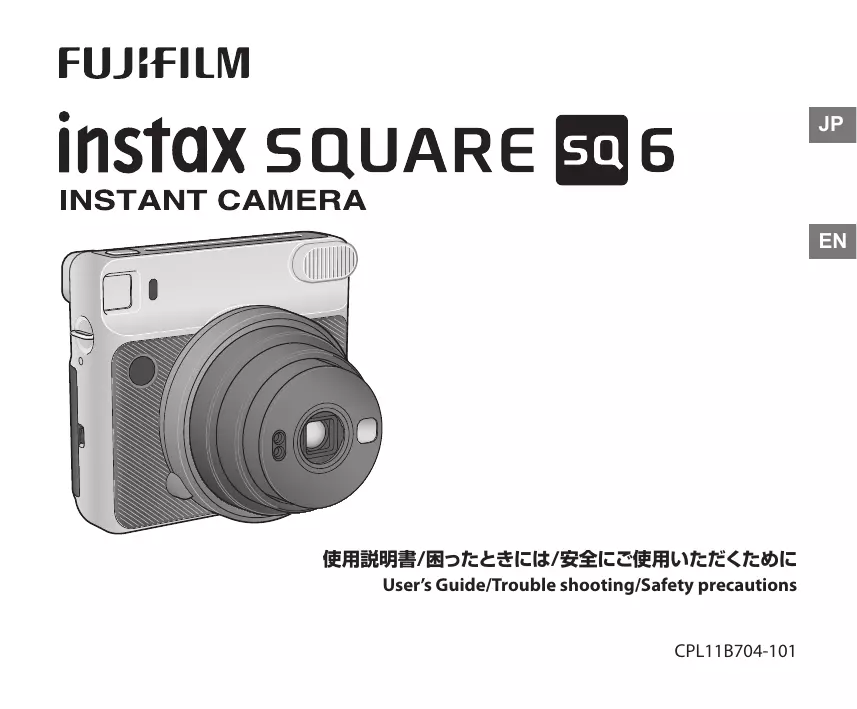

| Type de produit | Appareil photo instantané |
| Marque | Fujifilm |
| Modèle | Instax SQ6 |
| Film compatible | Instax SQUARE (62 mm x 62 mm) |
| Dimensions (L x H x P) | 118,7 x 128,1 x 58,1 mm (sans protubérances) |
| Poids | 393 g (sans batterie, sangle et film) |
| Alimentation | 2 piles lithium CR2 |
| Autonomie | Environ 30 chargeurs de 10 films avec piles neuves |
| Objectif | Rétractable, 2 éléments / 2 groupes, f = 65,75 mm, ouverture 1:12,6 |
| Modes de prise de vue | Auto, Selfie, Macro, Paysage, Double exposition, Clair, Foncé |
| Flash | Intégré, automatique, portée 0,3 - 2,7 m |
| Retardateur | Environ 10 secondes, annulable |
| Viseur | Galiléen inversé, grossissement 0,4x, avec repère |
| Mise au point | Motorisée, 3 positions : macro (0,3-0,5 m), normal (0,5-2 m), paysage (2 m - ∞) |
| Obturateur | Électronique programmé, 1,6 s - 1/400 s |
| Compensation d'exposition | ±2/3 EV, réglage manuel (Clair/Foncé) |
| Temps de développement | Environ 90 secondes (varie selon la température) |
| Accessoires fournis | 2 piles CR2, sangle, 3 filtres flash |
| Entretien | Nettoyer la lentille avec une soufflette et un chiffon doux ; ne pas utiliser de solvant |
| Sécurité | Ne pas démonter ; ne pas utiliser près de gaz inflammable ; garder hors de portée des enfants |
| Température d'utilisation | +5 °C à +40 °C |
| Pièces détachées et réparabilité | Contactez un distributeur agréé Fujifilm |
FOIRE AUX QUESTIONS - SQ6 FUJIFILM
Questions des utilisateurs sur SQ6 FUJIFILM
0 question sur cet appareil. Repondez a celles que vous connaissez ou posez la votre.
Poser une nouvelle question sur cet appareil
Téléchargez la notice de votre Appareil photoinstantane au format PDF gratuitement ! Retrouvez votre notice SQ6 - FUJIFILM et reprennez votre appareil électronique en main. Sur cette page sont publiés tous les documents nécessaires à l'utilisation de votre appareil SQ6 de la marque FUJIFILM.
MODE D'EMPLOI SQ6 FUJIFILM
FUJIFILM
instax SQUARE sq 6
INSTANT CAMERA
使用説明書/困ったときには/安全にご使用いただくために
User's Guide/Trouble shooting/Safety precautions
ENGLISH
Contents
Part Names....26
Attaching the Strap 28
Inserting Batteries....29
Loading the instax SQUARE Film Pack....30
Turning the Camera on/off 32
Taking Pictures 32
Unloading a Used instax SQUARE Film Pack....33
Taking Pictures with Various Shooting Modes 34
Selecting a Shooting Mode....34
Taking Pictures without Using the Flash (Flash Suppressing) 34
Shooting Mode....35
Using the Self Timer....37
Using the Flash Filter....37
SPECIFICATIONS....38
TROUBLE SHOOTING....39
IMPORTANT SAFETY NOTICE....42
- Read "IMPORTANT SAFETY NOTICE" (Page 42) for safety use.
- After reading this User's Guide, keep it in a safe, easy to find place where you can refer to it if needed.
Part Names
Front
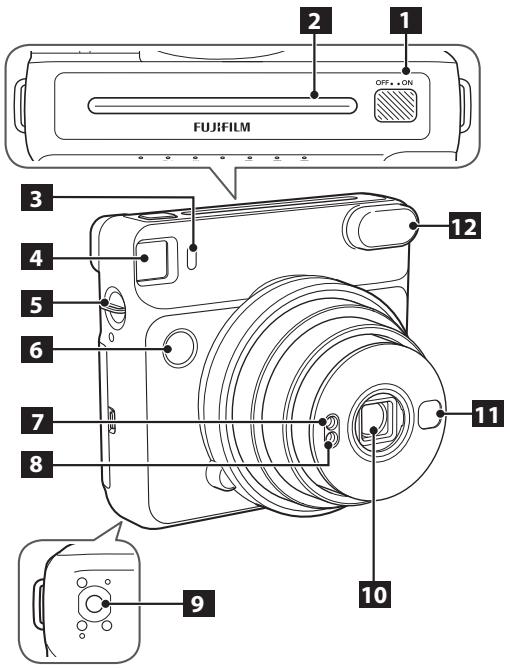
1 Power switch
2 Film ejection slot
3 Self timer lamp
4 Viewfinder
5 Strap hook
6 Shutter button
7 AE light sensor window
8 Flash sensor window
9 Tripod socket (Tripod sold separately)
10 Lens/Lens cover
11 Self-portrait mirror
12 Flash lampface
Part Names (Continued)
Rear
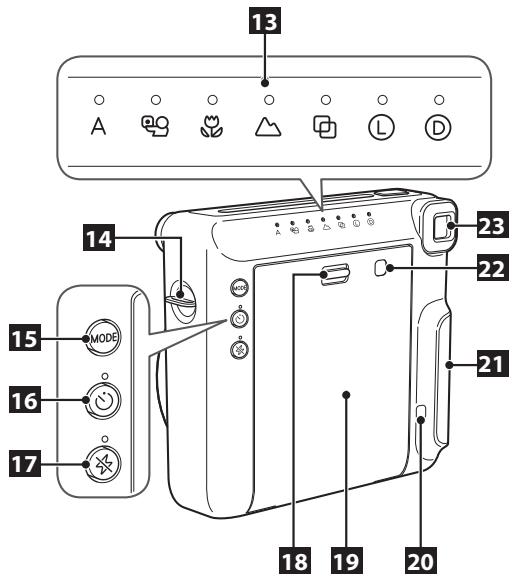
13 Mode indicator/LED
14 Strap hook
15 MODE (mode) button
16 Self timer button
17 Flash suppressing button
18 Back cover lock
19 Back cover
20 Film counter
21 Battery lid
22 Film pack confirmation window
23 Eyepiece
Attaching the Strap
Attach the provided camera strap to the strap hook on each side as in the illustrations below.
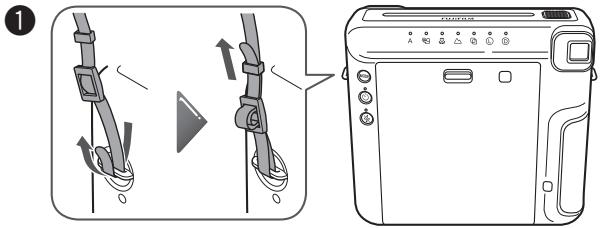
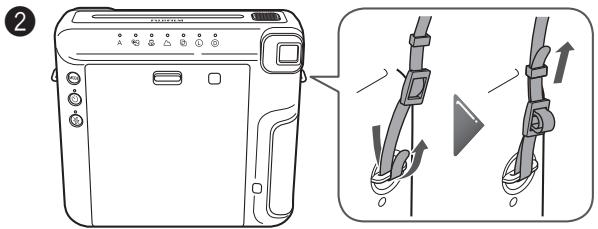
Caution
- For safety, use the strap only as a shoulder strap. Do not put the strap around your neck.
- Be careful so that the strap does not obstruct the film ejection slot.
Inserting Batteries
Caution
- Use two new CR2 lithium batteries. (All the batteries should be new and be the same brand/type.)
- Insert the batteries before you load the instax SQUARE film pack.
- The battery performance may be reduced when it is cold. In this case, warm up the batteries to room temperature before using this camera.
1
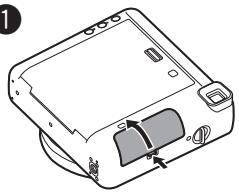
Open the battery lid.
3
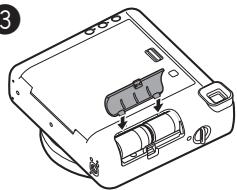
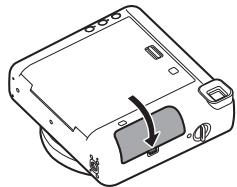
Align the tabs on the battery cover and push the battery cover lock until it clicks into place.
2
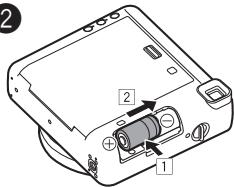
Insert the batteries.
- Insert one CR2 lithium battery straight (1) matching the ⊕ and ⊖ polarities and slide it to the end (2).
Then, insert the other battery.
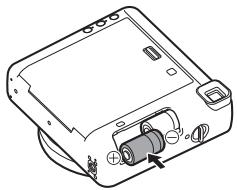
To remove the batteries, remove one battery first, and then slide the other battery and take it out.
Loading the instax SQUARE Film Pack
Caution
Do not open the back cover until you have used up the film; otherwise, the rest of the film will become exposed and turn white. The film can no longer be used.
- When you load the film pack, never press the two rectangular holes on the back of the film pack.
- Never use a film pack beyond its shelf life; otherwise, it may damage the camera.
Use FUJIFILM Instant Film "instax SQUARE" only. The instax mini film or instax WIDE film cannot be used.
Notes on the film pack
• Each FUJIFILM Instant Film "instax SQUARE" pack contains 1 black film protective cover and 10 film sheets.
- Do not remove the film pack from its inner bag before loading it into the camera.
For details, refer to the instructions and warnings on FUJIFILM Instant Film "instax SQUARE".
1
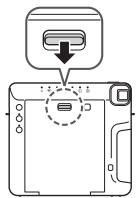

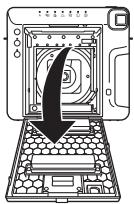
Press the back cover lock down to open the back cover.
2
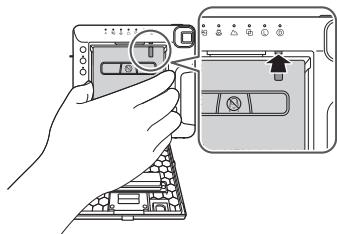
Hold both sides of the film pack, align the yellow marks on the camera and the film pack, then insert it straight.
Loading the instax SQUARE Film Pack (Continued)
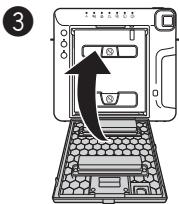
Close the back cover. Make sure the back cover lock clicks into place.
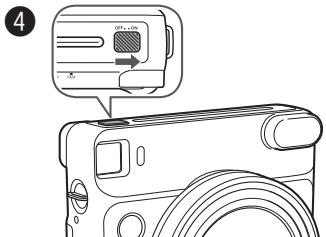
Slide the power switch toward the "ON" side to turn the camera on.
- Do not hold the lens cover when you are turning the camera on; otherwise, the lens cover will not open.
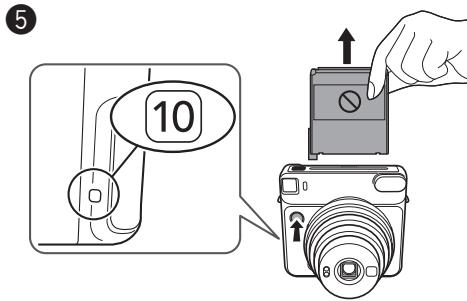
Press the shutter button.
The film cover (black) is ejected and "10" is displayed on the film counter on the back of the camera.
Carefully remove the film cover.
Turning the Camera on/off
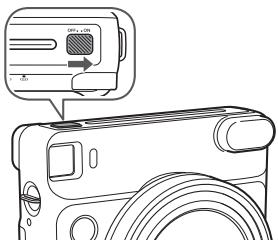
Slide the power switch toward the "ON" side to turn the camera on.
The lens will extend and the LED on "A" will light up.
- Do not hold the lens cover when you are turning the camera on; otherwise, the lens cover will not open.
Slide the power switch toward the "OFF" side to turn the camera off.
The lens will retract and the LED on the mode indicator will go off.
Auto power off
When no operation occurs for 5 minutes, LEDs on the back will go off and the camera will turn off automatically.
Press one of the buttons on the back to turn the camera on again.
Taking Pictures
1 Slide the power switch toward the "ON" side to turn the camera on.
2 Hold the camera and confirm the desired composition of the final image.
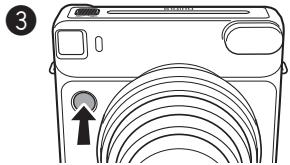
Press the shutter button.
- The shutter will not release while the flash is charging. (The LED on the flash suppressing button will be flashing while the flash is charging.)
- Hold the camera with the flash lampface at the top.
- Be careful so that your fingers or the strap do not cover the flash lampface, flash sensor window, AE light sensor window, lens, or film ejection slot.
- Look into the viewfinder so that the "O" mark appears in the center.
- Be careful not to touch the lens surface when you press the shutter button.
Taking Pictures (Continued)
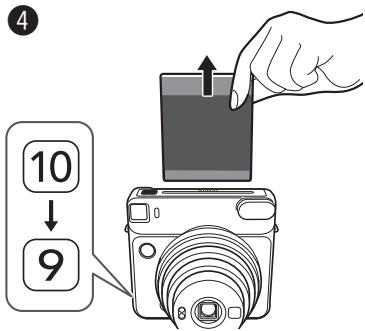
Every time you take a photo, the number on the film counter decreases from "10" to reflect the number of remaining photos, and "0" is displayed when you have used up the film pack.
When the film has been ejected (the camera stops making a sound), grasp the edge of the film, then take it out.
- The developing time is approximately 90 seconds. (The time varies depending on the ambient temperature.)
When finished using the camera, always switch the camera to "off" to maintain battery life. If the camera is left switched "on" for 5 minutes without being used, it will automatically switch to "off".
Unloading a Used instax SQUARE Film Pack
When "0" is displayed on the film counter, unload the film pack following the procedure below.
1
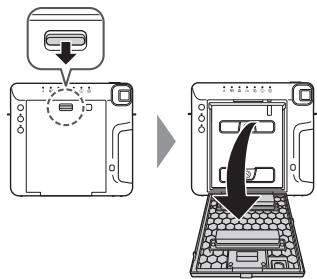
Press the back cover lock down to open the back cover.
2

Grasp the rectangular holes on the film pack, then pull it out straight.
Taking Pictures with Various Shooting Modes
You can choose settings according to the subject or purpose.
Selecting a Shooting Mode
Press the MODE (mode) button.
The LED on the selected mode lights up.
Each time you press the MODE button, the shooting mode changes as follows.
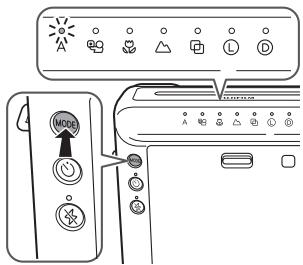
![graph LR A["Auto"] --> B["Selfie"] B --> C["Macro"] C --> D["Landscape"] D --> E["Double exposure"] E --> F["Lighten"] F --> G["Darken"] G --> A](/content/2024/12/313618/images/8953dbdcb79ca385ca2a012b3bda96ca99eb3517c627832ebd3b461613463a47.jpg)
• Taking a photo does not change the settings.
- Turning the power off returns to Auto.
Taking Pictures without Using the Flash (Flash Suppressing)
Select this where using the flash is prohibited or when you want to shoot without the flash in a bright place.
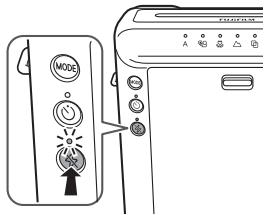
Press the flash suppressing button.
The LED on the button will light up and pressing the shutter button will not let the flash fire.
Flash suppressing is retained even after pressing the shutter button. To cancel, press the flash suppressing button.
- Depending on the lighting conditions, the picture may look bluish-green, reddish, or darker or lighter than expected.
• We recommend you use a tripod when it is dark.
Taking Pictures with Various Shooting Modes (Continued)
Shooting Mode
- In a dark place, the slow shutter may automatically be used. Hold the camera securely to prevent camera shake.
- The background may look bluish-green or reddish depending on the lighting condition.
A Auto
Select for normal photography.
- As the flash fires with slow shutter (slow synchro) in a dark place, the background is photographed brightly.

Selfie
You can take a self portrait using the self portrait mirror. Using this mode applies an appropriate brightness and shooting distance for self portrait.
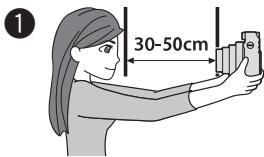
Hold the camera securely keeping 30 cm to 50 cm between you and the edge of the lens.
- Hold the camera securely especially in a dark place, to prevent blurring.
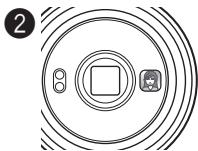
Confirm the composition using the self-portrait mirror, then take a photo.
- When you take a photo, do not look at the flash; otherwise, an afterglow may interfere with your view temporarily.
- If you press the shutter button while the flash is charging, the shutter release will not trip.
Taking Pictures with Various Shooting Modes (Continued)
Shooting Mode (Continued)
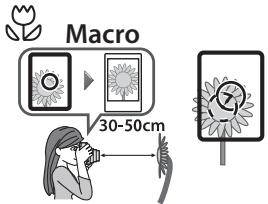
Select when shooting a subject at close range (30-50 cm).
- Hold the camera so that the "O" mark in the viewfinder is on the upper right of the center of the subject (see the illustration above), then take a photo.

Landscape
Select when shooting a distant subject (2 m\~∞).
Double exposure
2 subjects are photographed in one picture.
When you shoot the first subject, the LED on 📋 will flash. After that, shoot the second.
Lighten
Select to lighten the picture if photos are coming out too dark.
D Darken
Select to darken the picture if photos are coming out too bright.
Using the Self Timer
You can use the self timer in combination with each shooting mode.
1
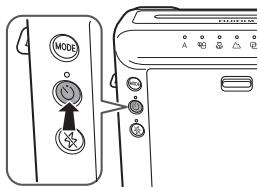
Press the self timer button once. The LED on the self timer button lights up.
2
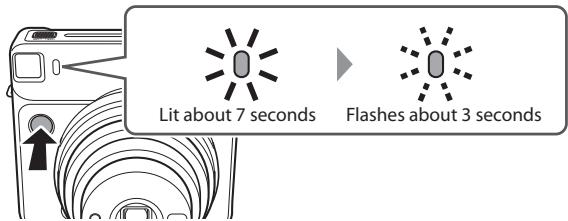
If you press the shutter button, the self timer lamp is lit about 7 seconds. After that, the lamp flashes about 3 seconds and the shutter is released.
※ To cancel the self timer, press the self timer button while the self timer lamp is lit or flashing.
Using the Flash Filter
Using the flash filter allows you to take a picture which may look different than usual.
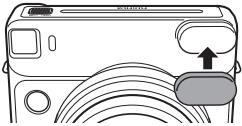
[Important] When you take a picture in a dark place
If you take a picture using the flash filter, the picture may look darker than expected. Select Ⓐ for the shooting mode when you use the flash filter in a dark place such as indoors and want the picture to look brighter.
SPECIFICATIONS
| Film | FUJIFILM Instant Film "instax SQUARE" (Purchased separately) |
| Picture Size | 62 mm x 62 mm/2.4 in.x2.4 in. |
| Lens | Retractable lens, 2 components, 2 elements, f = 65.75 mm, 1:12.6 |
| Viewfinder | Inverted Galilean finder, 0.4 x, with target spot |
| Focusing | Motor-driven 3-range switching (0.3 m - 0.5 m/1 ft. - 1.6 ft., 0.5 m - 2 m/1.6 ft - 6.6 ft., 2 m/6.6 ft. and beyond), Macro Mode (0.3 m - 0.5 m/1 ft. - 1.6 ft.) Normal Mode (0.5 m - 2 m/1.6 ft - 6.6 ft.) Landscape Mode (2 m/6.6 ft and beyond) |
| Shutter Release | Programmed electronic shutter release, 1.6 sec - 1/400 sec. |
| Exposure Control | Automatic, Interlocking range (ISO 800) : LV 5 - LV 15.5, Exposure compensation: ±2/3 EV |
| Film Feeding Out | Automatic |
| Film Developing Time | Approximately 90 seconds (Varies depending on the ambient temperature) |
| Flash | In Macro mode: Built-in, automatic electronic flash In a mode other than Macro mode: Always flashing Charging time: 0.2 sec - 7 sec (using a new battery), Flash charging indicator, Effective flash lamp range: 0.3 m - 2.7 m/1 ft. - 8.9 ft. |
| Self-Timer | Electronically controlled, approx. 10 second delay, Can be stopped mid-run |
| LED Display | Shooting mode (Auto, Selfie, Macro, Landscape, Double exposure), Brightness adjustment, Flash suppressing, Self timer Mode |
| Power Supply | Two CR2/DL CR2 lithium batteries Capacity: Approximately 30 instax SQUARE 10-pack film packs with new CR2/DL CR2 lithium batteries |
| Others | Film pack confirmation window, tripod socket (tripod sold separately) |
| Dimensions & Weight | 118.7 mm x 128.1 mm x 58.1 mm/4.7 in. x 5.0 in. x 2.3 in. (not including protrusions)/ 393 g/13.9 oz. (without battery, strap, and film pack) |
| Accessories | Two CR2/DL CR2 lithium batteries, Shoulder strap, Three flash filters |
* Specifications are subject to change for improvement.
* Certification marks acquired by the camera are located on the back of the back cover.
TROUBLE SHOOTING
★When to replace the batteries
① When the lens does not work when the power is switched on.
② When it takes an unusually long amount of time for the flash to be charged.
③ When pressing the shutter button turns off the camera.
* Replace both CR2 batteries with new lithium batteries of the same brand/type.
TROUBLE SHOOTING
During operation
| Problems | Possible Causes | Solutions |
| The shutter release won’t trip. | 1 The battery power is low.2 The LED on the flash suppressing button or the self timer lamp is flashing rapidly.3 The film counter is showing “0” sign. | 1 Replace both batteries with new batteries.2 The flash is charging. Please wait until the LED or lamp turns off.3 Unload the film pack, and load a new film pack. |
| The LED(s) on the mode indicator is flashing. | ● The camera has some trouble. | 1 Remove the batteries and reinsert them with the LED flashing.2 If 1 does not resolve the problem, contact a FUJIFILM authorized distributor. |
| The film pack won’t load into your camera, or won’t load into your camera smoothly. | 1 The film pack is not for your camera.2 You are not loading the film pack correctly. | 1 Use FUJIFILM Instant Film “instax SQUARE” only. (No other films can be used.)2 Match the yellow line on the film pack with the yellow positioning mark in your camera. Follow the FUJIFILM Instant Film “instax SQUARE” instructions. |
| The film cover cannot be ejected. | ● The battery power is low. | ● Replace both batteries with new batteries and load the film pack again. |
| The film cannot be ejected. | 1 The camera shakes or has been dropped and the film is misaligned.2 The film has been jammed. | 1 Load a new film pack.2 Remove both batteries and insert them again. If this does not solve the problem, remove the jammed film and load a new film pack. |
| The battery becomes exhausted quickly. | ● The batteries are not the same type. | ● Replace both batteries with new CR2 lithium batteries of the same brand/type. |
Printed pictures
| Problems | Possible Causes | Solutions |
| Part or whole finished print is white. | ● The back cover was opened before you have used up the film. | ● Do not open the back cover until you have used up the film; otherwise, the rest of the film may be exposed and ruined for use. |
| The finished print looks over exposed.(White in color) | 1 The ambient temperature is low (below +5°C/+41°F).2 The AE light sensor window or flash sensor window was covered. | 1 Before taking pictures, place your camera in a warm place to bring it to room temperature.2 Be careful not to block the AE light sensor or flash sensor window, or so that nothing blocks it. |
| The finished print looks under exposed.(Dark) | 1 The ambient temperature is high (above +40°C/+104°F).2 The picture was taken facing the light.3 The flash lampface, AE light sensor window or flash sensor window was covered.4 The background is too bright in comparison with the subject.5 The flash light did not reach the subject.6 The flash light reflected back from a mirror or window glass. | 1 Keep camera, film (exposed prints) away from excessive heat (+40°C/+104°F).2 Take pictures with the light behind you.3 Be careful not to cover the flash lampface, AE light sensor window, or flash sensor window.4 SELECT “☐” for the shooting mode.5 Take pictures closer than 2.7 m from the subject.6 Take pictures at an angle not facing the mirror or window glass. |
| The picture is out of focus. | 1 The shooting distance is not appropriate.2 The lens is not clean.3 Your camera was shaken when taking the picture. | 1 Select the shooting mode according to the distance.2 Clean the lens.3 Hold your camera firmly and press in the shutter release button gently. Since the slow shutter is selected when shooting indoors or dark outdoors, stabilizing the camera using a table, tripod, etc. is recommended. |
| The picture is blurred. | 1 Picture was not permitted to develop without touching, pressure being applied or other interference once it ejected from the camera.2 The picture did not come out smoothly. | 1 Do not press onto or fold the picture.2 Do not block the film exit with your finger. |
| The subject in the viewfinder has shifted in finished print. | ● The shooting distance is too close to the subject. | ● See notes on using Macro Mode. |
| The part seen from the viewfinder is not included in the picture. | ● You looked into the viewfinder obliquely when taking the picture. | ● Look into the viewfinder from the front when taking a picture. |
EN
IMPORTANT SAFETY NOTICE
This product has been designed with safety in mind, and to provide safe service when handled correctly and in accordance with the User's Guide and instructions. It is important that both the product and the INSTAX film are handled properly and used only to take pictures as instructed in this User's Guide and in the instax SQUARE film instructions. For your ease and safety, please follow what is written in this User's Guide. It is also a good idea to keep this User's Guide in a safe, easy to find place where you can refer to it if needed.
WARNING
This symbol indicates danger, which could result in injury or death. Please follow these instructions.
WARNING
Never attempt to take this product apart. There is a danger of an electric shock.
If this product is dropped or damaged so that the inside is showing, do not touch it. There is danger of an electric shock.
If the camera or the batteries inside become hot, begin to smoke, make a burning smell or show any sign of unusual condition, remove the batteries right away. Use gloves to keep from burning your hands. Not removing batteries could result in burns or fire.
Using a flash too close to a person's eyes may for the short term affect the eyesight. Take care when taking picture of infants and young children.
If your camera gets wet or if something such as pieces of metal get inside, remove the batteries right away to avoid heat buildup or a fire starting inside the camera.
Do not use this camera in places where there is flammable gas or near open gasoline, benzene, paint thinner or other unstable substances which can give off dangerous vapors. Doing so could result in explosion or fire.
⚠️ Store your camera out of the reach of infants and young children. Failure to do this could result in serious injury. (For example, the strap could become wrapped around a child's neck and cause choking.)
△ Never take apart the batteries. Do not subject them to heat, throw them into an open fire, or attempt to short-circuit them. Doing so could result in the batteries exploding or splitting open causing burns or fire.
WARNING
Only use specified batteries in this product. Use of incorrect type of batteries could cause explosion. Dispose of used batteries according to battery disposal instructions.
⚠ Make sure batteries are stored in a safe, secure place and well out of the reach of any infants, young children or pets. Improper storage could result in a child swallowing a battery. (If a child swallows a battery, call a doctor or a hospital right away.)
△ Never get this product wet or handle it with wet hands. Doing so may result in an electric shock.
⚠️ Never take flash photographs of people riding bicycles, driving cars or riding a horse. The flash can distract the driver and frighten the animal, possibly causing an accident.
⚠ Make sure that the battery ⊕ and ⊖ polarities are installed correctly in the camera. A damaged battery or electrolyte leakage may cause a fire, injury, and contaminate the environment.
Do not touch moving parts inside the camera. You may be injured.

The “CE” mark certifies that this product satisfies the requirements of the EU (European Union) regarding safety, public health, environment and consumer protection. (“CE” is the abbreviation of Conformité Européenne.)
For customers in the USA:
FCC Statement
This device complies with part 15 of the FCC Rules. Operation is subject to the following two conditions: (1) This device may not cause harmful interference, and (2) this device must accept any interference received, including interference that may cause undesired operation.
CAUTION
This equipment has been tested and found to comply with the limits for a Class B digital device, pursuant to Part 15 of the FCC Rules. These limits are designed to provide reasonable protection against harmful interference in a residential installation. This equipment generates, uses, and can radiate radio frequency energy and, if not installed and used in accordance with the instructions, may cause harmful interference to radio communications. However, there is no guarantee that interference will not occur in a particular installation. If this equipment does cause harmful interference to radio or television, which can be determined by turning the equipment off and on, the user is encouraged to try to correct the interference by one or more of the following measures:
• Reorient or relocate the receiving antenna
- Increase the separation between the equipment and receiver
- Connect the equipment into an outlet on a circuit different from that to which the receiver id connected
- Consult the dealer or an experienced radio/TV technician for help
Changes or modifications not expressly approved by FUJIFILM responsible for compliance could void the user's authority to operate the equipment.
For customers in Canada :
CAUTION: This Class B digital apparatus complies with Canadian ICES-003.

Disposal of Electric and Electronic Equipment in Private Households
Disposal of used Electrical & Electronic Equipment
(Applicable in the European Union and other European countries with separate collection systems)
This symbol on the product, or in the manual and in the warranty, and/or on its packaging indicates that this product shall not be treated as household waste.
Instead it should be taken to an applicable collection point for the recycling of electrical and electronic equipment.
By ensuring this product is disposed of correctly, you will help prevent potential negative consequences to the environment and human health, which could otherwise be caused by inappropriate waste handling of this product.
If your equipment contains easy removable batteries or accumulators, please dispose these separately according to your local requirements.
The recycling of materials will help to conserve natural resources. For more detailed information about recycling of this product, please contact your local city office, your household waste disposal service or the shop where you have purchased the product.
In Countries outside of EU: If you wish to discard this product, please contact your local authorities and ask for the correct way of disposal.
COMMON SENSE CAMERA CARE
CAMERA CARE
① Your camera is a precision instrument. Do not get it wet or drop it. Also, do not expose to sand.
② Do not use a strap made for cellular phones or other similar electronic products. These straps are usually too weak to hold your camera securely. For safety, use only straps designed for your camera, and use only as specifically intended and instructed.
③ When using a tripod, check the strength of the tripod and then mount the camera by turning the tripod instead of the camera body. When mounting the camera to a tripod, be sure not to turn the tripod screw excessively, apply unreasonable force, etc. Also, do not carry the camera while it is mounted to the tripod. Personal injury or camera damage may result.
④ If you are not using your camera for a long interval, unload the batteries and keep it where it will be safe from heat, dust, and moisture.
⑤ Remove soil and dust from the lens, viewfinder window, etc. with an air blower and by wiping lightly with a piece of soft cloth.
⑥ Do not use solvent such as thinner and alcohol to remove soil.
⑦ Keep the film chamber and camera interior clean to avoid damaging films.
⑧ In hot weather, do not leave your camera in a closed car or on the beach, and do not leave it in moist places.
⑨ Moth repellent gas such as naphthalene adversely affects your camera and films. Avoid keeping your camera or films in a chest with mothballs.
⑩ Your camera is computer-controlled. If you should experience an operational issue, remove the batteries and then reload them.
⑪ Note that the temperature range within which your camera can be used is +5°C/+41°F to +40°C/+104°F.
INSTAX SQUARE FILM AND PRINT CARE
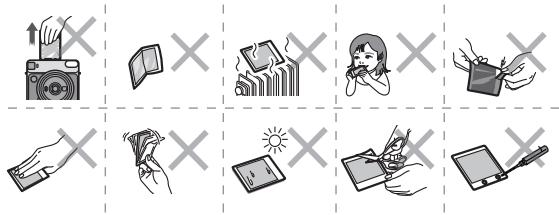
① Keep the film in a cool and dry place. Do not leave the film in a place where the temperature is extremely high (e.g., in a closed car).
② When you load a film pack, use the film as soon as possible.
③ If the film has been kept in a place where the temperature is extremely high or low, bring it to room temperature before starting to take pictures.
④ Be sure to use the film before the expiration or "Use Before" date.
⑤ Avoid airport checked luggage inspection and other strong X-ray illumination. The effect of fogging, etc. may appear on unused film. We recommend that you carry the camera and/or the film onto the aircraft as carry-on luggage. (Check with each airport for more information.)
⑥ Avoiding strong light, keep the developed prints in a cool and dry place.
⑦ Do not puncture, tear, or cut FUJIFILM Instant Film "instax SQUARE". If film becomes damaged, do not use.
Information for traceability in Europe
Manufacturer: FUJIFILM Corporation
Address, City: 7-3, Akasaka 9-Chome, Minato-ku, Tokyo
Country: JAPAN
Authorized representative in Europe:
FUJIFILM EUROPE GMBH
Address, City: Dusseldorf Heesenstrasse 31, 40549
Country: Germany
Information for FUJIFILM in the United States
FUJIFILM North America Corp.
200 Summit Lake Drive
Valhalla, New York 10595, USA
Information for FUJIFILM in Canada
FUJIFILM Canada Inc.
600 Suffolk Court, Mississauga, Ontario L5R 4G4
MEMO
EN
[ jp ] この製品に関するお問い合わせは、同封の保証書に記載の窓口にご連絡いただくか、下記のウェブサイトにアクセスしてください。
富士フイルムホームページ:http://fujifilm.jp/
[ en ] If you have any inquiries about this product, please contact a FUJIFILM authorized distributor, or access the website below.
http://www.fujifilm.com/
本製品のお問合せ/修理に関するお問い合わせ先
●富士フイルム フィルムカメラお客さま相談窓口
TEL 050-3786-1640/FAX 050-3786-2050
受付時間:月曜日~金曜日 9:30~17:30(土日祝日、年末年始を除く)
▶ 各窓口の受付時間・サービス内容は、予告なく変更する場合があります。最新の情報は弊社ホームページでご確認ください。
▶ 富士フイルムグループでは、お客さまからのお問い合わせ内容を正確に把握するために録音させていただくことがあります。
▶ FAXでの受け付けは24時間行っておりますが、返信応答は電話の受付時間と同じです。
▶ 修理品を持参または送付される場合は、下記サイトをご覧ください。
http://fujifilm.jp/support/filmandcamera/repairservice/index.html
- FUJIFILM
- INSTAX SQUARE SQ 6
- INSTANT CAMERA
- ENGLISH
- CONTENTS
- PART NAMES
- PART NAMES (CONTINUED)
- ATTACHING THE STRAP
- CAUTION
- INSERTING BATTERIES
- LOADING THE INSTAX SQUARE FILM PACK
- NOTES ON THE FILM PACK
- LOADING THE INSTAX SQUARE FILM PACK (CONTINUED)
- TURNING THE CAMERA ON/OFF
- AUTO POWER OFF
- TAKING PICTURES
- TAKING PICTURES (CONTINUED)
- UNLOADING A USED INSTAX SQUARE FILM PACK
- TAKING PICTURES WITH VARIOUS SHOOTING MODES
- SELECTING A SHOOTING MODE
- TAKING PICTURES WITHOUT USING THE FLASH (FLASH SUPPRESSING)
- TAKING PICTURES WITH VARIOUS SHOOTING MODES (CONTINUED)
- SHOOTING MODE
- A AUTO
- SELFIE
- SHOOTING MODE (CONTINUED)
- LANDSCAPE
- DOUBLE EXPOSURE
- LIGHTEN
- D DARKEN
- USING THE SELF TIMER
- USING THE FLASH FILTER
- [IMPORTANT] WHEN YOU TAKE A PICTURE IN A DARK PLACE
- TROUBLE SHOOTING
- ★WHEN TO REPLACE THE BATTERIES
- IMPORTANT SAFETY NOTICE
- WARNING
- FOR CUSTOMERS IN THE USA
- FCC STATEMENT
- FOR CUSTOMERS IN CANADA
- COMMON SENSE CAMERA CARE
- CAMERA CARE
- INSTAX SQUARE FILM AND PRINT CARE
- INFORMATION FOR TRACEABILITY IN EUROPE
- INFORMATION FOR FUJIFILM IN THE UNITED STATES
- INFORMATION FOR FUJIFILM IN CANADA
- MEMO
- 本製品のお問合せ/修理に関するお問い合わせ先
Marque : FUJIFILM
Modèle : SQ6
Catégorie : Appareil photoinstantane