
WDC5050 - Clavier et souris sans fil MICROSOFT - Notice d'utilisation et mode d'emploi gratuit
Retrouvez gratuitement la notice de l'appareil WDC5050 MICROSOFT au format PDF.

| Type de produit | Clavier et souris sans fil |
| Modèle | WDC5050 - Microsoft Wireless Comfort Desktop 5050 with AES |
| Dimensions du clavier | 469 x 218 x 37,3 mm (avec pieds dépliés) |
| Poids du clavier | 829 g (avec piles) |
| Dimensions de la souris | 116,7 x 70,25 x 42,2 mm |
| Poids de la souris | 152 g (avec piles) |
| Alimentation | 2 piles AA alcalines pour le clavier, 2 piles AA alcalines pour la souris (incluses) |
| Autonomie du clavier | 15 mois (typique) |
| Autonomie de la souris | 8 mois (typique) |
| Connectivité | Sans fil 2,4 GHz propriétaire |
| Portée | Jusqu'à 10 mètres (typique) |
| Technologie de suivi | Optique haute définition propriétaire Microsoft |
| Résolution | 988 points par pouce (38,9 points par mm) |
| Taux d'images | 8000 images par seconde (adaptatif) |
| Cryptage | Chiffrement AES 128 bits |
| Compatibilité | Windows 10/8/7, Mac OS X v10.4.x – 10.10 |
| Fonctions spéciales | Touches de raccourci (Web, Mail, Documents, etc.), molette inclinable, zoom |
| Garantie | 3 ans |
| Pays de fabrication | Chine (RPC) |
| Entretien et nettoyage | Nettoyer avec un chiffon doux légèrement humide. Ne pas utiliser de solvants. |
| Certifications | FCC, IC, CE, WEEE, RoHS, etc. |
FOIRE AUX QUESTIONS - WDC5050 MICROSOFT
Questions des utilisateurs sur WDC5050 MICROSOFT
0 question sur cet appareil. Repondez a celles que vous connaissez ou posez la votre.
Poser une nouvelle question sur cet appareil
Téléchargez la notice de votre Clavier et souris sans fil au format PDF gratuitement ! Retrouvez votre notice WDC5050 - MICROSOFT et reprennez votre appareil électronique en main. Sur cette page sont publiés tous les documents nécessaires à l'utilisation de votre appareil WDC5050 de la marque MICROSOFT.
MODE D'EMPLOI WDC5050 MICROSOFT
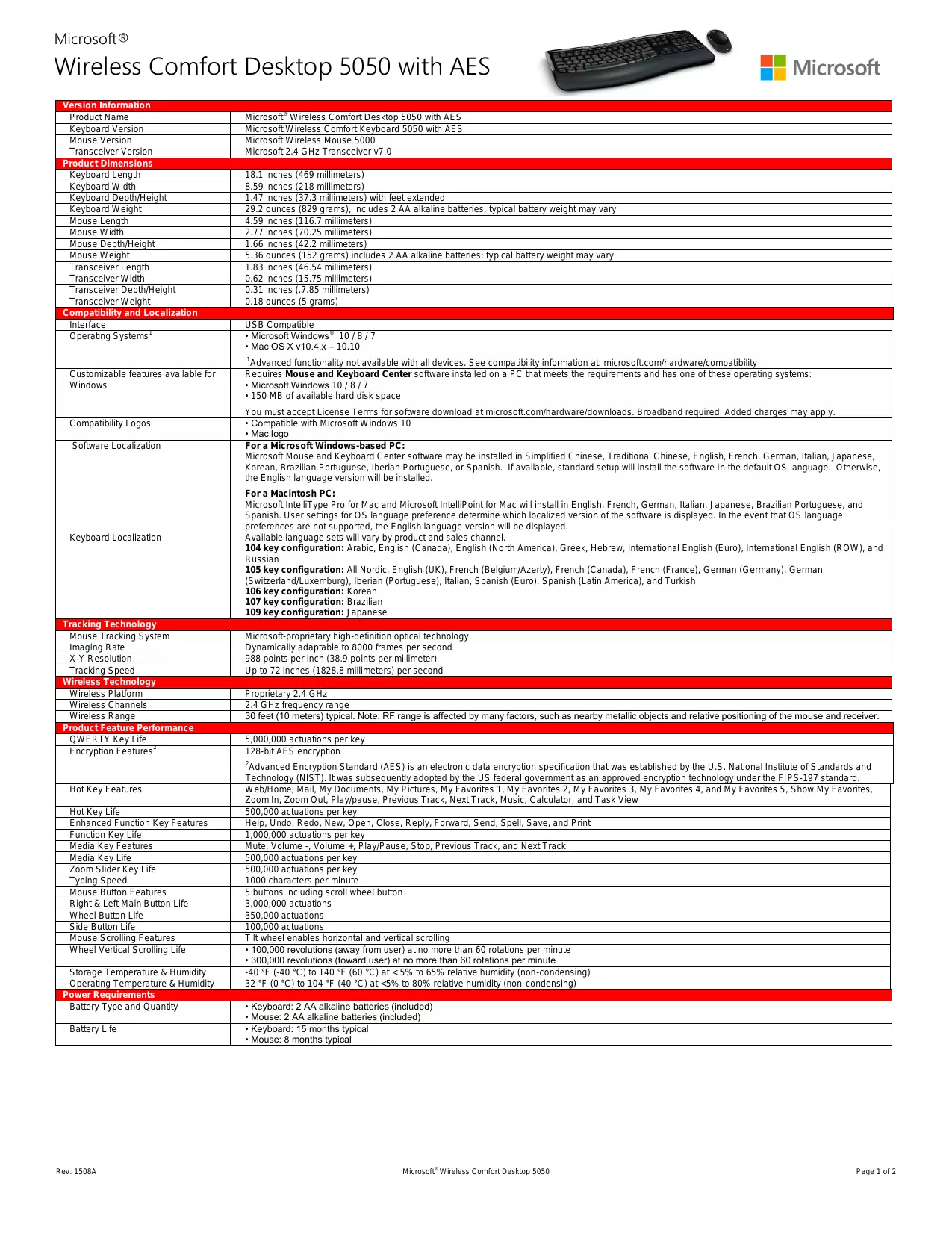
| Version Information | |
| Product Name | Microsoft® Wireless Comfort Desktop 5050 with AES |
| Keyboard Version | Microsoft Wireless Comfort Keyboard 5050 with AES |
| Mouse Version | Microsoft Wireless Mouse 5000 |
| Transceiver Version | Microsoft 2.4 GHz Transceiver v7.0 |
| Product Dimensions | |
| Keyboard Length | 18.1 inches (469 millimeters) |
| Keyboard Width | 8.59 inches (218 millimeters) |
| Keyboard Depth/Height | 1.47 inches (37.3 millimeters) with feet extended |
| Keyboard Weight | 29.2 ounces (829 grams), includes 2 AA alkaline batteries, typical battery weight may vary |
| Mouse Length | 4.59 inches (116.7 millimeters) |
| Mouse Width | 2.77 inches (70.25 millimeters) |
| Mouse Depth/Height | 1.66 inches (42.2 millimeters) |
| Mouse Weight | 5.36 ounces (152 grams) includes 2 AA alkaline batteries; typical battery weight may vary |
| Transceiver Length | 1.83 inches (46.54 millimeters) |
| Transceiver Width | 0.62 inches (15.75 millimeters) |
| Transceiver Depth/Height | 0.31 inches (7.85 millimeters) |
| Transceiver Weight | 0.18 ounces (5 grams) |
| Compatibility and Localization | |
| Interface | USB Compatible |
| Operating Systems1 | • Microsoft Windows® 10 / 8 / 7 • Mac OS X v10.4.x – 10.10 Advanced functionality not available with all devices. See compatibility information at: microsoft.com/hardware/compatibility |
| Customizable features available for Windows | Requires Mouse and Keyboard Center software installed on a PC that meets the requirements and has one of these operating systems: • Microsoft Windows 10 / 8 / 7 • 150 MB of available hard disk space You must accept License Terms for software download at microsoft.com/hardware/downloads. Broadband required. Added charges may apply. |
| Compatibility Logos | • Compatible with Microsoft Windows 10 • Mac logo |
| Software Localization | For a Microsoft Windows-based PC: Microsoft Mouse and Keyboard Center software may be installed in Simplified Chinese, Traditional Chinese, English, French, German, Italian, Japanese, Korean, Brazilian Portuguese, Iberian Portuguese, or Spanish. If available, standard setup will install the software in the default OS language. Otherwise, the English language version will be installed. For a Macintosh PC: Microsoft IntelliType Pro for Mac and Microsoft IntelliPoint for Mac will install in English, French, German, Italian, Japanese, Brazilian Portuguese, and Spanish. User settings for OS language preference determine which localized version of the software is displayed. In the event that OS language preferences are not supported, the English language version will be displayed. |
| Keyboard Localization | Available language sets will vary by product and sales channel. 104 key configuration: Arabic, English (Canada), English (North America), Greek, Hebrew, International English (Euro), International English (ROW), and Russian 105 key configuration: All Nordic, English (UK), French (Belgium/Azerty), French (Canada), French (France), German (Germany), German (Switzerland/Luxemburg), Iberian (Portuguese), Italian, Spanish (Euro), Spanish (Latin America), and Turkish 106 key configuration: Korean 107 key configuration: Brazilian 109 key configuration: Japanese |
| Tracking Technology | |
| Mouse Tracking System | Microsoft-proprietary high-definition optical technology |
| Imaging Rate | Dynamically adaptable to 8000 frames per second |
| X-Y Resolution | 988 points per inch (38.9 points per millimeter) |
| Tracking Speed | Up to 72 inches (1828.8 millimeters) per second |
| Wireless Technology | |
| Wireless Platform | Proprietary 2.4 GHz |
| Wireless Channels | 2.4 GHz frequency range |
| Wireless Range | 30 feet (10 meters) typical. Note: RF range is affected by many factors, such as nearby metallic objects and relative positioning of the mouse and receiver. |
| Product Feature Performance | |
| QWERTY Key Life | 5,000,000 actuations per key |
| Encryption Features2 | 128-bit AES encryption 2Advanced Encryption Standard (AES) is an electronic data encryption specification that was established by the U.S. National Institute of Standards and Technology (NIST). It was subsequently adopted by the US federal government as an approved encryption technology under the FIPS-197 standard. |
| Hot Key Features | Web/Home, Mail, Documents, My Pictures, My Favorites 1, My Favorites 2, My Favorites 3, My Favorites 4, and My Favorites 5, Show My Favorites, Zoom In, Zoom Out, Play/pause, Previous Track, Next Track, Music, Calculator, and Task View |
| Hot Key Life | 500,000 actuations per key |
| Enhanced Function Key Features | Help, Undo, Redo, New, Open, Close, Reply, Forward, Send, Spell, Save, and Print |
| Function Key Life | 1,000,000 actuations per key |
| Media Key Features | Mute, Volume -, Volume +, Play/Pause, Stop, Previous Track, and Next Track |
| Media Key Life | 500,000 actuations per key |
| Zoom Slider Key Life | 500,000 actuations per key |
| Typing Speed | 1000 characters per minute |
| Mouse Button Features | 5 buttons including scroll wheel button |
| Right & Left Main Button Life | 3,000,000 actuations |
| Wheel Button Life | 350,000 actuations |
| Side Button Life | 100,000 actuations |
| Mouse Scrolling Features | Tilt wheel enables horizontal and vertical scrolling |
| Wheel Vertical Scrolling Life | • 100,000 revolutions (away from user) at no more than 60 rotations per minute • 300,000 revolutions (toward user) at no more than 60 rotations per minute |
| Storage Temperature & Humidity | -40 °F (-40 °C) to 140 °F (60 °C) at <5% to 65% relative humidity (non-condensing) |
| Operating Temperature & Humidity | 32 °F (0 °C) to 104 °F (40 °C) at <5% to 80% relative humidity (non-condensing) |
| Power Requirements | |
| Battery Type and Quantity | • Keyboard: 2 AA alkaline batteries (included) • Mouse: 2 AA alkaline batteries (included) |
| Battery Life | • Keyboard: 15 months typical • Mouse: 8 months typical |
| Certification Information | ||
| Country of Manufacture | People's Republic of China (PRC) | |
| ISO 9001 Qualified Manufacturer | Yes | |
| ISO 14001 Qualified Manufacturer | Yes | |
| Restriction on Hazardous Substances | This device complies with all applicable worldwide regulations and restrictions including, but not limited to: EU directive 2002/95/EC on the Restriction of the Use of Certain Hazardous Substances in Electrical and Electronic Equipment and EU Registration Evaluation and Authorization of Chemicals (REACH) regulation regarding Substances of Very High Concern. | |
| FCC/IC ID | This Class B digital apparatus complies with Part 15 of the U.S. Federal Communications Commission (FCC) rules, Canadian ICES-003, and RSS-210. Operation is subject to the following two conditions: (1) this device may not cause interference, and (2) this device must accept any interference received, including interference that may cause undesired operation. Tested to comply with FCC (U.S. Federal Communications Commission) Standards. For home or office use. The term "IC:" before the certification/registration number only signifies that the Industry Canada technical specifications were met. Model numbers: 1728, Wireless Comfort Keyboard 5050 with AES; 1387, Wireless Mouse 5000; and 1423, 2.4 GHz Transceiver v7.0. FCC IDs C3K1728, C3K1387, and C3K1423. IC IDs 3048A-1728, 3048A-1387, and 3048A-1423. | |
| Regulacion para Mexico | La operacion de este equipo está susjete a las siguientes dos condiiones: (1) es possible que este equipo o disposito no cause interferencia perjudicial y (2) este equipo o dispositivo debeaceptarrial intereferencia, incluyendo laqueoca caesar su operationo no deseada. | |
| Agency and Regulatory Marks | • ACMA Declaration of Conformity (Australia and New Zealand) • DWLFM Certificate (Bahrain) • ANATEL Certificate (Brazil) • IC ID, Certificate of Acceptance (Canada) • SUBTEL Certificate (Chile) • SUTEL Certificate (Costa Rica) • RTT&E Declaration of Conformity, Safety and EMC (European Union) • WEEE (European Union) • NTRA Certificate (Egypt) • POSTEL Certificate (Indonesia) • MIC Certificate (Israel) • TELEC and VCCI Certificates (Japan) • TRC Certificate (Jordan) • CAK Certificate (Kenya) • MSIP Certificate (Korea) • MOC Certificate (Kuwait) | • SIRIM Certificate (Malaysia) • ICTA Certificate (Mauritius) • IFITEL Certificate (Mexico) • ANRT Certificate (Morocco) • TRA Certificate (Oman) • ASEP Certificate (Panama) • MTC Certificate (Peru) • ICT Certificate (Qatar) • EAC and FAC Certificates (Russia) • CITC Certificate (Saudi Arabia) • iDA Certificate (Singapore) • ICASA Certificate (South Africa) • SDoC Certificate (Thailand) • UNIIRT Certificate (Ukraine) • TRA Certificate (United Arab Emirates) • FCC Grant (United States) |
| Warranty | 3 years | |
| Windows Certification Kit (WCK) | Desktop ID: PENDING (32-bit) and PENDING (64-bit) Microsoft Windows 10 | |
Results stated herein are based on internal Microsoft testing. Individual results and performance may vary. Any device images shown are not actual size. This document is provided for informational purposes only and is subject to change without notice. Microsoft makes no warranty, express or implied, with this document or the information contained herein. Review any public use or publications of any data herein with your local legal counsel.
©2015 Microsoft Corporation. The names of actual companies and products mentioned herein may be trademarks of their respective owners.
Marque : MICROSOFT
Modèle : WDC5050
Catégorie : Clavier et souris sans fil