
HUMIDIFICATEURDDSX220WFA - Déshumidificateur DELONGHI - Notice d'utilisation et mode d'emploi gratuit
Retrouvez gratuitement la notice de l'appareil HUMIDIFICATEURDDSX220WFA DELONGHI au format PDF.


| Type de produit | Déshumidificateur |
| Marque | DELONGHI |
| Modèle | HUMIDIFICATEURDDSX220WFA |
| Alimentation électrique | Voir plaque signalétique (230 V ~ 50 Hz typique) |
| Puissance d'entrée | Voir plaque signalétique |
| Type de gaz réfrigérant | R290 (propane) |
| Plage de température de fonctionnement | 2°C à 30°C |
| Plage d'humidité relative | 30% à 90% |
| Capacité de déshumidification | Non spécifiée (modèle domestique standard) |
| Capacité du réservoir | Non spécifiée (typique 2-3 L) |
| Évacuation continue | Oui (avec tuyau fourni) |
| Filtre à air | Filtre EPA + filtre à poussière aux ions d'argent |
| Vitesses de ventilation | 3 (LOW, MED, HIGH) |
| Modes de fonctionnement | Déshumidification, séchage (dry), ventilation seule |
| Fonction swing | Oui (grille d'air orientable) |
| Minuterie | Oui (retard démarrage/arrêt, 1-12 h) |
| Wi-Fi intégré | Oui (compatible app De'Longhi Comfort) |
| Humidistat | Oui (réglage 30%-70% HR) |
| Dégivrage automatique | Oui |
| Affichage | Écran avec humidité, alarmes, icônes |
| Entretien | Nettoyage hebdomadaire filtre à poussière ; remplacement filtre EPA tous les 9 mois environ |
| Sécurité | Arrêt auto réservoir plein ; protection antigel ; sécurité électrique |
| Accessoires fournis | Tuyau d'évacuation continue, filtres (EPA et ion argent), guide d'utilisation |
| Réparabilité | Pièces de rechange d'origine ; centre de service agréé De'Longhi |
FOIRE AUX QUESTIONS - HUMIDIFICATEURDDSX220WFA DELONGHI
Questions des utilisateurs sur HUMIDIFICATEURDDSX220WFA DELONGHI
0 question sur cet appareil. Repondez a celles que vous connaissez ou posez la votre.
Poser une nouvelle question sur cet appareil
Téléchargez la notice de votre Déshumidificateur au format PDF gratuitement ! Retrouvez votre notice HUMIDIFICATEURDDSX220WFA - DELONGHI et reprennez votre appareil électronique en main. Sur cette page sont publiés tous les documents nécessaires à l'utilisation de votre appareil HUMIDIFICATEURDDSX220WFA de la marque DELONGHI.
MODE D'EMPLOI HUMIDIFICATEURDDSX220WFA DELONGHI
DÉSHUMIDIFICATEUR
FR
page 6





1. AVERTISSEMENTS DE SÉCURITÉ FONDAMENTAUX
- Cet appareil n'est pas destiné à être utilisé par des personnes (y compris les enfants) dont les capacités physiques, sensorielles ou mentales sont réduites, ou qui manquent d'expérience et de connaissances, à moins qu'elles ne soient supervisées ou instruites sur l'utilisation de l'appareil par une personne responsable de leur sécurité. Les enfants doivent être surveillés pour s'assurer qu'ils ne jouent pas avec l'appareil.
- Si le cordon d'alimentation est endommagé, il doit être remplacé par le fabricant ou par le service client du fabricant afin d'éviter tout risque.
L'appareil étant alimenté à l'électricité, la possibilité d'un choc électrique ne peut être exclue.
Les précautions de sécurité suivantes doivent donc être respectées :
Après avoir retiré l'emballage, vérifiez l'état de l'appareil. En cas de doute, n'utilisez pas l'appareil et contactez un personnel qualifié. Avant chaque utilisation, vérifiez toujours l'état du cordon d'alimentation. Il est dangereux de modifier ou d'altérer les caractéristiques de l'appareil de quelque manière que ce soit. - Cet appareil doit être connecté à un système de mise à la terre efficace. Faites vérifier le système électrique par un électricien qualifié. - Avant chaque opération de nettoyage ou d'entretien, débranchez toujours la fiche de la prise de courant. - Ne plongez jamais l'appareil dans l'eau. N'utilisez pas l'appareil à l'extérieur. - N'obstruez pas les entrées et sorties d'air. - Lorsque l'appareil est branché sur le secteur, gardez à l'esprit les règles de sécurité suivantes : - Ne touchez pas l'appareil avec des mains mouillées ou humides ; - N'utilisez pas l'appareil avec les pieds nus ou mouillés ; - Ne tirez pas sur le cordon d'alimentation ou sur l'appareil pour débrancher la fiche de la prise de courant ; - Ne déplacez pas l'appareil en tirant sur le câble d'alimentation. - Gardez l'appareil hors de portée des enfants ; - N'insérez pas de corps étrangers dans l'appareil ; - N'insérez pas d'objets métalliques dans les ouvertures.
Danger ! Pièces rotatives ; le contact avec le ventilateur interne peut provoquer un choc électrique ou une blessure.
Ne buvez pas l'eau collectée par l'appareil et ne l'utilisez pas comme eau de boisson pour les animaux.
N'exposez pas l'appareil aux intempéries. Si vous souhaitez éliminer définitivement l'appareil, après avoir débranché la fiche de la prise de courant, il est recommandé de le rendre inutilisable en coupant le cordon d'alimentation.
- En cas de panne et/ou de dysfonctionnement, éteignez l'appareil sans le manipuler. Pour toute réparation, contactez uniquement un centre de service technique agréé et demandez l'utilisation de pièces de rechange et d'accessoires d'origine.
- Évitez l'utilisation de rallonges électriques.
1.1 Utilisation prévue
Cet appareil doit être utilisé exclusivement pour l'usage auquel il est destiné, à savoir déshumidifier des environnements domestiques. Tout autre usage est considéré comme inapproprié et donc dangereux. Le fabricant ne pourra être tenu responsable des dommages causés par une utilisation inappropriée, erronée ou irresponsable, et/ou par des réparations effectuées par du personnel non qualifié.
1.2 Installation de l'appareil
- L'appareil doit être installé conformément aux normes nationales régissant les installations électriques.
- N'installez pas l'appareil dans des pièces contenant du gaz, de l'huile ou du soufre, ni à proximité de sources de chaleur.
- N'utilisez pas l'appareil sur des surfaces inclinées.
- Maintenez l'appareil à au moins 50 cm des substances inflammables (alcool, etc.) ou des récipients sous pression (par exemple, bombes aérosols).
- Ne posez pas d'objets sur l'appareil.
- Lors du transport, l'appareil doit être maintenu en position verticale ou
- couché sur un côté. Avant le transport, vidangez toute l'eau de l'appareil. Après le transport, attendez au moins une heure avant de mettre l'appareil en marche.
1.3 Informations environnementales
- Les matériaux utilisés pour l'emballage peuvent être recyclés. Il est donc recommandé de les déposer dans les conteneurs de collecte sélective des déchets.
Informations spécifiques concernant les appareils avec gaz réfrigérant R290
Lisez attentivement tous les avertissements. - Lors du dégivrage et du nettoyage de l'appareil, n'utilisez pas d'outils autres que ceux recommandés par le fabricant. - L'appareil doit être placé dans un endroit sans aucune source d'inflammation continue (par exemple : flammes nues, appareils à gaz ou électriques en fonctionnement). - Ne percez pas et ne brûlez pas. Les gaz réfrigérants peuvent être inodores. L'appareil doit être installé, utilisé et stocké dans un endroit d'une superficie supérieure à 4 m². Cet appareil contient du gaz réfrigérant R290.
(Pour plus de détails sur le réfrigérant, voir la couverture arrière).
Le R290 est un gaz réfrigérant conforme aux directives européennes sur l'environnement. Ne percez aucune partie du circuit frigorifique. - Si l'appareil est installé, utilisé ou stocké dans un espace non ventilé, la pièce doit être conçue pour empêcher l'accumulation de fuites de réfrigérant pouvant entraîner un risque d'incendie ou d'explosion dû à l'inflammation du réfrigérant causée par des radiateurs électriques, des poêles ou d'autres sources d'inflammation. - L'appareil doit être stocké de manière à éviter toute défaillance mécanique. - Les personnes qui manipulent ou travaillent sur le circuit frigorifique doivent posséder la certification appropriée délivrée par un organisme accrédité qui garantit leur compétence dans la manipulation des réfrigérants selon une évaluation spécifique reconnue par les associations du secteur. Les réparations doivent être effectuées conformément aux recommandations du fabricant.
Les opérations de maintenance et de réparation nécessitant l'assistance d'un autre personnel qualifié doivent être effectuées sous la supervision d'une personne désignée dans le cadre de l'utilisation de réfrigérants inflammables.
- Les matériaux utilisés pour l'emballage sont recyclables. Il est donc recommandé de les jeter dans des conteneurs de collecte sélective des déchets.
- N'utilisez pas l'appareil à l'extérieur.
- Ne bloquez pas les entrées et sorties d'air.
- N'utilisez pas l'appareil dans les buanderies.
2. INFORMATIONS GÉNÉRALES
2.1 Notice d'utilisation
Lisez attentivement toute la notice d'utilisation avant d'utiliser l'appareil. Le non-respect de cette notice peut entraîner des brûlures ou des dommages à l'appareil.
Le fabricant n'est pas responsable des dommages résultant du non-respect de cette notice d'utilisation.
Veuillez noter :
Ces avertissements de sécurité sont valables pour tous les déshumidificateurs De'Longhi.
Conservez ce livret avec les instructions fournies avec l'appareil.
Si l'appareil est transmis à d'autres personnes, elles doivent également recevoir cette notice d'utilisation.
3. AVANT UTILISATION
Important !
Conservez l'emballage (sacs en plastique, polystyrène) hors de portée des enfants.
DANGER D'ÉTOUFFEMENT. L'appareil peut contenir de petites pièces. Certaines de ces petites pièces peuvent devoir être démontées lors des opérations de nettoyage et d'entretien. Manipulez-les avec précaution et gardez les petites pièces hors de portée des enfants.
3.1 Vérification de l'appareil
Après avoir retiré l'emballage, assurez-vous que le produit est complet et non endommagé et que tous les accessoires sont présents. N'utilisez pas l'appareil s'il est visiblement endommagé. Contactez le service client De'Longhi.
3.2 Connexion de l'appareil
Avant de brancher l'appareil sur la prise, vérifiez que :
- La tension du secteur correspond à la tension de fonctionnement indiquée sur la plaque signalétique.
- La prise secteur et la ligne d'alimentation électrique sont adaptées à la charge requise. La prise de courant correspond à la fiche. Si ce n'est pas le cas, faites remplacer la fiche par un électricien qualifié. La prise est correctement mise à la terre.
4. NETTOYAGE ET ENTRETIEN
Débranchez toujours la fiche de la prise de courant avant d'effectuer toute opération de nettoyage ou d'entretien. Pour des raisons de sécurité, ne lavez jamais le déshumidificateur avec un jet d'eau.
Nettoyez régulièrement le filtre à air.
5. ÉLIMINATION
L'appareil ne doit pas être éliminé avec les déchets ménagers, mais doit être apporté à un centre de tri et de recyclage agréé.
Lisez les consignes de sécurité séparées avant d'utiliser l'appareil.
6. DESCRIPTION
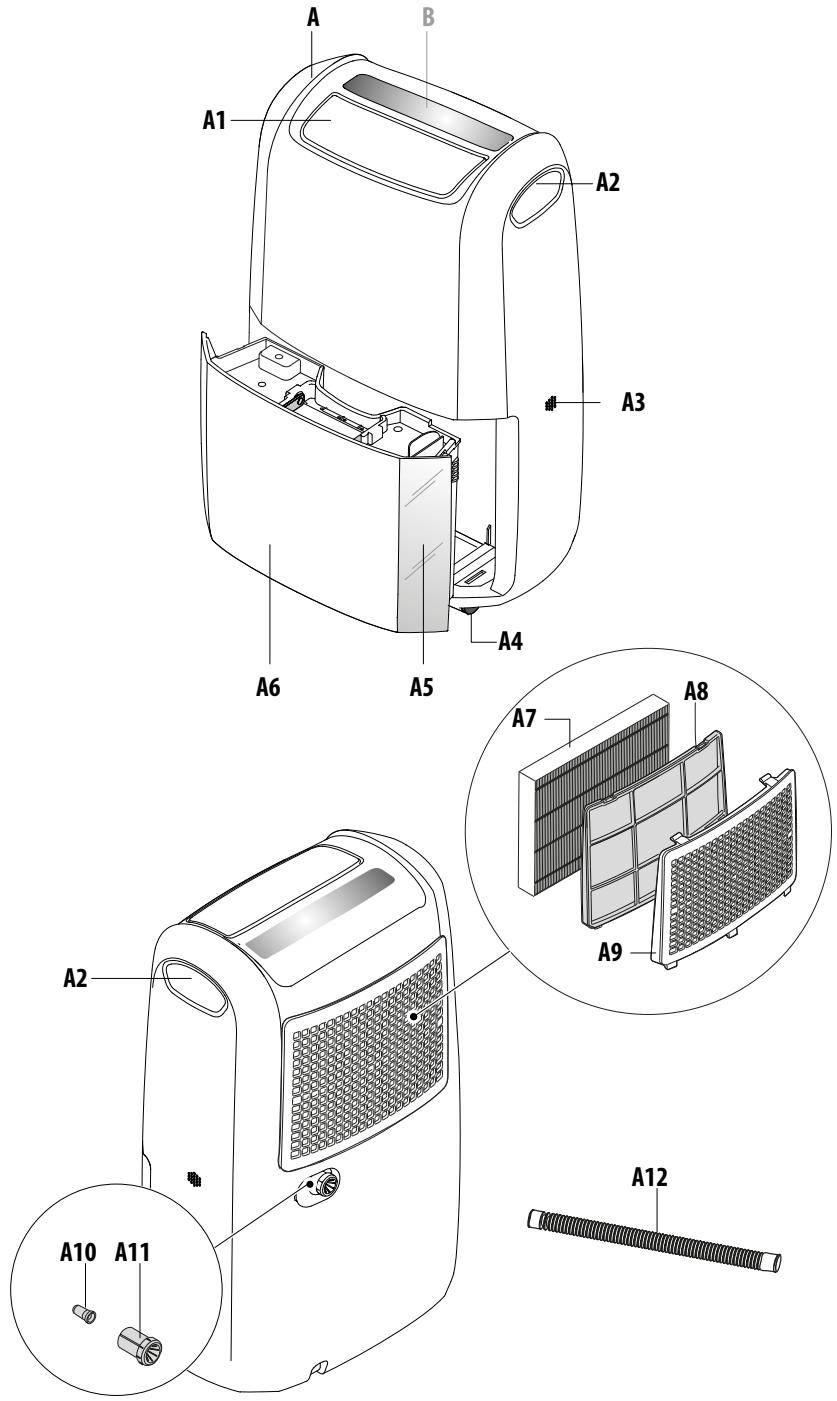
6.1 Description de l'appareil (A)
A1. Grille de sortie d'air A2. Poignées de levage A3. Entrée d'air du capteur ambiant A4. Roulettes A5. Fenêtre de visualisation du niveau d'eau A6. Réservoir de récupération des condensats A7. Filtre EPA A8. Filtre à poussière aux ions d'argent A9. Couvercle du boîtier du filtre A10. Bouchon en caoutchouc pour évacuation continue A11. Capuchon pour évacuation continue A12. Tuyau pour évacuation continue
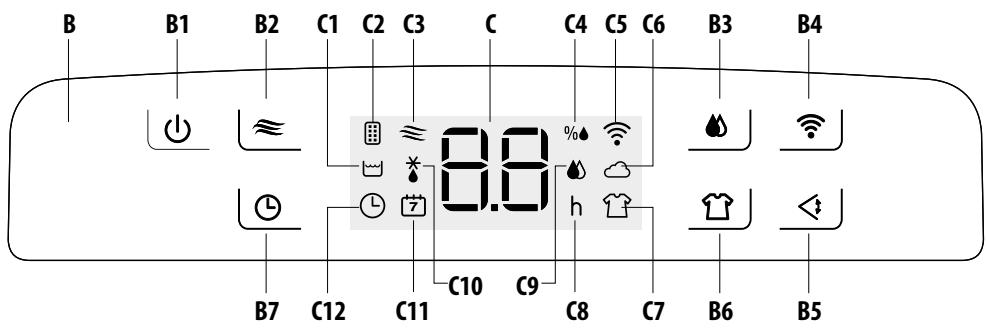
6.2 Description du panneau de commande (B)
B1. Bouton MARCHE/VEILLE B2. Bouton Ventilation B3. Bouton Déshumidification B4. Bouton Wi-Fi B5. Bouton Oscillation B6. Bouton Séchage B7. Bouton Minuterie
6.3 Description de l'affichage (C)
C1. Alarme réservoir plein C2. Symbole filtre EPA présent C3. Mode ventilation actif C4. % humidité relative C5. Symbole Wi-Fi C6. Symbole contrôle par application C7. Mode séchage actif C8. Heures C9. Mode déshumidification actif C10. Alarme basse température C11. Symbole minuterie à distance C12. Symbole minuterie locale
7. TÉLÉCHARGEZ L'APPLICATION !


Cet appareil peut également être utilisé avec l'application "De'Longhi Comfort APP" disponible sur Google Play ou téléchargeable depuis l'App Store.
Pour accéder à toutes les fonctions, un réseau local Wi-Fi (WLAN domestique) avec accès Internet est requis. De plus, vérifiez qu'il n'y a pas d'obstacles à l'accès Internet : pare-feu, proxy, authentifications, etc.
8. ÉVACUATION DE L'EAU DE CONDENSATION
Le condensat peut être évacué de deux manières :
8.1 Évacuation dans le réservoir
Le condensat est évacué directement dans le réservoir (A6).
Lorsque le réservoir est plein, l'appareil s'arrête et l'affichage (C) montre l'alarme de réservoir plein (C1). Procédez comme suit :
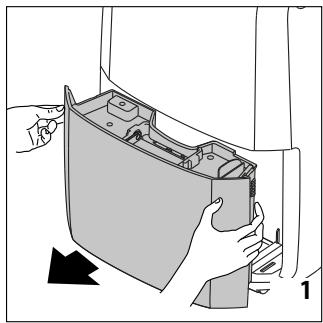
- Retirez le réservoir (fig. 1) et videz-le dans un évier ou une baignoire.
- Replacez le réservoir dans son logement en veillant à ce que la poignée soit correctement positionnée (fig. 2).
8.2 Évacuation continue externe
Si l'appareil est utilisé pendant de longues périodes sans possibilité de vider régulièrement le réservoir, la fonction d'évacuation continue doit être utilisée.
Procédez comme suit :
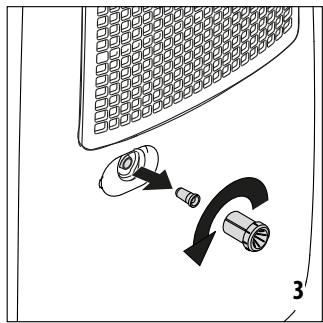
- Retirez le bouchon d'évacuation continue (A11) du bec, en le tournant dans le sens inverse des aiguilles d'une montre, puis retirez le bouchon en caoutchouc d'évacuation continue (A10) de l'ouverture (fig. 3) (Attention à toute fuite d'eau !)
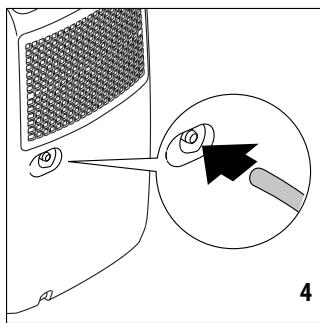
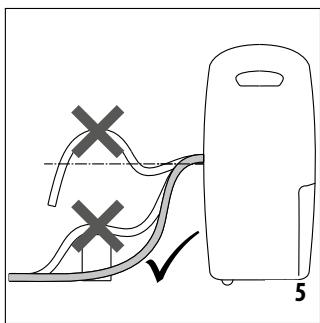
- Fixez le tuyau d'évacuation des condensats (A12) au bec (fig. 4). 3) Assurez-vous que le tuyau est positionné sous le bec (fig. 5) sinon l'eau retournera dans le réservoir de l'appareil. Assurez-vous également qu'il n'y a pas de plis dans le tuyau.
9. SÉLECTION DU MODE
Branchez l'appareil sur le secteur. Lors de la première utilisation, le symbole — apparaîtra sur l'écran et en même temps, un signal sonore retentira pour indiquer que l'appareil est en mode veille.
- Pour allumer l'appareil, touchez le bouton (B1). L'appareil fonctionnera dans le mode précédemment réglé et le volet de sortie d'air (A1) s'ouvrira dans une position prédéfinie (fig. 6).
- En cas de coupure de courant, lorsque le courant est rétabli, l'appareil reprendra son fonctionnement dans le mode de fonctionnement précédemment réglé.
Veuillez noter :
Si le symbole (C1) apparaît sur l'écran, le réservoir (A6) doit être vidé ou correctement positionné (voir paragraphe "3.1 Évacuation dans le réservoir").
Filtration de l'air
Si le filtre EPA (A7) est installé, en plus de fonctionner dans le mode prédéfini, l'appareil filtrera également l'air de la pièce. Dans ce cas, le symbole (C2) apparaîtra sur l'écran.
Le filtre est conçu pour durer jusqu'à 9 mois, sur la base d'une utilisation quotidienne de 8 heures à charge de travail moyenne.
Pour maintenir l'efficacité de la filtration, voir le paragraphe "5.3 Remplacement du filtre EPA".
9.1 Mode déshumidification
- Touchez le bouton (B3). Le symbole (C9) clignote sur l'écran (fig. 7).
- L'écran affiche la valeur d'humidité relative précédemment réglée. Lorsque le symbole clignote, le réglage peut être modifié en touchant à plusieurs reprises le bouton. Il existe 9 réglages d'humidité relative différents allant de 30 % (environnement sec) à 70 % (environnement humide). Selon les conditions environnementales, il se peut que l'appareil ne puisse pas atteindre la valeur minimale réglable. Dans ces cas, il est recommandé de chauffer la pièce à déshumidifier.
- Lorsque le symbole cesse de clignoter, l'écran affiche le pourcentage d'humidité relative de la pièce. L'appareil peut prendre quelques secondes pour afficher la valeur de l'humidité relative de la pièce.
- Lorsque la pièce atteint le niveau d'humidité relative prédéfini, l'appareil arrête la déshumidification et fonctionne à une vitesse de ventilation très lente.
9.2 Mode séchage
- Touchez le bouton (B6). L'écran affiche le symbole (C7) (fig. 8).
Veuillez noter :
L'appareil fonctionne automatiquement à la capacité de déshumidification maximale. Recommandé pour les environnements particulièrement humides ou pour sécher le linge plus rapidement.
9.3 Mode ventilation
- Touchez le bouton (B2). L'écran affiche le symbole (C3) et la vitesse sélectionnée (fig. 9).
- Lorsque le symbole ≈ clignote, la vitesse de ventilation peut être ajustée en appuyant à plusieurs reprises sur le bouton. L'écran affiche le numéro correspondant à la vitesse sélectionnée (1 ⇒ BASSE ; 2 ⇒ MOYENNE ; 3 ⇒ HAUTE).
9.4 Fonction oscillation
- Appuyez sur le bouton (B5) \ . La grille de sortie d'air (A1) monte et descend, répartissant uniformément le flux d'air dans la pièce (fig. 10).
- Pour arrêter le volet dans la position souhaitée, touchez à nouveau le même bouton.
9.5 Fonction minuterie
La minuterie peut être utilisée pour retarder le démarrage et l'arrêt de l'appareil. Cela évite le gaspillage d'énergie, en garantissant que l'appareil ne fonctionne que lorsque cela est nécessaire.
La fonction minuterie peut être programmée à partir du panneau de commande ou de l'application.
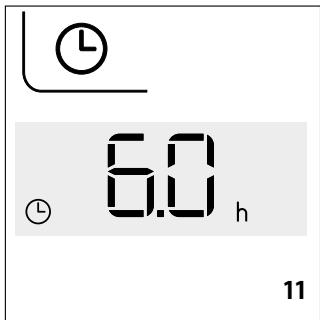
Si elle est programmée depuis le panneau de commande : l'écran affiche le symbole (C12) (fig. 11). Si elle est programmée depuis l'application : l'écran affiche le symbole (C11) (fig. 12). Pour programmer la minuterie depuis l'application, suivez les instructions fournies dans l'application.
Comment programmer un démarrage différé
- Avec l'appareil en veille (一 - 一), touchez le bouton (B7) : l'écran affiche le symbole et le nombre correspondant aux heures sélectionnées (fig. 11) ;
- Réglez le nombre d'heures souhaité en touchant à plusieurs reprises le bouton. Vous pouvez sélectionner 1, 2, 4, 6, 8, 12 heures.
- Après quelques secondes, l'appareil revient en mode veille et le symbole reste allumé sur l'écran.
- Après le temps programmé, l'appareil s'allume dans le mode de fonctionnement précédemment réglé.
Comment programmer un arrêt différé
- Pendant que l'appareil fonctionne, touchez le bouton (B7) : l'écran affiche le symbole et le nombre d'heures sélectionné (fig. 11) ;
- Réglez le nombre d'heures souhaité en touchant à plusieurs reprises le bouton. Vous pouvez sélectionner 1, 2, 4, 6, 8, 12 heures.
- Après quelques secondes, l'écran revient au mode de fonctionnement actuel et le symbole reste allumé.
- Après le temps programmé, l'appareil s'éteint automatiquement.
Veuillez noter :
Une fois la minuterie programmée, pour voir le temps restant avant la mise en marche ou l'arrêt, touchez le bouton une fois. Pour désactiver la fonction minuterie, appuyez deux fois sur le bouton . Le symbole sur l'écran s'éteindra.
9.6 Fonction Wi-Fi
L'appareil dispose d'une fonction Wi-Fi intégrée. Pour activer ou désactiver cette fonction, maintenez le bouton (B4) enfoncé jusqu'à ce que l'appareil émette deux bips. Lorsque la fonction Wi-Fi est active, l'écran affiche le symbole Wi-Fi (C5) avec les modes de fonctionnement suivants :
FIXE : cela signifie que les fonctions Wi-Fi sont actives et que le « WLAN domestique » a été trouvé. CLIGNOTEMENT LENT : cela signifie que l'appareil recherche le « WLAN domestique ».


CLIGNOTEMENT RAPIDE
cela signifie que le « WLAN domestique » n'a pas été trouvé ou n'a pas été configuré.
ICÔNE « CONTRÔLE APP »
Lorsque l'icône « CONTRÔLE APP » apparaît, cela signifie que la dernière commande a été reçue via une connexion à distance (par exemple, l'application).
Si le réglage « WLAN domestique » enregistré doit être modifié, procédez comme suit :
- Maintenez le bouton enfoncé pendant environ 20 secondes jusqu'à ce qu'un long bip soit entendu ;
- Utilisez l'application pour définir les nouveaux paramètres « WLAN domestique » dans l'unité.
10. NETTOYAGE ET ENTRETIEN
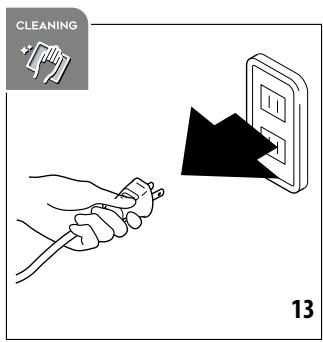
Débranchez toujours l'appareil de la prise de courant avant d'effectuer des opérations de nettoyage (fig. 13). - Ne jamais immerger l'appareil dans l'eau.
10.1 Nettoyage du boîtier
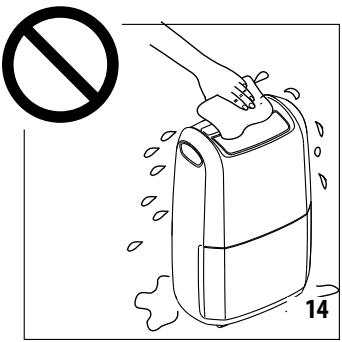
- Ne versez jamais d'eau directement sur l'appareil (fig. 14).
- N'utilisez jamais d'essence, d'alcool ou de solvants.
- Ne vaporisez jamais d'insecticides ou de substances similaires, car ils pourraient déformer le plastique.
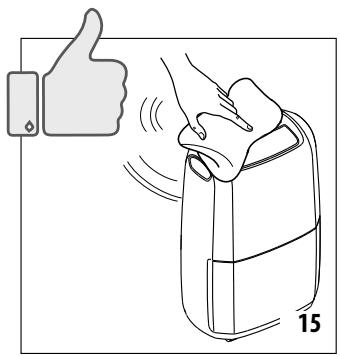
- Nettoyez les surfaces de l'appareil avec un chiffon doux et n'utilisez pas d'éponges abrasives, car elles pourraient rayer les surfaces (fig. 15).
10.2 Nettoyage du filtre à poussière ou à ions d'argent
La fréquence de nettoyage dépend de la fréquence d'utilisation : en cas d'utilisation quotidienne, il est recommandé de nettoyer le filtre chaque semaine.
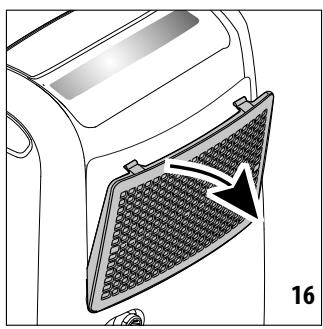
- Retirez le couvercle du boîtier du filtre (A9) de l'appareil (fig. 16).
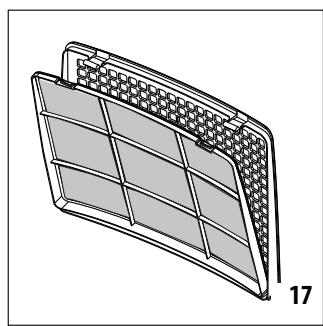
- Extrayez le filtre à poussière (fig. 17).
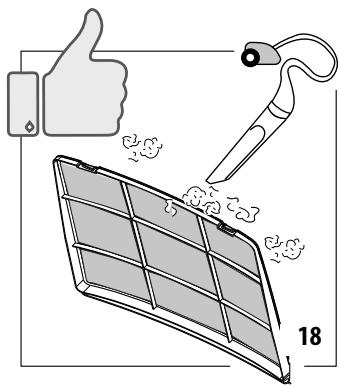
- Retirez la poussière du filtre à l'aide d'un aspirateur (fig. 18). Si le filtre à poussière est très sale, rincez-le abondamment à l'eau tiède. La température de l'eau ne doit pas dépasser 40 °C.
- Laissez-le sécher complètement, puis remettez-le en place.
10.3 Remplacement du filtre EPA
L'appareil vous rappellera automatiquement quand le filtre EPA (A7) doit être remplacé. Après un nombre d'heures de fonctionnement prédéfini, l'écran affiche le symbole clignotant (C2) pour indiquer que le filtre doit être remplacé.
Utilisez toujours des filtres De'Longhi d'origine.
- Retirez le couvercle du boîtier du filtre (A9) (fig. 16).
- Extrayez le filtre usagé (fig. 19) et remplacez-le par un neuf.
- Fermez le couvercle du boîtier du filtre (avec le filtre à poussière (A8) inséré).
- Réinitialisez l'alarme du filtre en maintenant la touche (B2) enfoncée pendant au moins 10 secondes jusqu'à ce que vous entendiez un bip long.
Remarque :
le symbole n'est donné qu'à titre indicatif et il peut être nécessaire de remplacer le filtre EPA plus fréquemment, selon la qualité de l'air.
En cas d'inactivité prolongée
- Débranchez l'appareil de la prise secteur et videz le réservoir (A6). Nettoyez le filtre à poussière (A8) et réinsérez-le.
- Couvrez l'appareil avec un sac en plastique pour le protéger de la poussière.
11. SPÉCIFICATIONS TECHNIQUES
| Power supply voltage | See rating plate |
| Input power | “” |
| Maximum input power | “” |
| Defrost device | Yes |
| Hygrometer | Yes |
| Fan speed | 3 |
| Air filter | Yes |
| Frequency: | 2400/2483.5 MHz |
| Maximum transmission power | 10 mW |
Limites de fonctionnement :
| Temperature | 2°C - 30°C |
| Relative Humidity | 30 - 90% |
12. ALARMES AFFICHÉES À L'ÉCRAN
| ALARM | CAUSE | SOLUTION |
| Tank (A6) missing or incorrectly positioned | Place the tank back in its correct position (see paragraph "3.1 Draining into the tank") | |
| Tank full | Empty the tank (see paragraph "3.1 Draining into the tank") | |
| Room temperature too low (see operating limits in chap. "6. Technical Specifications") | Increase the room temperature if possible | |
| Humidity in room too low or too high for correct measuring (see operating limits in chap. "6. Technical Specifications") | Move the appliance to another room with humidity and temperature levels within the operating limits: if the problem persists, call the Service Centre. | |
| Faulty probe | Call Service Centre | |
| Wi-Fi interface not working properly | Turn the appliance off and disconnect the plug from the power socket. Wait a few minutes, then re-insert the plug: if the problem persists, contact the Service Centre. | |
| After a preset number of operating hours, the symbol (C2) blinks on the display to indicate that the EPA filter (A7) needs to be replaced. | Replace the EPA filter (see para. "5.3 Replacing the EPA filter").If the EPA filter has recently been replaced, reset the alarm (see para. "5.3 Replacing the EPA filter") |
13. DÉPANNAGE
Vous trouverez ci-dessous une liste des dysfonctionnements possibles.
Si le problème ne peut pas être résolu à l'aide de la solution proposée, contactez le service après-vente.
| PROBLEM | CAUSE | SOLUTION |
| The appliance is operating in dehumidifying mode, but the humidity does not decrease | The filter is clogged | Clean the dust filter (para. “5.2 Cleaning the dust filter”) and check whether the EPA filter needs replacing (para. “5.3 Re-placing the EPA filter”) |
| Either the temperature or humidity in the room is too low | In certain conditions the appliance will not dehumidify: check the operating limits of the appliance (see chap. “6. Technical Specifications”). In certain cases, it is recommended to heat the room needing to be dehumidified. | |
| The set relative humidity level is too high | Set a lower humidity value (see para-graph “4.1 Dehumidifying mode”). |
Charge de gaz

De'Longhi Appliances via Seitz, 47 31100 Treviso Italia www.delonghi.com


- AVERTISSEMENTS DE SÉCURITÉ FONDAMENTAUX
- UTILISATION PRÉVUE
- INSTALLATION DE L'APPAREIL
- INFORMATIONS ENVIRONNEMENTALES
- INFORMATIONS SPÉCIFIQUES CONCERNANT LES APPAREILS AVEC GAZ RÉFRIGÉRANT R
- INFORMATIONS GÉNÉRALES
- NOTICE D'UTILISATION
- VEUILLEZ NOTER
- AVANT UTILISATION
- IMPORTANT
- VÉRIFICATION DE L'APPAREIL
- CONNEXION DE L'APPAREIL
- NETTOYAGE ET ENTRETIEN
- ÉLIMINATION
- DESCRIPTION
- DESCRIPTION DE L'APPAREIL (A)
- DESCRIPTION DU PANNEAU DE COMMANDE (B)
- DESCRIPTION DE L'AFFICHAGE (C)
- TÉLÉCHARGEZ L'APPLICATION
- ÉVACUATION DE L'EAU DE CONDENSATION
- ÉVACUATION DANS LE RÉSERVOIR
- ÉVACUATION CONTINUE EXTERNE
- SÉLECTION DU MODE
- FILTRATION DE L'AIR
- MODE DÉSHUMIDIFICATION
- MODE SÉCHAGE
- MODE VENTILATION
- FONCTION OSCILLATION
- FONCTION MINUTERIE
- COMMENT PROGRAMMER UN DÉMARRAGE DIFFÉRÉ
- COMMENT PROGRAMMER UN ARRÊT DIFFÉRÉ
- FONCTION WI-FI
- CLIGNOTEMENT RAPIDE
- ICÔNE « CONTRÔLE APP
- NETTOYAGE DU BOÎTIER
- NETTOYAGE DU FILTRE À POUSSIÈRE OU À IONS D'ARGENT
- REMPLACEMENT DU FILTRE EPA
- REMARQUE
- EN CAS D'INACTIVITÉ PROLONGÉE
- SPÉCIFICATIONS TECHNIQUES
- LIMITES DE FONCTIONNEMENT
- ALARMES AFFICHÉES À L'ÉCRAN
- DÉPANNAGE
Marque : DELONGHI
Modèle : HUMIDIFICATEURDDSX220WFA
Catégorie : Déshumidificateur