
SOUNDTRUEIE - Casque audio BOSE - Notice d'utilisation et mode d'emploi gratuit
Retrouvez gratuitement la notice de l'appareil SOUNDTRUEIE BOSE au format PDF.

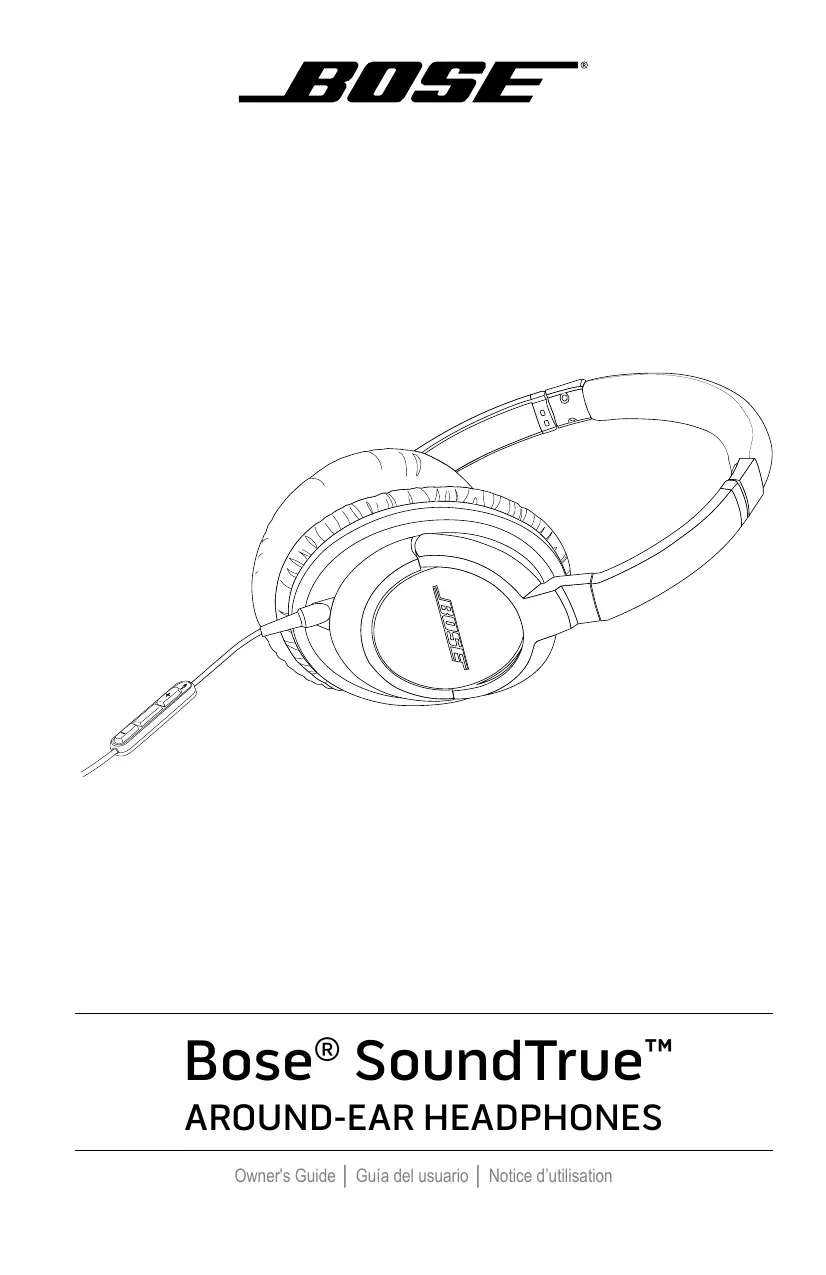

| Type de produit | Casque audio circum-auriculaire |
| Marque | Bose |
| Modèle | SoundTrue Around-Ear |
| Compatibilité | iPhone, iPod, iPad (modèles avec prise jack) |
| Fonctions téléphone | Répondre, raccrocher, refuser un appel, mise en attente, contrôle vocal |
| Fonctions multimédia | Lecture/pause, piste suivante/précédente, avance rapide, retour rapide |
| Contrôle du volume | Boutons + et - |
| Microphone | Intégré, situé à l'arrière du bouton Répondre/Fin |
| Connectique | Câble audio avec fiche 2,5 mm (côté casque) et fiche 3,5 mm (côté source) |
| Plage de température | Non spécifié |
| Entretien et nettoyage | Essuyer les surfaces extérieures avec un chiffon doux ; ne pas laisser pénétrer d'humidité dans les oreillettes |
| Sécurité | Éviter une exposition prolongée à un volume élevé ; ne pas utiliser d'adaptateur de téléphone mobile sur les prises avion ; contient des aimants |
| Pièces détachées et réparabilité | Coussinets d'oreille amovibles et remplaçables ; câble audio remplaçable ; contacter le service client Bose |
| Garantie | Garantie limitée (détails sur la carte d'enregistrement) |
| Pays d'origine | Non spécifié |
FOIRE AUX QUESTIONS - SOUNDTRUEIE BOSE
Questions des utilisateurs sur SOUNDTRUEIE BOSE
0 question sur cet appareil. Repondez a celles que vous connaissez ou posez la votre.
Poser une nouvelle question sur cet appareil
Téléchargez la notice de votre Casque audio au format PDF gratuitement ! Retrouvez votre notice SOUNDTRUEIE - BOSE et reprennez votre appareil électronique en main. Sur cette page sont publiés tous les documents nécessaires à l'utilisation de votre appareil SOUNDTRUEIE de la marque BOSE.
MODE D'EMPLOI SOUNDTRUEIE BOSE
Bose® SoundTrue™
AROUND-EAR HEADPHONES
Please read this owner's guide carefully and save it for future reference.
WARNING:
- Long-term exposure to loud music may cause hearing damage. It is best to avoid extreme volume when using headphones, especially for extended periods.
- Sounds that you rely on as reminders or warnings may have an unfamiliar character when using headphones. Be aware of how these sounds may vary in character so you can recognize them as needed.
- Do not place any naked flame sources, such as lighted candles, on or near the apparatus.
- This product contains magnetic material. Please contact your physician if you have any questions on whether this might affect the operation of your implantable medical device.
- DO NOT use mobile phone adapters to connect headphones to airplane seat jacks as this could result in personal injury such as burns or property damage due to overheating. Remove and disconnect immediately if you experience warming sensation or loss of audio.
- Do not submerge or expose for extended period to water or wear while participating in water sports, i.e. swimming, waterskiing, surfing, etc.
CAUTIONS:
- Do not drop, sit on or allow the headphones to be immersed in water.
- Be sure the earcup ports are kept clear, and that no moisture is allowed to get inside the earcup.
CE This product conforms to all applicable EU directive requirements. The complete declaration of conformity can be found at www.Bose.com/compliance
Limited Warranty
Your Bose® headphones are covered by a limited warranty. Details of the limited warranty are provided on the product registration card that is included in the carton. Please refer to the card for instructions on how to register. Failure to register will not affect your limited warranty rights.
| Names and Contents of Toxic or Hazardous Substances or Elements | ||||||
| Toxic or Hazardous Substances and Elements | ||||||
| Part Name | Lead (Pb) | Mercury (Hg) | Cadmium (Cd) | Hexavalent (CR(VI)) | Polybrominated Biphenyl (PBB) | Polybrominated diphenylether (PBDE) |
| PCBs | X | O | O | O | O | O |
| Metal parts | X | O | O | O | O | O |
| Plastic parts | O | O | O | O | O | O |
| Speakers | X | O | O | O | O | O |
| Cables | X | O | O | O | O | O |
| O: Indicates that this toxic or hazardous substance contained in all of the homogeneous materials for this part is below the limit requirement in SJ/T 11363-2006. | ||||||
| X: Indicates that this toxic or hazardous substance contained in at least one of the homogeneous materials used for this part is above the limit requirement in SJ/T 11363-2006. | ||||||

Made for
iPod iPhone iPad
iPad, iPhone, iPod, iPod classic, iPod nano, iPod shuffle and iPod touch are trademarks of Apple Inc., registered in the U.S. and other countries.
"Made for iPod," "Made for iPhone," and "Made for iPad" mean that an electronic accessory has been designed to connect specifically to iPod, iPhone, or iPad, respectively, and has been certified by the developer to meet Apple performance standards. Apple is not responsible for the operation of this device or its compliance with safety and regulatory standards. Please note that the use of this accessory with iPod, iPhone, or iPad may affect wireless performance.
Welcome. 5
Components 5
Wearing the headphones. 6
Connecting to your iPhone, iPod, or iPad 6
Using the headphones with your iPhone, iPod, or iPad. 6
For use with 6
Headphone controls. 6
Basic functions 7
Media playback functions 7
Folding earcups 8
Reattaching earup cushions. 8
Troubleshooting 9
Cleaning the headphones 9
Replacement parts and accessories 9
Welcome
Thank you for purchasing the Bose® SoundTrue™ around-ear headphones for select iPhone, iPod and iPad models. These headphones were designed to give you easy access and greater control of your Apple audio device. With Bose SoundTrue around-ear headphones, you can immerse yourself in your music and enjoy an around-ear fit that stays comfortable for hours.
Components
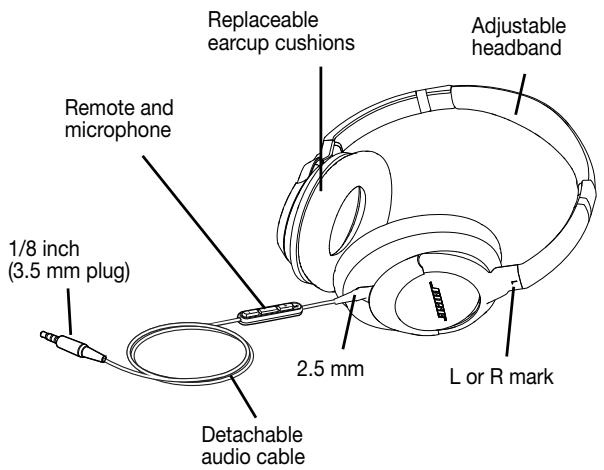
Wearing the headphones
Put on the headphones using the markings which identify the left (L) and right (R) earcups. Adjust the headband so it rests gently on top of your head and the earcup cushions fit comfortably around your ears.
Connecting to your iPhone, iPod, or iPad
Connect the smaller (2.5 mm) plug securely to the left earcup. Connect the other plug securely to the audio output jack of the iPhone, iPod or iPad. You should hear or feel a click when you make these connections.
Using the headphones with your iPhone, iPod, or iPad
The headphones have a small in-line remote with an integrated microphone for convenient control of select iPhone, iPod, and iPad models.
For use with
The remote and mic are supported only by iPhone 3GS or later, iPad, iPod touch (2nd generation or later), iPod classic (120GB, 160GB), and iPod nano (4th generation or later). The remote is supported by iPod shuffle (3rd generation or later). Audio is supported by all iPad and iPod models.
Note: Full controls may not be available for some iPhone, iPod, or iPad models.
Note: For information on using your headphones with non Apple devices, refer to http://global.Bose.com
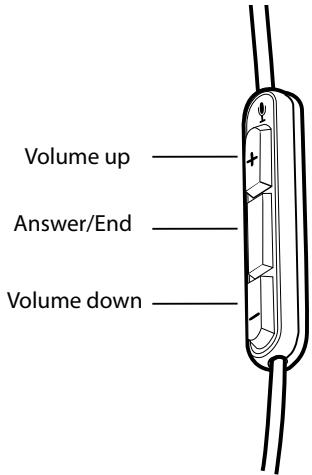
Headphone controls
Basic functions
| Increase volume | Press and release the + button. |
| Decrease volume | Press and release the - button. |
| Answer a call | When you receive an incoming call, press and release the Answer/End button to answer. |
| End a call | Press and release the Answer/End button. |
| Decline an incoming call | Press and hold the Answer/End button for about two seconds, then release. |
| Switch to an incoming or on-hold call and put the current call on hold | While on a call, press and release the Answer/End button once. Press and release again to switch back to the first call. |
| Switch to an incoming or on-hold call and end the current call | While on a call, press and hold the Answer/End button for about two seconds, then release. |
| Use Voice Control | Press and hold the Answer/End button. See iPhone User Guide for compatibility and usage information about this feature. |
Media playback functions
| Play or pause a song or video | Press and release the Answer/End button. |
| Skip to the next song or chapter | Press and release the Answer/End button twice quickly. |
| Fast forward | Press and release the Answer/End button twice quickly and hold the second press. |
| Go to the previous song or chapter | Press and release the Answer/End button three times quickly. |
| Rewind | Press and release the Answer/End button three times quickly and hold the third press. |
Folding earcups
The Bose® SoundTrue™ around-ear headphones feature rotating earcups that fold flat for easy, convenient storage. The earcups rotate in only one direction. Incorrectly rotating the earcups can damage the headphones.
Reattaching earup cushions
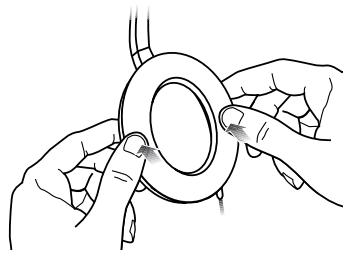
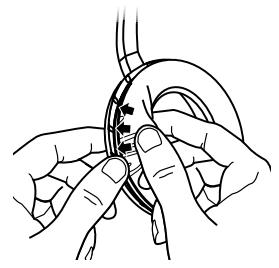
The earcup cushions are held in place by a mounting flange which snaps under 8 small tabs located around the inside rim of each earcup. If an earcup cushion becomes partially or completely detached, push the mounting flange of the earcup cushion back into the earcup. Using your finger or thumb, press around the edge of the mounting flange, making sure it snaps in place all the way around the earcup.
Troubleshooting
If you experience any trouble using your headphones, try the following troubleshooting instructions. If you still need help, contact Bose Customer Service.
| Problem | What to do |
| No audio or audio in one earcup only | ·Make sure both ends of the audio cable are firmly connected. ·Try another audio device. |
| Distorted bass | ·Make sure both ear cushions are firmly secured. |
| Mis-shaped cushion | ·The high-density earcup foam will regain its shape after a few minutes in a neutral position. |
| Microphone is not picking up sound | ·Make sure that the headphone plug is securely connected to the headphone jack. ·Make sure the microphone is not being blocked or covered. The microphone is located on the back of the Answer/End button. (You may notice the small opening for the microphone.) |
| Phone not responding to button presses | ·Make sure that the headphone plug is securely connected to the headphone jack. ·For multi-press functions: Vary speed of presses. |
| iPhone, iPod, or iPad not responding to remote | ·Full controls may not be available for some iPhone, iPod, or iPad models. |
Cleaning the headphones
The headphones do not require scheduled cleaning. Should cleaning be necessary, simply wipe the outside surfaces with a soft cloth. Be sure the earcup ports are kept clear, and that no moisture is allowed to get inside the earcup.
Replacement parts and accessories
Accessories or replacement parts can be ordered through Bose Customer Service at http://global.Bose.com
- Bose® SoundTrue™
- AROUND-EAR HEADPHONES
- Please read this owner's guide carefully and save it for future reference.
- WARNING:
- CAUTIONS:
- Limited Warranty
- Welcome
- Components
- Wearing the headphones
- Connecting to your iPhone, iPod, or iPad
- Using the headphones with your iPhone, iPod, or iPad
- For use with
- Folding earcups
- Reattaching earup cushions
- Troubleshooting
- Cleaning the headphones
- Replacement parts and accessories
Marque : BOSE
Modèle : SOUNDTRUEIE
Catégorie : Casque audio