BAUKNECHT KGIE1163 - Réfrigérateur combiné

KGIE1163 - Réfrigérateur combiné BAUKNECHT - Notice d'utilisation et mode d'emploi gratuit

Retrouvez gratuitement la notice de l'appareil KGIE1163 BAUKNECHT au format PDF.

📄 4 pages Français FR Télécharger 💬 Question IA 8 questions ⚙️ Specs
Notice BAUKNECHT KGIE1163 - page 1
Voir la notice : Français FR English EN
Choisissez votre langue et indiquez votre email : nous vous enverrons une version traduite specifiquement.
Type de produit Réfrigérateur combiné
Capacité totale 300 litres
Type de froid Froid statique
Dimensions approximatives Hauteur : 185 cm, Largeur : 60 cm, Profondeur : 65 cm
Poids 70 kg
Classe énergétique A+
Niveau sonore 42 dB
Fonctions principales Réfrigération, congélation, éclairage LED
Entretien et nettoyage Nettoyage régulier des surfaces intérieures et extérieures, dégivrage manuel
Pièces détachées et réparabilité Disponibilité des pièces détachées selon le modèle
Sécurité Système de verrouillage de porte, conformité aux normes de sécurité électrique
Compatibilités Compatible avec les accessoires BAUKNECHT
Alimentation électrique 220-240 V, 50 Hz
Garantie 2 ans

FOIRE AUX QUESTIONS - KGIE1163 BAUKNECHT

Comment réinitialiser le BAUKNECHT KGIE1163 ?
Pour réinitialiser le BAUKNECHT KGIE1163, débranchez l'appareil pendant environ 5 minutes, puis rebranchez-le. Cela devrait réinitialiser les paramètres.
Pourquoi mon BAUKNECHT KGIE1163 ne démarre-t-il pas ?
Vérifiez si l'appareil est correctement branché. Assurez-vous également que la porte est bien fermée et que le fusible n'est pas grillé.
Comment nettoyer le filtre de mon BAUKNECHT KGIE1163 ?
Pour nettoyer le filtre, retirez-le de l'appareil, rincez-le à l'eau chaude et laissez-le sécher complètement avant de le remettre en place.
Le BAUKNECHT KGIE1163 fait un bruit anormal, que dois-je faire ?
Assurez-vous que l'appareil est de niveau et qu'il n'est pas en contact avec d'autres objets. Si le bruit persiste, contactez le service après-vente.
Comment ajuster la température de mon BAUKNECHT KGIE1163 ?
Pour ajuster la température, utilisez le panneau de contrôle pour sélectionner la température souhaitée en fonction de vos besoins de cuisson.
Que faire si mon BAUKNECHT KGIE1163 affiche un code d'erreur ?
Consultez le manuel d'utilisation pour interpréter le code d'erreur. En général, cela indique un problème qui peut nécessiter une assistance technique.
Comment puis-je prolonger la durée de vie de mon BAUKNECHT KGIE1163 ?
Pour prolonger la durée de vie de l'appareil, effectuez un entretien régulier, nettoyez-le régulièrement, et suivez les instructions du manuel d'utilisation.
Le BAUKNECHT KGIE1163 ne chauffe pas, que faire ?
Vérifiez que le réglage de température est correct et que l'appareil est en mode de cuisson. Si le problème persiste, il pourrait y avoir un problème avec l'élément chauffant.

Questions des utilisateurs sur KGIE1163 BAUKNECHT

0 question sur cet appareil. Repondez a celles que vous connaissez ou posez la votre.

Poser une nouvelle question sur cet appareil

L'email reste privé : il sert seulement à vous prévenir si quelqu'un répond à votre question.

Aucune question pour l'instant. Soyez le premier à en poser une.

Téléchargez la notice de votre Réfrigérateur combiné au format PDF gratuitement ! Retrouvez votre notice KGIE1163 - BAUKNECHT et reprennez votre appareil électronique en main. Sur cette page sont publiés tous les documents nécessaires à l'utilisation de votre appareil KGIE1163 de la marque BAUKNECHT.

MODE D'EMPLOI KGIE1163 BAUKNECHT
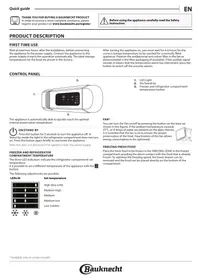
PRODUCT DESCRIPTION

FIRST TIME USE

Wait at least two hours, after the installation, before connecting the appliance to the power supply. Connect the appliance to the power supply it starts the operation automatically. The ideal storage temperatures for the food are preset in the factory.

After turning the appliance on, you must wait for 4-6 hours for the correct storage temperature to be reached for a normally filled appliance. Position the antibacterial anti-odour filter in the fan as demonstrated in the filter packaging (if available). If the audible signal sounds, it means that the temperature alarm has intervened: press the button to switch off the acoustic alarms.

CONTROL PANEL

BAUKNECHT KGIE1163 - CONTROL PANEL - 1

The appliance is automatically able to quickly reach the optimal internal preservation temperature.

BAUKNECHT KGIE1163 - CONTROL PANEL - 2

ON/STAND-BY

Press the button for 3 seconds to turn the appliance off. In

Stand-by mode the light in the refrigerator compartment does not turn on. Press the button again briefly to reactivate the appliance.

Note: this does not disconnect the appliance from the power supply.

FREEZER AND REFRIGERATOR COMPARTMENT TEMPERATURE

The three LED indicators indicate the refrigerator compartment set temperature.

It is possible to set a different temperature of the appliance with the button.

The following adjustments are possible:

BAUKNECHT KGIE1163 - FREEZER AND REFRIGERATOR COMPARTMENT TEMPERATURE - 1
LEDs lit

BAUKNECHT KGIE1163 - FREEZER AND REFRIGERATOR COMPARTMENT TEMPERATURE - 2

BAUKNECHT KGIE1163 - FREEZER AND REFRIGERATOR COMPARTMENT TEMPERATURE - 3

BAUKNECHT KGIE1163 - FREEZER AND REFRIGERATOR COMPARTMENT TEMPERATURE - 4

Set temperature

High (less cold)

Medium-high

Medium

Medium-low

Low (colder)

  1. LED Light
  2. On/Stand-by
  3. Freezer and refrigerator compartment temperature button

FAN*

You can turn the Fan on/off by pressing the button on the base (as shown in the figure). If the ambient temperature exceeds

27^ , or if drops of water are present on the glass shelves, it is essential that the fan is on to ensure the proper preservation of the food. Deactivation of the fan allows energy consumption to be optimised.

BAUKNECHT KGIE1163 - FAN* - 1

FREEZING FRESH FOOD

Place the fresh food to be frozen in the FREEZING ZONE in the freezer compartment avoiding the direct contact with the food that is already frozen. To optimize the freezing speed, the lower drawer can be removed and the food can be placed directly on the bottom of the compartment.

STOP FROST SYSTEM*

The STOP FROST SYSTEM facilitates the defrost procedure for the freezer compartment.

The STOP FROST accessory is designed to collect some of the frost that forms in the freezer compartment and it is easy to remove and clean, therefore reducing the time needed to defrost the freezer compartment.

PROCEDURE TO CLEAN THE STOP FROST ACCESSORY

  1. Open the freezer compartment door and remove the upper drawer.

BAUKNECHT KGIE1163 - PROCEDURE TO CLEAN THE STOP FROST ACCESSORY - 1

  1. Unfasten the STOP FROST accessory and remove it, taking care not to drop it on the glass shelf below.

Note: if the accessory is jammed or difficult to remove, do not keep trying to remove it, but proceed with the complete defrost of the freezer compartment.

BAUKNECHT KGIE1163 - PROCEDURE TO CLEAN THE STOP FROST ACCESSORY - 2

  1. Close the door of the freezer compartment.
  2. Remove the frost on the accessory by rinsing it under running (not hot) water.

BAUKNECHT KGIE1163 - PROCEDURE TO CLEAN THE STOP FROST ACCESSORY - 3

To remove the frost on the STOP FROST accessory follow the cleaning procedure demonstrated below.

BAUKNECHT KGIE1163 - PROCEDURE TO CLEAN THE STOP FROST ACCESSORY - 4

  1. Let the accessory drip dry and dry the plastic parts with a soft cloth.

BAUKNECHT KGIE1163 - PROCEDURE TO CLEAN THE STOP FROST ACCESSORY - 5

  1. Reinsert the accessory by placing the back part on the projections shown in figure, then refasten the handle of the accessory to the clasps above.

BAUKNECHT KGIE1163 - PROCEDURE TO CLEAN THE STOP FROST ACCESSORY - 6

  1. Reinsert the upper drawer and close the door of the freezer compartment.

It is possible to clean the STOP FROST accessory on its own without completely defrosting the freezer compartment.

Cleaning the STOP FROST accessory regularly helps to reduce the need to completely defrost the freezer compartment.

Note: the product specifications, including volume and energy, are calculated without the STOP FROST accessory.

HOW TO STORE FOOD AND BEVERAGE

BAUKNECHT KGIE1163 - HOW TO STORE FOOD AND BEVERAGE - 1

BAUKNECHT KGIE1163 - HOW TO STORE FOOD AND BEVERAGE - 2

** For models with "0° ZONE" COMPARTMENT the "coolest area" is the one highlighted in the legend
*** Only for CB310 e CB380 models (refer to the Rating plate located at side of Fruit and vegetable drawer)

  • Available only on certain models

Legend

TEMPERATE ZONE Suggested for storage of tropical fruit, cans, drink, eggs, sauces, pickles, butter, jam

COOL ZONE Suggested for storage of cheese, milk, daily food, delicatessen, yoghurt

COOLEST AREA Suggested for storage of cold cuts, desserts, meat and fish

FRUIT & VEGETABLE DRAWER

BAUKNECHT KGIE1163 - FRUIT & VEGETABLE DRAWER - 1

FREEZING ZONE DRAWER (Max cool zone) Suggested to freeze fresh/cooked food

TROUBLESHOOTING

What to do if...Possible reasonsSolutions
The control panel is switched off, the appliance does not work.There may be an appliance power supply problem.Check that: • there is not a power outage; • the plug is properly inserted in the power socket and the mains double-pole switch (if present) is in the correct position (i.e. allows the appliance to be powered); • the household electrical system protection devices are efficient; • the power cable is not damaged.
The appliance could be in On/stand by mode.Turn the appliance on by briefly pressing the "Temp." button (see On/ Stand-by function).
The inside light does not work.The light may need to be replace. Malfunction of a technical component.Disconnect the appliance from the power supply and contact the Technical Assistance Service if you need a replacement.
The inside light flashes.Door alarm active. It is activated when the refrigerator compartment door remains open for a prolonged period of time.To stop the alarm, close the refrigerator door. On reopening the door, check the light works.
The temperature inside the compartments is not low enough.There could be various causes (see "Solutions").Check that: • the doors close properly; • the appliance is not installed near a heat source; • the set temperature is adequate; • the circulation of air through the vents at the bottom of the appliance is not obstructed (see installation section).
There is water on the bottom of the refrigerator compartment.The defrost water drain is blocked.Clean the defrosting water drain (see section "Cleaning and Maintenance").
Excessive amount of frost in the freezer compartmentThe door of the freezer compartment does not close properly.• Check that there is nothing preventing the door from closing properly. • Defrost the freezer compartment. • Make sure the appliance has been correctly installed.
The front edge of the appliance, at the door striker seal, is hot.This is not a defect. It prevents condensation from forming.No solution is necessary.
One or more green symbols are flashing continuously and it is not possible to change the temperature set.Malfunction alarm. The alarm indicates a fault in a technical component.Contact Technical Assistance Service.
The temperature of the refrigerator compartment is too cold.• The set temperature is too cold. • A large amount of fresh food may have been placed in the freezer compartment.• Try to set a less cold temperature. • If fresh food has been placed in the freezer compartment, wait until it has fully frozen. • Turn off the fan (if present) following the procedure described in the paragraph "FAN".

BAUKNECHT KGIE1163 - FRUIT & VEGETABLE DRAWER - 2

You can download the Safety Instructions, User Manual, Product Fiche and Energy data by:

  • Visiting our website docs.bauknecht.eu
    Using QR Code
  • Alternatively, contact our After-sales Service (See phone number in the warranty booklet). When contacting our After-sales Service, please state the codes provided on your product's identification plate.

BAUKNECHT KGIE1163 - FRUIT & VEGETABLE DRAWER - 3

Assistant notice
Powered by Anthropic
En attente de votre message
Informations produit

Marque : BAUKNECHT

Modèle : KGIE1163

Catégorie : Réfrigérateur combiné