
BLACK & DECKER GK1635 - Outils de jardinage BLACK & DECKER - Notice d'utilisation et mode d'emploi gratuit
Retrouvez gratuitement la notice de l'appareil BLACK & DECKER GK1635 BLACK & DECKER au format PDF.



| Type de produit | Tronçonneuse électrique |
| Marque | BLACK & DECKER |
| Modèle | GK1635 |
| Catégorie | Outils de jardinage |
| Longueur du guide-chaîne | 35 cm |
| Tension d'alimentation | 230 V AC |
| Puissance absorbée | 1600 W |
| Vitesse de chaîne à vide | 8 m/s |
| Capacité du réservoir d'huile | 180 ml |
| Poids | 3,8 kg |
| Classe de protection | II (double isolation) |
| Niveau de pression acoustique | 92 dB(A) |
| Niveau de puissance acoustique garanti | 103 dB(A) |
| Vibration (valeur totale) | 5 m/s² |
| Fonctions principales | Élagage, abattage, tronçonnage |
| Sécurité | Frein de chaîne antirebond, interrupteur à verrouillage, protection avant |
| Entretien | Nettoyage régulier du guide et de la chaîne, affûtage ou remplacement de la chaîne |
| Réparabilité | Pièces de rechange disponibles auprès des centres de service agréés Black & Decker |
| Garantie | 24 mois pour défauts de matériau ou de fabrication |
FOIRE AUX QUESTIONS - BLACK & DECKER GK1635 BLACK & DECKER
Questions des utilisateurs sur BLACK & DECKER GK1635 BLACK & DECKER
0 question sur cet appareil. Repondez a celles que vous connaissez ou posez la votre.
Poser une nouvelle question sur cet appareil
Téléchargez la notice de votre Outils de jardinage au format PDF gratuitement ! Retrouvez votre notice BLACK & DECKER GK1635 - BLACK & DECKER et reprennez votre appareil électronique en main. Sur cette page sont publiés tous les documents nécessaires à l'utilisation de votre appareil BLACK & DECKER GK1635 de la marque BLACK & DECKER.
MODE D'EMPLOI BLACK & DECKER GK1635 BLACK & DECKER
Powerful Solutions ™
Français
(Instructions originales)
A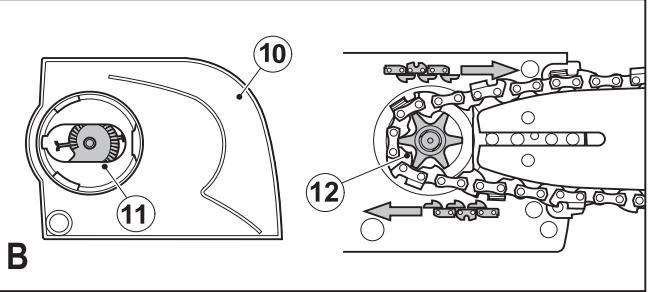
Utilisation prévue
Votre tronçonneuse Black & Decker a été conçue pour élaguer, abattre des arbres et couper des bûches. Cet outil est destiné à un usage domestique uniquement.
Consignes de sécurité
Avertissements de sécurité généraux pour les outils électriques

Avertissement ! Lisez tous les avertissements de sécurité et toutes les instructions. Le non-respect des avertissements et des instructions énumérés ci-dessous peut entraîner un choc électrique, un incendie et/ou des blessures graves.
Conservez tous les avertissements et instructions pour référence future.
Le terme « outil électrique » dans tous les avertissements ci-dessous fait référence à votre outil électrique alimenté par le secteur (avec fil) ou par batterie (sans fil).
- Sécurité de la zone de travail a. Gardez la zone de travail propre et bien éclairée. Les zones encombrées ou sombres invitent aux accidents. b. N'utilisez pas d'outils électriques dans des atmosphères explosives, comme en présence de liquides inflammables, de gaz ou de poussières. Les outils électriques créent des étincelles qui peuvent enflammer les poussières ou les vapeurs. c. Tenez les enfants et les personnes à l'écart pendant l'utilisation d'un outil électrique. Les distractions peuvent vous faire perdre le contrôle.
- Sécurité électrique
a. Les fiches des outils électriques doivent correspondre à la prise. Ne modifiez jamais la fiche de quelque manière que ce soit. N'utilisez aucun adaptateur avec des outils électriques mis à la terre. Des fiches non modifiées et des prises correspondantes réduiront le risque de choc électrique. b. Évitez tout contact corporel avec des surfaces mises à la terre telles que les tuyaux, les radiateurs, les cuisinières et les réfrigérateurs. Le risque de choc électrique est accru si votre corps est mis à la terre. c. N'exposez pas les outils électriques à la pluie ou à des conditions humides. La pénétration d'eau dans un outil électrique augmentera le risque de choc électrique. d. Ne maltraitez pas le cordon. N'utilisez jamais le cordon pour porter, tirer ou débrancher l'outil électrique. Tenez le cordon éloigné de la chaleur, de l'huile, des bords tranchants ou des pièces en mouvement. Des cordons endommagés ou emmêlés augmentent le risque de choc électrique. e. Lorsque vous utilisez un outil électrique à l'extérieur, utilisez une rallonge adaptée à un usage extérieur. L'utilisation d'un cordon adapté à l'extérieur réduit le risque de choc électrique. f. S'il est inévitable d'utiliser un outil électrique dans un endroit humide, utilisez une alimentation protégée par un dispositif à courant résiduel (DDR). L'utilisation d'un DDR réduit le risque de choc électrique.
- Sécurité personnelle
a. Restez vigilant, surveillez ce que vous faites et faites preuve de bon sens lorsque vous utilisez un outil électrique. N'utilisez pas un outil électrique si vous êtes fatigué ou sous l'influence de drogues, d'alcool ou de médicaments. Un moment d'inattention lors de l'utilisation d'outils électriques peut entraîner des blessures graves. b. Utilisez un équipement de protection individuelle. Portez toujours une protection oculaire. Un équipement de protection tel qu'un masque anti-poussière, des chaussures de sécurité antidérapantes, un casque ou une protection auditive utilisé dans des conditions appropriées réduira les blessures. c. Empêchez tout démarrage accidentel. Assurez-vous que l'interrupteur est en position d'arrêt avant de brancher l'outil sur une source d'alimentation et/ou une batterie, de le ramasser ou de le porter. Porter un outil électrique avec le doigt sur l'interrupteur ou brancher un outil électrique dont l'interrupteur est en position de marche invite aux accidents. d. Retirez toute clé de réglage ou clé avant de mettre l'outil électrique en marche. Une clé laissée sur une pièce rotative de l'outil électrique peut entraîner des blessures. e. Ne vous penchez pas trop. Gardez toujours une position stable et un bon équilibre. Cela permet un meilleur contrôle de l'outil électrique dans des situations inattendues. f. Habillez-vous correctement. Ne portez pas de vêtements amples ni de bijoux. Tenez vos cheveux, vos vêtements et vos gants éloignés des pièces en mouvement. Les vêtements amples, les bijoux ou les cheveux longs peuvent être pris dans les pièces en mouvement. g. Si des dispositifs sont fournis pour le raccordement de l'extraction et de la collecte des poussières, assurez-vous qu'ils sont connectés et correctement utilisés. L'utilisation de la collecte des poussières peut réduire les risques liés à la poussière.
- Utilisation et entretien des outils électriques
a. Ne forcez pas l'outil électrique. Utilisez l'outil électrique adapté à votre application. L'outil électrique adapté fera le travail mieux et plus sûrement à la vitesse pour laquelle il a été conçu. b. N'utilisez pas l'outil électrique si l'interrupteur ne permet pas de l'allumer et de l'éteindre. Tout outil électrique qui ne peut pas être contrôlé par l'interrupteur est dangereux et doit être réparé. c. Débranchez la fiche de la source d'alimentation et/ou retirez le bloc-batterie de l'outil électrique avant de faire tout réglage, de changer d'accessoire ou de ranger l'outil. Ces mesures de sécurité préventives réduisent le risque de démarrage accidentel de l'outil. d. Rangez les outils électriques inutilisés hors de portée des enfants et ne permettez pas à des personnes non familiarisées avec l'outil ou ces instructions de l'utiliser. Les outils électriques sont dangereux entre les mains d'utilisateurs non formés. e. Entretenez les outils électriques. Vérifiez l'alignement ou le blocage des pièces mobiles, la casse de pièces et toute autre condition pouvant affecter le fonctionnement de l'outil. S'il est endommagé, faites réparer l'outil avant de l'utiliser. De nombreux accidents sont causés par des outils mal entretenus.
f. Gardez les outils de coupe affûtés et propres. Des outils de coupe bien entretenus avec des arêtes de coupe tranchantes sont moins susceptibles de se bloquer et sont plus faciles à contrôler. g. Utilisez l'outil électrique, les accessoires et les embouts, etc., conformément à ces instructions, en tenant compte des conditions de travail et de la tâche à effectuer. L'utilisation de l'outil électrique pour des opérations autres que celles prévues pourrait entraîner une situation dangereuse.
5. Entretien
a. Faites réparer votre outil électrique par une personne qualifiée utilisant uniquement des pièces de rechange identiques. Cela garantira que la sécurité de l'outil électrique est maintenue.
Avertissements de sécurité supplémentaires pour les outils électriques

Avertissement ! Avertissements de sécurité supplémentaires pour les tronçonneuses
- Gardez toutes les parties du corps éloignées de la chaîne de scie lorsque la tronçonneuse fonctionne. Avant de démarrer la tronçonneuse, assurez-vous que la chaîne de scie ne touche rien. Un moment d'inattention pendant l'utilisation de la tronçonneuse peut provoquer l'accrochage de vos vêtements ou de votre corps à la tronçonneuse. Tenez toujours la tronçonneuse avec la main droite sur la poignée arrière et la main gauche sur la poignée avant. Tenir la tronçonneuse avec une configuration inversée des mains augmente le risque de blessure et ne doit jamais être fait. Portez des lunettes de sécurité et une protection auditive. Un équipement de protection supplémentaire pour la tête, les mains, les jambes et les pieds est recommandé. Des vêtements de protection adéquats réduiront les blessures causées par les débris volants ou un contact accidentel avec la chaîne de scie. N'utilisez pas une tronçonneuse dans un arbre. L'utilisation d'une tronçonneuse en hauteur dans un arbre peut entraîner des blessures. Gardez toujours un bon appui et n'utilisez la tronçonneuse que lorsque vous êtes debout sur une surface fixe, sécurisée et de niveau. Des surfaces glissantes ou instables telles que des échelles peuvent provoquer une perte d'équilibre ou de contrôle de la tronçonneuse.
- Lors de la coupe d'une branche sous tension, soyez attentif au retour élastique. Lorsque la tension des fibres du bois est relâchée, la branche chargée peut frapper l'opérateur et/ou faire perdre le contrôle de la tronçonneuse.
- Soyez extrêmement prudent lors de la coupe de broussailles et de jeunes arbres. Le matériau mince peut être attrapé par la chaîne de la scie et être projeté vers vous ou vous déséquilibrer.
- Portez la tronçonneuse par la poignée avant, éteinte et éloignée de votre corps. Lors du transport ou du stockage, installez toujours le protège-guide. Une manipulation correcte de la tronçonneuse réduira le risque de contact accidentel avec la chaîne en mouvement. Suivez les instructions de lubrification, de tension de la chaîne et de remplacement des accessoires. Une chaîne mal tendue ou mal lubrifiée peut se casser ou augmenter le risque de rebond.
- Gardez les poignées sèches, propres et exemptes d'huile et de graisse. Des poignées graisseuses ou huileuses sont glissantes et entraînent une perte de contrôle. Ne coupez que du bois. N'utilisez pas la tronçonneuse à d'autres fins. Par exemple, ne l'utilisez pas pour couper du plastique, de la maçonnerie ou des matériaux de construction non ligneux. Une utilisation non conforme peut créer une situation dangereuse. Positionnez le câble de manière à ce qu'il ne se prenne pas dans les branches ou autres lors de la coupe.
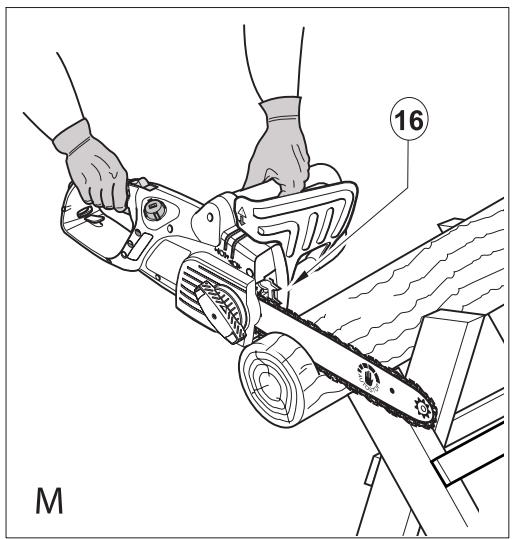
- Le butoir à ergots (16) peut devenir tranchant au cours de la vie du produit. Manipulez-le avec précaution.
- Lors de la manipulation du produit, le guide-chaîne peut devenir chaud. Manipulez-le avec précaution.
Causes et prévention du rebond par l'opérateur
Le rebond peut se produire lorsque le nez ou l'extrémité du guide-chaîne touche un objet, ou lorsque le bois se referme et pince la chaîne dans la coupe.
Le contact avec l'extrémité peut, dans certains cas, provoquer une réaction inverse soudaine, projetant le guide-chaîne vers le haut et vers l'arrière, en direction de l'opérateur.
Le pincement de la chaîne le long du dessus du guide-chaîne peut pousser rapidement le guide-chaîne vers l'arrière, en direction de l'opérateur. Ces réactions peuvent entraîner une perte de contrôle de la tronçonneuse, ce qui peut causer des blessures graves. Ne vous fiez pas uniquement aux dispositifs de sécurité intégrés à votre tronçonneuse. En tant qu'utilisateur, vous devez prendre plusieurs mesures pour éviter les accidents et les blessures lors de vos travaux de coupe. Le rebond résulte d'une mauvaise utilisation de l'outil et/ou de procédures ou conditions de fonctionnement incorrectes. Il peut être évité en prenant les précautions appropriées énumérées ci-dessous.
Maintenez une prise ferme, avec les pouces et les doigts encerclant les poignées de la tronçonneuse. Avec les deux mains sur la tronçonneuse, positionnez votre corps et votre bras de manière à pouvoir résister aux forces de rebond. Les forces de rebond peuvent être contrôlées par l'opérateur, si des précautions appropriées sont prises. Ne lâchez pas la tronçonneuse. - Ne vous penchez pas trop et ne coupez pas au-dessus de la hauteur des épaules. Cela aide à prévenir tout contact accidentel avec le bout du guide et permet un meilleur contrôle de la tronçonneuse dans des situations inattendues.
- Utilisez uniquement les guides et chaînes de remplacement spécifiés par le fabricant. Des guides et chaînes de remplacement incorrects peuvent provoquer la rupture de la chaîne et/ou un rebond. Suivez les instructions de la fabricant pour l'affûtage et l'entretien de la chaîne. Une diminution de la hauteur du jauge de profondeur peut entraîner une augmentation du rebond. Le fait de heurter du métal, du ciment ou tout autre matériau dur près du bois, ou enfoui dans le bois, peut provoquer un rebond. Une chaîne émoussée ou desserrée peut provoquer un rebond.
- N'essayez pas de vous insérer dans une coupe précédente. Cela pourrait provoquer un rebond. Faites une nouvelle coupe à chaque fois.
Recommandations de sécurité pour la tronçonneuse
Nous recommandons fortement aux utilisateurs débutants d'obtenir une instruction pratique sur l'utilisation de la tronçonneuse et de l'équipement de protection auprès d'un utilisateur expérimenté. La pratique initiale doit être effectuée en sciant des bûches sur un chevalet ou un berceau. Vérifiez toujours que le frein de rebond fonctionne correctement avant utilisation. Nous recommandons que lors du transport de la tronçonneuse, vous vous assuriez que le frein est engagé et que la chaîne est orientée vers l'arrière. Entretenez votre tronçonneuse lorsqu'elle n'est pas utilisée. Ne rangez pas votre tronçonneuse pendant une longue période sans avoir d'abord retiré la chaîne et le guide, qui doivent être conservés immergés dans l'huile. Rangez toutes les pièces de votre tronçonneuse dans un endroit sec et sûr, hors de portée des enfants. Nous recommandons de vidanger le réservoir d'huile avant le stockage. Assurez-vous de votre équilibre et planifiez à l'avance une issue de secours en cas de chute d'arbre ou de branches. Utilisez des coins pour aider à contrôler l'abattage et éviter de coincer le guide et la chaîne dans la coupe. Entretien de la chaîne. Gardez la chaîne affûtée et bien tendue sur le guide. Assurez-vous que la chaîne et le guide sont propres et bien huilés. Gardez les poignées sèches, propres et exemptes d'huile et de graisse.
Évitez de couper
Bois préparé. Dans le sol. Dans des clôtures en fil de fer, des clous, etc.
Vibrations
Les valeurs de vibration déclarées dans les données techniques et la déclaration de conformité ont été mesurées conformément à une méthode d'essai normalisée fournie par EN 60745 et peuvent être utilisées pour comparer un outil à un autre. La valeur de vibration déclarée peut également être utilisée pour une évaluation préliminaire de l'exposition.
Avertissement ! La valeur d'émission de vibrations pendant l'utilisation réelle de l'outil électrique peut différer de la valeur déclarée en fonction des manières dont l'outil est utilisé. Le niveau de vibrations peut augmenter au-dessus du niveau indiqué.
Lors de l'évaluation de l'exposition aux vibrations pour déterminer les mesures de sécurité requises par la directive 2002/44/CE afin de protéger les personnes utilisant régulièrement des outils électriques dans le cadre de leur travail, l'estimation de l'exposition aux vibrations doit tenir compte des conditions réelles d'utilisation et de la manière dont l'outil est utilisé, y compris en prenant en compte toutes les parties du cycle de fonctionnement, telles que les moments où l'outil est éteint et où il tourne au ralenti, en plus du temps de déclenchement.
Sécurité électrique

Cet outil est à double isolation ; par conséquent, aucun fil de terre n'est requis. Vérifiez toujours que l'alimentation électrique correspond à la tension indiquée sur la plaque signalétique.
- Si le cordon d'alimentation est endommagé, il doit être remplacé par le fabricant ou un centre de service agréé Black & Decker afin d'éviter tout danger.
Utilisation d'une rallonge
Utilisez toujours une rallonge approuvée adaptée à la puissance d'entrée de cet outil (voir les données techniques). La rallonge doit être adaptée à une utilisation en extérieur et porter la mention correspondante. Une rallonge de type HO7RN-F 2 x 1,5 mm² jusqu'à 30 m peut être utilisée sans perte de performance du produit. Avant utilisation, inspectez la rallonge pour détecter tout signe de dommage, d'usure ou de vieillissement. Remplacez la rallonge si elle est endommagée ou défectueuse. Lors de l'utilisation d'un dévidoir, déroulez toujours complètement le câble.
Protection contre les chocs électriques
Évitez tout contact du corps avec des surfaces mises à la terre (par exemple, garde-corps métalliques, lampadaires, etc.). La sécurité électrique peut être encore améliorée en utilisant un dispositif à courant résiduel (DDR) à haute sensibilité (30 mA / 30 ms).

Avertissement ! L'utilisation d'un DDR ou d'un autre disjoncteur ne dispense pas l'utilisateur de la tronçonneuse de respecter les consignes de sécurité et les pratiques de travail sûres décrites dans ce manuel.
Consignes de sécurité supplémentaires
Cet appareil n'est pas destiné à être utilisé par des personnes (y compris les enfants) ayant des capacités physiques, sensorielles ou mentales réduites, ou manquant d'expérience et de connaissances, à moins qu'elles ne soient sous la surveillance d'une personne responsable de leur sécurité ou qu'elles aient reçu des instructions concernant l'utilisation de l'appareil. Les enfants doivent être surveillés pour s'assurer qu'ils ne jouent pas avec l'appareil. Assurez-vous qu'une personne se trouve à proximité (mais à une distance sûre) en cas d'accident. Si, pour une raison quelconque, vous devez toucher la chaîne de la scie, assurez-vous que la tronçonneuse est débranchée du secteur. - Le bruit de ce produit peut dépasser 85 dB(A). Nous vous recommandons donc de prendre des mesures appropriées pour protéger votre ouïe.
Risques résiduels.
Des risques résiduels supplémentaires peuvent survenir lors de l'utilisation de l'outil, qui peuvent ne pas être inclus dans les avertissements de sécurité fournis. Ces risques peuvent résulter d'une mauvaise utilisation, d'une utilisation prolongée, etc.
Même avec l'application des réglementations de sécurité pertinentes et la mise en œuvre de dispositifs de sécurité, certains risques résiduels ne peuvent être évités. Ceux-ci incluent :
♦ Blessures causées par le contact avec des pièces rotatives ou mobiles. ♦ Blessures causées lors du changement de pièces, de lames ou d'accessoires. ♦ Blessures causées par une utilisation prolongée de l'outil. Lors de l'utilisation prolongée d'un outil, veillez à faire des pauses régulières. ♦ Altération de l'audition. ♦ Risques pour la santé liés à l'inhalation de poussières générées lors de l'utilisation de l'outil (par exemple : travail du bois, en particulier le chêne, le hêtre et le MDF).
Étiquettes sur l'outil
Les pictogrammes suivants sont apposés sur l'outil :


Avertissement ! Pour réduire le risque de blessure, l'utilisateur doit lire le manuel d'instructions.

Porter toujours une protection auditive et oculaire

Ne pas exposer l'outil à la pluie ou à une humidité élevée.

Toujours débrancher la fiche de la prise avant d'inspecter un câble endommagé. Veillez à ne pas utiliser la tronçonneuse si le câble est endommagé.

Directive 2000/14/CE puissance acoustique garantie.
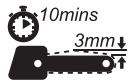
Pour garantir un fonctionnement sûr et continu, vérifiez la tension de la chaîne comme décrit dans ce manuel après chaque 10 minutes d'utilisation, et ajustez-la à un jeu de 3 mm si nécessaire.
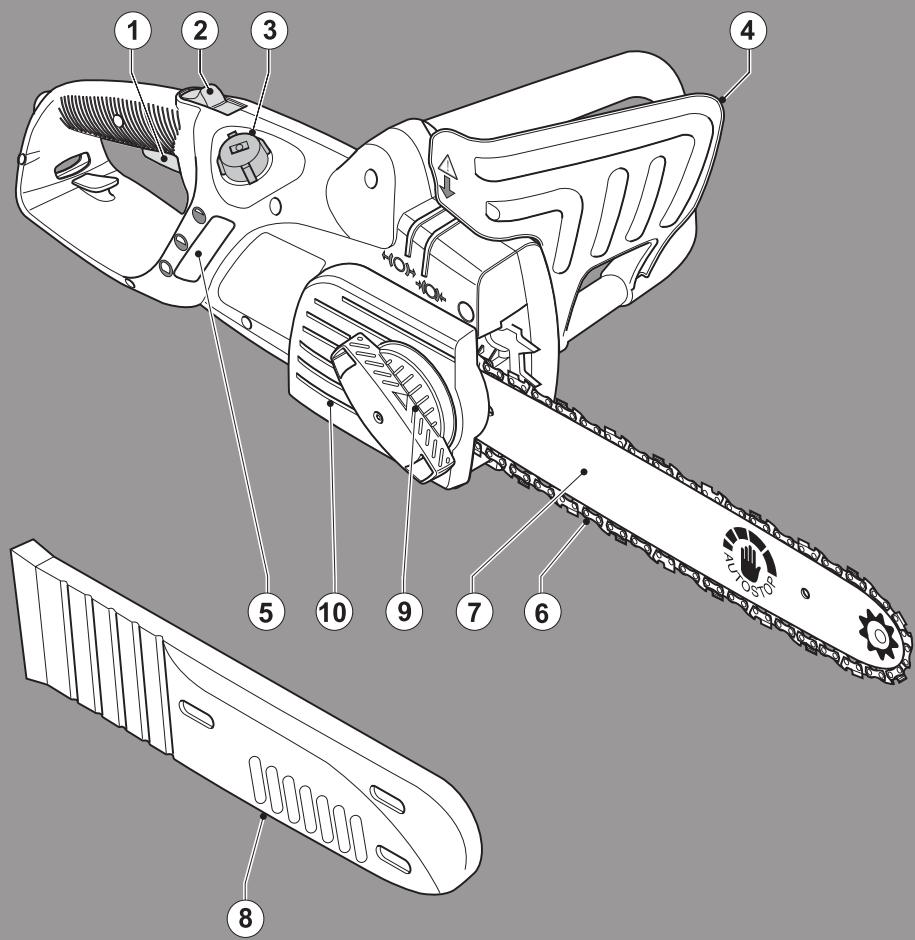
Caractéristiques
- Interrupteur marche/arrêt
- Bouton de verrouillage
- Bouchon d'huile
- Protecteur avant / frein de chaîne
- Indicateur de niveau d'huile
- Chaîne
- Guide-chaîne
- Fourreau de chaîne
- Bouton de commande
- Ensemble du couvercle de chaîne
Assemblage

Avertissement ! Portez toujours des gants de protection lorsque vous travaillez sur votre tronçonneuse.

Avertissement ! Avant d'effectuer tout entretien sur des outils électriques, éteignez et débranchez l'appareil.
Graissage de la chaîne
Vous devez le faire chaque fois que vous utilisez une nouvelle chaîne (6) pour la première fois. Prenez la nouvelle chaîne (6) et faites-la tremper dans de l'huile de chaîne pendant au moins une heure avant de l'utiliser. Utilisez de l'huile de chaîne Black & Decker. Nous recommandons d'utiliser uniquement de l'huile Black & Decker pendant toute la durée de vie de votre tronçonneuse, car le mélange de différentes huiles pourrait entraîner une dégradation de l'huile, ce qui peut réduire considérablement la durée de vie de la chaîne et créer des risques supplémentaires.
N'utilisez jamais d'huile usagée, d'huile épaisse ou d'huile très fluide pour machine à coudre. Elles pourraient endommager votre tronçonneuse.
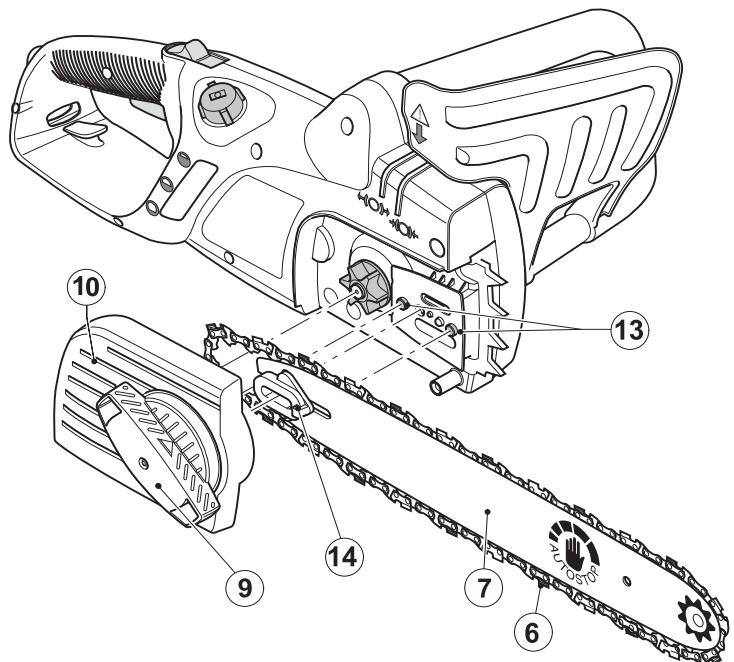
Montage du guide-chaîne et de la chaîne. (fig. A - E)
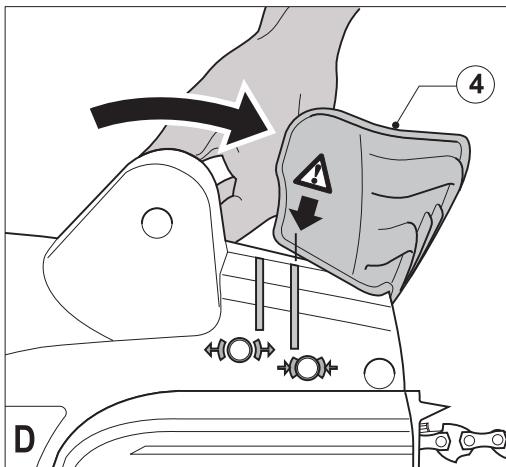
♠ Placez la tronçonneuse sur une surface stable. ♠ Placez le protecteur avant/ensemble de frein de chaîne en position avant (fig. D). ♠ Desserrez complètement le bouton de commande (9) (fig. A). ♠ Retirez l'ensemble du couvercle de chaîne (10).
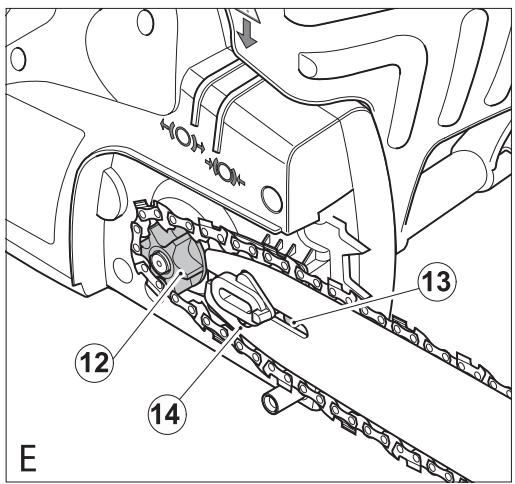
♣ Placez la chaîne (6) sur le guide-chaîne (7) en vous assurant que les gouges de coupe de la chaîne sur la partie supérieure du guide-chaîne (7) sont orientées vers l'avant (fig. B). ♣ Guidez la chaîne (6) autour du guide-chaîne (7) et tirez-la pour créer une boucle d'un côté à l'extrémité arrière du guide-chaîne (7). ♣ Guidez la chaîne (6) autour du pignon d'entraînement (12). Placez le guide-chaîne (7) sur les goujons de positionnement (13) (fig. E).
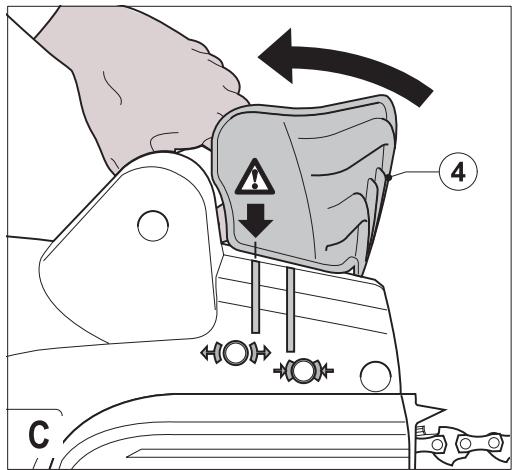
Avertissement ! Assurez-vous que le protecteur avant/ensemble de frein de chaîne (4) est en position (avant) avant de le remonter (fig. C).
Avant de monter l'ensemble du carter de chaîne, vérifiez que la came (11) (fig. B) est dans la bonne position. Si nécessaire, enfoncez et tournez le bouton de commande (9) dans le sens horaire pour faire pivoter la came dans la bonne position. Montez le carter de chaîne en positionnant le boulon et en utilisant le bouton de commande (9) pour serrer le carter à la main. Pour tendre la chaîne, desserrez le bouton de commande d'un tour complet, enfoncez-le fermement et tournez-le dans le sens horaire. Pendant que le guide se déplace vers l'avant, assurez-vous que les maillons de la chaîne s'engagent dans le guide-chaîne. Laissez le bouton de commande revenir en position "sorti" et tournez-le davantage dans le sens horaire pour serrer le guide-chaîne. Ne serrez pas trop. Vérifiez la tension comme décrit ci-dessous.
Contrôle et réglage de la tension de la chaîne (fig. G)
Avant chaque utilisation et après chaque tranche de 10 minutes d'utilisation, vous devez vérifier la tension de la chaîne.
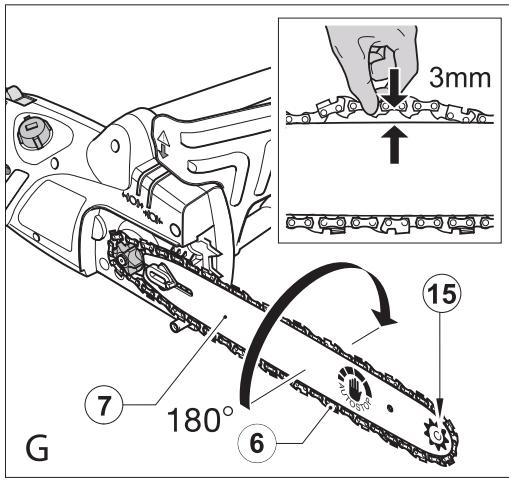
Débranchez l'outil de l'alimentation secteur. Tirez légèrement sur la chaîne (6) comme indiqué (encart fig. G). La tension est correcte lorsque la chaîne (6) revient en place après avoir été tirée à 3 mm du guide-chaîne (7). Il ne doit pas y avoir de "mou" entre le guide-chaîne (7) et la chaîne (6) sur le dessous.
Remarque : Ne pas trop tendre la chaîne, car cela entraînerait une usure excessive et réduirait la durée de vie du guide-chaîne et de la chaîne.
Remarque : Lorsque la chaîne est neuve, vérifiez la tension fréquemment (après avoir débranché l'outil) pendant les 2 premières heures d'utilisation, car une chaîne neuve s'allonge légèrement.
Pour augmenter la tension
Desserrez le bouton de commande d'un tour complet, enfoncez-le fermement et tournez-le dans le sens horaire jusqu'à ce que la tension requise soit atteinte. Pendant que le guide se déplace vers l'avant, assurez-vous que les maillons de la chaîne s'engagent dans le guide-chaîne.
Laissez le bouton de commande revenir en position sortie et tournez-le davantage dans le sens horaire pour serrer le guide-chaîne. Ne serrez pas trop.
Utilisation
Avertissement ! Laissez l'outil travailler à son propre rythme. Ne le surchargez pas.
Remplissage du réservoir d'huile (fig. F)
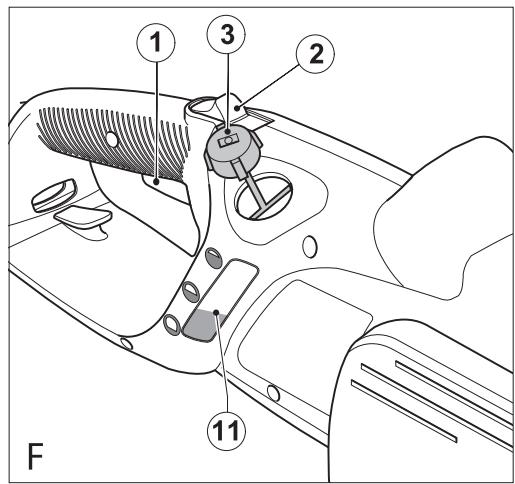
Retirez le bouchon d'huile (3) et remplissez le réservoir avec l'huile de chaîne recommandée. Vous pouvez voir le niveau d'huile dans l'indicateur de niveau d'huile (5). Remettez le bouchon d'huile (3). Éteignez périodiquement et vérifiez l'indicateur de niveau d'huile (5) ; s'il est moins d'un quart plein, débranchez votre tronçonneuse de l'alimentation secteur et remplissez avec l'huile appropriée.
Mise en marche
Remarque : Il ne sera pas possible d'allumer l'outil si le protecteur avant / l'ensemble de frein de chaîne n'est pas en position "armé".
Tenez fermement la tronçonneuse à deux mains. Poussez le bouton de verrouillage (2), puis appuyez sur l'interrupteur marche/arrêt (1) pour démarrer. - Lorsque le moteur démarre, retirez votre pouce du bouton de verrouillage (2) et tenez fermement la poignée.
Ne forcez pas l'outil, laissez l'outil faire le travail.
Il fera un travail meilleur et plus sûr à la vitesse pour laquelle il a été conçu. Une force excessive étirera la chaîne de scie (6).
Comment régler le frein de chaîne (fig. C)
Assurez-vous que l'outil est débranché de l'alimentation électrique. Tirez le protecteur avant / ensemble de frein de chaîne (4) vers l'arrière en position "armé" (fig. C). L'outil est maintenant prêt à être utilisé.
Comment fonctionne le frein de chaîne anti-rebond
En cas de rebond, votre main gauche entre en contact avec le protecteur avant, le poussant vers l'avant, vers la pièce à travailler, et arrête l'outil en quelques fractions de seconde.
Comment tester le frein de chaîne anti-rebond (fig. C)
Vérifiez toujours que le frein anti-rebond fonctionne correctement avant utilisation. Tenez fermement l'outil à deux mains sur une surface stable, assurez-vous que la chaîne de scie (6) est dégagée du sol et allumez (voir "Comment allumer la tronçonneuse"). Faites pivoter votre main gauche vers l'avant autour de la poignée avant afin que le dos de votre main entre en contact avec le protecteur avant / ensemble de frein de chaîne (4) et poussez-le vers l'avant, vers la pièce à travailler (fig. C). La chaîne de scie (6) devrait s'arrêter en quelques fractions de seconde.
Pour réinitialiser après le fonctionnement du protecteur avant / ensemble de frein de chaîne (4), suivez les instructions pour "Comment régler le frein de chaîne".
Remarque : évitez de redémarrer l'outil jusqu'à ce que vous entendiez le moteur s'arrêter complètement.
Remarque : si le frein de chaîne est défectueux, apportez le produit à un centre de service agréé Black & Decker.
Si la chaîne de scie (6) ou le guide-chaîne (7) se coince
Éteignez l'outil. Débranchez l'outil de l'alimentation électrique. Ouvrez la coupe avec des coins pour soulager la tension sur le guide-chaîne (7). N'essayez pas de forcer la tronçonneuse pour la dégager. Commencez une nouvelle coupe.
Abattage (fig. H-J)
Les utilisateurs inexpérimentés ne doivent pas tenter d'abattre des arbres. L'utilisateur risque de se blesser ou de causer des dommages matériels en raison de l'incapacité à contrôler la direction de chute ; l'arbre peut se fendre ou des branches endommagées ou mortes peuvent tomber pendant la coupe. La distance de sécurité entre un arbre à abattre et les spectateurs, les bâtiments et autres objets est d'au moins 2,5 fois la hauteur de l'arbre. Tout spectateur, bâtiment ou objet se trouvant dans cette distance risque d'être heurté par l'arbre lors de sa chute.
Avant de tenter d'abattre un arbre :
Assurez-vous qu'il n'existe pas de règlements locaux ou d'arrêtés qui interdiraient ou contrôleraient l'abattage de l'arbre. Considérez toutes les conditions qui peuvent affecter la direction de chute, notamment :
La direction de chute prévue. L'inclinaison naturelle de l'arbre. Toute structure de branches inhabituellement lourde ou pourriture. - Les arbres environnants et les obstacles, y compris les lignes aériennes et les drains souterrains.
La vitesse et la direction du vent.
Planifiez à l'avance une issue de secours sûre en cas de chute d'arbres ou de branches. Assurez-vous que la voie de sortie est dégagée de tout obstacle qui pourrait empêcher ou gêner le mouvement. Rappelez-vous que l'herbe mouillée et l'écorce fraîchement coupée sont glissantes.
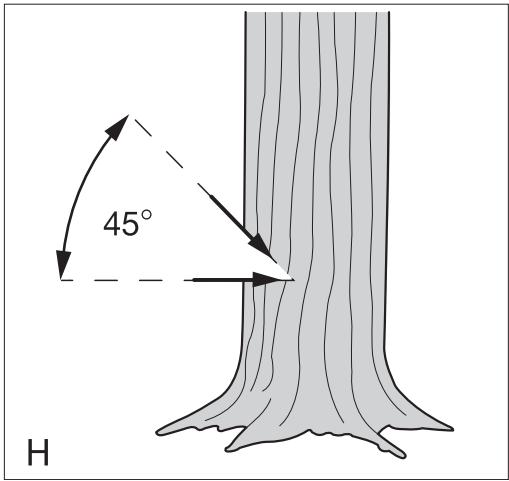
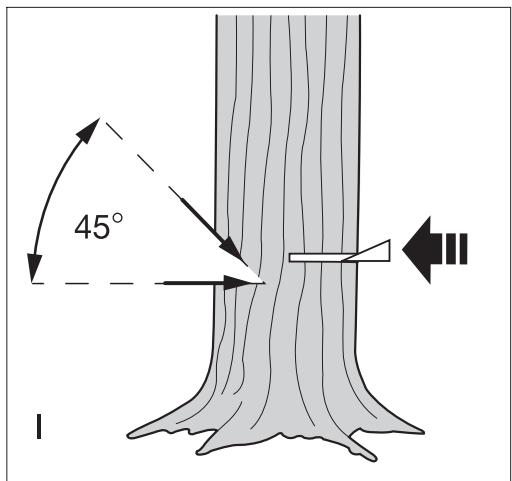
Ne tentez pas d'abattre des arbres dont le diamètre est supérieur à la longueur de coupe de la tronçonneuse. Entaillez une encoche directionnelle pour déterminer la direction de chute. Effectuez une coupe horizontale à une profondeur comprise entre 1/5 et 1/3 du diamètre de l'arbre, perpendiculaire à la ligne de chute à la base de l'arbre (fig. H). Effectuez une deuxième coupe par le haut pour rejoindre la première et créer une encoche d'environ 45°. Effectuez une seule coupe d'abattage horizontale de l'autre côté, 25 mm à 50 mm au-dessus du centre de l'encoche directionnelle (fig. 1). Ne coupez pas jusqu'à l'encoche directionnelle, vous pourriez perdre le contrôle de la direction de chute.
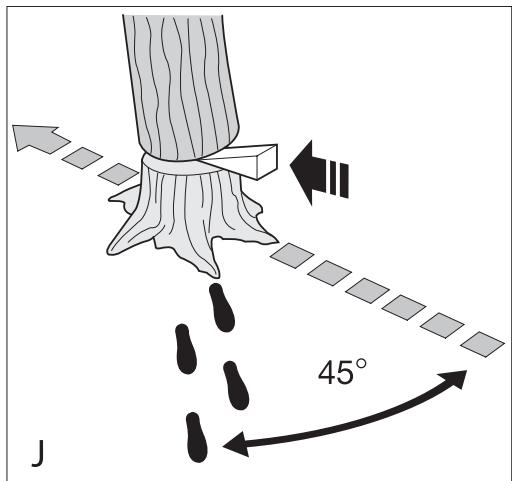
Enfoncez un ou plusieurs coins dans la coupe d'abattage pour l'ouvrir et faire tomber l'arbre (fig. J).
Élagage des arbres
Assurez-vous qu'il n'existe pas de règlements locaux ou d'arrêtés qui interdiraient ou contrôleraient l'élagage des branches d'arbres.
L'élagage ne doit être effectué que par des utilisateurs expérimentés, car il existe un risque accru de pincement de la chaîne et de rebond.
Avant l'élagage, il faut tenir compte des conditions affectant la direction de chute, notamment :
La longueur et le poids de la branche à couper. Toute structure de branches inhabituellement lourde ou pourriture. Les arbres environnants et les obstacles, y compris les lignes aériennes. La vitesse et la direction du vent. Le fait que la branche soit entrelacée avec d'autres branches.
L'opérateur doit considérer l'accès à la branche de l'arbre et la direction de chute. La branche de l'arbre est susceptible de se balancer vers le tronc. En plus de l'utilisateur, les spectateurs, les objets et les biens situés sous la branche seront en danger.
- Pour éviter les éclats, effectuez la première coupe vers le haut jusqu'à une profondeur maximale d'un tiers du diamètre de la branche. Effectuez la deuxième coupe vers le bas pour rejoindre la première.
Tronçonnage (fig. K - M)
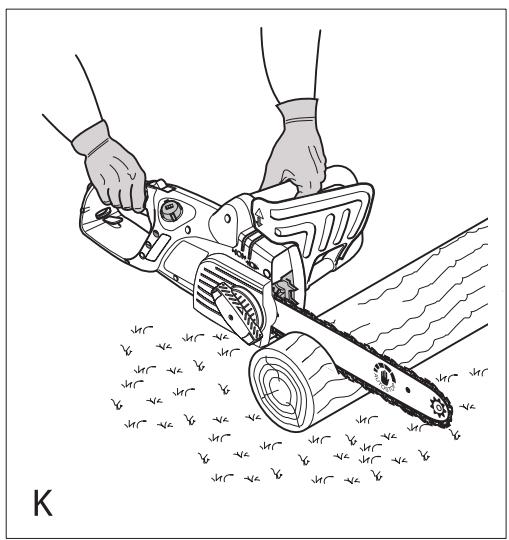
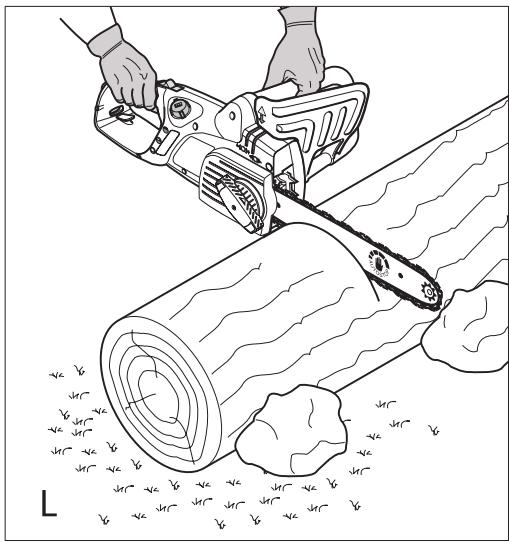
La manière de couper dépend de la façon dont la bille est soutenue. Utilisez un chevalet de sciage chaque fois que possible. Commencez toujours une coupe avec la chaîne en mouvement et le pare-chocs à ergots (16) en contact avec le bois (fig. K). Pour terminer la coupe, utilisez une action pivotante du pare-chocs à ergots contre le bois.
Lorsque la bille est soutenue sur toute sa longueur :
Effectuez une coupe vers le bas, mais évitez de toucher le sol, car cela émousserait rapidement votre chaîne.
Lorsque la bille est soutenue aux deux extrémités :
Coupez d'abord un tiers de la profondeur par le dessus pour éviter l'éclatement, puis coupez de nouveau pour rejoindre la première coupe.
Lorsque la bille est soutenue à une seule extrémité :
Coupez d'abord un tiers par le dessous pour éviter l'éclatement, puis coupez par le dessus pour empêcher l'éclatement.
Sur une pente (fig. L) :
Tenez-vous toujours du côté amont.
Lorsque vous coupez une bille posée au sol (fig. L) :
Fixez la pièce à l'aide de cales ou de coins. L'utilisateur ou une personne à proximité ne doit pas maintenir la bille en s'asseyant ou en se tenant debout dessus. Assurez-vous que la chaîne ne touche pas le sol.
Lorsque vous utilisez un chevalet de sciage (fig. M) :
Ceci est fortement recommandé chaque fois que possible.
Placez la bille dans une position stable. Coupez toujours à l'extérieur des bras du chevalet. Utilisez des pinces ou des sangles pour fixer la pièce.
Dépannage
| Problem | Possible cause | Possible solution |
| Tool will not start | Lock button not pressed. | Press the lock button. |
| Front guard in the brake position | Reset front guard | |
| Blown fuse | Replace fuse | |
| Tripped RCD | Check RCD | |
| Mains lead not connected | Check mains supply | |
| Chain does not stop instantly when the tool is switched off | Chain tension is too slack | Check chain tension |
| Bar/chain appear hot/smoking | Oil tank empty | Check oil tank level |
| Oil hole blocked on chain bar | Clean oil hole | |
| Chain tension is too tight | Check chain tension | |
| Guide bar sprocket nose needs greasing | Oil the guide bar sprocket nose | |
| Chainsaw does not cut well | Chain on backwards | Check/modify chain direction |
| Sharpen | ||
| Chainsaw not using oil | Debris in tank | Empty oil from tank and replace |
| Oil hole in cap blocked | Remove debris from hole | |
| Debris in chain bar | Remove debris and clean the chain bar | |
| Debris in oil outlet | remove debris |
Entretien
Un entretien régulier garantit une longue durée de vie à l'outil. Nous vous recommandons d'effectuer les vérifications suivantes régulièrement.
Avertissement ! Avant d'effectuer tout entretien sur les outils électriques :
Éteignez et débranchez l'outil de l'alimentation secteur.
Niveau d'huile
Le niveau dans le réservoir ne doit pas être autorisé à descendre en dessous du quart plein.
Chaîne de scie et guide-chaîne (fig. G)
Après quelques heures d'utilisation et avant le stockage, retirez le guide-chaîne (7) et la chaîne de scie (6) et nettoyez-les soigneusement. Assurez-vous que le protège-lame est propre et exempt de débris. Lors du remontage, tournez le guide-chaîne (7) de 180° et lubrifiez le nez du pignon par le trou de lubrification du pignon (15). Cela assure une répartition uniforme de l'usure sur les rails du guide-chaîne.
Affûtage de la chaîne de scie
Pour obtenir les meilleures performances de l'outil, il est important de garder les dents de la chaîne de scie bien affûtées. Les instructions pour cette procédure se trouvent sur l'emballage de l'affûteur. À cette fin, nous recommandons l'achat du kit d'affûtage de chaîne de scie Black & Decker (disponible auprès des agents de service Black & Decker et des revendeurs sélectionnés).
Remplacement des chaînes de scie usées
Les chaînes de scie de remplacement sont disponibles chez les détaillants ou les agents de service Black & Decker. Utilisez toujours des pièces de rechange d'origine.
Affûtage de la chaîne de scie
Les gouges de la chaîne de scie s'émoussent immédiatement si elles touchent le sol ou un clou pendant la coupe.
Tension de la chaîne de scie
Vérifiez régulièrement la tension de la chaîne de scie.
Que faire si votre tronçonneuse a besoin de réparations.
Votre tronçonneuse est fabriquée conformément aux exigences de sécurité en vigueur. Les réparations ne doivent être effectuées que par une personne qualifiée utilisant des pièces de rechange d'origine, sinon cela peut présenter un danger considérable pour l'utilisateur. Nous vous recommandons de conserver ce manuel d'utilisation dans un endroit sûr.
Remplacement de la fiche secteur (Royaume-Uni et Irlande uniquement)
Si une nouvelle fiche secteur doit être installée :
♠ Mettez l'ancienne fiche au rebut en toute sécurité. ♣ Connectez le fil brun à la borne sous tension de la nouvelle fiche. ♣ Connectez le fil bleu à la borne neutre.
Avertissement ! Aucune connexion ne doit être faite à la borne de terre.
Suivez les instructions de montage fournies avec les fiches de bonne qualité. Fusible recommandé : 10 A.
Protection de l'environnement

Collecte séparée. Ce produit ne doit pas être jeté avec les déchets ménagers ordinaires.
Si un jour vous constatez que votre produit Black & Decker doit être remplacé, ou s'il ne vous est plus utile, ne le jetez pas avec les déchets ménagers. Mettez ce produit à disposition pour une collecte séparée.

La collecte séparée des produits usagés et des emballages permet de recycler et de réutiliser les matériaux. La réutilisation des matériaux recyclés contribue à prévenir la pollution de l'environnement et réduit la demande en matières premières.
Les réglementations locales peuvent prévoir la collecte séparée des produits électriques ménagers, dans les déchetteries municipales ou par le détaillant lors de l'achat d'un nouveau produit.
Black & Decker fournit une installation pour la collecte et le recyclage des produits Black & Decker une fois qu'ils ont atteint la fin de leur vie utile. Pour profiter de ce service, veuillez retourner votre produit à un réparateur agréé qui le collectera en notre nom.
Vous pouvez vérifier l'emplacement de votre agent de réparation agréé le plus proche en contactant votre bureau local Black & Decker à l'adresse indiquée dans ce manuel. Alternativement, une liste des agents de réparation agréés Black & Decker et tous les détails de notre service après-vente et de nos contacts sont disponibles sur Internet à l'adresse : www.2helpU.com
Données techniques
| GK1630T | GK1635T | ||
| Typ. 5 | Typ. 5 | ||
| Bar length | cm | 30 | 35 |
| Voltage | VAC | 230 | 230 |
| Power input | W | 1600 | 1600 |
| Chain speed (no load) | m/s | 8 | 8 |
| Max cutting length | cm | 30 | 35 |
| Oil capacity | ml | 180 | 180 |
| Weight | kg | 3.7 | 3.8 |
| Safety class | II | II |
| GK1640T | ||
| Typ. 5 | ||
| Bar length | cm | 40 |
| Voltage | VAC | 230 |
| Power input | W | 1600 |
| Chain speed (no load) | m/s | 8 |
| Max cutting length | cm | 40 |
| Oil capacity | ml | 180 |
| Weight | kg | 3.9 |
| Safety class | II | |
Niveau de pression acoustique selon EN 60745 :
Pression acoustique (LdB) 92 dB(A), incertitude (K) 3 dB(A)
Puissance acoustique (LWA)103dB(A) incertitude (K) 3 dB(A)
Valeurs totales de vibration (somme vectorielle triaxiale) selon EN 60745 :
Valeur d'émission de vibration (ab) 5m / s2 incertitude (K) 1.5m / s2
Déclaration de conformité CE
DIRECTIVE MACHINES DIRECTIVE BRUIT EXTÉRIEUR

GK1630T, GK1635T, GK1640T
Black & Decker déclare que ces produits décrits sous
"données techniques" sont conformes à :
98/37/CE (jusqu'au 28 déc. 2009), 2006/42/CE
(à partir du 29 déc. 2009), EN 60745-1, EN 60745-2-13
2000/14/CE, Tronçonneuse, Annexe V
KEMA Quality B.V., Utrechtseweg 310, 6802 ED Arnhem,
Pays-Bas
Organisme notifié n° : 0344
Niveau de puissance acoustique selon la directive 2000/14/CE
(Article 13, Annexe III) :
LWA (puissance acoustique mesurée) 103 dB(A)
Incertitude = 3 dB(A)
LWA (puissance acoustique garantie) 103 dB(A)
Incertitude = 3 dB(A)
Ces produits sont également conformes à la directive 2004/108/CE.
Pour plus d'informations, veuillez contacter Black & Decker à l'adresse
suivante ou vous référer au dos du manuel.
Le soussigné est responsable de la compilation du dossier technique et fait cette déclaration au nom de Black & Decker.
Kevin Hewitt
Vice-président Ingénierie mondiale
Black & Decker Europe, 210 Bath Road, Slough
Berkshire, SL1 3YD
Royaume-Uni
01-12-2009
Garantie
Black & Decker a confiance en la qualité de ses produits et offre une garantie exceptionnelle. Cette déclaration de garantie s'ajoute à vos droits légaux et ne les affecte en aucune manière.
La garantie est valable dans les territoires des États membres
de l'Union européenne et de l'Association européenne de libre-échange.
Zone.
Si un produit Black & Decker devient défectueux en raison de matériaux défectueux, de défauts de fabrication ou de non-conformité, dans les 24 mois suivant la date d'achat, Black & Decker s'engage à remplacer les pièces défectueuses, à réparer les produits soumis à une usure normale ou à remplacer ces produits afin de minimiser les désagréments pour le client, sauf si :
- Le produit a été utilisé à des fins commerciales, professionnelles ou de location ; ♠ Le produit a été soumis à une utilisation abusive ou à une négligence ;
- Le produit a subi des dommages causés par des corps étrangers, des substances ou des accidents ; ♣ Des réparations ont été tentées par des personnes autres que les agents de réparation agréés ou le personnel de service Black & Decker.
Pour bénéficier de la garantie, vous devrez fournir une preuve d'achat au vendeur ou à un agent de réparation agréé. Vous pouvez vérifier l'emplacement de l'agent de réparation agréé le plus proche en contactant votre bureau local Black & Decker à l'adresse indiquée dans ce manuel. Vous pouvez également consulter la liste des agents de réparation agréés Black & Decker et tous les détails de notre service après-vente et de nos contacts sur Internet à l'adresse :
www.2helpU.com
Veuillez visiter notre site Web www.blackanddecker.co.uk pour enregistrer votre nouveau produit Black & Decker et rester informé des nouveaux produits et des offres spéciales. De plus amples informations sur la marque Black & Decker et notre gamme de produits sont disponibles sur www.blackanddecker.co.uk
| BLACK& DECKER. | GK1630 GK1635 GK1640 GK1630T GK1635T GK1640T | TYP. 5 | |
| 152 153 154 155 156 157 158 160 161 162 163 | 111 112 113 114 115 116 117 118 119 120 121 122 123 124 125 126 127 128 129 130 131 132 133 | ||
| 165 166 167 168 169 170 171 172 173 174 175 176 177 178 179 180 181 182 183 184 185 186 187 188 189 190 191 192 193 194 195 196 197 198 199 200 201 202 203 204 205 206 207 208 209 210 211 212 213 214 215 216 217 218 219 220 221 222 223 224 225 226 227 228 229 230 231 232 233 234 235 236 237 238 239 240 241 242 243 244 245 246 247 248 249 250 251 252 253 254 255 256 257 258 259 260 261 262 263 264 265 266 267 268 269 270 271 272 273 274 275 276 277 278 279 280 281 282 283 284 285 286 287 288 289 290 291 292 293 294 295 296 297 298 299 300 301 302 303 304 305 306 307 308 309 310 311 312 313 314 315 316 317 318 319 320 321 322 323 324 325 326 327 328 329 330 331 332 333 334 335 336 337 338 339 340 341 342 343 344 345 346 347 348 349 350 351 352 353 354 355 356 357 358 359 360 361 362 363 364 365 366 367 368 369 370 371 372 373 374 375 376 377 378 379 380 381 382 383 384 385 386 387 388 389 390 391 392 393 394 395 396 397 398 399 400 401 402 403 404 405 406 407 408 409 410 411 412 413 414 415 416 417 418 419 420 421 422 423 424 425 426 427 428 429 430 431 432 433 434 435 436 437 438 439 440 441 442 443 444 445 446 447 448 449 450 451 452 453 454 455 456 457 458 459 460 461 462 463 464 465 466 467 468 469 470 471 472 473 474 475 476 477 478 479 480 481 482 483 484 485 486 487 488 489 490 491 492 493 494 495 496 497 498 499 500 501 502 503 504 505 506 507 508 509 510 511 512 513 514 515 516 517 518 519 520 521 522 523 524 525 526 527 528 529 530 531 532 533 534 535 536 537 538 539 540 541 542 543 544 545 546 547 548 549 550 551 552 553 554 555 556 557 558 559 560 561 562 563 564 565 566 567 568 569 570 571 572 573 574 575 576 577 578 579 580 581 582 583 584 585 586 587 588 589 590 591 592 593 594 595 596 597 598 599 600 601 602 603 604 605 606 607 608 609 610 611 612 613 614 615 616 617 618 619 620 621 622 623 624 625 626 627 628 629 630 631 632 633 634 635 636 637 638 639 640 641 642 643 644 645 646 647 648 649 650 651 652 653 654 655 656 657 658 659 660 661 662 663 664 665 666 667 668 669 670 671 672 673 674 675 676 677 678 679 680 681 682 683 684 685 686 687 688 689 690 691 692 693 694 695 696 697 698 699 700 701 702 703 704 705 706 707 708 709 710 711 712 713 714 715 716 717 718 719 720 721 722 723 724 725 726 727 728 729 730 731 732 733 734 735 736 737 738 739 740 741 742 743 744 745 746 747 748 749 750 751 752 753 754 755 756 757 758 759 760 761 762 763 764 765 766 767 768 769 770 771 772 773 774 775 776 777 778 779 780 781 782 783 784 785 786 787 788 789 790 791 792 793 794 795 796 797 798 799 800 801 802 803 804 805 806 807 808 809 810 811 812 813 814 815 816 817 818 819 820 821 822 823 824 825 826 827 828 829 830 831 832 833 834 835 836 837 838 839 840 841 842 843 844 845 846 847 848 849 850 851 852 853 854 855 856 857 858 859 860 861 862 863 864 865 866 867 868 869 870 871 872 873 874 875 876 877 878 879 880 881 882 883 884 885 886 887 888 889 890 891 892 893 894 895 896 897 898 899 900 901 902 903 904 905 906 907 908 909 910 911 912 913 914 915 916 917 918 919 920 921 922 923 924 925 926 927 928 929 930 931 932 933 934 935 936 937 938 939 940 941 942 943 944 945 946 947 948 949 950 951 952 953 954 955 956 957 958 959 960 961 962 963 964 965 966 967 968 969 970 971 972 973 974 975 976 977 978 979 980 981 982 983 984 985 986 987 988 989 990 | |||
Australie
Black & Decker (Australia) Pty. Ltd. Tél. 03-8720 5100
20 Fletcher Road, Mooroolbark, Fax 03-9727 5940
Victoria, 3138
Nouvelle-Zélande
Black & Decker Tél. +64 9 259 1133
5 Te Apunga Place Fax +64 9 259 1122
Mt Wellington
Auckland 1060
Royaume-Uni
Black & Decker Tél. 01753 511234
210 Bath Road Fax 01753 551155
Slough, Berkshire SL1 3YD Assistance téléphonique 01753 574277
ANGLAIS
N'oubliez pas d'enregistrer votre produit !
www.blackanddecker.fr/enregistrement-produit
Enregistrez votre produit en ligne sur www.blackanddecker.fr/enregistrement-produit ou envoyez votre nom, prénom et le code
produit à Black & Decker dans votre pays.
- POWERFUL SOLUTIONS ™
- UTILISATION PRÉVUE
- CONSIGNES DE SÉCURITÉ
- AVERTISSEMENTS DE SÉCURITÉ GÉNÉRAUX POUR LES OUTILS ÉLECTRIQUES
- ENTRETIEN
- AVERTISSEMENTS DE SÉCURITÉ SUPPLÉMENTAIRES POUR LES OUTILS ÉLECTRIQUES
- AVERTISSEMENT ! AVERTISSEMENTS DE SÉCURITÉ SUPPLÉMENTAIRES POUR LES TRONÇONNEUSES
- CAUSES ET PRÉVENTION DU REBOND PAR L'OPÉRATEUR
- RECOMMANDATIONS DE SÉCURITÉ POUR LA TRONÇONNEUSE
- ÉVITEZ DE COUPER
- VIBRATIONS
- SÉCURITÉ ÉLECTRIQUE
- UTILISATION D'UNE RALLONGE
- PROTECTION CONTRE LES CHOCS ÉLECTRIQUES
- CONSIGNES DE SÉCURITÉ SUPPLÉMENTAIRES
- RISQUES RÉSIDUELS
- ÉTIQUETTES SUR L'OUTIL
- CARACTÉRISTIQUES
- ASSEMBLAGE
- GRAISSAGE DE LA CHAÎNE
- MONTAGE DU GUIDE-CHAÎNE ET DE LA CHAÎNE. (FIG. A - E)
- CONTRÔLE ET RÉGLAGE DE LA TENSION DE LA CHAÎNE (FIG. G)
- POUR AUGMENTER LA TENSION
- UTILISATION
- REMPLISSAGE DU RÉSERVOIR D'HUILE (FIG. F)
- MISE EN MARCHE
- COMMENT RÉGLER LE FREIN DE CHAÎNE (FIG. C)
- COMMENT FONCTIONNE LE FREIN DE CHAÎNE ANTI-REBOND
- COMMENT TESTER LE FREIN DE CHAÎNE ANTI-REBOND (FIG. C)
- ABATTAGE (FIG. H-J)
- AVANT DE TENTER D'ABATTRE UN ARBRE
- ÉLAGAGE DES ARBRES
- TRONÇONNAGE (FIG. K - M)
- LORSQUE LA BILLE EST SOUTENUE SUR TOUTE SA LONGUEUR
- LORSQUE LA BILLE EST SOUTENUE AUX DEUX EXTRÉMITÉS
- LORSQUE LA BILLE EST SOUTENUE À UNE SEULE EXTRÉMITÉ
- SUR UNE PENTE (FIG. L)
- LORSQUE VOUS COUPEZ UNE BILLE POSÉE AU SOL (FIG. L)
- LORSQUE VOUS UTILISEZ UN CHEVALET DE SCIAGE (FIG. M)
- NIVEAU D'HUILE
- CHAÎNE DE SCIE ET GUIDE-CHAÎNE (FIG. G)
- AFFÛTAGE DE LA CHAÎNE DE SCIE
- REMPLACEMENT DES CHAÎNES DE SCIE USÉES
- TENSION DE LA CHAÎNE DE SCIE
- QUE FAIRE SI VOTRE TRONÇONNEUSE A BESOIN DE RÉPARATIONS
- REMPLACEMENT DE LA FICHE SECTEUR (ROYAUME-UNI ET IRLANDE UNIQUEMENT)
- PROTECTION DE L'ENVIRONNEMENT
- NIVEAU DE PRESSION ACOUSTIQUE SELON EN
- VALEURS TOTALES DE VIBRATION (SOMME VECTORIELLE TRIAXIALE) SELON EN
- DÉCLARATION DE CONFORMITÉ CE
- GARANTIE
- AUSTRALIE
- NOUVELLE-ZÉLANDE
- ROYAUME-UNI
- ANGLAIS
Marque : BLACK & DECKER
Modèle : BLACK & DECKER GK1635
Catégorie : Outils de jardinage