
FW321 - Réfrigérateur CDA - Notice d'utilisation et mode d'emploi gratuit
Retrouvez gratuitement la notice de l'appareil FW321 CDA au format PDF.


| Type de produit | Réfrigérateur intégré sous plan |
| Marque | CDA |
| Modèle | FW321 |
| Dimensions (H x L x P) | 820-890 x 595 x 548 mm |
| Alimentation | 220-240 V / 50 Hz, 13 A |
| Type de réfrigérant | Non spécifié |
| Classe climatique | Non spécifiée |
| Consommation énergétique | Non spécifiée |
| Capacité | Non spécifiée |
| Fonctions principales | Dégivrage automatique, thermostat réglable, éclairage intérieur, porte réversible, installation sous plan |
| Entretien et nettoyage | Nettoyage avec bicarbonate de soude et eau tiède ; ne pas utiliser de produits abrasifs ; nettoyer le trou d'évacuation et le bac d'évaporation régulièrement |
| Sécurité | Mise à la terre obligatoire ; ne pas stocker de produits inflammables ; ne pas toucher les surfaces froides avec les mains mouillées ; ne pas utiliser d'appareils électriques à l'intérieur |
| Réversibilité de la porte | Oui, possible en suivant les instructions |
| Installation | Éloigner des sources de chaleur ; laisser un espace d'au moins 25 mm pour la ventilation ; ne pas obstruer les fentes de ventilation |
| Compatibilité porte décorative | Oui, kit de fixation inclus |
| Poids | Non spécifié |
| Indice de réparabilité | Non spécifié |
| Pays de fabrication | Non spécifié |
| Garantie | Non spécifiée |
FOIRE AUX QUESTIONS - FW321 CDA
Questions des utilisateurs sur FW321 CDA
0 question sur cet appareil. Repondez a celles que vous connaissez ou posez la votre.
Poser une nouvelle question sur cet appareil
Téléchargez la notice de votre Réfrigérateur au format PDF gratuitement ! Retrouvez votre notice FW321 - CDA et reprennez votre appareil électronique en main. Sur cette page sont publiés tous les documents nécessaires à l'utilisation de votre appareil FW321 de la marque CDA.
MODE D'EMPLOI FW321 CDA
FW223 Integrated Under Counter Larder Fridge
Manual for Installation, Use and Maintenance
C|D|A|
Important
The CDA Group Ltd cannot be held responsible for injuries or losses caused by incorrect use or installation of this product. Please note that CDA reserve the right to invalidate the guarantee supplied with this product following incorrect installation or misuse of the appliance.
This appliance is not designed to be used by people (including children) with reduced physical, sensorial or mental capacity, or who lack experience or knowledge about it, unless they have had supervision or instructions on how to use the appliance by someone who is responsible for their safety.
Under no circumstances should any external covers be removed for servicing or maintenance except by suitably qualified personnel.
Appliance information:
Please enter the details on the appliance rating plate below for reference, to assist CDA Customer Care in the event of a fault with your appliance and to register your appliance for guarantee purposes.
Appliance Model
Serial Number
CE Declarations of Conformity:
This appliance has been designed, constructed and marketed in compliance with safety requirements of EEC Directive 2006/95/EEC (Low voltage) and requirements of EMC Directive 2004/108/EEC.
This appliance has been manufactured to the strictest standards and complies with all applicable legislation, including Electrical safety (LVD) and Electromagnetic interference compatibility (EMC). Parts intended to come into contact with food conform to EEC/89/109.4
IMPORTANT INFORMATION FOR CORRECT DISPOSAL OF THE PRODUCT IN ACCORDANCE WITH EC DIRECTIVE 2002/96/EC.
At the end of its working life, the product must not be disposed of as urban waste. It must be taken to a special local authority differentiated waste collection centre or to a dealer providing this service.
Disposing of a household appliance separately avoids possible negative consequences for the environment and health deriving from inappropriate disposal and enables the constituent materials to be recovered to obtain significant savings in energy and resources. As a reminder of the need to dispose of household appliances separately, the product is marked with a crossed-out wheeled dustbin.
Important
Never store inflammable or explosive items and strong corrosive acids or alkalis in the appliance.
This is a household appliance, which is produced in accordance with the national standard. It is intended for food storage only, not for storage of blood, medicine and biological products.
To prevent risk of fire, keep the appliance away from petrol or any other inflammables.
To prevent risk of electromagnetic interference or other accidents, do not place a microwave oven on top of the refrigerator or use any electric appliance inside the refrigerator.
Do not allow children to play with or near the appliance.
The internal surface of freezer compartment is very cold when the appliance is running. Do not touch the surface especially with wet hands.
Do not splash water onto the appliance. Keep it away from places of high humidity that may have adverse effect on the electric insulation performance.
Please remove the door, door seal and shelves before disposal of the old appliance and put them away in a safe place to prevent children from being entrapped.
Before first use
You must allow the fridge to settle for at least twenty four hours prior to switching the power on.
It is recommended that you clean the interior of the appliance prior to first use, using a solution of bicarbonate of soda and warm water and then thoroughly drying the interior.
The fridge may have an odour to it at first use. This will disappear as the appliance cools.
Please note:
The appliance will work continuously until it comes down to the correct temperature.
If the appliance is switched off, you should allow five minutes before switching it on again to prevent unnecessary damage to the compressor.
Never store inflammable or explosive items and strong corrosive acids or alkalis in the appliance.
Setting the temperature
You must allow the fridge to settle for at least twenty four hours prior to switching the power on.
To adjust the temperature turn the thermostat control knob clockwise (from off) to the required level. The temperature becomes colder the higher the number on the control.
Use
Fridge
• Never put liquids in the refrigerator uncovered.
- Never put hot foods in the refrigerator. Warm food should be allowed to cool to room temperature before being put into the refrigerator.
- Nothing should rest against the rear wall of the refrigerator, as this will cause frost and possible condensation problems which will be difficult to remove.
• Make sure food is clean and any extra water is wiped away before putting into the fridge.
- Wrap or cover food before putting into the fridge. This will help prevent the loss of moisture, keep food fresh and avoid unpleasant odours.
- Sort foods prior to storing. Any foods to be used soon should be stored at the front of the shelf to prevent deterioration caused by the door being open for prolonged periods.
- Do not overfill the fridge. There should be sufficient space between the foods to allow the cool air to circulate.
- Thawing frozen foods in the fridge compartment will help to keep the temperature low and save energy.
- Only open the door for as long as is necessary. Leaving the door open for long periods will affect the temperature inside the appliance and waste energy.
- Ensure all compartments are fully closed after use.
Care and cleaning
Always disconnect the appliance from the power supply before any cleaning or maintenance.
The fridge sections should be cleaned using a solution of bicarbonate of soda and lukewarm water. Do not use abrasive products or detergents. After washing, rinse and dry thoroughly.
Clean the shelves and balconies separately by hand with soap and water. Do not put them in the dishwasher.
The water drain hole at the back of the fridge compartment and the evaporating tray should be clened periodically to prevent the defrosted water from collecting inside the fridge compartment. The drain plug can be used to clean the drain hole.
Once cleaning is complete, then reconnect the power.
- Keep the door gasket clean. If damaged, the gasket should be replaced.
- If the appliance is not used for prolonged periods of time, unplug and clean the appliance. The door should be left slightly open to prevent the formation of mildew and smell.
Defrosting the fridge
The fridge is self-defrosting. Any water created will run out of the fridge through the channel at the back of the fridge.
It is important to keep the channel clear at all times. The defrosted water is collected in the evaporating tray at the back of the appliance.
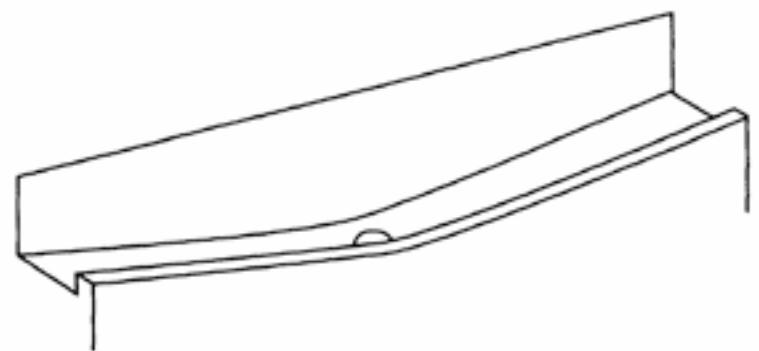
natural_image
Simple line drawing of a structural beam or support with a small circular hole at one end (no text or symbols)fig. 1
natural_image
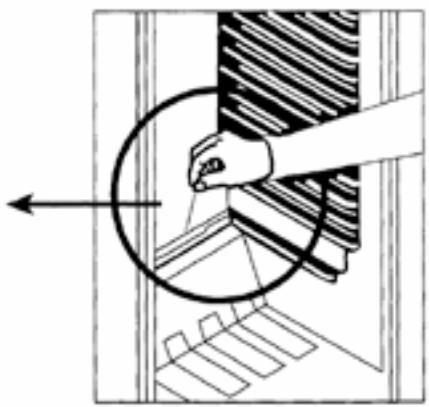
Diagram showing a hand operating a circular component with a striped pattern, no text or symbols presentChanging the light bulb
Disconnect the appliance from the power.
- Carefully remove the light cover by pushing in the lever at the back of the cover, and then pulling the cover down..
- Unscrew the light bulb to remove it and replace with a new bulb (not more than 15W).
- Replace the light cover and reconnect the power after five minutes' delay as explained on page 3.
Troubleshooting
If you have any problems with your appliance, you should check the troubleshooting prior to calling CDA Customer Care to prevent unnecessary service calls and potential cost.
If the appliance is not working
- Check there is power to the appliance:
- The house fuses are intact and the fuse in the plug has not blown.
• The thermostat is not set to 0 (off position). - The plug socket is functioning fine. To check this, plug another electrical appliance in to see if the socket is working.
• The temperature of the room is adequate ( 16^ C or above).
The appliance is working, but not very well
• The appliance is not overloaded.
- The thermostat is set to an appropriate temperature.
• The door is closing properly.
- The cooling system at the rear of the appliance is clean and free of dust, and not touching the rear wall.
• There is enough ventilation at the side and rear walls.
• The temperature of the room is adequate (16°C or above).
The appliance is noisy
• The appliance is level and stable.
- The side and rear walls are clear, and there is nothing resting on the appliance.
- The cooling gas in the refrigerator will make a slight bubbling noise, even when the compressor is not running.
There is water in the lower part of the refrigerator compartment
- The drain hole in the channel at the back of the compartment is clear.
Installation
This appliance must never be installed close to heat sources i.e. heating elements, radiators, cookers or in damp places.
The appliance should be mounted on a piece of wood (for example a section of worktop or kitchen carcass) if a raised floor is to be fitted, if the kitchen floor is to be tiled after installation, or if the installation height of the appliance is greater than 850 mm.
Contents and Tools Required
Fig. 2 - Installation kit contents
- Wood screw (17 pcs)
- Decor door fixing bracket
- Decor door base fixings (2 pcs)
- Decorative cover
- Screw
- Top bracket
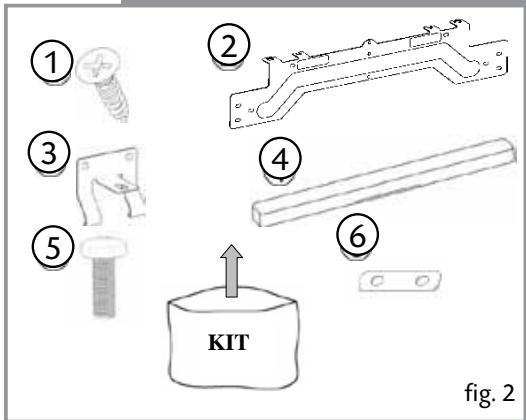
text_image
① ② ③ ④ ⑤ KIT ⑥ fig. 2Fig. 3 - Tools required
- Spirit level
- Spanner
- Setsquare
- Flathead screwdriver

text_image
⑦ ⑧ ⑨ ⑩ fig. 3Installation
Fig. 4 - Dimensions of the appliance
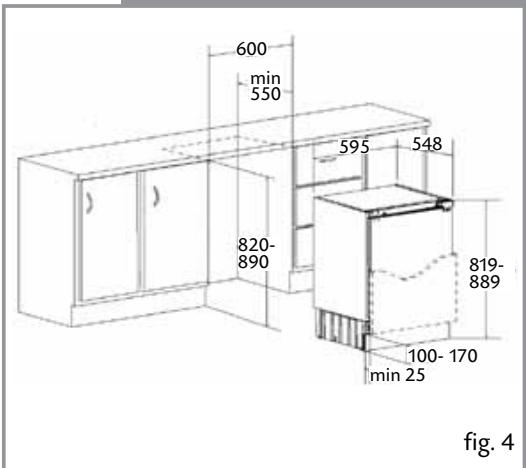
text_image
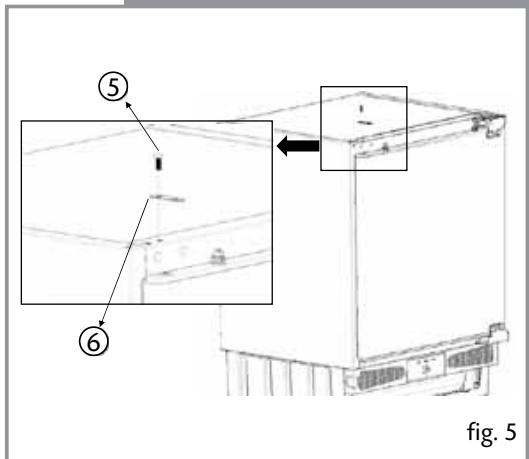
600 min 550 595 548 820- 890 819- 889 100- 170 min 25 fig. 4Fig. 5 - Fitting the worktop bracket
Remove the screw (5) on the top of the appliance, locate the top bracket(6) and fix the bracket with screw(5).
text_image
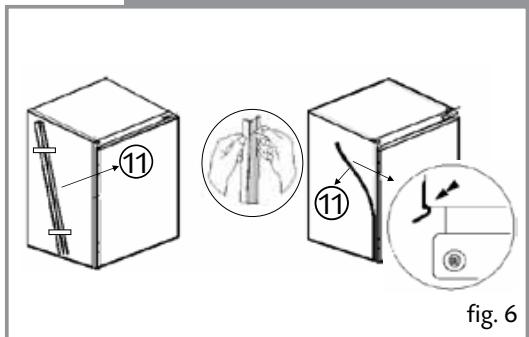
⑤ ⑥ fig. 5Fig.6 - Fitting the spacer piece
Take out the spacer piece (11) located on the side panel and remove the protective tape. Stick the spacer piece on the opposite side to the door hinges of the appliance.
text_image
11 11 fig. 6Installation
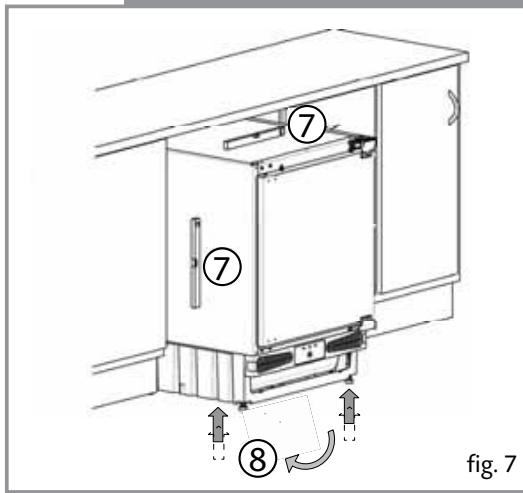
Fig. 7 - Adjusting the appliance height
The height of the appliance can be adjusted by the help of adjustable feet to fit the furniture height. Use a spirit level to ensure the appliance is level.
Fig. 8 - Aligning the appliance
Slide the appliance into the kitchen unit and align the hinge surface with front surface of the kitchen unit.
Fig. 9 - Fixing the appliance
Screw the hinges and metal bracket to the kitchen unit using screws (1)
text_image
⑦ ⑦ ⑧ fig. 7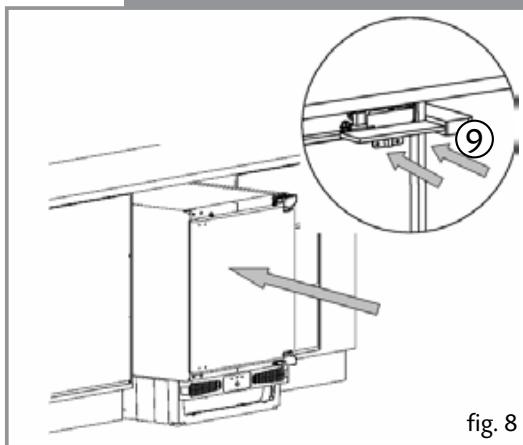
natural_image
Technical diagram of a refrigerator with an inset showing airflow direction (no text or symbols)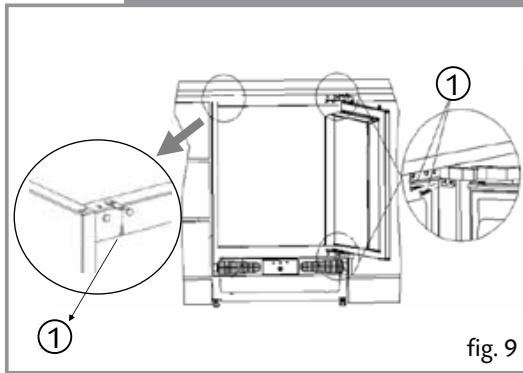
text_image
① ① fig. 9Installation
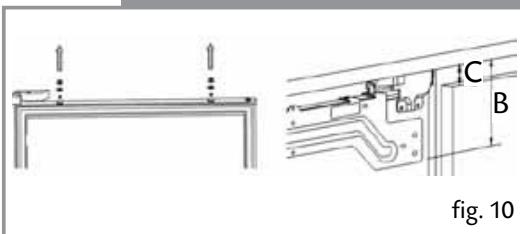
Fig. 10 - Fitting the decor door bracket
Unscrew and remove the nuts and washers from the appliance door. Place fixing bracket on the appliance door by inserting the holes to adjustment bolts.
Dimension B= Measure from the underside surface of kitchen unit to the bottom of fixing bracket.
Dimension C= Measure from the underside surface of kitchen unit to the top of next unit door.
Fig. 11 - Fitting the decor door bracket
Subtract C from B and put the fixing bracket (2) in place using this measurement for vertical position and place to the centre for horizontal position. Secure the fixing bracket (2) using screws(1).
Fig. 12 - Fitting the decor door
Place the decor door onto the appliance door by inserting adjustment bolts into the slots on the fixing bracket. Locate the washers and screw the nuts onto the adjustment bolts.
text_image
C B fig. 10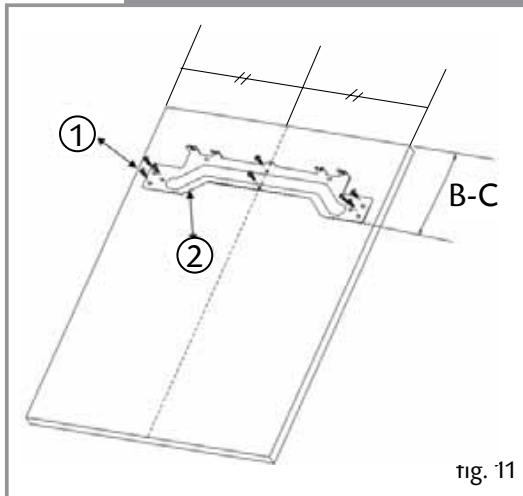
text_image
① ② B-C fig. 11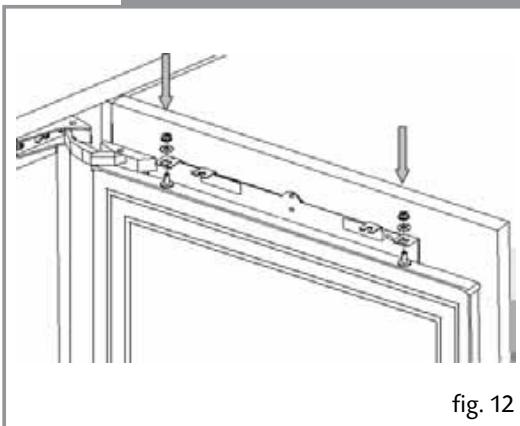
natural_image
Technical line drawing of a structural frame with mounting brackets and support fixtures (no text or symbols)Installation
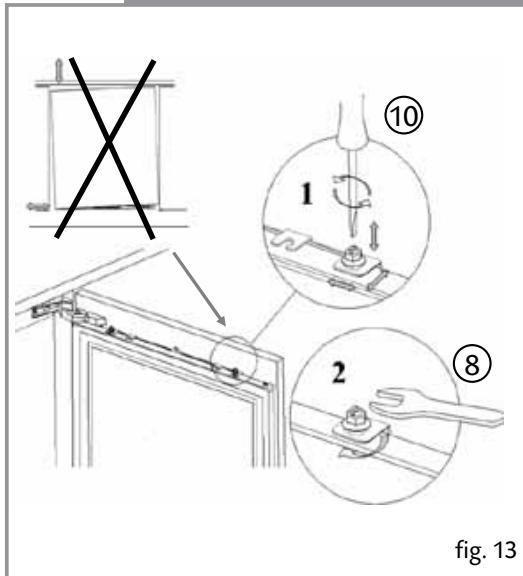
Fig. 13 - Aligning the decor door
Close the door and check the alignment with the other unit doors. Adjust the decor door by screwing or unscrewing the adjustment bolts for vertical adjustment and by the help of the slots on the fixing bracket for other directions. Lock the screws into place as shown in 10.2.
Fig. 14 - Fitting the decor door base fixings
With the appliance door open, remove the screws at the bottom of the appliance door. Locate the decor door base fixings (3) and screw the fixings to the appliance door and the decor door.
Fig. 15 - Fitting the decorative cover
Fit the decorative cover (4) on the decor door fixing bracket.
text_image
⑩ 1 2 ⑧ fig. 13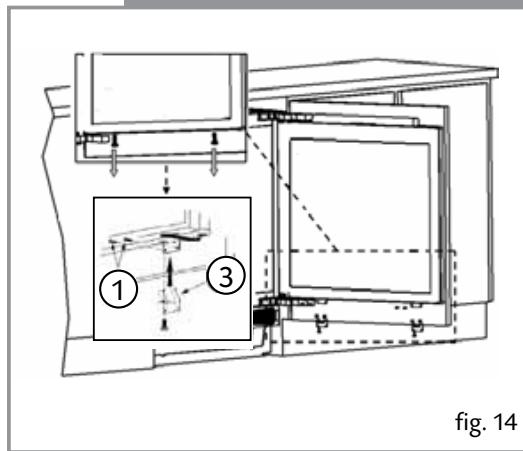
text_image
① ③ fig. 14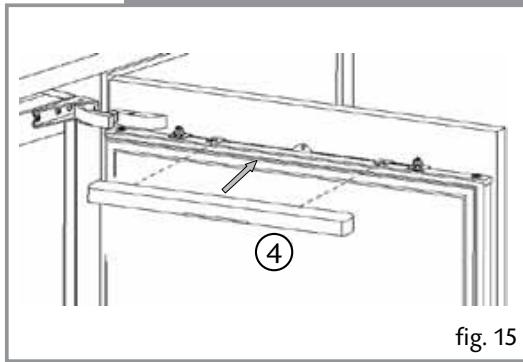
natural_image
Technical line drawing of a mechanical assembly with labeled component (4), no readable text or symbols beyond label and figure number (15)Installation
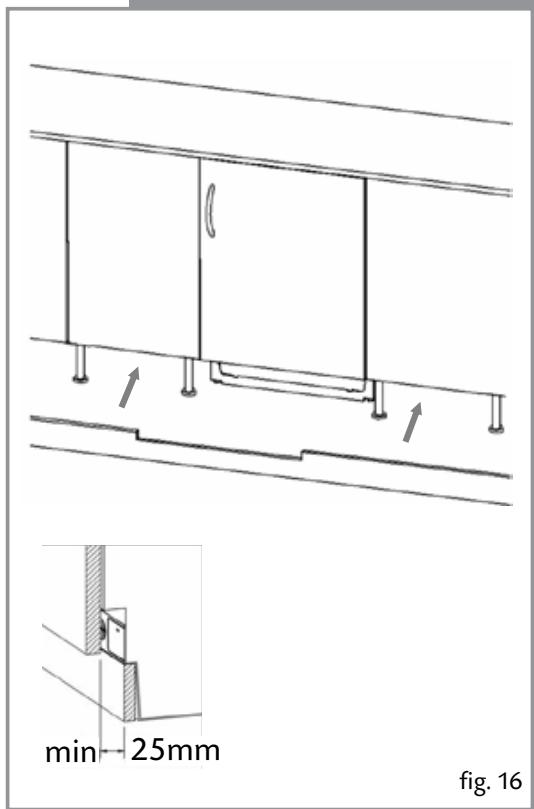
Fig. 16 - Fitting the plinth
Fit the plinth section, providing minimum 25 mm gap between the cabinet door and fix it.
Never cover over the ventilation slots.
Once installed the plinth must not block the ventilation slots in the appliance.
This may require cutting the plinth down. Failure to ensure adequate ventilation may invalidate the warranty.
text_image
min 25mm fig. 16Reversing the door
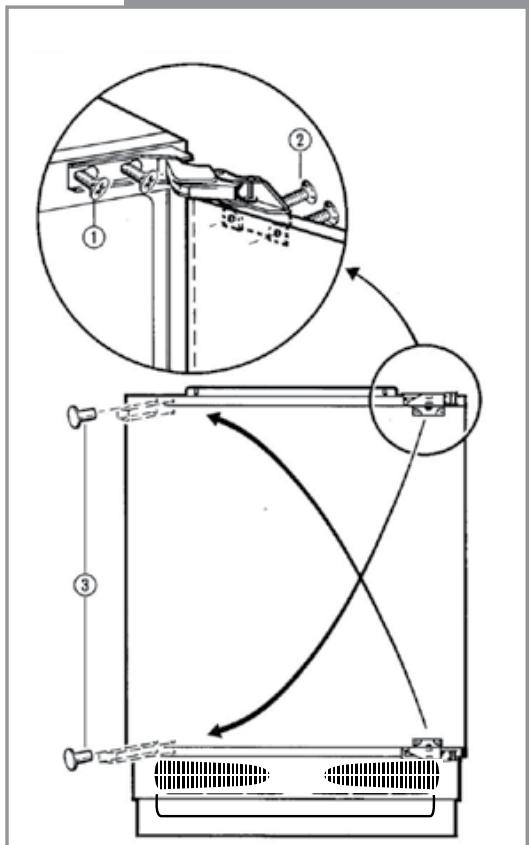
It is possible to reverse the door on this appliance, if required. To do so, follow the steps below:
- Open the door.
- Loosen the hinge fixing screws (1) and remove the door.
- Remove the door fixing screws (2).
- Remove the cover caps (3).
- Relocate the hinges as shown.
- Refit the door to the hinges.
Do not turn the door upside down
- Insert the cover caps (3) on the opposite side in the exposed holes.
text_image
Technical diagram illustrating a mechanical assembly with labeled components and motion arrows indicating movement or force.fig. 17
Electrical information
Warning! This appliance must be earthed.
text_image
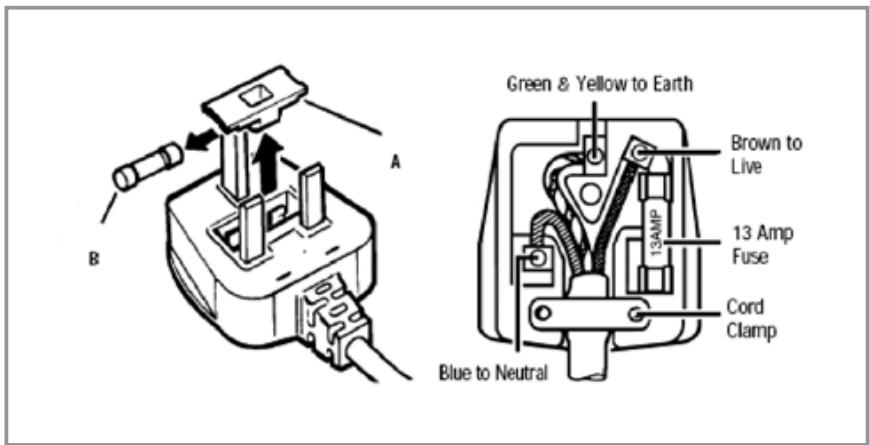
Green & Yellow to Earth Brown to Live 13 Amp Fuse Cord Clamp Blue to NeutralThe mains lead of this appliance has been fitted with a BS 1363A 13 amp fused plug. To change a fuse in this type of plug, follow the steps below:
- Remove the fuse cover and fuse.
- Fit replacement 13A fuse, ASTA approved to BS 1362 type, into the fuse cover.
- Replace fuse cover.
Important: Do not use the appliance without the fuse cover in position.
How to connect an alternative plug
If the fitted plug is not suitable for your socket outlet, then it should be cut off and disposed of safely to prevent the risk of electric shock. A suitable alternative plug of at least 13 Amp rating to BS 1363 should be used.
As the colours of the wires in the mains lead of this appliance may not correspond with the coloured markings identifying the terminals in your plug, proceed as follows:-
- The wire which is coloured GREEN and YELLOW must be connected to the terminal which is marked with letter (E) or by the Earth symbol 12 or coloured GREEN and YELLOW.
- The wire which is coloured BLUE must be connected to the terminal which is marked with the letter (N), or coloured BLACK.
- The wire which is coloured BROWN must be connected to the terminal which is marked with the letter (L) or coloured RED.
If in doubt regarding the electrical connection of this appliance, consult a qualified electrician. Do not shorten the supply cable, the appliance may require removing for servicing.
N.B. Ensure that the plug socket is situated in an easily accessible place.
If the power supply cord is damaged, it must replaced by a CDA authorised agent.

natural_image
Grid of grayscale rectangular blocks with varying shades of gray, no text or symbols present|C|D|A|
To contact our Customer Care Department, or for Service, please contact us on the details below.