
BUDS - Écouteurs sans fil SAMSUNG - Notice d'utilisation et mode d'emploi gratuit
Retrouvez gratuitement la notice de l'appareil BUDS SAMSUNG au format PDF.


| Type de produit | Écouteurs sans fil Bluetooth |
| Marque | Samsung |
| Modèle | BUDS |
| Version Bluetooth | 4.0 (Headset/Handsfree/A2DP/AVRCP) |
| Dimensions (L x l x H) | 167.3 x 135.6 x 16.9 mm |
| Poids | 34 g |
| Type de batterie | Lithium polymère 3,7 V / 200 mAh |
| Temps de charge | Moins de 2 heures |
| Temps de conversation | Plus de 10 heures |
| Temps de lecture musicale (Bluetooth) | Plus de 8 heures |
| Temps de lecture MP3 (hors Bluetooth) | Plus de 6 heures |
| Fréquence de fonctionnement | 2402 MHz - 2480 MHz |
| Température de stockage | -10 °C à 60 °C |
| Fonctions principales | Lecture/Pause, pistes précédente/suivante, volume, appel, redial, transfert d'appel, rejet, muet, MP3 avec carte TF |
| Indicateur de batterie | Voix et LED (rouge/verte) - Haut/Moyen/Faible |
| Entretien et nettoyage | Nettoyer avec un chiffon sec, non abrasif. Ne pas exposer à l'eau ou à l'humidité. |
| Sécurité | Ne pas exposer à des températures extrêmes, ne pas immerger dans l'eau, ne pas démonter, ne pas jeter au feu. |
| Pièces détachées et réparabilité | Aucune pièce réparable par l'utilisateur. Contacter le service après-vente. |
| Informations générales | Portée jusqu'à 10 mètres sans obstruction. Adapté à une utilisation avec téléphones mobiles. |
FOIRE AUX QUESTIONS - BUDS SAMSUNG
Questions des utilisateurs sur BUDS SAMSUNG
0 question sur cet appareil. Repondez a celles que vous connaissez ou posez la votre.
Poser une nouvelle question sur cet appareil
Téléchargez la notice de votre Écouteurs sans fil au format PDF gratuitement ! Retrouvez votre notice BUDS - SAMSUNG et reprennez votre appareil électronique en main. Sur cette page sont publiés tous les documents nécessaires à l'utilisation de votre appareil BUDS de la marque SAMSUNG.
MODE D'EMPLOI BUDS SAMSUNG

ORICORE
欧立格
USERGUIDE
Model: HF740T
www.oricore.com
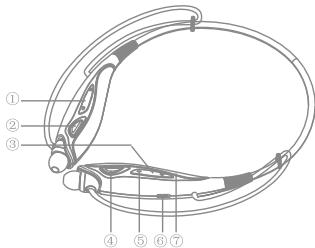
①、Previous track/Next track
②、Play/Pause
③ 、TFcard
④、Multifunction Button
⑤、Volume +/Volume -
⑥、Power switch
⑦、Charge socket
Specification
Bluetooth Version: V4.0 (Headset/Handsfree/A2DP/AVRCP)
Battery: 3.7V/200mAh, Polymer Lithium Battery
Talk Time: >10 hrs
Music Time: >8 hrs
MP3 Time: >6 hrs
Charge Time: <2 hrs
Work Temp: -10 C~60 C
DIM/Weight: 135.6mm(W)167.3mm(L)16.9mm(H)*34g
Frequency: 2402MHz~2480MHz
Bluetooth On/Off
--Turn it On: In off status, press and hold the MFB for 3 seconds with "Power On"voice prompt.
—Pairing: In off status, press and hold the MFB for 5 seconds with "Pairing" voice prompt.
--Turn it Off: In standby, press and hold the MFB for 3 seconds with "Power Off'voice prompt.
Volume Adjustment
--Adjust the volume by the volume keys "+"&"-".
--In order to avoid damaging to your hearing, there will be twice long voice when it reaches to the topmost 3 tons.
Charging
--The indicator is red while charging.
Battery Status
--Press and hold the volume key " - " for 3 seconds to get battery status as belows:
| Battery condition | High(3.9-4.1V) | Medium(3.7-3.9V) | Low(under 3.6V) |
| Voice prompt | Battery High | Battery Medium | Battery Low |
*When connecting to Iphone, the headset power will appear in the upper right of Iphone.
Low Power Level
--Voice prompt of low power every 2 minutes with red indicator
blinking. (green indicator blinking in MP3 mode)
--It will shut down if not be charged in time.
Answer/End Call
-Click to answer call, or double click to end the call.
- Only the left engine will shake when HF740T comes a call.
Redial the Call
--Double click the MFB to radial the last call you dialed.
Voice Dialing
---Press and hold the MFB for 1 second after you hear "Du"tone, speak the voice tag that you store in your phone. (Check whether your mobile phones support voice dialing or not)
Transfer the Call
---Press and hold the volume key " ^+ " to transfer the call between headset and phone.
- Some mobile phones will transfer to HF740T automatically while some need to press and hold volume key “+” for 3 seconds.
Reject the Call
--Press and hold the MFB for 1 second to reject the calls.
Mute the Microphone
---During the call, click the volume keys " -& " +" together once to mute the microphone. (Repeat to return)
Music Operation
---Play/Pause the Music: Click "Play/Pause" key to play or pause the
music.
- Previous track/Next track: Click the "Previous Track"& "Next Track"keys to select songs.
MP3 Operations
Turn MP3 On/Off
—Slip the power switch to "On/Off" position to turn it on/off.
—In Bluetooth standby mode, if no audio output, it will transfer to MP3 mode in 10 seconds.
Play/Pause
—Under MP3 status, click "Play/Pause" to play or pause the music. Previous Track/Next Track
—Under MP3 Status, press "Previous Track" and "Next Track" to choose the song you like.
Volume Adjustment
- Click the volume keys "+"& "-" to adjust the volume.
Warm Prompt
- Under TF card mode, enter MP3 play/pause status, click "Play/pause" to start. (Connect the Bluetooth devices automatically if there is paired record.)
2, Turn MP3 on and insert the TF card, it enters MP3 music playing
mode.(Connect the Bluetooth devices automatically if there is paired record.)
- In Bluetooth standby status, playing music from MP3, if call comes it will transfer to Bluetooth talk automatically and return to MP3 playing mode after call ends.
4,In Bluetooth standby mode,it will shut down automatically if no operationBluetooth is prior to MP3.
5,MP3 can not automatically shut down. Please shut down if no using to avoid affecting use next time.
Troubleshooting
If you are unable to connect your headset and mobile phone, please try the followings:
--Ensure your headset is turned on and properly charged.
--Ensure the headset is paired with your mobile phone.
--Ensure your mobile phone's Bluetooth feature is activated.
Please refer to your mobile phone used guide for specific instruction.
---Ensure the headset is within a 10 meters range of your mobile headset and there are no obstructions, such as walls or other electronic devices in between.
-
If the above steps do not solve your problem, please recharge the headset and restart your mobile phone.
-
Consider turning your headset off before placing it in your pocket or bag. If the MBF is accidentally activated, your mobile phone may place an unintended call.
--Do not expose the headset to liquid, moisture or humidity as it is not waterproof.
--Do not use abrasive cleaning solvents to clean the headset.
—Do not expose the headset to extreme temperature conditions. The best store temperature range is from -10 to +60, otherwise the life of the headset will be influenced.
--Do not dispose of the headset is a fire as it this may result in an explosion.
--Do not bring your headset into contact with sharp objects as this will cause scratched and damage.
--Do not insert any objects to the headset as this will damage the components inside.
--Do not attempt to disassemble the headset as it dose not contain serviceable components. - If you will not use the headset for long periods, be sure to store it in a dry place, free from extreme temperature conditions and dust. If the headset is placed for more than 1 month, please charge it on time to make sure the battery and the headset's working performance.
Product Information Card
Product Name:
Product Model:
S/N NO.:
Purchase Date:
Customer Name:
Tel/Mobil:
Distributor:
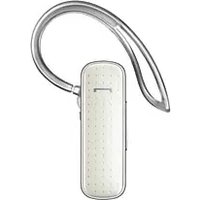
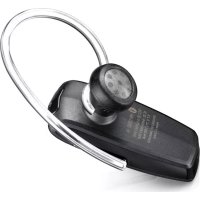
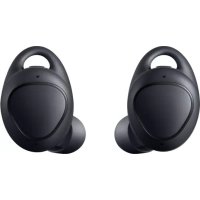
Marque : SAMSUNG
Modèle : BUDS
Catégorie : Écouteurs sans fil