
LATITUDE 100 DUO - Téléphone sans fil BINATONE - Notice d'utilisation et mode d'emploi gratuit
Retrouvez gratuitement la notice de l'appareil LATITUDE 100 DUO BINATONE au format PDF.

| Type de produit | Talkies-walkies PMR446 |
| Marque | Binatone |
| Modèle | Latitude 100 Duo |
| Nombre de canaux | 8 canaux (446,00625 à 446,09375 MHz) |
| Puissance d'émission | 0,5 W (haute/basse) |
| Portée maximale | Jusqu'à 3 km en champ libre |
| Alimentation | 3 piles AAA/LR03 (alcalines ou rechargeables) |
| Écran | LCD avec affichage du canal, volume, indicateurs TX/RX, batterie faible |
| Fonctions principales | Sélection de canal, balayage, appel tonal, réglage volume, sélection puissance, moniteur, économiseur d'énergie |
| Accessoires fournis | Clip ceinture |
| Poids estimé | Environ 100 g (avec piles) |
| Dimensions estimées | Environ 150 x 60 x 30 mm |
| Nettoyage | Chiffon doux humide, sans solvants |
| Sécurité | Ne pas utiliser avec antenne endommagée ; éviter atmosphères explosives ; ne pas placer près des airbags |
| Garantie | 12 mois à compter de la date d'achat |
| Pays d'utilisation | UE, Suisse, Norvège, Islande, Turquie (27 pays) |
| Réparabilité | Retour au magasin ou centre de réparation Binatone |
| Déclaration de conformité | Directive R&TTE 1999/5/EC et basse tension 73/23/EEC |
| Indicateur de batterie faible | Alerte sonore et LED rouge clignotante toutes les 15 secondes |
| Température de fonctionnement | Non spécifiée |
FOIRE AUX QUESTIONS - LATITUDE 100 DUO BINATONE
Questions des utilisateurs sur LATITUDE 100 DUO BINATONE
0 question sur cet appareil. Repondez a celles que vous connaissez ou posez la votre.
Poser une nouvelle question sur cet appareil
Téléchargez la notice de votre Téléphone sans fil au format PDF gratuitement ! Retrouvez votre notice LATITUDE 100 DUO - BINATONE et reprennez votre appareil électronique en main. Sur cette page sont publiés tous les documents nécessaires à l'utilisation de votre appareil LATITUDE 100 DUO de la marque BINATONE.
MODE D'EMPLOI LATITUDE 100 DUO BINATONE
BINATONE LATITUDE 100
SET UP & USER GUIDE
Find more user manuals and product information at www.liGo.co.uk/manuals/
GET £5 OFF
GET 25 your next purchase over £50 with voucher code:
With Vouchers! JiGo5reward
aNot in conjunction with any other offer.
www.liGo.co.uk
TELEPHONES | HEADSETS | TWOWAY RADIOS
PERSONAL CARE | BABY MONITORS | AND MUCH MORE
USERGUIDE
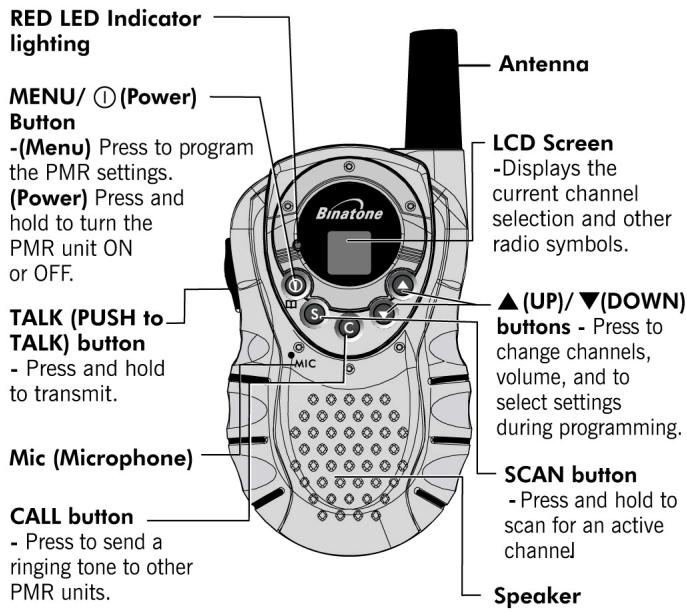
1. LCD Screen
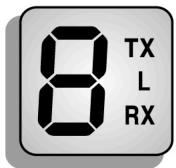

Channel Number. Changes from 1 to 8 as selected by the user.

Displays the Speaker volume level.
TX Displayed when transmitting a signal.
RX Displayed when receiving a signal.
L Displayed when the Power Low is activated.
2. Installation
2.1 Removing the Belt Clip
a.Pull the Belt Clip Latch away from the PMR.
b. While pulling the Belt Clip Latch, push up the Belt Clip as shown in Figure 1.
2.2 Installing the Belt Clip
a. Slide the Belt Clip into the slot as shown in Figure 2.
b. A "click" indicates the Belt Clip is locked into position.
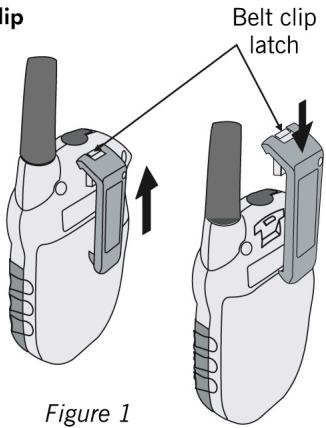
Figure 2
2.3 Installing the Batteries
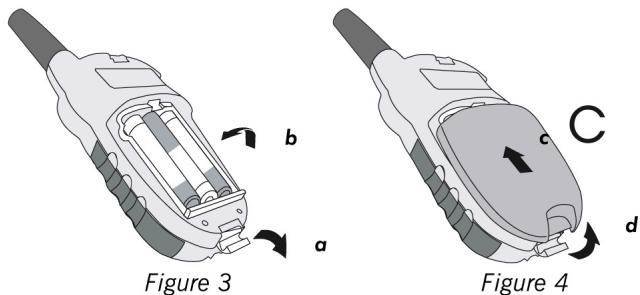
Caution: Observe the proper battery polarity orientation when installing batteries. Incorrect positioning can damage both the batteries and the unit.
a. Release the Battery Compartment Cover Latch located on the rear side of the PMR then remove the Battery Compartment Cover from the Battery Compartment. See Figure 3.
b. Install 3 x 1.5V AAA/LR03 regular Alkaline or Ni-MH rechargeable batteries by following the orientation as shown in Figure 3.
c. Replace the Battery Compartment Cover.
d. Lock the Battery Compartment Cover Latch into position.
Notes:
- Use only same type and make of batteries on the PMR units.
- The PMR units have a built-in Power Saver (PS) for maximum battery life, but when not in use, turn the unit OFF to conserve battery power.
- Remove the batteries if the units will not be used for a long period of time.
3. Operation
3.1 Turning the Unit ON/OFF

To Turn ON;
a. Press and hold the ① (Power) button. A special "beep" sound will be heard and the LCD Screen will display the current channel.
To switch OFF;
b. Press and hold the ① (Power) button. A special "beep" sound will be heard and the LCD Screen will turn blank.
3.2 Adjusting the Speaker volume

There are 8 volume levels. To adjust the speaker volume, press the (UP) button to increase, or press the (DOWN) button to decrease. The LCD Screen will show the digital speaker volume level during adjustment.
3.3 Receiving a Call
The unit is continuously in Receive mode when the unit is turned ON and not transmitting. When a signal is received on the current channel, the receive signal icon "RX" will be displayed on the LCD Screen.
3.4 Transmitting (sending)

a. Press and hold the TALK (Push to Talk) button to transmit your voice. The transmit signal icon "TX" will display on the LCD Screen and the RED LED indicator will light.
b. Hold the unit in a vertical position with the Mic (Microphone) 5 cm away from the mouth. While holding the TALK button, speak into the mic (microphone) in a normal tone of voice.
c. Release the TALK button when you have finished transmitting.
Important:
- In order for other people to receive your transmission, they must also be on the same channel that you are currently using. Refer to the "Changing Channel" section for more information.
- When the TALK and/or CALL buttons are continuously pressed, your PMR cannot receive any transmissions.
3.5 Calling (Paging) Tone

You can use the CALL button to send a tone to other users on the same channel. To activate this feature;
With the PMR in normal mode, press and release the CALL button. The unit will transmit a 2-second page tone to the other unit/s set with the same channel within transmitting range.
3.6 Channel Scan

Channel scan performs a search for active signals in a continuous loop from channels 1 to 8. This allows you to find other radios without having to manually change to each channel. To activate this feature;
a. Press and hold down the SCAN button. The channel number on the LCD screen changes rapidly until an active signal is detected.
b. When an active signal (one of the 8 channels) is detected, the channel scan pauses on the active channel until the active signal stops.
c. If you press the TALK button while the scan is paused on an active channel the unit will communicate through the active signal channel, and the channel scan will be deactivated. (OR press the (UP) button to continue the channel scanning.)
d. If no action is taken before the detected signal stops then the scan will continue.
e. Press and hold the SCAN button to stop the channel scanning operation. The unit will return to the channel set before the scan was started.
3.7 The Menu Functions

3.7.1 Changing Channels
The PMR has 8 available channels. To change channel;
a. Press the (Menu) button once, the Ch "8" will start blinking on the LCD Screen.
b. While the Channel icon is blinking, press the (UP) or (DOWN) button to select the desired channel. The channel changes from 1 to 8, or from 8 to 1.
c. Press the TALK button again to confirm your selected channel.
Note:
Refer to the "Channel Table" section of this Owner's Manual for detailed frequency listing.
3.7.2 TX Power High/Low setting

This feature permits the selection of the transmitting power level to high or low. At Power High, the PMR will transmit at maximum power and at a longer transmission range.
a. Press the (Menu) button twice.
b. Press the (UP) or (DOWN) button to select High or Low. The LCD Screen will display "L" when the low power is selected. At low power mode, the PMR will transmit at reduced transmitting range but could extend the battery life.
c. Press the TALK button again to confirm your selected power level.
3.7.3 Monitor

You can use the Monitor feature to check for weak signals on the current channel.
a. Press the (Menu) button 3 times. The PMR will enter the Monitor mode and hear everything on the current channel.
b. Press the (Menu) button again to turn off the Monitor operation and return to standby mode.
4. Auxiliary Features
4.1 Power Saving
Your PMR unit has special circuitry designed to extend the life of your battery. When the unit is not used for 6 seconds, it will automatically switch into a low power mode.
The Power Saving feature does not affect the PMR's ability to receive transmissions. When a signal is detected, it automatically returns to full power mode.
4.2 Low Battery Indicator
The PMR can detect when the battery charge level gets low. An alert tone will be heard and the RED LED indicator will flash once every 15 seconds. When this happens, replace the batteries.
Important:
For regular batteries, replace only with "AAA/LR03" or equivalent type.
For rechargeable batteries, replace only with the same type and make of rechargeable batteries.
5. Effective Range
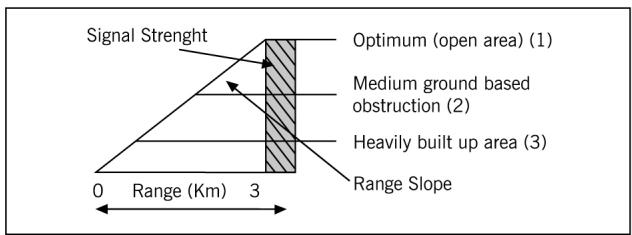
The Transmission range of the product is dependent on the environment terrain where it is being used, the following diagram attempts to guide the user on the sort of performance to expect for everyday use.
Range Check
The Transmission range will be affected as shown in the above diagram. The transmitting range typical values for different environment conditions will be (1) 3km (2) 1.5km (3) 750m . It should be remembered that these are only guide values as actual achieved distances will be dependent on the environment and terrain.
6. Specifications
| Channels Available | 8 Channels |
| Output Power (TX) | 0.5W |
| Range | Up to 3 Kms. |
Channel Frequency Table
| Channel | Frequency (MHz) | Channel | Frequency (MHz) |
| 1 | 446.00625 | 5 | 446.05625 |
| 2 | 446.01875 | 6 | 446.06875 |
| 3 | 446.03125 | 7 | 446.08125 |
| 4 | 446.04375 | 8 | 446.09375 |
7. Safety

CAUTION
Damaged Antenna
Do not use any PMR that has a damaged antenna. If a damaged antenna comes in contact with the skin, a minor burn may result.
Batteries
All batteries can cause property damage and/or bodily injury such as burns if conductive material such as jewelry, keys, or beaded chains touch exposed terminals. The material may complete an electrical circuit (short circuit) and become quite hot. Exercise care in handling any charged battery, particularly when placing it inside a pocket, purse, or other container with metal objects.

WARNING
For Vehicles with an Air Bag
Do not place your PMR in the area over an air bag or in the air bag deployment area. Air bags inflate with great force. If a PMR is placed in the air bag deployment area and the air bag inflates, the PMR may be propelled with great force and cause serious injury to the occupants of the vehicle.
Potentially Explosive Atmospheres
Turn your PMR OFF when in any area with a potentially explosive atmosphere, unless it is a type especially qualified for such use (for example, Factory Mutual Approved). Sparks in such areas could cause an explosion or fire resulting in injury or even death.
Batteries
Do not replace or charge batteries in a potentially explosive atmosphere. Contact sparking may occur while installing or removing batteries and cause an explosion.
Blasting Caps and Areas
To avoid possible interference with blasting operations, turn your PMR OFF near electrical blasting caps or in a "blasting area" or in areas posted: "Turn off the two-way radio." Obey all signs and instructions.
NOTE: Areas with potentially explosive atmospheres are often, but not always, clearly marked. They include fueling areas such as below deck on boats; fuel or chemical transfer or storage facilities; areas where the air contains chemicals or particles, such as grain, dust, or metal powders; and any other area where you would normally be advised to turn off your vehicle engine.
8. Cleaning and Care
To clean your PMR, use a soft cloth dampened with water. Do not use cleaners or solvent, which may cause damage that may not be covered by guarantee.
9. Guarantee and service
The Binatone Latitude 100 is fully guaranteed for 12 months from the date of purchase shown on your sales receipt. The guarantee does not cover damage by misuse or negligence, or by excessive voltage.
Please keep your sales (till) receipt - this is your guarantee. You should also keep the original packaging materials.
When unpacking your Binatone Latitude 100, check for visible damage. If you see any damage, do not use the PMR - return the whole unit to where you bought it.
If your Binatone Latitude 100 develops a fault, refer to the "Troubleshooting Guide." section of this manual. If you can't solve the problem, return the whole unit as follows;
While the unit is under guarantee
- Pack up all the parts of your Latitude 100, using the original packaging.
- Return the unit to the store where you bought it, and make sure you take your sales receipt as your proof of purchase.
- In the unlikely event that you need to return your Latitude 100 to our Repair Centre while it is under Guarantee, please include the sales receipt. There will be an £5 handling charge for repair of unit under Guarantee.
Repair after the Guarantee has expired
If the unit is no longer covered by Guarantee, first follow steps 1 as for repair under Guarantee, Then...
- Call our service Department on 0845 345 9677 and ask for a quotation of the repair charge, and details of where to send your Latitude 100 for repair.
- Return your Latitude 100 to the address given by the Service Department, making sure to include your name and address, and a cheque or postal order for the value of the repair charge.
This does not affect your statutory rights.
Binatone Telecom plc operates a policy of continuous product improvement, and so reserves the right to make changes to the product and functions without prior notice.
This equipment is intended for use in:
| Austria | ✓ | Finland | ✓ | Latvia | ✓ | Spain | ✓ |
| Belgium | ✓ | France | ✓ | Liechtenstein | ✓ | Sweden | ✓ |
| Bulgaria | ✓ | Germany | ✓ | Luxemburg | ✓ | Switzerland | ✓ |
| Croatia | ✓ | Greece | ✓ | The Netherlands | ✓ | Turkey | ✓ |
| Cyprus | ✓ | Hungary | ✓ | Norway | ✓ | UK | ✓ |
| Czech | ✓ | Iceland | ✓ | Poland | ✓ | Romania | ✓ |
| Denmark | ✓ | Ireland | ✓ | Portugal | ✓ | ||
| Estonia | ✓ | Italy | ✓ | Slovenia | ✓ |
Countries of use
- Troubleshooting Guide
| Symptom | Solution |
| No power. | ·Check the batteries are installed properly. ·The batteries may be weak. ·Replace the old batteries with new ones. |
| Reception is weak. | ·Press the▲(UP) button to increase the receiver volume level. ·The receiving signal may be weak and/or out of range. |
| Cannot change channels. | ·To change channels, press the□(Menu) button once then press the▲(UP) or▼(DOWN) buttons to change the current channel. ·Batteries may be weak. |
| Range is limited. | ·Batteries may be weak. ·Replace with new batteries if the battery charge level is low. (The RED LED indicator is flashing once in every 15 seconds.) ·The maximum range will vary depending on terrain and environment, and depending on the TX power high/low setting. ·Open fields provide the maximum range, while steel/concrete structures, heavy foliage, and use in buildings and in vehicles may limit the range significantly. ·Wearing the radio close to the body, such as in a pocket or on a belt, will decrease range; change the location of the radio. |
| Sound distortion problems. | ·If you are transmitting, speak in a normal tone of voice, 5 cm away from the Mic (microphone.). ·If you are receiving, lower the volume to a comfortable level. ·Radios too close. Radios must be at least 1.5 meters apart; increase your distance. ·Radios too far apart. Obstacles interfere with transmission. Talk range is up to 3 Km in clear unobstructed conditions. |
Declaration of Conformity
The Binatone Latitude100 complies with the essential requirements
R&TTE Directive, 1999/5/EC
Low Voltage Directive 73/23/EEC
And conforms to the following relevant standards:
ETSI EN 300 296-2: 2001
EN 301489:2002
EN 60065:2002

Waste electrical products must not be disposed of with household waste. This equipment should be taken to your local recycling centre for safe treatment.
Binatone Telecom plc operates a policy of continuous product improvement, and so reserves the right to make changes to the product and functions without prior notice.