
CONTROL 1 XTREME X2 - Enceinte passive JBL - Notice d'utilisation et mode d'emploi gratuit
Retrouvez gratuitement la notice de l'appareil CONTROL 1 XTREME X2 JBL au format PDF.


| Type de produit | Enceinte passive 2 voies |
| Marque | JBL |
| Modèle | Control 1 Xtreme X2 |
| Dimensions (H x L x P) | 228 x 155 x 139 mm |
| Poids unitaire | 2,4 kg |
| Alimentation | Aucune (enceinte passive) |
| Puissance admissible (crête/continue) | 200 W / 50 W |
| Puissance ampli recommandée max | 100 W RMS |
| Sensibilité | 89 dB / 2,83 V / 1 m |
| Impédance nominale | 8 ohms |
| Réponse en fréquence | 50 Hz – 20 kHz |
| Haut-parleur grave/médium | 100 mm (blindé vidéo) |
| Haut-parleur aigu | 12 mm (dôme titane laminé, blindé vidéo) |
| Type de charge | Réflexe avec évent FreeFlow™ |
| Montage mural | Oui, avec support fourni |
| Câble de sécurité | Oui, fourni (anti-chute) |
| Utilisation recommandée | Enceintes avant ou surround |
| Nettoyage | Chiffon humide, débrancher l’ampli avant |
| Réparabilité | Faire appel à un technicien qualifié |
FOIRE AUX QUESTIONS - CONTROL 1 XTREME X2 JBL
Questions des utilisateurs sur CONTROL 1 XTREME X2 JBL
0 question sur cet appareil. Repondez a celles que vous connaissez ou posez la votre.
Poser une nouvelle question sur cet appareil
Téléchargez la notice de votre Enceinte passive au format PDF gratuitement ! Retrouvez votre notice CONTROL 1 XTREME X2 - JBL et reprennez votre appareil électronique en main. Sur cette page sont publiés tous les documents nécessaires à l'utilisation de votre appareil CONTROL 1 XTREME X2 de la marque JBL.
MODE D'EMPLOI CONTROL 1 XTREME X2 JBL
CONTROLONE
OWNER'S GUIDE
JBL
CONTROL MONITOR LOUDSPEAKER
CONTROL ONE
R
CAUTION
RISK OF ELECTRIC SHOCK DO NOT OPEN
CAUTION: To prevent electric shock, do not remove the grounding plug on the power cord, or use any plug or extension cord that does not have
a grounding plug provided.
Make certain that the
AC outlet is properly grounded.
not use an adapter plug.
with this product.

The lightning flash with arrowhead symbol, within an equilateral triangle, is intended to alert the user to the presence of uninsulated "dangerous voltage" within the product's enclosure that may be of sufficient magnitude to constitute a risk of electric shock to persons.

The exclamation point within an equilateral triangle is intended to alert the user to the presence of important operating and maintenance (servicing) instructions in the literature accompanying the appliance.
General:
- Unpacking: Check the product carefully. If it has been damaged in transit, report the damage immediately by calling your dealer and/or the shipping company that delivered it.
- Connections: Whenever changing, connecting or disconnecting signal or power cables etc., always turn off all equipment. This prevents transients from entering the equipment and prevents electrical energy from reaching you. Keep all connections out of the reach of children. Before moving the unit, be certain to disconnect any interconnection cords with other components, and make certain that you disconnect any powered units from the AC outlet.
- Read Instructions. All the safety and operating instructions should be read before the product is operated.
- Retain Instructions. The safety and operating instructions should be retained for future reference.
- HeedWarnings. All warnings on the product and in the operating instructions should be adhered to.
- Follow Instructions. All operating and use instructions should be followed.
-
Water and Moisture. The product should not be used near water - for example, near a bathtub, washbowl, kitchen sink, laundry tub, in a wet basement, or near a swimming pool, and the like.
-
Accessories. To ensure proper operation and to avoid the potential for safety hazards, place the unit on a firm and level surface. When placing the unit on a shelf, be certain that the shelf and any mounting hardware can support the product's weight. Do not place this product on an unstable cart, stand, tripod, bracket, or table. The product may fall, causing serious injury to a child or adult, and serious damage to the product. Use only with a cart, stand, tripod, bracket, or table recommended by the manufacturer, or sold with the product. Any mounting of the product should follow the manufacturer's instructions, and should use a mounting accessory recommended by the manufacturer.
-
Wall or Ceiling Mounting. The product should be mounted on a wall or ceiling only when and as recommended by the manufacturer.
-
Cleaning. Unplug this product from the wall outlet before cleaning. Do not use liquid cleaners or aerosol cleaners. Use a damp cloth for cleaning.
-
Attachments. Do not use attachments not recommended by the product manufacturer, as they may cause hazards.
- Replacement Parts. When replacement parts are required, be sure the service technician has used replacement parts specified by the manufacturer or that have the same characteristics as the original part. Unauthorized substitutions may result in fire, electric shock or other hazards.
- Safety Check. Upon completion of any service or repairs to this product, ask the service technician to perform safety checks to determine that the product is in proper operating condition.
- Feet/Spikes. When positioning, or moving this product ensure that is lifted rather than dragged across any floor/mounting surface. This will avoid any damage to the floor/mounting surface. Attention! Products and/or product feet constructed of rubber or plastics may, in seldom cases, react chemically and discolor treated or non-treated wooden surfaces if positioned without protection.
-
Warranty: The following conditions may result in a void product warranty: a. the manufacturers serial number is removed or forged.
b. if repairs and/or modifications and/or other treatments/tunings have been carried out by non-authorized personnel or accessories/supplements are attached, which are not approved by manufacturer/importer. -
Warranty: The following items are not covered by the product warranty:
a. Damage caused by inappropriate handling despite clear instructions provided in the owners manual.
b. Damage to mechanical parts (such as record- playback heads, moving rubber and plastic parts and fuses) as well as results of normal wear and tear.
c. Damage caused by external action or influence.
d. Damage caused by miss-use by user.
e. Damage caused by excessive electrical mains supply voltage or lightning strike.
f. Damage caused by fire, water or smoke.
g. Damage known to buyer prior to purchase.
h. Damage caused by professional employment of home entertainment products (e.g. for catering trade, restaurants, public address or infinite loop announcement use etc.)
- Specifications: All product specifications/features are subject to change without notification.
Passive Products:
- Amplifiers: Amplifiers used to drive these units must deliver a sufficient output power. A lack of output power may lead to amplifier-clipping, which causes damage not covered by guarantee.
Active (Powered) Products:
- Ventilation. Slots and openings in the cabinet are provided for ventilation and to ensure reliable operation of the product and to protect it from overheating, and these openings must not be blocked or covered. The openings should never be blocked by placing the product on a bed, sofa, rug, or other similar surface. This product should not be placed in a built-in installation such as a bookcase or rack unless proper ventilation is provided or the manufacturer's instructions have been adhered to.
Make certain that the proper space (more than 10cm is provided both above and below the unit for ventilation. If the amplifier will be installed in a cabinet or other enclosed area, make certain that there is sufficient air movement within the cabinet, with means provided for hot air to exit and for cool air to be brought in.
Do not obstruct the ventilation slots on the top of the unit or place objects directly over them. Remember, power amplifiers generate heat, and the heatsink fins and ventilation slots that form part of the cabinet are specially designed to remove this heat. Placing other electronic equipment near these heat-dissipation systems may possibly affect the long term reliability of both your amplifier and the objects placed above it.
Do not place CDs, record jackets, owner's manuals or other paper on top of or beneath the unit or in between products containing amplifiers in a stack. This will block the air flow, causing degraded performance and a possible fire hazard.
-
Power Sources. This product should be operated only from the type of power source indicated on the marking label. If you are not sure of the type of power supply to your home, consult your product dealer or local power company. For products intended to operate from battery power, or other sources, refer to the operating instructions.
-
Grounding or Polarization. This product may be equipped with a polarized alternating-current line plug (a plug having one blade wider than the other). This plug will fit into the power outlet only one way. This is a safety feature. If you are unable to insert the plug fully into the outlet, try reversing the plug. If the plug should still fail to fit, contact your electrician to replace your obsolete outlet. Do not defeat the safety purpose of the polarized plug.
-
Power-Cord Protection. Power-supply cords should be routed so that they are not likely to be walked on or pinched by items placed upon or against them, paying particular attention to cords at plugs, convenience receptacles, and the point where they exit from the product. To avoid safety hazards, use only the power cord supplied with your unit. If a replacement cord is used, make certain that it is of a similar gauge. We do not recommend using extension cords with this product. As with all electrical devices, do not run power cords under rugs or carpets or place heavy objects on power cords. Damaged power cords should be replaced immediately, by a qualified service technician, with cords meeting factory specifications. When disconnecting the power cord from an AC outlet, always pull the plug; never pull the cord.
-
Non-use Periods. The power cord of the product should be unplugged from the outlet when left unused for long periods of time.
- Lightning. For added protection for this product during a lightning storm, or when it is left unattended and unused for long periods of time, unplig it from the wall outlet and disconnect the antenna or cable system. This will prevent damage to the product due to lightning and power-line surges.
- Overloading. Do not overload wall outlets, extension cords, or integral convenience receptacles, as this can result in a risk of fire or electric shock.
- Damage Requiring Service. Unplug this product from the wall outlet and refer servicing to qualified service personnel under the following conditions:
a. The power-supply cord or the plug has been damaged; or
b. Objects have fallen, or liquid has been spilled into, the product; or
c. The product has been exposed to rain or water; or
d. The product does not operate normally when following the operating instructions. Adjust only those controls that are covered by the operating instructions, as an improper adjustment of other controls may result in damage and will often require extensive work by a qualified technician to restore the product to its normal operation; or
e. The product has been dropped, or the enclosure damaged; or
f. The product does not appear to operate normally or exhibits a marked change in performance.
- Servicing. Do not attempt to service this product yourself, as opening or removing covers may expose you to dangerous voltage or other hazards. Refer all servicing to qualified service personnel.
- Object and Liquid Entry. Never push objects of any kind into this product through openings, as they may touch dangerous voltage points or short-out parts that could result in a fire or electric shock. Never spill liquid of any kind on the product. The apparatus shall not be exposed to dripping or splashing and no objects filled with liquids, such as vases, shall be placed on the apparatus.
- Heat. The product should be situated away from heat sources such as radiators, heat registers, stoves or other products (including amplifiers) that produce heat. Avoid installation in extremely hot or cold locations, in an area that is exposed to direct sunlight or near heating equipment. When positioning the product in its final location, make certain that it has adequate ventilation on all sides, as well as on the top and bottom.
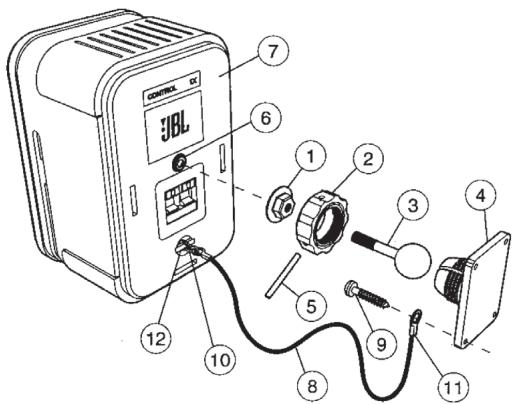
Important safety note: Proper selection of mounting hardware not included herein and proper assembly and installation of brackets, including but not limited to selection of appropriate weight bearing support and bracket use with the specified speaker only is the exclusive responsibility of the customer. Manufacturer disclaims any liability for the selection of mounting hardware and or bracket installation.
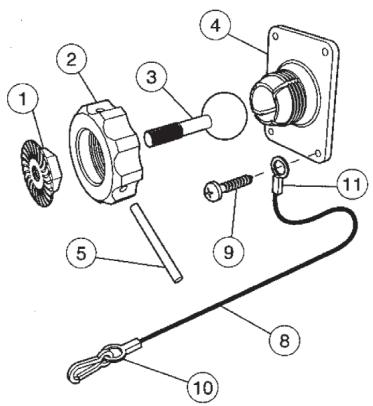
a. Loosen and remove the molded nut 2 by turning it counter clockwise. Use the supplied metal bar 5 if necessary by inserting it in one of the holes on the molded nut 2.
b.Pull the ball/shaft ③ out of the wall bracket 4.
c. Slide on the molded nut ② onto the ball/shaft ③ with threaded opening facing the ball, and thread on the metal nut ① all the way onto the ball/shaft ③, with the nut ①'s "knurled" surface facing away from the ball.
d. Screw on the ball/shaft ③ into the threaded insert on the back of the speaker
cabinet 6 until it is fully seated against the bottom of the insert.
e. Tighten the "knurled" nut 1 using a crescent wrench until it is firmly seated against the back of the speaker and has fully locked the ball/shaft 3 and the speaker cabinet together. Please note that once this nut is tightened, it may embed some marks on the back of the speaker where the attachment is made. However, these marks will be covered by the nut 1.
f. The back-up cord ③ provided as an additional measure to prevent the fall of the speaker in case the speaker becomes detached from the wall bracket. One of the two lower screws ⑨ that attach the wall bracket ④ to the wall, will need to go through the eyelet ⑩ at the end of the cord before going through the wall bracket hole. Mount the wall bracket ④ onto a wood stud on the wall, using #10, minimum 1 inch long, pan head wood screws. Make sure that all
4 screws are driven into the stud and not in drywall. If the bracket needs to be mounted on drywall, the use of properly selected and installed wall-anchors and screws is essential. Make sure that the screw head is at least 0.36 inches (approximately 3/8 inches) or larger in diameter so that it can properly hold the backup cord eyelet 1 .
g. Holding the speaker cabinet with both hands, reinsert the ball portion of the ball/shaft into the wall bracket 4.
h. Hand tighten the molded nut 2 while positioning the speaker for the intended orientation.
i. Once the orientation of the speaker is finalized, use the metal bar 5 in one of the holes on the molded nut 2 and tighten securely.
j. Securely attach the other end 10 of the backup cord 3 to the Control ONE, by engaging it through the bar 1 on the back speaker.
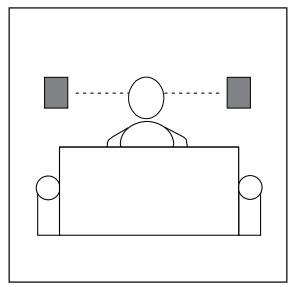
ONE. Speaker Placement
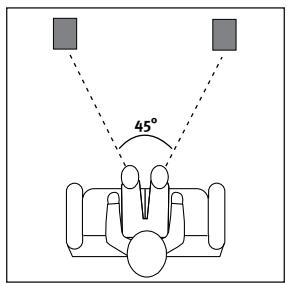
As front speakers.
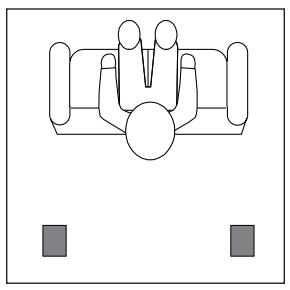
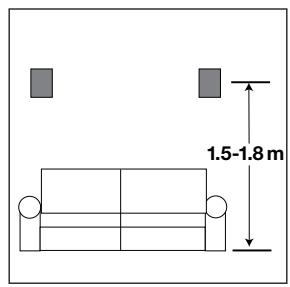
As rear speakers.
TWO. Wall mounting
The Control ONE loudspeakers may be wall-mounted. Please refer to wall-mounting instructions.
THREE. Speaker Connections
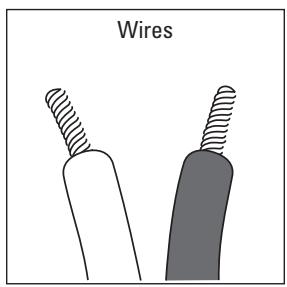
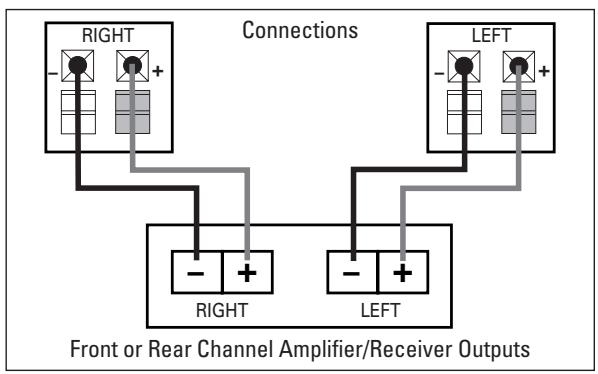
Speakers and electronics terminals have corresponding (+) and (-) terminals. It is important to connect both speakers identically: (+) on the speaker to (+) on the amplifier and (-) on the speaker to (-) on the amplifier. Wiring 'out of phase' results in thin sound, weak bass and a poor stereo image.
TROUBLESHOOTING
If there is no sound from any of the speakers:
- Check that the receiver/ amplifier is on and a source is playing.
- Review proper operation of your receiver/amplifier.
If there is no sound coming from one speaker:
- Check the 'Balance' control on your receiver/amplifier.
-
Check all wires and connections between receiver/ amplifier and speakers.
-
Make sure all wires are connected. Make sure none of the speaker wires are frayed, cut or punctured.
If the system plays at low volumes but shuts off as volume is increased:
- Check all wires and connections between receiver/amplifier and speakers.
-
Make sure all wires are connected. Make sure none of the speaker wires are frayed, cut or punctured.
-
If more than one pair of speakers is being used, check the minimum impedance requirements of your receiver/amplifier.
If there is no (or low) bass output:
Make sure the polarities (+ and - of the left and right 'Speaker Inputs' are connected properly.
SPECIFICATIONS
| Drivers Bass/midrange (video shielded) | 100mm |
| Drivers Tweeter (video shielded) | 12mm Titanium Laminate |
| Frequency Response | 50Hz – 20kHz |
| Power Handling (Peak/Continuous) | 200W/50W |
| Maximum Recommended Amplifier Power* | 100W RMS |
| Sensitivity | 89dB/2.83V/1m |
| Nominal Impedance | 8 Ohms |
| Dimensions (H x W x D) | 228 x 155 x 139 mm |
| Weight (each) | 2.4kg |
*The maximum recommended amplifier power rating will ensure proper system headroom to allow for occasional peaks. We do not recommend sustained operation at these maximum power levels.
Descriptions and specifications subject to change without notice.
Notice to Purchaser: JBL assumes no responsibility or liability for injuries or property damage – direct, indirect or consequential – resulting from the improper installations of Control ONE loudspeakers.
Declaration of Conformity

We, Harman Consumer Group International 2, route de Tours 72500 Chateau-du-Loir France
declare in own responsibility, that the product described in this owner's manual is in compliance with technical standards:
EN 61000-6-3:2001
EN 61000-6-1:2001
Gary Mardell
Harman Consumer Group International
Chateau-du-Loir, France 06/04
OWNER'SGUIDE
PRODUCT LINE:
Control Monitor Series
MODEL
NUMBER:
Control One
DESIGN GOAL: Bring the thrill of live performance and movie sound to the home environment by calling on JBL's professional engineering leadership.
SATELLITE TYPE:Titanium-laminate-dome tweeter, reflex-loaded enclosure
PORT DESIGN: FreeFlow™ flared
PROFESSIONAL REFERENCE: Control Monitor Series
JBL
PRO SOUN
COMES HOME
JBL Consumer Products
250 Crossways Park Drive, Woodbury, NY 11797
Europe: 2. Route de Tours, 72500 Château du Loir, France www.jbl.com
©2004 Harman International Industries, Incorporated
JBL is a registered trademark of JBL, Incorporated.
Part No.C10030A

H A Harman International Company
- CONTROLONE
- CAUTION
- RISK OF ELECTRIC SHOCK DO NOT OPEN
- General:
- Passive Products:
- Active (Powered) Products:
- Speaker Placement
- Wall mounting
- THREE. Speaker Connections
- TROUBLESHOOTING
- If there is no sound from any of the speakers:
- If there is no sound coming from one speaker:
- If the system plays at low volumes but shuts off as volume is increased:
- If there is no (or low) bass output:
- SPECIFICATIONS
- OWNER'SGUIDE
- Control Monitor Series
- Control One
Marque : JBL
Modèle : CONTROL 1 XTREME X2
Catégorie : Enceinte passive