
IMAGER - Écran de projection DA-LITE - Notice d'utilisation et mode d'emploi gratuit
Retrouvez gratuitement la notice de l'appareil IMAGER DA-LITE au format PDF.



| Marque | DA-LITE |
| Modèle | IMAGER |
| Type de produit | Écran de projection mural |
| Largeur de vision | 80 pouces et moins, 80 à 96 pouces, plus de 96 pouces (selon version) |
| Matériau de la surface | Da-Tex, Dual Vision, Pearlescent, Cinema Vision, Da-Mat, High Contrast Da-Mat, Audio Vision, High Contrast Audio Vision, High Contrast Cinema Vision, High Contrast Cinema Perf |
| Méthodes d'installation | 3 méthodes selon la largeur de l'écran |
| Alimentation | Aucune (écran manuel) |
| Fonctions principales | Projection d'images, surface tendue, nettoyable |
| Contenu de l'emballage | Cadre en 4 parties, vis #10 (16), snap stud, supports muraux (petit ou grand selon taille) |
| Outils requis pour l'installation | Tournevis cruciforme, niveau à bulle, mètre ruban |
| Fixation murale | Sur montants muraux, vis de fixation non fournies |
| Entretien et nettoyage | Chiffon doux blanc humide (eau claire) ou alcool dénaturé, essuyage dans un sens |
| Pièces détachées disponibles | Cadre, vis, supports muraux, snap stud |
| Réparabilité | Pièces standards, assemblage modulaire |
| Informations générales | Fabriqué par DA-LITE Screen Company, USA |
FOIRE AUX QUESTIONS - IMAGER DA-LITE
Questions des utilisateurs sur IMAGER DA-LITE
0 question sur cet appareil. Repondez a celles que vous connaissez ou posez la votre.
Poser une nouvelle question sur cet appareil
Téléchargez la notice de votre Écran de projection au format PDF gratuitement ! Retrouvez votre notice IMAGER - DA-LITE et reprennez votre appareil électronique en main. Sur cette page sont publiés tous les documents nécessaires à l'utilisation de votre appareil IMAGER de la marque DA-LITE.
MODE D'EMPLOI IMAGER DA-LITE
The
POWER I1
In
PRESENTATION PRODUCTS
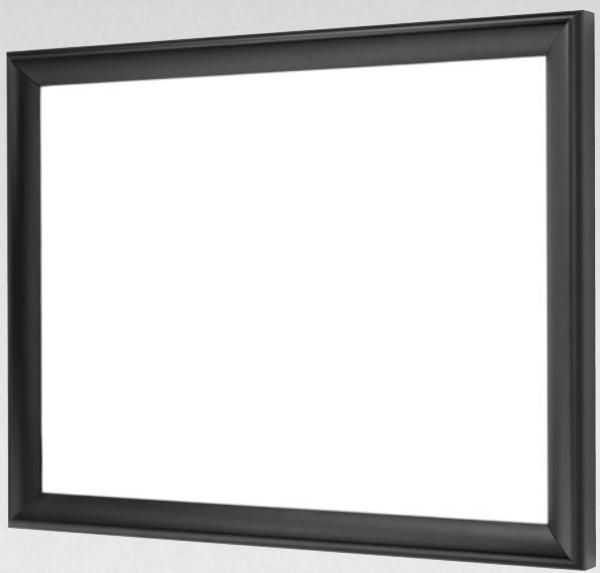
Instruction Book for IMAGER

DA-LITE SCREEN COMPANY, INC.
3100 North Detroit Street
Post Office Box 137
Warsaw, Indiana 46581-0137
Phone: 574-267-8101
800-622-3737
Fax: 574-267-7804
Toll Free Fax: 877-325-4832
www.da-lite.com
e-mail: info@da-lite.com
Quantities vary by screen size:
Screens 80" and smaller viewing width = 1
Screens over 80" to 96" viewing width = 2
Screens over 96" viewing width = 3
QUANTITY INCLUDED
Installation screws not included
10 SCREW
Quantity = 16
(8 attached to frame)
QUANTITY INCLUDED
SNAP STUD
QUANTITY INCLUDED


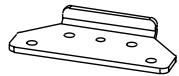
SMALL WALL BRACKET (8" LONG)
Quantity = 1 .Only for screens
80" and smaller viewing width.
QUANTITY INCLUDED

Installation screws not included
CORNER BRACKET
Quantity = 4
(attached to frame)
QUANTITY INCLUDED
USE INSTALLATION
METHOD NUMBER
INSTALLATION
There are three methods of installation based on the size of the screen. Measure the width of the viewing area of your screen and refer to the appropriate method of installation below. The hanger bracket figure shows the type and quantity of bracket that is supplied based on the size of the screen.
Method 1: Screens 80^ and smaller in viewing width.
Method 2: Screens over 80^ up to 96^ in viewing width.
Method 3: Screens over 96^ in viewing width.
SETTING UP YOUR SCREEN
TOOLS REQUIRED:
Phillips Screwdriver
Carpenter's Level
Tape Measure
FRAME ASSEMBLY
- Place the four frame pieces on a clean floor.
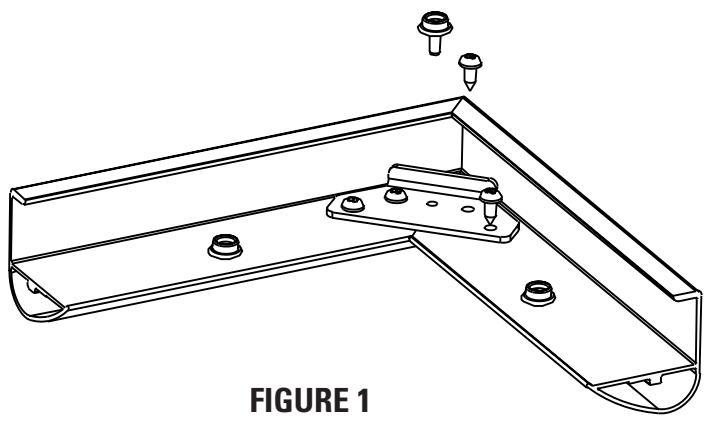
- Slide the frame pieces together at corners. (Note: Frame assembly holes may not appear to fit properly at the corners until all fasteners have been attached. Once fasteners are attached, the frame corners will be drawn in for a proper fit.) Secure frame pieces with #10 screws provided. Do not tighten screws until all are started, then tighten. See Figure 1.
- Tighten the two screws at each corner. Do not over-tighten the screws.
- Insert and tighten the snap stud in the center of the corner bracket (Figure 1).
ATTACH THE VIEWING SURFACE
Unroll the screen on a clean surface. Do not use newspaper. The viewing side is rolled to the inside of the roll. Place the frame over the screen surface, and while lifting the frame with one hand, snap the screen surface onto the frame with the other hand while maintaining a steady pull on the surface.
METHOD 1 (SCREENS 80" AND SMALLER IN VIEWING WIDTH)
Method 1
- Secure the large wall bracket to wall studs at the desired height. Make sure the bracket is level. The top of the frame will be 1/8 above the top of the wall bracket when mounted. You will need at least 5/8 clearance above the bracket to hang the screen. Figures 2, 3, and 4 show the proper orientation for the supplied wall brackets.
- To install the small wall bracket, you must measure the overall height of the screen frame and subtract 1 - 3 / 8" . Using that dimension, measure down from the top edge of the wall bracket and mark the wall for two screw holes. The holes should be centered within the frame and 6'' apart. Refer to Figure 3.
- Attach the small wall bracket to the wall. Refer to Figure 4 for proper orientation. Do not tighten the screws completely. The bracket should slide up and down easily.
- Hang the screen on the brackets by hooking the bottom of the frame onto the small wall bracket and lift up until you can hook the top of the frame on the top large bracket. Push down on the frame to seat it on the brackets. Refer to Figure 4.
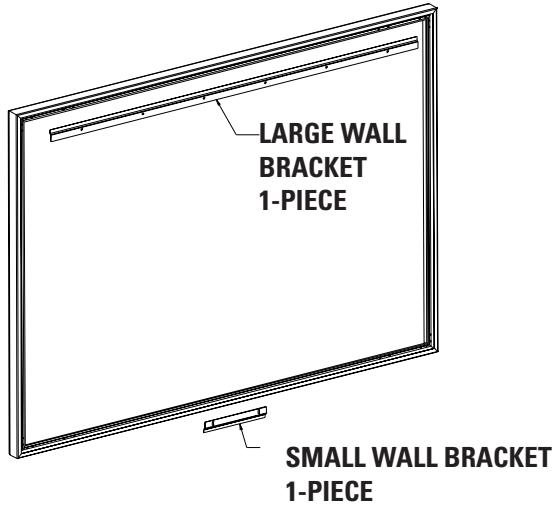
FIGURE 2
METHOD 1 (SCREENS 80^ AND SMALLER IN VIEWING WIDTH)
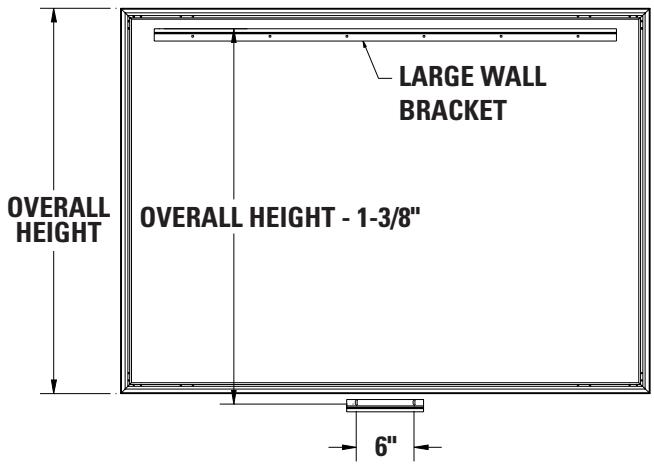
FIGURE 3
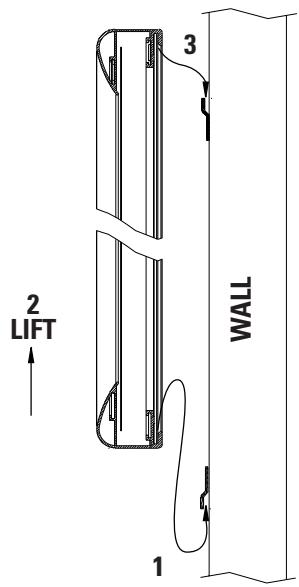
FIGURE 4
METHOD 2 (SCREENS OVER 80" UP TO 96" IN VIEWING WIDTH)
Method 2
- Secure the large wall bracket to wall studs at the desired height. Make sure the large bracket is level. The top of the frame will be 1 / 8" above the top of the large wall bracket when mounted. You will need at least 5 / 8" clearance above the bracket to hang the screen. Figures 5 and 6 show the proper orientation for the supplied wall brackets.
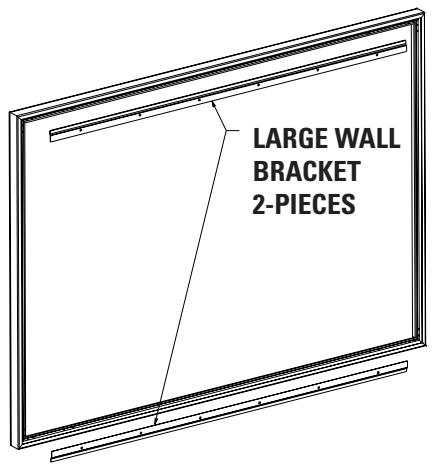
FIGURE 5
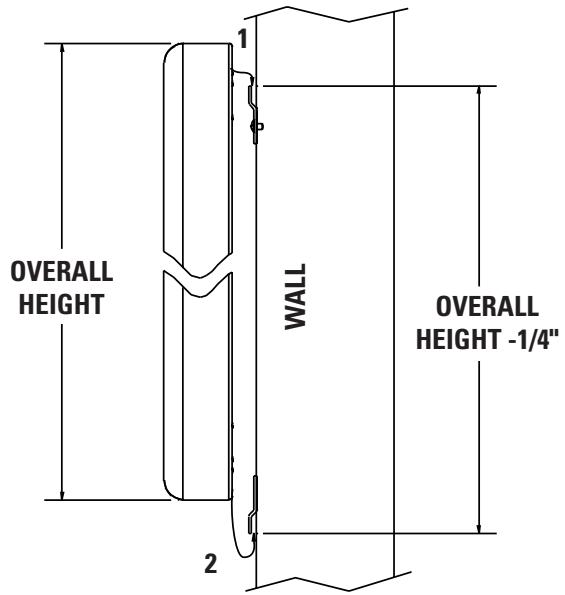
FIGURE 6
- To install the lower wall bracket, you must measure the overall height of the screen frame and subtract 1 / 4 . This is the dimension from the top of the upper wall bracket to the bottom of the lower wall bracket. See Figure 6.
- Position the screen with the attached surface onto the top wall bracket as shown in Figure 6. Push down at the center of the bottom frame rail to hook onto the lower wall bracket.
METHOD 3 (SCREENS OVER 96^ IN VIEWING WIDTH)
- Secure the large wall brackets to wall studs at the desired height. Make sure the brackets are level. The top of the frame will be 1 / 8" above the top of the large wall bracket when mounted. You will need at least 5 / 8" clearance above the bracket to hang the screen. Figures 6 and 7 show the proper orientation for the supplied wall brackets.
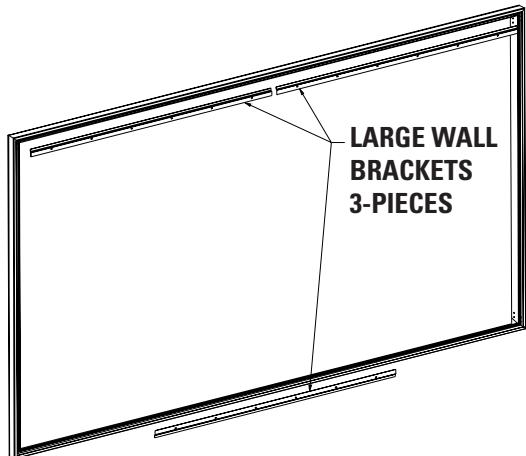
FIGURE 7
- To install the lower large wall bracket, you must measure the overall height of the screen frame and subtract 1 / 4" . This is the dimension from the top of the upper large wall bracket to the bottom of the lower large wall bracket. See Figure 6.
- Position the screen with the attached surface onto the top large wall bracket as shown in Figure 6. Push down at the center of the bottom frame rail to hook onto the lower large wall bracket.
CLEANING
Da-Tex®, Dual Vision, Pearlescent, Cinema Vision, Da-Mat®, High Contrast Da-Mat®, Audio Vision, High Contrast Audio Vision, High Contrast Cinema Vision and High Contrast Cinema Perf surfaces can be cleaned as follows:
Using a white clean cloth (100% cotton preferred) that is dampened with clear water, gently wipe the area in one direction. Do not use a circular motion. Using a dry 100% cotton cloth, wipe dry after each cleaning session. To clean a stubborn stain or a sticky surface, use denatured alcohol (methanol or methyl alcohol) following the same procedure as for water.
- PRESENTATION PRODUCTS
- SCREW
- SNAP STUD
- SMALL WALL BRACKET (8" LONG)
- CORNER BRACKET
- INSTALLATION
- SETTING UP YOUR SCREEN
- FRAME ASSEMBLY
- ATTACH THE VIEWING SURFACE
- METHOD 1 (SCREENS 80" AND SMALLER IN VIEWING WIDTH)
- Method 1
- METHOD 1 (SCREENS 80^ AND SMALLER IN VIEWING WIDTH)
- METHOD 2 (SCREENS OVER 80" UP TO 96" IN VIEWING WIDTH)
- Method 2
- METHOD 3 (SCREENS OVER 96^ IN VIEWING WIDTH)
- CLEANING
Marque : DA-LITE
Modèle : IMAGER
Catégorie : Écran de projection