23453 - Caméra BAZOO - Notice d'utilisation et mode d'emploi gratuit
Retrouvez gratuitement la notice de l'appareil 23453 BAZOO au format PDF.

| Type de produit | Webcam |
| Marque | BAZOO |
| Modèle | 23453 |
| Résolution | 640 x 480 pixels |
| Interface | USB |
| Alimentation | Via port USB |
| Compatibilité | Windows 98SE, ME, 2000, XP, Vista |
| Fonctions principales | Capture vidéo, photo |
| Accessoires fournis | CD-ROM de pilotes |
| Dimensions (approx.) | 80 x 50 x 30 mm |
| Poids (approx.) | 100 g |
| Matériau | Plastique |
| Longueur du câble | 1.5 m |
| Angle de vue (approx.) | 60° |
| Microphone intégré | Oui |
| Fixation | Pince pour écran ou trépied |
| Entretien et nettoyage | Nettoyer la lentille avec un chiffon doux et sec |
| Sécurité | Ne pas exposer à l'humidité ou à des températures extrêmes |
| Pièces détachées et réparabilité | Contactez le support client pour les pièces |
| Informations générales | Fabriqué pour BAZOO par Vivanco GmbH |
FOIRE AUX QUESTIONS - 23453 BAZOO
Questions des utilisateurs sur 23453 BAZOO
0 question sur cet appareil. Repondez a celles que vous connaissez ou posez la votre.
Poser une nouvelle question sur cet appareil
Téléchargez la notice de votre Caméra au format PDF gratuitement ! Retrouvez votre notice 23453 - BAZOO et reprennez votre appareil électronique en main. Sur cette page sont publiés tous les documents nécessaires à l'utilisation de votre appareil 23453 de la marque BAZOO.
MODE D'EMPLOI 23453 BAZOO
Gebrauchsanleitung – User's Manual – Notice d'emploi – Instrucciones de uso – Istruzioni per l'uso– Gebruiksaanwijzing– Instruções de uso – Instrukcja obšługi – Brugermanualer – Bruksanvisining
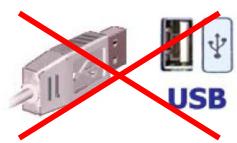
1

CD-ROM
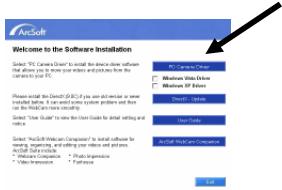
3
4

USB
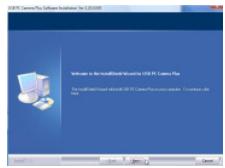
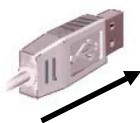
| GB - 1st step: Do not connect the camera to the USB interface (fig. 1) | 2nd step: Insert the CD ROM into your CD-ROM drive (fig. 2)3rd step: Click on “Install Driver” in start screen (fig. 3) | 4th step: Follow the instructions on the screen (fig. 4)5th step: Connect the USB plug of the webcam with your computer. (fig. 5) | Windows 98SE: System will ask you to insert Win98SE CD-ROM, and copy the necessary files to support USB Web camera. Windows ME, 2000, XP, Vista The webcam will be detected and installed by the system |
| D - 1. Schritt: Verbinden Sie die Kamera nicht mit dem USB-Anschluss (Abb. 1) | 2. Schritt: Legen Sie die Treiber-CD in das CD-ROM Laufwerk ein. (Abb. 2)3. Schritt: Klichen Sie im Startfenster auf „Install Driver“ (Abb. 3) | 4. Schritt: Folgen Sie den Anweisungen auf dem Bildschirm. (Abb. 4)5. Schritt: Verbinden Sie den USB-Stecker der Kamera mit dem Computer. (Abb. 5) | Windows 98SE: Halten Sie die Windows 98 Installations-CD bereit, um benötigte Treiber zu Installieren. Windows ME, 2000, XP, Vista Die Kamera wird vom System erkannt und installiert |
| F - Étape 1: Ne reliez pas la-camera à la connexion USB (fig. 1) | Etape 2 : Insérez le CD pilote dans le lecteur de CD (fig. 2)Etape 3 : Cliquez dans la fenêtre sur « Install Driver » (fig. 3) | Etape 4 : Suivez les instructions de l'écran (fig. 4)Etape 5 : Reliez la prise USB de laamera à l'ordinateur (fig. 5) | Windows 98SE: Ayez à portée de main le CD d'installation du Windows 98 afin d'installer le pilote nécessaire. Windows ME, 2000, XP, Vista Laamera est reconnaue par le système et installée. |
| E - 1g bajo: No conecte la CAMERA al enchufe USB (fig. 1) | 2g bajo: Introduzca el CD con los controladores en la unidad CD-ROM (fig. 2)3g bajo: En la pantalla de arranque, Hera click en “Install Driver” (Instalar controlador) | 4g bajo: Siga las instrucciones en pantalla (fig. 4)5g bajo: Conecte el enchufe USB de la CAMERA web en su ordinador (fig. 5) | Windows 98SE: Tenga el CD de instalación de Windows 98 a mano, para instalar los controladores necessarios. Windows ME, 2000, XP, Vista El sistema Reconocerá e instalará la CAMERA |
| I - Passaggio 1: non collegare la videocamera alla porta USB (Fig. 1). | Passaggio 2: insere il CD dei driver nellettore CD-ROM (Fig. 2). Passaggio 3:fare cliç su "Install Driver" [installa driver] nella finestra di avvio (Fig. 3). | Passaggio 4: seguire le istruzioni che vengono presentation a schermo (Fig. 4). Passaggio 5: collegare lo spinotto USB della videocamera al computer (Fig. 5). | Windows 98SE: Maintainere a disposizione il CD di installatione di Windows 98 per installare eventuali driver necessari. Windows ME, 2000, XP, Vista: la videocamera viene riconosciuti ed installata dalsystema. |
Gebrauchsanleitung – User's Manual – Notice d'emploi – Instrucciones de uso – Istruzioni per l'uso– Gebruiksaanwijzing– Instruções de uso – Instrukcja obšługi – Brugermanualer – Bruksanvisining
| NL - Stap 1: Sluit de camera nicht aan op de USB-aansluiting (afb. 1) | Stap 2: Plaats de CD met de stuurprogramma's in het CD-ROM station van uw computer. (Afb. 2) Stap 3: Klik in het startvenster op "Install Driver" (Afb. 3) | Stap 4: Volg de aanwijzingen in het scherm op. (Afb. 4) Stap 5: Sluit de USB-stekker van de camera aan op de computer (Afb. 5) | Windows 98SE: Houd de Windows 98 installment-CD bij de hand om de benodigde stuurprogramma's te installereren. Windows ME, 2000, XP, Vista De camera worden door het system herkend en geinstalleerd |
| PL* - Krok 1: Nie podłuczaj kamery do gniażda USB (rys. 1). | Krok 2: Umieść płyte CD ze sterownikami w napędzie CD (rys. 2). Krok 3: Kliknio na ekranie startowym na „Install Driver" (rys. 3). | Krok 4: Wykonuj polecenia wyświetlane na ekranie (rys. 4). Krok 5: Podstaw zwtyczek USB kamery internetowej do komputera (rys. 5). | Window 98SE: System poprosi o wędzenia płyty CD Win98SE i skopiOWanie plików wymaganych w celu obshugi kamery internetowej USB. |
| P - 1º passo: Não ligue a-camera à entrada USB (fig. 1) | 2º passo: Insira o CD de controladores na drive de CD-ROM. (fig. 2) 3º passo::Clique na janela de arranque em "Install Driver" (Instalar controlador). (fig. 3) | 4º passo: Siga as instruções exibidas no ecran. (fig. 4) 5º passo: Ligue o conector USB da-camera ao comptutar. (fig. 5) | Windows 98SE: Mantenha o CD de instalação do Windows 98 à maior para instalar os controladores que foram necessários. Windows ME, 2000, XP, Vista A-camera é reconhecida pelo Sistema e instalada |
| DK - 1. skridt: Tilslut ikke kameraet til USB-interfacet (fig. 1) | 2. skridt: Sæt CD ROM'en i dit CD ROM-drev (fig. 2) 3. skridt: Klik på "Install Driver" i startskærmibilledet (fig. 3) | 4. skridt: Følg instructijtionerne på skærmen (fig. 4) 5. skridt: Tilslut webcam'ets USB-stik til din computer (fig. 5) | Windows 98SE: Systemet:beder dig sætte Win98SE CD-ROM'en i og kopiere de nødvendige filer for at understandite dit USB Web camera. Windows ME, 2000, XP, Vista Systemet registreter og installerer webcam'et |
| SE - Steg 1: Anslut inte kameran till USB-anslutningen (bild 1) | Steg2: Lagg in CD-skivan med drivrutinerna i CD ROM-enheden (bild 2) Steg 3: Klicka på "Install Driver" i startfönstret (bild 3) | Steg 4: Följ anvisingarna på bildskärmen (bild 4). Steg 5: Anslut kamerans USB-enhet till datorn (bild 5). | Windows 98SE: Ha Windows 98 installations-CD i beredskap für att installerera nödvändiga drivrutiner. WindowsME, 2000, XP, Vista Kameran identifieras av systemet och installereras.. |
Dystrybutor VIVANCO POLAND Sp.z.o.o. UI Sosnkowskiego 1 02 495 Warszawa
Vivanco GmbH
Ewige Weide 15
D-22926 Ahrensburg / Germany
Phone +49 (0) 4102 / 231 - 0
Fax +49 (0) 4102 / 231- 160 Internet: www.bazoo.de
Product support
D 01805/404910(12Cent/Min)
hotline@vivanco.de
G consumer@vivanco.co.uk
F hotline@vivanco-france.fr
E vivanco@vivanco.es
I support@vivanco.it
NL info@vivanco.nl