
LG - Imprimante TALLYGENICOM - Notice d'utilisation et mode d'emploi gratuit
Retrouvez gratuitement la notice de l'appareil LG TALLYGENICOM au format PDF.


| Type de produit | Imprimante matricielle ligne |
| Marque | TALLYGENICOM |
| Modèle | LG (série LGe, LGL, LGi) |
| Vitesse d'impression | Jusqu'à 1800 lignes par minute (lpm) selon le modèle |
| Résolution | 240 × 288 dpi |
| Méthode d'impression | Matricielle impact ligne |
| Nombre de copies | Jusqu'à 6 copies (formulaires multiparties) |
| Gestion du papier | Papier continu, largeur 3 à 18,7 pouces, longueur 1 à 255 lignes |
| Connectivité standard | RS-232 série (jusqu'à 38,4 kbaud) et parallèle IEEE 1284 |
| Connectivité optionnelle | Ethernet 10BaseT/100BaseT |
| Émulations | DEC LG Series, Tally ANSI, Genicom ANSI, Printronix P Series, HP2564C, Epson FX-1180, IBM Proprinter III XL, etc. |
| Polices et codes-barres | Draft, Data Processing, Courier, Gothic, OCR A & B ; codes-barres : Code 39, Code 128, Interleaved 2 of 5, UPC-A, EAN 8, PDF-417, etc. |
| Dimensions (L × P × H) | Modèles LGi : 101,6 × 71,6 × 71,9 cm ; modèles LGL/LGe : 71,9 × 100,8 × 59,4 cm |
| Poids | Modèles LGi : 113,4 kg ; modèles LGL/LGe : 97,1 kg |
| Alimentation | 90-130 VAC ou 180-264 VAC, 50-60 Hz (auto-adaptable) |
| Consommation électrique | 180 W typique, 260 W maximum |
| Température d'utilisation | 10°C à 40°C |
| Humidité d'utilisation | 10% à 90% sans condensation |
| Niveau sonore | De 50 à 60 dBA selon le modèle |
| Cycle de travail | Jusqu'à 512 000 pages par mois (selon modèle) |
| Fiabilité (MTBF) | 16 000 heures à 25% de cycle |
| Consommables | Ruban : jusqu'à 250 millions de caractères (selon modèle) |
| Garantie | 1 an, sur site (90 premiers jours pièces, main-d'œuvre et déplacement ; reste pièces uniquement) |
| Normes et certifications | Energy Star, RoHS, Ozone-free, ISO, Meditech |
| Entretien et nettoyage | Nettoyer régulièrement le chemin papier et les têtes d'impression avec un kit adapté. Consulter la notice pour les procédures détaillées. |
| Sécurité | Débrancher avant entretien. Utiliser uniquement des consommables agréés. Respecter les tensions d'alimentation. |
| Pièces détachées et réparabilité | Pièces disponibles : rubans, têtes d'impression, circuit d'alimentation, cartes d'interface. Support technique via TallyGenicom. |
FOIRE AUX QUESTIONS - LG TALLYGENICOM
Questions des utilisateurs sur LG TALLYGENICOM
0 question sur cet appareil. Repondez a celles que vous connaissez ou posez la votre.
Poser une nouvelle question sur cet appareil
Téléchargez la notice de votre Imprimante au format PDF gratuitement ! Retrouvez votre notice LG - TALLYGENICOM et reprennez votre appareil électronique en main. Sur cette page sont publiés tous les documents nécessaires à l'utilisation de votre appareil LG de la marque TALLYGENICOM.
MODE D'EMPLOI LG TALLYGENICOM
LG Series Line Matrix Printers
DEC/Compaq® compatible Line Matrix Printers
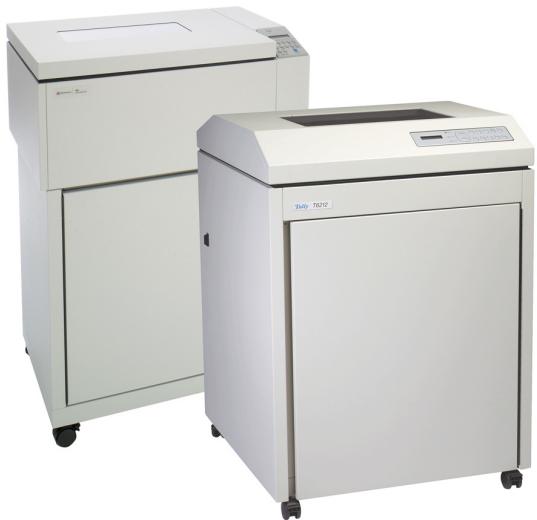
- Up to 1800 lines per minute (lpm).
- DEC/Compaq® compatible.
- Virtually unlimited duty cycle.
- Complies with industry standards for open systems printing.
- High-quality text and graphics.
- Handles paper and multipart forms with ease.
- Flexible connectivity and interfacing.
- Enclosed cabinet models for quiet operation in office environments.
- Pedestal models for fast, easy access and operation in harsh, shop-floor environments.
Fast, Quality Printing.
The LG Series builds on the reputation of our 6300 and T6200 Standard Series line matrix printers, adding plug-in compatibility with DEC and Compaq systems. The LG Series offers the same advanced set of features found in the 6300 and T6200 Standard Series: Auto Gap, Auto Form Profiling, SmartRibbon, extensive connectivity options, compatibility with wide range of host systems.
Superior Paper Handling Performance.
The LGe06, LGL06, LGe12 and LGL12 are the first and only line printers to offer Auto-Gap which simplifies operator set-up and printer use by setting the optimum print gap based on the form thickness. Other models in the LG Series offer an easy to use manual print gap setting. All LG Series printers handle single to six-part continuous forms with ease.
SmartRibbon Technology.
The patented TallyGenicom SmartRibbonTM, available on the LGe12, LGi12, LGL12, LGi15 and LGi18 models, ensures a uniformly high contrast over the ribbon's life – the last form looks as good as the first.
Complies With Industry Standards For Open Systems.
For true open systems printing with workstations, mainframes and PC applications, the LG series supports a variety of printing languages and protocols including DEC ANSI, IBM® Proprinter® and Epson®, as well as VGL and PGL.
Print Speed LGL06/LGe06: 600 lpm, LGL12/LGe12/LGi12: 1200 lpm, LGi15: 1500 lpm, LGi18: 1800 lpm
Graphic Speed LGL06/LGe06: 75 lpm, LGL12/LGe12/LGi12: 150 lpm, LGi15: 187 lpm, LGi18: 225 lpm
Print Method Line impact dot matrix
Resolution 240× 288 dpi
Character Density 5, 6, 6.7, 7.5, 8.3, 8.6, 10, 12, 13.3, 15, 16.7, 17.1, and 20
Line Density 1.5, 2, 3, 4, 5, 6, 8, 9, 10, 12 (plus variable line spacing)
Character Sets 26 sets; comprehensive language coverage for North and South America, Western and Eastern Europe, as well as Greek, Hebrew, and Katakana
Standard Connectivity RS-232 Serial (up to 38.4K baud) and IEEE 1284 Compliant Parallel (both ports hot, active port selected automatically)
Optional Connectivity Ethernet 10BaseT / 100BaseT
Standard Emulation DEC LG Series, Tally® ANSI, Genicom® ANSI, Printronix® P Series, HP2564C, Epson® FX-1180, IBM® Proprinter III XL; Graphics Tally® Industrial Graphics; QMS® CODE V™ Version 2; Printronix® PGL
Fonts Draft, Data Processing, Courier, Gothic, OCR A & B; Barcodes: Code 39, Code 128, Interleaved 2 of 5, UPC-A, UPC-E, EAN 8, EAN 13, EAN 128, Codabar, MSI, PDF-417, POSTNET
Consumables LGL06/LGe06: 40 million; ALL Others: 40, 60, 250 million
STD Paper Handling Straight through paper path, paper out and paper motion detection, forms position retained in non-volatile memory; Auto-Gap on LGL06/12 and LGe06/12
Number of Copies Up to 6-part forms
Form Thickness Max .025"
Paper Type Continuous paper
Paper Weight 15-100 lbs.
Paper Size Width: 3 to 18.7 in.; Length: 1 to 255 lines
Physical Weight LGi Models: 250 lbs.; LGL and LGe Models: 214 lbs.
PhysicalSize LGi Models: 40'' × 28.2'' × 28.3'' ; LGL and LGe Models: 28.3'' × 39.7'' × 23.4''
Power Voltage 90 to 130 VAC or 180 to 264 VAC
Power Frequency 50 to 60Hz (auto ranging)
Power Consumption 180 watts typical, 260 watts maximum
Compliance Energy Star compliant, Ozone-free, RoHS, Microsoft, ISO-compliant, Meditech Approved
Workload LGL06/LGe06: 175,000 ppm, LGL12/LGe12/LGi12: 345,000 ppm, LGi15: 430,000 ppm, LGi18: 512,000 ppm, Energy Star, RoHS, Microsoft, ISO-compliant, Meditech Approved
Reliability MTBF 16,000 hours @ 25% duty cycle, 25% page density
Drivers Windows 2003 Server, XP, 2000, NT 4.0, 95/98
Temperature 50 to 104^ F (10 to 40^ C) operating; -40^ C to 66^ C non-operating
Humidity 10% to 90% non-condensing (operating); 5% to 95% non-condensing (non-operating)
Acoustic LGL06 55 dBA, LGe06 52 dBA, LGL12 60 dBA, LGe12 56 dBA, LGi12 50 dBA, LGi15 52 dBA, LGi18 55 dBA
Warranty 1-year Limited On-Site (First 90 days parts, labor, travel; Remainder of year: Parts only)
Option 1 Ethernet 10BaseT / 100BaseT



© 2009 Printronix, Inc. All rights reserved. Genicom, Tally, TallyGenicom, TG TallyGenicom, the TG Logo, Intellifilter, Intelliprint and Intellipress are trademarks or registered trademarks of Printronix, Inc. Microsoft, Windows, and the Windows logo are trademarks or registered trademarks of Microsoft Corporation in the United States and/or other countries. All other trademarks, product names, company names or logos herein are the property of their respective owners. Product appearance and/or specifications are subject to change without notice.
PRINTRONIX
GLOBAL PRINTING... ENABLED.
14600 Myford Road
Irvine, CA 92606
800-665-6210
www.tallygenicom.com
Marque : TALLYGENICOM
Modèle : LG
Catégorie : Imprimante