
1360 - Téléphone fixe UNIDEN - Notice d'utilisation et mode d'emploi gratuit
Retrouvez gratuitement la notice de l'appareil 1360 UNIDEN au format PDF.


| Type de produit | Téléphone fixe avec afficheur |
| Marque | UNIDEN |
| Modèle | 1360 |
| Alimentation | 4 piles AA alcalines |
| Fonctions principales | Identification de l'appelant, Messagerie visuelle, Haut-parleur, Mémoire de numérotation (12 numéros), Rappel, Mise en attente |
| Affichage | Afficheur pour numéro et nom de l'appelant |
| Compatibilité | Nécessite abonnement aux services d'identification de l'appelant et d'appel en attente |
| Réglage de la sonnerie | Commutateur de volume (0, 1, 2) à l'arrière |
| Montage mural | Oui (adaptateur mural non fourni, rotation du socle nécessaire) |
| Connectivité | Prise téléphonique RJ11 (ligne et combiné) |
| Type de numérotation | Tonalité ou impulsions (sélectionnable) |
| Mémoire des appels | Jusqu'à 75 appels en mémoire |
| Batterie de sauvegarde | 4 piles AA pour la conservation des données CID |
| Normes | FCC Part 15, compatible appareils auditifs (HAC) |
| Entretien | Chiffon doux et sec, éviter produits abrasifs et solvants |
| Sécurité | Distance minimale de 20 cm entre l'appareil et le corps pour l'exposition RF |
| Service client (États-Unis) | 1-800-297-1023 |
| Garantie | 1 an limitée (pièces et main-d'œuvre) |
FOIRE AUX QUESTIONS - 1360 UNIDEN
Questions des utilisateurs sur 1360 UNIDEN
0 question sur cet appareil. Repondez a celles que vous connaissez ou posez la votre.
Poser une nouvelle question sur cet appareil
Téléchargez la notice de votre Téléphone fixe au format PDF gratuitement ! Retrouvez votre notice 1360 - UNIDEN et reprennez votre appareil électronique en main. Sur cette page sont publiés tous les documents nécessaires à l'utilisation de votre appareil 1360 de la marque UNIDEN.
MODE D'EMPLOI 1360 UNIDEN
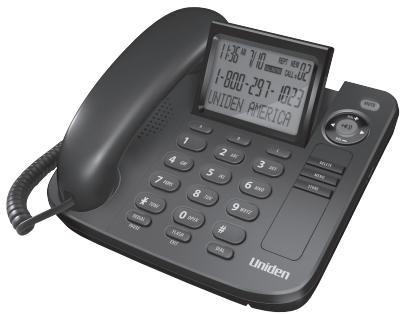
Call Waiting / Caller ID Speakerphone with 12 Number Memory User's Guide
Interference Information
This device complies with Part 15 of the FCC Rules. Operation is subject to the following two conditions: (1) This device may not cause harmful interference; and (2) This device must accept any other device that has been designed for operation in the same way.
This equipment has been tested and found to comply with the limits for a Class B digital device, including the following requirements. This equipment is designed to provide reasonable protection against harmful interference in a residential installation.
This equipment generates, uses, and can radiate radio frequency energy and, if not installed and used in a particular installation, may cause serious environmental damage to the environment. However, there is no guarantee that interference will not occur in a particular installation.
Privacy of Communications may not be ensured when using this product.
If this equipment does cause harmful interference to radio or television reception, which is the case in the case of the above-mentioned equipment, the user is encouraged to try to correct the interference by one or more of the following measures:
- Reorient or relocate the receiving antenna (that is, the antenna for radio or television that is "receiving" the interference).
Reorient or relocate and increase the separation between the telecommunications equipment and receiving antenna.
- Connect the telecommunications equipment into an outlet on a circuit different from that to which the receiving antenna is connected.
If these measures do not eliminate the interference, please consult your dealer or an experienced radio/television technician for additional suggestions. Also, the Federal Communications Commission has prepared a helpful booklet, "How to Identify and Resolve Radio/TV Interference Problems." This booklet includes information about the Office, Washington, D.C. 20402. Please specify stock number 004-000-00345-4 when ordering copies.
Notice: The changes or modifications not expressly approved by the party responsible for compliance could void the user's authority to operate the equipment.
Hearing Aid Compatibility (HAC)
This telephone system meets FCC standards for Hearing Aid Compatibility.
Licensing
Licensed under US Patent 6.427.009.
FCC RF Radiation Exposure Statement
This equipment complies with FCC RF radiation exposure limits set forth for an uncontrolled environment. This equipment should be installed and operated with a minimum distance of 20 centimeters between the radiator and your body. This transmitter must not be co-located or operated in conjunction with any other antenna or transmitter.
Introduction
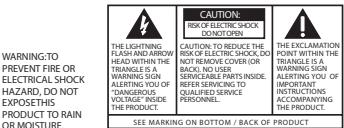
A CAUTION: When using telephone equipment, there are basic safety instructions that should always be followed. Refer to the IMPORTANT SAFETY INSTRUCTIONS provided with this product and save them for future reference.
Short Glossary of Terminology Used in this Manual
Hook switch. The part of the phone that pops up to activate the phone line when the handset is lifted from the base.
Off-hook. A term used to describe the phone in its active mode when the handset is off of the base cradle or when the speaker button is pressed.
On-hook. A term used to describe the phone in an inactive mode.
Before You Begin
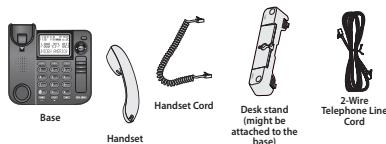
Parts Checklist
Make sure your package includes the following items:
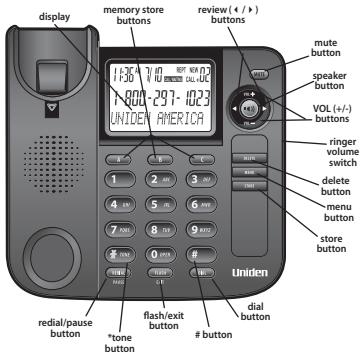
Base Layout
Installing and Replacing the Batteries
Your Caller ID phone uses 4 AA-size alkaline batteries for receiving and storing Caller ID records and for storing the numbers you use for memory dialing, pulse dialing, and radial IMPORTANT: You will have approximately 90 seconds to replace the batteries before the memories stored are lost. Please read the instructions before replacing the batteries and have the batteries ready to be inserted beforehand.
IMPORTANT: If you are not going to use the telephone for more than 30 days, remove the batteries because they may leak and damage the unit.
-
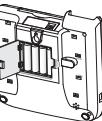
Disconnect the telephone line cord and remove the desk stand from the back of the base.
-
Release latch or the battery compartments and remove cover.
-
Insert 4 AA-size alkaline batteries as shown on the diagram in the battery compartments.
-
Snap the battery compartment door back into place and replace the desk stand.
-
Connect the line cord and check your memory locations.
NOTE: If the low battery icon appears in the display, you need to replace the low battery icon with a high battery icon. The batteries as soon as possible in order to maintain Caller ID operation.
Installing the Phone
Your phone should be placed on a level surface, such as a desk or table top, or you can mount it on a wall.
Connecting the Handset
-
Connect one end of the coiled handset cord to the jack on the handset
-
Plug the other end of the coiled handset cord to the jack on the base
-
Place the handset in the cradle
Connecting the Telephone Line
-
Connect one end of the straight telephone line cord to the jack on the back of the base.
-
Connect the other end to a wall phone jack.
-
Set the ringer volume switch located at the back of the base to the desired loudness.
-Telephone will not ring.
1 - Sound will be lowest.
2- Sound will be loudest. NOTE: The unit is properly installed if you pick up the
handset and hear the dial tone. Otherwise, recheck all installation steps.
Wall Mounting
Your speakerphone can also be mounted on a wall plate (not included).
NOTE: To prevent the handset from falling out of the cradle while the phone is hanging on the wall, you must switch both the handset and the desk stand to their wall-mount positions.
-
On the front of the base, pull the handset hook out of the slot and slide it back to the slot. The handset drop it from front to back. Slide it back into the slot.
-
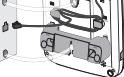
Turn the base over. Press in on the tabs and remove the desk stand from the back of the base.
Rotate the stand 180 degrees, and insert the hooks into the slots. Press the switch on the press in the tabs and snap the stand into place.
-
Connect the telephone line cord to the wall jack and the phone. If desired, wrap any excess cord around the wall jack.
-
Place the mounting slots over the pins on the wall plate, and slide the base down to lock it into place.
For best speakerphone performance
- Areas with high background noise. (The microphone might pick up these sounds and the speakerphone may be going into the receiving mode when you finish talking.)
- Surfaces affected by vibration.
the handset. - Recessed areas such as in a corner, under a cupboard, or next to a cabinet, which can generate an echo effect.
in the base. Speakerphone Use
Note the following guidelines when using the speakerphone
-
The speakerphone works similar to a two-way radio in that you can only listen or talk at one time.
-
Stay reasonably close to the phone so that you can be clearly heard by the person to whom you are talking.
You can adjust the speaker volume by pressing the VOL (-or + ) buttons.
- The speakerphone indicator light comes on when the speakerphone is in use. NOTE: Batteries must be installed for the speakerphone to operate.
e Caller ID (CID) Features. 103TINr In order to use a
You must subscribe to two separate services available from your local telephone company: the standard Name/Number Caller ID Service to know who is calling when the phone rings and Caller ID with Call Included). Waiting Service to know who is calling while you are on the phone.
CID Summary Screen
The Summary Screen shows the current time, date, and number of new calls to review. It is displayed until any button is pressed.
NOTE: The number of new calls is displayed until all new calls have been reviewed.
Receiving and Storing CID Calls
This units receives and displays information transmitted by your local company. This information can include the phone number, date, and time or the name, phone number, date, and time. The unit can store up to 75 calls for later review. When the memory is full, a new call automatically replaces the oldest call in memory. The screen displays NEW for calls received that have not been reviewed. The screen displays REPT for calls received more than once which have not been reviewed.

Equipment Approval Information
Your telephone equipment is approved for connection to the Public Switched Telephone Service (PST) system. The PST system provides a complete set of communications and the Tech Requirements for Telephone Terminal Equipment published by ACTA.
1 Notification to the Local Telephone Company
On the bottom of this equipment is a label indicating, among other information, the US number and the country of origin for the equipment. You must, upon request, provide this information to your telephone company.
The REN is useful in determining the number of devices you may connect to your telephone line and still have all of these devices ring when your telephone number is called. In most (but not all) areas, the sum of the RENs of all devices connected to one line should not exceed 5. To be certain that you are connecting to a device you want to, contact to your line as determined by the REN, you should contact your local telephone company.
A plug and jack used to connect this equipment to the premises wiring and telephone network must comply with the applicable FCC Part 68 rules and requirements adopted by the ACTA. A compliant telephone cord and modular plug is provided with this product. It is designed to be connected to a compatible modular jack that is also compliant. See installation instructions for details. Notes:
- This equipment may not be used on coin service provided by the telephone company.
- Party lines are subject to state tariffs, and therefore, you may not be able to use your own telephone equipment if you are on a party line. Check with your local telephone company.
-
Notice must be given to the telephone company upon permanent disconnection of your phone.
-
If your home has specially wired alarm equipment connected to the telephone line, ensure the installation of this product does not disable your alarm equipment. If you have questions about the installation of this product, please contact our technical support at 900-123-4866.
US Number is located on the cabinet bottom.
REN Number is located on the cabinet bottom.
2 Rights of the Telephone Company
Should your equipment cause trouble on your line which may harm the telephone network, the telephone company shall, where practicable, notify you that temporary discontinue of service will be required. The telephone company shall also notify you that any such action, the telephone company may temporarily discontinue service immediately. In case of such temporary discontinue, the telephone company must: (1) promptly notify you of such temporary discontinue; (2) afford you the opportunity to correct the situation; and (3) inform the operator of the transmission pursuant to procedures set forth in Subpart E of Part 68, FCC Rules and Regulations.
The telephone company may make changes in its communications facilities, equipment, operations or procedures where such action is required in the operation of its business and not inconsistent with FCC Rules and Regulations. If these changes are expected to affect the use or performance of the system, the operator should be informed that you must give you adequate notice, in writing, to allow you to maintain uninterrupted service.
Visit our website at: www.uniden.com
telephone number shows in the display.
- Lift the handset or press the speaker button and the number automatically dials. NOTE: Use the delete button to delete an incorrectly entered number.
Caller ID Display Messages
The following special messages indicate the status of a message or the unit:
BLOCKED CALL The caller of the incoming call is registered as "Private Number" and their Caller ID information
LOW Battery power level is low.
NO CALLS The caller memory is empty.
START/END You are at the beginning or the end of the Caller ID memory log.
PRIVATE CALLER The incoming call does not have Caller ID service or their service area is not linked to yours. If the screen displays PRIVATE CALLER along with a calling number, the name information for that number was not available.
Troubleshooting Tips
No Dial Tone
-
Check all cabling to make sure that all connections are secure and not damaged.
-
Check hook switch: Does it fully extend when handset is lifted from cradle?
No Display
Replace the batteries.
- Check for proper battery installation.
No Information is Shown After the Phone Rings
-
Are you subscribed to Caller ID service from your local telephone company?
-
Be sure to wait until the second ring before answering.
Phone Dials in Pulse with Tone Service
Make sure TONE PULSE is set to TONE DIAL.
Phone Won't Dial Out with Pulse Service
Make sure TONE PULSE is set to PULSE DIAL.
Phone Does Not Ring
Make sure ringer switch is set to 1 or 2
- You may have too many extension phones on your line. Try unplugging some
extension phones.
- Check for dial tone. See Troubleshooting Tips for No Dial Tone
Incoming Voice Volume Low
- Are other phones off hook at same time? If so, this is normal condition as volume
drops when additional phones are used at once
Check the handset receiver or speaker volume.
Memory Dialing
Make sure you entered the numbers correctly into memory.
General Product Care
To keep your phone working and looking good, follow these guidelines:
- Avoid putting it near heating appliances and devices that generate electrical noise (for example, motors or fluorescent lamps).
DO NOT expose to direct sunlight or moisture.
- Avoid dropping and other rough treatment to the unit.
Clean with a soft cloth.
- Never use a strong cleaning agent or abrasive powder because this will damage the
finish.
- Retain the original packaging in case you need to ship it at a later date.
Service
If trouble is experienced with this equipment, for repair or warranty information, please contact customer service at 1-800-297-1023. If the equipment is causing harm to the telephone network, the telephone company may request that you disconnect the equipment until the problem is resolved.
This product may be serviced only by the manufacturer or its authorized service agents. Changes or modifications not expressly approved by Uniden America Corporation could void the user's authority to operate this product. For instructions on how to obtain a warranty for the warranty included in this guide or call customer service at 1-800-297-1023.
Or refer inquiries to:
Uniden America Service
4700 Amon Carter Blvd.
Forth Worth, TX 76155
Attach your sales receipt to the booklet for future reference or jot down the date this week. This will ensure that all the information will be valuable if service should be required during the warranty period.
Purchase Date
Name of Starm
Industry Canada (I.C.) Notice
Terminal equipment
NOTICE: This equipment meets the applicable Industry Canada Terminal Equipment Technical Specifications. This is confirmed by the registration number. The abbreviation IC, before the registration number signifies that registration was performed based on a Canadian Standard Specification. The industry standards and specifications were met. It does not imply that Industry Canada approved the equipment.
NOTICE: The Ringer Equivalence Number (REN) for this terminal equipment is marked on the equipment itself. The REN assigned to each terminal equipment provides a reference to the equipment used in the test. The number of items that are included in the test is 10.
telephone interface. The termination on an interface may consist of any combination of the following three types: a device that is not in the sum of the Ringer Equivalence Numbers of all the devices does not exceed five.
One-year limited warranty
IMPORTANT: Evidence of original purchase is required for warranty service. WARRANTY: UNIDEN AMERICA CORPORATION ("Uniden") ELEMENTS OF WARRANTY: Uniden warrants, for one year, to the original retail owner, this Uniden product to be free from defects in materials and craftsmanship with only the limitations or exclusions set out below.
WARRANTY DURATION: This warranty to the original user shall terminate and be of no further effect 12 months after the date of original retail sale. The warranty is invalid if the Product is (A) damaged or not maintained as reasonable or necessary, (B) modified, altered, or used as part of any conversion kits, subassemblies, or any configurations not sold by Uniden, (C) improperly installed, (D) serviced or repaired by someone other than an authorized Uniden service center for a defect or malfunction covered by this warranty, (E) used in any conjunction with equipment or parts or as part of any system that has been designed and manufactured by anyone other than as detailed by the owner's manual for this product.
STATEMENT OF REMEDY: In the event that the product does not conform to this warranty at any time while this warranty is in effect, warrantor will either, at its option, repair or replace the defective unit and return it to you without charge for parts, service, or any other cost (except shipping and handling) incurred by warrantor or its representatives in connection with the performance of this warranty. Warrantor, at its option, may replace the unit with a new or refurbished unit. THE LIMITED WARRANTY SET FORTH ARE THE SOLE AND ENTIRE WARRANTY PERTAINING TO THE PRODUCT AND IS IN LEUDE OF AND EXCLUDING ALL OTHER WARRANTYS OF ANY NATURE WHATsoever, WHETHER EXPRESS, IMPLIED OR ASRIING BY OPERATION OF LAW INCLUDING, BUT NOT LIMITED TO ANY IMPLIED WARRANTY OF MERCHANTABILITY OR FITNESS FOR A PARTICULAR PURPOSE. THIS WARRANTY DOES NOT COVER OR PROVIDE FOR THE REIMBURSEMENT OR PAYMENT OF INCIDENTAL OR CONSEJONTAL DAMAGES. Some states do not allow this exclusion or limitation of incidental or consequential damages so the above limitation or exclusion may not apply to you.
LEGAL REMEDIES: This warranty gives you specific legal rights, and you may also have other rights which vary from state to state. This warranty is void outside the United States of America and Canada. PROCEDURE FOR OBTAINING PERFORMANCE OF WARRANTY: If, after following the instructions in the owner's manual you are certain that the Product is defective, pack the Product carefully (preferably in its original packaging). The Product should include parts and accessories originally purchased with the knowledge of the original purchase and a note describing the defect that has caused you to return it. The Product should be shipped freight prepaid, by traceable means, to warranty at:
Uniden America Service
4700 Amon Carter Blvd.
Fort Worth, TX 76155
Uniden® is a registered trademark of Uniden America Corporation.
The pictures in this manual are used for examples only. Your actual phone may not look exactly like the pictures.
- Call Waiting / Caller ID Speakerphone with 12 Number Memory User's Guide
- Interference Information
- Hearing Aid Compatibility (HAC)
- Licensing
- FCC RF Radiation Exposure Statement
- Introduction
- Short Glossary of Terminology Used in this Manual
- Before You Begin
- Parts Checklist
- Base Layout
- Installing and Replacing the Batteries
- IMPORTANT: If you are not going to use the telephone for more than 30 days, remove the batteries because they may leak and damage the unit.
- Installing the Phone
- Connecting the Handset
- Connecting the Telephone Line
- Wall Mounting
- For best speakerphone performance
- in the base. Speakerphone Use
- e Caller ID (CID) Features. 103TINr In order to use a
- CID Summary Screen
- Receiving and Storing CID Calls
- Equipment Approval Information
- Notification to the Local Telephone Company
- US Number is located on the cabinet bottom.
- REN Number is located on the cabinet bottom.
- Rights of the Telephone Company
- Visit our website at: www.uniden.com
- Caller ID Display Messages
- LOW Battery power level is low.
- Troubleshooting Tips
- General Product Care
- Service
- Industry Canada (I.C.) Notice
- One-year limited warranty
Marque : UNIDEN
Modèle : 1360
Catégorie : Téléphone fixe