
BTSC1500 - Kit Bluetooth voiture UNIDEN - Notice d'utilisation et mode d'emploi gratuit
Retrouvez gratuitement la notice de l'appareil BTSC1500 UNIDEN au format PDF.


| Type de produit | Kit Bluetooth voiture |
| Marque | UNIDEN |
| Modèle | BTSC1500 |
| Alimentation | Batterie lithium-polymère rechargeable via adaptateur 12 V DC (allume-cigare) |
| Temps de charge | Au moins 3 heures |
| Autonomie en conversation | Environ 12 heures |
| Autonomie en veille | Environ 10 jours |
| Connectivité | Bluetooth |
| Portée Bluetooth | Jusqu'à 10 mètres (30 pieds) |
| Profils Bluetooth supportés | Profil mains-libres (HFP) et profil casque (HSP) |
| Fonctions principales | Appels mains-libres, identification de l'appelant, synthèse vocale (anglais), gestion de deux téléphones, rappel des numéros, mise en attente, rejet d'appel, transfert d'appel |
| Reconnaissance vocale | Oui (activation vocale via téléphone compatible) |
| Affichage | Écran à icônes (intensité signal, batterie, volume, etc.) |
| Montage | Clip pour pare-soleil, orientation réversible |
| Entretien et nettoyage | Essuyer avec un chiffon sec ou légèrement humide (eau ou nettoyant électronique). Ne pas immerger. |
| Sécurité | Ne pas exposer à l'eau, éteindre lors du plein d'essence, ne pas laisser les enfants jouer avec (petites pièces) |
| Garantie | 2 ans (pièces et main-d'œuvre) |
| Température de fonctionnement | Jusqu'à 52 °C (125 °F) |
| Certifications | FCC Part 15, Industrie Canada RSS-210 |
FOIRE AUX QUESTIONS - BTSC1500 UNIDEN
Questions des utilisateurs sur BTSC1500 UNIDEN
0 question sur cet appareil. Repondez a celles que vous connaissez ou posez la votre.
Poser une nouvelle question sur cet appareil
Téléchargez la notice de votre Kit Bluetooth voiture au format PDF gratuitement ! Retrouvez votre notice BTSC1500 - UNIDEN et reprennez votre appareil électronique en main. Sur cette page sont publiés tous les documents nécessaires à l'utilisation de votre appareil BTSC1500 de la marque UNIDEN.
MODE D'EMPLOI BTSC1500 UNIDEN
Uniden
BTSC1500 Bluetooth® Travel Kit User's Guide
Also in this package:
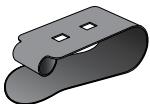
Visor clip (attached)
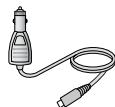
DC (car) power adapter
Questions? Problems? Get help on the web at www.uniden.com
or call our Customer Service line at 800-292-2294.
Getting to Know the Travel Kit
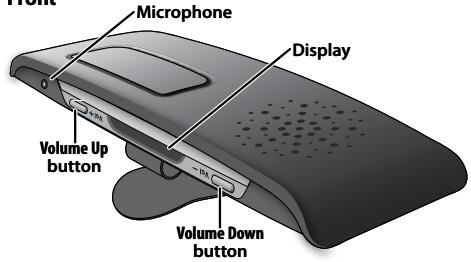
Front
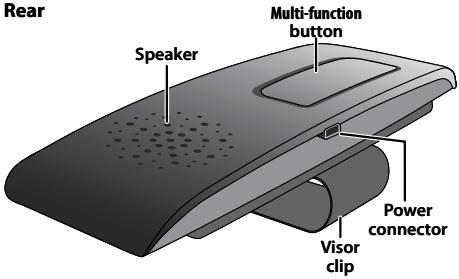
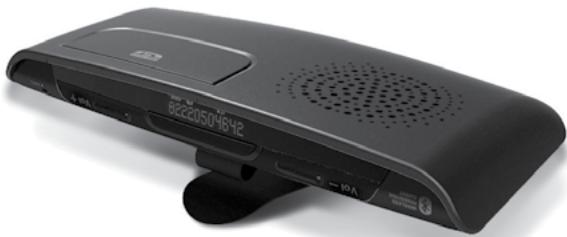
Rear

Reading the Display Icons
| Icon | Name | What it means |
| T.I.I | Signal strength | Shows the relative strength of the Bluetooth signal (appears separately for each connection). |
| T.I.I | Text to speech | Text to speech mode is on. |
| Bluetooth | Bluetooth | The travel kit is currently paired to a Bluetooth device. |
| Call activation | Call activation | The travel kit is on an active call. |
| Mute | The microphone is muted. | |
| Battery status | Shows the relative strength of the battery. | |
| Volume level | Shows the current volume level. |
Using the Buttons
| Button | Press to | Press & hold (2 seconds) to | Press & hold (4 seconds) to |
| Multi-function | -In standby: radial the last number.-While a call is ringing: answer the call.-On a call: hang up. | -In standby: activate voice dialing.-While a call is ringing: reject the call.-On a call: transfer the call to your phone (and back). | -In standby: turn the travel kit off. |
| Volume Up | -In standby: see the outgoing call log.-On a call: increase the volume. | -In standby: activate voice dialing on your second phone. | -On a call: put the current call on hold and switch to a waiting call. |
| Volume Down | -In standby: see the received call log.-On a call: decrease the volume. | -In standby: radial the last number on your second phone.-On a call: mute the microphone. | -On a call: hang up the current call and switch to a waiting call. |
The buttons only activate the function when you release them.
Setting Up Your Travel Kit
Charge the Battery
Before using your travel kit, charge the battery for at least 3 hours. Charging the battery completely (and keeping it charged) will help you get the longest possible talk and standby time out of the battery. (On average, the battery provides about 12 hours of talk time and about 10 days of standby time.)
Connect the adapter to the power connector on the back of the travel kit and plug it into any standard 12 V DC (regular automobile) power outlet.
Use ONLY the power adapter supplied with the travel kit! Using any other adapter could damage your travel kit, create a fire hazard, or cause a risk of electric shock!
Pair the Kit to Your Bluetooth Phone
Pairing "introduces" two Bluetooth devices and gives them permission to connect to each other. If you want to use the travel kit with more than one phone, you need to pair it with each phone separately. Once you pair a phone to the travel kit, the two devices can connect automatically whenever they can detect each other.
1: Make sure the travel kit is powered off and the power adapter is not connected (you can't pair the travel kit while it's charging).
2: Press and hold Multi-function until the display shows Pairing Mode and you hear the Pairing melody. This means the travel kit is visible to other Bluetooth devices.
3: On your phone, start a search for Bluetooth travel kits or hands-free devices. (This process may take several seconds, and it will be different for each mobile phone; see your phone's owner's manual for detailed instructions.)
4: Your phone should discover a device called a BTSC1500 or a Handsfree device. When your phone asks if you want to pair with this device, answer yes.
5: If your phone prompts you for a PIN code or password to pair with the BTSC-1500, enter 0000.
6: When the travel kit is paired, the LED turns blue and flashes every 3 seconds. Your phone might display a confirmation message, also.
7: Your phone might ask if you want to change the travel kit's name; generally, you should only change the name if you have more than one BTSC1500 that you use with this phone.
Connecting to your phone
Most phones connect to the travel kit as soon as you pair it; if yours won't, turn the travel kit off and back on. If travel kit still won't connect, check your phone's owner's manual for additional information.
Once the travel kit is paired:
Each time you turn the travel kit on, it automatically connects to whatever device it was connected to last.
If the travel kit loses the connection (e.g., if your phone is out of range), it
should reconnect automatically when it detects the phone again. To manually reconnect, press Multi-function.
Inverting the Travel Kit
The travel kit can operate upside down so you can clip it to either side of your visor.
To reverse the visor clip: press in on the two tabs that come through the holes in the clip, and slide the clip out. Rotate the clip 180 degrees and slide it back in.
To invert the display: press & hold Volume Up and Volume Down (at the same time) for 2 seconds.
Using Your Travel Kit
To turn on the travel kit, press and hold Multi-function until the display shows Hello and you hear the Power-on melody.
To turn off the travel kit, press and hold Multi-function until the display shows Goodbye and you hear the Power-off melody (this takes about 4 seconds).
Making and Receiving Calls
To make a call
Just dial from your phone as usual. Your phone should automatically send the call to the travel kit. If it doesn't, press and hold Multi-function for 2 seconds to send the call to the travel kit manually.
To answer a call
Press Multi-function while the call is ringing.
Common Tasks
| Hang up a call | On a call, press Multi-function. |
| Reject a call | Press and hold Multi-function until you hear a long beep (about 2 seconds). |
| Change the volume | On a call, press Volume Up for more volume or Volume Down for less volume. |
| Mute the microphone | To mute the microphone so the caller can’t hear you, press and hold Volume Down for about 2 seconds. While the microphone is muted, the travel kit plays a melody every 10 seconds to remind you. To turn the microphone back on, press either Volume Up or Volume Down. |
| Open the call log | With the phone in standby, press Volume Up to see the outgoing call log or Volume Down to see the incoming call log. To dial the number on the display, press Multi-function. |
| Redial the last dialed number | With the phone in standby, press Multi-function. When the phone displays the number, press Multi-function again. |
| Activate voice dialing | With the phone in standby, press & hold Multi-function for about 2 seconds. When you hear a beep, you can use any command you have already programmed into your phone. (The phone must support voice dialing.) |
| Send a call back to your phone. | Press and hold Multi-function for 2 seconds. The travel kit sends the call to the phone & disconnects from the phone. |
Special Features
Caller ID Announce/Text-to-Speech (English only)
When a call comes in, the travel kit sounds a ring tone and displays Caller ID information. In addition, the travel kit uses text-to-speech to announce the caller's phone number. To turn text-to-speech off (and back on), press Volume Up & Volume Down at the same time.
Call Waiting
When another call comes in while your on the phone, the travel kit sounds a tone and displays Caller ID information for the waiting call.
To put your current call on hold and switch to the waiting call, press and hold Volume Up until you hear 2 long beeps (about 4 seconds). When you release the button, you'll be connected to the waiting call. When you want to switch back to the current call, press and hold Volume Up again to switch back to the current call.
To hang up your current call and switch to the waiting call, press and hold Volume Down until you hear 2 long beeps (about 4 seconds). When you release the button, you'll be connected to the waiting call.
To use this feature, you must subscribe to Call Waiting through your service provider, and your phone must support the hands-free profile.
Using the Travel Kit With Two Phones
You can connect your travel kit to two Bluetooth devices and use them simultaneously. Just pair the travel kit to the first phone following the instructions on page 4. When the first phone is successfully paired, pair the travel kit to the second phone.
This feature may not be compatible with certain mobile phones.
Using Both Phones
The travel kit stays connected to both phones until a call comes in. If you answer the call, the travel kit disconnects from the other phone for the duration of the call. When you hang up, the travel kit automatically reconnects to the other phone.
Only one phone at a time can be on an active call.
The travel kit plays a different ring tone for each phone so you know which one is ringing. To answer the incoming call, press Multi-function as usual.
All the button functions remain the same for the first phone (the one you paired first).
To use last number redial on the second phone, press and hold Volume Down until you hear a beep (about 2 seconds).
To activate voice dialing on the second phone, press and hold Volume Up until you hear a beep (about 2 seconds).
Troubleshooting and Maintenance
If you have problems with the travel kit, see the suggestions in the table below. If these don't help, contact customer support (see the front cover for contact information).
| If... | Try... |
| The travel kit won’t turn on. | - Charging the battery completely. |
| The travel kit won’t pair with my phone. | - Making sure your phone is in pairing mode. Check your phone’s manual for instructions on Bluetooth device pairing. - Turning the travel kit off. Wait at least 10 seconds, then turn the travel kit on and try again. - Resetting the travel kit (see page 11). - Making sure your phone supports the Bluetooth headset profile or hands free profile. |
| The travel kit paired with my phone, but I can’t hear anything through it. | - Making sure the call connected and is still active. - Making sure the phone transferred the call to the travel kit. Press and hold Multi-function for 2 seconds to transfer the call. |
| I can hear the caller, but the audio is very weak or soft. | - Turning the speaker volume up. - Moving closer to your phone (if you aren’t carrying it). - Keeping the battery fully charged. (As the battery power starts to run out, the speaker will get softer.) |
| The travel kit keeps playing a melody or beeping, and I don’t know why. | - Checking the display: it if shows Low Battery, you need to charge the battery. - Checking to see if your phone has lost the network signal. Some phones will trigger an alert when they can’t connect to the network. If your phone supports this feature, the travel kit passes on this alert by beeping every 5 seconds. |
Resetting Your Travel Kit
If you are having trouble with your travel kit or you want to delete all your information (paired device information, call log, etc.), you can reset it. Press and hold Volume down and Multi-function until the display shows RESET DATA (about 8 seconds).
Resetting the travel kit deletes all saved information; this information can't be recovered.
Cleaning the travel kit
Generally, wiping the travel kit with a dry cloth is all the cleaning it needs. If more cleaning is necessary, dampen a lint-free cloth with water or a cleaner specially designed for electronics, and gently wipe the travel kit clean.
Do not expose this product to liquid (water, alcohol, etc.) or submerse in liquid for any reason.
General Information
You cannot use the travel kit while it is recharging.
Bluetooth wireless devices have a maximum range of 30 feet (10 m); the actual range will vary depending on current conditions (obstacles, battery power, interference, etc.).
The travel kit can be connected only to devices that support the Bluetooth travel kit or hands-free profile. This product is not compatible with standard cordless phones.
Battery life
- With average use, the battery should provide about 12 hours of talk time and 10 days of standby time.
A battery that is new or left unused for long periods of time can have reduced capacity the first few times it is used. For maximum battery life, keep your battery charged.
When the battery only has enough charge for about 15 minutes of talk time, the travel kit triggers a low battery alert: you'll hear a melody every 20 seconds, and the display shows Low Battery.
- When the battery no longer has enough charge to operate the travel kit, the travel kit will power off; you won't be able to turn it back on until you connect the charger or charge the battery.
Noise or Static on the Travel kit
Interference is the most common cause of noise or static on wireless devices. Bluetooth devices operate in the ISM band (2.402 GHz 2.480 GHz); any equipment operating in this frequency range might interfere with the travel kit. Some common interference sources in this range are
Wireless LAN equipment or WiFi connections
Other Bluetooth devices or computers
Any equipment that uses microwaves, especially microwave ovens
Certain cordless telephones
Certain medical equipment and appliances
If you have problems with static during calls, look around for one of these interference sources. Try moving away from the suspected source.
If the noise continues, there may be interference on your phone itself, and any noise in the phone's connection will come through on the travel kit, too. Transfer the call to your phone and see if the audio quality improves. If it doesn't, check around for things that might interfere with your phone.
Safety and Handling Information
Important Safety Instructions
Uniden America Corporation DOES NOT represent this product to be waterproof. To reduce the risk of fire, electrical shock, or damage to the product, DO NOT expose this product to rain or moisture.
For maximum product life, do not drop, throw, or crush the travel kit. Do not expose it to humidity, dust, or temperatures above 125 F.
When using the travel kit, always follow basic safety precautions to reduce the risk of fire, electric shock and injury to persons, including the following:
Do not use this product near water, for example, near a bath tub, wash bowl, kitchen sink or laundry tub, in a wet basement or near a swimming pool.
- Use only the power cord and batteries indicated in this manual. Do not expose the battery (or the device) to flames or dispose of it in a fire: the battery may explode. Check with local authorities for possible battery disposal instructions.
Do not disassemble, modify, or attempt to repair any component of this product.
- Check the laws and regulations on the use of mobile phones and hands-free equipment in the areas where you drive. Always give full attention to driving and
pull off the road and park before making or answering a call if driving conditions require.
Do not allow children to play with your travel kit since it contains small parts that could become detached and create a choking hazard.
Turn off your travel kit when pumping gas, handling flammable materials, or in any area with a risk of explosion. In rare occurrences, this product could generate sparks which can cause an explosion or fire. Follow all warning notices in your immediate area!
SAVE THESE INSTRUCTIONS!
FCC Notice
This device complies with part 15 of the FCC rules.
Operation is subject to the following two conditions:
(1) This device may not cause harmful interference, and
(2) This device must accept any interference received, including interference that may cause undesired
operation. Privacy of communications may not be ensured when using this product.
To insure the safety of users, the FCC has established criteria for the amount of radio frequency energy various products may produce depending on their intended usage. This product has been tested and found to comply with the FCC's exposure criteria. For body worn operation, the FCC RF exposure guidelines were also met when used with the Uniden accessories supplied or designed for this product. Use of other accessories may not ensure compliance with FCC RF exposure guidelines and should be avoided.
Industry Canada statement:
This device complies with RSS-210 of the Industry Canada Rules. Operation is subject to the following two conditions: (1) This device may not cause harmful interference, and (2) this device must accept any interference received, including interference that may cause undesired operation.
IMPORTANT NOTE: Radiation Exposure Statement:
This equipment complies with IC radiation exposure limits set forth for an uncontrolled environment. End users must follow the specific operating instructions for satisfying RF exposure compliance. To maintain compliance with IC RF exposure compliance requirements, please follow operation instruction as documented in this manual.
Lithium-polymer battery information
This device contains a lithium-polymer battery. The travel kit and battery must be recycled or disposed of properly. Contact your local waste management office for information on battery recycling or disposal.
Two-Year Limited Warranty
Important: Evidence of original purchase is required for warranty service.
WARRANTOR: UNIDEN AMERICA CORPORATION ("Uniden")
ELEMENTS OF WARRANTY: Uniden warrants, for two years, to the original retail owner, this Uniden Product to be free from defects in materials and craftsmanship with only the limitations or exclusions set out below.
WARRANTY DURATION: This warranty to the original user shall terminate and be of no further effect 24 months after the date of original retail sale. The warranty is invalid if the Product is a) damaged or not maintained as reasonable or necessary, b) modified, altered, or used as part of any conversion kits, subassemblies, or any configurations not sold by Uniden, c) improperly installed, d) serviced or repaired by someone other than an authorized Uniden service center for a defect or malfunction covered by this warranty, e) used in any conjunction with equipment or parts or as part of any system not manufactured by Uniden, or f) installed or programmed by anyone other than as detailed by the owner's manual for this product.
STATEMENT OF REMEDY: In the event that the product does not conform to this warranty at any time while this warranty is in effect, warrantor will either, at its option, repair or replace the defective unit and return it to you without charge for parts, service, or any other cost (except shipping and handling) incurred by warrantor or its representatives in connection with the performance of this warranty. Warrantor, at its option, may replace the unit with a new or refurbished unit.
THE LIMITED WARRANTY SET FORTH ABOVE IS THE SOLE AND ENTIRE WARRANTY PERTAINING TO THE PRODUCT AND IS IN LIEU OF AND EXCULES ALL OTHER WARRANTYES OF ANY NATURE WHATSOEVER, WHETHER EXPRESS, IMPLIED OR ARISING BY OPERATION OF LAW, INCLUDING, BUT NOT LIMITED TO ANY IMPLIED WARRANTYES OF MERCHANTABILITY OR FITNESS FOR A PARTICULAR PURPOSE. THIS WARRANTY DOES NOT COVER OR PROVIDE FOR THE REIMBURSEMENT OR PAYMENT OF INCIDENTAL OR CONSEQUENTIAL DAMAGES. Some states do not allow this exclusion or limitation of incidental
or consequential damages so the above limitation or exclusion may not apply to you.
LEGAL REMEDIES: This warranty gives you specific legal rights, and you may also have other rights which vary from state to state. This warranty is void outside the United States of America and Canada.
PROCEDURE FOR OBTAINING PERFORMANCE OF WARRANTY: If, after following the instructions in the owner's manual you are certain that the Product is defective, pack the Product carefully (preferably in its original packaging). The Product should include all parts and accessories originally packaged with the Product. Include evidence of original purchase and a note describing the defect that has caused you to return it. The Product should be shipped freight prepaid, by traceable
means, to warrantor at: Uniden America Service 4700 Amon Carter Blvd. Fort Worth, TX 76155
- Uniden
- BTSC1500 Bluetooth® Travel Kit User's Guide
- Getting to Know the Travel Kit
- Setting Up Your Travel Kit
- Charge the Battery
- Pair the Kit to Your Bluetooth Phone
- Connecting to your phone
- Inverting the Travel Kit
- Using Your Travel Kit
- Making and Receiving Calls
- To make a call
- To answer a call
- Common Tasks
- Special Features
- Caller ID Announce/Text-to-Speech (English only)
- Call Waiting
- Using the Travel Kit With Two Phones
- This feature may not be compatible with certain mobile phones.
- Using Both Phones
- Troubleshooting and Maintenance
- Resetting Your Travel Kit
- Cleaning the travel kit
- General Information
- Battery life
- Noise or Static on the Travel kit
- Safety and Handling Information
- Important Safety Instructions
- SAVE THESE INSTRUCTIONS!
- FCC Notice
- Industry Canada statement:
- IMPORTANT NOTE: Radiation Exposure Statement:
- Lithium-polymer battery information
- Two-Year Limited Warranty
Marque : UNIDEN
Modèle : BTSC1500
Catégorie : Kit Bluetooth voiture