
BT229 - Téléphone sans fil UNIDEN - Notice d'utilisation et mode d'emploi gratuit
Retrouvez gratuitement la notice de l'appareil BT229 UNIDEN au format PDF.


| Type de produit | Casque Bluetooth |
| Marque | UNIDEN |
| Modèle | BT229 |
| Dimensions (approx.) | 5 x 2 x 1,5 cm |
| Poids (approx.) | 12 g |
| Alimentation | Batterie lithium-polymère rechargeable, adaptateur secteur 120 V CA (intérieur) |
| Autonomie en conversation | Environ 6 heures |
| Autonomie en veille | Environ 7 jours |
| Portée Bluetooth | Jusqu'à 10 mètres |
| Profils Bluetooth supportés | Profil casque et profil mains-libres |
| Fonctions principales | Répondre, rejeter, transférer un appel, recomposition, mise en sourdine, appel en attente, numérotation vocale, fonction multipoint (2 téléphones) |
| Indicateur LED | Rouge (charge, basse batterie, éteint), Bleu (allumé, appairé, en veille) |
| Entretien et nettoyage | Nettoyer avec un chiffon non pelucheux légèrement humide (eau ou nettoyant pour électronique). Ne pas immerger. |
| Sécurité | Ne pas exposer à l'humidité, températures > 52°C, ne pas démonter. Utiliser à volume modéré pour prévenir les dommages auditifs. |
| Pièces fournies | Oreillette supplémentaire, adaptateur secteur, guide d'utilisation |
| Garantie | 2 ans (limitée, pièces et main-d'œuvre) |
| Réparabilité | Service après-vente agréé UNIDEN. Ne pas essayer de réparer soi-même. |
FOIRE AUX QUESTIONS - BT229 UNIDEN
Questions des utilisateurs sur BT229 UNIDEN
0 question sur cet appareil. Repondez a celles que vous connaissez ou posez la votre.
Poser une nouvelle question sur cet appareil
Téléchargez la notice de votre Téléphone sans fil au format PDF gratuitement ! Retrouvez votre notice BT229 - UNIDEN et reprennez votre appareil électronique en main. Sur cette page sont publiés tous les documents nécessaires à l'utilisation de votre appareil BT229 de la marque UNIDEN.
MODE D'EMPLOI BT229 UNIDEN
Uniden
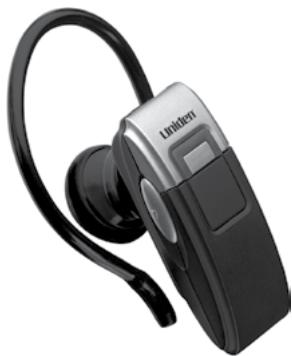
BT229 Bluetooth® Headset User's Guide
Also in this package:
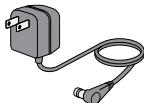
AC (indoor) power adapter

Extra ear cushion
Questions? Problems? Get help on the web at www.uniden.com or call our Customer Service line at 800-292-2294.
Getting to Know the Headset What the LED colors mean
| Color | State | Meaning |
| Red | Steady | The headset is currently charging. When the battery is fully charged, the LED turns off. |
| Flashing | The headset is turned off. If the headset is also beeping, the battery is low. | |
| Blue | Flashing | The headset is turned on. |
| 1 flash every 5 seconds | The headset is in standby and not paired to a Bluetooth device. | |
| 2 flashes every 5 seconds | The headset is currently paired to a Bluetooth device. | |
| Red & blue | Alternating flash | The headset is in pairing mode. |
- Specifications and features are subject to change without notice.
Using the headset at excessive volume can cause permanent hearing loss. To reduce the risk of hearing damage, use the minimum volume level necessary (see page 13).
What the buttons do
The headset initiates the function only after the button is released.
| Press it to | Press & hold it for 2 seconds to | 4 seconds to | |
| Multi-function button (MFB) | |||
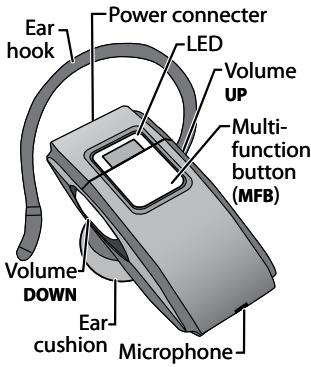
| In standby: Redial the most recently dialed number. During an incoming call: Answer the call. During a call: Hang up. | In standby: Activate voice dialing. During an incoming call: Reject the call. During a call: Transfer the call to your phone (or back). | Turn the headset on or off. | |
| Press it to | Press & hold it for 2 seconds to | 4 seconds to | |
| Volume UP | |||
| During a call: Increase the call volume. | NA | During a call-waiting call: Put the active call on hold and switch to the waiting call. | |
| Volume DOWN | |||
| During a call: Decrease the call volume. | During a call: Mute the microphone. | During a call-waiting call: Hang up the active call and switch to the waiting call. | |
Setting Up Your Headset
Charge the battery
Before using your headset, charge the battery until the red LED is solid on (about 2 hours). Charging the battery completely (and keeping it charged) will help you get the longest possible talk and standby time out of the battery.
Connect the adapter to the power connector on the top of the headset, then plug it into any standard 120 V AC (regular indoor) power outlet.
- When the battery needs to be recharged, you will hear warning beeps every 20 seconds and see the red LED (depending on your headset status).
Use ONLY the AC adapter supplied with the headset! Using any other adapter could damage your headset, create a fire hazard, or cause a risk of electric shock!
Pair the headset to your Bluetooth phone
Pairing is like "introducing" two Bluetooth devices and giving them permission to connect to each other. If you want to use the headset with more than one phone, you need to pair it with each phone separately. Once you pair a phone to the headset, the two devices can connect automatically whenever they can detect each other.
1) Make sure the headset is powered off and the power adapter is not connected (you can't use the headset while it's charging).
2) Press and hold MFB until the LED flashes alternating red and blue (approximately 6 seconds), then release. The headset is in pairing mode and should be visible to other Bluetooth devices.
3) On your phone, start a search for Bluetooth headsets or handsfree devices. (This process may take several seconds, and it will be different for each phone; see your phone's manual for detailed instructions.)
4) Your phone should discover a device called a BT229 or BT229 headset, When your phone asks if you want to pair with this device, answer yes.
5) When your phone prompts you for a PIN code or password to pair with the BT229 enter 0000.
6) When the headset is paired, the blue LED flashes twice every 5 seconds; your phone might also display a confirmation message.
If the blue LED flashes once every 5 seconds, the headset is not paired. Try the pairing procedure again.
Connect to your phone
Most phones connect to the headset as soon as you pair it; if yours won't, turn the headset off and back on. If headset still won't connect, check your phone's owner's manual for additional Bluetooth information.
Once the headset is paired:
Whenever you turn the headset on, it will automatically try to connect to whatever device it was connected to last.
If the headset loses the connection (e.g., if your phone is out of range), it should reconnect automatically. To manually reconnect, press MFB.
Using Your Headset
| Turning the headset on | To turn the headset on, press and hold MFB until the blue LED flashes and you hear the turn-on melody (about 4 seconds). |
| Turning the headset off | Press and hold MFB until the red LED flashes and you hear the turn-off melody (about 4 seconds). |
Put your headset on
Insert the ear cushion, then wrap the earhook behind your ear.
Everyone's ear has a sweet spot, a particular angle of the speaker where the audio comes in loud and clear. Take a few minutes to
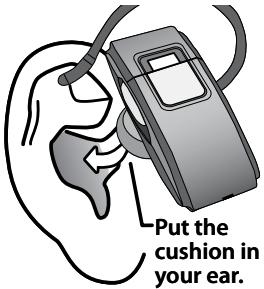
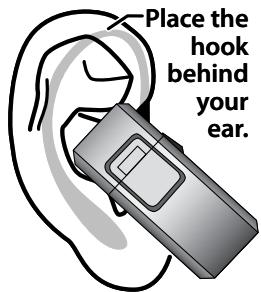
move the headset around until you find the best angle for the ear cushion.
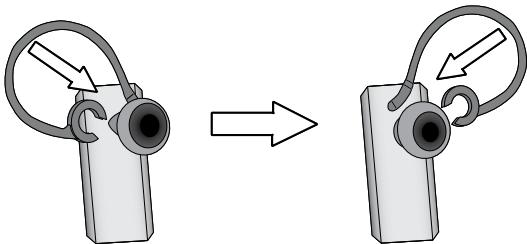
Wearing the headset on your left ear:
If you want to wear the headset on your left ear, take the earhook off and turn it over.
Available Features
After the headset is connected, you can use the following features:
| Make a call | Make the call from your mobile phone as usual; your phone should automatically send the call to the headset; if it doesn’t, press and hold MFB for 2 seconds to send the call to the headset manually. |
| Answer a call | While the phone is ringing, press MFB. |
| End a call | Press MFB. |
| Reject an incoming call | While the phone is ringing, press and hold MFB for at least 2 seconds. Wait until you hear a beep before you release the button. |
| Transfer a call | Press and hold MFB for 2 seconds to transfer the current call from your phone to headset (and back). |
| Redial the last number | With the phone in standby, press MFB. The headset automatically dials the last number you dialed from your phone. |
| Mute the microphone | During a call, press and hold DOWN for 2 seconds. The headset plays a melody every 10 seconds to remind you the microphone is muted and the caller can’t hear you. To turn the microphone back on, press either UP or DOWN. |
Call Waiting
To use this feature, you must subscribe to Call Waiting through your service provider, and your phone must support the hands-free profile.
To put your current call on hold and switch to a waiting call, press and hold UP until you hear 3 beeps (about 4 seconds). When you release the button, you'll be connected to the waiting call. (Press and hold UP again to switch back to the original call.)
To hang up your current call and switch to a waiting call: press and hold DOWN for about 4 seconds. Wait until you hear 3 beeps, then release the button.
Voice-activated dialing
To use this feature, your phone must support voice dialing, and all voice commands must already be programmed.
To activate voice dialing, make sure your phone is in standby. Then, press and hold MFB until you hear a beep (about 2 seconds).
- Use your pre-programmed voice commands as you would with your phone. (For best results, try recording your voice tags through your headset.)
Using the Multipoint Function
The headset supports simultaneous connection with 2 mobile phones with full control of each one. (This feature may not be compatible with some mobile phones.)
Pairing to more than one phone
Pair the headset to the first phone following the instructions on page 6. When you hear a high-pitched, short double-beep, pair the headset to the second phone.
Using both phones
The headset stays connected to both phones until a call comes in. If you answer the call, the headset automatically disconnects from the other phone while the call is active. When you hang up, the headset automatically reconnects to the other phone.
Only one phone at a time can be on an active call.
The headset plays a different ring tone for each phone so you know which one is ringing. To answer the incoming call, press MFB as usual.
All the button functions remain the same for the first phone (the one you paired first).
To use last number redial on the second phone, press and hold DOWN for about 2 seconds. (When you hear a beep, release the button.)
To activate voice dialing on the second phone, press and hold UP for about 2 seconds. (When you hear a beep, release the button.)
Troubleshooting and Maintenance
If you have problems with the headset, see the suggestions in the table below. If these suggestions don't help, contact customer support (see the cover for contact information).
| If... | Try... |
| The headset won't turn on. | •Charging the battery completely. |
| The headset won't pair with my phone. | •Making sure your phone is in pairing mode. Check your phone's manual for instructions on Bluetooth device pairing. •Turning the headset off. Wait at least 10 seconds, then try again. •Seeing if your phone supports the Bluetooth Headset or Hands Free profiles. |
| The headset paired with my phone, but I can't hear anything through it. | •Making sure the call connected and is still active. •Making sure the phone transferred the call to the headset. Press and hold MFB for two seconds to transfer the call. |
| The headset keeps beeping, and I don't know why. | •Seeing if the battery is getting low. If the LED is blinking red, charge the battery. •Seeing if your phone has lost the network signal. If your phone sounds an alert when it can't connect to the network, the headset passes on this alert by beeping every 5 seconds. |
| I can hear the caller, but the audio is very weak or soft. | •Turning the speaker volume up. •Moving closer to your phone (if you aren't carrying it). •Keeping the battery fully charged; As the battery starts to run out, the speaker gets softer. |
General Information
- You cannot use the headset while it is recharging.
- Bluetooth wireless devices have a maximum range of 30 feet (10 m); the actual range varies depending on current conditions (obstacles, battery power, interference, etc.).
- The headset can be connected only to devices that support the Bluetooth headset or hands-free profile. This product is not compatible with standard cordless phones.
Battery life
- With average use, the battery should provide about 6 hours of talk time and 7 days of standby time. If a battery is new or left unused for a long time, it can have reduced capacity the first few times you use it. For maximum battery life, keep the battery charged.
- When the battery only has enough charge for about 15 minutes of talk time, the headset triggers a low battery alert: you'll hear a periodic beep, and the LED changes from blue to red.
- When the battery no longer has enough charge to operate the headset, the headset will power off; you won't be able to turn it back on until you charge the battery.
Noise or Static on the Headset
The most common cause of noise or static on any wireless device is interference. Bluetooth devices operate in the ISM band (2.402 GHz 2.480 GHz); any equipment operating in this frequency range might interfere with the headset. Some common sources of interference in this range are
- Equipment that uses microwaves, especially microwave ovens
- Wireless LAN equipment or WiFi connections
- Other Bluetooth devices or computers
Certain cordless telephones - Certain medical equipment and appliances If you have problems with static during calls, look for one of these interference sources. Try moving away from the suspected source.
If the noise continues, there may be interference on your phone itself, and any noise in the phone's connection will come through on the headset, too. Transfer the call to your phone and see if the audio quality improves. If it doesn't, look around for things that can interfere with your phone.
Safety and Handling Information
For maximum product life, do not drop, throw, or crush the headset. Do not expose it to humidity, dust, or temperatures above 125 F.
Cleaning the headset
- If necessary, remove the earhook. Dampen a lint-free cloth with water or a cleaner specially designed for electronics, and gently wipe the headset clean.
- Do not expose this product to liquid (water, alcohol, etc.) or submerse in liquid for any reason.
Avoiding hearing damage
Using any headset or earbud at too high a volume can cause permanent hearing damage. To reduce the risk of hearing damage:
- Set the volume at the minimum level needed to hear in the current environment. If possible, use your headset in quiet surroundings or try to move to an area with less background noise before adjusting the volume.
-
Start with the volume at its lowest setting, then gradually increase it until you can hear.
-
Turn the volume down before powering off the headset and readjust the volume each time you turn it on.
- If someone next to you can hear the other end of the call through your headset or if your ears hurt or ring when you hang up, the volume is too high.
- The longer your ears are exposed to noise, the greater the risk of damage. Limit calls at higher volumes (or other exposure to loud noise).
- For more information on protecting your hearing, visit the WISE EARS® website (www.nidcd.nih.gov/health/wise/) or consult an audiologist.
Important Safety Instructions
Uniden America Corporation DOES NOT represent this product to be waterproof. To reduce the risk of fire, electrical shock, or damage to the product, DO NOT expose this product to rain or moisture.
When using the headset, always follow basic safety precautions to reduce the risk of fire, electric shock and injury to persons, including the following:
-
Do not use this product near water, for example, near a bath tub, wash bowl, kitchen sink or laundry tub, in a wet basement or near a swimming pool.
-
Use only the power cord and batteries indicated in this manual. Do not expose the battery (or the device) to flames or dispose of it in a fire: the battery may explode. Check with local authorities for possible battery disposal instructions.
- Do not disassemble, modify, or attempt to repair any component of this product.
- Check the laws and regulations on the use of mobile phones and hands-free equipment in the areas where you drive. Always give full attention to driving and pull off the road and park before making or answering a call if driving conditions require.
- Do not allow children to play with the headset: since it contains small parts that could become detached and create a choking hazard.
- Turn off your headset when pumping gas, handling flammable materials, or in any area with a risk of explosion. In rare occurrences, this product could generate sparks which can cause an explosion or fire. Follow all warning notices in your immediate area!
SAVE THESE INSTRUCTIONS!
FCC Notice
This device complies with part 15 of the FCC rules. Operation is subject to the following two conditions: (1) This device may not cause harmful interference, and (2) This device must accept any interference received, including interference that may cause undesired operation. Privacy of communications may not be ensured when using this product.
To insure the safety of users, the FCC has established criteria for the amount of radio frequency energy various products may produce depending on their intended usage. This product has been tested and found to comply with the FCC's exposure criteria. For body worn operation, the FCC RF exposure guidelines were also met when used with the Uniden accessories supplied or designed for this product. Use of other accessories may not ensure compliance with FCC RF exposure guidelines and should be avoided.
Industry Canada statement
This device complies with RSS-210 of the Industry Canada Rules. Operation is subject to the following two conditions: (1) This device may not cause harmful interference, and (2) this device must accept any
interference received, including interference that may cause undesired operation.
IMPORTANT NOTE: Radiation Exposure Statement
This equipment complies with IC radiation exposure limits set forth for an uncontrolled environment. End users must follow the specific operating instructions for satisfying RF exposure compliance. To maintain compliance with IC RF exposure compliance requirements, please follow operation instruction as documented in this manual.
Lithium-polymer battery information
This device contains a lithium-polymer battery. The headset and battery must be recycled or disposed of properly. Contact your local waste management office for information on battery recycling or disposal.
Two-Year Limited Warranty
Evidence of original purchase is required for warranty service.
WARRANTOR: UNIDEN AMERICA CORPORATION ("Uniden")
ELEMENTS OF WARRANTY: Uniden warrants, for two years, to the original retail owner, this Uniden Product to be free from defects in materials and craftsmanship with only the limitations or exclusions set out below.
WARRANTY DURATION: This warranty to the original user shall terminate and be of no further effect 24 months after the date of original retail sale. The warranty is invalid if the Product is a) damaged or not maintained as reasonable or necessary, b) modified, altered, or used as part of any conversion kits, subassemblies, or any configurations not sold by Uniden, c) improperly installed, d) serviced or repaired by someone other than an authorized Uniden service center for a defect or malfunction covered by this warranty, e) used in any conjunction with equipment or parts or as part of any system not manufactured by Uniden, or f) installed or
programmed by anyone other than as detailed by the owner's manual for this product.
STATEMENT OF REMEDY: In the event that the product does not conform to this warranty at any time while this warranty is in effect, warrantor will either, at its option, repair or replace the defective unit and return it to you without charge for parts, service, or any other cost (except shipping and handling) incurred by warrantor or its representatives in connection with the performance of this warranty. Warrantor, at its option, may replace the unit with a new or refurbished unit.
THE LIMITED WARRANTY SET FORTH ABOVE IS THE SOLE AND ENTIRE WARRANTY PERTAINING TO THE PRODUCT AND IS IN LIEU OF AND EXCULES ALL OTHER WARRANTYES OF ANY NATURE WHATSOEVER, WHETHER EXPRESS, IMplied OR ARISING BY OPERATION OF LAW, INCLUDING, BUT NOT LIMITED TO ANY IMPLIED WARRANTYES OF MERCHANTABILITY OR FITNESS FOR A PARTICULAR PURPOSE. THIS WARRANTY DOES NOT COVER OR PROVIDE FOR THE REIMBURSEMENT OR PAYMENT OF INCIDENTAL OR CONSEQUENTIAL DAMAGES. Some states do not allow this exclusion or limitation of incidental or
consequential damages so the above limitation or exclusion may not apply to you.
LEGAL REMEDIES: This warranty gives you specific legal rights, and you may also have other rights which vary from state to state. This warranty is void outside the United States of America and Canada.
PROCEDURE FOR OBTAINING PERFORMANCE OF WARRANTY: If, after following the instructions in the owner's manual you are certain that the Product is defective, pack the Product carefully (preferably in its original packaging). The Product should include all parts and accessories originally packaged with the Product. Include evidence of original purchase and a note describing the defect that has caused you to return it. The Product should be shipped freight prepaid, by traceable means, to warrantor at:
Uniden America Service
4700 Amon Carter Blvd.
Fort Worth, TX 76155
- Uniden
- BT229 Bluetooth® Headset User's Guide
- Getting to Know the Headset What the LED colors mean
- What the buttons do
- Setting Up Your Headset
- Charge the battery
- Pair the headset to your Bluetooth phone
- Connect to your phone
- Once the headset is paired:
- Using Your Headset
- Put your headset on
- Wearing the headset on your left ear:
- Available Features
- Call Waiting
- Voice-activated dialing
- Using the Multipoint Function
- Pairing to more than one phone
- Using both phones
- Troubleshooting and Maintenance
- General Information
- Battery life
- Noise or Static on the Headset
- Safety and Handling Information
- Cleaning the headset
- Avoiding hearing damage
- Important Safety Instructions
- FCC Notice
- Industry Canada statement
- IMPORTANT NOTE: Radiation Exposure Statement
- Lithium-polymer battery information
- Two-Year Limited Warranty
Marque : UNIDEN
Modèle : BT229
Catégorie : Téléphone sans fil