
FIRESTORM PROGRAMMABLE - Accessoire de jeu TRUSTMASTER - Notice d'utilisation et mode d'emploi gratuit
Retrouvez gratuitement la notice de l'appareil FIRESTORM PROGRAMMABLE TRUSTMASTER au format PDF.


| Type de produit | Manette de jeu programmable |
| Marque | TRUSTMASTER |
| Modèle | FIRESTORM PROGRAMMABLE |
| Compatibilité | Xbox (première génération) |
| Connexion | Filaire (câble USB) |
| Dimensions (approx.) | 15 x 10 x 5 cm |
| Poids (approx.) | 300 g |
| Alimentation | Via port USB de la console |
| Nombre de boutons | 8 boutons d'action programmables (A, B, X, Y, Noir, Blanc) |
| D-Pad | 8 directions |
| Mini-sticks analogiques | 2 (gauche et droit) |
| Gâchettes analogiques | 2 |
| Boutons système | Start, Back, Program LED |
| Fonctions de programmation | Assignation de fonctions entre boutons, axes et directions du D-Pad |
| Mémoire intégrée | Oui, pour sauvegarder les configurations (via emplacement pour carte mémoire) |
| Réinitialisation | Maintenir le bouton Program LED enfoncé >3 secondes |
| Longueur de câble | 2 mètres (estimation) |
| Matière | Plastique ABS |
| Couleur | Noir |
| Entretien | Nettoyer avec un chiffon doux légèrement humide. Ne pas utiliser de solvants. |
| Sécurité | Ne pas exposer à l'humidité ou à des températures extrêmes. Débrancher en cas d'orage. |
| Garantie | 2 ans |
| Contenu de l'emballage | Manette, manuel d'utilisation |
FOIRE AUX QUESTIONS - FIRESTORM PROGRAMMABLE TRUSTMASTER
Questions des utilisateurs sur FIRESTORM PROGRAMMABLE TRUSTMASTER
0 question sur cet appareil. Repondez a celles que vous connaissez ou posez la votre.
Poser une nouvelle question sur cet appareil
Téléchargez la notice de votre Accessoire de jeu au format PDF gratuitement ! Retrouvez votre notice FIRESTORM PROGRAMMABLE - TRUSTMASTER et reprennez votre appareil électronique en main. Sur cette page sont publiés tous les documents nécessaires à l'utilisation de votre appareil FIRESTORM PROGRAMMABLE de la marque TRUSTMASTER.
MODE D'EMPLOI FIRESTORM PROGRAMMABLE TRUSTMASTER
FirestormProgrammable
GAMEPRO
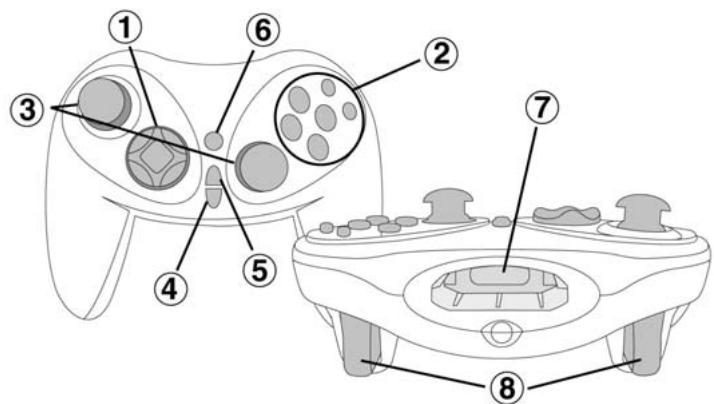

TECHNICAL FEATURES
① 8-way D-Pad
Action buttons (X,Y,A,B,Black,White)
③ 2 analog mini-sticks
④ Start button
⑤ Back button
⑥ Program LED button
Slot for memory card and other peripherals
2 analog triggers

TECHNISCHE MERKMALE
① 8-Wege D-Pad
Funktionstaten (X,Y,A,B, Schwarz;Weil)
③ 2 analogue Mini-Sticks
④ Start-Taste
⑤ Back-Taste
⑥ Program LED-Taste
Slat for Memory-Card und andere Zusatzgeräte
2 analogue Trigger-Tasten

CHARACTERISTICAS TECNICAS
D-Pad de 8 direcciones
2 Botones de action (X, Y, A, B, Negro, Blanco
③ 2 mini-sticks analógicos
④ Botón Start
⑤ Botón Back
⑥ Botón LED Program
⑦ Ranura para tarjeta de memoria y otros periféricos
⑧ 2 gatillos analógicos

CHARACTERISTICAS TECNICAS
1 Almofada digital de 8 direccos
Botoes de acco (X,Y,A,B, Preto, Branco)
③ 2 minialavancas analógicas
④ Botao Start
⑤ Botão Back
6 Botão LED Program
☑ Ranhura para cartão de memória e outros periféros
2 gatilhos analogicos

PROGRAMMING THE BUTTONS AND AXES - OVERVIEW
- The function of each analog button (A, B, X, Y, Black, White) can be applied to a different analog button, D-Pad direction or axis (mini-stick axes only).
- The function of each axis can be applied to a different axis, analog button or D-Pad direction.
- If a D-Pad direction is programmed onto an analog button, the analog button becomes digital.
- If an analog button is programmed onto a D-Pad direction however, the D-Pad direction remains digital.
N.B. The Start, Back, and Program buttons are not programmable.

PROGRAMMIERUNG DER TASTEN UND ACHSEN-ÜBERSICHT
- Die Funktion jeder analogen Taste (A, B, X, Y, Schwarz, Weiß) kann auf eine andere analoge Taste oder Richtung des D-Pads sowie der Aachen (nur Mini-Stick Achten) gelegt werden.
- Die Funktion jeder Achse kann auf eine andere Achse, analoge Taste oder Richtung des D-Pads gelegt werden.
- Wenn eine Richtung des Steuerkreuzes (D-Pad) auf eine analoge Taste gelegt wird, so wird diese analoge Taste automatisch digital.
- Wenn die Funktion einer analogen Taste jedoch auf eineichtigung des D-Pads gelegt wird, bleibt das D-Pad digital.
N.B. Die Tasten Start, Back und Program sind nicht konfigurierbar.

PROGRAMACION DE BOTONES Y EJES - VISION GENERAL
- La funciona de cada botón analógico (A, B, X, Y, Negro, Blanco) puede aplicarse a un botón analógicodistincto, o a una direccion o eje del D-Pad (solo ejes del mini-stick).
- La función de cada eje pueda aplicarse a un eje, botón analógico o direccion del D-Pad.
- Si una direccion del D-Pad se programa en un botón analógico, ese botón se vuye digital.
- Sin embargo, si un botón analógico se programa en una direccion del D-Pad, esta direccion permanece digital.
N.B. Los botones Start, Back, y Program no son programables.

PROGRAMAR OS BOTões E EIXOS - DESCRIÇÃO
- A função de cada botão analógico (A, B, X, Y, Preto, Branco) pode ser aplicada a um botão analógico diferente, direção da almofada digital ou eixo (apenas eixos das minialavancas).
- A funcão de cada eixo pode ser aplicada a um eixo diferente, botão analógico ou direção da almofada digital.
- Se uma direcção da almofada digital for programada num botão analógico, este passará a ser digital.
- Se, no entanto, um botão análogico for programado numa direção da almofada digital, esta permanecera digital.
Nota: Os botões Start, Back e Program não são programáveis.
US
PROGRAMMING THE BUTTONS AND AXES
- Press the Program LED button: the LED turns red*.
- Press the button/axis whose function you wish to program elsewhere: the LED flashes red*. For axes this means pushing the right/left mini-stick upwards, downwards, to the left or to the right.
- Press the button/axis that you wish to program with the same function as the button/axis selected in Step 2 above: the LED turns green, and then turns off.
- The button/axis pressed in Step 3 now has the same function as the button/axis selected in Step 2.
-
The button/axis pressed in Step 2 retains its original function.
-
If you do not press another button/axis within 5 seconds, the LED will turn off and no changes will have been made.
D
PROGRAMMIERUNG DER TASTEN UND ACHSEN
- Drücken Sie die Program LED-Taste. Das LED-Licht leuchtet rot*.
- Drücken Sie die Taste/Achse, die Sie neu programmieren möhen. Das LED-Licht blinking rot*. Bewegen Sie den rechten/linken Mini-Stick nach oben, unter, rechts oder links, wenn Sie die Achen umprogrammierieren möhen.
- Drücken Sie die Taste/Achse, die Sie mit der in Schritt 2 ausgewählten Funktion (Taste/Achse) belegen möhen. Das LED-Licht leucht grün und erischt dann.
- Die in Schritt 3 gewährte Taste/Achse hat nun die gleiche Funktion wie die in Schritt 2 gewährte Taste/Achse.
-
Die in Schritt 2 gewählte Taste/Achse gehalt ihre ursprüngliche Funktion bei.
-
Wenn Sie innerhalb von 5 Sekunden keine andere Taste/Achse wahren, erischt das LED-Licht und es werden keine Änderungen der Tasten/Achsen-Belegung vorgenommen.
E
PROGRAMACION DE BOTONES Y EJES
- Pulsa el botón LED Program: el LED se vuye rojo*.
- Pulsa el boton/eje cuya configuraciones programar en另一边 parte: el LED parpadea en rojo*. Para los ejes este implicca empujarlos mini-stick izquierdo/derecho hacia arriba, hacia abajo, a la izquierda o a la derecha.
- Pulsa el botón/eje que quieras programar con la misma función que el botón/eje selecciónado en el Paso 2 anteriormente: el LED se vuelve verde, y después se apaga.
- El botón/eje pulsado en el Paso 3 Tiene ahora la misma configuración que el botón/eje selecciónado en el Paso 2.
-
El botón/eje pulsado en el Paso 2 conserva su funciona original.
-
Si no pulsas或其他 botón/eje en 5 días, el LED se apagará y no se trabra realizado ningún cambio.
P
PROGRAMAR OS BOTÖES E EIXOS
- Prima o botão LED Program: o LED fica vermelho*.
- Prima o botão/eixo cura função pretende programar noutro lado; o LED fisca a vermelho*. Para os eixos, isto significica inclinar a minialavanca direita/esquerda para cima, para baixo, para a esquerda ou para a direita.
- Prima o botão/eixo que pretende programar com a mesma funcao do botão/eixo selecionado no Passo 2 acima: o LEDtica verde, apagando-se em seguida.
- O botão/eixo premido no Passo 3 possui a mesma funcção do botão/eixo selecionado no Passo 2.
-
O botão/eixo premido no Passo 2 conserva a sua funcção original.
-
Se não premir及其他botão/eixo no espoço de 5 segundos, o LED apagar-se-a e não serao efectuadas alterações.

Example 1:
Press the Program LED button: the LED turns red. Next, press the B button: the LED flashes red. Finally, press the A button: the LED turns green and then turns off. The A button now performs the B button's function, and the B button retains its original function.
Example 2:
Press the Program LED button: the LED turns red. Next, push the left mini-stick upwards: the LED flashes red. Finally, press the A button: the LED turns green and then turns off. The A button now performs the left minstick's upward movement and the left mini-stick retains its original function.

Beispiel 1:
Drucken Sie die Program LED-Taste. Das LED-Licht leuchtet rot. Drucken Sie anschließend die B-Taste. Das LED-Licht blinkt rot. Drucken Sie nun die A-Taste. Das LED-Licht leuchtet grün und erlischt. Die A-Taste ist nun mit der Funktion der B-Taste belegt, wobe)iie ihre ursprüngliche Funktion beibehalt.
Beispiel 2:
Drücken Sie die Program LED Taste. Das LED-Licht leucht rot. Bewegen Sie den linken Mini-Stick nach oben. Das LED-Licht blinkt rot. Drücken Sie zulezt die A-Taste. Das LED-Licht leucht grün und erlischt dann. Die A-Taste ist nun mit der Funktion der Aufwärtsbewegung des Mini-Sticks belegt, wobei dieser seine ursprüngliche Funktion beibehält.

Ejemplo 1:
Pulsa el botón LED Program: el LED se vuelve rojo. Después, pulsa el botón B: el LED parpadae en rojo. Finalmente, pulsa el botón A: el LED se vuela verde y antes se apaga. El botón A realiza ahora la función del botón B, y el botón B conserva su función original.
Ejempio 2:
Pulsa el botón LED Program: el LED se vuelve rojo. Despues, pulsa el mini-stick izquierdo hacía arriba: el LED parpadea en rojo. Finalmente, pulsa el botón A: el LED se vuelve verde y después se apaga. El botón A realiza ahora elmovementido hacía arriba del mini-stick izquierdo y ese mini-stick conserva su funcional original.

Exemplo 1:
Prima o botão LED Program: o LED fica vermelho. Em seguida, prima o botão B: o LED piscá a vermelho. Finalmente, prima o botão A: o LED fica verde e depois apaga-se. O botão A executa quando a minha funcção do botão B, e esté conserva a sua funcção original.
Exemplo 2:
Prima o botão LED Program: o LED fica vermelho. Em seguida, incline a minialavanca esquerda para cima: o LED piscá a vermelho. Finalmente, prima o botão A: o LED fica verde e(depais apaga-se. O botão A executa agora o movimento ascendional da minialavanca esquerda, e esta conserva a sua funcção original.

To return to the default configuration:
Press and hold the Program LED button for more than 3 seconds: the LED will first turn red and then green for 2 seconds. This means that the default configuration has been restored.
www.thrustmaster.com
© Guillemot Corporation 2001. Thrustmaster® and Firestorm™ are trademarks and/or registered trademarks of Guillemot Corporation S.A. Xbox™ is a trademark of Microsoft Corporation in the US and/or other countries and is used under license from Microsoft. All other trademarks are the property of their respective owners. Photos not binding. Contents, designs and specifications are subject to change without notice and may vary from one country to another.

Wiederherstellung der Grundkonfiguration:
Drucken Sie die Program LED-Taste für mindestens drei Sekunden. Das LED-Licht leucht zunachst rot und dann zwei Sekunden lang grün. Dies bedeutet, dass die Grundeinstellungen wieder hergestellt wurden.
www.thrustmaster.com
© Guillemot Corporation 2001. Thrustmaster® und Firestorm™ sind Warenzeichen und/oder eingetragene Warenzeichen der Guillemot Corporation S.A. Xbox™ ist Warenzeichen der Microsoft Corporation in den USA und/oder anderen Ländern. Verwendung durch Microsoft lizensiert. Alle anderen Warenzeichen sind Eigentum der jeweiligen Besitzer. Abbildungen ohne Gewähr. Änderungen des Inhalts, des Designs und der technischen Angaben sind vorbehalten, bedürfen keiner Ankündigung und können je nach Land varieren.

Para volver a la configuración por defecto:
Mantén pulsado el botón LED Program durante más de 3 días: el LED primo se volverá rojo y después verde durante 2 días. Esto significía que se ha restaurado la configuración por defecto.
www.thrustmaster.com
© Guillemot Corporation 2001. Thrustmaster® y Firestorm™ son marcas commerciales y/o marcas commerciales registradas de Guillemot Corporation S.A. Xbox™ es unamarca commercial de Microsoft Corporation en los Estados Unidos y/others payses y está bajo licencia de Microsoft. Todas lasdemas marcas commerciales son propidad de sus respectivos dueños. Fotos no definitivos. Los contentidos,disneos y specificationsstan sujetos a Cambios sin previo aviso y你能variarde un paysa otro.

Para regressar a configuração padrão:
Prima e pressione o botão LED Program durante mais de 3 segundos: o LED ficar primeiramente vermelho e(befores durante 2 segundos. Isto significa que a configuração padrão foi reposa.
www.thrustmaster.com
© Guillemot Corporation 2001. Thrustmaster® e Firestorm™ sãoemarks commerciais e/ou marca registadas da Guillemot Corporation S.A. Xbox™ é uma marca comercial da Microsoft Corporation nos EUA e/ou noutros pauês, sentido uso下滑 licença da Microsoft. Todas as outrasemarks commerciais pertencem aos seures respectivos propriétários. As fotografia não são vinculativas. Os conteudos, desenhos e espécografções está sujeitos a alteração sem征求意见, e poderávaria de pais para pais.