
CAR4000 - Récepteur satellite TERRATEC - Notice d'utilisation et mode d'emploi gratuit
Retrouvez gratuitement la notice de l'appareil CAR4000 TERRATEC au format PDF.


| Type d'appareil | Centre audio numérique |
| Fonctions principales | Enregistreur audio numérique, lecteur CD, jukebox numérique |
| Formats audio pris en charge | MP3, WAV non compressé |
| Compression audio | Réduction de la taille des fichiers audio jusqu'à 1/11 |
| Stockage intégré | Disque dur interne préinstallé |
| Capacité de stockage | Au moins 540 heures en qualité CD |
| Affichage | Écran graphique pour navigation et informations |
| Contrôle | Navigation facile via écran et boutons |
| Sources audio compatibles | Entrées audio pour ordinateur et équipement audio externe |
| Fonction d'indexation | Détection automatique du titre, de l'artiste et de l'album |
| Formats d'enregistrement | MP3 compressé ou WAV non compressé |
| Fonctionnalités supplémentaires | Compatible avec un adaptateur numérique pour Mini-Disc |
| Utilisation | Enregistrement et lecture de pistes audio numériques |
| Connectivité | Entrées audio analogiques |
| Affichage à distance | Affichage lisible depuis le fauteuil |
FOIRE AUX QUESTIONS - CAR4000 TERRATEC
Questions des utilisateurs sur CAR4000 TERRATEC
0 question sur cet appareil. Repondez a celles que vous connaissez ou posez la votre.
Poser une nouvelle question sur cet appareil
Téléchargez la notice de votre Récepteur satellite au format PDF gratuitement ! Retrouvez votre notice CAR4000 - TERRATEC et reprennez votre appareil électronique en main. Sur cette page sont publiés tous les documents nécessaires à l'utilisation de votre appareil CAR4000 de la marque TERRATEC.
MODE D'EMPLOI CAR4000 TERRATEC
C.A.R. 4000 – Smaller and Better
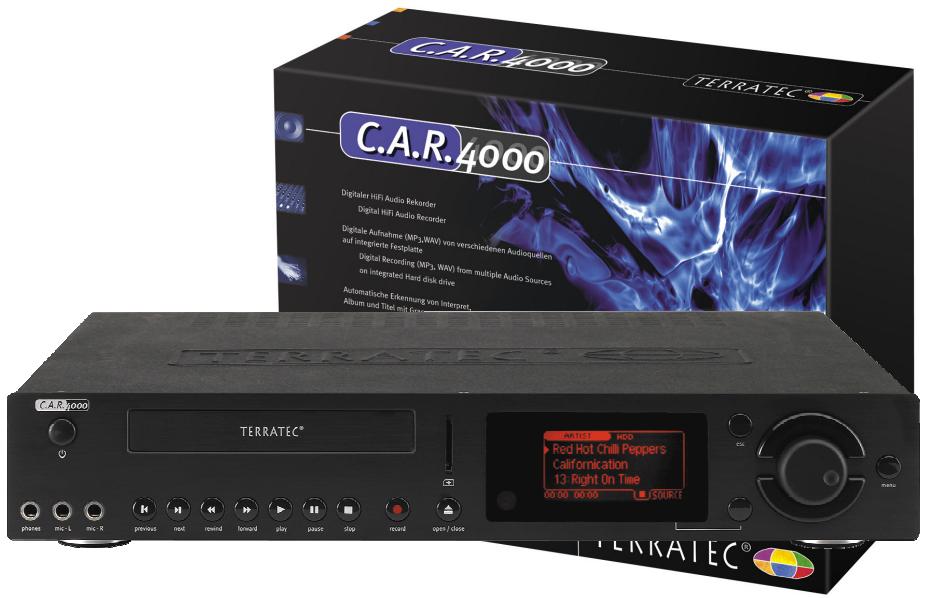
The C.A.R. 4000 is the complete digital audio centre for your Hi-Fi rack. It combines the functionality of a digital audio recorder, a CD player and a digital jukebox for thousands of music tracks – all in one.
The compression of audio files has been a matter of interest long before the days of Napster and similar companies. Nowadays, most users know about the advantages of MP3 as one of the most popular audio compression formats: It reduces the size of an audio title to 1/11 of its original size. Terra Tec's C.A.R. 4000 now enables you to use all of the advantages of the MP3 format, in combination with your Hi-Fi equipment. C.A.R. 4000 is able to record all audio signals coming from the audio inputs of your computer and other audio equipment, and save them to the preinstalled hard disk drive. No matter if it is a tape recorder, a tuner or a microphone, C.A.R. 4000 will digitise and save them all.
The C.A.R. 4000 brings together some of the most desirable features; Record your Audio-CD tracks to the built-in hard disk drive (at least 540 hours in CD quality); using the digital selection function, the extensive CDDB support allows automatic detection of artist, title and album for indexing your music (without the need for an internet connection). The graphic display offers easy control for convenient browsing through your favourite audio tracks. You can magnify the display while playing your music to be able to read the information from across the room in the comfort of your arm-chair.
You can choose the format of your saved audio file; A compressed MP3 file, or an uncompressed full-quality WAV format. The choice is yours. To further enhance the variety of audio sources you can use, a digital input for Mini-Disc users is also included.
C.A.R.4000
Furthermore, in addition to the usual stereo line output we have also integrated a microphone amplifier connection, an optical digital output and a configurable headphone output. Friends of mobile MP3 will also benefit from the insertion for MMC memory cards. If you want to go jogging you can use it as a gas station for your portable player and refill your memory card.
After having finished the recording, you can use the remote control functions to enter information such as the artist, album and track title – just like composing an SMS message from your mobile phone.
The integrated title database is a real feature of the product. As well as creating all kinds of playback selection filters, you can also evaluate any, or all, tracks using a 'personal preference' scale from +2 (really cool) to -2 (oh no, not again!). Using the remote control you can put together your personal music charts; Your own Top 100. For an easy update of your hit list, you can use the bundled Windows application to communicate with your C.A.R. 4000 from your PC. The C.A.R. 4000 can also play, for example, ordinary audio CDs, or data CDs containing MP3 tracks. Even Winamp playlists (M3U) can be read, played and extended. Other features include an extensive timer function for recording and playing, automatic signal detection (ASD) for recordings (automatically starts recording when an audio input is detected), PartyLock password protection against prohibited use, a configurable interface (normal, advanced and professional settings) and individual saving and editing of almost all settings. The C.A.R. 4000 offers all the functions you would expect from an up-todate Hi-Fi device, including high quality compression and a complete jukebox functionality.
C.A.R. 4000 - the audio collection in your Hi-Fi rack.
- Analogue and digital audio recording (MP3, WAV) and playback (MP3, WAV, WMA)
- Saves Audio CD's on a pre-installed hard disk drive
Automatic recognition of artist, album and title (Gracenote CDDB support) - Variable database with extensive filter functions and personal chart
- Simple and convenient data transfer with a PC using a USB-interface
- Interface for mobile MP3 players (MMC slot)
C.A.R.4000
Technical Data
Input
2 separate Line inputs (rear, cinch)
2 MIC inputs (front, 2 x 6,3 mm, 1 / 4 "jacks, also useable for stereo microphones)
Digital input (rear, optical)
Output
Line output (rear, cinch)
Digital output (front, optical)
- Configurable headphone output (front, 6,3 mm, 1/4" jack)
Other connectors
USB(slave)
Supported Media
CD-Audio
CD-ROM including CD-Rs and CD-RWs
- FAT16/32 file system on hard disk
ISO 9660 Level 1 and 2 file systems including long filename support
Memory card (MMC)
Direct recording to Hard disk drive
Supported playback formats ...
- MPEG Audio Layer 3 (MP3) including variable bit rates (VBR)
MS Audio (WMA)
Microsoft Wave (WAV)
CD Audio (CDA)
Supported recording formats ...
MPEG Audio Layer 3 (MP3)
Microsoft Wave (WAV)
CD Drive
- Playback of WMA, MP3 and WAV files directly from the CD
- Playback of common audio CD's with automatic detection of artist, album and title (Using CDDB)
- Direct reading of audio CD's for saving on a memory card or hard disk drive
- CWhip technology (change while play - enables changing a CD while playing tracks from a memory card or a hard disk drive)
Hard disk
- Recording capacity of at least 540 hours (MP3 files with 128 KB/s)
- Complete data management via computer and USB connection
- Fully compatible with a computer using the FAT32 file system
Display (LCD)
Graphical display (resolution of 128 × 64 )
- Zoom function of display while playing
- Background lighting (turn on and off through software)
- Readable in dark and bright environments
Playlists
- Creates, loads, edits, saves and plays playlists
Supports Winamp- Playlist (M3U) - Merge different playlists
Data base
- Convenient browsing through the entire contents
- Search for filenames, artists, album or other IDTag information
- Complete maintenance via PC through USB connection and Windows software
- Rate each track for simple set up of a personal playlist
- Extensive filter functions (i.e. specific styles, moods or years can be included or excluded)
- Edit, save and load filter settings
PC software
- Manages all audio files on PC and C.A.R. 4000 memory card and hard disk
- Adapt function for simultaneous data update (PC C.A.R. 4000)
Remote control functions - Configurations, filters and other settings can be set up and edited with a computer and transferred to the C.A.R. 4000
- Configurable and practical up-to-date software interface
PC software system requirements
Intel PII or AMD K6 or faster
USB interface
Windows9x/ME/2000
- CD-ROM drive for software installation
Controls
Power, Previous, Next, Rewind, Forward, Play, Pause, Record, Stop, Eject, Escape, Softkey, Up, Down, Scroll wheel with button, Menu
Additional functions
- Displays and uses IDTag information
- CDDB database can be updated by CD or PC/USB through an internet connection
- Select next track while playing
- Various timer functions for recording and playback, automatic power on
- Advanced and variable reproduction modes in addition to common functions
Automatic signal detection while recording (ASD) ASD means automatic signal detection; a configurable threshold determines the start and the interruption of a recording - The C.A.R. 4000 operating system can be updated via CD or USB/PC, ensuring that future formats can be de- or encoded, additional functions be added or improved.
- Interface can be configured for easier handling (normal, advanced and professional)
Party Lock password protection against prohibited use
Art.Nr.: 1443
EAN-Code: 4017273614434
Warranty: 24 month