
PMHP10 - Casque audio TEAC - Notice d'utilisation et mode d'emploi gratuit
Retrouvez gratuitement la notice de l'appareil PMHP10 TEAC au format PDF.


| Type de casque | Casque surround 5.1 |
| Connexion | Sans fil / filaire (non précisé) |
| Compatibilité | Non précisé |
| Réponse en fréquence | Non précisé |
| Impédance | Non précisé |
| Sensibilité | Non précisé |
| Microphone intégré | Non précisé |
| Alimentation | Non précisé |
| Autonomie | Non précisé |
| Poids | Non précisé |
| Couleur | Non précisé |
| Accessoires inclus | Non précisé |
| Fonctions spéciales | Son surround 5.1 |
| Garantie | Non précisé |
FOIRE AUX QUESTIONS - PMHP10 TEAC
Questions des utilisateurs sur PMHP10 TEAC
0 question sur cet appareil. Repondez a celles que vous connaissez ou posez la votre.
Poser une nouvelle question sur cet appareil
Téléchargez la notice de votre Casque audio au format PDF gratuitement ! Retrouvez votre notice PMHP10 - TEAC et reprennez votre appareil électronique en main. Sur cette page sont publiés tous les documents nécessaires à l'utilisation de votre appareil PMHP10 de la marque TEAC.
MODE D'EMPLOI PMHP10 TEAC
5.1 Surround Sound Headphone System PowerMax-HP10
User Manual
To ensure the smooth handling of your warranty please write the serial number of your device into the box. In the case of warranty you are expected to send it together with a copy of your invoice to your nearest TEAC sales representative.
- Changes in specifications and features may be made without notice or obligation.
Copyright © 2004, TEAC Corporation. All rights reserved. First Edition: May 2004 - Company and product names provided herein are trademarks of their respective companies.
Contents
CEDECLARATION 26
CONTENT OF PACKAGE 26
FEATURES 26
INSTRUCTIONS 27
CONTROL BUTTONS DEFINITION AND FUNCTION 28
5.1 HOME THEATER HEADPHONE CONNECTING CABLES 29
CONNECTING THE MICROPHONE 30
PLAYBACK OPERATION 30
CONNECTING THE POWERMAX-HP10 32
- Connecting DVD players 32
- Connecting Computers (5.1 Sound Cards) 34
- Connecting CD players 36
- Connecting VCD player devices 37
- Connecting Computers (Stereo Sound Cards) 38
- Connecting Computers (Stereo Sound Cards) 39
SPECIFICATION 5.1-CHANNELS AMPLIFIER 40
SPECIFICATION 5.1-CHANNELS HEADPHONE 40
SPECIFICATION MICROPHONE 40
WARRANTY 41
CE DECLARATION
We declare the product PowerMax-HP/PowerMax-HP10M complies with the following standards and directives:
EMC Directive 89/336/EEC
LVD Directive 73/23/EEC
EN 55022/1998 EN 60000-3-2/-3-3
EN 55024/1998 EN 60000-4-2/-4-3/-4-4/-4-5/-4-6/-4-8/-4-11
EN 60950
CONTENT OF PACKAGE
PowerMax-HP10 existing of
5.1 channel amplifier
6 channel 5.1 headphone
In-line controller
Power adapter
PC connecting cable
AMP connecting cable
DVD connecting cable
TV connecting cable
USB connecting cable
Microphone and microphone cable
Adapter cable
FEATURES
The 5.1 surround sound headphone system incorporates a home theatre 5.1 channel amplifier with 6 independent amplified sound channels. The independence enables to perform different sounds that together achieve perfect home theater leisure enjoyment. Stereo surround sound provides full 360 degree soundscape which comes impressively close to real theater feeling. Therefore it presents real 5.1 channel surround sound effects
for DVD movies or music. This makes it possible to enjoy theater feeling at home.
Compatible to AC-3/DTS decoders for 5.1-channel playback the front, rear, center, and subwoofer speaker units in the special headphone are controlled separately by a volume controller applied to the headphone connection cable. For conventional 2-channel stereo sources like TV, CD, VCD, MP3 etc., an AUX input is installed: through 5.1 headphone 6 channel speaker drive, the stereo-soundscape is extended, by 3D space surround sound field a virtual surround scene opens, that impressively enhances the spacious impression of all stereo signals.
INSTRUCTIONS
- Please make sure local AC power and frequency are compatible with the equipped AC adaptor.
- If the product is not being used for a long period of time, please disconnect AC power plug from mains socket.
- Before switching on the power, please make sure the connecting cables and power cables are correctly connected.
- Before switching on the power of 5.1 amplifier box, please turn the master volume button to the position where minimum is indicated. Adjust to desired volume after the product is working properly. Doing so will prevent damage to 5.1 speaker units and also prevent of shock by unexpected volumes.
- Please operate the product in a ventilated area and away from high temperature, do not expose it to direct sunlight, or damply or dusty environment. Also avoid placing on top of heat radiating objects.
By strong electromagnetic fields (e.g. wireless phones) noisy sound may be caused. As long as the distortions may last we recommend to reduce the volume of the unit with the "master volume knob".
CONTROL BUTTONS DEFINITION AND FUNCTION
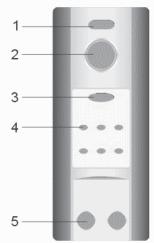
Front Plate
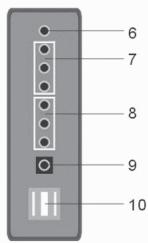
Back Plate
- Power On/Off (On/ Standby) Button
- Master Volume Knob
- DVD/AUX source selector switch
- Channel Indication Light
-
5.1 Channel Headphone outputs
-
AUX (Stereo) Audio Input
- DVD (5.1 channel) Audio Input
- Audio Extension Output
- DC Power Source (7.5 V adaptor) Input
- USB Power Source (5V) Input/extension
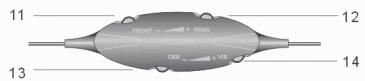
In-line Controller
- Front level control knob
- Rear level control knob
- Center level control knob
- Vibration (subwoofer 5.1 channel) level control knob
5.1 HOME THEATER HEADPHONE CONNECTING CABLES
A PC signal connecting cable with 3.5mm stereo plugs on both ends.

B AMP connection cable with 3.5mm stereo plugs & RCA jacks.
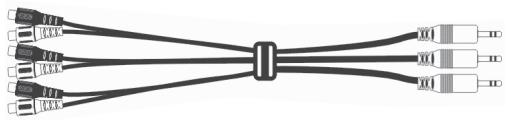
C DVD connection cable with RCA jacks and 3.5mm stereo phono plugs.
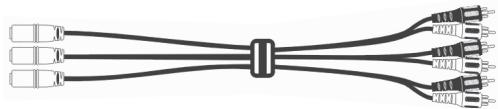
D TV connection cable with 3.5mm stereo phono plug & RCA plugs.

E USB extension cable.

F Microphone extension cable with 3.5mm jack & 3.5mm stereo phono plugs.

G Adaptor cable for the headphone from G9 to 3.5mm stereo plug to operate as conventional stereo headphones.

CONNECTING THE MICROPHONE
The microphone is connected to the microphone input (3.5 stereo jack) of your sound card respectively of your computer.
PLAYBACK OPERATION
When operating this product with DVD or 5.1 sound cards please connect the six channel audio cable to the front, rear, center and subwoofer 5.1 channel inputs. Set the source selector to DVD. At the same time, the 6 sound channel indicator lights will be turned on. Play back your DVD movies or music and sit back to enjoy the home theater digital surround sound effects. The master volume button on 5.1 amplifier box controls the output volume of each of the six sound channels simultaneously. The selections Front, Rear, Center, Sub/Vibration on the volume controller separately control all six surround sound channels, voice dialog, X bass volume, and vibration to satisfy your personal desires.
If your sound source is stereo, e.g. TV, VCD, CD, MP3, PC etc. please connect the signal to the AUX input. The source selector has to be set to AUX. At the same time the indicator lights associated with the channels L, R, and Sub are turned on. Adjust volume to the desired position according to environment and preferences. Front, Rear, Center, Sub/Vibration selections on the
volume controller allow to control the volume of the six speaker units individually. Sound environment and vibration effects are the same as on 5.1 source playback.
Important:
Please follow the instructions given by the labels on the device which are shown below.

CAUTION

Unless by professional technicians, do not dis-assemble product to avoid the danger of electric shock

This symbol is to remind users that the product contains "hazardous voltage." Improper operation may cause the danger of fire or electric shock.

This symbol is to remind users that the product provides important instruction. Please carefully read instruction manual before using product to prevent improper operations.

Please do not expose product to rain or moisturized influences to avoid product malfunction or fire incident.
Notes:
This product is protected by national patent.
Please don't use it under maximum volume for a long period time, and protect product from the dust, moisture, and dirt.
Tenderly take care of product. Avoid contact with high temperature and keen articles to prevent destroying product structures and functions.
F (OUTPUT)
R (OUTPUT)
C (OUTPUT)
F (FRONT)
R (REAR)
C (CENTER)
F(INPUT)
R (INPUT)
C(INPUT)
AUX (INPUT)
CONNECTING THE POWERMAX-HP10
Caution!
Before connecting the system, switch off the power of the PowerMax-HP10 and other equipments power sources.
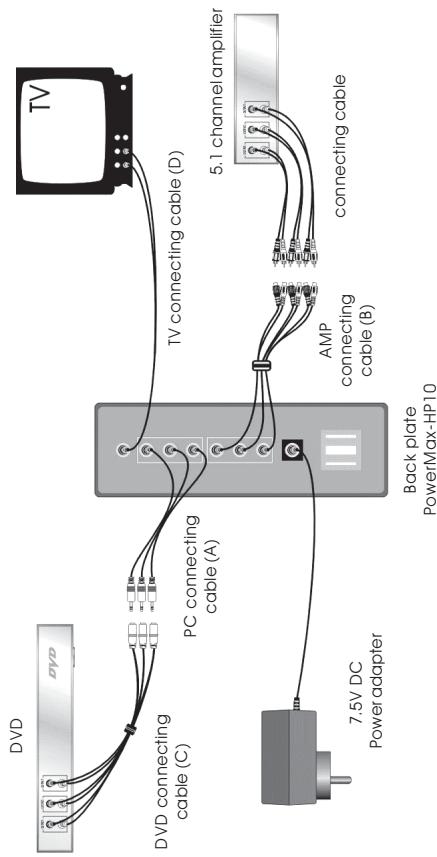
1. Connecting DVD players
An external DC power supply is required. Connect a 7.5V DC power supply to the 7.5V DC input jack on the back of the 5.1 amplifier box.
DVD players are connected to the input jacks Front, Rear, Sub/ Center over the 6 RCA output jacks. The connection is provided by a DVD and a PC cable.
Optionally a 5.1 amplifier/speaker system can be connected to the pass-through 5.1-output connectors of the headphone amplifier. It provides the DVD signal for further playback devices. TV sound can be connected to the input AUX using a TV cable.
For power and signal connection method, please refer to the following picture.
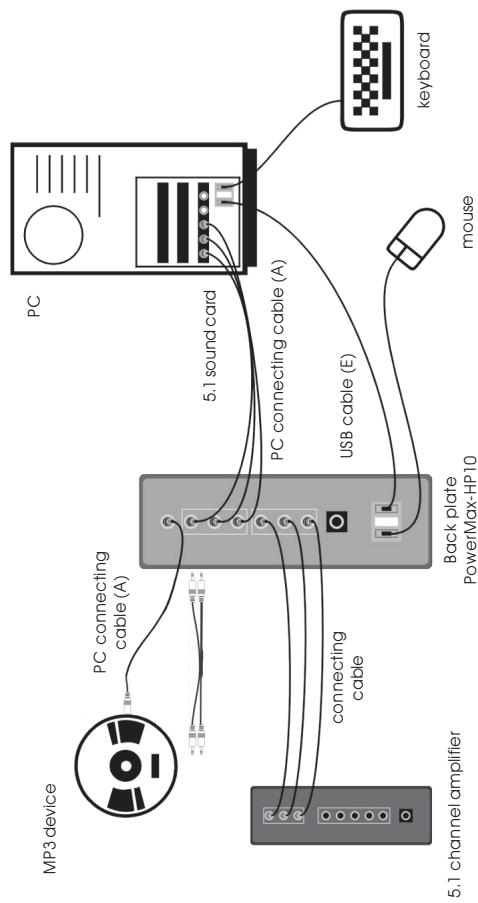
2. Connecting Computers (5.1 Sound Cards)
Utilize an USB cable to connect power to the system. The USB 5V power source is connected to the back of the 5.1 amplifier box (USB1). The second USB connector USB2 is intended to replace the occupied USB connector of your computer for other USB devices. In case of audible interference noise (e.g. with notebooks) disconnect the USB cable and install the external power supply.
PC 5.1 sound cards and the 3.5mm mini phono stereo input jacks of the headphone amplifier are connected together with the PC cable.
Optionally a 5.1 amplifier/speaker system can be connected to the pass-through 5.1 output connectors of the headphone amplifier. It provides the DVD signal for further playback devices.
MP3 devices can be connected to AUX with the PC connecting cable.
For power and signal connection method, please refer to the following picture.
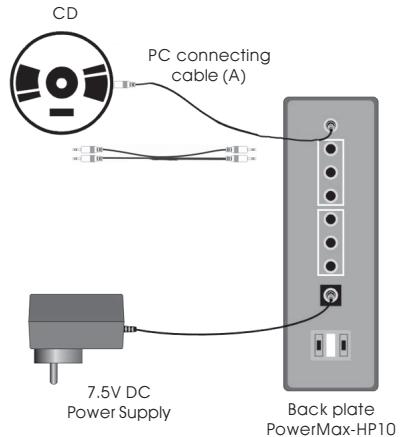
3. Connecting CD players
An external DC power supply is required. Connect the 7.5V DC power supply to the 7.5V DC input jack on the back of the 5.1 amplifier box.
CD devices can be connected to the input AUX with the PC connecting cable.
For power and signal connection method, please refer to the picture below.
4. Connecting VCD player devices
An external DC power supply is required. Connect the 7.5V DC power supply to the 7.5V DC input jack on the back of the 5.1 amplifier box.
VCD players can be connected to the input AUX with the TV cable.
Optionally a stereo amplifier/speaker system can be connected to the pass-through 5.1 front output connectors of the headphone amplifier. It provides the AUX signal for further playback devices.
For power and signal connection method, please refer to the picture below.
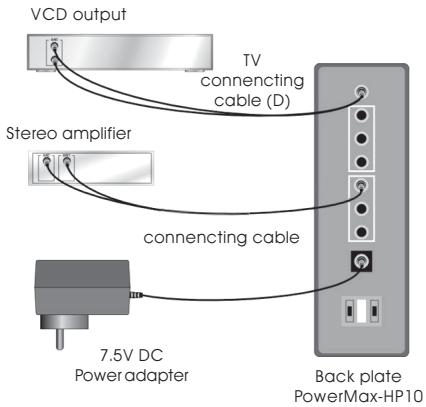
5. Connecting Computers (Stereo Sound Cards)
Utilize an USB cable for power source. Connect the USB 5V power source to the jack USB1 on the back of the 5.1 amplifier box. The second USB connector USB2 can extend the occupied USB connector of your computer for other USB devices. In case of audible interference noise (e.g. with Notebooks) disconnect the USB cable and install the external power supply.
PC stereo sound cards can be connected to the input AUX of the amplifier box by a PC audio cable with 3.5mm mini phono plugs at both ends.
Optionally a stereo amplifier/speaker system can be connected to the pass-through 5.1 front output connectors of the headphone amplifier.
For power and signal connection method, please refer to the picture below.
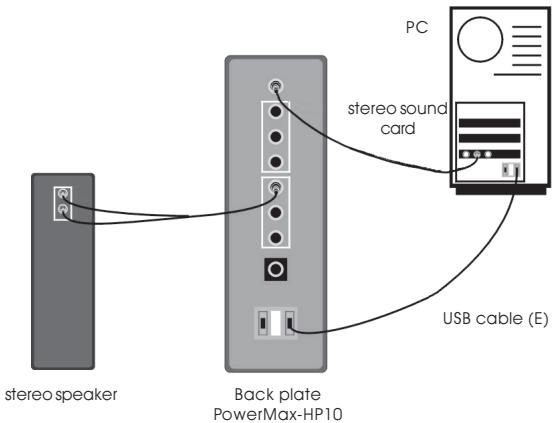
6. Connecting Computers (Stereo Sound Cards)
Utilize an USB cable for power source. Connect the USB 5V power source to the jack USB1 on the back of the 5.1 amplifier box. The second USB connector USB2 can replace the occupied USB connector of your computer for other USB devices. In case of audible interference noise (e.g. with Notebooks) disconnect the USB cable and install the external power supply.
PC stereo sound cards can be connected to the input AUX of the amplifier box by a PC audio cable with 3.5mm mini phono plugs at both ends.
Optionally a 5.1 amplifier/speaker system can be connected to the pass-through 5.1 front output connectors of the headphone amplifier. It provides the AUX signal for further playback devices.
For power and signal connection method, please refer to the picture below.
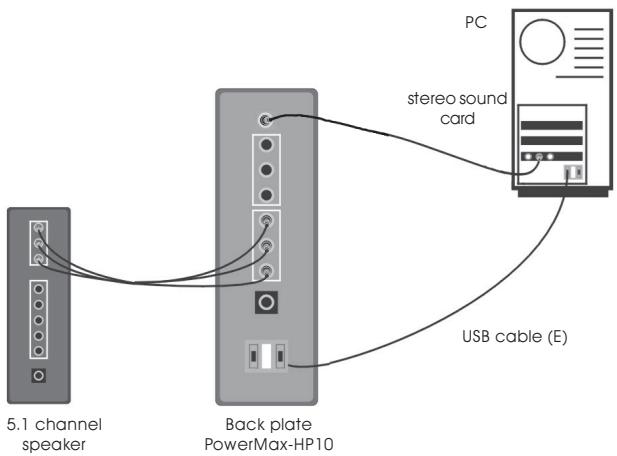
SPECIFICATION 5.1-CHANNELS AMPLIFIER
| Compatible to | DVD, PC, VCD, CD, TV, MP3, CD-R, CD-DA | |
| Audio Inputs | AUX (Stereo) | 1 Set |
| DVD (5.1-channel) | 1 Set | |
| Audio Outputs | 6 Channels | 1 Set |
| Audio Specifications | Front, Rear, Center. | 20Hz-20kHz |
| Subwoofer | 20Hz-120Hz | |
| Signal/Noise ratio | >=80dB | |
| Selection | >-60dB | |
| Distortion | <0.5% | |
| Power supply | AC/DC power supply | 230/7.5V, 500mA, 3.75W |
| USB power | 5.0V, 500mA, 2.5W | |
| Dimensions (W x D x H) | 90 x 155 x 143 mm | |
| Weight amplifier | approx. 450g | |
| Operation Temperature | 0-40 °C | |
| Operation Humidity rel. | <90% | |
| Weight cables | approx. 100g | |
SPECIFICATION 5.1-CHANNELS HEADPHONE
| Power capacity Weight | 500mW x 6 approx. 300g | |
| Speaker Driver Front | Diameter | 40 mm (x 2) |
| Impedance | 64 Ohms | |
| Frequency Range | 20Hz-20k Hz | |
| Speaker Driver Rear | Diameter | 30 mm (x 2) |
| Impedance | 32 Ohms | |
| Frequency Range | 20Hz-20k Hz | |
| Speaker Driver Center | Diameter | 30 mm (x 2) |
| Impedance | 32 Ohms | |
| Frequency Range | 20Hz-20 k Hz | |
| Speaker Driver Vibration | Diameter | 30 mm (x 2) |
| Impedance | 8 Ohms | |
| Frequency Range | 20Hz-120 Hz |
SPECIFICATION MICROPHONE
| Type | Electret-Capsule | 9.7mm |
| Weight | approx. 30g | |
| Directivity | Omnidirektonal | |
| Impedance | 2200 Ohms +/- 15% | |
| Sensitivity | 60dB +/- 2dB | |
| Frequency Range | 30Hz- 16,000Hz | |
| Operation Voltage | nominal | 4.5V |
WARRANTY
Model
Serial No.
PowerMax-HP10
Owner's name
Address
Dealer's name Date of purchase
Dealer's address
Warranty Period
TEAC Corporation, hereinafter called TEAC, warrants this product against any defect in material and workmanship for two (2) years from the date of purchase by the original retail purchaser. According to the following terms this TEAC product will be repaired without charge of labor and materials by the authorized TEAC service stations, by the authorized TEAC dealers and/or their authorized service stations. TEAC, the authorized TEAC service stations, the authorized TEAC dealers and/or their authorized service stations may decide whether the defective product will be repaired or replaced as a whole or partially. The TEAC dependencies, the authorized TEAC service stations, the authorized TEAC dealers and/or their authorized service stations will also honour this warranty in the other EC and EFTA member states based on the terms in this warranty conditions.
What is Covered and What is Not Covered.
Except as specified below, this warranty covers any defects in materials and workmanship of this product. The following are not covered by the warranty:
- Damage to or deterioration of the external cabinet.
-
Any unit that has been altered or on which the serial number has been defaced, modified, or removed.
-
Damage, deterioration or malfunction resulting from:
(a) accident, misuse, abuse or neglect;
(b) failure to follow instructions supplied with the product;
(c) any shipment of the product. Any damage arising of transportation is the liability of the freight company. Any damage arising of transportation and any implicit and explicit risks are the liability of the freight company. This is expressly not a liability of TEAC;
(d) repair or attempted repair by anyone not authorized by TEAC to repair this product;
(e) causes other than product defects, including lack of technical skill, competence or experience of the user. Especially damages which may arise of incidental use respectively by improper ventilation,
(f) damages caused by improper or incorrect installation of software,
(g) periodic check-ups,
(h) maintenance respectively repair of parts due to normal wear and tear,
(i) adoptions or adjustments to the product in order to conform to different national technical or safety standards of any country other than the one for which the product was originally designed and manufactured.
Who May Enforce the Warranty
This warranty may be enforced only by the original retail purchaser.
What We Will Pay For
We will pay all labor and material expenses for items covered by the warranty. Payment of shipping and insurance charge is discussed in the next section of this warranty.
How You Can Get Warranty Service
-
If your unit needs service during the warranty period, please contact the local authorized distributor for this product. If you are unable to locate such a distributor, please contact your TEAC facility at the address indicated below.
-
After identifying the nearest authorized service station for this product the product or any parts believed to be defective must be shipped freight and insurance prepaid to such service station, together with a copy of this warranty certificate and a copy of your sales receipt, showing the date of purchase. Please ensure to fill out the warranty certificate correctly (do not forget the serial number of the product). TEAC reserves the right to refuse the guarantee service if the documents are missing or incomplete in the understanding of this terms.
If the necessary repairs are covered by the warranty, and if you have sent the product or parts of it to the nearest authorized service station, the return freight and insurance charges will be prepaid.
Please do not return your unit to the TEAC factory without out prior authorization (see also RMA form)!
Limitations of Liability and Exclusion of Implied Warranties
Unless considered unenforceable or unlawfull under the applicable national law:
- TEAC's liability for any defective product is limited to repair or replacement of the product, at TEAC's option and the option of authorized service stations, authorized dealers and their authorized service stations. No one is authorized to assume any greater liability on TEACs behalf. TEAC shall not be liable for any damage to any other properties independent of their virtual or real nature especially there is no liability for any damage to any kind of software and/or any kind of databases caused by TEAC products. Furthermore TEAC is not liable for damages arising out of loss of use, loss of revenue or profits, or any other damages, wether incidental, consequential, or otherwise.
- All implied warranties or conditions, including but not limited to warranties or conditions of merchantability and fitness for a particular purpose, hereby are excluded.
These warranty terms do not affect any statutory rights of consumers which were granted by the respective national laws.
TEAC Europe GmbH,DSPD:
Bahnstraße 12, 65205 Wiesbaden-Erbenheim, Germany
Internet: www.teac.de
TEAC Service Center:
TEAC Service Centre Europe
Hessenring 25
64546 Mörfelden-Walldorf, Germany
www.teac.de/rma
Serial No.
Model
Owner's name
PowerMax-HP10
Address
Warranty Period
This warranty may be enforced only by the original retail purchaser.
What We Will Pay For
We will pay all labor and material expenses for items covered by the warranty. Payment of shipping and insurance charge is discussed in the next section of this warranty.
How You Can Get Warranty Service
1. If your unit needs service during the warranty period, please contact the local authorized distributor for more information. This will enable to locate such a distributor, please contact your TEAC facility at the address indicated below.
2. After identifying the nearest authorized service station for this product the product or any parts be- lied to be defective must be chipped freight and insurance prepaid to such service station together
with a copy of this warranty certificate and a copy of your sales receipt, showing the date of purchase. Please ensure to fill out the warranty certificate correctly (do not forget the serial number of the
product). TEAC reserves the right to refuse the guarantee service if the documents are missing or incomplete in the understanding of this terms.
If the necessary repairs are covered by the warranty, and if you have sent the product or parts of it to the nearest authorized service station, the return freight and insurance charges will be prepaid.
RMA form)!
Please do not return your unit to the TEAC factory without our prior authorization (see also RMA form)!
Limitations of Liability and Exclusion of Implied Warranties
Unless considered unenforceable or unlawful under the applicable national law: 4. TEAC's liability for non-defence product in limited to certain scope of respect of the contract - at TEACs
option and the option of authorized service stations, authorized dealers and their authorized service
stations. No one is authorized to assume any greater liability on TEACS denial. TEACS shall not be liable for any damage to any other properties independent of their virtual or real nature especially there
is no liability for any damage to any kind of software and/or any kind of databases caused by TEAC conduct. Furthermore, TEAC is not liable for damages arising out of loss of use, loss of revenue or
profits, or any other damages, wether incidental, consequential, or otherwise.
2. An implied warranties of conditions, including but not limited to warranties of conditions of merchantability and fitness for a particular purpose, hereby are excluded.
These warranty terms do not affect any statutory rights of consumers which were granted by the respective national laws.
TEAC Corporation, hereininafter called TEAC, warrants this product against any defect in material and workmanship for two (2) years from the date of purchase by the original retail purchaser. According to the following terms this TEAC product will be repaired without charge of labor and materials by the authorized TEAC service stations, by the authorized TEAC dealers and/or their authorized service stations. TEAC, the authorized TEAC service stations, the authorized TEAC dealers and/or their authorized service stations, shall not manufacture or repair the product but shall be repaired or replaced as a whole or partially. The TEAC dependancies, the authorized TEAC service stations, the authorized TEAC dealers and/or their authorized service stations will also honour this warranty in the other EC and EFTA member states based on the terms in this warranty conditions.
What is Covered and What is Not Covered.
Except as specified below, this warranty covers any defects in materials and workmanship of this product. The following are not covered by the warranty:
1. 两条既含又不含有 ^15 N 的 DNA 单链
1. Damage to or deterioration of the external cabinet.
2. Any unit that has been altered or on which the serial number has
3. Damage, deterioration or malfunction results
(c) any shipment of the product. Any damage arising of transportation is the liability of the freight company. Any damage to a single of these parties and any writed and装卸 risks are the liability
company. Any damage arising from transportation and any
(d) repair or attempted repair by anyone not authorized by TEAC to repair this product;
(e) causes other than product defects, including lack of technical skill, competence or experience in the design and development of the user. Especially damages which may arise of incidental use respectively by
of the asset, especially damages within may arise of incidental or ventilation.
(f) damages caused by improper or incorrect installation of software,
(g) periodic check-ups,
(i) maintenance respectively repair or paint due to human wear and tear;
(ii) adoptions or adjustments to the product in order to conform to different national technical or safety standards of any country other than the one for which the product was originally designed and manufactured.
Aaeaae aeeaae eaeaae aeaae aaeaae aaeaae aaeaae aaeaae aaeaae aaeaae aaeaae aaeaae aaeaae aaeaae aaeaae aaeaae aaeaae aaeaae aaeaae aaeaae aaeaae aaeaae aaeaae aaeaae aaeaae aaeaae aaeaae aaeaae aaeaae aee
Hqnnnne
cdSD
e e
Wnennnnnnnnnnnnnnnnnnnnnnnnnnnnnnnnnnnnnnnnnnnnnnnnnnnnnnnnnnnnnnnnnnnnnnnnnnnnnnnnnnnnnnnnnnnnnnnnnnnnnnnnnnnnnn
Ae