B&W CASA KEYPAD UNIT - Système de contrôle d'accès B&W - Notice d'utilisation et mode d'emploi gratuit
Retrouvez gratuitement la notice de l'appareil B&W CASA KEYPAD UNIT B&W au format PDF.


| Type d'appareil | Enceinte audio |
| Puissance de sortie | Non précisé |
| Impédance | Non précisé |
| Réponse en fréquence | Non précisé |
| Sensibilité | Non précisé |
| Connectivité | Filaire |
| Nombre de voies | Non précisé |
| Type de haut-parleurs | Non précisé |
| Dimensions (L x H x P) | Non précisé |
| Poids | Non précisé |
| Couleur | Non précisé |
| Matériau | Non précisé |
| Utilisation recommandée | Audio domestique |
| Fabricant | Non précisé |
| Garantie | Non précisé |
FOIRE AUX QUESTIONS - B&W CASA KEYPAD UNIT B&W
Questions des utilisateurs sur B&W CASA KEYPAD UNIT B&W
0 question sur cet appareil. Repondez a celles que vous connaissez ou posez la votre.
Poser une nouvelle question sur cet appareil
Téléchargez la notice de votre Système de contrôle d'accès au format PDF gratuitement ! Retrouvez votre notice B&W CASA KEYPAD UNIT - B&W et reprennez votre appareil électronique en main. Sur cette page sont publiés tous les documents nécessaires à l'utilisation de votre appareil B&W CASA KEYPAD UNIT de la marque B&W.
MODE D'EMPLOI B&W CASA KEYPAD UNIT B&W
B&W Loudspeakers Ltd. reserves the right to amend details of the specification without notice in line with technical developments. Copyright © B&W Loudspeakers Ltd. Printed in England. B&W Loudspeakers Ltd, Meadow Road, Worthing, BN11 2RX, England Tel: +44 (0) 1903 524801 Fax: +44 (0) 1903 524725 B&W Loudspeakers of America, 54 Concord Street, North Reading, MA 01864-2699, USA Tel: (1978) 664 2870 Fax: (1978) 664 4109 http://www.bwspeakers.com
CASA Keypad Unit
INSTALLATION NOTES
CASA KEYPAD UNIT INSTALLATION NOTES
THESE NOTES MUST BE READ IN CONJUNCTION WITH THE CASA INSTALLATION MANUAL.
Unpacking
Check the contents:
1 x Keypad unit
8 x Auxiliary source buttons
3 x Blank black buttons
2 x Blank white buttons
1 x Mounting frame assembly
2 x spacers
1 x Double J box fascia
1 x Keypad frame edge
4 x Self tapping screws (to hold mounting frame assembly into double J box)
4 x Small self tapping screws (to hold keypad into mounting frame assembly)
NOTE: THERE ARE PROTECTED STATIC DEVICES ON THE CIRCUIT BOARD SO IT SHOULD BE HANDLED BY THE EDGES ONLY.
Installing the buttons
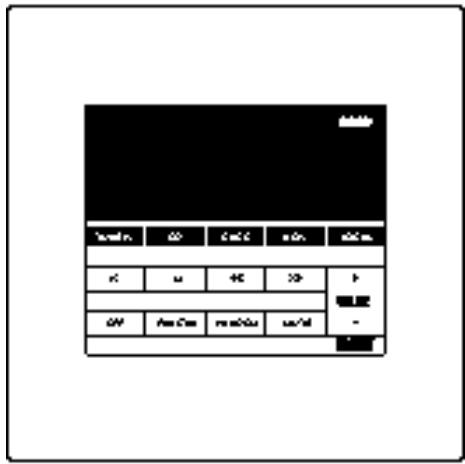
Press home (the buttons simply click into place) the appropriate source buttons in the two holes immediately adjacent to the CD source button.
If a local source is going to be used click the LOCAL button into the empty hole on the far right of the keypad above the volume control.
If either of these third or fourth sources or the local source are not going to be used push a blank black button in the unused hole.
If a Tuner that is being used supports either Direct Access to the station presets or a "Favourite Station" function click the FAV.STN button into the hole next to the OFF button.
If a CD Player being used supports a "Random Play" function click the RANDOM button into the hole next to the MUTE button.
If either of these two functions are not going to be used push a blank white button in the unused hole.
Note: If the keys need to be removed from the keypad for any reason they can be prised out from behind by first removing the circuit board and the 4 screws that hold the board and keypad together.
Installing the keypad (Figure 1)
Use the 4 screws provided to mount the mounting frame assembly into the double J box.
Use the spacers provided, if necessary, to sit under the keypad (to bring it flush with the wall frame). Offer up the unit to the mounting frame and attach the cables as described in the CASA Installation Manual.
Using the 4 small screws provided attach the keypad to the mounting frame.
Gently press the supplied fascia home in place around the keypad.
Fitting an alternative fascia
Cut out the centre section of the double J box fascia that you wish to use, cleaning off any rough edges. Screw the fascia loosely in position around the keypad and press home the supplied frame edge on the inside edge of the fascia. Finally, tighten the screws to hold the fascia in position.
Figure 1
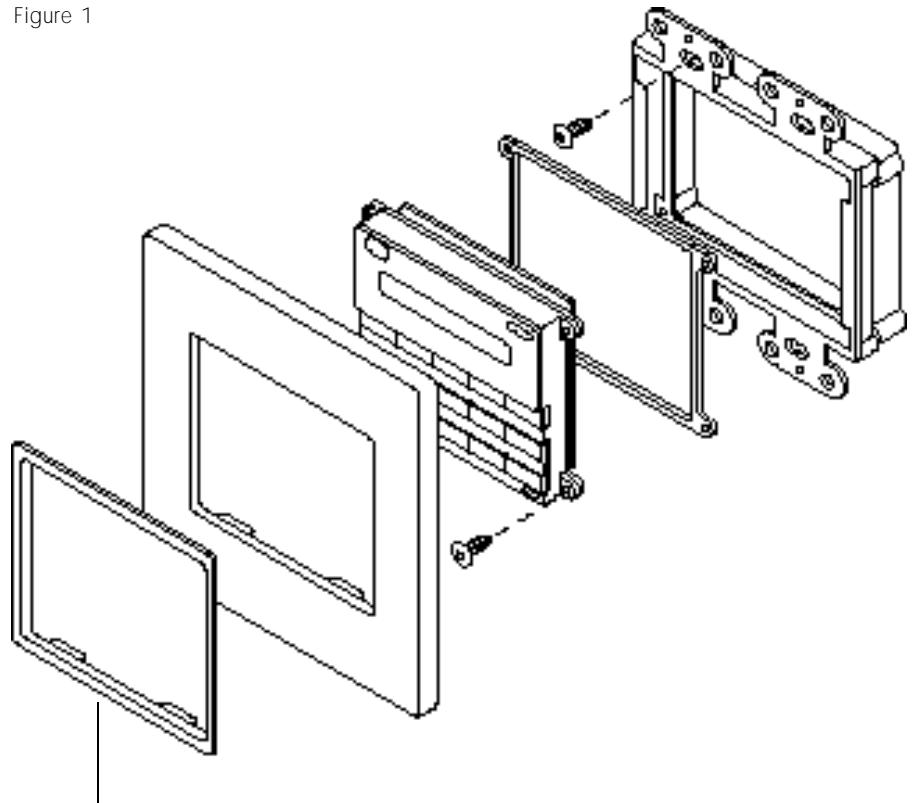
To be used with non B&W fascia.
B&W Loudspeakers Ltd. reserves the right to amend details of the specification without notice in line with technical developments. Copyright © B&W Loudspeakers Ltd. Printed in England. B&W Loudspeakers Ltd, Meadow Road, Worthing, BN11 2RX, England Tel: +44 (0) 1903 524801 Fax: +44 (0) 1903 524725 B&W Loudspeakers of America, 54 Concord Street, North Reading, MA 01864-2699, USA Tel: (1978) 664 2870 Fax: (1978) 664 4109 http://www.bwspeakers.com