
MICROTALK MT 600 - Talkie-walkie COBRA - Notice d'utilisation et mode d'emploi gratuit
Retrouvez gratuitement la notice de l'appareil MICROTALK MT 600 COBRA au format PDF.


| Type de produit | Talkie-walkie PMR 446 |
| Marque | COBRA |
| Modèle | MICROTALK MT 600 |
| Dimensions (approx.) | 145 × 58 × 38 mm |
| Poids (avec piles) | Environ 130 g |
| Alimentation | 3 piles AAA alcalines ou accumulateurs NiMH fournis |
| Autonomie estimée | Jusqu'à 12 heures en utilisation normale |
| Portée maximale | Jusqu'à 5 km en champ libre |
| Nombre de canaux | 8 canaux (canaux 1 et 2 non autorisés en France) |
| Codes de confidentialité | 38 codes CTCSS et 83 codes DCS |
| Écran | Écran LCD rétroéclairé |
| Fonction mains-libres (VOX) | Oui, avec 5 niveaux de sensibilité réglables |
| Balayage automatique des canaux et codes | Oui |
| Tonalité d'appel | 5 sonneries sélectionnables |
| Roger Beep | Oui, activable/désactivable |
| Verrouillage des touches | Oui |
| Économiseur d'énergie | Oui, automatique |
| Prise pour écouteur/micro externe et chargeur | Oui, jack 2,5 mm |
| Clip ceinture | Inclus, amovible |
| Entretien et nettoyage | Essuyer avec un chiffon sec ; éviter l'eau, la poussière et les températures extrêmes |
| Sécurité | Conforme aux directives R&TTE ; ne pas jeter les piles au feu |
| Pièces détachées et réparabilité | Piles rechargeables et chargeur fournis ; autres pièces disponibles via revendeur agréé |
| Informations générales | Homologué pour une utilisation dans les pays de l'UE sous réserve des réglementations locales ; marque CE0682 |
FOIRE AUX QUESTIONS - MICROTALK MT 600 COBRA
Questions des utilisateurs sur MICROTALK MT 600 COBRA
0 question sur cet appareil. Repondez a celles que vous connaissez ou posez la votre.
Poser une nouvelle question sur cet appareil
Téléchargez la notice de votre Talkie-walkie au format PDF gratuitement ! Retrouvez votre notice MICROTALK MT 600 - COBRA et reprennez votre appareil électronique en main. Sur cette page sont publiés tous les documents nécessaires à l'utilisation de votre appareil MICROTALK MT 600 de la marque COBRA.
MODE D'EMPLOI MICROTALK MT 600 COBRA
ENGLISH
text_image
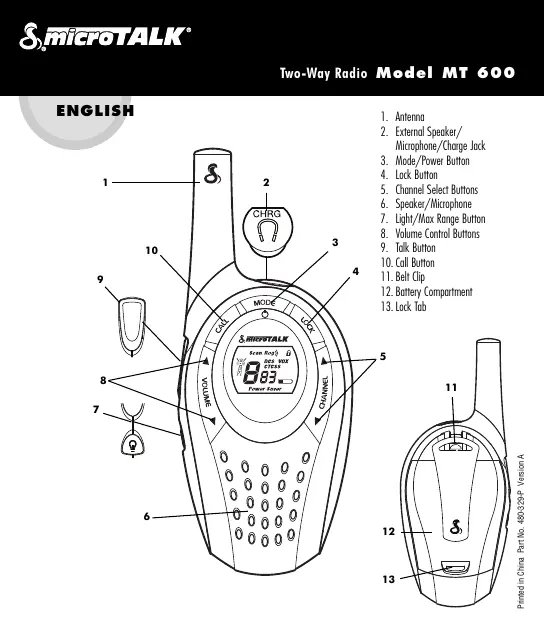
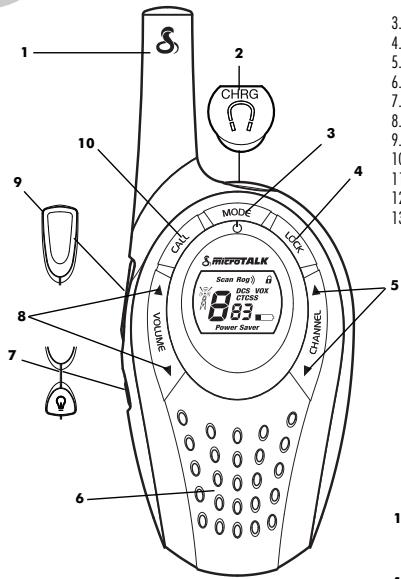
1 2 CHRG 3 4 5 6 7 8 9 10 VOLUME CAN MODE LOCK CHANNEL S.MICETALK Scan Ro#) DOC BOX CTESS 8.83 Power Saver 3. 4. 5. 6. 7. 8. 9. 10 11 12 13- Antenna
- External Speaker/Microphone/Charge Jack
- Mode/Power Button
- Lock Button
- Channel Select Buttons
- Speaker/Microphone
- Light/Max Range Button
- Volume Control Buttons
- Talk Button
- Call Button
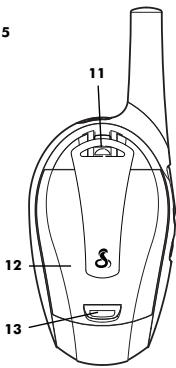
- Belt Clip
- Battery Compartment
- Lock Tab
text_image
5 11 12 13Features
- Two-Way Radio with up to a 5 km (3 mile) range
- 8 Channels*
• 38 CTCSS Privacy Codes
• 83 DCS Privacy Codes - Backlit LCD Display
- Battery Saver Circuitry
• Maximum Range Extender - Call Alert (5 selectable tones)
- Scan (Channel, Privacy Codes)
• Auto Squelch
• Key Lock - Belt Clip
• Vox Mode for Hands-Free Operation
- Selectable On/Off "Roger Beep" Confirmation Tone
• External Speaker/Microphone/Charge Jack
*You are not allowed to use channels 1 and 2 in France. This situation can change; please contact the French radio licensing authority for more information.
text_image
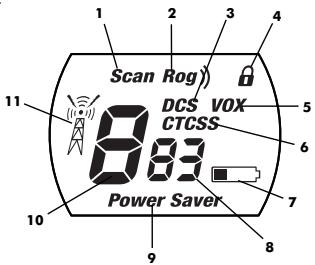
Scan Rog) DCS VOX CTCSS 8.83 Power Saver 11 10 9 8 7 6 5 4 3 2 1- Scan Icon
- Roger Beep Icon
- DCS Icon
- Lock Icon
- VOX Icon
- CTCSS Icon
- Battery Low Icon
- Privacy Code Numbers
- Power Saver Icon
- Main Channel Number
- Receive/Transmit Icon
Product Information
This microTALK ^® radio has been manufactured to meet all required standards for radio equipment using PMR 446 frequencies as authorized. The use of this two-way radio product involves the public airways and its use may be subject to local laws or regulations. Contact your radio licensing authority for more information.
Caring for Your Radio
Your microTALK ^® radio will give you years of trouble-free service if cared for properly. Here are a few suggestions:
- Handle the radio gently.
- Keep it away from dust.
- Never put the radio in water or in a damp place.
- Avoid exposure to extreme temperatures.
Charger and Rechargeable Batteries
To Insert Batteries in Radio:
- Remove belt clip by releasing belt clip latch and sliding clip up.
- Push up on lock tab to remove battery cover.
- Insert batteries according to polarity markings.
NOTE: Estimated operation time on full charge: 12 hours.

text_image
Remove Belt Clip
text_image
Lock Tab
text_image
Insert BatteriesThese rechargeable batteries must be recycled or disposed of properly in compliance with all applicable laws. They must not be thrown in the rubbish bin. Some countries and local authorities require recycling and have established collection programs. Please contact your local waste disposal authority for instructions.
WARNING: Do not put batteries into fire or expose to high heat. They may explode.
text_image
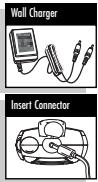
Wall Charger Insert ConnectorFor Charging Cobra's microTALK® Radio(s):
- Check to see that the batteries have been inserted properly. See above for battery installation instructions.
- Insert round connector of wall charger into the charge jack located at the top of the radio. The wall charger has two (2) round connectors which enables you to charge either one (1) or two (2) radios at a time.
- Plug the wall charger into electrical outlet.
It is not recommended to recharge batteries more than 24 hours. Estimated operation time on a full charge is 12 hours.
Use only the supplied rechargeable batteries and wall charger for recharging your Cobra microTALK® radio. Non-rechargeable alkaline batteries can also be used.
Radio Power
To Turn Your Radio On:
— Press and hold the MODE/POWER button until you hear a series of audible tones indicating that the radio is On. Your microTALK® radio is now in LISTENING MODE, ready to receive transmissions. The radio is always in LISTENING MODE, except when the TALK, CALL or MODE/POWER buttons are pressed.
To Turn Your Radio Off:
- Press and hold the MODE/POWER button for two (2) seconds.
Battery Low Indicator
When battery power is low, the BATTERY LOW indicator will blink, indicating that batteries should be recharged or replaced.
WARNING: Only the supplied NiMH batteries can be recharged.
Battery/Power Saver
If there are no transmissions within 10 seconds, the unit will automatically switch to Battery Save mode and POWER SAVER will appear in the display. This will not affect the unit's ability to receive incoming transmissions.

text_image
Mode/Power Button MODE Battery Low Icon Power Saver Icon Power SaverCommunicating with Another Person
- Press and hold the TALK button.
- With the microphone about 5 cm (2 inches) from your mouth, speak in a normal voice.
- Release the button when you have finished talking and listen for a response.
You cannot receive incoming calls while pressing the TALK button.
NOTE: Both radios must be tuned to the same channel and privacy code to communicate.

text_image
Talk Button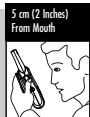
text_image
5 cm (2 Inches) From MouthListening for a Response
- Release the TALK button to receive incoming transmissions. Your microTALK® is always in LISTENING MODE while the TALK or CALL buttons are not pressed.

text_image
Listening
text_image
Volume Buttons VOLUME
text_image
Volume Level Scan Rog)) DCS VOX CTCSS 8 Power SaverTo Adjust Volume
— Press the VOLUME UP or the VOLUME DOWN buttons.
A dual beep sound is used to indicate that you have reached the minimum (1) or maximum (8) volume level.
Call Button
— Press and release the CALL button.
The other person will hear a two (2) second ringing tone. You cannot send or receive transmissions during the two (2) second call tone.
NOTE: Both radios must be tuned to the same channel and privacy code to communicate.

text_image
Call Button CALL S.F.
text_image
Channel Buttons CHANNEL
text_image
Channels DCS CTC 8:8To Select a Channel
— With the radio on, select any of the eight (8) channels by pushing the CHANNEL UP or CHANNEL DOWN button.
You can press and hold the CHANNEL UP or CHANNEL DOWN button for fast advance.
NOTE: Both radios must be tuned to the same channel and privacy code (see "CTCSS Privacy Codes" or "DCS Privacy Codes") to communicate.
Lock Function
The LOCK button locks the CHANNEL UP, CHANNEL DOWN and MODE/POWER buttons to prevent accidental operation.
To Use the Lock Function:
— Press and hold the LOCK button for two (2) seconds to turn the Lock On or Off.
A double beep sound is used to confirm your Lock On or Off request. When the radio is in Lock Mode, the Lock icon will be displayed.

text_image
Lock Button LOCK LK
text_image
Lock Icon VOXTo Illuminate Display
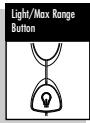
— Press and release the LIGHT/MAX RANGE button to illuminate the display for 10 seconds.
Auto Squelch/Maximum Range Extender
Your microTALK ^® radio is equipped with Auto Squelch, which automatically shuts off weak transmissions and unwanted noise resulting from terrain, conditions or from reaching your maximum range limit.
You can temporarily turn Off Auto Squelch or turn On Maximum Range Extender, allowing all signals to be received and extending the maximum range of your radio.
text_image
Light/Max Range Button
text_image
Light/Max Range ButtonTo Temporarily Turn Off Auto Squelch:
- Press the LIGHT/MAX RANGE button for less than five (5) seconds.
If you hear two (2) beeps, you have turned the Maximum Range Extender On (see below).
To Turn Maximum Range Extender On:
- Press and hold the LIGHT/MAX RANGE button for at least five (5) seconds until you hear two (2) beeps, indicating that the Maximum Range Extender is On.
To Turn Maximum Range Extender Off:
— Press and release the LIGHT/MAX RANGE button or change channels.
microTALK® Range
Your microTALK ^® radio has a range of up to 5 kilometres (3 miles).
Your range will vary depending on terrain and conditions.
In flat, open country, your radio will operate at maximum range.
Buildings and foliage in the path of the signal can reduce the range.
Dense foliage and hilly terrain will further reduce the signal.
Remember, you can achieve maximum range by using Maximum Range Extender.
See above for details.

text_image
Maximum Range
text_image
Reduced Range
text_image
Reduced Range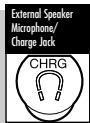
text_image
External Speaker Microphone/ Charge Jack CHRGExternal Speaker/Microphone/Charge Jack
Your microTALK® radio can be fitted with an optional external speaker/microphone (not included), freeing your hands for other tasks.
To Attach the External Speaker/Microphone or Charger:
- Open the charge tab on top of the radio.
- Insert the plug into the jack.
Scrolling Through the Mode Functions
By scrolling through the Mode Functions, you will be able to select or change preferred features of your microTALK® radio. While you are scrolling through the Mode Functions, your radio features will be displayed in the same predetermined order:

Set CTCSS Privacy Codes
Set DCS Privacy Codes
Set VOX On/Off
Set VOX Sensitivity Level
Set Channel Scan
Set CTCSS Privacy Code Scan
Set DCS Privacy Code Scan
Set Call Tones
Set "Roger Beep" On/Off
CTCSS Privacy Codes
CTCSS (Continuous Tone Coded Squelch System) is an advanced tone coding system allowing you to select one of
38 privacy codes to reduce incoming transmissions from other users on the channel.
NOTE: If you are using a privacy code, both radios must be tuned to the same channel and privacy code to communicate. Each channel will remember the last privacy code you selected.
To Select a CTCSS Privacy Code:
- After selecting a channel, press and release the MODE button until the CTCSS icon flashes on the display. In addition to the CTCSS icon, either OFF or the small numbers next to the channel number will flash on the display.
- If CTCSS and OFF are flashing, press the CHANNEL UP or CHANNEL DOWN button to exit OFF and proceed to select a privacy code; or, if CTCSS and the small numbers next to the channel number are flashing, press the CHANNEL UP or CHANNEL DOWN button to select a privacy code.
- When your desired privacy code is displayed, choose one of the following:
a. Press the MODE button to enter the new setting and proceed to other functions.
b. Press the LOCK button to enter the new setting and return to LISTENING MODE.
c. Do not press any buttons for 15 seconds to enter the new setting and return to LISTENING MODE.

text_image
Mode Button MODE
text_image
CTCSS OFF DCS VOX CTCSS OFF Power Saver
text_image
Select Privacy Code 6-38- Power Layer
text_image
Channel Buttons CHANNELDCS Privacy Codes
DCS (Digital Coded Squelch) is an advanced digital coding system allowing you to select one of 83 privacy codes to reduce incoming transmissions from other users on the channel.
NOTE: If you are using a DCS code, both radios must be turned to the same channel and DCS privacy code to communicate. Each channel will remember the last code you selected.
To Select a DCS Privacy Code:
- After selecting a channel, press and release the MODE button until the DCS icon flashes on the display. In addition to the DCS icon, either OFF or the small numbers next to the channel number will flash on the display.
-
If DCS and OFF are flashing, press the CHANNEL UP or CHANNEL DOWN button to exit OFF and proceed to select a privacy code; or, if DCS and the small numbers next to the channel number are flashing, press the CHANNEL UP or CHANNEL DOWN button to select a privacy code.
-
When your desired privacy code is displayed, choose one of the following:
a. Press the MODE button to enter the new setting and proceed to other functions.
b. Press the LOCK button to enter the new setting and return to LISTENING MODE.
c. Do not press any buttons for 15 seconds to enter the new setting and return to LISTENING MODE.

text_image
Mode Button MODE
text_image
DCS OFF DCS VOX CTCSS OFF Power Saver
text_image
Select Privacy Code 6 bus v c1css -38- Power Saver
text_image
Channel Buttons CHANNEL
text_image
Mode Button MODE
text_image
Select VOX DCS- VOX- CTCS/ OFF Power Saver
text_image
CHANNEL Buttons CHANNELVoice Activated Transmit (VOX)
In VOX Mode, your microTALK ^® radio can be used "hands-free," automatically transmitting when you speak. You can set the VOX sensitivity level to fit the volume of your voice and avoid transmissions triggered by background noise.
To Turn VOX Mode On or Off:
- Press the MODE button until the VOX icon flashes on the display. The current On or Off setting is displayed.
- Press the CHANNEL UP or CHANNEL DOWN button to turn VOX On or Off.
- When your desired VOX Mode setting is displayed, choose one of the following:
a. Press the MODE button to enter the new setting and proceed to other functions.
b. Press the LOCK button to enter the new setting and return to LISTENING MODE.
c. Do not press any buttons for 15 seconds to enter the new setting and return to LISTENING MODE.

text_image
Mode Button MODE
text_image
Select VOX Sensitivity Level Scan Rog DC- VOX - CTCS 5 L OS Power Saver
text_image
Channel Buttons CHANNELTo Set the VOX Sensitivity Level:
- Press the MODE button until the VOX icon flashes and the current sensitivity level is displayed.
The current sensitivity level is displayed with the letter "L" and a number 1 to 5, 5 being the most sensitive level and 1 being the least sensitive level. -
Press the CHANNEL UP or CHANNEL DOWN button to change the setting.
-
When your desired VOX sensitivity level is displayed, choose one of the following:
a. Press the MODE button to enter the new setting and proceed to other functions.
b. Press the LOCK button to enter the new setting and return to LISTENING MODE.
c. Do not press any buttons for 15 seconds to enter the new setting and return to LISTENING MODE.
Channel Scan
Your microTALK ^® radio can automatically scan channels (1 to 8).
NOTE: The radio ignores specific CTCSS or DCS privacy codes while scanning channels.
To Scan Channels:
- Press the MODE button until the Scan icon and the channel number flash on the display.
- Press the CHANNEL UP or CHANNEL DOWN button to begin scanning channels.
The Scan icon will continue to be displayed when channel scan is On. Your radio will continue to scan all channels and stop if an incoming transmission is detected. Your radio will remain on that channel for 10 seconds.
While setting channel scan, if you do not press any buttons for 15 seconds, your radio will automatically return to LISTENING MODE on the channel or channel/privacy code displayed before you entered Mode Functions.

text_image
Mode Button MODE
text_image
Select Scan Channels Scan 83 low SaverDuring An Incoming Transmission, You Can Choose From The Following:

text_image
Channel Buttons CHANNELa. Press and hold the TALK button to communicate on that channel. Your radio will remain on that channel and return to LISTENING MODE.
b. Press the CHANNEL UP or CHANNEL DOWN button to resume scanning channels.
If you press the TALK button while scanning and not within 10 seconds of receiving a transmission, you will transmit on the channel on which you last received a transmission. This will return the radio to LISTENING MODE.
If you do not press any button within 10 seconds, your radio will automatically resume scanning channels.
During Scanning (while not receiving a transmission), You Can Choose From The Following:
a. Press and hold the TALK button to communicate on either the channel or channel/privacy code that was displayed before you entered Mode Functions or the channel on which, during scanning, you last received a transmission. This will return the radio to LISTENING MODE.
b. Press the MODE button to proceed to set privacy code on the channel that was either displayed before you entered Mode Functions or on which, during scanning, you last received a transmission (see "CTCSS Privacy Code Scan" or "DCS Privacy Code Scan" for further details).
c. Press the LOCK button to return to LISTENING MODE on either the channel or channel/privacy code that was displayed before you entered Mode Functions or the channel on which, during scanning, you last transmitted or received.

text_image
Select Channel Scan Reg DCS VOX CTCSS 838 Power Saver
text_image
Mode Button MODECTCSS Privacy Code Scan
Your microTALK ^® radio can automatically scan the CTCSS privacy codes (01 to 38) within one (1) channel.
To Scan Privacy Codes:

text_image
Select Scan Privacy Codes Scan 8:38 CTCSS Power Save
text_image
Channel Buttons CHANNEL- While in LISTENING MODE, press the CHANNEL UP or CHANNEL DOWN button to choose the channel on which you wish to scan the CTCSS privacy codes.
- Press the MODE button until the Scan icon, CTCSS icon and the small numbers flash on the display.
- Press the CHANNEL UP or CHANNEL DOWN button to begin scanning CTCSS privacy codes within the channel you selected.
The Scan icon will continue to be displayed when CTCSS privacy code scan is On. Your radio will continue to scan CTCSS privacy codes and stop as an incoming transmission is detected. Your radio will remain on that channel/privacy code for 10 seconds.
While setting CTCSS privacy code scan, if you do not press any buttons for 15 seconds, your radio will automatically return to LISTENING MODE on the channel/privacy code that was displayed before you entered Mode Functions.
During An Incoming Transmission, You Can Choose From The Following:
a. Press and hold the TALK button to communicate on that channel/privacy code. Your radio will remain on that channel/privacy code and return to LISTENING MODE.
b. Press the CHANNEL UP or CHANNEL DOWN button to resume scanning CTCSS privacy codes.
If you press the TALK button while scanning and not within 10 seconds of receiving a transmission, you will transmit on the channel/privacy code on which you last received a transmission. This will return the radio to LISTENING MODE.
If you do not press any button within 10 seconds, your radio will automatically resume scanning CTCSS privacy codes.
During Scanning (while not receiving a transmission), You Can Choose From The Following:
a. Press and hold the TALK button to communicate on either the channel or channel/privacy code that was displayed before you entered Mode Functions or channel/privacy code on which, during scanning, you last received a transmission. This will return the radio to LISTENING MODE.
b. Press the MODE button to proceed to next available Mode Function.
c. Press the LOCK button to return to LISTENING MODE on either the channel or channel/privacy code that was displayed before you entered Mode Functions or the channel/privacy code on which, during scanning, you last received a transmission.
DCS Privacy Code Scan
You can automatically scan the DCS privacy codes (01 to 83) within one channel.
NOTE: The radio must be in the CTCSS OFF MODE when scrolling through mode functions or DCS mode will be skipped.
To Scan DCS Privacy Codes:
- While in the LISTENING MODE, press the CHANNEL UP or CHANNEL DOWN button to choose the channel on which you wish to scan the DCS privacy codes.
- Press the MODE button until the SCAN icon, DCS icon and the small numbers next to the channel number flash on the display.
- Press the CHANNEL UP or CHANNEL DOWN button to begin scanning DCS privacy codes within the channel you selected.

text_image
Mode Button MODE
text_image
Select Channel Scan Rog DCS VOX CTCSS 8:30 Power Saver
text_image
Channel Buttons CHANNEL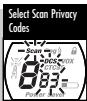
text_image
Select Scan Privacy Codes Scan DCS VIX CTGSY 8:33 Power SaveThe scan icon will continue to be displayed when DCS privacy code scan is ON. Your radio will continue to scan DCS privacy codes and stop when an incoming transmission is detected. The radio will remain on that channel/privacy code for 10 seconds.
While setting DCS privacy code scan, if you do not press any buttons for 15 seconds, your radio will automatically return to LISTENING MODE on the channel/privacy code that was displayed before you entered more functions.
During Scanning (While Receiving an Incoming Transmission), You Can Choose from the Following:
a. Press and hold the TALK button to communicate on that channel/privacy code. Your radio will remain on that channel/privacy code and return to LISTENING MODE.
b. Press the CHANNEL UP or CHANNEL DOWN button to resume scanning DCS privacy codes.
If you press the TALK button while scanning and not within 10 seconds of receiving a transmission, you will transmit on the channel/privacy code on which you last received a transmission. This will return the radio to LISTENING MODE.
During Scanning (While Not Receiving an Incoming Transmission), You Can Choose from the Following:
a. Press channel/privacy code that was displayed before you entered Mode Functions or channel/privacy code on which, during scanning, you last received a transmission. This will return the radio to the LISTENING MODE. Press and hold the TALK button to communicate on either the channel or channel MODE.
b. Press the MODE button to proceed to next available Mode Function.
c. Press the LOCK button to return to LISTENING MODE on either the channel or channel/privacy code that was displayed before you entered Mode Functions or the channel/privacy code on which, during scanning, you last received a transmission.
Set Call Tones
You can choose between five (5) different call tones to transmit a unique call alert.
To Change a Call Tone Setting:
- Press the MODE button until the letter "C" is displayed. The current call tone number will be flashing on the display next to the "C." The current call tone will sound for one (1) second.
- Press CHANNEL UP or CHANNEL DOWN button to hear the other call tone settings.
- When you have selected a call tone choose one of the following:
a. Press the MODE button to enter the new setting and proceed to other functions.
b. Press the LOCK button to enter the new setting and return to LISTENING MODE.
a. Press the MODE button to enter the new setting and proceed to other functions. b. Press the LOCK button to enter the new setting and return to LISTENING MODE.
NOTE: If no button is pushed for 15 seconds, the call tone setting will be set to the present selection.

text_image
Mode Button MODE
text_image
Select Call Tones Scan Rog) DCS VOX C-0K Power Javer
text_image
Channel Buttons CHANNEL"Roger Beep" Confirmation Tone
Your listener will hear an audible tone when you release the TALK button. This alerts the other party that you have finished talking and that it is OK for them to speak. This feature can be turned On or Off.
To Turn "Roger Beep" On or Off:
When you turn On your microTALK® radio for the first time, "Roger Beep" will be On.

text_image
Mode Button MODE
text_image
Select Roger Beep Sc Rog DCS VOX CTCSS OFF
text_image
Channel Buttons CHANNEL- Press and release the MODE button until the "Roger Beep" icon flashes on the display. The current On or Off setting is displayed.
- Press the CHANNEL UP or CHANNEL DOWN button to select "Roger Beep" On or Off.
- When your desired Roger Beep Mode setting is displayed, choose one of the following:
a. Press the MODE button to enter the new setting and return to LISTENING MODE.
b. Press the LOCK button to enter the new setting and return to LISTENING MODE.
c. Do not press any buttons for 15 seconds to enter the new setting and return to LISTENING MODE.
The setting you select will be saved when you turn your radio off and on again. When the "Roger Beep" is On, the "Roger Beep" icon will be displayed.
Declaration of Conformity
This declaration is the responsibility of the manufacturer/importer
Cobra Electronics Europe Limited
Dungar House
Northumberland Avenue
Dun Laoghaire
County Dublin, Ireland
Date: 15 January 2007
This certifies that the following designated product
PRIVATE MOBILE RADIO: MT 600
complies with the essential protection requirements of R & TTE Directive 1999/5/EC on the approximation of the laws of the Member States relating to Radio Spectrum Matters, EMC and Electrical Safety.
This declaration applies to all specimens manufactured in accordance with the attached technical documentation described in Annex II of the Directive which forms part of this declaration.
Assessment of compliance of the product (class 2.6) with the requirements relating to the essential requirements according to Article 3 R & TTE was based on Annex IV of Directive 1999/5/EC and the following standards:
Radio Spectrum: EN 300 296-1 V1.1.1 (2001-03)
EN 300 296-2 V1.1.1 (2001-03)
EMC: EN 301 489-1 V1.5.1 (2004-11)
EN 301 489-5 V1.3.1 (2002-08)
Electrical Safety: EN 60950-1:2001 + A11:2004
RF Exposure: EN 50392 (2004-02)
DUBLIN, IRELAND MIKE KAVANAGH

text_image
Handwritten signature or scribble on a document or formWarranty & Customer Service
For warranty and customer service information, please contact your local dealer.
CE0682①
For use in EU countries, subject to local laws and regulations.
CEEL ^® is a registered trademark of
Cobra Electronics Europe, Ltd.
Snake design and microTALK® are registered
trademarks of Cobra Electronics Corporation, USA.
©2007 Cobra Electronics Europe Limited
Dungar House, Northumberland Avenue
Dun Laoghaire, County Dublin, Ireland
www.cobra.com

This equipment is intended for use in:
| AT | √ | DE | √ | GB | √ | IT | MK | √ | RO | √ | |
| BA | √ | DK | √ | GR | √ | LT | √ | MT | √ | RS | |
| BE | √ | EE | √ | HR | √ | LV | √ | NL | √ | SE | √ |
| BG | √ | ES | √ | HU | √ | LI | √ | NO | √ | SI | √ |
| CH | √ | FI | √ | IE | √ | LU | √ | PL | √ | SK | √ |
| CY | √ | FR | √ | IS | √ | ME | PT | √ | TR | √ | |
| CZ | √ | √Countries of use | |||||||||