
MM030 - Carte d'acquisition vidéo USB SWEEX - Notice d'utilisation et mode d'emploi gratuit
Retrouvez gratuitement la notice de l'appareil MM030 SWEEX au format PDF.

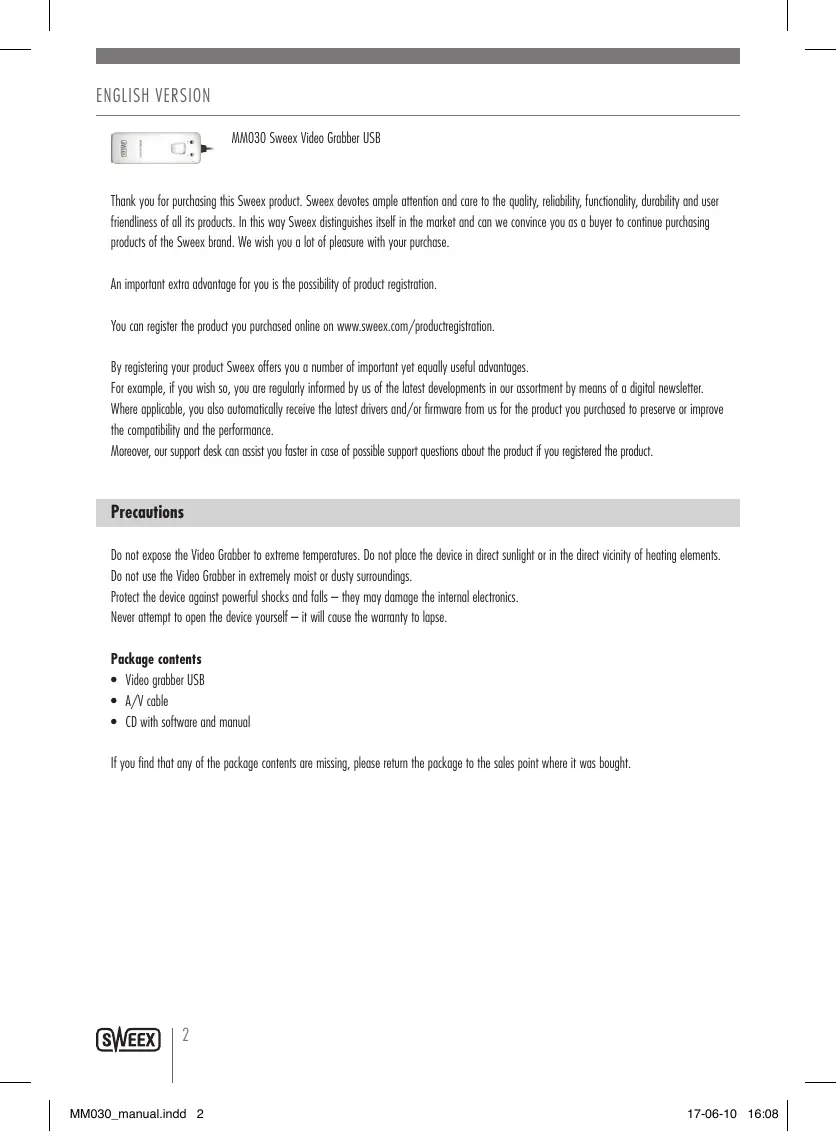

| Type d'appareil | Carte d'acquisition vidéo USB |
| Interface | USB |
| Contenu du paquet | Carte vidéo USB, câble A/V, CD avec logiciel et manuel |
| Compatibilité | Non précisé |
| Résolution vidéo | Non précisé |
| Format vidéo supporté | Non précisé |
| Alimentation | Par USB |
| Dimensions | Non précisé |
| Poids | Non précisé |
| Température d'utilisation | Éviter températures extrêmes |
| Précautions | Ne pas exposer à la lumière directe du soleil ou à proximité d'éléments chauffants, éviter humidité et chocs |
| Garantie | Annulée en cas d'ouverture du produit |
| Support technique | Disponible en ligne après enregistrement |
| Enregistrement produit | Possible en ligne pour avantages et support |
| Utilisation recommandée | Éviter environnements bruyants |
FOIRE AUX QUESTIONS - MM030 SWEEX
Questions des utilisateurs sur MM030 SWEEX
0 question sur cet appareil. Repondez a celles que vous connaissez ou posez la votre.
Poser une nouvelle question sur cet appareil
Téléchargez la notice de votre Carte d'acquisition vidéo USB au format PDF gratuitement ! Retrouvez votre notice MM030 - SWEEX et reprennez votre appareil électronique en main. Sur cette page sont publiés tous les documents nécessaires à l'utilisation de votre appareil MM030 de la marque SWEEX.
MODE D'EMPLOI MM030 SWEEX
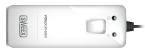
MM030 Sweex Video Grabber USB
Thank you for purchasing this Sweeex product. Sweeex devotes ample attention and care to the quality, reliability, functionality, durability and user friendliness of all its products. In this way Sweeex distinguishes itself in the market and can we convince you as a buyer to continue purchasing products of the Sweeex brand. We wish you a lot of pleasure with your purchase.
An important extra advantage for you is the possibility of product registration.
You can register the product you purchased online on www.sweex.com/productregistration.
By registering your product Sweex offers you a number of important yet equally useful advantages.
For example, if you wish so, you are regularly informed by us of the latest developments in our assortment by means of a digital newsletter.
Where applicable, you also automatically receive the latest drivers and/or firmware from us for the product you purchased to preserve or improve the compatibility and the performance.
Moreover, our support desk can assist you faster in case of possible support questions about the product if you registered the product.
Precautions
Do not expose the Video Grabber to extreme temperatures. Do not place the device in direct sunlight or in the direct vicinity of heating elements. Do not use the Video Grabber in extremely moist or dusty surroundings.
Protect the device against powerful shocks and falls - they may damage the internal electronics.
Never attempt to open the device yourself - it will cause the warranty to lapse.
Package contents
Video grabber USB
A/V cable
CD with software and manual
If you find that any of the package contents are missing, please return the package to the sales point where it was bought.
Product description
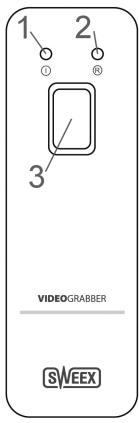
Front
- Power LED
- Record LED
- Snapshot/record button
This light indicates that video grabber receives power and is ready to capture video.
This light indicates that the video grabber is currently recording
Press this button to take a snapshot of the current image, or to start recording
(the function can be set in the recording software options)
Connectors
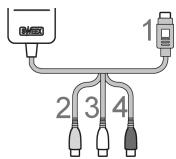
- S-video
If your video source has a S-video output, use an S-video cable to connect it to this input.
S-video is higher in quality than composite
- Composite
If your video source has a composite output (almost all sources do), use the included A/V cable to connect the yellow composite output to the input.
- Left channel
Use the included A/V cable to connect the left audio output (it can be white or black) to the input.
- Right channel
Use the included A/V cable to connect the right audio output (red) to the input.
Installation
- Install the driver software and video grabber software from the bundled Sweex CD and follow the instructions on screen.
- Install the Ulead software from the Ulead CD
- Connect your video source. You are now ready to capture and record video to your PC.
Capturing video
You can capture video with the bundled "EZ Grabber" software
Overview
| NO | Description | NO | Description |
| 1 | Status | 9 | Play |
| 2 | Settings and options | 10 | Recording status |
| 3 | Snapshot button | 11 | Stop |
| 4 | Record button | 12 | Forward 5 seconds |
| 5 | Stop recording | 13 | Rewind 5 seconds |
| 6 | Fast forward | 14 | Open file |
| 7 | Rewind | 15 | Window controls |
| 8 | Pause |
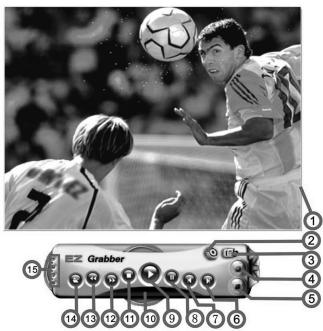
Settings and options
Click the settings and options button

to open the setup window:
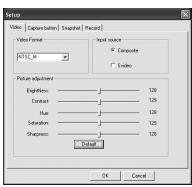
Video Format
Select the video format that matches your source. PAL_BDHIG is the most common format in Europe. If your captured video looks very distorted or is in black & white, try a different video format.
- Input source
Select the video source, S-video or composite
- Picture adjustment:
Move the sliders to adjust the picture
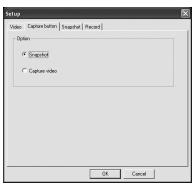
Option
Select the behavior of the snapshot / record button on the Video Grabber
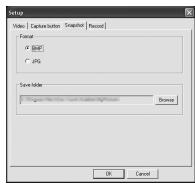
- Format Select the snapshot format, BMP (higher quality, larger file) or JPG (lower quality, smaller file).
- Save folder Click the "Browse" button to change the folder where snapshots should be saved
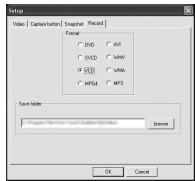
- Format Select the digital format for saving video capture files. The DVD format gives the best quality and is recommended
- Save folder Click the "Browse" button to change the folder where video should be saved
Note: Some options can also be accessed by right-clicking the video window.
Before starting to record, check the settings and options and ensure that you see a clear picture in the video window.
Troubleshooting
This chapter of the manual will explain a number of common issues that you may run into and possible solutions.
- I have S-video selected as source and the picture is in black and white, how can I get the picture in colour
- If you are sure that you have selected the right format for the video (PAL/SECAM/NTSC), but the picture is still in black and white, you may be using a composite to S-video cable or have a composite source, such as VHS. In this case, it is not possible to have the higher quality that S-video offers, and it is best to switch to the composite input.
Editing and storing video to DVD
Editing and storing your video can be done with the bundled Ulead Video Studio software. For more information, please consult the Video Studio manual.
Sweex warranty conditions
2-year standard warranty within the EU
In a standard manner a warranty period of 2 years as from the purchase date is available for this Sweex product within the EU.
Should you wish to invoke this warranty within the first 2 years after the purchase then you can directly apply to the point of sale where you purchased the product for the conditions and procedures.
Matters that are excluded from the warranty
- The warranty of Sweex only covers manufacturing defects. Excluded from the warranty are accessories like batteries, rechargeable batteries and also supplied software, where applicable.
- The liability of Sweex is limited to the costs of repair and/or replacement of the product covered by the warranty.
- The standard warranty is null and void if the product has been opened, changes have been made, physical damage was caused to the product and if the product is used for another purpose than for which it is originally meant.
All brand names and associated rights mentioned in this manual are and remain the sole property of the rightful claimant.
Specifications
MM030 Video Grabber USB specifications
CONNECTIONS
To PC: USB 2.0
Analogue: S-Video / Composite, RCA for audio
LEDS
Power, record
STANDARDS SUPPORTED
Video: PAL, NTSC
Compression: MPEG-1/2/4
SUPPORTED FORMATS
Resolutions: 576i 50, 470i 60
Video sources: VHS, VHS-C, Video 8, Hi8, Digital 8, DV, mini DV
ADVANCED FEATURES
One click record button
BUNDLED SOFTWARE
Ulead VideoStudio ⑥ 10 SE
SYSTEM REQUIREMENTS
Minimum:
Processor: 1.4 GHz
Memory: 512 MB RAM, 10 GB free hard disk space for storing recorded video
Graphics card: DirectX 9.0c
DVD-RW drive
Sound card
OPERATING SYSTEM
Microsoft® Windows® XP, Windows Vista® or Windows® 7
CABLING
A/V cable length: 110 cm
WARRANTY
2 years + 10 years extended warranty after registration
Visit: sweex.com/12yearwarranty for more information, terms and the registration form