
WC003V3 - Webcam SWEEX - Notice d'utilisation et mode d'emploi gratuit
Retrouvez gratuitement la notice de l'appareil WC003V3 SWEEX au format PDF.


| Type de produit | Webcam |
|---|---|
| Résolution vidéo | 640 x 480 pixels |
| Fréquence d'images | 30 images par seconde |
| Connectivité | USB 2.0 |
| Dimensions approximatives | 10 x 5 x 5 cm |
| Poids | 200 g |
| Compatibilités | Windows, macOS |
| Fonctions principales | Vidéo en direct, prise de photos, microphone intégré |
| Entretien et nettoyage | Essuyer avec un chiffon doux, éviter les produits chimiques |
| Pièces détachées et réparabilité | Non spécifié, vérifier auprès du fabricant |
| Sécurité | Utiliser sur des surfaces stables, éviter l'exposition à l'humidité |
| Informations générales | Idéale pour les visioconférences et le streaming |
FOIRE AUX QUESTIONS - WC003V3 SWEEX
Questions des utilisateurs sur WC003V3 SWEEX
0 question sur cet appareil. Repondez a celles que vous connaissez ou posez la votre.
Poser une nouvelle question sur cet appareil
Téléchargez la notice de votre Webcam au format PDF gratuitement ! Retrouvez votre notice WC003V3 - SWEEX et reprennez votre appareil électronique en main. Sur cette page sont publiés tous les documents nécessaires à l'utilisation de votre appareil WC003V3 de la marque SWEEX.
MODE D'EMPLOI WC003V3 SWEEX
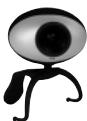
WC003V3 - Sweex Foldable Webcam
Introduction
- Do not expose the Sweeex Foldable Webcam to extreme temperatures. Do not place the device in direct sunlight or in the direct vicinity of heating elements.
- Do not use the Sweex Foldable Webcam in extremely dusty or moist surroundings.
- Protect the device against powerful shocks or jolts - they may damage the internal electronics.
- Never attempt to open the device yourself - it will cause the warranty to lapse.
Important!
Install the driver prior to connecting the Sweex Foldable Webcam!
Software installation under Windows XP + Vista
We advise you to ensure the operating system is up-to-date before starting the installation. This is easy to check by starting up Internet Explorer and selecting the option "Windows Update" in the "Extra" menu.
Insert the Sweex CD-ROM in the CD-ROM player. The autorun menu will start automatically.
In this menu, select "Drivers Windows 98SE, 2000, XP and Vista"

Drivers XP and Vista
In the event that the autorun menu does not appear, the driver installation process can also be started manually. In order to do this, open "My computer" and go to X`driver\ (X being the letter of your CD-ROM drive). Here you can find the 'WC003V3_driv_xp_vista...' file. Double-click this file and follow the instructions.
The following screen appears:

Click "Next".
Click "Finish" to complete the installation process for the driver. Now restart the computer. Connect the Sweex webcam once the computer has been restarted.
Windows will automatically install the Sweex Webcam. After this installation, the webcam is ready for use.
Software installation under Windows Vista
Under Windows Vista, the following screen will appear:
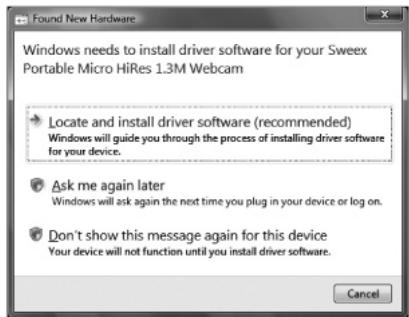
Click "Locate and install driver software (recommended)". The installation will now continue automatically.
Viewing the webcam picture
The picture of the Sweeex webcam can be viewed as follows: Via START go to "All Programs" and select the option "AmCap" under "Sweeex Foldable Webcam".
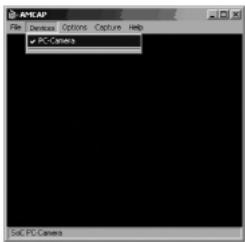
In AmCap, open the "Devices" tab. Make sure to select the correct webcam: "SoC PC-Camera".
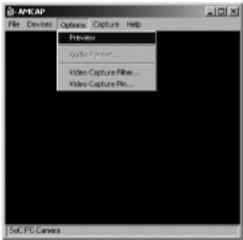
In AmCap, open the "Options" menu. Select "Preview". This option enables you to view the picture.
In the same menu, the "Video Capture Filter..." and "Video Capture Pin..." options enable you to change the settings of the webcam.
Snapshot button
The Sweeex webcam features a 'snapshot button'. Having viewed the image of the webcam by means of AmCap or another programme, a photo can be taken by pressing this button. The installation is activated after the computer is restarted. The button can be found on top of the webcam.
LED lighting
The Sweeex webcam contains 6 white LEDs. This enables you to video and voice chat, even in dark surroundings. The intensity of the LEDs can be regulated by means of a regulator integrated in the cord. By turning it either to the left or right the LEDs can be turned off or intensified to maximum.
Focus ring
The picture of the Sweeex Webcam can be brought into focus manually by means of the focus ring. The focus ring is a rotating wheel around the lens at the front of the camera. By turning it either to the left or right, the picture can be brought into focus.
Warranty
All Swee x products are warranted for three years. We do not grant support or warranties for any software and/or (rechargeable) batteries included. Settlement of guarantee only takes place via the dealer where you have purchased the product in question.
The rightful owner has and retains title to all brand names and related rights mentioned in this manual.