SP002V2 - Enceinte bluetooth SWEEX - Notice d'utilisation et mode d'emploi gratuit
Retrouvez gratuitement la notice de l'appareil SP002V2 SWEEX au format PDF.


| Type de système | 2.1 avec caisson de basses |
| Puissance | 175 Watt |
| Nombre d'enceintes satellites | 2 |
| Caisson de basses | 1 subwoofer |
| Connectique audio | Câble jack 3,5 mm (2 x prise jack) |
| Support de manuel | CD-ROM |
| Utilisation recommandée | Films, jeux |
| Protection contre | Chocs, jets, températures extrêmes |
| Environnement d'utilisation | Éviter poussière et humidité |
| Installation | Ne pas exposer à la chaleur directe |
| Garantie | Perdue en cas d'ouverture du produit |
| Accessoires inclus | Câble audio, CD-ROM, 2 enceintes satellites, 1 subwoofer |
FOIRE AUX QUESTIONS - SP002V2 SWEEX
Questions des utilisateurs sur SP002V2 SWEEX
0 question sur cet appareil. Repondez a celles que vous connaissez ou posez la votre.
Poser une nouvelle question sur cet appareil
Téléchargez la notice de votre Enceinte bluetooth au format PDF gratuitement ! Retrouvez votre notice SP002V2 - SWEEX et reprennez votre appareil électronique en main. Sur cette page sont publiés tous les documents nécessaires à l'utilisation de votre appareil SP002V2 de la marque SWEEX.
MODE D'EMPLOI SP002V2 SWEEX
natural_image
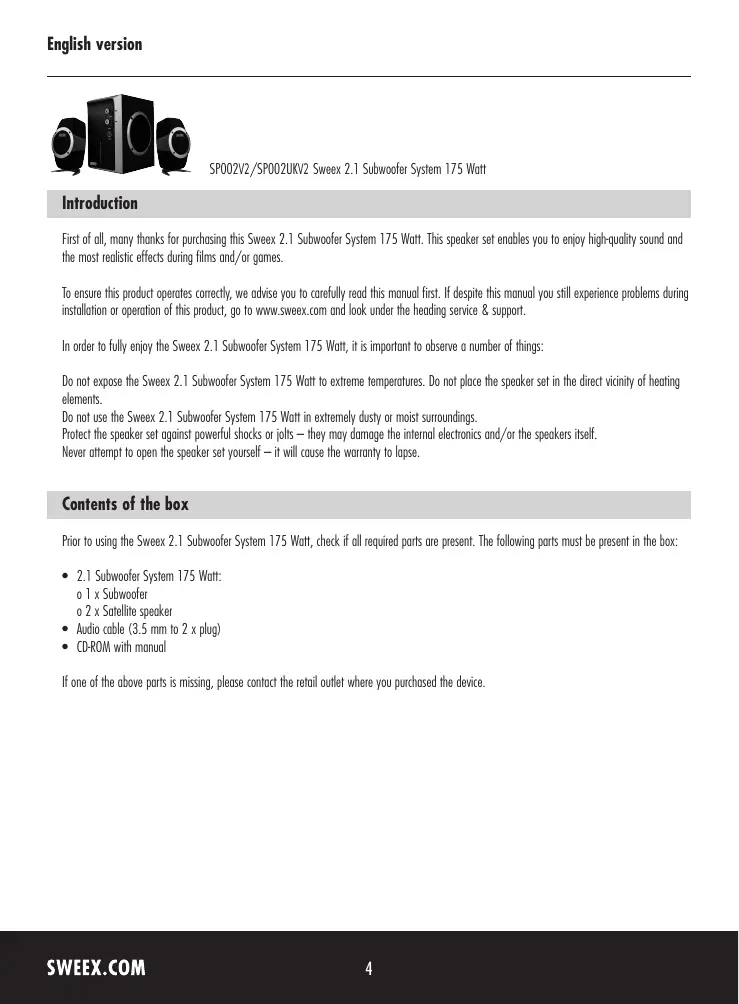
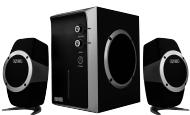
Three black audio/video speakers with speaker stands, no visible text or symbolsSP002V2/SP002UKV2 Sweex 2.1 Subwoofer System 175 Watt
Introduction
First of all, many thanks for purchasing this Sweex 2.1 Subwoofer System 175 Watt. This speaker set enables you to enjoy high-quality sound and the most realistic effects during films and/or games.
To ensure this product operates correctly, we advise you to carefully read this manual first. If despite this manual you still experience problems during installation or operation of this product, go to www.sweex.com and look under the heading service & support.
In order to fully enjoy the Sweex 2.1 Subwoofer System 175 Watt, it is important to observe a number of things:
Do not expose the Sweex 2.1 Subwoofer System 175 Watt to extreme temperatures. Do not place the speaker set in the direct vicinity of heating elements.
Do not use the Sweex 2.1 Subwoofer System 175 Watt in extremely dusty or moist surroundings.
Protect the speaker set against powerful shocks or jolts — they may damage the internal electronics and/or the speakers itself.
Never attempt to open the speaker set yourself — it will cause the warranty to lapse.
Contents of the box
Prior to using the Sweex 2.1 Subwoofer System 175 Watt, check if all required parts are present. The following parts must be present in the box:
• 2.1 Subwoofer System 175 Watt:
o 1 x Subwoofer
o 2 x Satellite speaker
• Audio cable (3.5 mm to 2 x plug)
- CD-ROM with manual
If one of the above parts is missing, please contact the retail outlet where you purchased the device.
Specifications
• Maximum power satellite speakers: 1.5 Watt RMS
• Maximum power woofer: 5 Watt RMS
- Magnetically shielded
• Built-in stereo amplifier
- 2 x 2.5" satellite speaker
• Volume and bass controls
- Plug and Play
• Built-in power supply
- Input: stereo plug (RCA)
• Output: stereo plug (RCA)
• Frequency range satellite: 120 Hz – 20 KHz
• Frequency range woofer: 50 Hz – 140 Hz
- Woofer diameter: 3"
• Supports: Windows 98SE, 2000 and XP
Installation of hardware
text_image
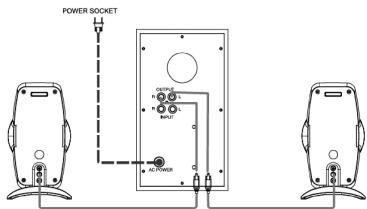
POWER SOCKET OUTPUT R R R AC POWERFirst connect the satellite speakers to the woofer. Please note that these need to be connected to the 'OUTPUT' of the woofer. The red connection (R) is for the right speaker, the white connection (L) is for the left speaker.
text_image
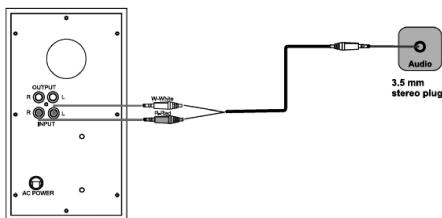
OUTPUT R L R L OUTPUT AC POWER W/White Audio 3.5 mm stereo plugSubsequently, the woofer must be connected to the sound source. Once again, note the colour coding of both the audio cable and the woofer. To this end, use the 'INPUT' connection of the woofer. The red connection (R) is for the red plug, the white connection (L) is for the white plug. The 3.5 mm audio plug can be connected to the sound card or any other sound source with a 3.5 mm output connection.
Finally, plug into the mains and switch on the Sweex 2.1 Subwoofer System 175 Watt by pressing the 'POWER' button at the front. The woofer lights up in blue.
Operation
The front of the Sweex 2.1 Subwoofer System 175 Watt features 3 buttons.
| Button | LED Colour | Function |
| POWER | Blue | Switching the Sweex 2.1 Subwoofer System 175 Watt on/off |
| VOLUME | Blue | Volume control button |
| BASS | Blue | Controls the intensity of the low tones (bass) |
LED indicators
The Sweex 2.1 Subwoofer System 175 Watt has a blue LED. This is lit continuously, indicating that the speaker set is switched on.
Warranty
All products under the Sweex brand are warranted for a period of three years. We do not grant support or warranties for any software and/or (rechargeable) batteries included. If one of the above parts is missing, please contact the retail outlet where you purchased the device.
The rightful owner has and retains title to all brand names and related rights mentioned in this manual.