
GC455V2 - Carte graphique SWEEX - Notice d'utilisation et mode d'emploi gratuit
Retrouvez gratuitement la notice de l'appareil GC455V2 SWEEX au format PDF.

| Type de produit | Carte graphique |
| Marque | SWEEX |
| Modèle | GC455V2 |
| Interface | PCI Express |
| Compatibilité système | Windows |
| Alimentation | Via le slot PCIe (pas d'alimentation externe) |
| Dimensions (approx.) | 17.5 x 10.5 x 2 cm |
| Poids (approx.) | 100 g |
| Fonctions principales | Accélération graphique, sortie écran, installation plug-and-play |
| Installation logicielle | Pilotes via CD-ROM fourni |
| Configuration | Panneau de configuration graphique dans Windows |
| Garantie | 2 ans à compter de la date d'achat |
| Sécurité | Décharger l'électricité statique avant manipulation ; éviter tout contact avec les contacts dorés |
| Entretien | Nettoyer avec un chiffon sec et non pelucheux ; éviter l'humidité |
| Pièces détachées | Non disponibles ; retour au revendeur en cas de défaut |
| Réparabilité | Réparation par des personnes non autorisées annule la garantie |
| Accessoires inclus | CD-ROM de pilotes, guide d'installation rapide |
| Environnement d'utilisation | Intérieur, température ambiante |
FOIRE AUX QUESTIONS - GC455V2 SWEEX
Questions des utilisateurs sur GC455V2 SWEEX
0 question sur cet appareil. Repondez a celles que vous connaissez ou posez la votre.
Poser une nouvelle question sur cet appareil
Téléchargez la notice de votre Carte graphique au format PDF gratuitement ! Retrouvez votre notice GC455V2 - SWEEX et reprennez votre appareil électronique en main. Sur cette page sont publiés tous les documents nécessaires à l'utilisation de votre appareil GC455V2 de la marque SWEEX.
MODE D'EMPLOI GC455V2 SWEEX
Quick Install Guide for Sweex PCIe graphic cards
Hardware Installation
- Make sure the computer is turned off and that there is no power connected.
- Also remove the printer and monitor cable, because these have their own power supply.
- Now unscrew the computer casing.
- Make sure that you undo yourself of possible static electricity. This can be done by grabbing a (naked) central heating pipe or an unpainted water pipe. Pay attention not to use a magnetic screwdriver. Briefly touch the iron frame of the PC casing. Avoid direct contact with the contact points of the PCIe slot and contact points on the graphics card.
- Locate a free PCIe slot and remove the metal protection plate that is in the computer casing for the intended slot. Consult the manual of your computer to find the PCIe slot.
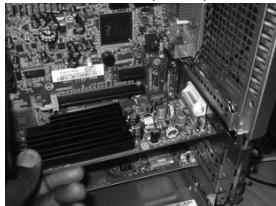
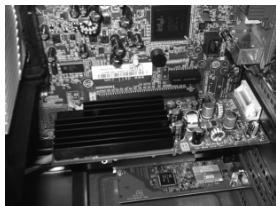
Place the card in the PCIe slot. (Your PCIe slot may look different)
Make sure the card is securely fastened
- When possible fasten the card with screws so it can not move.
- When the card is mounted successfully, check if the other cards are still fitted properly in their expansion slot. It can happen that when a new card is added the other cards rise a little with as result that the card, or even the entire computer, may not work.
- Close the computer casing and reconnect all cables properly.
- Tum on the computer.
Software installation
After starting the computer the graphics card will automatically be detected. Windows will ask for drivers of the card. Choose cancel installation.
Place the Sweex CD-ROM in the computer. The CD-ROM will start automatically and display a menu. Choose install drivers.
Operation
After the successful installation you can configure the graphics card with the Software. Click the icon, bottom right on your screen, to adjust your screen, resolution and other personal preferences.
Warranty
- For this Swee x product a two year warranty period applies, beginning from of the date of purchase.
- In case of defect, return the product to your reseller with failure description, proof of purchase and all accessories.
- Warranty will be void in case of opened products, physical damage, misuse, modification, repair by unauthorised persons and using the product for other purposes than its intended use.
- We do not give support or warranty on supplied software, rechargeable batteries and batteries. Transaction of warranty only takes place at the sales point where the product is bought.
All brand names and associated rights mentioned in this manual are and stay property of the rightful owner.