
PH-NV523TG - Boîtier d'ordinateur Phanteks - Notice d'utilisation et mode d'emploi gratuit
Retrouvez gratuitement la notice de l'appareil PH-NV523TG Phanteks au format PDF.
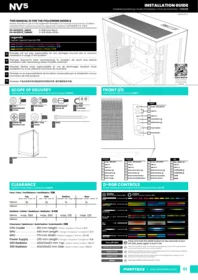


| Type de produit | Boîtier moyen tour pour PC |
| Modèles compatibles | PH-NV523TG_DBK01 (Satin Black), PH-NV523TG_DMW01 (Matte White) |
| Facteur de forme de la carte mère | ATX, Micro-ATX, Mini-ITX |
| Panneaux latéraux | Verre trempé |
| Emplacements de stockage 2.5" | 2 |
| Emplacements de stockage 3.5" | 2 |
| Connecteurs panneau avant | 1x Audio/Mic, 2x USB 3.0, 1x USB-C 3.1, bouton Power, bouton Reset |
| Contrôle D-RGB | Bouton couleur, bouton mode, extinction via appui long sur Mode, synchronisation carte mère |
| Ventilation supérieure | 3x 120 mm ou radiateur 360 mm |
| Ventilation latérale | 3x 120 mm ou radiateur 360 mm |
| Ventilation inférieure | 1x 120 mm ou radiateur 120 mm |
| Ventilation arrière | 1x 120 mm ou radiateur 120 mm |
| Hauteur maximale du refroidisseur CPU | 180 mm |
| Longueur maximale de la carte graphique | 440 mm |
| Largeur maximale de la carte graphique | 170 mm |
| Longueur maximale de l'alimentation | 230 mm |
| Dimensions max du radiateur supérieur | 430 x 134 x 62 mm |
| Dimensions max du radiateur latéral | 412 x 130 x 62 mm |
| Montage GPU vertical | Optionnel avec support PH-VGPUKT4.0_03 |
| Sécurité | Consignes de sécurité incluses, verre trempé, protections électriques |
| Entretien | Dépoussiérage régulier des filtres et des ventilateurs |
| Recyclage | Conforme DEEE, recyclable |
FOIRE AUX QUESTIONS - PH-NV523TG Phanteks
Questions des utilisateurs sur PH-NV523TG Phanteks
0 question sur cet appareil. Repondez a celles que vous connaissez ou posez la votre.
Poser une nouvelle question sur cet appareil
Téléchargez la notice de votre Boîtier d'ordinateur au format PDF gratuitement ! Retrouvez votre notice PH-NV523TG - Phanteks et reprennez votre appareil électronique en main. Sur cette page sont publiés tous les documents nécessaires à l'utilisation de votre appareil PH-NV523TG de la marque Phanteks.
MODE D'EMPLOI PH-NV523TG Phanteks
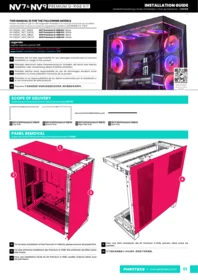
THIS MANUAL IS FOR THE FOLLOWING MODELS
Dieses Handbuch gilt für die folgenden Modelle | Ce manuel concerne les modèles suivants | Este manual es para los siguientes modelos | 此手册适用于以下型号
PH-NV523TG_DBK01
D-RGB Satin Black
PH-NV523TG_DMW01
D-RGB Matte White
Legenda
Legende | Légende | Leyenda | 传奇
Remove | Entfernen | Retirer | Eliminar | 移除
Install | Installieren | Installer | Instalar | 安装
Loosen | Lösen | Desserrer | Aflojar | 拧松

Phanteks will not take responsibility for any damages incurred due to incorrect installation or usage of this product.

Phanteks übernimmt keine Verantwortung für Schäden, die durch eine falsche Installation oder Verwendung dieses Produkts entstehen.

Phanteks décline toute responsabilité en cas de dommages résultant d'une installation ou d'une utilisation incorrecte de ce produit.

Phanteks no se responsabilizará de los daños ocasionados por la instalación o el uso incorrectos de este producto.

Phanteks 不会对安装中失误造成的任何损失负责,请仔细阅读本手册。
VERSION 1.1

SCOPE OF DELIVERY
Lieferumfang | Contenu de la livraison | Alcance de la entrega | 供货范围


FRONT I/O
Vorne I/O | I/O avant | I/O frontal | 机箱I/O

Deutsch
1 Audio | Mikrofon
2 | USB 3.0
3 USB C 3.1
4 Farbtaste
5 Modustaste Ⓜ
6 Power-Taste
7 Reset-Knopf
Français
1 Audio | Microphone
2 USB 3.0
3 USB C 3.1
4 Bouton de Couleur
5 Bouton Mode Ⓜ
6 Bouton d'alimentation
7 Bouton de réinitialisation
Española
1 Sonido | Micrófono
2 USB 3.0
3 USB C 3.1
4 Botón de Colores
5 Botón de Modo Ⓜ
6 Botón de encendido
7 Botón de reinicio
中文
1 耳机 | 麦克风二合一
2 USB 3.0
3 USB C 3.1
4 灯光颜色切换
5 灯光模式切换 Ⓜ
6 开机键
7 重启键
CLEARANCE
Spielraum | Autorisation | Autorización | 安装间隙
Fans | Fans | Ventilateurs | Ventiladors | 风扇
| Top | Side | Bottom | Rear | |
| Spitze | Haut | Arriba | 顶 | Seite | Côté | Lado | 侧 | Unterseite | Bas | Abajo | 底 | Rückseite | Arrière | Trasera | 后 | |
| 120mm | 3x | 3x | 1x | 1x |
| 140mm | - | - | - | - |
Radiator | Kühler | Radiateur | Radiador | 水冷排
| 120mm | max. 360 | max. 360 | max. 120 | max. 120 |
| 140mm | - | - | - | - |
Clearance | Spielraum | Autorisation | Autorización | 间隙
| CPU Cooler | 180 mm Height | Höhe | Hauteur | Altura | 风冷 |
| GPU | 440 mm Length | Länge | Longueur | Longitud | 显卡 |
| GPU | 170 mm Width | Breite | Largeur | Ancho | 显卡宽 |
| Power Supply | 230 mm Length | Länge | Longueur | Longitud | 电源 |
| 360 Radiator | 430x134x62 mm Top | Spitze | Haut | Arriba | 顶水冷 |
| 360 Radiator | 412x130x62 mm Side | Seite | Côté | Lado | 侧水冷 |
D-RGB CONTROLS
D-RGB-Steuerung | Commandes D-RVB | Controles D-RGB | D-RGB 灯控

Turn off LEDs
Schalten Sie die LEDs aus
Éteignez les LED
Apague los LED
关闭灯光
M Press and hold the MODE button for two seconds to turn off LEDs, press again to turn it ON
M Halten Sie die MODE-Taste zwei Sekunden lang gedrückt, um die LEDs auszuschalten, und drücken Sie sie erneut, um sie einzuschalten
Appuyez et maintenez enfoncé le bouton MODE pendant deux secondes pour éteindre les LED, appuyez à nouveau pour l'allumer
Mantenga presionado el botón MODE durante dos segundos para apagar los LED, presione nuevamente para encenderlo
M 长按灯光模式切换键 2 秒关闭灯光,再次按下打开灯光
PANEL REMOVAL
Ausbau des Panels | Retrait du panneau | Eliminación de paneles | 移除面板
01
TOP PANEL
Oberes Panel | Panneau du haut | Panel superior | 顶部面板

02
LEFT SIDE PANEL
Linke Seitenwand | Panneau latéral gauche | Panel lateral izquierdo | 左侧板

03
FRONT PANEL
Frontblende | Panneau avant | Panel frontal | 前面板

04
RIGHT SIDE PANEL
Rechtes Seitenteil | Panneau latéral droit | Panel lateral derecho | 右侧板

05
POWER SUPPLY COVER
Netzteilabdeckung | Couvercle d'alimentation | Cubierta de la fuente de alimentación | 电源仓盖

2

HARDWARE INSTALLATION
Hardware-Installation | Installation du matériel | Instalación de hardware | 硬件安装
01
MOTHERBOARD
Hauptplatine | Carte mère | tarjeta madre | 主板

02
POWER SUPPLY
Stromversorgung | Source de courant | Fuente de alimentación | 电源

03
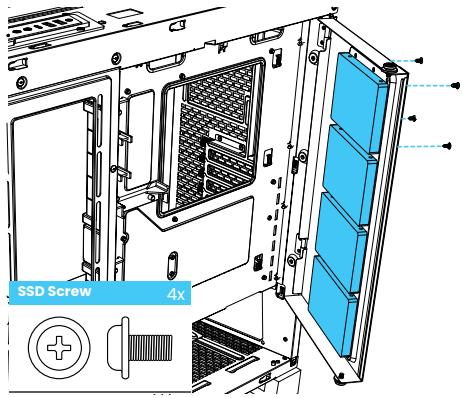
STORAGE LAYOUT
Lagerlayout | Disposition de stockage | Diseño de almacenamiento | 硬盘螺丝布局

A
STORAGE | 2.5" SSD
Speicher 2.5-Zoll-SSD | Stockage SSD 2.5" | Almacenamiento SSD de 2.5" | 2.5" SSD硬盘位
B
STORAGE | 3.5" HDD
Speicher 3.5-Zoll-HDD | Stockage HDD.5" | Almacenamiento HDD de 3.5" | 2.5" HDD硬盘位

04
BOTTOM FAN BRACKET
Untere Lüfterhalterung | Support de ventilateur inférieur | Soporte inferior del ventilador | 底风扇支架

05
GPU FAN BRACKET
GPU-Lüfterhalterung | Support de ventilateur GPU | Soporte de ventilador GPU | 显卡支撑架


CABLES
Kabel | Câbles | Cabos | 机箱线缆

D-RGB CABLES
D-RGB-Kabel | Câbles D-RVB | Cables D-RGB | D-RGB 线材
Expand with more D-RGB products
Erweitern Sie mit weiteren D-RGB-Produkten Développez-vous avec plus de produits D-RGB Expanda con más productos D-RGB
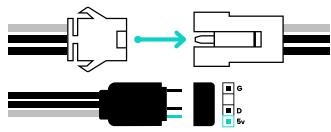
Sync lighting to the motherboard
Synchronisieren Sie die Beleuchtung mit dem Motherboard
Synchroniser l'éclairage avec la carte mère
Sincroniza la iluminación con la placa base

NOTE | D-RGB control buttons are deactivated if connected to a motherboard.
HINWEIS | D-RGB-Steuertasten sind deaktiviert, wenn sie an ein Motherboard angeschlossen sind.
REMARQUE | Les boutons de contrôle D-RGB sont désactivés s'ils sont connectés à une carte mère.
NOTA | Los botones de control D-RGB se desactivan si se conecta a una placa base.
注意 | 若连接主板灯光接口,机箱灯控按键将失效
OPTIONAL UPGRADE
Optionales Upgrade | Mise à niveau facultative | Actualización opcional | 可选升级
GEN 4 VERTICAL GPU BRACKET PH-VGPUKT4.0_03

SAFETY INFORMATION
SICHERHEITSINFORMATION | INFORMATION DE SÉCURITÉ | INFORMACIÓN DE SEGURIDAD | 安全信息
In order to achieve maximum safety, we suggest that you adopt the following guidelines:
- Place the product on a clean and stable surface that allows adequate air ventilation.
- Don't use or place the product and any of its components near water, moisture, or other wet surfaces; or place the product near any heat, open flame, or other hot surfaces such as radiators, stoves, fireplaces, and candles.
- Use caution when operating the desktop PC to avoid electrical shock or damage, such as unplugging the power supply during thunderstorms, ensuring that your hands are dry before using (and handling) the desktop PC, keeping it away from any source of liquid and/or heat source, and using all other reasonable precautions needed under the circumstances.
- When connecting external devices to your desktop PC, carefully plan how the wires will be placed. Protect any connected cables from being trod on or pinched, particularly at plugs, convenience receptacles, or the point where they exit from.
- Take extra caution when handling/removing/reattaching glass components. Once removed, place the glass component on a stable surface first before proceeding.
- When unplugging any connected devices and/or cables, always pull the cable or device's plug or connector. Don't forcefully tug on its cord.
- Don't place any heavy items on top of the product.
- Make sure that the desktop PC is off, unplugged from the outlet, and that all connected devices are powered off and unplugged (if any) before installing or uninstalling any internal component to and/or from the desktop PC or product.

FR
Cet appareil se recycle
REPRISE À LA LIVRAISON
À DÉPOSER EN MAGASIN
À DÉPOSER EN DÉCHÈTERIE

The WEEE symbol indicates that this product must not be disposed of with normal household waste. Through the correct disposal of this product, you will help protect the environment. For more information on the disposal of this product, please contact your local municipality, your waste disposal service or the shop where you purchased the product.
Phanteks Taiwan Inc.
11F., No. 150, Jian 1st Rd., Zhonghe Dist.
New Taipei City 235
Importer EU
Axpertec Int. B.V. (EU) Sydneystraat 33
3047 BP Rotterdam The Netherlands
Importer US
Axpertec Inc. (US)
20465 E Walnut Dr. N
City of Industry, CA 91789 USA
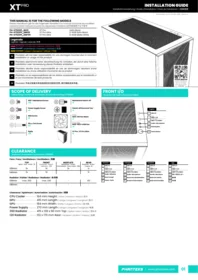

Marque : Phanteks
Modèle : PH-NV523TG
Catégorie : Boîtier d'ordinateur