
CX-PROFIBUS - Automatisation industrielle OMRON - Notice d'utilisation et mode d'emploi gratuit
Retrouvez gratuitement la notice de l'appareil CX-PROFIBUS OMRON au format PDF.


| Type de produit | Logiciel de configuration PROFIBUS |
| Marque | OMRON |
| Modèle | CX-PROFIBUS |
| Catégorie | Automatisation industrielle |
| Technologie utilisée | FDT/DTM (Field Device Tool / Device Type Manager) |
| Fonctions principales | Configuration du réseau PROFIBUS-DP, paramétrage des stations esclaves, définition des paramètres de communication, surveillance du système, dépannage, ajout/suppression d'esclaves |
| Compatibilité maîtres | Tous les maîtres OMRON (C200HW-PRM21 pris en charge début 2004) |
| Configuration à distance | Oui, via Ethernet ou ControllerLink (sauf maître C200H) |
| DTM inclus | DTM pour tous les maîtres et esclaves OMRON, plus DTM esclave générique pour les appareils GSD |
| Nombre de pages de la notice | 2 pages |
| Langues disponibles | Anglais (version originale), traduction possible sur demande |
| Référence catalogue | CX-Profi |
| Numéro de catalogue | P03E-EN-01 |
| Dimensions | Logiciel, sans dimension physique |
| Poids | Non applicable (logiciel) |
| Alimentation | Non applicable (logiciel) |
| Entretien et nettoyage | Non applicable (logiciel) |
| Sécurité | Non applicable (logiciel) |
| Pièces détachées et réparabilité | Non applicable (logiciel) |
FOIRE AUX QUESTIONS - CX-PROFIBUS OMRON
Questions des utilisateurs sur CX-PROFIBUS OMRON
0 question sur cet appareil. Repondez a celles que vous connaissez ou posez la votre.
Poser une nouvelle question sur cet appareil
Téléchargez la notice de votre Automatisation industrielle au format PDF gratuitement ! Retrouvez votre notice CX-PROFIBUS - OMRON et reprennez votre appareil électronique en main. Sur cette page sont publiés tous les documents nécessaires à l'utilisation de votre appareil CX-PROFIBUS de la marque OMRON.
MODE D'EMPLOI CX-PROFIBUS OMRON
CX-PROFIBUS
PROFIBUS configurator
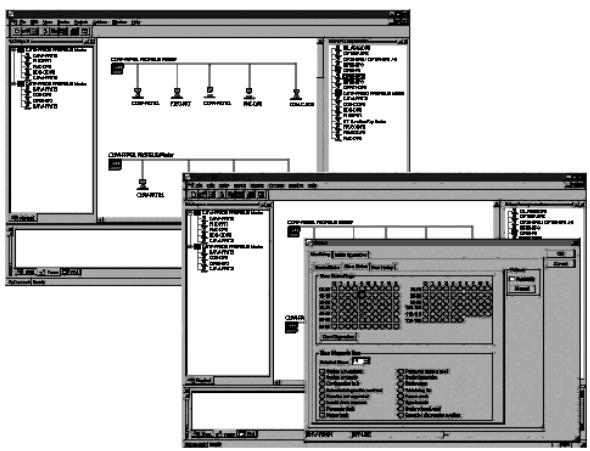
Advanced configuration tool that uses FDT/DTM (Field Device Tool and Device Type Manager) Technology
- The PROFIBUS-DP network topology and system characteristics are defined and then downloaded in the OMRON PROFIBUS Master Unit
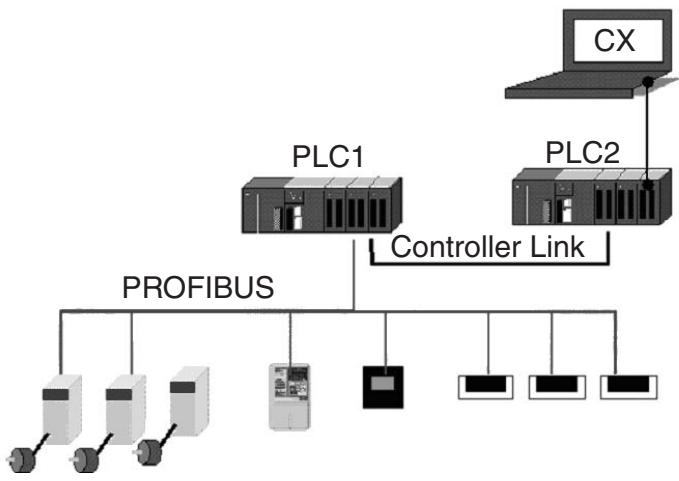
- Configuration can be done remotely, via other networks as Ethernet or ControllerLink
- Can be used with all Omron masters*
flowchart
graph TD
    A["COMATEL"] --> B["POST"]
    A --> C["REGIL"]
    D["POST"] --> E["REGIL"]
    F["REGIL"] --> G["REGIL"]
    H["POST"] --> I["REGIL"]
    J["REGIL"] --> K["REGIL"]
    L["POST"] --> M["REGIL"]
    N["REGIL"] --> O["REGIL"]
    P["POST"] --> Q["REGIL"]
    R["REGIL"] --> S["REGIL"]
    T["POST"] --> U["REGIL"]
    V["REGIL"] --> W["REGIL"]
    X["POST"] --> Y["REGIL"]
    Z["REGIL"] --> AA["REGIL"]
Function
The configuration software package for the OMRON PROFIBUS-DP master is used to define:
- The configuration of the bus system connected.
- Configuration- and parameter data of all connected slave stations.
- Overall bus communication settings.
All configuration data can be prepared off-line and downloaded remotely.
After the initial configuration has been downloaded, the software package can be used for:
- Addition / deletion of slave units or -modules.
• Monitoring the PROFIBUS system status. - Troubleshooting communication problems.
It is not possible to use other (general-purpose) PROFIBUS-DP Configurator software packages for this purpose
More about FDT/DTM and Omron CX-PROFIBUS
FDT is a frame application that provides a standard communication interface between software components that support the field devices and systems. These so-called DTMs, can be used in all configuration tools who follow the FDT specification.
The DTM is the management component for a field device or system. It provides all configuration, diagnostics and maintenance information and even graphical user dialogs of the specific device. Omron's CX-PROFIBUS configuration package is a FDT frame application that includes all DTM's for Omron PROFIBUS masters and slaves. DTM's of other vendors devices can be added. Also a Generic slave DTM for field devices that only provide a GSD-file for configuration is available.
Ordering Information
| Name | Model |
| CX-PROFIBUS | CX-Profi |
C200HW-PRM21 will be supported early 2004. Remote configuration is not possible with the C200H master.
System Configuration
flowchart
graph TD
    A["PROFIBUS"] --> B["PLC1"]
    A --> C["PLC2"]
    B --> D["Controller Link"]
    C --> D
    D --> E["CX"]
Cat. No. P03E-EN-01
In the interest of product improvement, specifications are subject to change without notice.
OMRON EUROPE B.V.
Wegalaan 67-69,
NL-2132 JD, Hoofddorf,
The Netherlands
Phone: +31 23 568 13 00
Fax: +31 23 568 13 88
www.eu.omron.com
- CX-PROFIBUS
- PROFIBUS configurator
- Advanced configuration tool that uses FDT/DTM (Field Device Tool and Device Type Manager) Technology
- Function
- The configuration software package for the OMRON PROFIBUS-DP master is used to define:
- After the initial configuration has been downloaded, the software package can be used for:
- More about FDT/DTM and Omron CX-PROFIBUS
- OMRON EUROPE B.V.
Marque : OMRON
Modèle : CX-PROFIBUS
Catégorie : Automatisation industrielle