
CX-POSITIO - Automatisation industrielle OMRON - Notice d'utilisation et mode d'emploi gratuit
Retrouvez gratuitement la notice de l'appareil CX-POSITIO OMRON au format PDF.


| Type de produit | Logiciel de paramétrage et de surveillance |
| Marque | OMRON |
| Modèle | CX-POSITIO (WS02-NCTC1-E) |
| Catégorie | Automatisation industrielle |
| Compatibilité OS | Windows 95, 98, NT 4.0, 2000, XP |
| Processeur requis | Pentium 100 MHz ou supérieur |
| Mémoire RAM recommandée | 64 Mo |
| Espace disque requis | 50 Mo |
| Affichage requis | Résolution 800x600 minimum |
| Fonctions principales | Création, édition, gestion et impression des données des unités NC |
| Surveillance | Affichage des positions, codes d'erreur, numéros de séquence, état E/S |
| Communication | Via FinsGateway (HostLink ou Ethernet) |
| Unités compatibles | CS1W-NC113/133/213/413/433, CJ1W-NC113/133/213/413/433 |
| Importation de données | Depuis SYSMAC-NCT pour C200HW-NC |
| Format de fichier | .nci (paramètres, séquences, vitesses, accélérations, temporisations, zones) |
| Nombre d'unités NC gérées | Jusqu'à 1000 PLCs par projet |
| Affichage arborescent | Oui, avec possibilité de copier/déplacer des données entre PLCs |
| Langue de l'interface | Anglais (notice multilingue disponible) |
| Type de licence | Licence logicielle |
| Entretien | Mises à jour disponibles sur le site OMRON |
| Assistance | Support technique OMRON |
FOIRE AUX QUESTIONS - CX-POSITIO OMRON
Questions des utilisateurs sur CX-POSITIO OMRON
0 question sur cet appareil. Repondez a celles que vous connaissez ou posez la votre.
Poser une nouvelle question sur cet appareil
Téléchargez la notice de votre Automatisation industrielle au format PDF gratuitement ! Retrouvez votre notice CX-POSITIO - OMRON et reprennez votre appareil électronique en main. Sur cette page sont publiés tous les documents nécessaires à l'utilisation de votre appareil CX-POSITIO de la marque OMRON.
MODE D'EMPLOI CX-POSITIO OMRON
WS02-NCTC1-E
CX-Position
Set, transfer, store, and print position control unit data and monitor operation online
Increase productivity in all position control tasks, from design and startup to system maintenance.
Key Features
The CX-Position software simplifies every aspect of position control, from creating/editing the data used in Position Control Units (NC Units) to communicating online and monitoring operation. The software is equipped with functions that can improve productivity, such as automatically generating project data and reusing existing data.
Creating and managing data
Data can be created for various applications
The CX-Position enables data for multiple NC Units on up to 1,000 PLCs to be handled as 1 project. Data is displayed in tree format and the data for an NC Unit can be moved or copied (overwritten) between PLCs in the project tree. This feature allows data to be edited and re-used in other PLCs or NC Units.
The CX-Position can read information from NC Units connected online and automatically generate project data.
- Data created for a C200HW-NC□□□ using the SYSMAC-NCT can be imported and used as data for the CS1W-NC□□□ or CJS1W-NC□□□.
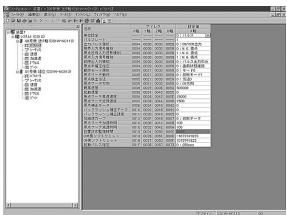
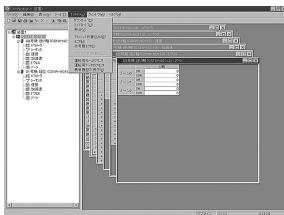
NC Monitor
Display the NC units' present positions, error codes, sequence numbers, and I/O status.
The sequence numbers and present positions can be displayed for up to 4 Units. In addition, the contents of the operating memory area and operating data area can be monitored and the error log can be displayed.
Communications
Communicate with NC units through the network.
It is possible to communicate with NC Units through the Fins-Gateway. Depending on the FinsGateway driver version, HostLink or Ethernet. can be used to perform online operations (monitoring operation or transferring/verifying parameters,sequences,etc.) with the NC Unit.
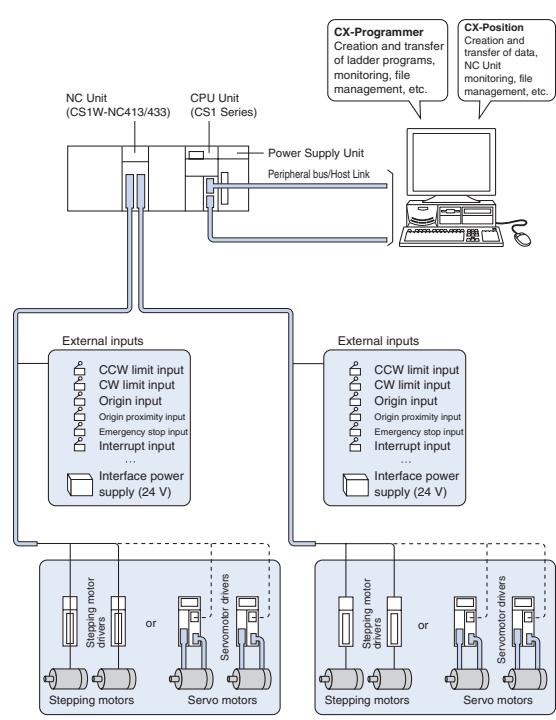
System Configuration with CS1W-NC413/433
Specifications
Compatible Position Co Units:
CS Series:CS1W-NC113/NC133/NC213/NC413/NC433 CJ Series: CJ1W-NC113/NC133/NC213/NC413/NC433
Basic Functions
Create, edit, and print the Position Control Unit's parameter data, sequence data, speed data, acceleration/deceleration data, dwell times, and zone data. Monitor the Position Control Unit's operating status.
Created files
CX-Position project files (.nci)
Contents: Parameter data, sequence data, speed data, acceleration/deceleration data, dwell times, and zone data
Operating Environment
CPU:
Pentium 100 MHz or faster CPU
OS:
Windows 95, 98, NT4.0, W2000 or XP
Compatible PLCs:
CS Series and CJ Series
ALL DIMENSIONS SHOWN ARE IN MILLIMETERS.
To convert millimeters into inches, multiply by 0.03937. To convert grams into ounces, multiply by 0.03527.
- WS02-NCTC1-E
- CX-Position
- Set, transfer, store, and print position control unit data and monitor operation online
- Key Features
- Creating and managing data
- Data can be created for various applications
- NC Monitor
- Communications
- Communicate with NC units through the network.
- Specifications
- Operating Environment
Marque : OMRON
Modèle : CX-POSITIO
Catégorie : Automatisation industrielle