KH 2252 CD-RADIO ALARM CLOCK - Réveil radio CD EBENCH - Notice d'utilisation et mode d'emploi gratuit
Retrouvez gratuitement la notice de l'appareil KH 2252 CD-RADIO ALARM CLOCK EBENCH au format PDF.

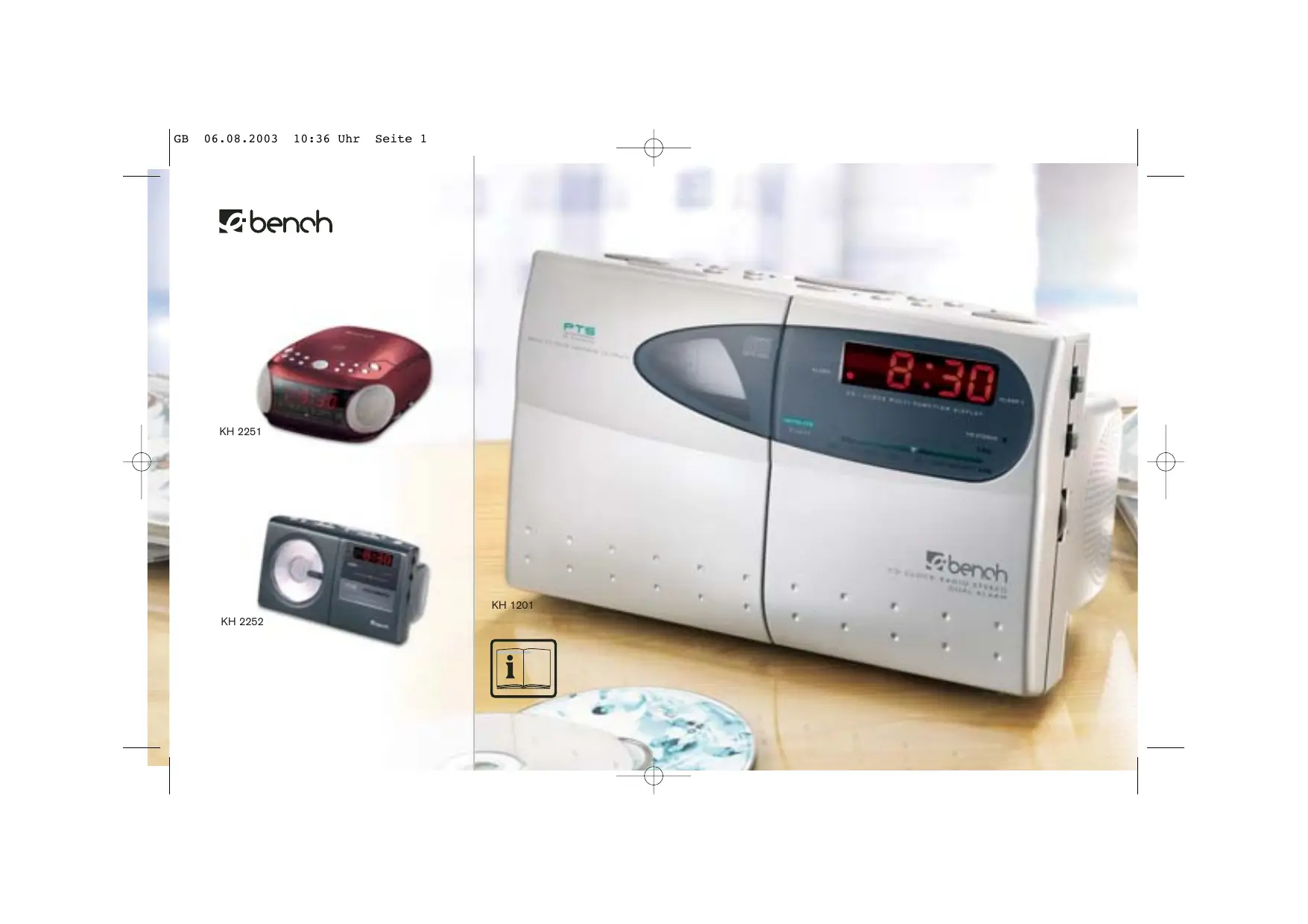

| Type de produit | Réveil radio CD avec lecteur CD |
| Marque | EBENCH |
| Modèle | KH 2252 |
| Alimentation principale | AC 230 V ~ 50 Hz |
| Alimentation de secours | Pile 9 V type 6F22 / 006P / PP3 (non incluse) |
| Dimensions approximatives | 30 x 20 x 10 cm |
| Poids approximatif | 1,5 kg |
| Radio FM | 87,5 – 108 MHz (stéréo) |
| Radio MW | 530 – 1600 kHz |
| Lecteur CD | Réponse 100 Hz – 16 kHz, laser 760 nm, 0,4 mW |
| Alarmes | Double alarme indépendante (AL1 et AL2) |
| Modes de réveil | Buzzer, radio, CD, programmation de pistes |
| Snooze | Arrêt temporaire de 6 minutes |
| Minuterie sommeil | 90/60/30 minutes |
| Fonctions CD | Lecture, pause, saut, recherche, répétition, aléatoire, programmation (20 pistes) |
| Prise casque | Jack 3,5 mm |
| Antenne FM | Fil |
| Entretien et nettoyage | Chiffon doux ou peau de chamois humide, jamais de solvants |
| Sécurité | Ne pas exposer à l'humidité, laser classe 1, ouverture réservée au personnel qualifié |
| Réparabilité | Aucune pièce réparable par l'utilisateur |
FOIRE AUX QUESTIONS - KH 2252 CD-RADIO ALARM CLOCK EBENCH
Questions des utilisateurs sur KH 2252 CD-RADIO ALARM CLOCK EBENCH
0 question sur cet appareil. Repondez a celles que vous connaissez ou posez la votre.
Poser une nouvelle question sur cet appareil
Téléchargez la notice de votre Réveil radio CD au format PDF gratuitement ! Retrouvez votre notice KH 2252 CD-RADIO ALARM CLOCK - EBENCH et reprennez votre appareil électronique en main. Sur cette page sont publiés tous les documents nécessaires à l'utilisation de votre appareil KH 2252 CD-RADIO ALARM CLOCK de la marque EBENCH.
MODE D'EMPLOI KH 2252 CD-RADIO ALARM CLOCK EBENCH

natural_image
Red and white electronic device with a digital display showing '手扣' (hand button) and 'KH 2251' (no readable text or symbols on the device body)
natural_image
Black and white photo of a CD or DVD radio with a digital display (no visible text or symbols)KH 2252


text_image
PTS PHOSK PHOSK PHOSK PHOSK PHOSK PHOSK PHOSK PHOSK PHOSK PHOSK PHOSK PHOSK PHOSK PHOSK PHOSK PHOSK PHOSK PHOSK PHOSK PHOSK PHOSK PHOSK PHOSK PHOSK PHOSK PHOSk PHOSk PHOSk PHOSk PHOSk PHOSk PHOSk PHOSk PHOSk PHOSk PHOSk PHOSk PHOSk PHOSk PHOSk PHOSk PHOSk PHOSk PHOSk PHOSk PHOSk PHOSk PHOSk PHOSk PHOSk PHOSs PHOSs PHOSs PHOSs PHOSs PHOSs PHOSs PHOSs PHOSs PHOSs PHOSs PHOSs PHOSs PHOSs PHOSs PHOSs PHOSs PHOSs PHOSs PHOSs PHOSs PHOSs PHOSs PHOSs PHOSs PHOSl PHOSl PHOSl PHOSl PHOSl PHOSl PHOSl PHOSl PHOSl PHOSl PHOSl PHOSl PHOSl PHOSl PHOSl PHOSl PHOSl PHOSl PHOSl PHOSl PHOSl PHOSl PHOSl PHOSl PHOSl PHOSls PHOSls PHOSls PHOSls PHOSls PHOSls PHOSls PHOSls PHOSls PHOSls PHOSls PHOSls PHOSls PHOIs PHOIs PHOIs PHOIs PHOIs PHOIs PHOIs PHOIs PHOIs PHOIs PHOIs PHOIs PHOIs PHOIs PHOIs PHOIs PHOIs PhoIs PhoIs PhoIs PhoIs PhoIs PhoIs PhoIs PhoIsKH 1201
KH 2251
text_image
1 2 11 10 13 5 16 3 8 21 4 12 14 26 19 6 15 27 9 17 12:34- 25 29 22
text_image
32 18 28 30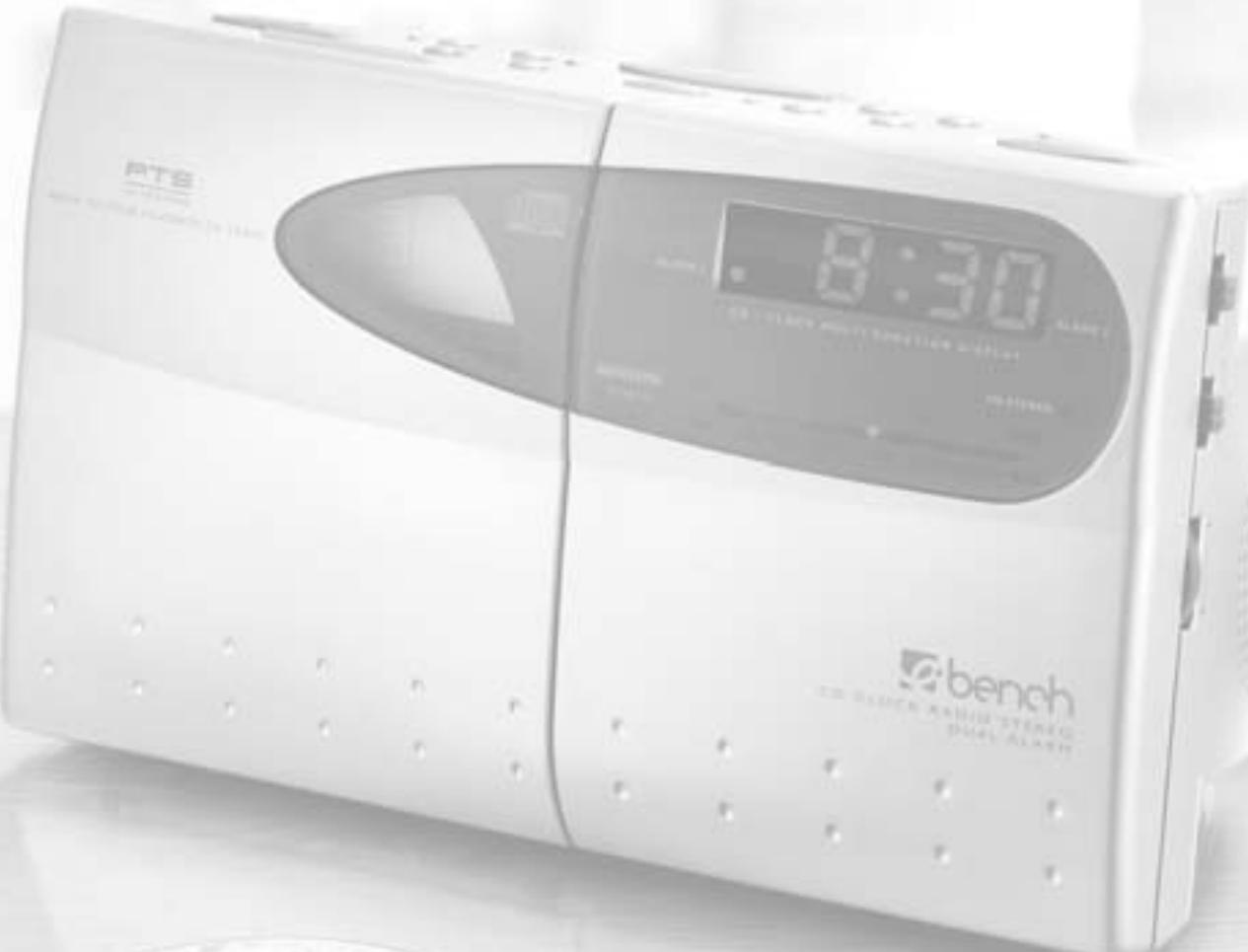
text_image
P726 8:30 BE CHINE MAXIM STENANCE bench BE CHINE MAXIM STENANCE BE CHINE MAXIM STENANCE
text_image
13 15 16 10 - 11 1 2 9 4 12 5 6 7 8
text_image
3 21 14 25 25 35 22 8:30 24 27 29 17 Ebench
natural_image
Back view of a device showing internal components and labeled parts (no text or symbols beyond labels)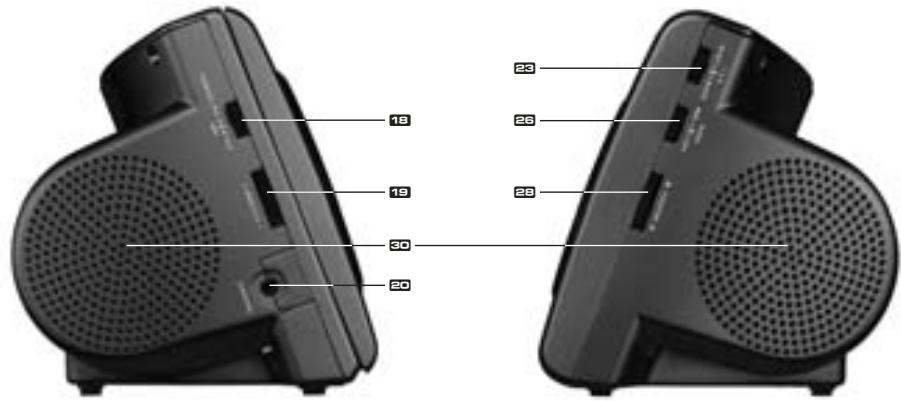
text_image
18 19 30 20 23 26 28Technical specifications
Power Supply: AC 230V \~ 50 Hz
Battery back-up - 9V type 6F22 / 006P / PP3 (not included)
CD Player: Response curve ( ± 3dB) 100 Hz to 16 kHz
Laser: = 760 nm P max = 0.4 mW
Radio: FM / Frequency Modulation - 87.5 / 108 MHz
MW / Medium Wave - 530 / 1600 kHz
CAUTION! This set uses a laser beam. To prevent any accident due to this type of beam, the set should only be opened by properly trained personnel. The unit conforms to the international safety specifications and to guide lines of the european community, and also complies with current standards concerning electrical safety and electromagnetic compatibility EMC.
WARNING: To reduce the risk of fire or electric shock, do not expose this appliance to rain or moisture. Ventilation holes not being impeded.

The lightening flash with arrowhead symbol within the triangle is a warning sign alerting the user of "dangerous voltage" inside the unit.

The exclamation point within the triangle is a warning sign alerting the user of important instructions accompanying the product.

Invisible laser radiation when open and interlocks defeated. Avoid exposure to beam.
ATTENTION: To reduce the risk of electric shock, do not remove the cover. There are no user serviceable parts inside the unit. Refer all servicing to qualified personnel.
IMPORTANT! Do not throw batteries in fire!
Do not be expose to dripping or splashing, and that no object filled with liquids, such as vases, shall be plced on the apparatus.
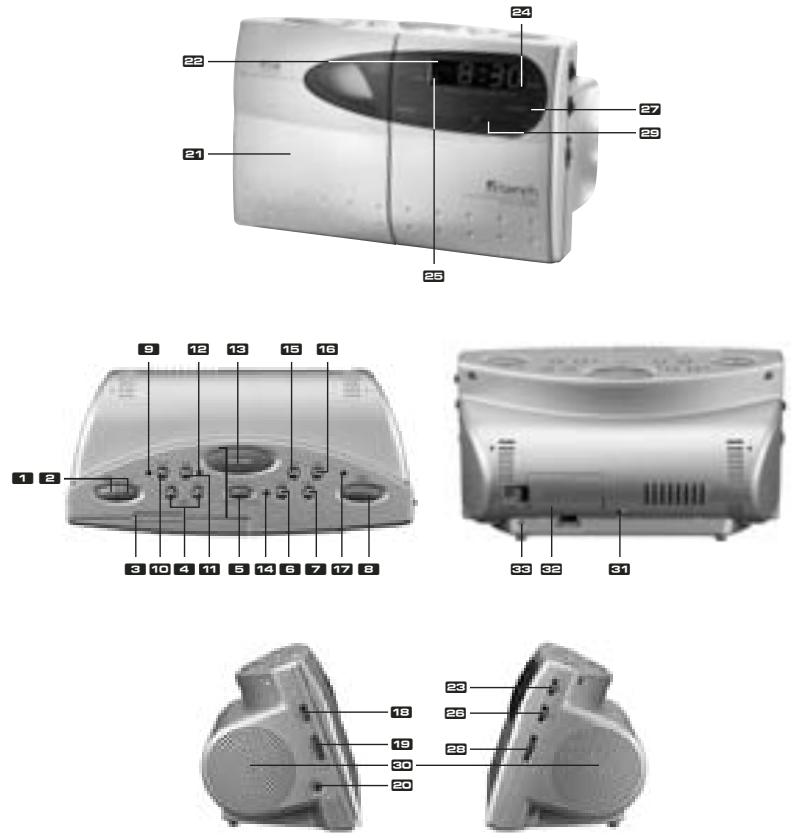
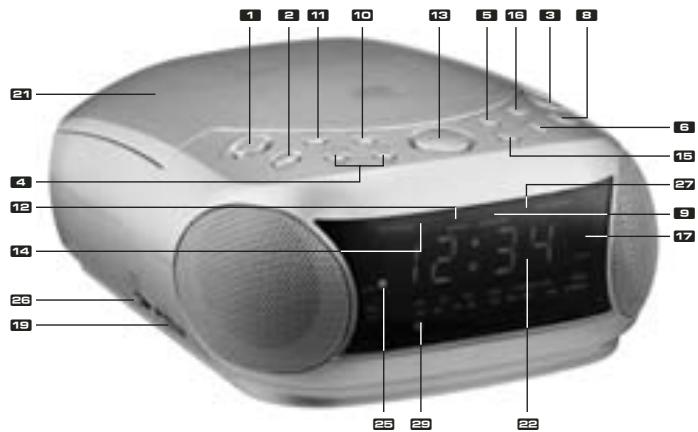
Location of controls
▶ II PLAY/PAUSE : To start playing the CD or to stop momentarily the disc playera
2 ■ STOP : To stop playing the disc
3 CD door open
Skip / Fast Search (backward / forward) - HOUR / MINUTE:
· CD track skip and fast search within the track
· All clock functions minute and hour setting
5 PTS (PROGRAM) : to set programmable CD tracks
6 ALARM 1: set / ALARM-Set (KH 2251)
7 ALARM 2: set (KH 1201, KH 2252)
8 POWER
9 CD Random function LED indicator
10 RANDOM : To select the desired mode of play
11 REPEAT : To play the disc continuously
12 CD repeat function LED indicator
13 SNOOZE : Interval alarm repetition
14 CD Program LED indicator
15 TIME : set
16 SLEEP
17 Power Led Indicator
18 Function selector : CD - AM - FM
19 Volume control
20 Phones jack (KH 1201, KH 2252)
21 CD compartment
2
22 Digital Display
23 Alarm Selector : AL 1 - AL 1+2 - AL 2
24 ALARM 2 LED Indicator
25 ALARM 1 LED Indicator
26 Alarm Mode : Off - Buzzer - Auto
27 FM Stereo LED indicator
23 Tuning knob : To select your radio station
29 Dial scale and pointer
30 Speakers
31 AC power cord
32 Battery compartment
FM wire antenna
34 PM Indicator
Power Supply
3
This CD clock radio operates on AC230V\~50Hz. It is also equipped with a clock battery back-up system, powered by an optional 9V battery type 6F22 (not provided).
- Insert the AC power cord 31 into a convenient standard AC wall outlet.
- Connect the 9V battery inside the compartment at the bottom of the unit 32.
Note: An alkaline type battery is recommended. For optimum performance, this battery should be replaced every 6 months.
Battery Backup System
4
Ensures that the unit will continue to operate as normal during AC power disruption (in order to preserve the battery life the display will not light). All clock settings will be kept in the memory, however, the clock time may require adjustment for exact accuracy. If this battery is not installed, the display will blink 12:00 to indicate that you have to redo the time and alarm settings.
Setting the time
5
- Press and hold TIME 15 and MINUTE or HOUR 4 to adjust to your desired time.
- Release TIME 15 to store your setting in memory.
Listening to the radio
6
- Switch to FM or AM position with the function selector 18.
- For a better reception in FM, extend the antenna ☐. In AM, rotate the unit.
- Press POWER 8.
- Adjust the volume 19 to the desired level.
- Select your desired radio station 23 and 29 – (If the FM station is being received in stereo, the FM STEREO LED indicator 27 will alight).
- To stop listening to the radio press Power ☐.
Listening to the CD player
7
- Open the CD door ☐, load your disc (label up) into CD compartment ☐.
- Switch to the CD position 18.
-
Press POWER ☐, the Display ☐ will show total track numbers. It will return to the clock time after few seconds.
-
Press 9 ☐ to start listening from the first track. The Display ☐ will show "1 ", then it will return to the clock time.
Note: Use also this knob to suspend momentarily the playing track. Press once again to continue playing.
- Rotate the volume 19 to adjust the desired level.
- Press ■ 2 to stop listening the disc.
Other CD player functions
8
SKIP / FAST SEARCH ▶:
Press ➤ to skip forward to the next track or repeatedly to skiptracks. Press ➤ return to the beginning of the track, or press repeatedly to skip backwards several tracks. Press and hold ➤ or ➤ to search quickly within a track.
REPEAT 11
9
- Press once to repeat your selected track. REPEAT indicator 12 blinks.
- Press twice to play the disc continuously. REPEAT indicator 12 alight.
- Press again to switch off this function, REPEAT indicator 12 goes off.
PROGRAM 5: To set your own musical program
10
- Insert the disc (3, 21). The total number of tracks is displayed 22.
- Press ☐, the display show PO1. PROGRAM indicator 14 blinks
- Select with 🏠 or 🏠 your desired track, then press 📄 to store your program in memory. Redo this operation as many times as necessary. 20 tracks can be memorised.
-
Press ▶ II 1 to start playing.
-
Press ■ STOP 2 to stop the disc.
- To cancel this function, open the CD compartment
RANDOM
11
- Press RANDOM ☐ to select RANDOM play mode and it will play randomly all the tracks of the CD. RANDOM indicator ☑ alight.
- Press again to switch off this function until the RANDOM indicator ☐ goes off.
Setting the alarm and wake up mode
12
This unit allows you to set two different wake up times which you can choose to use independently or simultaneously AL 1 or AL 2, or AL 1 and 2.
Setting the alarm
13
- 1st Alarm (AL 1): Press and hold the ALARM 1 ☐, and press ↔ or ➞ to adjust your desired alarm time, then release ALARM 1 ☐ to store your setting in memory.
- 2nd Alarm (AL 2): Press and hold the ALARM 2 ▼ and redo the same operation as above.
Select your wake-up mode ☐ in AUTO (for RADIO or CD), BUZZER (for alarm sound) or OFF to switch off the alarm. Select you wake-up time with alarm selector ☐.
Wake up to the BUZZER sound
14
Switch to the BUZZER position ☐, the alarm LED indicator (☐ and/or ☐) will alight.
Wake up to the radio
15
- Follow procedures 1 to 6, in "LISTENING TO THE RADIO", to select your desired radio station.
- Switch to the AUTO position 23, the alarm indicator (24 and/or 25) will alight.
Wake up to the CD
16
- Follow procedures 1 to 6, in "LISTENING TO THE CD PLAYER".
- Switch to the AUTO 26 position, the alarm LED indicator (24 and/or 25) will alight.
- Press POWER 8 and POWER indicator 17 goes off
Note: If the CD play time is longer than 60 minutes, the music will stop after playing 60 minutes.
Wake up to the programmable tracks
17
- Switch to the CD position 18 and press POWER 8. POWER indicator 17 alight.
- Follow procedures 1 to 5 in "LISTENING TO THE CD PLAYER - PROGRAM".
- Switch to the AUTO 28 position, the alarm LED indicator (24 and/or 25) will alight.
- Press POWER 8 and POWER and PROGRAM indicators (17, 14) goes off.
Note: The music will stop after the programmed tracks, e.g. if one track is programmed, the alarm will stop at the end of this track. The programmed memory will be erased once the CD door be opened.
Stopping the alarm
18
The alarm is programmed to run for 60 minutes.
- SNOOZE 13: Press to stop the alarm temporarily, the alarm will stop and ring again automatically, after 6 min.
- POWER ☐: The alarm will stop, and will sound again 24 hours later.
- OFF ☐: To turn off the alarm permanently the alarm LED indicators (24, 25) will go off.
Sleep to the music
19
- Select CD/FM/AM 18 for the sleep mode, then
- Press SLEEP ☐, the display shows "--", press again to select the desired sleep time.(three Sleep time 90-60-30 minutes). It will start countdown after few seconds.
- If in CD mode, it needs to press PLAY-PAUSE ■ for CD playing
- Press POWER ☐ to stop
Note: If the CD play time is shorter than your selected sleep time, the music will stop at the end of the disc.
More information
20
- Do not use your set immediately after transport from a cold place to a warm place, there may be condensation problems.
• Make sure that you keep your set away from water and high temperatures. - Clean the player with a soft cloth, or a damp chamois leather. Never use solvents.
Notes on Compact Disces
- If there is a scratch, dirt or fingerprints on the CD, it may cause tracking error.
Before playing, clean the CD with a cleaning cloth. Wipe the CD from the center out.
Don't store discs in places with high temperatures or high humidity - they can become warped. After playing, store the CD in its case.
text_image
PTS 8:30 24 GHz POLD FRETIRE SHARET benoh TO-CHUCK RADIO STRAID DOUBLE ALARM ss.com ulations by unication