
OXY2 - Ordinateur de plongée SCUBAPRO-UWATEC - Notice d'utilisation et mode d'emploi gratuit
Retrouvez gratuitement la notice de l'appareil OXY2 SCUBAPRO-UWATEC au format PDF.

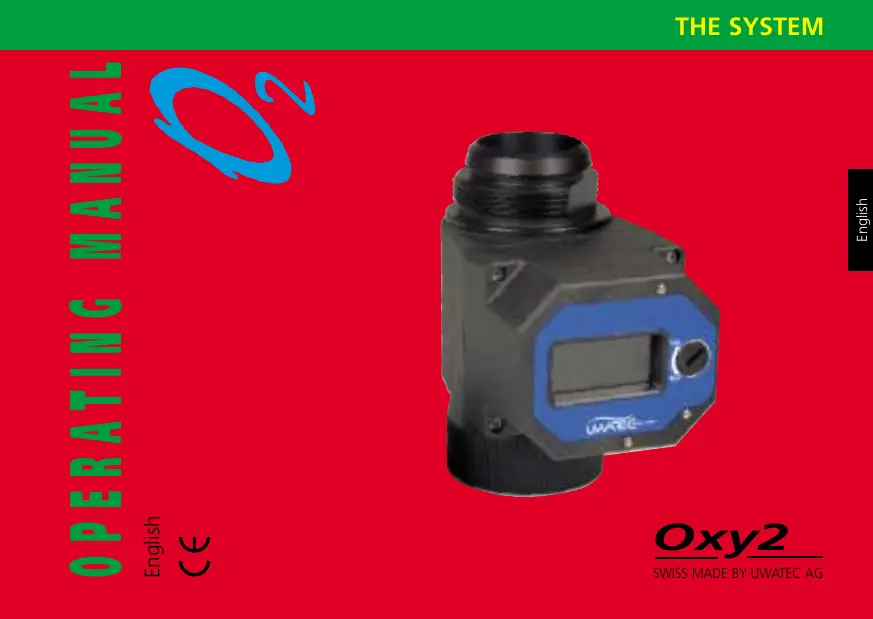

| Type de produit | Ordinateur de plongée pour recycleur semi-autonome (SCR) |
| Marque | SCUBAPRO-UWATEC |
| Modèle | OXY2 |
| Alimentation | Pile UWATEC interne (remplaçable par soudure) |
| Autonomie de la pile | ≥ 4,5 ans à 100 plongées/an |
| Capteurs d'oxygène | 2 capteurs redondants (double sécurité), durée de vie ~1 an |
| Plage de mesure O2 | 0 à 100% O2 |
| Pression partielle d'oxygène | 0 à 2,5 bar |
| Résolution | 0,1% O2 |
| Précision | < ±4% relative |
| Linéarité | < 3% |
| Profondeur maximale | 50 m (164 pi) |
| Altitude maximale | 4000 m (13 120 pi) |
| Température de fonctionnement | -10 °C à 60 °C (14 °F à 122 °F) |
| Fonctions principales | Mesure en ligne de la fraction d'O2 inhalé, affichage, transmission sans fil vers Aladin® Air X O2, autotest, alarmes, calibrage air/oxygène pur |
| Transmission sans fil | Vers ordinateur de plongée compatible (Aladin® Air X O2) |
| Entretien et nettoyage | Rincer à l'eau douce après plongée en mer, sécher avec un chiffon doux, stocker au frais et pas trop sec |
| Sécurité | Ne pas utiliser en circuit fermé, respecter la profondeur maximale, formation obligatoire pour plongée au recycleur |
| Pièces détachées et réparabilité | Capteurs O2 et pile remplaçables par l'utilisateur (soudure pour la pile), adaptateurs pour différents SCR en option, kit d'étalonnage oxygène en option |
| Informations générales | Garantie 12 mois, ne pas exposer aux tests en caisson hyperbare, manuel inclus |
FOIRE AUX QUESTIONS - OXY2 SCUBAPRO-UWATEC
Questions des utilisateurs sur OXY2 SCUBAPRO-UWATEC
0 question sur cet appareil. Repondez a celles que vous connaissez ou posez la votre.
Poser une nouvelle question sur cet appareil
Téléchargez la notice de votre Ordinateur de plongée au format PDF gratuitement ! Retrouvez votre notice OXY2 - SCUBAPRO-UWATEC et reprennez votre appareil électronique en main. Sur cette page sont publiés tous les documents nécessaires à l'utilisation de votre appareil OXY2 de la marque SCUBAPRO-UWATEC.
MODE D'EMPLOI OXY2 SCUBAPRO-UWATEC
OPERATING MANUAL
English
C E

List of chapters
Introduction 4
How to operate the Oxy2 5
Switching the unit on and off. 6
Checking the remaining battery and O_2 -sensor lifetime 6
Checking the Oxy2 7
Pairing of the Oxy2 with a dive computer 9
Mounting the Oxy2 on a rebreather 10
Warnings and service messages 11
O_2 Sensors 13
Calibrating the O_2 sensors 14
Replacing the O_2 sensors 17
Battery 21
Replacing the Battery 21
Maintenance and Storing 24
Technical Information / Features 25
Diving in Mountain Lakes 26
Pressure Chamber Tests 26
Warranty 26
Safety considerations 28
Introduction
The Oxy2 is fitted "in line" to the inhalation hose of the semi closed rebreather (SCR) and measures the actual oxygen fraction of the inspired gas mixture. This information is displayed on the Oxy2 display and can be transmitted to a paired hoseless dive computer (Aladin® Air X O_2 ). This is the basis for the calculation of both oxygen toxicity and decompression, based on the real values of the inhalation gas. Up to now the composition of the gas had to be estimated.
The Aladin® Air X O₂ calculates the diver's oxygen metabolism using the measured oxygen fraction of the inhalation gas mix, plus the automatically determined oxygen fraction of the premixed gas and a value for the highest oxygen consumption you calculate with (programmed into the Aladin® Air X O₂ with DataTalk software). Using these 3 values the diver's workload is calculated on line and updated in real time. The significance of these calculations should not be underestimated because both the oxygen toxicity – measured by the CNS clock – and the speed of nitrogen diffusion in the muscles is affected by workload. Due to the higher workload the diver's metabolism gets more activa
ted and accelerates the nitrogen uptake. At the same time the oxygen fraction goes down due to the increased need for oxygen and the nitrogen fraction is increased. This means that a higher workload accelerates the uptake of the nitrogen and additionally the nitrogen fraction increases.
This shows how important it is to know the composition of the inhalation gas, measured by the Oxy2. Only with this information can the diver have updated information (online) about decompression and oxygen toxicity. All this increases the safety of diving.

- Diving with a semi-closed rebreather (SCR) needs special education!
- Please read this manual carefully to the end!
- Before the first use, the O_2 sensors have to be fitted and calibrated. See Page 17 and 14.
How to operate the Oxy2
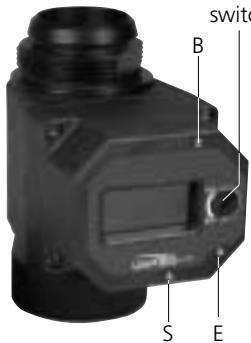
The user can operate the Oxy2 by using the 3 contacts and the turnable switch. The user has - similar to the Aladin dive computers - to bridge two contacts with moistened fingertips.


B Base contact, must to be touched for all user operations
E Enter contact, selects / confirms the current input
S Switch contact, changes the settings
Instruction for manual inputs.
For example: Bridging the contacts B and E.
Instruction for the turnable switch
For example: The switch has to be in „RUN" position
Switching the unit on and off

20.9%O
Switching on
Manually: by bridging contacts B and E
Automatically: by dip (dipping) into water.
- The Oxy2 has to be switched on manually before the dive in order that it is checked. see page 7.

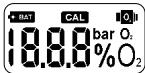
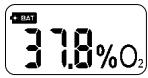
After being switched on the unit first runs a display check – for the first 4 seconds all the display segments are displayed. Then the screen shows the current oxygen percentage. The turnable switch has to be in position "RUN".
Switching off
The unit automatically switches off if a dive has not commenced within 30 minutes of either switching on the Oxy2 or a calibration was done. 30 minutes gives the diver enough time to thoroughly check his equipment and to start the dive.
After a dive the unit switches off automatically after 15 min..
Checking the remaining battery and O_2 sensor lifetime
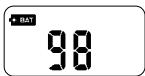
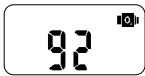
The remaining battery lifetime can be checked - after the unit has been switched on - by connecting the contacts B and E. The display shows for 4 seconds the battery symbol and the remaining percentage of the battery lifetime and afterwards for another 4 seconds the O_2 sensors remaining percentage lifetime.
Checking the Oxy2
Before each dive the Oxy2 has to be checked as follows:
Remove the Oxy2 from your equipment and move it very slowly through the air for a few seconds. If the reading is within 20.9% ± 0.2% O_2 and if the "CAL" segment on the display is not visible, no further calibration is necessary.
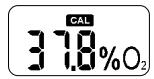
A recalibration is necessary if:
The reading shows less then 20.7% O_2
The reading shows more then 21.1% O_2
- The „CAL“ segment on the display is visible
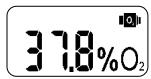
On page 14 is described how to calibrate the Oxy2.
The O_2 sensors have to be replaced if the display shows the sensor segment. See page 17.
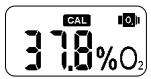
If there is no reliable measurement possible the unit shows the "CAL" segment and the sensor segment. First try a calibration. A sensor replacement may be necessary if the calibration is not successful. See page 17 (Replacing the O_2 Sensors).
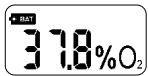
The battery has to be replaced if the display shows the battery segment. See page 21 (Replacing the battery).
Replace the battery if the remaining capacity would not be enough for the planned dives.
Check that the Oxy2 is fitted to the inhalation hose of your rebreather!
Check the communication between the Oxy2 and the dive computer before each dive! You will find more about the communication in the user's manual of your dive computer.
Pairing the Oxy2 with a dive computer
The Oxy2 sends every 5 seconds the actual oxygen values of the inhalation gas to an Aladin® Air XO_2 or a compatible dive computer. The dive computer and the Oxy2 need to be paired to make sure that the dive computer receives and uses the data from its own Oxy2.
A pairing is necessary:
- Before the first dive of an Oxy2 with a dive computer
- If you change from a pressure transmitter (air/nitrox) to an Oxy2 or the reverse
- If you use a new Oxy2 or dive computer
After a change of the dive computer battery

- Oxy2 and Aladin® Air X O_2 must be paired if you change from using a pressure transmitter (air/nitrox) to an Oxy2!
The Oxy2 sends a pairing string during switching on the unit and at the beginning of the battery and O_2 sensor lifetime check.
Make sure that the Oxy2 and the dive computer touch each other during all the pairing process, until after the pairing has been confirmed. See page 6 (Checking the remaining battery and O_2 sensor lifetime).

- You find more detailed information about pairing in the Aladin® Air X O₂ manual.
Mounting the Oxy2 to a rebreather
The Oxy2 is fitted "in line" to the inhalation hose of the semi closed rebreather (SCR). The Oxy2 has to be mounted as shown below. This is the optimal position for transmission.
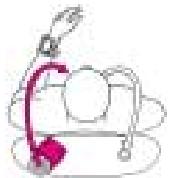
Position for left side inhalation hose and lefthanders.
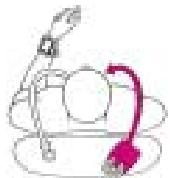
Position for right side inhalation hose and lefthanders.

Position for left side inhalation hose and righthanders.
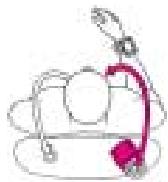
Position for right side inhalation hose and righthanders.
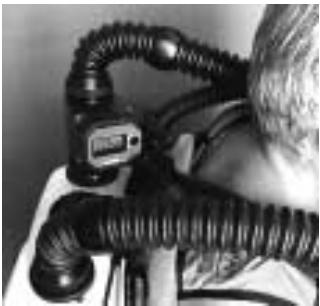

- The Oxy2 may only be mounted into the inhalation hose of the semi-closed rebreather! Otherwise the calculation of decompression and the oxygen toxicity are based on wrong data and this could result in death or serious injury.
Warnings and service messages
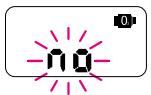
O_2 sensor connection problems
If there is no O_2 sensor or only one connected, the "no" and the sensor symbol will be displayed. You will find how the sensors are connected on page 17 (Replacing the O_2 Sensors).
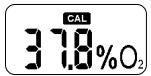
One O_2 sensor measures wrong
The Oxy2 continues to work but indicates the defect by displaying „CAL". The message also appears on the Aladin® Air X O_2 display. Calibrate the Oxy2 after you have finished your dive (see page 14 „Calibrating the O_2 -sensors"). If this is not successful, you have to replace the O_2 sensors. (see page 17 „Replacing the O_2 Sensors") You can continue your actual dive if the display shows „CAL".
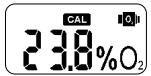
Both O_2 sensors measure wrong
When a reliable measurement is not possible the sensor symbol and "CAL" appear on the displays of both the Oxy2 and the Aladin® Air X O₂. When this happens the Oxy2 goes on measuring and indicating the oxygen fraction. At the same time the Aladin® Air X O₂ switches for its calculations to the premix value which was automatically measured by the Oxy2. The dive computer then has to be used as though there is no Oxy2. It is recommended that an ascent is made.
Calibrate the Oxy2 after the dive (see page 14 „Calibrating the O_2 sensors"). If the calibration is not successful the O_2 sensors have to be replaced. (see page 17)
It is possible that the sensor symbol and „CAL“ will disappear during the dive in which case recalibration is not required.
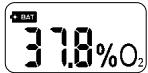
Battery warning
If the battery capacity reaches 0% , the battery symbol will be displayed. Replace the battery after the dive (see page 21 „Replacing the battery”).
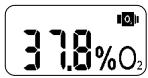
O_2 sensor warning
If the O_2 sensor capacity reaches 0% , the sensor symbol will be displayed. Replace both sensors after the dive (see page 17, "Replacing the O_2 sensors").
O_2 Sensors
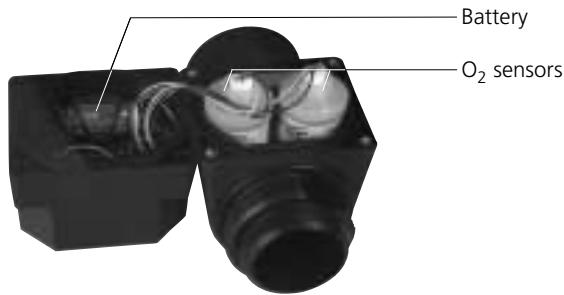
The O_2 sensors have - like batteries - a certain lifetime. From the first time that a sensor contacts oxygen it starts to discharge. Its' lifetime is approx. 1 year. The user can replace the sensors by himself.
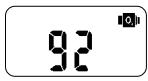
The actual remaining O_2 sensors life can be checked (after the unit has been switched on) by bridging the contacts B and E.

- The remaining lifetime of an O_2 sensor cannot be increased by disconnecting the sensor! On page 24 (maintenance and storing) you get information on how to store the Oxy2.
Calibrating the O_2 Sensors
A new calibration is needed when:
- The "CAL" segment on the display is visible.
- New sensors have been installed.
- At least one of the O_2 sensors needs to be calibrated.
- For other reasons see page 7 (Checking the Oxy2).
If the Oxy2 case has been opened you have to then wait 5 minutes after closing the case before you start to recalibrate. This prevents the calibration being affected by the influence of light.

Procedure
- Disconnect the Oxy2 from any equipment.
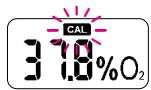
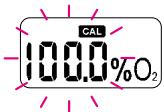
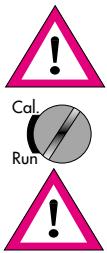
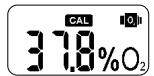
- Switch it on and put the turnable switch to the position „CAL" (calibration). The display shows the flashing „CAL" symbol. It will remain visible until the turnable switch is turned back to „RUN".
- If you want to calibrate with pure oxygen, you have to confirm that by bridging B-E


- Using pure oxygen or oxygen enriched gas needs special safety measures!
- If a calibration is performed with pure oxygen, no air should enter the space between the exit of the oxygen tank and the entrance of the Oxy2.
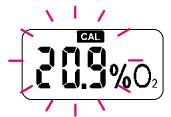
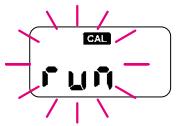
If you want to calibrate with air (20.9% O_2) , switch with B-S to 20.9% and confirm by bridging B-E.
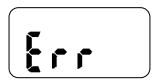
- After having confirmed your choice (100% or 20.9% O_2 ), the Oxy2 starts a self test. If the program finds an important defect the Oxy2 displays "Err" which means that the Oxy2 has gone into a special error mode which cannot be fixed by the user. Only an authorised retailer or the manufacturer is able to repair it.
After the Oxy2 has passed the self test, the program starts with the automatic calibration procedure. The duration is between a few seconds up to approx. a minute.
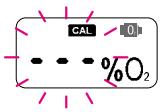
If the calibration was not completely successful the old calibration settings will still be valid and the display shows - - - " . In this case try to recalibrate again: turn the switch to „RUN" and back to „CAL". If the calibration is still not successfully completed the reason could be an unstable reference gas. Or if the display also shows the sensor symbol the O_2 sensors could be exhausted and need replacing.
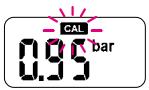
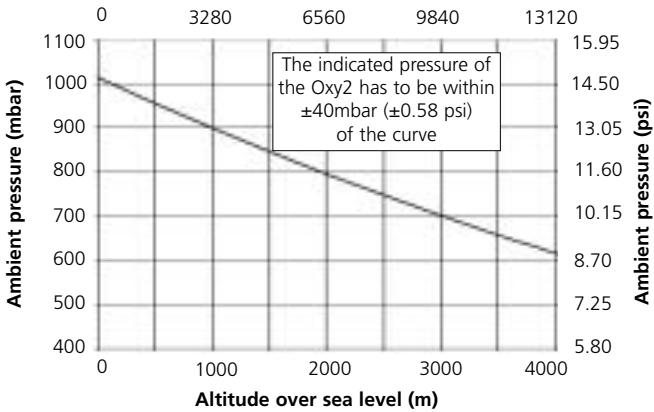
After a successful calibration the Oxy2 indicates the ambient air pressure. This value has to be checked according to the following description: The absolute ambient air pressure relates to the actual altitude and the weather. It can only be measured by a barometer which is able to display the absolute air pressure. Barometers which only display the air pressure reduced to the equivalent sea level (normal) cannot be used. If you have no barometer on hand you can read out from the altitude reference curve the theoretical ambient pressure. If the displayed air pressure of the Oxy2 stays outside of a range of ± 40 mbar ( ± 0.58 psi) from the measured or readout value, the unit has to be checked by an authorised retailer.
Altitude over sea level (feet)
-
Do not calibrate the Oxy2 above 4000m (13120 feet).
-
Switch the turnable switch back to „RUN".
-
Make sure that you switch back to „RUN“ otherwise the unit does not turn off automatically and the battery will be quickly used up!
Replacing the O_2 Sensors
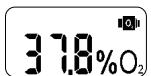
In the following situations the O_2 sensors have to be replaced:
- The sensor symbol is visible on the Oxy2 display.
- If a reliable measurement is not possible anymore, the sensor symbol and "CAL" will be displayed. Try a calibration. If this is not successful, the O_2 sensors have to be replaced.
If the sensor capacity reaches 0% .

- If a sensor replacement is required, always replace both sensors!
Procedure:
- Disconnect the Oxy2 from any equipment.
- Dry it with a soft towel.
- Make sure that the turnable switch stays in position „RUN".
- Use a 2.5mm Allen key to unscrew (anticlockwise) the 4 case screws. Carefully separate the 2 parts.

- Open the Oxy2 only in a dry and clean place! It prevents soiling and damage to the electronics and O rings.

- Only open the unit if a battery or sensor replacement is necessary!
-
Do not touch either by hand or with any other object the electronics on the PCB board!
-
Remove carefully the large O ring and carefully dry the O ring recess.
- Pull carefully the plugs out of the socket ( the tab, which stops the plug from falling out of the socket, has to be pulled back while pulling out the plug)

- Do not pull on the wires!
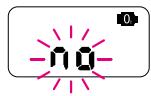
If the unit is running with an O_2 sensor disconnected then, after a few seconds, the display shows "no". The unit switches off automatically after 10 minutes.
- Screw the O_2 sensors out (anti clockwise)
- Take the new O_2 sensors out of their packaging and clean the sealing areas of the O rings. If necessary clean the O rings too. Screw the sensors into the case. Tighten the sensors so that they cannot loosen by themselves.

- Do not open the sealed packaging before you need to use them for a replacement! See remark page 13.

-
After opening the sealed package the O_2 sensors need 10 minutes start-up time. This means that calibration cannot be made until 10 minutes after opening the package.
-
Connect the plugs with the sockets of the O_2 sensors.
- Check the O ring of the case (little cuts ...) and replace it if necessary.
- Clean the O ring and the sealing area of the case.
- Fit the O ring carefully into the case.
- Carefully refit together the 2 parts of the case. Make sure that no wire gets trapped and damaged by the case. Carefully and evenly tighten the 4 screws (for example first the upper left, second the lower right, then the remaining two screws).
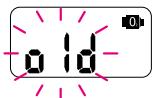
- After connecting the sensors or after the next switching on, the Oxy2 asks you: Are the fitted O_2 sensors the same as you already used before disconnection (old) or have they been replaced (rep)?
"OLD" means that after a confirmation (bridging B-E) the lifetime calculation of the O_2 sensors continues where it was before disconnection. "OLD" has to be selected if the sensors have not been replaced.
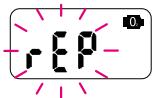
If you replaced the sensors, you have to switch by bridging B-S to „REP". „REP" means, that - after a confirmation (B-E ) - the lifetime will be reset to 100% and the unit requires automatically a calibration. See page 14 „Calibrating the O_2 sensors".

-
"REP" may only be chosen after a replacement of the O_2 sensors by new ones!
-
Check the Oxy2. See page 7 „Checking the Oxy2".

- Wait after you have opened the sealed packaging of the O_2 sensors for 10 minutes before you start with a calibration! See page 19.
Battery
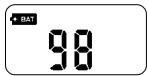


The built-in battery has a lifetime of at least 4,5 years at 100 dives / year and can be replaced by a authorised retailer or – if the user knows how to solder properly – by the user.
The remaining battery lifetime can be checked - after switching on the unit - by bridging the contacts B and E.
Replacing the Battery
The following situations require a battery replacement:
- The battery symbol is visible
-
If the remaining battery capacity seems to be too low for the dives you want to make
-
After the battery has been disconnected (by soldering) the battery lifetime counter will be reset to 100% . That means: If the battery has been disconnected, the battery has to be replaced by a new one! Otherwise the Oxy2 calculates with a higher battery capacity than the battery has. The Oxy2 can stop working in this case without any warning!
Procedure:
- Disconnect the Oxy2 from any equipment.
- Dry it with a soft towel.
- Make sure that the turnable switch stays in position „RUN".
- Use a 2.5mm Allen key to unscrew (anticlockwise) the 4 case screws. Carefully separate the 2 parts.

- Open the Oxy2 only in a dry and clean place! It prevents soiling and damage to the electronics and O rings.
- Do not touch either by hand or with any other object the electronics on the PCB board!
-
Only open the unit if a battery or sensor replacement is necessary!
-
Remove carefully the large O ring and carefully dry the O ring recess.
- Replace the old battery with a new one.

- Make sure that the polarity is correct: the red wire has to be connected to the + pole of the battery.
- Make sure that the battery does not get too hot from the soldering!

-
Check whether the unit can be switched on (B-E). If it does not start, the battery has to be short-circuited (bridging with a wire the + and the - of the battery) for 3 seconds. If it still does not want to start, the unit has to be sent to an authorised retailer.
-
If the battery leaks: Do not bring the liquid in contact with your skin or eyes. Do not inhale the vapour. Clean off immediately the battery leakage from the Oxy2!
-
Check the O ring of the case (little cuts ...) and replace it if necessary.
- Clean the O ring and the sealing area of the case and fit the O ring carefully into the case.
- Carefully refit together the 2 parts of the case. Make sure that no wire gets trapped and damaged by the case. Carefully and evenly tighten the 4 screws (for example first the upper left, second the lower right, then the remaining two screws).
- Switch the unit on and check it. See page 7 (Checking the Oxy2).

- Take care to our environment, bring the used battery to a battery collection point!
Maintenance and Storing

- Protect the unit from impacts and intensive sun!
- After diving in salt water rinse the OXY2 with freshwater
- Dry the unit after use with a soft towel.
- Store the unit in a cool not too dry place. This helps to preserve the sensor lifetime.
- To maximise the O_2 sensor lifetime do not leave them in an oxygen enriched atmosphere except when it is necessary.

- Unplugging the O_2 sensors does not increase their lifetime!
- Replace the battery if the remaining capacity would not be enough for the planned dives.
Technical Information / Features
Maximum depth: 50m (164ft)
Maximum altitude: 4000m (13120ft)
- Operating temperature: -10 °C up to 60 °C (14 °F to 122 °F)
- Oxygen percentage: 0 100% O_2
- Oxygen partial pressure (measurement range): 0...2.5bar (0...36,26 psi)
Resolution: 01% O_2
- Linearity: <3%
Accuracy: < ± 4% relative
Selftest at startup
- Online oxygen sensor check
- Malfunction information
- Request for recalibration of oxygen sensors if necessary
- Oxygen sensor lifetime: approx. 1 year
- Battery lifetime: min. 4,5 years @ 100 dives/year
- Oxygen sensors remaining capacity
- Battery remaining capacity
- Battery: Uwatec
- Offline measurement possible (display)
- Wireless data transmission to Aladin® Air X O₂
- 2 dual (redundant) oxygen sensors (checking each other) (A11.301)
- Adapter for oxygen calibration (optional)
Exchangeable adapters for different SCR's (optional)
Diving in Mountain Lakes
The Oxy2 adapts itself to the ambient pressure.

- Diving while at altitude can considerably increase the risks. Do not undertake high altitude diving without being specifically trained in special techniques for this diving.
Pressure Chamber Tests

- The Oxy2 must not be exposed to any pressure chamber test! See Warranty page 27.
Warranty
Please pay attention to the following remarks on warranty claims:
Recognition of warranty:
The warranty only covers units which have been provably bought from an authorised retailer or from the manufacturer.
Scope of the warranty:
The manufacturer will repair all defects which are provably traceable to defects of material or faults in production. The warranty covers the repair of the unit free of charge, the replacement of faulty parts or the entire Oxy2, respectively.
The O_2 sensors are excluded from the warranty.
UWATEC reserves the right to determine the merits of the warranty claim and to determine whether the unit will be repaired or replaced.
Excluded are faults or defects due to:
excessive wear and tear
- exterior influences, e.g. transport damage, impact, damage due to bumping and hitting, influences of weather or other phenomena
- repairs by anybody not authorised by the manufacturer
- pressure chamber tests
diving accidents
Warranty period and claim
The warranty is given by a period of 12 months. Repairs or replacements during the warranty period do not increase the warranty period.
In order to put forward a warranty claim, send the unit together with a dated receipt of the purchase to your authorised retailer or an authorised servicing point.
The manufacturer does not have to accept extensions of the warranty granted by national importers.
Safety considerations

- Using pure oxygen or oxygen enriched gas needs special safety measures!
Please consider the general safety considerations of using pure oxygen or oxygen enriched gases!
Oxy2 with Aladin® Air X O₂ gives to the diver a high level of reassurance and safety. However these units can never be a substitute for a thorough diving education.
Pay careful attention to warnings given by the Oxy2. Do not make risky dives. Pay special attention to the parts of this manual which are marked with and !
Follow all standard safe diving practices:
- Never dive without a buddy. The Oxy2 does not substitute – not even together with an Aladin® Air X O₂ – for a dive buddy!
- Only make dives that are appropriate to your level of dive training. Neither the Oxy2 nor the Oxy2 together with an Aladin® Air X O_2 increase your knowledge of diving.
- Neither the Oxy2 nor the Aladin® Air X O₂ warn about nitrogen narcosis!

- Do not dive deeper than the limit given by your SCR.
- Do not dive deeper than the Oxy2 maximum depth of 50m .
- The Oxy2 should only be used for semi closed rebreathers (SCR).
- The Oxy2 is not to be used with closed circuit rebreathers.
This manual is part of the Oxy2 safety concept. Please confirm that you have read and understood the complete manual:
Place: Date: Signature: