
ES-1016A - Switch réseau ZYXEL - Notice d'utilisation et mode d'emploi gratuit
Retrouvez gratuitement la notice de l'appareil ES-1016A ZYXEL au format PDF.


| Type de produit | Switch réseau non géré (unmanaged) |
| Marque | ZYXEL |
| Modèle | ES-1016A |
| Nombre de ports | 16 ports RJ-45 |
| Type de ports | 10/100 Mbps auto-négociation, auto-crossover (MDI/MDIX) |
| Débit de la baie de commutation | 3.2 Gbps |
| Méthode de commutation | Store-and-forward |
| Table d'adresses MAC | 4 Ko (4096 entrées) avec apprentissage automatique |
| Normes réseau supportées | IEEE 802.3 10BASE-T, IEEE 802.3u 100BASE-TX, IEEE 802.3x (contrôle de flux), IEEE 802.1p (Classe de service) |
| Files d'attente prioritaires | 2 files (IEEE 802.1p) |
| Contrôle de flux | Back-pressure (half-duplex), pause-frame (full-duplex) |
| Dimensions (L × P × H) | 440 × 120 × 44 mm |
| Poids | 1.4 kg |
| Alimentation électrique | 100–240 V CA, 50/60 Hz, 0.8 A max |
| Consommation électrique | 14 W |
| Température de fonctionnement | 0 °C à 45 °C |
| Humidité de fonctionnement | 10 % à 90 % (sans condensation) |
| Montage | Bureau (pieds en caoutchouc) ou rack 19 pouces (kit de montage inclus) |
| Certifications | FCC Classe A, CE, UL, cUL |
| Garantie | 2 ans (pièces et main-d'œuvre) |
| Contenu de l'emballage | Switch, cordon d'alimentation, guide de démarrage rapide, CD-ROM (manuel utilisateur), 4 pieds en caoutchouc, équerres de montage |
| Refroidissement | Sans ventilateur (fanless) |
| Type de câble réseau | 10BASE-T : Catégorie 3, 4 ou 5 ; 100BASE-TX : Catégorie 5 ; longueur max 100 m |
FOIRE AUX QUESTIONS - ES-1016A ZYXEL
Questions des utilisateurs sur ES-1016A ZYXEL
0 question sur cet appareil. Repondez a celles que vous connaissez ou posez la votre.
Poser une nouvelle question sur cet appareil
Téléchargez la notice de votre Switch réseau au format PDF gratuitement ! Retrouvez votre notice ES-1016A - ZYXEL et reprennez votre appareil électronique en main. Sur cette page sont publiés tous les documents nécessaires à l'utilisation de votre appareil ES-1016A de la marque ZYXEL.
MODE D'EMPLOI ES-1016A ZYXEL
Dimension
ES-1016A/ES-1024A
Unmanaged 16/24-Port Ethernet Switch
User's Guide
Version 1.0
April 2004
ZyXEL Unleash Network
Unleash Networking Power
Copyright
Copyright © 2004 by ZyXEL Communications Corporation
The contents of this publication may not be reproduced in any part or as a whole, transcribed, stored in a retrieval system, translated into any language, or transmitted in any form or by any means, electronic, mechanical, magnetic, optical, chemical, photocopying, manual, or otherwise, without the prior written permission of ZyXEL Communications Corporation.
Published by ZyXEL Communications Corporation. All rights reserved.
Disclaimer
ZyXEL does not assume any liability arising out of the application or use of any products, or software described herein. Neither does it convey any license under its patent rights nor the patents rights of others. ZyXEL further reserves the right to make changes in any products described herein without notice. This publication is subject to change without notice.
Trademarks
Trademarks mentioned in this publication are used for identification purposes only and may be properties of their respective owners.
ZyXEL Limited Warranty
ZyXEL warrants to the original end user (purchaser) that this product is free from any defects in materials or workmanship for a period of up to two (2) years from the date of purchase. During the warranty period and upon proof of purchase, should the product have indications of failure due to faulty workmanship and/or materials, ZyXEL will, at its discretion, repair or replace the defective products or components without charge for either parts or labor and to whatever extent it shall deem necessary to restore the product or components to proper operating condition. Any replacement will consist of a new or re-manufactured functionally equivalent product of equal value, and will be solely at the discretion of ZyXEL. This warranty shall not apply if the product is modified, misused, tampered with, damaged by an act of God, or subjected to abnormal working conditions.
Note
Repair or replacement, as provided under this warranty, is the exclusive remedy of the purchaser. This warranty is in lieu of all other warranties, express or implied, including any implied warranty of merchantability or fitness for a particular use or purpose. ZyXEL shall in no event be held liable for indirect or consequential damages of any kind of character to the purchaser.
To obtain the services of this warranty, contact ZyXEL's Service Center for your Return Material Authorization number (RMA). Products must be returned Postage Prepaid. It is recommended that the unit be insured when shipped. Any returned products without proof of purchase or those with an out-dated warranty will be repaired or replaced (at the discretion of ZyXEL) and the customer will be billed for parts and labor. All repaired or replaced products will be shipped by ZyXEL to the corresponding return address, Postage Paid. This warranty gives you specific legal rights, and you may also have other rights that vary from country to country.
Interference Statements andWarnings
FCC Interference Statement
This device complies with Part 15 of the FCC rules. Operation is subject to the following two conditions:
(1) This device may not cause harmful interference.
(2) This device must accept any interference received, including interference that may cause undesired operations.
FCC Warning
This equipment has been tested and found to comply with the limits for a Class A digital device, pursuant to Part 15 of the FCC Rules. These limits are designed to provide reasonable protection against harmful interference in a commercial environment. This equipment generates, uses, and can radiate radio frequency energy and, if not installed and used in accordance with the instruction manual, may cause harmful interference to radio communications. Operation of this equipment in a residential area is likely to cause harmful interference in which case the user will be required to correct the interference at his own expense.
CE Mark Warning
This is a class A product. In a domestic environment this product may cause radio interference in which case the user may be required to take adequate measures.
Taiwanese BCIQ A Warning
警告使用者
這是甲類的資訊產品,在居住的環境使用時
可能造成射频干擾,在這種情況下,
使用者會被要求採取某些適當的對策
Certifications
Register your product online to receive e-mail notices of firmware upgrades and information at www.zyxel.com for global products, or at www.us.zyxel.com for North American products.
Customer Support
If you have questions about your ZyXEL product or desire assistance, contact ZyXEL Communications Corporation offices worldwide, in one of the following ways:
Contacting Customer Support
When you contact your customer support representative, have the following information ready:
Product model and serial number.
Warranty information.
- Date you received your product.
- Brief description of the problem and the steps you took to solve it.
| LOCATION\ METHOD | SUPPORT E-MAIL SALES E-MAIL | \( \mathsf{{TELEPHONE}}^{1} \) \( {\mathsf{{FAX}}}^{1} \) | WEB SITE FTP SITE | REGULAR MAIL |
| WORLDWIDE | support@zyxel.com.tw sales@zyxel.com.tw | +886-3-578-3942 +886-3-578-2439 | www.zyxel.com www.europe.zyxel.com ftp.zyxel.com ftp.europe.zyxel.com | ZyxEL Communications Corp. 6 Innovation Road II Science Park Hsinchu 300 Taiwan |
| NORTH AMERICA | support@zyxel.com | www.us.zyxel.com | ZyxEL Communications Inc. 1130 N. Miller St. Anaheim CA 92806-2001 U.S.A. | |
| sales@zyxel.com | +1-714-632-0882 +1-714-632-0858 | ftp.us.zyxel.com | ||
| GERMANY | support@zyxel.de sales@zyxel.de | +49-2405-6909-0 +49-2405-6909-99 | www.zyxel.de | ZyxEL Deutschland GmbH. Adenauerstr. 20/A2 D-52146 Wuerselen Germany |
| FRANCE | info@zyxel.fr | +33 (0)4 72 52 97 97 +33 (0)4 72 52 19 20 | www.zyxel.fr | ZyxEL France 1 rue des Vergers Bat. 1 / C 69760 Limonest France |
| LOCATION | SUPPORT E-MAIL SALES E-MAIL | TELEPHONE1 FAX1 | WEB SITE FTP SITE | REGULAR MAIL |
| SPAIN | support@zyxel.es sales@zyxel.es | +34 902 195 420 +34 913 005 345 | www.zyxel.es | ZyxEL Communications Alejandro Villegas 33 1°, 28043 Madrid Spain |
| DENMARK | support@zyxel.dk sales@zyxel.dk | +45 39 55 07 00 +45 39 55 07 07 | www.zyxel.dk | ZyxEL Communications A/S Columbusvej 5 2860 Soeborg Denmark |
| NORWAY | support@zyxel.no sales@zyxel.no | +47 22 80 61 80 +47 22 80 61 81 | www.zyxel.no | ZyxEL Communications A/S Nils Hansens vei 13 0667 Oslo Norway |
| SWEDEN | support@zyxel.se sales@zyxel.se | +46 31 744 7700 +46 31 744 7701 | www.zyxel.se | ZyxEL Communications A/S Sjöporten 4, 41764 Göteborg Sweden |
| FINLAND | support@zyxel.fi | +358-9-4780-8411 | www.zyxel.fi | ZyxEL Communications Oy Malminkaari 10 00700 Helsinki Finland |
Table of Contents
Copyright
ZyXEL Limited Warranty.. iii
Interference Statements andWarnings iv
Customer Support . V
List of Figures. VIII
List of Tables. VIII
Preface ix
Chapter 1 Getting to Know Your Switch. 1-1
1.1 Introduction 1-1
1.2 Features 1-1
1.2.1 IEEE 802.1p Class of Service 1-2
1.3 Package Contents.. 1-2
1.4 Ethernet Switching Technology 1-2
1.5 Applications 1-3
1.5.1 Standalone Workgroup 1-3
1.5.2 Bridging 1-3
Chapter 2 Hardware Description and Installation 2-1
2.1 Installation Option 2-1
2.1.1 Desktop Installation 2-1
2.1.2 Rack-Mount Installation 2-2
2.2 Rear Panel 2-3
2.2.1 Rear Panel Power Connection 2-3
2.3 Front Panel 2-4
2.3.1 10Base-T/100Base-TX RJ-45 auto-negotiating ports.. 2-4
2.3.2 Auto-crossover ports 2-4
2.3.3 Front Panel Connections 2-4
2.3.4 Front Panel LEDs 2-5
Chapter 3 Troubleshooting 3-1
3.1 Introduction 3-1
3.1.1 PWR LED.. 3-1
3.1.2 LNK/ACT LED 3-1
3.1.3 FDX/COL LED 3-1
3.2 Improper Network Cabling and Topology 3-2
Appendix A Product Specifications.
Index C
List of Figures
Figure 1-1 ES-1016A. 1-1
Figure 1-2 ES-1024A. 1-1
Figure 1-3 Standalone Workgroup Example 1-3
Figure 1-4 Bridging Example 1-4
Figure 2-1 Attaching Rubber Feet 2-2
Figure 2-2 Attaching Mounting Brackets and Screws. 2-2
Figure 2-3 Mounting the ES to an EIA standard 19-inch rack. 2-3
Figure 2-4 Rear Panel 2-3
Figure 2-5 Front Panel: ES-1016A 2-4
Figure 2-6 Front Panel: ES-1024A 2-4
Figure 2-7 Front Panel LEDs: ES-1016A. 2-5
Figure 2-8 Front Panel LEDs: ES-1024A. 2-5
List of Tables
Table 2-1 Network Cable Types 2-5
Table 2-2 The Front Panel LED Descriptions 2-5
Table 3-1 Troubleshooting Power LED. 3-1
Table 3-2 Troubleshooting LNK/ACT LED. 3-1
Table 3-3 Troubleshooting FDX/COL LED. 3-1
Table 3-4 Troubleshooting Improper Network Cabling and Topology 3-2
Preface
Congratulations on your purchase of the Dimension ES-1016A/ES-1024A Ethernet Switch.
About the Dimension ES-1016A/ES-1024A Ethernet Switches
The Dimension ES-1016A/ES-1024A switch is a cost effective Fast Ethernet switch ideal for setting up a small workgroup or for bridging two separate networks.
The ES-1016A comes with 16 10/100M ports and the ES-1024A with 24 10/100M ports.
General Syntax Conventions
For brevity's sake, we will use "e.g." as shorthand for "for instance", and "i.e." as shorthand for "that is" or "in other words" throughout this manual.
The Dimension ES-1016A/ES-1024A Ethernet Switch will be referred to as "the ES" or, simply, as "the switch" in this manual.
Unless specified, images of the ES-1024A are used throughout this document. The ES-1016A has 16 available Ethernet ports however the images used in this User's Guide show the 24 available ports that are featured on the ES-1024A. Images that directly relate to the ES-1016A are used when referring to the key differences between the two models.
Related Documentation
ZyXEL Web Site
The ZyXEL download library at www.zyxel.com contains additional support documentation and an online glossary of networking terms.
User Guide Feedback
Help us help you! E-mail all User Guide-related comments, questions or suggestions for improvement to techwriters@zyxel.com.tw or send regular mail to The Technical Writing Team, ZyXEL Communications Corp., 6 Innovation Road II, Science-Based Industrial Park, Hsinchu, 300, Taiwan. Thank you!
Chapter 1
Getting to Know Your Switch
This chapter describes the key features, benefits and applications of your switch.
1.1 Introduction
The switch is a multi-port switch that can be used to build high-performance switched workgroup networks. The switch is a store-and-forward device that offers low latency for high-speed networking. The switch is designed for workgroups, departments or backbone computing environments for SME (small, medium enterprise) businesses.
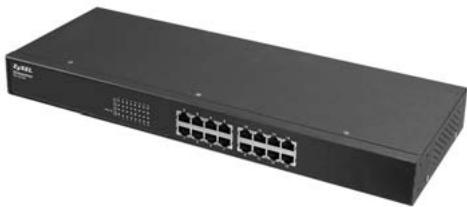
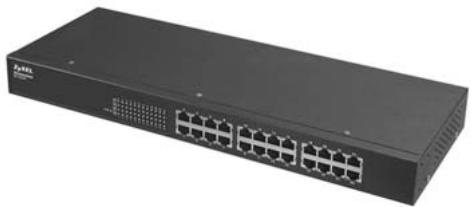
Figure 1-1 ES-1016A
Figure 1-2 ES-1024A
1.2 Features
The following are the essential features of the switch.
- Conforms to IEEE 802.3, 802.3u, and 802.3x standards.
- Auto-negotiating 10/100Mbps Ethernet RJ-45 ports.
-
Auto-negotiating crossover for all 10/100Mbps Ethernet RJ-45 ports.
-
IEEE 802.1p supports two priority queues for outgoing traffic.
Back-Pressure-Base flow control on Half-duplex ports. - Pause-Frame-Base flow control on Full-duplex ports.
- Store-and-forwarding switching architecture for abnormal packet filtering.
Supports automatic address learning.
No-Blocking full wire speed architecture.
Fan free design. - Embedded 4K MAC address table providing 4000 MAC addresses entries.
Power, LNK/ACT and FDX/COL LEDs.
Standard 19-inch rack-mount design.
1.2.1 IEEE 802.1p Class of Service
The IEEE 802.1p Class of Service (CoS) provides two queues for high and low priority traffic. This improves network efficiency and performance by giving higher priority to outgoing traffic. For example, the lower queue has a priority value in the range of zero to three and the higher queue has a priority value in the range four to seven.
1.3 Package Contents
Compare the contents of your ES package with the checklist below. If any item is missing or damaged, please contact your local dealer.
ES-1016A/ES-1024A Ethernet switch
Power cord
Quickstart Guide
This User's Guide in CD-ROM format.
Four rubber feet
Rack mount brackets
1.4 Ethernet Switching Technology
Ethernet Switching Technology has dramatically boosted the total bandwidth of a network, eliminated congestion problems inherent with CSMA/CD (Carrier Sense multiple access with Collision Detection) protocol, and greatly reduced unnecessary transmissions.
This revolutionized networking in a number of ways:
By allowing two-way, simultaneous transmissions over the same port (Full-duplex), which essentially doubled the bandwidth.
Reducing the collision domain to a single switch-port, which eliminated the need for carrier sensing.
Using the store-and-forward technology's approach of inspecting each packet to intercept corrupt or redundant data, switching eliminated unnecessary transmission that slowed the network.
By employing address learning, which replaced the inefficient receiving port.
Auto-negotiation regulates the speed and duplex of each port, based on the capability of both devices. Flow-control allows transmission from a 100Mbps node to a 10Mbps node without loss of data. Auto-negotiation and flow-control may require disablement for some networking operations involves legacy equipment. Disabling the auto-negotiation is accomplished by fixing the speed or duplex of a port.
Ethernet Switching Technology supplied higher performance at costs lower than other solutions. Wider bandwidth, no congestion, and the reduction in traffic is why switching is replacing expensive routers and inefficient hubs as the ultimate networking solution.
1.5 Applications
This section provides two network topology examples in which the switch is used.
1.5.1 Standalone Workgroup
The switch can be used as a standalone switch to which computers, servers and printer server are directly connected to form a small workgroup.
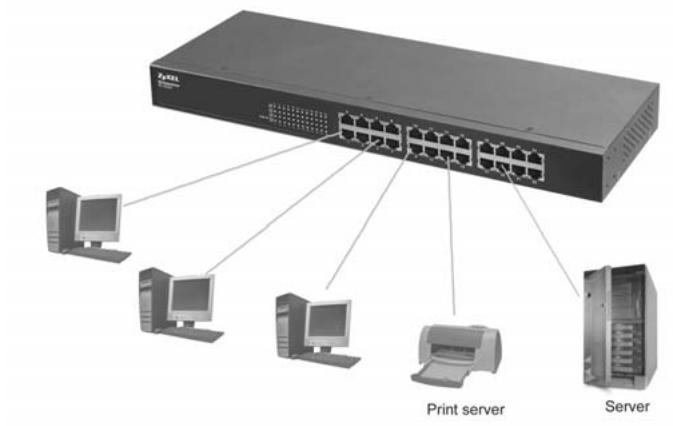
Figure 1-3 Standalone Workgroup Example
1.5.2 Bridging
With its large address table (4000 MAC address entries) and high performance, the switch is an ideal solution for department networks to connect to the corporate backbone or for connecting network segments.
The following figure depicts a typical segment bridge application of the switch in an enterprise environment. The two workgroups, the standalone server and the two servers can all communicate with each other and share all network resources.
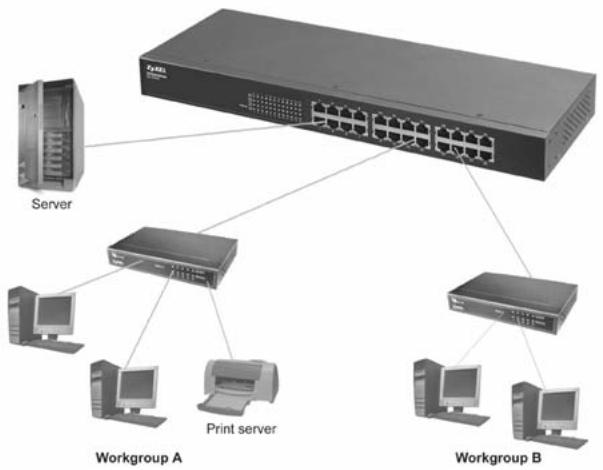
Figure 1-4 Bridging Example
Chapter 2
Hardware Description and Installation
This chapter describes the hardware installation and gives a functional overview of the switch.
2.1 Installation Option
The switch is suitable for an office environment where it can be rack mounted on standard EIA racks or as a standalone.
For proper ventilation, allow at least 4 inches (10 cm) of clearance at the front and 3.4 inches (8 cm) at the back of the switch. This is especially important for enclosed rack installations.
2.1.1 Desktop Installation
Step 1. Make sure the switch is clean and dry.
Step 2. Set the switch on a smooth, leveled and sturdy flat space strong enough to support the weight of the switch and the connected cables. Make sure there is a power outlet nearby.
Step 3. Make sure there is enough clearance around the switch to allow air circulation and the attachment of cables and the power cord.
Step 4. Remove the adhesive backing from the supplied rubber feet.
Step 5. Attach the rubber feet to each corner on the bottom of the switch. These rubber feet help protect the switch from shock or vibration and ensure space between devices when stacking.
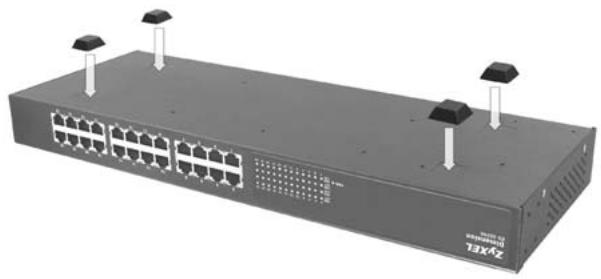
Figure 2-1 Attaching Rubber Feet
Do not block the ventilation holes. Leave space between switches when stacking.
2.1.2 Rack-Mount Installation
The switch can be mounted on an EIA standard size, 19-inch rack or in a wiring closet with other equipment. Follow the steps below to mount your switch on a standard EIA rack using the included rack-mounting kit.
Step 1. Align one bracket with the holes on one side of the switch and secure it with the bracket screws smaller than the rack-mounting screws. Similarly, attach the other brackets.
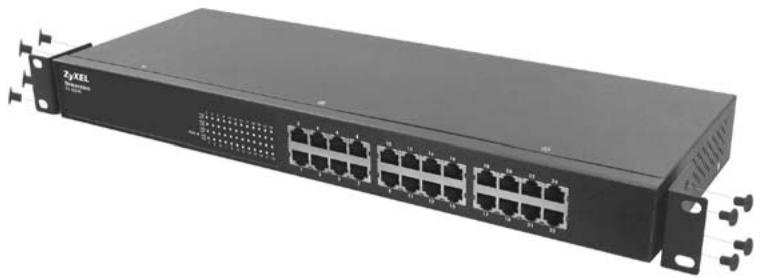
Figure 2-2 Attaching Mounting Brackets and Screws
Step 2. After attaching both mounting brackets, position the switch in the rack by lining up the holes in the brackets with the appropriate holes on the rack. Secure the switch to the rack with the rackmounting screws.
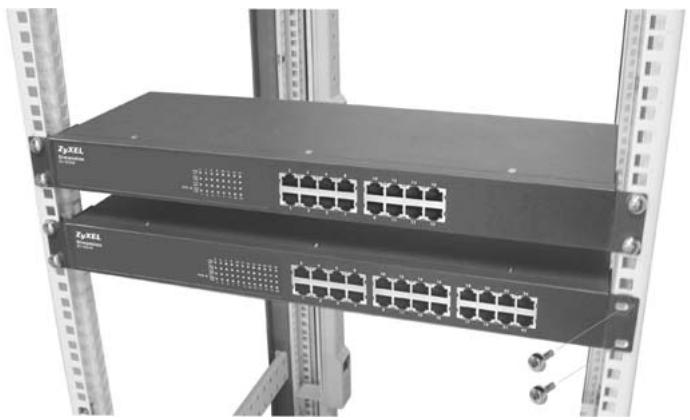
Figure 2-3 Mounting the ES to an EIA standard 19-inch rack
2.2 Rear Panel
The three-pronged power receptacle is located on the rear panel of the switch. Refer to the Product Specifications for power specification.

Figure 2-4 Rear Panel
2.2.1 Rear Panel Power Connection
Connect one end of the supplied power cord to the power receptacle on the back of the switch and the other end to the appropriate power source.
2.3 Front Panel
The front panel of the switch includes the auto-negotiating 10Base-T/100Base-TX RJ-45 ports and the LEDs.
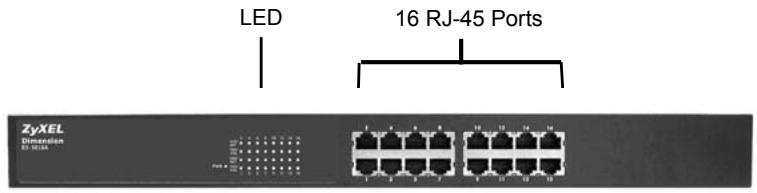
Figure 2-5 Front Panel: ES-1016A
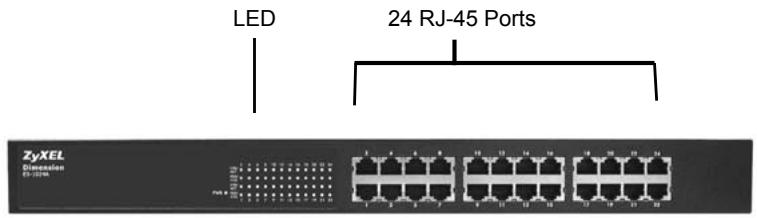
Figure 2-6 Front Panel: ES-1024A
2.3.1 10Base-T/100Base-TX RJ-45 auto-negotiating ports
Your switch comes with 16 or 24 10Base-T/100Base-TX RJ-45 ports depending on the model of your switch. The auto-negotiation feature allows the switch to detect the speed of incoming transmission and adjust appropriately without manual intervention. It allows data transfers of either 10 Mbps or 100 Mbps in either half-duplex or full-duplex mode depending on your Ethernet network.
2.3.2 Auto-crossover ports
Each 10Base-T/100Base-TX RJ-45 MDI/MDIX port allows you to connect to a computer or to a hub using either a straight-through or a crossover Ethernet cable.
2.3.3 Front Panel Connections
You can use unshielded twisted pair (UTP) or shielded twisted-pair (STP) Ethernet cables for RJ-45 ports. The following table describes the types of network cable used for the different connection speeds.
Make sure the cable length between connections does not exceed 100 meters (328 feet).
Table 2-1 Network Cable Types
| SPEED | NETWORK CABLE TYPE |
| 10 Base-T | 100Ω 2-pair UTP/STP Category 3, 4 or 5 |
| 100 Base-TX | 100Ω 2-pair UTP/STP Category 5 |
2.3.4 Front Panel LEDs
The LED Indicators give real-time information about the status of the switch. The following table provides descriptions of the LEDs.


Figure 2-7 Front Panel LEDs: ES-1016A
Figure 2-8 Front Panel LEDs: ES-1024A
Table 2-2 The Front Panel LED Descriptions
| SYSTEM | |||
| LED | COLOR | STATUS | DESCRIPTION |
| PWR | Green | On | The switch is on and receiving power. |
| Off | The switch is not receiving power. | ||
| RJ-45 Ports | |||
| LED | COLOR | STATUS | DESCRIPTION |
| LNK/ACT | Green | On | The port is connected to an Ethernet network. |
| Blinking | The port is receiving or transmitting data. | ||
| Off | The port is not connected to an Ethernet network. | ||
| FDX/COL | Amber | On | The port is operating in full-duplex mode. |
| Blinking | Packet collision occurred on this port. | ||
| Off | The port is operating in half-duplex mode. | ||
Chapter 3
Troubleshooting
This section describes common problems you may encounter with the switch and possible
solutions.
3.1 Introduction
Troubleshoot the switch using the LEDs to detect problems.
3.1.1 PWR LED
The PWR LED on the front panel does not light up.
Table 3-1 Troubleshooting Power LED
| STEPS | CORRECTIVE ACTION |
| 1 | Check the connections from your switch to the power source. Make sure you are using the supplied power cord and that you are using an appropriate power source. Refer to the Product Specifications section. |
| 2 | Make sure the power source is turned on and that the switch is receiving sufficient power. |
| 3 | If these steps fail to correct the problem, contact your local distributor for assistance. |
3.1.2 LNK/ACT LED
The LNK/ACT LED does not light up when a device is connected.
Table 3-2 Troubleshooting LNK/ACT LED
| STEPS | CORRECTIVE ACTION |
| 1 | Verify that the attached device(s) is turned on and properly connected to your switch. |
| 2 | Make sure the Network Interface Cards (NICs) are working on the attached devices. |
| 3 | Verify that proper network cable type is used and its length does not exceed 100 meters. For more information on network cable types, see the Front Panel Connections section. |
3.1.3 FDX/COL LED
The FDX/COL LED blinks.
Table 3-3 Troubleshooting FDX/COL LED
| STEP | CORRECTIVE ACTION |
| 1 | Some collisions in the network are normal. If the FDX/COL LED blinks continuously, proceed to the steps below. |
| 2 | Verify that proper network cable type is used and its length does not exceed 100 meters. For more information on network cable types, see the Front Panel Connections section. |
| 3 | Your network is busy. Try sending large files later, reduce the number of users or segment your network. |
3.2 Improper Network Cabling and Topology
Improper network cabling or topology setup is a common cause of poor network performance or even network failure.
Table 3-4 Troubleshooting Improper Network Cabling and Topology
| DESCRIPTION | PROBLEMS AND CORRECTIVE ACTION |
| Faulty cables | Using faulty network cables may affect data rates and have an impact on your network performance. Replace with new standard network cables. |
| Non-standard network cables | Non-standard cables may increase the number of network collisions and cause other network problems that affect your network performance. Refer to the Front Panel Connections section for more information on network cable types. |
| Cabling Length | If you use longer cables than are needed, transmission quality may be affected. The network cables should not be longer than the limit of 100 meters. |
| Too many hubs between the computers in the network | Too many hubs (or repeaters) between the connected computers in the network may increase the number of network collision or other network problems. Remove unnecessary hubs from the network. |
| A loop in the data path | A data path loop forms when there is more than one path or route between two networked computers. This results in broadcast storms that will severely affect your network performance. Make sure there are no loops in your network topology. |
Appendix A
Product Specifications
This section provides the specifications of the switch.
PRODUCT SPECIFICATIONS
| General | |
| Standards | IEEE 802.3 10BASE-T Ethernet IEEE 802.3u 100BASE-TX Fast Ethernet IEEE802.3x Flow Control and Back-pressure IEEE802.1p Class of Service |
| Protocol | CSMA/CD |
| Interface | 16 / 24 10/100M Ethernet Ports Auto-crossover Compliant with IEEE 802.3/3u Back pressure on half duplex Flow control on full duplex Connector: RJ-45 |
| Data Transfer Rate | Ethernet: 14,880 pps per Ethernet port Fast Ethernet: 148,800 pps per Ethernet port |
| Network Cables | 10BASE-T: 2-pair UTP/STP Cat. 3, 4, 5 cable EIA/TIA-568 100- ohm (100m) 100BASE-TX: 2-pair UTP/STP Cat. 5 cable EIA/TIA-568 100-ohm (100m) STP (100 m max.) |
| Full/Half Duplex | Full/Half duplex for 10/100Mbps speeds |
| Media Interface Exchange | All ports are auto-crossover (auto-MDI-X) and auto-negotiating. |
| Performance and Management | |
| Back plane | Non-Blocking full wire speed forwarding rate: ES-1016A: 3.2Gbps ES-1024A: 4.8Gbps |
| Packet Forwarding Rate | 14880 PPS for 10BASE-T 148800 PPS for 100BASE-TX |
| Switching Method | Store-and-forward |
| Priority Queues | IEEE 802.1p Class of Service |
| MAC Address Table | 4K Mac with Auto Learning |
| Data Buffer | 1.25Mbits |
| Physical and Environmental | |
| Weight | ES-1016A: 1.4Kg ES-1024A: 1.5Kg |
PRODUCT SPECIFICATIONS
| LED | For the whole switch: PWR (green): Light on or off: Power on or off Ethernet ports: LNK/ACT, FDX/COL |
| Layer 2 features | Bridging:4K MAC addresses Switching Method: ES-1016A: 7.2Gbps ES-1024A: 8.8Gbps Class of Service: IEEE 802.1p Frame size: 1522 bytes Broadcast storm control |
| Dimensions | 19" rack mountable enclosure 440(W) x 120(D) x 44(H) mm |
| Power Supply | ES-1016A: 100-240VAC 50/60Hz 0.8A MAX ES-1024A: 100-240VAC 50/60Hz 0.8A MAX |
| Power Consumption | ES-1016A: 14W ES-1024A: 19W |
| Operating Temperature | 0°C ~ 45°C (32°F to 113°F) |
| Operational Humidity | 10% to 90% (Non-condensing) |
| EMI | FCC Class A, CE |
| Safety | UL, cUL |
Index
1
10 Mbps Ethernet 2-5
A
About the ES-1000 Series Ethernet to Ethernet
Switches ix
Applications 1-3
Segment Bridge 1-3
C
Cabling Length 3-2
CE .iv
class A.. iv
Contacting Customer Support .
Copyright
D
Data path loop. 3-2
Desktop Installation. 2-1
Disclaimer
E
Ethernet Technology. 1-2
F
Faulty cables 3-2
FCC iv
FCC Rules. iv
Federal Communications Commission (FCC)
Interference Statement. iv
Front Panel 2-4
Front Panel Connections. 2-4
Front Panel LED Descriptions. 2-5
I
IEEE 802.1p. 1-2
Installation
Desktop 2-1
Rack-Mount 2-2
L
LED Descriptions
FD/COL 2-5
LK/ACT 2-5
PWR. 2-5
N
Network Cable Length Limit. 2-4
Network Cable Types 2-5
100Mbps 2-5
10Mbps 2-5
Non-standard network cables 3-2
P
Package Contents. 1-2
Product Specifications
General A
Performance and Management A
Physical and Enciromental A
R
Rack-Mount Installation 2-2
Rear Panel 2-3
Rear Panel Power Connection. 2-3
Related Documentation ix
repair .iii
Return Material Authorization number.
RMA
Return Material Authorization number .......See
S
Service.. iii
Standalone Workgroup 1-3
Syntax Conventions ix
T
Trademarks.. ii
Troubleshooting
FD/COL LED. 3-1
Improper Network Cabling and Topology.. 3-2
LK/ACT LED 3-1
Power LED. 3-1
V
ventilation. 2-1
Z
ZyXEL Limited Warranty iii
Note. iii
ZyXEL Web Site. ix
- Dimension
- ES-1016A/ES-1024A
- Unmanaged 16/24-Port Ethernet Switch
- User's Guide
- Copyright
- Copyright © 2004 by ZyXEL Communications Corporation
- Disclaimer
- Trademarks
- ZyXEL Limited Warranty
- Note
- Interference Statements andWarnings
- FCC Interference Statement
- FCC Warning
- CE Mark Warning
- Taiwanese BCIQ A Warning
- Certifications
- Customer Support
- Contacting Customer Support
- Table of Contents
- ZyXEL Limited Warranty.. iii
- Interference Statements andWarnings iv
- Customer Support . V
- List of Figures. VIII
- List of Tables. VIII
- Preface ix
- Chapter 1 Getting to Know Your Switch. 1-1
- Chapter 2 Hardware Description and Installation 2-1
- Chapter 3 Troubleshooting 3-1
- Improper Network Cabling and Topology 3-2
- Appendix A Product Specifications.
- Index C
- List of Figures
- List of Tables
- Preface
- About the Dimension ES-1016A/ES-1024A Ethernet Switches
- General Syntax Conventions
- Related Documentation
- ZyXEL Web Site
- User Guide Feedback
- Chapter 1
- Getting to Know Your Switch
- Introduction
- Features
- IEEE 802.1p Class of Service
- Package Contents
- Ethernet Switching Technology
- Applications
- Standalone Workgroup
- Bridging
- Chapter 2
- Hardware Description and Installation
- Installation Option
- Desktop Installation
- Do not block the ventilation holes. Leave space between switches when stacking.
- Rack-Mount Installation
- Rear Panel
- Rear Panel Power Connection
- Front Panel
- 10Base-T/100Base-TX RJ-45 auto-negotiating ports
- Auto-crossover ports
- Front Panel Connections
- Front Panel LEDs
- Chapter 3
- Troubleshooting
- Introduction
- PWR LED
- LNK/ACT LED
- FDX/COL LED
- Improper Network Cabling and Topology
- Appendix A
- Product Specifications
- Index
- 1
- A
- C
- D
- E
- F
- I
- L
- N
- P
- R
Marque : ZYXEL
Modèle : ES-1016A
Catégorie : Switch réseau