
BP24M60 - Lave-linge BLAUPUNKT - Notice d'utilisation et mode d'emploi gratuit
Retrouvez gratuitement la notice de l'appareil BP24M60 BLAUPUNKT au format PDF.
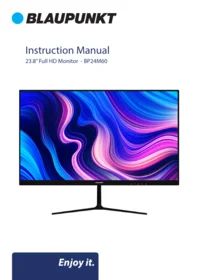


| Type de produit | Moniteur LED 23,8 pouces Full HD |
| Marque | BLAUPUNKT |
| Modèle | BP24M60 |
| Résolution | 1920 x 1080 pixels |
| Nombre de couleurs | 16,7 millions |
| Taux de contraste | 1000:1 |
| Luminosité | 200 cd/m² |
| Alimentation électrique | 12V, 4A |
| Dimensions avec support (L×l×H) | 541 x 161 x 406 mm |
| Dimensions sans support (L×l×H) | 541 x 39 x 324 mm |
| Poids net | 2,4 kg |
| Poids brut | 3,8 kg |
| Compatible VESA | Oui, 75 x 75 mm |
| Connectique d'entrée | HDMI, VGA, Audio IN |
| Fonctions d'image | Luminosité, Contraste, Netteté |
| Fonctions d'affichage | Ajustement auto, Position H/V, Horloge |
| Fonctions couleur | Température, Gamma, Effet, Mode démo |
| Fonctions avancées | Format, DDCCI, Ultra Vivid, Contraste actif |
| Fonction audio | Volume, Mute |
| Nettoyage | Chiffon sec uniquement, débrancher avant nettoyage |
| Installation murale | Oui, norme VESA 75x75 |
| Service client | info@ayonz.com |
FOIRE AUX QUESTIONS - BP24M60 BLAUPUNKT
Questions des utilisateurs sur BP24M60 BLAUPUNKT
0 question sur cet appareil. Repondez a celles que vous connaissez ou posez la votre.
Poser une nouvelle question sur cet appareil
Téléchargez la notice de votre Lave-linge au format PDF gratuitement ! Retrouvez votre notice BP24M60 - BLAUPUNKT et reprennez votre appareil électronique en main. Sur cette page sont publiés tous les documents nécessaires à l'utilisation de votre appareil BP24M60 de la marque BLAUPUNKT.
MODE D'EMPLOI BP24M60 BLAUPUNKT
Instruction Manual
23.8" Full HD Monitor - BP24M60

CONTENTS
| General Safety | 4 |
| Installation | 8 |
| Wall Mounting Instructions | 9 |
| Controls and Connections | 10 |
| Menus | 12 |
| Picture Settings | 12 |
| Display Settings | 13 |
| Colour Settings | 14 |
| Advance Settings | 15 |
| Input Menu | 16 |
| Audio Settings | 17 |
| Other Settings | 18 |
| Information | 19 |
| Specifications | Last Page |
| Customer Helpline | Last Page |
GENERAL SAFETY
Read this manual thoroughly before you start using the Monitor.
Store this manual, the completed warranty card, your receipt and the product packaging.
The safety precautions instructions reduces the risk of fire, electric shock and injury when correctly complied to.
Please follow all instructions and take notice of all warnings.

The cover (or back) of the unit should not be removed to prevent risk of electric shock.
This unit must be serviced by a qualified service personnel only.


The lightning flash with symbol within the triangle is intended to warn you of a non-insulated dangerous voltage in the product's enclosure that could be of sufficient magnitude to generate a risk of electric shock to persons.
The exclamation point within the triangle is intended to warn you to the presence of important operating and maintenance instructions in the documents included with the product.
IMPORTANT INFORMATION
The lightning flash symbol within the triangle is intended to warn you of non-insulated dangerous voltage the product's enclosure that could be of sufficient magnitude to generate a risk of electric shock to persons.
- Using Cabinets or stands recommended by the manufacturer of the monitor.
- Only using furniture that can safely support the Products.
- Ensure the Product is not overhanging the edge of the supporting furniture.
- Do not place the product on a high furniture without securing both the furniture and the product to a stable support.
- Do not place the product on cloth or other conductive materials.
- Warn children of the dangers of climbing on furniture to reach the monitor or its controls and to call for an adult to assist.
GENERAL SAFETY (CONT.)
IMPORTANT INFORMATION
- Do not expose this appliance to rain or moisture as it may result in fire or an electric shock hazard
- Do not tamper or change or modify the product in any way.
- Only use Accessories outlined and recommended by the manufacturer.
- Please do not expose the product to splashing or water contact
- Please do not place any object on top of the product including objects filled with liquids such as vases.
Installation
Please follow instruction when installing this product in accordance with the instruction manual. This product must be positioned in a sufficiently stable location, it can be potentially hazardous due to falling and can cause injury, particularly to children if it positioned incorrectly.
- Before installing this Monitor set, make sure your outlet voltage corresponds to the voltage stated on the product rating label
- Do not use a damaged power cord, plug or loose outlet. Doing so may cause an electric shock.
- Do not plug several devices into the same outlet. Doing so may cause the outlet to overheat and start a fire. Make sure the outlet is readily accessible during operation of the equipment.
- Do not bend, twist or kink the power cord excessively.
- Do not allow anything to rest on or roll over the power cord and antenna cable. Doing so may cause a fire or an electric shock.
- Do not run the power cord near heat-producing appliances such as radiators, stoves or irons. The excessive heat could melt the insulation and expose live wires, resulting in fire or electric shock.
- Unplug this Monitor during lightning storms or when unused for long periods of time. Not doing so may result in fire or electric shock.
- Do not cover the ventilation openings of the product with items such as newspapers, tablecloths, curtains etc or insert objects into the slots available on the products. As this could result in the product temperature rising and could cause a fire.
- If you notice any unusual odors or smoke around the unit, immediately disconnect the unit from the outlet and contact the service center. Failure to do so may result in fire or electric shock.
- When not using the unit for long periods of time or when you are moving the unit please ensure to disconnect the power cord from the wall socket.
GENERAL SAFETY (CONT.)
- Please beware that Dust could accumulate over time on the unit and cause it to generate heat and or deteriorate insulation, which in turn may result in an electrical fire.
- The product is not intended for use by persons (including children) with reduced physical, sensory or mental capabilities, or young children of any age, They must be supervised product by a person responsible for their safety.
- To maintain the product do not use any chemical or cleaning agent or wet cloth, please only ensure to utilize a dry cloth to wipe it down from marks or dust and only after unplugging the product from the power socket.
- Please ensure to contact our call center for any repair or service required for the products
- Make sure to always carry Monitor from the sides. Do not carry the Monitor from the middle.
GENERAL SAFETY (CONT.)
Please make sure upon positioning this product, the place is:
- Not wet or damp and Well ventilated
- Away from direct sunlight or heaters.
- Away from splashes or food.
- Protected from excessive dust or grease.
- Do not install this equipment in a confined space such as a bookcase or similar unit.
- Do not install the Monitor set near heat sources such as radiators, stoves or other audio visual equipment that produce heat.
- Do not place containers with liquids, if liquid falls inside the products it may result in short-circuit, fire or electric shock.
- Do not use or store flammable or combustible materials near the unit. Doing so may result in fire or explosion. Do not place any naked flame sources, such as lit candles, cigarettes or incense sticks on top of the Monitor set.
• Install the unit at a reasonable distance from the wall to ensure sufficient ventilation. - If mains plug or an appliance coupler is used as the disconnect device, the disconnect device shall remain readily operable.

HIGH-DEFINITION MULTIMEDIA INTERFACE
"HDMI, the HDMI logo and High-Definition Multimedia Interface are trademarks or registered trademarks of HDMI Licensing LLC."
INSTALLATION
Install the stand as described below, or if you want to mount it to a wall, please contact a professional installer. Please ensure the monitor is not plugged into the wall socket and furthermore we recommend to get another person to assist in the following task.
Attaching the stand
Step 1 - Use the foam and box provided to lay the screen onto face down.
Step 2 - Using the thicker part of the stand (separate), screw in the screws provided to mount it to the back of the holes.
Step 3 - Install the arrow stand into the base of the stand you installed into the back of the monitor. Tighten with the larger screw provided in accessories.
Step 4 - You can stand the monitor upright and commence to the next step.


CAUTION!
INSTALLATION (CONT.)
Wall-Mounting or Monitor Arm Brakets for Desk Instructions
Please ensure the Monitor is not plugged into the wall socket and furthermore we recommend to get another person to assist in the following task.
- We recommend you use a professional installer as we assume no liability for any eventual damage to the product or injury to yourself if you mount the Monitor on your own.
BACK OF Monitor
VESA PATTERN: 75 (w) x 75 (h) mm

NOTE: If you are wall-mounting the Monitor, this should be done by a qualified installer.
CONTROLS AND CONNECTIONS
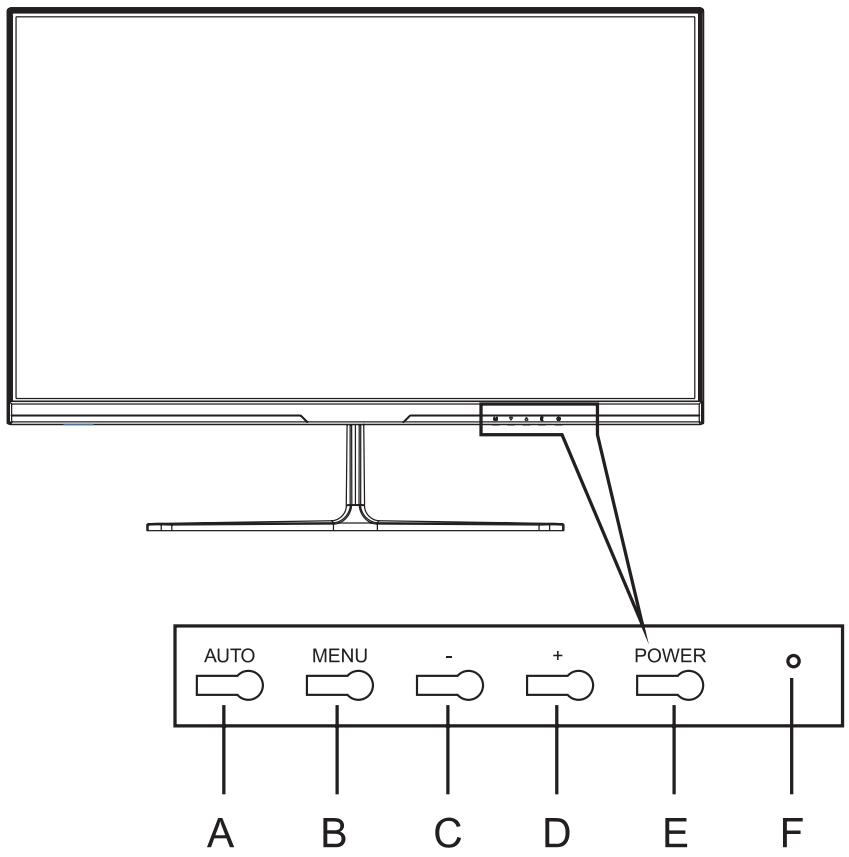
A Button AUTO Automatically adjust the image quality.
B Button MENU Open, select the item and exit the screen menu.
C Button -(Negative) It is also used to move backward on screen menu items and lower the setting level.
D Button +(PLUS) It is also used to move forward on screen menu items and increase the level of settings.
E Button POWER Used to turn the monitor on or off.
F Indicator Light Power normal mode blue sleep mode red.
CONTROLS AND CONNECTIONS


Audio IN

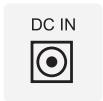
HDMI -The digital interface is used to transmit the uncompressed video image and audio signal from the monitor to the external device at the same time;
VGA - This is an analog connector that connects the monitor to the system unit.
Audio IN-This port is an audio input port.
DC - Power cable connector.
MENUS
PICTURE
- Backlight
- Brightness
- Contrast
- Sharpness

MONITOR BUTTONS REFER:
AUTO - Previous or Back
MENU - Open on screen menu, SELECT and Exit On Screen Menu
- Move Backward on screen menu items or a lower level
+ - Move Forward on screen menu items or increase level
MENUS (Cont.)
DISPLAY
• Auto Adjust screen position
- Adjust Horizontal (width) position
- Adjust Vertical (height) position
- Adjust the Clock

MONITOR BUTTONS REFER:
AUTO - Previous or Back
MENU - Open on screen menu, SELECT and Exit On Screen Menu
- Move Backward on screen menu items or a lower level
+ - Move Forward on screen menu items or increase level
MENUS (Cont.)
COLOUR
• Temperature Colour
• Gamma adjustment
- Color Effect
- Demo Mode

MONITOR BUTTONS REFER:
AUTO - Previous or Back
MENU - Open on screen menu, SELECT and Exit On Screen Menu
- Move Backward on screen menu items or a lower level
+ - Move Forward on screen menu items or increase level
MENUS (Cont.)
ADVANCE
• Aspect Ratio Adjustment
• DDCCI
• Ultra Vivid Function
• Active Contrast Function

MONITOR BUTTONS REFER:
AUTO - Previous or Back
MENU - Open on screen menu, SELECT and Exit On Screen Menu
- Move Backward on screen menu items or a lower level
+ - Move Forward on screen menu items or increase level
MENUS (Cont.)
INPUT
• Auto Select Input
- VGA Input
- HDMI Input

MONITOR BUTTONS REFER:
AUTO - Previous or Back
MENU - Open on screen menu, SELECT and Exit On Screen Menu
- Move Backward on screen menu items or a lower level
-
- Move Forward on screen menu items or increase level
MENUS (Cont.)
AUDIO
• Volume level adjustment
- Mute on/off

MONITOR BUTTONS REFER:
AUTO - Previous or Back
MENU - Open on screen menu, SELECT and Exit On Screen Menu
- Move Backward on screen menu items or a lower level
+ - Move Forward on screen menu items or increase level
MENUS (Cont.)
OTHER
- Reset Monitor Settings (NOT RECOMMENDED)
- Menu Time adjustment
- OSD Horizontal Position
- OSD Vertical Position

MONITOR BUTTONS REFER:
AUTO - Previous or Back
MENU - Open on screen menu, SELECT and Exit On Screen Menu
- Move Backward on screen menu items or a lower level
+ - Move Forward on screen menu items or increase level
MENUS (Cont.)
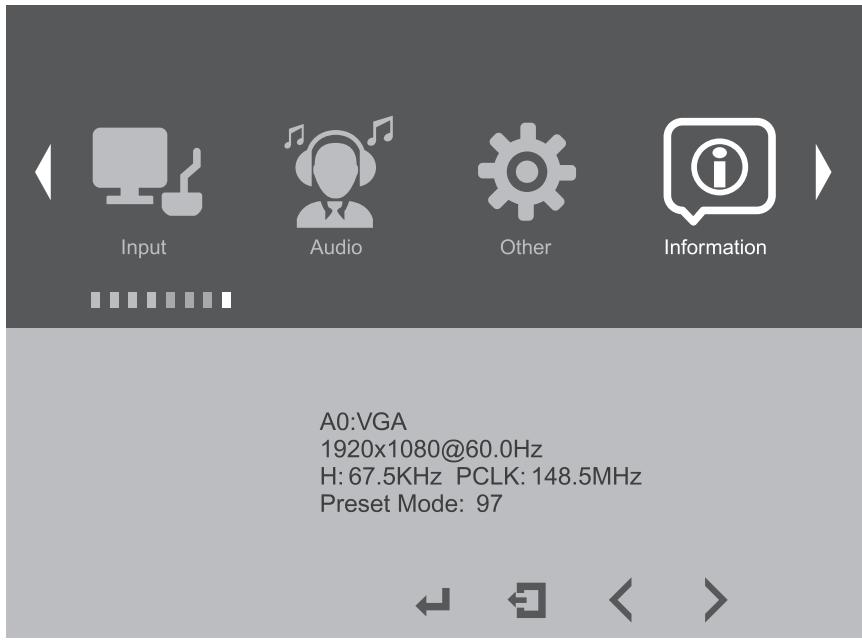
INFORMATION
• MONITOR INFORMATION/DISPLAY
MONITOR BUTTONS REFER:
AUTO - Previous or Back
MENU - Open on screen menu, SELECT and Exit On Screen Menu
- Move Backward on screen menu items or a lower level
+ - Move Forward on screen menu items or increase level
SPECIFICATIONS
| Resolution | 1920 x 1080 |
| Display Colours | 16.7M |
| Contrast ratio: | 1000 : 1 |
| Brightness | 200 cd/m2 |
| Power Source | 12V --- 4A |
| Dimensions | With stand: 541 (w) × 161 × 406 (h) mm |
| Without stand: 541 (w) × 39 × 324 (h) mm | |
| Weight | Net: 2.4 kg |
| Gross: 3.8 kg |

BLAUPUNKT
CUSTOMER HELPLINE:
info@ayonz.com
DISTRIBUTED BY:
Ayonz Pty Ltd
- INSTRUCTION MANUAL
- CONTENTS
- GENERAL SAFETY
- IMPORTANT INFORMATION
- GENERAL SAFETY (CONT.)
- INSTALLATION
- PLEASE MAKE SURE UPON POSITIONING THIS PRODUCT, THE PLACE IS
- ATTACHING THE STAND
- CAUTION
- INSTALLATION (CONT.)
- WALL-MOUNTING OR MONITOR ARM BRAKETS FOR DESK INSTRUCTIONS
- BACK OF MONITOR
- CONTROLS AND CONNECTIONS
- MENUS
- PICTURE
- MONITOR BUTTONS REFER
- MENUS (CONT.)
- DISPLAY
- COLOUR
- ADVANCE
- INPUT
- AUDIO
- OTHER
- INFORMATION
- SPECIFICATIONS
- BLAUPUNKT
Marque : BLAUPUNKT
Modèle : BP24M60
Catégorie : Lave-linge