
BP1080W - Lave-linge BLAUPUNKT - Notice d'utilisation et mode d'emploi gratuit
Retrouvez gratuitement la notice de l'appareil BP1080W BLAUPUNKT au format PDF.
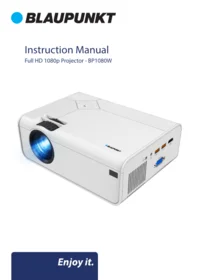


| Type de produit | Vidéoprojecteur Full HD 1080p |
| Marque | BLAUPUNKT |
| Modèle | BP1080W |
| Résolution native | 1920 x 1080 pixels |
| Contraste | 2000:1 |
| Luminosité | 200 ANSI lumens |
| Distance de projection | 0,8 à 4,5 mètres |
| Formats vidéo pris en charge (USB) | VOB, MKV, MPG, MP4, MOV, AVI |
| Formats audio pris en charge (USB) | MP3, WAV, WMA |
| Formats photo pris en charge (USB) | JPG, GIF, BMP, PNG |
| Alimentation | 100-240 V ~ 50/60 Hz |
| Consommation électrique | 100 W |
| Dimensions (L × P × H) | 212 × 158 × 78 mm |
| Poids net | 1,12 kg |
| Port USB | 5 V, 500 mA max |
| Correction trapézoïdale | Oui, via anneau de correction |
| Mise au point | Anneau de mise au point manuel |
| Modes image | Standard, température de couleur réglable, formats Auto, 4:3, 16:9 |
| Modes de projection | Front, Rear, Ceiling Front, Ceiling Rear |
| Télécommande | Incluse, portée 5-6 m, piles non fournies |
| Entrées | HDMI, AV (câble 3 en 1 inclus), USB |
| Nettoyage | Débrancher, essuyer avec un chiffon sec |
| Sécurité | Ne pas regarder directement la lentille, ventilation adéquate |
| Service client | Contact par email info@ayonz.com |
FOIRE AUX QUESTIONS - BP1080W BLAUPUNKT
Questions des utilisateurs sur BP1080W BLAUPUNKT
0 question sur cet appareil. Repondez a celles que vous connaissez ou posez la votre.
Poser une nouvelle question sur cet appareil
Téléchargez la notice de votre Lave-linge au format PDF gratuitement ! Retrouvez votre notice BP1080W - BLAUPUNKT et reprennez votre appareil électronique en main. Sur cette page sont publiés tous les documents nécessaires à l'utilisation de votre appareil BP1080W de la marque BLAUPUNKT.
MODE D'EMPLOI BP1080W BLAUPUNKT
Instruction Manual
Full HD 1080p Projector - BP1080W

CONTENTS
| General Safety | 4 |
| Product Overview | 8 |
| Remote Control | 9 |
| First Time Setup | 10 |
| Install Projector | 11 |
| Adjust Focal Length | 12 |
| Home Dashboard | 13 |
Settings
| Picture | 14 |
| Sound | 15 |
| Option | 16 |
| Time | 17 |
| Specifications | 18 |
| Customer Helpline | Last Page |
GENERAL SAFETY
Read this manual thoroughly before you start using the Projector.
Store this manual, the completed warranty card, your receipt and the product packaging.
The safety precautions instructions reduces the risk of fire, electric shock and injury when correctly complied to.
Please follow all instructions and take notice of all warnings.

The cover (or back) of the unit should not be removed to prevent risk of electric shock.
This unit must be serviced by a qualified service personnel only.


The lightning flash with symbol within the triangle is intended to warn you of a non-insulated dangerous voltage in the product's enclosure that could be of sufficient magnitude to generate a risk of electric shock to persons.
The exclamation point within the triangle is intended to warn you to the presence of important operating and maintenance instructions in the documents included with the product.
IMPORTANT INFORMATION
The lightning flash symbol within the triangle is intended to warn you of non-insulated dangerous voltage the product's enclosure that could be of sufficient magnitude to generate a risk of electric shock to persons.
- Only using furniture that can safely support the Products.
- Ensure the Product is not overhanging the edge of the supporting furniture.
- Do not place the product on a high furniture without securing both the furniture and the product to a stable support.
- Do not place the product on cloth or other conductive materials.
- Warn children of the dangers of climbing on furniture to reach the projector or its controls and to call for an adult to assist.
GENERAL SAFETY (CONT.)
IMPORTANT INFORMATION
- Do not expose this appliance to rain or moisture as it may result in fire or an electric shock hazard
- Do not tamper or change or modify the product in any way.
- Only use Accessories outlined and recommended by the manufacturer.
- Please do not expose the product to splashing or water contact
- Please do not place any object on top of the product including objects filled with liquids such as vases.
- Replace with same or equivalent type.
Installation
Please follow instruction when installing this product in accordance with the instruction manual. This product must be positioned in a sufficiently stable location, it can be potentially hazardous due to falling and can cause injury, particularly to children if it positioned incorrectly.
- Before installing this Projector set, make sure your outlet voltage corresponds to the voltage stated on the product rating label
- Do not use a damaged power cord, plug or loose outlet. Doing so may cause an electric shock.
- Do not plug several devices into the same outlet. Doing so may cause the outlet to overheat and start a fire. Make sure the outlet is readily accessible during operation of the equipment.
- Do not bend, twist or kink the power cord excessively.
- Do not allow anything to rest on or roll over the power cord. Doing so may cause a fire or an electric shock.
- Do not run the power cord near heat-producing appliances such as radiators, stoves or irons. The excessive heat could melt the insulation and expose live wires, resulting in fire or electric shock.
- Unplug this Projector during lightning storms or when unused for long periods of time. Not doing so may result in fire or electric shock.
- Do not cover the ventilation openings of the product with items such as newspapers, tablecloths, curtains etc or insert objects into the slots available on the products. As this could result in the product temperature rising and could cause a fire.
- If you notice any unusual odors or smoke around the unit, immediately disconnect the unit from the outlet and contact the service center. Failure to do so may result in fire or electric shock.
- When not using the unit for long periods of time or when you are moving the unit please ensure to disconnect the power cord from the wall socket.
GENERAL SAFETY (CONT.)
- Please beware that Dust could accumulate over time on the unit and cause it to generate heat and or deteriorate insulation, which in turn may result in an electrical fire.
- The product is not intended for use by persons (including children) with reduced physical, sensory or mental capabilities, or young children of any age, They must be supervised product by a person responsible for their safety.
- Batteries from the remote control must be only removed by an adult, the adult must ensure to keep them out of reach of infants and children. Seek medical attention immediately if a child has swallowed a battery.
- Batteries (battery pack or batteries installed) shall not be exposed to excessive heat such as sunshine, fire or the like.
- To maintain the product do not use any chemical or cleaning agent or wet cloth, please only ensure to utilize a dry cloth to wipe it down from marks or dust and only after unplugging the product from the power socket.
- Please ensure to contact our call center for any repair or service required for the products.
! CAUTION !
DO NOT look directly into Project LENS. This can cause damage to a persons or childrens eyes. Take all nessecary precautions to make sure that no one looks into the LENS while turned on.
MAKE SURE this project is out of reach of children or baby so that they do not stand and look into the project LENS.
DO NOT cover the vents, the vents are needed to let out hot air. Placing objects near or covering the vents can cause the product to overheat and permanently damage the projector.
GENERAL SAFETY (CONT.)
Please make sure upon positioning this product, the place is:
- Not wet or damp and Well ventilated
- Away from direct sunlight or heaters.
- Away from splashes or food.
- Protected from excessive dust or grease.
- Do not install this equipment in a confined space such as a bookcase or similar unit.
- Do not install the Projector set near heat sources such as radiators, stoves or other audio visual equipment that produce heat.
- Do not place containers with liquids, if liquid falls inside the products it may result in short-circuit, fire or electric shock.
- Do not place small metallic objects on top of the unit. Metal object falls inside the product it may result in short-circuit, fire or electric shock.
- Do not use or store flammable or combustible materials near the unit. Doing so may result in fire or explosion. Do not place any naked flame sources, such as lit candles, cigarettes or incense sticks on top of the Projector set.
• Install the unit at a reasonable distance from the wall to ensure sufficient ventilation.

HIGH-DEFINITION MULTIMEDIA INTERFACE
"HDMI, the HDMI logo and High-Definition Multimedia Interface are trademarks or registered trademarks of HDMI Licensing LLC."
PRODUCT OVERVIEW


REMOTE CONTROL
Your projector comes with a Remote Control to access and control your projector from a distance. (Batteries not included).

Using the Remote Control
- Do not mix old and new batteries in the remote
- Do not use different types of battery
- If you do not intend to use the unit for a long time, please remove batteries from the remote to avoid accident.
- Keep batteries away from children and pets.
- Never throw batteries into a fire.
- Do not drop, or impact the remote control as it void warranty immediately.
- The remote control operate at a range of 5 to 6M effectively
- Do not expose the remote control sensor to a bright light.
FIRST TIME SETUP
Make sure to place the projector on a flat and stable surface that is level. So that the projector projects the video/image onto the wall nice and straight.


FIRST TIME SETUP (cont.)
1 Install the Projector
You can choose to place the projector on the horizontal plane or attach it to a hanging bracket.

! Attentions:
The hanging bracket is an accessory that is not supplied.
2 | Adjust the Focal Length
Keystone Correction Ring
Focusing Ring

Adjust the projector's keystone correction ring and the focusing ring to obtain a satisfactory image.
It is recommended to adjust the keystone correction ring in case of keystone distortion in the image(Figure 1 on the right).
When the screen image is blurred (Figure 2 on the right), it is recommended to adjust the focus ring to improve the picture definition.
Please move forward or backward proportionally in case the adjustment is unable to obtain the satisfactory definition.
Distortion Image Diagram

Keystone Distortion

Blurred Image
HOME DASHBOARD


Setup

Movie

Music

HDMI

AV

Photo

Text
This dashboard above appears when finish turning on your projector.
From here you can select your inputs depending the device you want to project or other media devices and menu options.
SETTING - PICTURE


Picture Mode
Standard

Color Temperature
Medium

Aspect Ratio
16:9

Projection Mode

Zoom
100
PICTURE MODES: Select between different modes.
COLOUR TEMP: Adjust colour temperature to what suites you.
ASPECT RATIO: 3 modes: Auto, 4:3, 16:9
PROJECTION MODES: Front, Rear, Ceiling Front, Ceiling Rear.
SETTING - SOUND


Music Mode
Standard

Surround Sound
On

SOUND MODES:
Set music mode.
SURROUND SOUND:
Adjust between modes such as
SETTING - OPTION


OSD Language
English

OSD Time
30 S

Software Update(USB)


Restore Factory Default

Version: V53820210505
OSD LANGUAGE:
Adjust between English (default), Chinese
RESTORE FACTORY:
Press Yes to reset your projector settings and device.
SOFTWARE UPGRADE:
Put Firmware into a USB storage device and plug into USB port of projector, Choose Software Update.
(please note, only use software upgraded provided by the distributor (info@ayonz.com).
SETTING - TIME

SLEEP TIMER: Set a timer when you want the projector to automatically turn off.
SPECIFICATIONS
| Resolution | 1920 x 1080 Native Resolution | |
| Contrast ratio: | 2000 : 1 | |
| Projection Distance | 0.8 to 4.5 Metres | |
| Projection Size | 27" to 27" (inches) | |
| Lumens | 200 ANSI | |
| Aspect Ratio | 16:9, 4:3, AUTO | |
| Multimedia Playback Format under USB Mode | Movie: VOB/MKV/MPG/MP4/MOV/AVI | |
| Music: MP3/WAV/WMA | ||
| Photo: JPG/GIF/BMP/PNG | ||
| Power Source | 100-240V ~ 50/60Hz | |
| Power Consumption | 100W | |
| USB | 5V = max. 500mA | |
| Dimensions | 212 (w) × 158 (d) × 78 (h) mm | |
| Weight | Net: 1.12 kg | |
| Gross: 1.9 kg | ||
| Accessories | 1 x Instruction Manual | 1 x Remote Control |
| 1 x 3 in 1 - AV Cable | 1 x HDMI Cable | |
| 1 x Warranty Card | ||
NOTE: This document is for reference only, the operation interface is subject to software.
THIS PAGE IS LEFT BLANK ON PURPOSE

BLAUPUNKT
CUSTOMER SUPPORT:
info@ayonz.com
DISTRIBUTED BY:
Ayonz Pty Ltd
- INSTRUCTION MANUAL
- CONTENTS
- GENERAL SAFETY
- IMPORTANT INFORMATION
- GENERAL SAFETY (CONT.)
- INSTALLATION
- CAUTION
- PLEASE MAKE SURE UPON POSITIONING THIS PRODUCT, THE PLACE IS
- PRODUCT OVERVIEW
- REMOTE CONTROL
- USING THE REMOTE CONTROL
- FIRST TIME SETUP
- FIRST TIME SETUP (CONT.)
- INSTALL THE PROJECTOR
- ATTENTIONS
- ADJUST THE FOCAL LENGTH
- DISTORTION IMAGE DIAGRAM
- HOME DASHBOARD
- SETTING - PICTURE
- SETTING - SOUND
- SETTING - OPTION
- OSD LANGUAGE
- RESTORE FACTORY
- SOFTWARE UPGRADE
- SETTING - TIME
- BLAUPUNKT
Marque : BLAUPUNKT
Modèle : BP1080W
Catégorie : Lave-linge