IMPRESSA C5N - Machine à café JURA - Notice d'utilisation et mode d'emploi gratuit
Retrouvez gratuitement la notice de l'appareil IMPRESSA C5N JURA au format PDF.


| Type de produit | Machine à café automatique |
| Marque | JURA |
| Modèle | IMPRESSA C5N |
| Dimensions (L x H x P) | 28 x 34,5 x 41 cm |
| Poids | 9 kg |
| Alimentation électrique | 220-240 V ~, 50 Hz |
| Puissance | 1450 W |
| Pression de la pompe | Max. 15 bar (statique) |
| Capacité du réservoir d'eau | 1,9 litres |
| Capacité du réservoir à grains | 200 g |
| Capacité du bac à marc | Environ 16 portions |
| Longueur du câble | Environ 1,1 m |
| Préparations possibles | Espresso, café, cappuccino, lait mousseux, eau chaude |
| Mouture | Moulin réglable en continu |
| Système de dosage | Click & Drink avec Rotary Switch |
| Buse à café réglable en hauteur | Oui, de 65 à 111 mm |
| Système de connexion | Connector System® pour mousseur et buse eau chaude |
| Filtre à eau | CLARIS (cartouche filtrante) |
| Programmes d'entretien | Rinçage, nettoyage, détartrage, changement filtre |
| Arrêt automatique programmable | Oui (1, 2, 4 ou 8 heures) |
| Consommation en veille | Moins de 0,01 W |
| Sécurité | Arrêt automatique, supervision requise pour enfants |
| Accessoires inclus | Easy Cappuccino Frother, cartouche CLARIS, cuillère doseuse, pastilles nettoyantes JURA |
FOIRE AUX QUESTIONS - IMPRESSA C5N JURA
Questions des utilisateurs sur IMPRESSA C5N JURA
0 question sur cet appareil. Repondez a celles que vous connaissez ou posez la votre.
Poser une nouvelle question sur cet appareil
Téléchargez la notice de votre Machine à café au format PDF gratuitement ! Retrouvez votre notice IMPRESSA C5N - JURA et reprennez votre appareil électronique en main. Sur cette page sont publiés tous les documents nécessaires à l'utilisation de votre appareil IMPRESSA C5N de la marque JURA.
MODE D'EMPLOI IMPRESSA C5N JURA
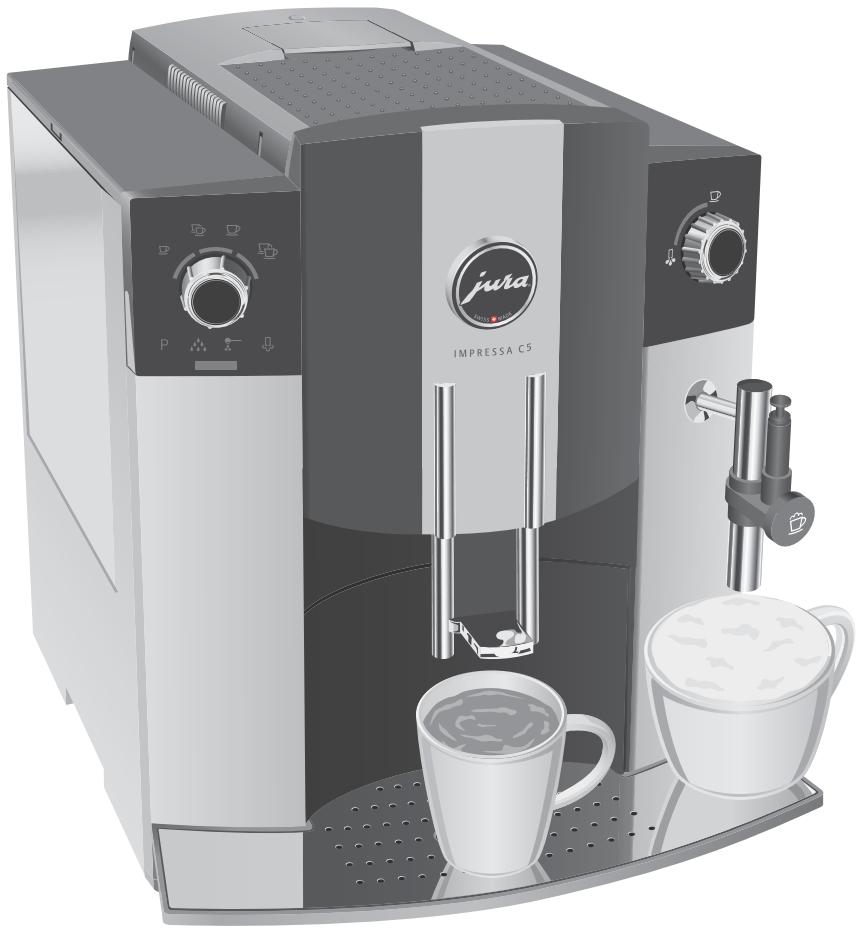
The IMPRESSA C5 Manual
The 'IMPRESSA C5 Manual' has been awarded the seal of approval by the independent German Technical Inspection Agency, TÜV SÜD, due to its easy-to-understand style, its thoroughness and coverage of safety aspects.
Your IMPRESSA C5
Control elements and accessories 4
Proper use 6
For your safety 6
The IMPRESSA C5 Manual 8
Symbol description. 8
1 IMPRESSA C5-Click & Drink 9
Coffee that fulfils your wildest dreams 9
Click & Drink 9
JURA on the Internet 10
Knowledge Builder 10
2 Preparing and using your IMPRESSA for the first time 11
Setting up 11
Filling the water tank. 11
Filling the bean container. 11
First-time use 12
Using and activating filter 13
Assessing and setting water hardness 15
Adjustinggrinder 16
Switching on 17
Switching off 17
3 Familiarising yourself with the control options 18
Preparing drinks at the touch of a button 18
One-off setting during drink preparation. 19
Adjusting the permanent cup size settings 20
4 Preparing drinks at the touch of a button 21
Espresso and coffee 21
Cappuccino 21
Pre-ground coffee 22
Milk foam 24
Hot water 24
5 Adjusting the permanent settings in programming mode 26
Automatic switch-off 26
6 Maintenance 27
Maintenance tips 27
Rinsing the machine 27
Changing the filter 28
Table of contents
Cleaning the machine 29
Dscaling the machine 31
Rinsing the Easy Cappuccino Frother 33
Cleaning the Easy Cappuccino Frother 34
Dscaling the water tank 35
7 Messages in the maintenance field and symbol display 36
8 Troubleshooting 38
9 Transport and environmentally neutral disposal 39
Empty system 39
Transport 39
Disposal 39
10 Technical data 40
Index 41
JURA contact details / Legal information 44
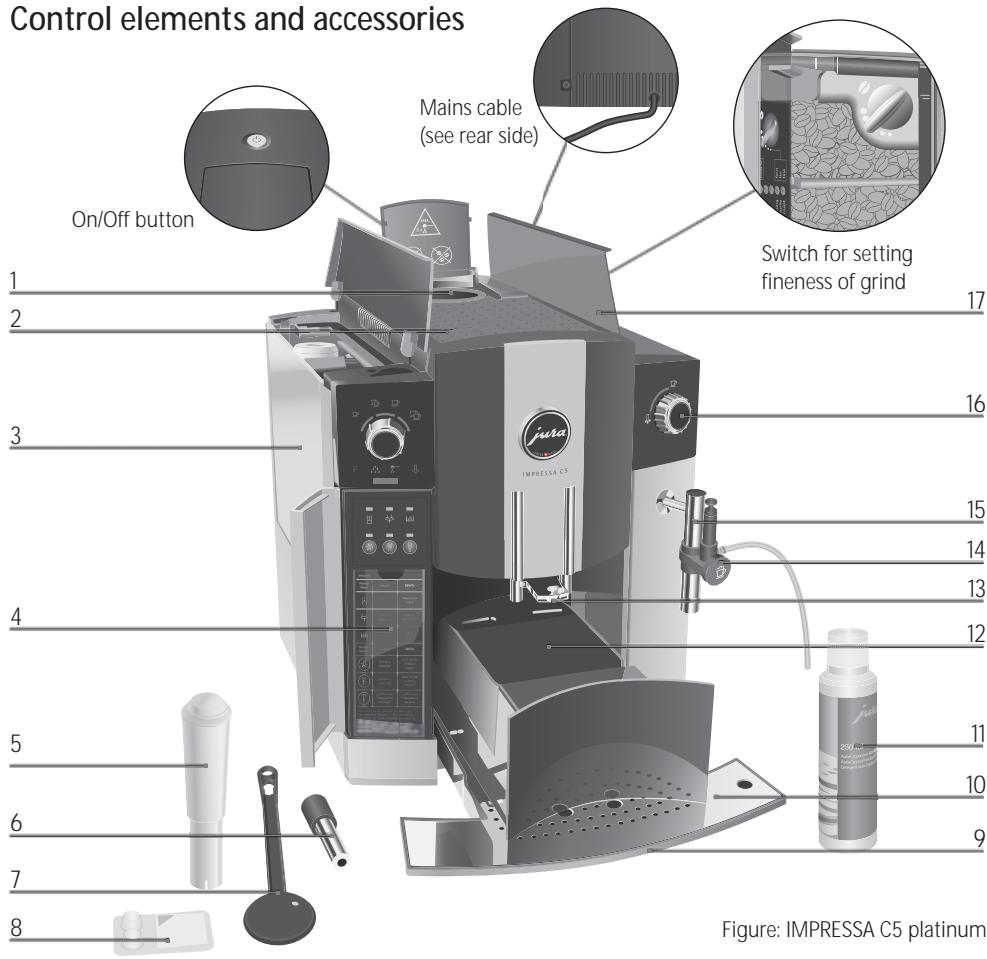
Control elements and accessories
Figure: IMPRESSA C5 platinum
| 1 | Filler funnel for pre-ground coffee | 9 | Drip tray |
| 2 | Cup tray | 10 | Cup platform |
| 3 | Water tank with level indicator | 11 | JURA Cappuccino Cleaner |
| 4 | Overview of maintenance indicators | 12 | Drawer with coffee grounds container |
| 5 | CLARIS filter cartridge | 13 | Height-adjustable coffee spout |
| 6 | Hot water nozzle | 14 | Easy Cappuccino Frother with milk pipe |
| 7 | Measuring spoon for pre-ground coffee | 15 | Connector System® for removable nozzles |
| 8 | JURA cleaning tablets | 16 | Switch for hot water and milk preparation |
| 17 | Bean container, aroma preservation cover |
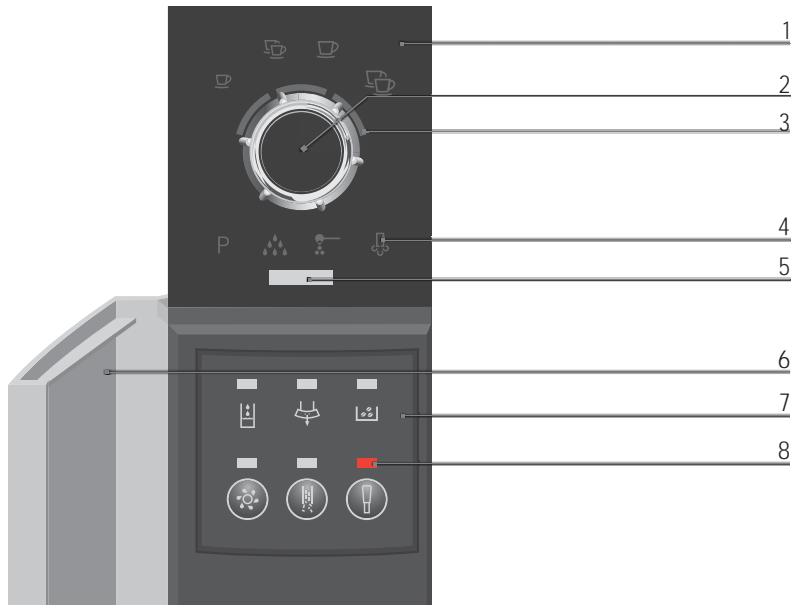
Symbol display
Maintenance field
1 Symbol display
5 Maintenance indicator
2 Rotary Switch
6 Access door
3 Light segments
7 Maintenance field
4 Symbols
8 Indicators
1Espresso
Water tank
2 Espressos
Coffee grounds container
1 coffee
Bean container
2 coffees
Cleaning button
P P (Programming)
D escaling button
Maintenance
Filter button
Pre-ground coffee
Steam
Proper use
The machine has been designed and built for domestic use. It should only be used to prepare coffee and to heat milk and water. Use for any other purpose will be deemed improper. JURA Elektroapparate AG cannot accept any responsibility for the consequences of improper use.
For your safety

Before using the machine always carefully read and comply with all these instructions. Keep this manual close to the IMPRESSA and, if appropriate, pass it on to the next user.
Please read and note carefully the following important safety information.
By doing this, you can avoid the life-threatening danger of electric shock:
- Never use a machine which has been damaged or with a defective power cable.
For information on what to do in case of damage, for example if there is a smell of burning, unplug the machine immediately from the mains supply and contact the JURA service centre.
If the power cable for this machine is damaged, it must be repaired either directly by JURA or by a JURA approved service centre.
Make sure that the IMPRESSA and the power cable are not located close to hot surfaces. - Be careful to ensure that the power cable does not get caught and does not rub against sharp edges.
- Never open and repair the machine yourself. Do not modify the machine in any way that is not described in the IMPRESSA Manual. The machine contains live parts. If opened, there is a danger of serious injury. Repairs may only be carried out by JURA approved service centres, using original spare parts and accessories.
There is a risk of scalds or burns on the spouts or on the nozzle:
Place the machine out of the reach of children.
- Do not touch any hot parts. Use the handles provided.
- Be careful to ensure that the appropriate nozzle is installed and clean. The nozzle or parts of the nozzle might come off if the parts are not assembled correctly or a blockage occurs.
A defective machine is not safe and could cause injury or fire. To avoid damage and any associated risk of injury or fire:
- Never allow the power cable to loosely hang down. The power cable can be tripped over or damaged.
- Protect your IMPRESSA from environmental influences such as rain, frost and direct sunlight.
- Do not put the IMPRESSA, cable or connections in water.
- Do not put the IMPRESSA or any individual parts in the dishwasher.
- Switch your IMPRESSA off before cleaning it. Always wipe your IMPRESSA with a damp cloth rather than a wet one, and protect it from prolonged water splash.
- Only connect the machine to a power supply in accordance with the information on the rating plate. The rating plate is located on the underside of your IMPRESSA. Further technical data is given in Chapter 10 'Technical Data'.
Use only original JURA care products. Use of accessories that are not explicitly recommended by JURA could damage the IMPRESSA. - Do not use any coffee beans treated with additives or caramelised coffee beans.
Always fill the water tank with cold, fresh mains water.
If you are absent for a prolonged period of time, turn the machine off.
People, including children, who
do not have the physical, sensory or mental capabilities to use the machine safely or
are inexperienced or lack knowledge in how to use the machine safely
must be supervised by a responsible person when using it, or must be instructed in how to use it correctly.
Safe handling of the CLARIS filter cartridges:
Filter cartridges should be kept out of the reach of children.
Store them dry in the sealed package.
Protect them from heat and direct sunlight.
- Do NOT use damaged filter cartridges.
- Do NOT open filter cartridges.
The IMPRESSA C5 Manual
You are holding the manual for your IMPRESSA C5 in your hand. The information contained in this manual will help you to familiarise yourself with your IMPRESSA safely and quickly and teach you the full range of facilities it offers.
Chapter 2, 'Preparing and using your IMPRESSA for the first time', explains step-by-step how to set up and prepare the IMPRESSA.
Chapter 3, 'Familiarising yourself with the control options' is important for you to read as you are familiarising yourself with your IMPRESSA. It invites you to actively explore all the different coffee experiences that it offers.
All the other chapters are intended to help you when you have a specific query.
If you use the IMPRESSA C5 Manual, you will become a past master at preparing exciting coffee specialities, you will be a Barista!
You can download the short operating instructions for your machine from the JURA website (www.jura.com).
Symbol description
Warnings
| CAUTION | Always take note of any information marked with the CAUTION or WARNING symbol. The signal word WARNING points out potential risk of serious injury, and the signal word CAUTION potential risk of slight injury. |
| CAUTION | The CAUTION symbol is used to draw attention to circumstances which could cause the machine to become damaged. |
| Symbols used | |
| i | Information and tips to ease things for you as you use your IMPRESSA. |
| @ | References to the online JURA website, where you can find interesting further information: www.jura.com |
| ▶ | Prompt to take action. This symbol means that you are being prompted to perform some action. |
1 IMPRESSA C5 - Click & Drink
Coffee that fulfils your wildest dreams
JURA's avowed mission is to develop superior machines which get the best out of every blend and roast of coffee. This it delivers through a unique, intelligent pre-brew system combined with loving attention to detail.
Click & Drink
The IMPRESSA C5 demonstrates just how wonderful a perfect cup of coffee can taste and how easy it is to prepare one. Thus, the further development of the IMPRESSA compact series is setting new standards in coffee quality while at the same time maintaining a visually pleasing appearance from every angle. The smart control philosophy is especially to be admired. The various speciality coffees can be selected simply and intuitively using a single control element.
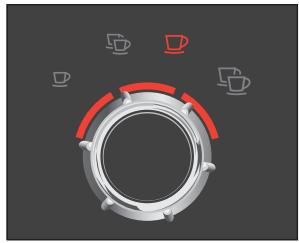
Click & Drink
Thanks to the revolutionary one-switch operation philosophy with the smart Rotary Switch, you are only a single touch of a button away from enjoying a perfect cup of coffee. To make your choice, all you have to do is to rotate the switch between coffee and Espresso, one or two cups. Just click the control and seconds later you can be enjoying your drink.
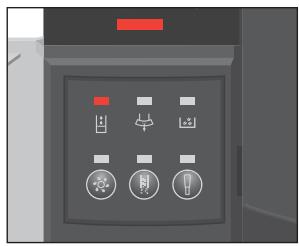
Indicators
The easy-to-understand indicators light up in a regal red, providing the information that you need. Just one click of the Rotary Switch away, unobtrusively concealed, are the maintenance buttons with associated indicators.
Height-adjustable coffee spout
Whether you are after a small cup of Espresso or a large cup of breakfast coffee, the height-adjustable coffee spout, which can be raised and lowered between 65 and 111~mm , can be adjusted on a continuous scale to suit all sizes of cup. This prevents coffee splashing on the machine and is your guarantee of a rich, thick crema. The superior design and feel of the machine are also evident.
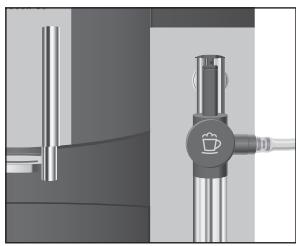
Connector System
The Connector System® allows one to use the Easy Cappuccino Frother, which is fitted as standard, a hot water nozzle for an even jet of water and the optionally available 2-stage frothing nozzle or the Professional Cappuccino Frother for perfect milk foam or hot milk.
JURA on the Internet
Visit us on the Internet.
@ At www.jura.com you will find interesting and up-to-date information on your IMPRESSA and on every aspect of the subject of coffee.
Knowledge Builder
You can familiarise yourself with your IMPRESSA C5 in a fun way on the PC.
@ The Knowledge Builder awaits you at www.jura.com. The interactive assistant, LEO, will support you and explain the benefits of and how to use your IMPRESSA.
2 Preparing and using your IMPRESSA for the first time
| This chapter provides you with the information you need to use your IMPRESSA without any problems. You will prepare your IMPRESSA step-by-step for your first coffee experience using it. | |
| Setting up | When setting up your IMPRESSA, please note the following: ■ Set the IMPRESSA down on a horizontal surface that is not sensitive to water. ■ Choose a spot for your IMPRESSA which is protected against overheating. Ensure that the ventilation slots are not covered. |
| Filling the water tank | To enjoy perfect coffee, we recommend that you change the water every day. |
| CAUTION | Milk, mineral water or other liquids can damage the water tank or the machine. ■ Only fill the water tank with fresh, cold water. ■ Open the cover of the water tank. ■ Remove the water tank and rinse it with cold water. ■ Fill the water tank with fresh, cold mains water and rein-sert. ■ Close the cover of the water tank. |
| Filling the bean container | The bean container has an aroma preservation cover. This will ensure that your coffee beans retain their aroma for longer. |
| CAUTION | Coffee beans which have been treated with additives (e.g. sugar), either pre-ground or in the form of freeze-dried coffee, will damage the grinder. ■ Only use untreated coffee beans to refill the bean container. ■ Open the cover of the bean container and remove the aroma preservation cover. ■ Remove any dirt or foreign objects inside the bean container. ■ New machines contain an information sheet in the bean container. Remove this information sheet. |
- Fill the bean container with coffee beans, then close the aroma preservation cover and the bean container cover.
First-time use

If the machine is operated with a defective power cable, there is a danger of electric shock.
- Never use a machine which has a defective power cable.
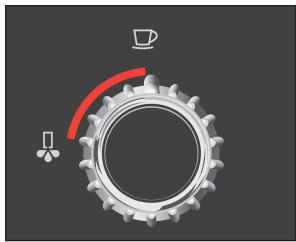
Precondition: the water tank must be full.
Remove the protective film from the symbol display.
Insert the mains plug into a power socket.
Press the On/Off button to switch the IMPRESSA on. The light segment by the switch will now flash.
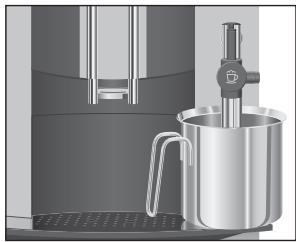

Place a receptacle under the Easy Cappuccino Frother.
Turn the switch in the anticlockwise direction.
The light segment by the switch will now light up. The system will now be filled with water. A small amount of water will flow out of the Easy Cappuccino Frother.
The operation stops automatically. The light segment by the switch will now flash.

Turn the switch in the clockwise direction.
As long as the machine is heating up, the Maintenance symbol will flash. The Maintenance symbol lights up.
Place a receptacle under the coffee spout.

Press the Rotary Switch.
The machine will rinse itself, stopping automatically.
The 1 Espresso symbol 口 will light up indicating that your IMPRESSA is ready to use.
i After the first time that a coffee speciality has been prepared, you may find that the maintenance indicator and the bean container display flash if the grinder has not yet been filled with coffee beans. In that case, prepare a different coffee speciality.
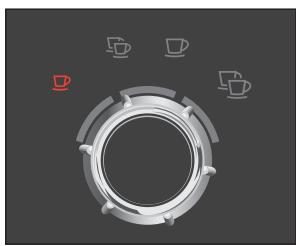
Using and activating filter
Your IMPRESSA no longer has to be descaled if you are using CLARIS filter cartridges.
i Perform the 'Using filter' operation without a break. This will ensure that your IMPRESSA always produces its best.
@ You can also try out the 'Using filter' operation online. Visit the Knowledge Builder on www.jura.com.
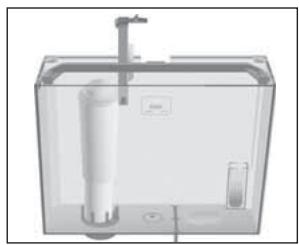
Remove the packaging on the CLARIS filter cartridge.
Remove the water tank and empty it.
- Lift the cartridge holder and insert the filter cartridge into the water tank, applying a light pressure.
- Close the cartridge holder. It will lock into place audibly.
- Fill the water tank with cold, fresh mains water and reinsert.
i After two months, the filter will cease to work. Monitor the elapsed time as shown on the date plate on the cartridge holder.
Precondition: your IMPRESSA is ready for use.
Open the access door.

Turn the Rotary Switch so that it points to the P symbol P.

Press the Rotary Switch. The cleaning, descaling and filter indicators light up.

- Hold down the Filter button until the Filter indicator lights up.

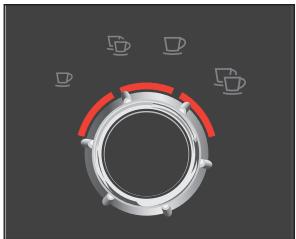
- Turn the Rotary Switch until the 3 light segments around the Rotary Switch light up.
i When the 3 light segments light up, the filter is activated. If none of the light segments light up, this means that the filter has not been activated.

Press the Rotary Switch to confirm the setting. The light segment by the switch will now flash.
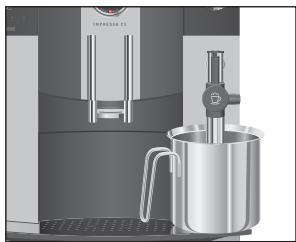
- Place a receptacle (containing at least 500ml ) under the Easy Cappuccino Frother.
If the milk pipe is connected, remove it.
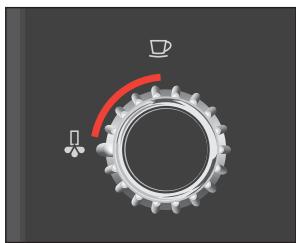
Turn the switch in the anticlockwise direction.
Rinsing of the filter will now begin. The light segment by the switch will light up.
i You can interrupt rinsing of the filter at any time. To do this, turn the switch clockwise. Turn the switch anticlockwise to continue rinsing the filter.
i The water could be slightly discoloured. This is not harmful to health, nor does it affect the taste.
Rinsing of the filter will automatically stop after approx. 500ml and the light segment by the switch will then flash.
Turn the switch in the clockwise direction.
As long as the machine is heating up, the Maintenance symbol will flash. The IMPRESSA is ready for use again. The filter is now activated.
Assessing and setting water hardness
The harder the water is, the more frequently the IMPRESSA needs to be descaled. It is therefore important to set the water hardness.
i However, if you are using the CLARIS filter cartridge and have activated the filter, you will not be able to adjust the water hardness.
The symbols in the symbol display show the configured degree of water hardness. The number of symbols corresponds to the relevant level.
| Level | Water hardness | Shown in display |
| 0 | The water hardness is switched off, the automatic calcification indicator is switched off | No symbol is illuminated |
| 1 | German degree of water hardness 1 – 7° dH French degree of water hardness 1.79 – 12.53° f | 1 symbol is illuminated |
| 2 | German degree of water hardness 8 – 15° dH French degree of water hardness 14.32 – 26.85° f | 2 symbols are illuminated |
| 3 | German degree of water hardness 16 – 23° dH French degree of water hardness 28.64 – 41.14° f | 3 symbols are illuminated |
| 4 | German degree of water hardness 24 – 30° dH French degree of water hardness 42.96 – 53.7° f | 4 symbols are illuminated |
You can find out what the water hardness is, using the Aquadur® test strip enclosed in the Welcome Pack.
- Hold the test strip briefly (for one second) under flowing mains water. Shake off the water.
Wait for about 1 minute. - You will then be able to read the degree of water hardness from the discoloration of the Aquadur® test strip and the description on the packaging.
You can now configure the water hardness.
Example: to change the water hardness from level 3 to level 4, proceed as follows:
Precondition: your IMPRESSA is ready for use.
Open the access door.
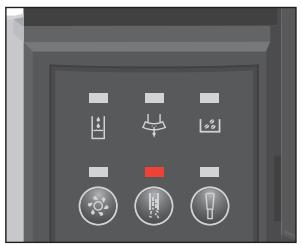
Hold down the Descaling button until the Descaling indicator lights up. The Descaling indicator and the symbols will now light up.
Turn the Rotary Switch until the four symbols light up.
Press the Rotary Switch to confirm the level 4 setting. The IMPRESSA is ready for use again. The water hardness is now set.
Adjusting grinder
CAUTION
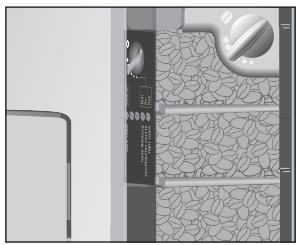
You can adjust the grinder continuously to suit the roast of your coffee.
If you adjust the fineness of grind when the grinder is not operating, the grinding wheel could be damaged.
- Only adjust the fineness of grind when the grinder is running.
The consistency of grind setting is correct if the coffee flows regularly from the coffee spout. In addition a fine, thick crema forms.
Example: to change the fineness of grinding during preparation of a coffee, proceed as follows:
- Open the cover of the bean container and remove the aroma preservation cover.
Place a cup under the coffee spout.
Turn the Rotary Switch to the 1 coffee setting.
Press the Rotary Switch to initiate preparation of the coffee. The grinder will now start up, and the 1 coffee symbol flashes.
- Turn the fineness of grind switch to the desired position while the grinder is running.
The coffee will be prepared and the fineness of grind is set.
Switching on
When the IMPRESSA is switched on, a prompt to perform a rinse operation automatically appears.
Press the On/Off button to switch the IMPRESSA on. As long as the machine is heating up, the Maintenance symbol will flash. The Maintenance symbol lights up.
Place a receptacle under the coffee spout.
Press the Rotary Switch to start the rinse operation. The coffee spout will be rinsed. The operation stops automatically and your IMPRESSA is now ready for use.
Switching off
When you switch off your IMPRESSA, the system is automatically rinsed.
Place a receptacle under the coffee spout.
Press the On/Off button to switch the IMPRESSA off. The system is rinsed and the Maintenance symbol flashes. The operation stops automatically. The IMPRESSA is switched off
i When the IMPRESSA is switched off with the On/Off button, the machine consumes less than 0.01W of standby energy.
3 Familiarising yourself with the control options
With the IMPRESSA, you can prepare an excellent coffee speciality at the touch of a button. You also have the option of adjusting the coffee strength and amount of water to your personal taste while the coffee is brewing.
This chapter will show you how to operate the machine with the aid of examples. To familiarise yourself with your IMPRESSA, we recommend that you make a point of actively trying the facilities described in this chapter. You will find this is well worthwhile.
Learn how to perform the following:
Preparing drinks at the touch of a button
Adjusting the settings on a one-off basis while your drink is being prepared
Adjusting the permanent cup size settings
i You can stop the machine at any time while a coffee speciality is being prepared. To do this press the Rotary Switch.
@ If you prefer to familiarise yourself with your IMPRESSA in a fun way on the PC, the interactive Knowledge Builder tutorial program can be found on the Internet at www.jura.com.
Preparing drinks at the touch of a button
Prepare your favourite coffee speciality at the touch of a button.
All coffee specialities are prepared following this model at the touch of a button.
Unless you change the permanent settings, all coffee specialties prepared at the touch of a button will have a coffee strength of mild.
One-off setting during drink preparation
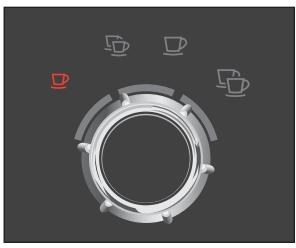
Example: this is how to prepare an Espresso.
Place an Espresso cup under the coffee spout.
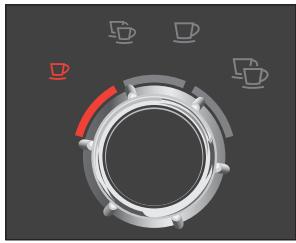
Turn the Rotary Switch to the 1 Espresso setting.
Press the Rotary Switch to initiate preparation of the Espresso.
The 1 Espresso symbol will now flash, and the pre-set amount of water will flow into the cup.
Drink preparation stops automatically.
You can change both the coffee strength and the amount of water while your drink is being prepared. These settings are not saved.
One-off settings during coffee preparation always follow this model.
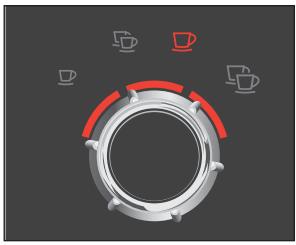
i During the grinding operation, the light segments above the Rotary Switch indicate the coffee strength. The coffee strength can be altered while 1 Espresso or 1 coffee is being prepared.
The coffee strength options available are as follows:
| Coffee strength | Shown in symbol display |
| Mild | 1 light segment is illuminated |
| Normal | 2 light segments are illuminated |
| Strong | 3 light segments are illuminated |
i During the brew operation, the light segments indicate the amount of water. At this stage of the operation, you can change the amount of water by turning the Rotary Switch.
Example: this is how to prepare a strong coffee.
Place a cup under the coffee spout.
Turn the Rotary Switch to the 1 coffee setting.
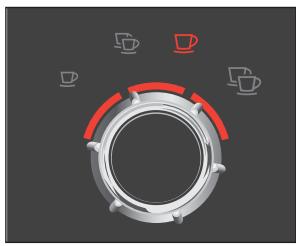
Press the Rotary Switch to initiate preparation of the coffee. The grinder starts up, the 1 coffee symbol flashes, and one light segment above the Rotary Switch is illuminated.
Adjusting the permanent cup size settings
- While the grinder is running, turn the Rotary Switch in a clockwise direction until three light segments have lit up. The grinding operation stops, brewing begins and the predefined quantity of water flows into the cup. Drink preparation stops automatically.
It is easy to adjust the amount of water for all coffee specialities to the cup size for good. As in the following example, adjust the amount of water once. Every time you prepare a drink in the future, this amount of water will be dispensed.
Permanent adjustment of cup size works the same way for all coffee specialities.
Example: to permanently adjust the amount of water for an Espresso, you should proceed as follows:
Place an Espresso cup under the coffee spout.
Turn the Rotary Switch to the 1 Espresso setting.
Keep the Rotary Switch pressed down until the light segment flashes above the Rotary Switch.
Coffee preparation will start and the Espresso will flow into the cup.
Press the Rotary Switch again when enough Espresso has flown into the cup.
Espresso preparation will now stop. Your IMPRESSA will remember the amount of water you have specified for an Espresso for good.
i You can alter these settings at any time by repeating the above procedure.
4 Preparing drinks at the touch of a button
This chapter will explain how to prepare coffee specialties, milk and hot water.
Chapter 3, 'Familiarising yourself with the control options', will teach you how to adjust the settings to your personal preferences.
You can stop the machine at any time while a coffee speciality is being prepared. To do this press the Rotary Switch.
@ You can also try out the preparation of coffee specialities online. Visit the Knowledge Builder on www.jura.com.
Espresso and coffee
All speciality coffees (espresso and coffee) are prepared following this model.
Example: this is how to prepare a coffee.
Place a cup under the coffee spout.
Turn the Rotary Switch to the 1 coffee setting.
Press the Rotary Switch to initiate preparation of the coffee. The 1 coffee symbol will now flash, and the pre-set amount of water will flow into the cup. Drink preparation stops automatically.
To prepare two cups of coffee, place two cups under the coffee spout and turn the Rotary Switch to the symbol for 2 coffees, then press the switch to initiate coffee preparation.
Cappuccino
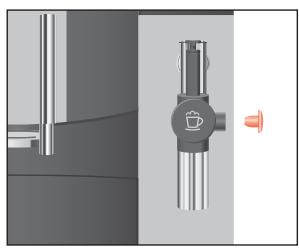
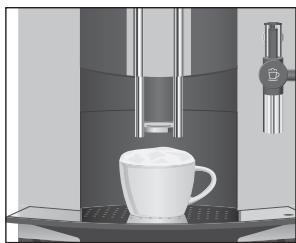
Precondition: your IMPRESSA is ready to use, the Easy Cappuccino Frother is mounted.
Take the milk pipe out of the Welcome Pack.
Take the protective cap off the Easy Cappuccino Frother.
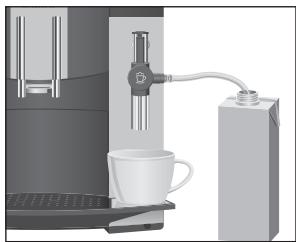
Attach the milk pipe to the frother.
- Insert the other end in a milk Tetrapack or connect it to a milk container.
Pre-ground coffee
Place a cup under the Easy Cappuccino Frother.
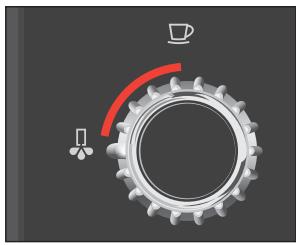
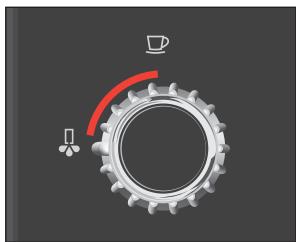
- Turn the Rotary Switch so that it points to the Steam symbol.
Press the Rotary Switch to confirm your choice.
The Steam symbol will continue flashing until the IMPRESSA has warmed up. As soon as the required temperature has been reached, the light segment by the switch will flash.
Turn the switch in the anticlockwise direction.
The milk foam will be prepared.
Turn the switch in the clockwise direction when there is
sufficient milk foam in the cup.
As long as the light segment continues to flash on the switch, you can continue preparing milk foam.
Move the cup under the coffee spout.
Turn the Rotary Switch to the 1 Espresso setting.
Press the Rotary Switch to initiate preparation of the Espresso.
The 1 Espresso symbol will now flash, and the pre-set amount of water will flow into the cup.
Drink preparation stops automatically.
To ensure that the Easy Cappuccino Frother works perfectly, you should clean it regularly. For further information on cleaning, see Chapter 6, 'Maintenance – cleaning the Easy Cappuccino Frother'.
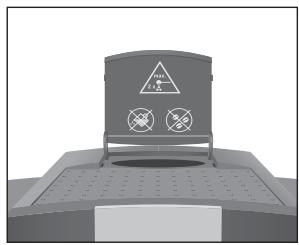
You can choose a second variety of coffee with the filler funnel for pre-ground coffee.
All coffee specialities using pre-ground coffee are prepared in the same way.
i Never add more than two level measuring spoons of pre-ground coffee.
i Use pre-ground coffee which is not ground too finely. Very fine coffee can block up the system so that the coffee only comes out in drips.
If you have added too little pre-ground coffee, the IMPRESSA will come to a halt ready for further use.
Example: proceed as follows to prepare a cup of coffee using pre-ground coffee.
Take the measuring spoon for pre-ground coffee out of the Welcome Pack.
Turn the Rotary Switch so that it points to the pre-ground coffee symbol.
Press the Rotary Switch to confirm your choice.
The pre-ground coffee symbol will flash.
Place a cup under the coffee spout.
-
Open the filler funnel for pre-ground coffee.
-
Place one level measuring spoon of pre-ground coffee in the filler funnel.
Turn the Rotary Switch to the 1 coffee setting.
Press the Rotary Switch to initiate preparation of the coffee. The symbols for pre-ground coffee and 1 coffee will flash, and the pre-configured amount of water will flow into the cup.
Drink preparation stops automatically.
To prepare two cups of pre-ground coffee, place two cups under the coffee spout, add two level measuring spoons of pre-ground coffee to the filler funnel, turn the Rotary Switch to the symbol for 2 coffees and then press to initiate preparation of the coffee.
Milk foam
Hot water
CAUTION
Precondition: your IMPRESSA is ready to use, the Easy Cappuccino Frother is mounted.
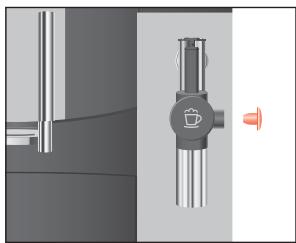
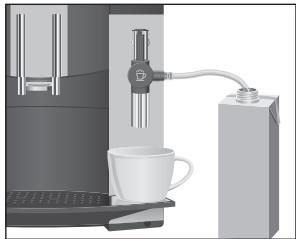
Take the milk pipe out of the Welcome Pack.
Take the protective cap off the Easy Cappuccino Frother.
Attach the milk pipe to the frother.
- Insert the other end in a milk Tetrapack or connect it to a milk container.
Place a cup under the Easy Cappuccino Frother.
Turn the Rotary Switch so that it points to the Steam symbol.
Press the Rotary Switch to confirm your choice.
The Steam symbol will continue flashing until the IMPRESSA has warmed up. As soon as the required temperature has been reached, the light segment by the switch will flash.
Turn the switch in the anticlockwise direction. The milk foam will be prepared.
Turn the switch in the clockwise direction when there is sufficient milk foam in the cup.
i As long as the light segment continues to flash by the switch, you can continue preparing milk foam.
To ensure that the Easy Cappuccino Frother works perfectly, you should clean it daily. Further information can be found in Chapter 6, 'Maintenance - cleaning the Easy Cappuccino Frother'.
To obtain a perfect water flow, attach the removable hot water nozzle.
There is a danger of scalding from hot water splashes.
- Avoid direct contact with the skin.
Start by replacing the nozzle:
- Carefully remove the Easy Cappuccino Frother from the Connector System.
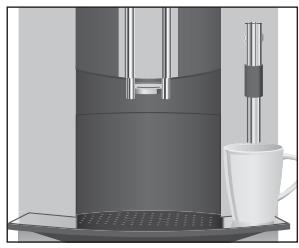
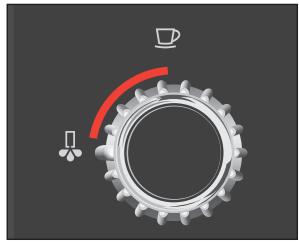
Take the hot water nozzle out of the Welcome Pack.
Insert this into the Connector System with a light turning motion.
Place a cup under the hot water nozzle.
Precondition: your IMPRESSA is ready for use.
Turn the switch in the anticlockwise direction.
The light segment on the switch will light up and hot water will flow into the cup.
Turn the switch in the clockwise direction when there is sufficient water in the cup.
5 Adjusting the permanent settings in programming mode
Automatic switch-off
By instructing your IMPRESSA to automatically switch itself off, you can cut down your energy consumption. If this function is activated, your IMPRESSA switches off automatically after the preset time following the last action on the machine.
The number of symbols illuminated indicates the programmable switch-off time that has been activated in hours:
| Switch-off time | Shown in symbol display | Meaning |
| 1 hour | 1 symbol is illuminated | Switch-off after 1 hour |
| 2 hours | 2 symbols are illuminated | Switch-off after 2 hours |
| 4 hours | 3 symbols are illuminated | Switch-off after 4 hours |
| 8 hours | 4 symbols are illuminated | Switch-off after 8 hours |
Example: to amend the programmable switch-off time from 2 hours to 4, you should proceed as follows:
Precondition: your IMPRESSA is ready for use.
Open the access door.

Turn the Rotary Switch so that it points to the P symbol P.

Press the Rotary Switch.
The cleaning, descending and filter indicators light up.

- Hold down the Cleaning button until the Cleaning indicator (◇) lights up.
The IMPRESSA is in programming mode, the Cleaning indicator and the symbols are illuminated.
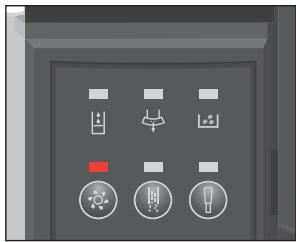

Turn the Rotary Switch until the 3 symbols light up.
Press the Rotary Switch to confirm the setting.
The IMPRESSA is ready for use again. The programmable switch-off time is now configured at 4 hours.
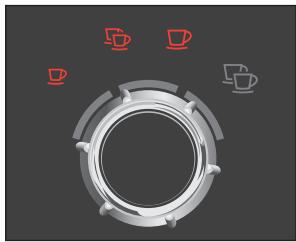
6 Maintenance
Your IMPRESSA has the following integrated maintenance programs:
Rinse the machine
Change the filter
Clean the machine
Descale the machine
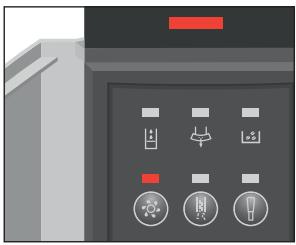
The illuminated maintenance indicator draws your attention to the maintenance actions that are necessary. Open the access door and note the further indicators in the maintenance field. In the example shown on the left, your IMPRESSA is prompting you to clean it.
i Clean or descale the machine or change the filter whenever the appropriate indicator is lit up.
Maintenance tips
To ensure that you get many years' reliable service out of your IMPRESSA and to guarantee the optimum coffee quality, the machine requires daily maintenance.
You should proceed as follows:
Empty the coffee grounds container and the drip tray. Rinse them with warm water.
Rinse the water tank with clean water.
Dismantle and rinse the Cappuccino Frother (see Chapter 6, 'Maintenance - rinsing the Easy Cappuccino Frother').
Wipe the surface of the machine with a damp cloth.
Rinsing the machine
i Once the IMPRESSA has heated up following switch-on, the Maintenance symbol will light up, prompting you to perform a rinse operation. To initiate the rinse operation, press the Rotary Switch.
i When the IMPRESSA is switched off, a rinse operation is automatically performed.
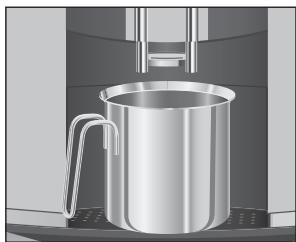
Changing the filter
Precondition: the IMPRESSA is ready for use.
Place a receptacle under the coffee spout.
Turn the Rotary Switch so that it points to the Maintenance symbol.
Press the Rotary Switch to start the rinse operation. The rinse operation now starts and the Maintenance symbol flashes. Rinsing stops automatically. Your IMPRESSA is ready for use.
i After 50 litres of water have been dispensed, the filter will cease to work. Your IMPRESSA will automatically prompt you to replace the filter.
i After two months, the filter will cease to work. Monitor the elapsed time as shown on the date plate on the cartridge holder.
If the CLARIS filter cartridge is not activated, you will not be prompted to change the filter.
Replacement following a prompt
To change the CLARIS filter cartridge when prompted to do so by your IMPRESSA, you should proceed as follows:
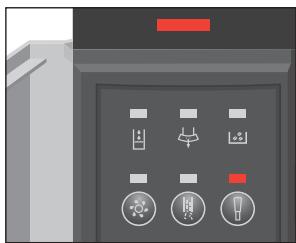
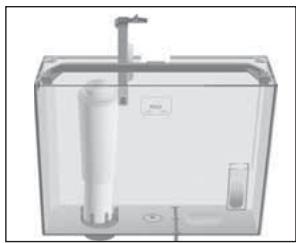
Precondition: the Maintenance indicator and the Filter indicator are illuminated.
Remove the water tank and empty it.
Lift the cartridge holder.
Take out the old CLARIS filter cartridge.
- Insert the new CLARIS filter cartridge into the water tank, pressing it lightly.
- Close the cartridge holder. It will lock into place audibly.
- Fill the water tank with cold, fresh mains water and reinsert.
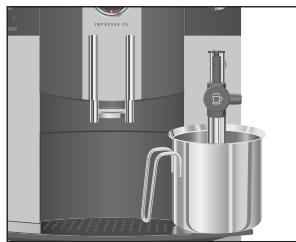
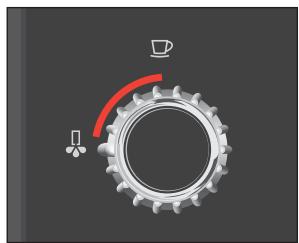
- Place a receptacle (containing at least 500ml ) under the Easy Cappuccino Frother.
If the milk pipe is connected, remove it.
Hold down the Filter button until the Filter indicator ⑧ flashes.
The light segment by the switch will now flash.
Turn the switch in the anticlockwise direction.
Rinsing of the filter will now begin. The light segment by the switch will now light up.
i You can interrupt rinsing of the filter at any time. To do this, turn the switch clockwise. Turn the switch anticlockwise to continue rinsing the filter.
i The water could be slightly discoloured. This is not harmful to health, nor does it affect the taste.
Rinsing of the filter will automatically stop after approx. 500ml and the light segment by the switch will then flash.
Turn the switch in the clockwise direction.
The Maintenance symbol flashes, the IMPRESSA heats up and is once again ready for use.
Manual filter change
You can initiate the 'Changing the filter' operation manually. Start when the first prompt appears▶, as described under 'Replacement following a prompt'.
Cleaning the machine
CAUTION
After dispensing 200 cups of coffee or performing 80 switch-on rinses, the IMPRESSA will prompt you to clean it.
If the wrong cleaning agent is used, the machine could be damaged and/or traces of detergent could be left behind in the water.
Use only original JURA care products.
i The cleaning program only lasts about 15 minutes.
i Do not interrupt the cleaning program, as this will impair the quality of cleaning.
i Your dealer will stock JURA cleaning tablets.
@ Try out the 'Cleaning the machine' operation online. Visit the Knowledge Builder on www.jura.com.
Cleaning following a prompt
To clean your IMPRESSA when prompted to do so, you should proceed as follows:
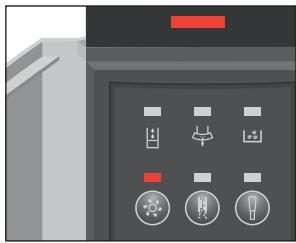
Precondition: the Maintenance indicator and the Cleaning indicator are illuminated.

- Hold down the Cleaning button until the Cleaning indicator flashes.
The coffee grounds container indicator now flashes.
Empty the drip tray and the coffee grounds container.
- Insert the empty drip tray and coffee grounds container back in the machine.
The Cleaning indicator will now light up.
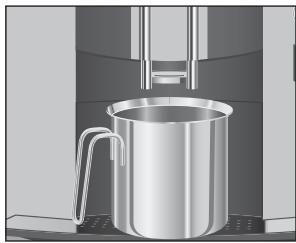

Press the Cleaning button.
The Cleaning indicator ( now flashes. Water flows out of the coffee spout.
The process is interrupted. The pre-ground coffee symbol flashes and the Cleaning indicator lights up.
Open the cover of the filler funnel for pre-ground coffee.
Insert a JURA cleaning tablet into the filler funnel.
- Close the cover of the filler funnel.
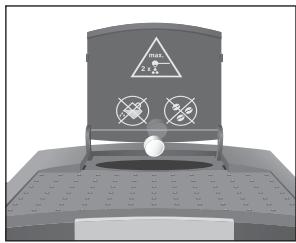

Press the Cleaning button.
The Cleaning indicator ( 念 ) now flashes. Water flows out of the coffee spout once again.
The operation stops, the coffee grounds container indicator flashes.
Empty the drip tray and the coffee grounds container.
- Insert the empty drip tray and coffee grounds container back in the machine.
The cleaning operation is now complete. The IMPRESSA heats up and is once again ready for use.
Manual cleaning
You can initiate the 'Cleaning the machine' operation manually. Start when the first prompt appears , as described under 'Cleaning following a prompt'.
Dscaling the machine
The IMPRESSA builds up deposits of limescale over time and automatically prompts you to descale it when necessary. The degree of calcification depends on the degree of hardness of your water.
CAUTION
If the descending agent comes into contact with the skin or eyes, this can cause irritation.
Avoid contact with the skin or eyes.
- Rinse the descending agent off with clean water. Should you get any descending agent in your eye, see a doctor.
CAUTION
If the wrong descending agent is used, the machine could be damaged and/or traces of detergent could be left behind in the water.
Use only original JURA care products.
CAUTION
If the descending operation is interrupted, it is possible that the machine could be damaged.
- Allow the descending program to run to the end.
CAUTION
If the descending agent comes into contact with sensitive surfaces, the possibility of damage cannot be excluded.
Clean up any splashes immediately.
i The descending program lasts approx. 40 minutes.
i Your dealer will stock JURA descending tablets.
@ Try out the 'Descaling the machine' operation online. Visit the Knowledge Builder on www.jura.com.
Dscaling following a prompt
To descale your IMPRESSA when prompted to do so, you should proceed as follows:
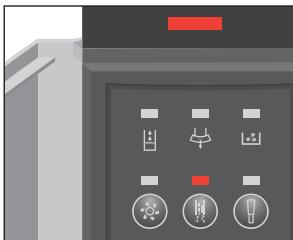
Precondition: the maintenance indicator and the Descaling indicator are lit up.
Hold down the Descaling button until the Descaling indicator flashes. The coffee grounds container indicator now flashes.
Empty the drip tray and the coffee grounds container.
- Insert the empty drip tray and coffee grounds container back in the machine.
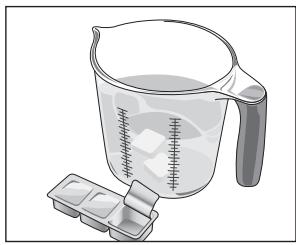
The Water Tank indicator now flashes.
Remove the water tank and empty it.
- Completely dissolve the contents of one blister (3 JURA descaling tablets) in a container that holds 500 ml of water. This can take a few minutes.
Pour the solution into the empty water tank.
Insert the water tank.
Remove the frother.
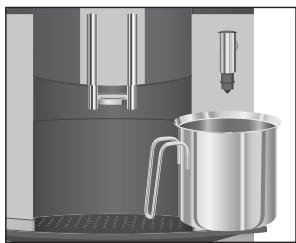
Place a container under the Connector System.
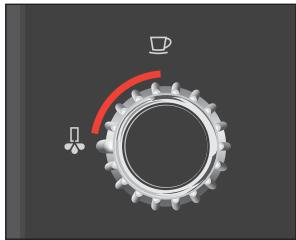
Turn the switch in the anticlockwise direction.
This causes water to flow out of the Connector System.
The light segment by the switch lights up during the descal- ing operation.
The operation stops automatically, and the light segment by the switch flashes.
Turn the switch in the clockwise direction.
The descending operation will resume. After a few minutes, the coffee grounds container indicator flashes.
Empty the container under the Connector System.
Empty the drip tray and the coffee grounds container.
- Insert the empty drip tray and coffee grounds container back in the machine.
The Water Tank indicator now flashes.
- Rinse the water tank thoroughly and fill it with cold, fresh mains water.
Put the water tank back in.
The light segment by the switch will now flash.
- Place a container under the Connector System.
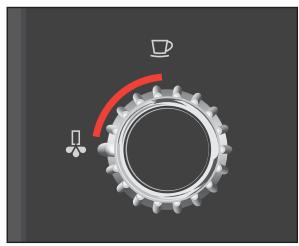
Turn the switch in the anticlockwise direction.
This causes water to flow out of the Connector System.
The operation stops automatically, and the light segment by the switch flashes.
Turn the switch in the clockwise direction.
The descending operation will resume. After a few minutes, the coffee grounds container indicator flashes.
Empty the drip tray and the coffee grounds container.
- Insert the empty drip tray and coffee grounds container back in the machine.
Put back the frother.
The descending operation is now complete. The Maintenance symbol flashes, the IMPRESSA heats up and is once again ready for use.
If the descending operation stops unexpectedly, rinse the water tank thoroughly.
Manual descending
You can initiate the operation 'Dscaling the machine' manually. Start when the first prompt appears▶, as described under 'Dscaling following a prompt'.
Rinsing the Easy Cappuccino Frother
To ensure that the Easy Cappuccino Frother works perfectly, you should rinse it with water whenever you have prepared some milk.
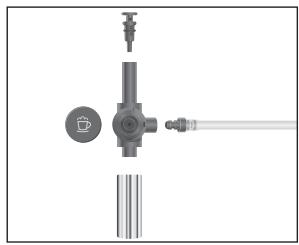
i The IMPRESSA will not prompt you to rinse the Easy Cappuccino Frother.
- Carefully remove the Easy Cappuccino Frother from the Connector System.
Take the Easy Cappuccino Frother apart.
Rinse all the frother parts thoroughly under running water. - Reassemble the Easy Cappuccino Frother and attach it to the Connector System.
6 Maintenance
Cleaning the Easy Cappuccino Frother
CAUTION
To ensure that the Easy Cappuccino Frother works perfectly, you should clean it daily when you have been preparing milk.
i The IMPRESSA will not prompt you to clean the Easy Cappuccino Frother.
i Your dealer will stock the JURA Cappuccino Cleaner.
If the wrong cleaning agent is used, the machine could be damaged and/or traces of detergent could be left behind in the water.
Use only original JURA care products.
@ Try this operation out on the Internet. Visit the Knowledge Builder on www.jura.com.
Precondition: your IMPRESSA is ready for use.
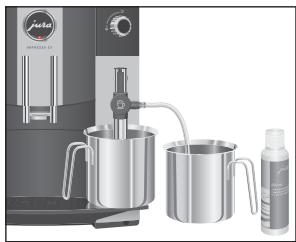
Place a receptacle under the Easy Cappuccino Frother.
- Pour 250ml of fresh water into a container and add one capful (max. 15ml ) of Cappuccino Cleaner.
Immerse the milk pipe in the receptacle.
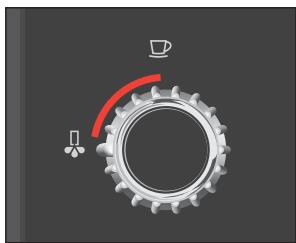
- Turn the Rotary Switch so that it points to the Steam symbol .
Press the Rotary Switch to confirm the action.
The Steam symbol will continue flashing until the IMPRESSA has warmed up.
As soon as the required temperature has been reached, the light segment by the switch will flash.
Turn the switch in the anticlockwise direction.
The frother and pipe will be cleaned.
Turn the switch in the clockwise direction as soon as the container holding the Cappuccino Cleaner is empty.
The light segment by the switch will now flash.
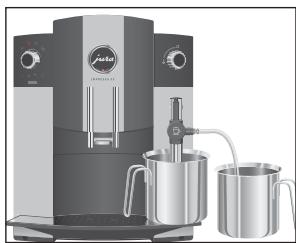
- Fill the receptacle with 250ml of fresh water and immerse the milk pipe in it.
Dscaling the water tank
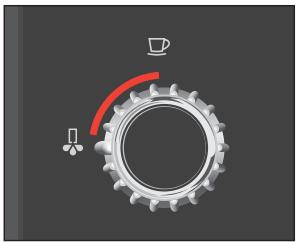
i Perform the next step as soon as the light segment by the switch is flashing. This means that the IMPRESSA has reached the temperature necessary for steam. If the light segment is no longer flashing, turn the Rotary Switch once again to the Steam symbol and press the Rotary Switch. As soon as the required temperature has been reached, the light segment by the switch will flash again.
Turn the switch in the anticlockwise direction. The frother and pipe are rinsed with fresh water.
Turn the switch in the clockwise direction as soon as the container holding the water is empty. Cleaning of the Easy Cappuccino Frother is now complete and your IMPRESSA is ready to use again.
The water tank may build up deposits of limescale. In order to ensure perfect working order, descale the water tank from time to time.
Remove the water tank.
If you use a CLARIS filter cartridge, remove this.
- Descale the tank with a mild, commercially available descaling agent in accordance with the instructions of the manufacturer.
Rinse the water tank with clean water afterwards.
If you use a CLARIS filter cartridge, insert this again.
- Fill the water tank with fresh water and insert it again.
7 Messages in the maintenance field and symbol display
| Message | Cause/Result | Action |
| Maintenance indicator is illuminated or is flashing. | The IMPRESSA wants to tell you something. | • Open the access door and note the other indicators. |
| Maintenance indicator and Water Tank indicator are flashing. | Water tank is empty. You cannot prepare any coffee or hot water. | • Fill the water tank (see Chapter 2, ‘Preparing and using your IMPRESSA for the first time – Filling the water tank’). |
| Maintenance indicator and coffee grounds container indicator are flashing. | Coffee grounds container is full. You cannot prepare any coffee but you can obtain hot water. | • Empty the coffee grounds container and the drip tray. |
| Maintenance indicator and bean container indicator are flashing. | Bean container is empty. You cannot prepare any coffee but you can obtain hot water. | • Fill the bean container. The indicator will go out after you have prepared one coffee speciality (see Chapter 2, ‘Preparing and using your IMPRESSA for the first time – Filling the bean container’). |
| Maintenance indicator and Cleaning indicator light up. | The IMPRESSA will prompt you to clean it after 200 cups of coffee or 80 switch-on rinses. | • Perform cleaning operation (see Chapter 6, ‘Maintenance – Cleaning the machine’). |
| Maintenance indicator and Descaling indicator light up. | The IMPRESSA is prompting you to descale it. | • Perform descending operation (see Chapter 6, ‘Maintenance – Descaling the machine’). |
| Maintenance indicator and Filter indicator light up. | The CLARIS filter cartridge is exhausted. | • Change the CLARIS filter cartridge (see Chapter 6, ‘Maintenance – Changing the filter’). |
| Maintenance indicator and Cleaning indicator flash twice. | System is too hot to clean. | • Wait a few minutes. |
| Maintenance indicator and Descending indicator ☑ flash twice. | System is too hot to descale. | Wait a few minutes. |
| Maintenance symbol ∩ flashes twice. | System is too hot for mainte-nance and switch-off rinses. | Wait a few minutes. |
| Maintenance indicator and all the indicators ☑ behind the access door are flashing synchronously. | There is a general fault. | Switch the IMPRESSA off with the On/Off button ♂. If the problem persists when you turn the machine back on again, contact Customer Support in your country (see ‘JURA contact details / Legal information”). |
8 Troubleshooting
| Problem | Cause/Result | Action |
| Grinder is making a very loud noise. | There are some foreign bodies in the grinder. | ► Contact Customer Support in your country (see ‘JURA contact details / Legal information’. |
| The coffee grounds container indicator ⍷ is flashing continuously. | Drawer with coffee grounds container has not been correctly inserted. | ► Insert the drawer correctly. |
| The frother does not produce enough milk foam. | Easy Cappuccino Brother is dirty. | ► Clean the Easy Cappuccino Frother (see Chapter 6, ‘Maintenance – Cleaning the Easy Cappuccino Frother’). |
| Coffee only comes out in drips. | Coffee or pre-ground coffee has been ground too fine and is blocking the sieve. | ► Put the grinder on a coarser setting or use coarser pre-ground coffee (see Chapter 2, ‘Preparing and using your IMPRESSA for the first time – Adjusting grinder’). |
| Water hardness cannot be adjusted. | CLARIS filter cartridge is activated. | ► Deactivate the CLARIS filter cartridge (see Chapter 2, ‘Preparing and using your IMPRESSA for the first time – Using and activating filter’) |
| The maintenance indicator lights up and the bean container indicator ⍷ continues to flash although it has been filled. | The machine will not be able to tell that the bean container has been filled until the next time you make a coffee. | ► Prepare a coffee speciality. |
i If you have not been able to solve the problem, contact Customer Support in your country (see 'JURA contact details / Legal information').
9 Transport and environmentally neutral disposal
Empty system
To protect the IMPRESSA from damage caused by frost during transportation, the system needs to be emptied.

Precondition: the IMPRESSA is ready for use.
Place a receptacle under the frother.
Turn the Rotary Switch so that it points to the Steam symbol.
Press the Rotary Switch to confirm your choice.
The Steam symbol will continue flashing until the machine has warmed up. As soon as the required temperature has been reached, the light segment by the switch will flash.
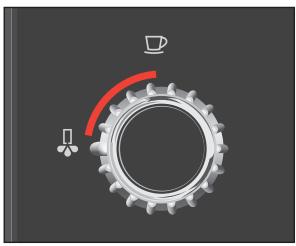
Turn the switch in the anticlockwise direction.
Steam will now come out of the frother.
Remove the water tank and empty it.
Steam will continue to flow out of the frother until the system is empty. The light segment by the switch will now flash.
Turn the switch in the clockwise direction.
i The Maintenance indicator and the Water Tank indicator both flash. Please ignore these indicators.
Press the On/Off button to switch the IMPRESSA off.
i The next time you use the machine, you will need to refill the system (see Chapter 2, 'Preparing and using your IMPRESSA for the first time - First-time use').
Transport
Keep the packaging for your IMPRESSA. It is used to protect the machine during transportation.
Disposal

Please dispose of old machines in an environmentally neutral way.
Old machines contain valuable materials capable of being recycled which should be salvaged for recycling. Please therefore dispose of old machines via suitable collection systems.
10 Technical data
| Voltage | 220–240 V ~, 50 Hz |
| Power output | 1450 W |
| Marks of conformity | CE § |
| Pump pressure | Static max. 15 bar |
| Holding capacity of water tank | 1.9 litres |
| Holding capacity of bean container | 200 g |
| Holding capacity of coffee grounds container | Approx. 16 portions |
| Cable length | Approx. 1.1 m |
| Weight | 9 kg |
| Dimensions (W x H x D) | 28 x 34.5 x 41 cm |
Index
A
Activate filter 13
Addresses 44
Adjusting
Grinder 16
Adjusting the amount of water
One-off setting during drink preparation 19
Permanent adjusting the permanent cup size settings 20
Altering coffee strength
One-off setting during drink preparation 19
Automatic switch-off 26
B
Bean container 4
Filling 11
C
Cappuccino preparation 21
Changing
Filter 28
CLARIS filter cartridge
Activating 13
Changing 28
Using 13
Cleaning
Easy Cappuccino Frother 34
Machine 29
Coffee powder
Pre-ground coffee preparation 22
Coffee preparation 21
Coffee speciality 21
Coffee strength
One-off setting during drink preparation 19
Contact details 44
Customer support 44
D
Descale
Water tank 35
Dscaling 31
E
Easy Cappuccino Frother 4
Cleaning 34
Rinsing 33
Espresso preparation 21
F
Filling
Bean container 11
Water tank 11
Filter
Activating 13
Changing 28
Using 13
First-time use 12
G
Grinder
Adjust 16
Ground coffee
Pre-ground coffee preparation 22
H
Hotline 44
Hot water preparation 24
J
JURA contact details 44
L
Legal information 44
M
Machine
Cleaning 29
Dscaling 31
Rinsing 27
Setting up 11
Switching off 17
Switching on 17
Milk foam preparation 24
0
One-off setting during drink preparation 19
P
Pre-ground coffee preparation 22
Preparation
Cappuccino 21
Coffee 21
Espresso 21
Hot water 24
Milk foam 24
Pre-ground coffee 22
Programming mode
Automatic switch-off 26
Proper use 6
Putting into service
First-time use 12
R
Rinsing
Easy Cappuccino Frother 33
Machine 27
Rotary switch 9
S
Safety information 6
Setting
Water hardness 15
Setting up 11
Switching off 17
Switching on 17
U
Use, Proper 6
Using filter 13
W
Water hardness 15
Assessing 15
Setting 15
Water tank 4
Dscaling 35
Filling 11
Index
JURA contact details / Legal information
JURA Elektroapparate AG
Kaffeeweltstrasse 10
CH-4626 Niederbuchsiten
Phone: +41 62 38 98 233
@ Contact information is available on the company website at www.jura.com.
Directives
The machine complies with the following EU directives:
2006/95/EC - Low Voltage Directive
2004/108/EC - Electromagnetic Compatibility
2009/125/EC-Ecodesign
Technical changes
We reserve the right to make technical changes.
The illustrations used in the IMPRESSA C5 Manual show the IMPRESSA C5 platinum model. Your IMPRESSA could incorporate minor changes.
Feedback
Your opinion is important to us!
Use the contact link at www.jura.com.
Copyright
The Instructions for Use contain information which is protected by copyright. It is not permitted to photocopy or translate these Instructions for Use into another language without the express written consent of JURA Elektroapparate AG.
- The IMPRESSA C5 Manual
- Your IMPRESSA C5
- Symbol display
- Maintenance field
- Proper use
- For your safety
- Symbol description
- Warnings
- IMPRESSA C5 - Click & Drink
- Coffee that fulfils your wildest dreams
- Click & Drink
- Indicators
- Height-adjustable coffee spout
- Connector System
- JURA on the Internet
- Knowledge Builder
- Preparing and using your IMPRESSA for the first time
- First-time use
- Using and activating filter
- Assessing and setting water hardness
- Adjusting grinder
- CAUTION
- Switching on
- Switching off
- Familiarising yourself with the control options
- Preparing drinks at the touch of a button
- One-off setting during drink preparation
- Adjusting the permanent cup size settings
- Preparing drinks at the touch of a button
- Espresso and coffee
- Cappuccino
- Pre-ground coffee
- Milk foam
- Hot water
- Adjusting the permanent settings in programming mode
- Automatic switch-off
- Maintenance
- Maintenance tips
- Rinsing the machine
- Changing the filter
- Replacement following a prompt
- Manual filter change
- Cleaning the machine
- Cleaning following a prompt
- Manual cleaning
- Dscaling the machine
- Dscaling following a prompt
- Manual descending
- Rinsing the Easy Cappuccino Frother
- Cleaning the Easy Cappuccino Frother
- Dscaling the water tank
- Messages in the maintenance field and symbol display
- Transport and environmentally neutral disposal
- Empty system
- Transport
- Disposal
- Technical data
- Index
- A
- B
- C
- D
- E
- F
- G
- H
- J
- L
- M
- 0
- P
- R
- S
- U
- W
- JURA contact details / Legal information
- Directives
- Technical changes
- Feedback
- Copyright
Marque : JURA
Modèle : IMPRESSA C5N
Catégorie : Machine à café