IMPRESSA 4000 - Machine à café JURA - Notice d'utilisation et mode d'emploi gratuit
Retrouvez gratuitement la notice de l'appareil IMPRESSA 4000 JURA au format PDF.


| Marque | JURA |
| Modèle | IMPRESSA 4000 |
| Catégorie | Machine à café automatique |
| Alimentation | 230 V AC, 1350 W, 10 A |
| Dimensions (L x P x H) | 34,5 × 35 × 39 cm |
| Poids | 11,3 kg |
| Type de produit | Machine expresso automatique avec broyeur intégré |
| Capacité | 1 ou 2 tasses simultanément |
| Réservoir d'eau | Amovible, remplissage par le dessus possible |
| Réservoir à grains | Avec couvercle hermétique |
| Système d'extraction | I.P.B.A.S. (pré-infusion intelligente) |
| Mouture | Réglable en continu (5 positions) |
| Fonctions | Café, expresso, vapeur, eau chaude, café moulu |
| Programmes d'entretien | Rinçage, nettoyage (pastilles JURA), détartrage (pastilles JURA) |
| Filtre à eau | Cartouche CLARIS (optionnelle, évite le détartrage) |
| Arrêt automatique | Réglable : 1 h, 3 h, 5 h ou désactivé |
| Dureté de l'eau | 5 niveaux réglables |
| Sécurité | Fusible 10 A, arrêt automatique, protection contre les projections |
| Entretien et nettoyage | Programmes intégrés ; pièces amovibles lavables à l'eau |
| Pièces détachées | Disponibles chez le revendeur JURA |
| Réparabilité | Réparations par centres agréés JURA uniquement |
| Informations générales | Notice d'utilisation gratuite disponible en PDF |
FOIRE AUX QUESTIONS - IMPRESSA 4000 JURA
Questions des utilisateurs sur IMPRESSA 4000 JURA
0 question sur cet appareil. Repondez a celles que vous connaissez ou posez la votre.
Poser une nouvelle question sur cet appareil
Téléchargez la notice de votre Machine à café au format PDF gratuitement ! Retrouvez votre notice IMPRESSA 4000 - JURA et reprennez votre appareil électronique en main. Sur cette page sont publiés tous les documents nécessaires à l'utilisation de votre appareil IMPRESSA 4000 de la marque JURA.
MODE D'EMPLOI IMPRESSA 4000 JURA

IMPRESSA S50/4000/401
Instructions for use
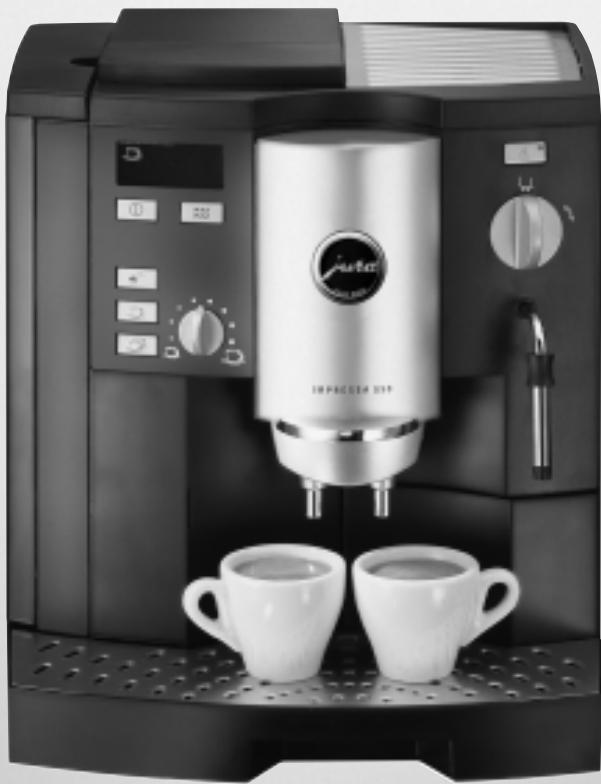
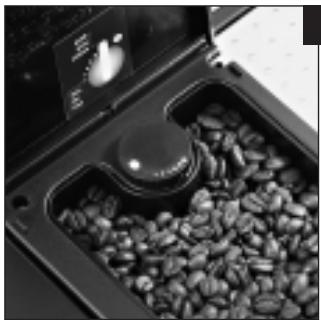
Fig. 1
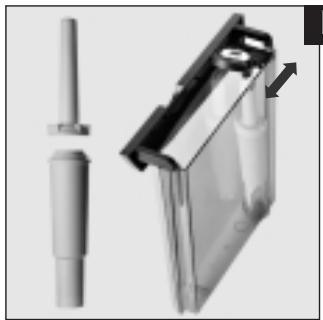
Fig. 2
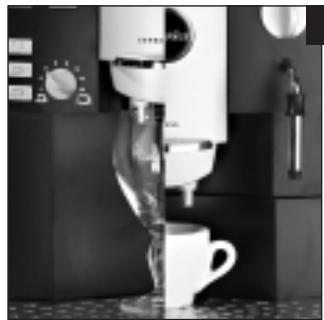
Fig. 3
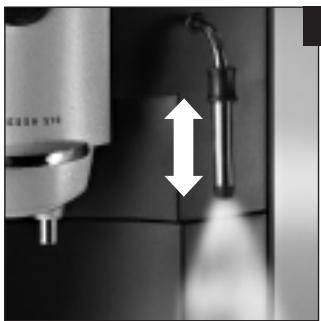
Fig. 4
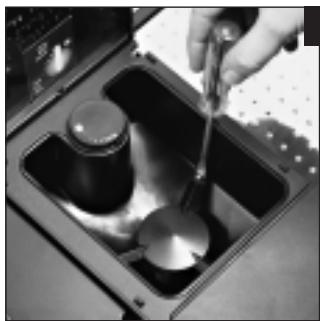
Fig. 5
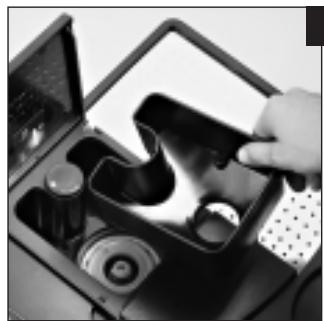
Fig. 6
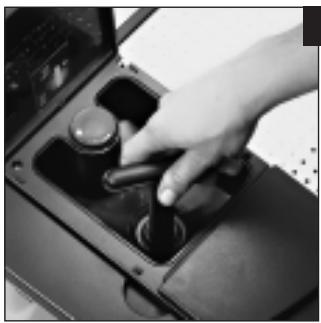
Fig. 7
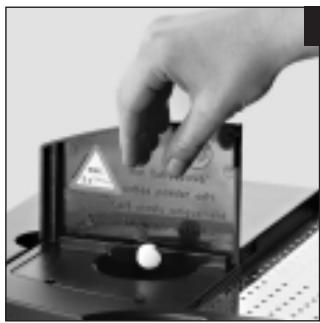
Fig. 8
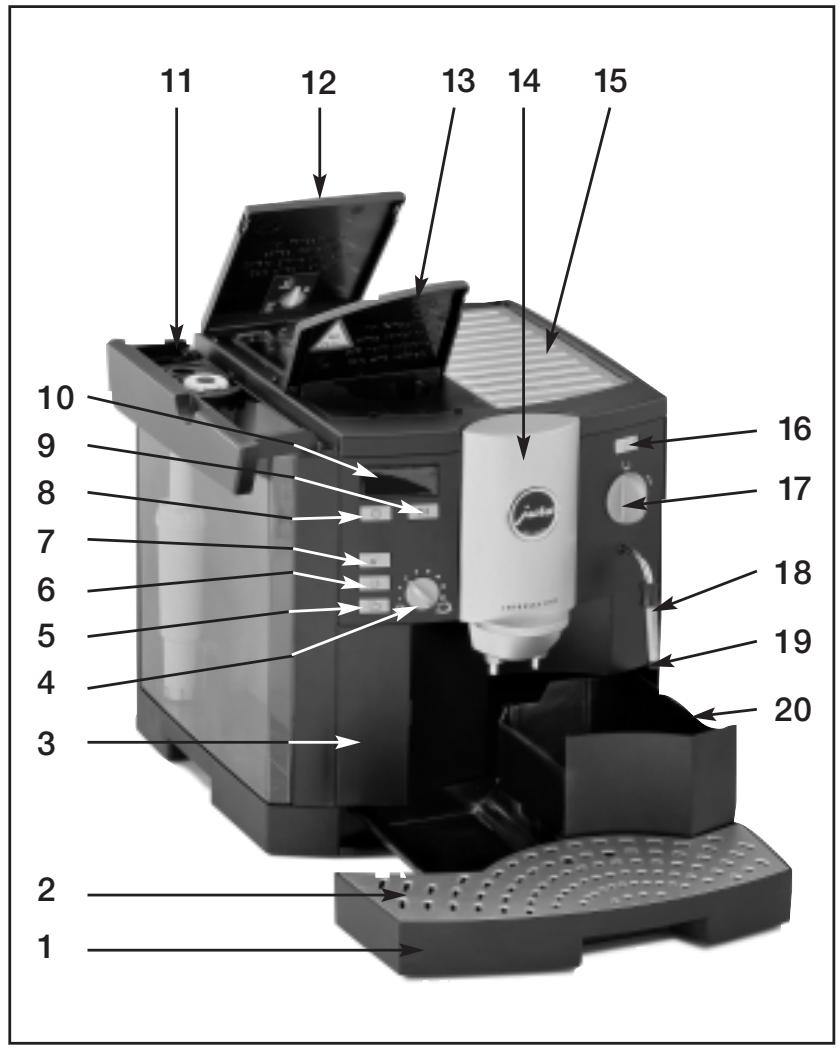
1.2 Operating elements, Jura Impressa S50/4000/401
1 Drip tray/residual water container
2 Drip tray cover
3 Cover for special functions
4 Rotary button, water quantity
5 Coffee key, 2 cups
6 Coffee key, 1 cup
7 Selector key for pre-ground coffee powder
8 ON/OFF switch
9 Rinsing key
10 Display
11 Water tank with carrying handle
12 Cover for bean container with aroma protection lid
13 Cover for pre-ground coffee filler funnel
14 Height-adjustable coffee spout
15 Cup tray
16 Selector key for steam
17 Selector key for coffee or hot water/steam
18 Pivoting nozzle for hot water/steam
19 Frothing nozzle
20 Container for coffee grounds
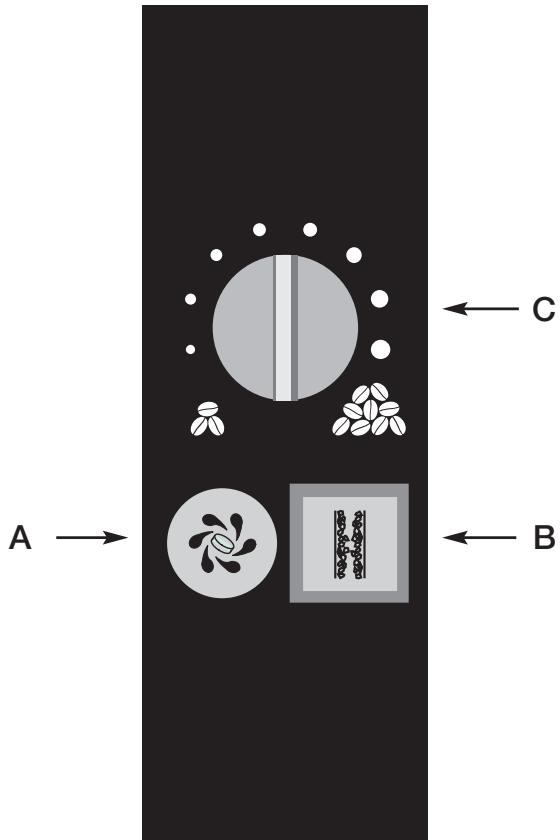
A Cleaning key
B Dscaling key
C Rotary key, powder quantity
Table off contents
Jura Impressa S50/4000/401
1.Description page 7
1.1 The symbol displays mean.. page 7
2. Safety instructions.. page 7
2.1Warnings page 7
2.2 Safety precautions.. page 8
3.Preparing the machine. page 8
3.1 Checking mains voltage.. page 8
3.2 Checking the fuse.. page 8
3.3 Filling the water tank.. page 8
3.4 Adding coffee beans.. page 8
3.5 Adjusting the grinder 8
3.6 Adjustment of water hardness page 9
3.7 Adjustable automatic switch-off.... page 10
- First use of the machine page 10
5.Use of Claris filter cartridges . page 10
5.1 Inserting/replacing filter page 10 - Rinsing the machine . page 11
- Setting the water quantity.. page 11
- Setting the powder quantity.. page 11
-
Drawing off espresso/normal coffee page 11
9.1 Drawing off powder coffee.. page 11 -
Drawing off steam.. page 12
10.1 Return to readiness for coffee.. page 12
- Drawing off hot water.. page 12
- Switching off the machine.. page 12
- Care and maintenance.. page 13
13.1 Fill water page 13
13.2 Empty grounds container page 13
13.3 Fill beans.. page 13
13.4 Removing foreign objects.. page 13
13.5 Clean machine.. page 13
13.6 Unit scaled.. page 13
13.7 General cleaning instructions.. page 14
13.8 Emptying the system.. page 14
- Cleaning . page 14
- Descaling.. page 15
- Disposal.. page 16
- Tips for perfect coffee.. page 16
- Messages page 17
19.Problems page 19 - Legal information.. page 20
- Technical specifications.. page 20
Important information for the user
Thank you for choosing this Jura product.
Please study these instructions carefully before using your new machine and keep them in a safe place for easy reference in the future.
Should you require further information or should particular problems occur that are not dealt with in sufficient detail for you in these operating instructions, then please ask your local dealer for the information you require or get in touch with us directly.
1.Description
This fully automatic 2-cup espresso/coffee machine impresses because of its elegant, timeless design, the elaborate technology and prepares 1 or 2 cups of outstanding espresso/coffee, as required, with a guaranteed froth. The unique Jura intelligent pre-brew aroma system (I.P.B.A.S) ensures that the full coffee aromat is made use of. The integrated grinder grinds the beans to the fineness required. A separate filler funnel permits the use of additional, pre-ground sorts of coffee. The amount of water can be adjusted individually. The electronic control of the water quantity in the water tank and the container for coffee grounds make operation easy. User-friendly guidance by means of an easy-to-understand symbol display on the LED. Integrated rinsing, cleaning and descaling programmes make the machine easy to care for.
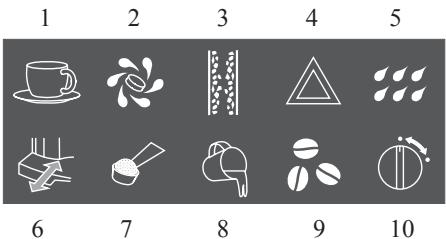
1.1 The symbol displays mean
1 COFFEE READY
2 CLEAN UNIT
3 UNIT SCALED
4 FAULT
5 RINSE UNIT
6 EMPTY GROUNDS CONTAINER / DRIP TRAY MISSING
7 COFFEE POWDER
8 ADD WATER
9 ADD BEANS
10 TAP POSITION COFFEE/HOT WATER/STEAM
2. Safety instructions
2.1Warnings
Children are unaware of the dangers that can be caused by electrical machines; for this reason, children should never be left unsupervised with electrical machines.
The machine should only be used by people who have read and understood the operating instructions.
- Never use a faulty machine or one with a damaged power cable.
- Never immerse the machine in water.
2.2 Safety precautions
- Never expose the machine to the effects of weather (rain, snow, frost) and never operate it with your hands wet.
- Place your machine on a solid and level surface. Never leave it on a warm or hot surface (hob etc.). Choose a location that is inaccessible for children or pets.
- Remove the plug from the power socket if you are away for some time (holidays etc.).
Always remove the plug from the power socket before cleaning. - When removing the plug from the power socket, never tug on the cord or the machine itself.
- Never repair or open the machine yourself. Repairs may only be done by authorised service centres using original spare parts and accessories.
- The machine is connected to the mains power socket via an electric cable. Please ensure that no-one trips over the cable and pulls the machine down. Keep children and pets at a distance.
- Never put the machine or parts of it into the dish-washer.
- To prevent overheating, please put the machine in a place with a good circulation of air.
3. Preparing the machine
3.1 Checking mains voltage
The machine has been set to the correct voltage in our factory. Ensure that your mains voltage corresponds to the details on the rating plate attached to the bottom of the machine.
3.2 Checking the fuse
The machine is designed for a current of 10 Amps. Please check that a correct fuse is fitted.
3.3 Filling the water tank
Remove the water tank and rinse it out well with cold tap water.
- Then fill the water tank and put it back into the machine. Please ensure that the tank locks in properly.

Please only use fresh, cold water. Never fill up with milk, mineral water and other fluids. You can also top up water without removing the tank. Simply lift up the cover and pour in the water from above with a vessel and close the cover again.
3.4 Adding coffee beans

To ensure that your machine will work perfectly for a long time and to avoid damage, please note that the grinding gear of your Jura coffee machine is not suitable for coffee beans which were treated, during or after roasting, with additives (e.g. sugar). Such coffee blends may damage the grinding gear. Any repair costs resulting from the use of such blends are not covered by warranty.
- Lift up the cover of the bean container (13) and remove the aroma protection lid.
Clean out any dirt or foreign objects from the beam container. - Fill with coffee beans, replace the aroma protection lid and close the cover.
3.5 Adjusting the grinder
You have the opportunity of adapting the grinder to the roast of your coffee. We recommend the following:
for a light roasta finer adjustment for a dark roasta coarser adjustment
Open the cover of the bean container (13).
- To adjust the grinding, turn the selector key (Fig. 1) to the desired position.
You have the following options:
he smaller the dots, the finer the grinding the larger the dots, the coarser the grinding

The grinding may only be adjusted with the grinder in operation.
3.6 Adjustment of water hardness
Water is heated in the machine. This leads to scale as a result of use, which is automatically shown on the display .
Before first operation, the machine must be adjusted to match the hardness of the water used. For this, please use the enclosed test sticks.

1^ water hardness on the German scale represents 1.79^ on the French scale.
The machine has 5 hardness settings to choose from. During the adjustment, the grade in question is shown on the display.
Setting 0 = Adjustment for Display Claris filter cartridges
The automatic scale display is switched off.

Setting 1
German water hardness 1 - 7^
French water hardness 1.79 - 12.53^

Setting 2
German water hardness 8 - 15^
French water hardness 14.32 - 26.85^
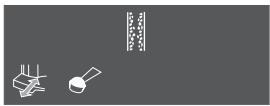
Setting 3
German water hardness 16 - 23^
French water hardness 28.64 - 41.14°
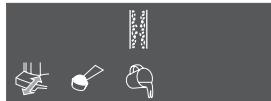
Setting 4
German water hardness 24 - 30^
French water hardness 42.96 - 53.7^
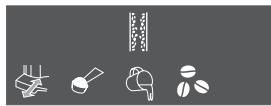
In the factory, the machine is set to hardness level 3. You can alter this setting. Proceed as follows:
- Remove the mains plug with the wire from the wire box on the back of the machine.
Insert the mains plug. - Do not switch the machine on.
Press the coffee key for about 3 seconds. The symbol flashes and the 出 _ 出 symbols light up.
■ By pressing the coffee key 一 you can select the individual settings.
In order to set your degree of water hardness, select the corresponding setting and press the ON/OFF ① switch in order to store this setting. The display goes off.

The water hardness only needs to be set before the first use or if a different water quality is used.
If you do not alter the setting for longer than 60 seconds, the display goes off. The last stored figure is retained.
3.7 Adjustable automatic switch-off
You can alter the automatic switch-off of 3 hours set by Jura. The machine offers you 4 settings for this:
1st setting
The symbol 串串 flashes. The automatic switch-off is not activated.
2nd setting
The symbol 串串 flashes and the symbol lights up. The automatic switch-off is set to 1 hour.
3rd setting
The symbol flashes and the symbols 品 light up. The automatic switch-off is set to 3 hours.
4th setting
The symbol flashes and the symbols 品 ,,,, light up. The automatic switch-off is set to 5 hours.
In order to adjust or to alter the automatic switch-off, please proceed as follows:
Insert the mains socket.
However, do not switch the machine on.
Push the coffee key for about 3 sec.
In order to set the required setting, press the coffee key
In order to store the setting, press the ON/OFF switch.

If you do not make any adjustment of the setting for more than 60 seconds, the display goes off. The last stored figure is retained.
4. First use of the machine
- Switch your machine on with the ON/OFF switch. The symbol flashes and the symbol lights up. The machine automatically goes to the starting position.
Put an empty cup under the pivoting nozzle for hot water/steam (18). - Turn the selector key coffee or hot water/steam (17) to position. The machine now lets off water. The flow of water stops automatically.
Turn the selector key coffee or hot water/steam (17) back to position.
5. Use of CLARIS filter cartridges

If the Claris filter cartridges are used properly, your machine need never be descaled. You will find more information about the Claris filter cartridge in the brochure "Claris. Hard on scale. Soft to the coffee machine".
After drawing off 50 litres or after 2 months, the effect of the filter is exhausted. No report appears on the display. Replace the filter cartridge as described under point 5.1.

When you use the Claris filter cartridge, the first thing you must do is to switch off the descaling display (as described under point 3.6) (setting 0).
5.1 Inserting / replacing filter
Pull up the cartridge mounting in the water tank. Pressing slightly, place the filter cartridge into the water tank (Fig. 2).
- Close the cartridge mounting until it engages audibly. On the cartridge mounting, there is a special turntable for the setting of the replacement date.
Fill the water tank with fresh, cold tap water and replace it.
- Switch the machine on with the ON/OFF ① switch.
- Place a vessel large enough (about 1 litre) under the pivoting nozzle for hot water/steam (17) and turn the selector key for coffee or hot water/steam (17) to the symbol . Now draw off about 1 / 2 litre of water.
■ After this, turn the selector key for coffee or hot water/steam (17) back to the symbol 山 . Pour the hot water down the drain.

The water can be slightly discoloured (no threat to health).
6. Rinsing the machine
If the symbol lights up, a rinsing process is demanded.
■ Place an empty cup under the height-adjustable coffee spout (14).
- Press the rinsing key. The rinsing process is automatically ended.

If the machine has been switched off and has already cooled down, the rinsing process is demanded when it is switched on.
When the machine is switched off, a rinsing process is automatically started.
7. Setting the water quantity
The water quantity can be set infinitely with the selector key (4). The small cup means a little water for espresso, the large cup means a lot of water for coffee.

You can also alter the water quantity in the course of the process. Simply set the water quantity selector key (4) to more or less water.

With the coffee key , the machine automatically doubles the water quantity and distributes it to 2 cups.
8. Setting the powder quantity
The aroma of the coffee also depends upon the powder quantity, which can be set infinitely with the rotary key (C) behind the cover. The symbol "3 beans" means a little coffee powder, the symbol "9 beans" means a lot of coffee powder.
The machine has been set to a medium strength of coffee in the factory, but you can adapt this setting to your own personal taste. Simply turn the rotary key (C) to more or less.

Only change the powder quantity by 1 setting at a time and assess the result.
9. Drawing off espresso/normal coffee
- Switch your machine on with the ON/OFF ① switch. As soon as the symbol lights up, you can draw off coffee.
- Place 1 or 2 cups, as the case may be, under the height-adjustable coffee spout (14) and press the required draw-off button. The pre-brew procedure (I.P.B.A.S®) moisturises the coffee powder, briefly interrupts the discharge and then starts the actual brewing procedure.

You can also interrupt the draw-off prematurely by pressing any of the coffee draw-off buttons.

In order to obtain outstanding froth, you can adapt the height-adjustable coffee spout (14) individually to match the size of your cups (Fig. 3).
9.1 Drawing off powder coffee
Press the selector button. The symbols and light up.
■ Now put 1 or 2 level portion spoons of pre-ground coffee powder into the pre-ground coffee powder filling funnel (13).
- Place 1 or 2 cups, as necessary, under the height-adjustable coffee spout (16) and press the required drawing-off button.
Never use water-soluble instant coffee or express coffee. We recommend that you only use powder from freshly ground coffee beans or pre-ground, vacuum-packed coffee. Never put more than 2 portions of powder in. The filling shaft is not a storage place.
If the drawing-off key is pressed by mistake, the choice can be cancelled again by pressing a drawing-off key. Your machine rinses.
10. Drawing off steam
The steam can be used to heat liquids and also to froth up milk for cappuccino. Please ensure that the frothing nozzle (19) is pushed upwards when heating liquids. When frothing liquids, push the frothing nozzle downwards (Fig. 4).
- Place a cup under the pivoting nozzle for hot water/steam (18).
Press the selector key . As soon as the control lamp lights up, you can draw off steam. - Immerse the frothing nozzle (19) into the milk to be frothed or the liquid to be heated.
Turn the selector key coffee or hot water/steam (17) to the position.
To end the draw-off of steam, put the selector key coffee or hot water/steam (17) back to position 忍 . The symbol 忍 flashes.
If you would like to draw off a coffee immediately after the steam, proceed as described under point 10.1.
The maximum draw-off period is about 8 minutes. Due to the system set-up, some water can come out and can be let off before the actual drawing-off of steam. The good result, e.g. in the frothing of milk, is not influenced in any way.
When steam is drawn off, there can be spattering at the beginning. The pivoting nozzle for hot water/steam (18) becomes hot. Avoid direct contact with the skin.
10.1 Return to readiness for coffee
Press the selector key. The control lamp goes off. Now, the machine gets ready to produce coffee. This process is automatic and only takes a matter of seconds.
Clean the pivoting nozzle for hot water/steam (18) with a soft cloth after each drawing-off of steam.
In the automatic return to readiness to make coffee, some water always drips into the drip tray (1). If a lot of steam is drawn off, the drip tray (1) must be emptied more often.
11. Drawing off hot water
- Place a cup under the pivoting nozzle for hot water/steam (18) and turn the selector key for coffee or hot water/steam (17) to the symbol . The machine now gives off hot water.
■ In order to end the procedure, turn the selector key for coffee or hot water/steam (17) back to the symbol
When water is drawn off, there can be spattering at the beginning. The pivoting nozzle for hot water/steam (18) becomes hot. Avoid direct contact with the skin.
12. Switching off the machine
When the machine is switched off, the rinsing programme is automatically run again. Therefore, place an empty vessel under the height-adjustable coffee spout (14) and push the ON/OFF ① switch.
After the rinsing water has run into the cup, the machine switches off. Pour the rinsing water down the drain.
13. Care and maintenance
The machine has automatic controls. The display gives indications of due cleaning and care work.
13.1 Fill water
If the symbol lights up, no more coffee can be drawn off. Top up with water as described under point 3.3.
13.2 Empty grounds container
The grounds container (20) collects the coffee grounds. If the symbol lights up, the draw-off keys are blocked and the grounds container must be emptied.
Remove the drip tray (1) carefully, as there is water in it.
Empty and clean the drip tray thoroughly under running water.
- The grounds container (22) is fitted inside the drip tray. Remove it and dispose of the coffee grounds. Put the cleaned grounds container back into the drip tray.

If the drip tray is not inserted in the machine, you can clean the interior of the machine. Wipe off any coffee powder there with a moist cloth. Push the cleaned drip tray back into the machine.
13.3 Fill beans
If the symbol lights up, beans have to be topped up. Proceed as described under point 3.4.

Before re-filling, clean the bean container with a dry cloth. Switch the machine off for this.

The symbol only goes off after the first coffee has been drawn off.
13.4 Removing foreign objects
Switch your machine off with the ON/OFF ① key.
- Remove the plug from the power socket.
- Open the bean container (13) and remove the beans. The remaining beans can be removed with a vacuum cleaner.
- Loosen both screws in the bean container and then remove the container (Figs. 5 and 6).
- Remove any remaining beans with a vacuum cleaner.
Position the spanner (Fig. 7).
Now turn the spanner in an anti-clockwise direction until the foreign object becomes loose.
- Remove remaining powder with a vacuum cleaner.
Replace the bean container and fasten the screws.
13.5 Clean machine
After 220 draw-offs or 180 rinsings, the machine has to be cleaned. The symbol indicates this. You can continue to draw off coffee and/or hot water/steam. However, we recommend that you clean the machine (as described under point 14) within the next few days. The symbol only goes off after the complete cleaning procedure has been finished.
13.6 Unit scaled
The machine scales up due to use. The amount of scale depends upon the hardness of your water. The machine recognises the necessity of descending. The symbol indicates when the descending procedure must be carried out. You can continue to draw off coffee or hot water/steam. However, we recommend that you carry out the descending (as described under point 15) within the next few days. The symbol only goes off after the complete de-scaling procedure has been finished.
13.7 General cleaning instructions
- Never use abrasive articles or corrosive chemicals to clean your machine
■ Wipe off the inside and outside of the casing with a soft, damp cloth.
Clean the pivoting nozzle after each use.
After heating milk, draw off a little hot water, in order to clean the inside of the pivoting nozzle.
You can take off the frothing nozzle for a thorough cleaning.
The water tank should be rinsed and filled with fresh water every day.

If you see any visible scaling in the water tank, you can remove it with a customary de-scaling agent. Remove the tank from the machine for this purpose.

If a Claris filter cartridge is used, it must be removed first.
13.8 Emptying the system

This process is necessary in order to protect the machine against damage from frost in transportation.
Switch your machine off with the ON/OFF ① switch.
- Place a sufficiently sized container under the pivoting nozzle for hot water/steam (18).
- Turn the selector key for coffee or hot water/steam (17) to position.
- Switch your machine on with the ON/OFF ① switch. The symbol ② flashes and the symbol ③ lights up.
Press the selector key until only the symbol flashes. After a short time, steam comes out.
The drawing-off of steam stops automatically. Turn the selector key for coffee or hot water/steam (17) back to position
14. Cleaning
The machine has an integrated cleaning programme. The procedure takes about 15min

If the machine needs cleaning, the symbol lights up. You can continue to draw off coffee or hot water/steam and carry out the cleaning programme at a later stage.
Please only use Jura cleaning tablets, which you can obtain from your dealer.

Once the cleaning process has started, it must not be interrupted.
- Switch the machine on with the ON/OFF ① switch.
- Open the cover for special functions (3) and press the key 念 for about 3 seconds. The symbol 念 flashes, the symbols 念 , 念 light up. If the symbol 念 lights up, pour water into the water tank.
- Empty the drip tray (1) and the coffee grounds container (20) and put them back in again.
Put a sufficiently large vessel under the height-adjustable coffee spout (14).
Now put a Jura cleaning tablet into the pre-ground coffee powder filling funnel (13) (Fig 8).
Press the key. The symbols and flash. The automatic cleaning procedure now starts.
If the symbol lights up, empty the tray and press the key once more. The cleaning process is continued. - When the cleaning process has been completed, the symbol lights up. Now empty the drip tray (1) and the coffee grounds container (20) and put them back in again.
The symbol lights up. Place a vessel under the height-adjustable coffee spout (14) and press the rinsing key

After each cleaning process, the filling funnel for the 2nd kind of coffee should be cleaned. For this purpose, remove it from the machine. Rinse it under running hot water and put it back in again after drying it properly.
15. Descaling
The machine has an integrated descaling programme. The descaling process takes about 50min

Your machine does not need to be descaled if Claris filter cartridges are used. The symbol lights up when your machine needs descending. You can continue to draw off coffee or hot water/steam and carry out the descending programme at a later stage.
Only use Jura descending tablets, which you can obtain from your dealer.

Only descale your machine when it has been switched off for at least 2 hours and has cooled off properly. The descending programme is started with the machine switched off. Once it has started, the descending procedure must not be interrupted.

If descending agents containing acid are used, immediately remove all splashes and drips on sensitive work surfaces, in particular natural rock and wooden surfaces, or take corresponding precautionary measures.
In any case, wait until the descending agent has been used up and the tank is empty. Never top up descending agent.
Remove the water tank.
Press the key for at least 2 seconds. The symbols, and light up.
Empty the drip tray (1) and put it back in again.
- Completely dissolve the contents of one blister pack (2 tablets) in 0.5 litres of water in a vessel and pour the mixture into the water tank.
Put the water tank back in. The symbols light up.
- Place a sufficiently large vessel under the pivoting nozzle for hot water/steam (18) and turn the selector key for coffee or hot water/steam (17) to the symbol .
The automatic descending process now starts.
After some time, the process is interrupted and the symbol lights up.
Turn the selector key for coffee and hot water/steam (17) back to the symbol
- The descending process is continued and the descending solution is fed to the drip tray in the interior of the machine.
After some time, the process is interrupted and the symbols light up and the symbol flashes.
- Empty the drip tray and put it back in again. Rinse the water tank out with fresh water. Fill the water tank and put it back in again. The symbols , light up, the symbol 串串 flashes.
- Place a sufficiently large vessel under the pivoting nozzle for hot water/steam (18) and turn the selector key for coffee or hot water/steam (17) to the symbol . The descaling process is continued. The symbols and flash.
The rinsing process is interrupted after some time. The symbols and light up, the symbol 串串 flashes.
Turn the selector key for coffee or hot water/steam (17) back to the symbol 念 . The solution is fed to the drip tray in the interior of the machine. The symbols and 念 flash.
The descending procedure is completed when the symbols 品 and light up and the symbol 品 flashes.
Empty the drip tray and put it back in again.
The symbol 品 flashes and the symbol lights up.
- Place a vessel under the height-adjustable coffee spout (14) and press the key ... .
16. Disposal
For correct disposal, you should return your coffee machine to your dealer, Jura service centre or the firm of Jura.
17. Tips for perfect coffee
Height-adjustable coffee spout
You can adjust the height of the coffee-spout to the size of your cups (Fig. 3).
Grinding
Please refer to point 3.5
Pre-warm cups
You can warm the cups in advance with hot water or steam. The smaller the quantity of coffee, the more important the warming of the cups.
Sugar and cream
Heat is lost by stirring the contents of the cup. Adding milk or cream from the fridge considerably lowers the temperature of the coffee.
18. Messages
| Display | Cause | Action |
| 220 draw-offs or 180 rinses have beenThe display does not go off even though the machine has been cleaned | Clean as described in donepoint 14Run cleaning programme again; this time, do not add a cleaning tablet | |
| The machine must be de-scaledThe display does not go off even though the machine has been de-scaled | De-scale as described in point 15Run de-scaling programme again, only this time with water and not with de-scaling agent | |
| Fault | Temperature too low (after transport) | - switch machine off- leave to stand at room temperature for 2 hours- switch machine on |
| Fault | Fault | - Switch the machine off- disconnect from mains- switch the machine on |
| Rinsing is necessary | Press the rinse key | |
| The coffee grounds container is full | Remove the drip tray, empty the grounds container, replace the drip tray | |
| The display does not go off even though the grounds container has been emptied | The tray was out of the machine for less than 8 sec. in emptying. The drip tray is to be removed for about 10 seconds and replaced. | |
| The display appears after only a few cups | Leave the machine on while the grounds container is being emptied. Resetting the counter only takes place with the machine on | |
| Drip tray missing | Remove and empty tray, replace properly | |
| Pre-selection of powder coffee without drawing of | Draw coffee off as described fin point 9.1 | |
| The tank is empty | Top up with water | |
| The water level indicator in the tank is jammed is jammed | Empty the tank, rinse it out and put it back in again full | |
| The tank is scaled, the water level indicator is stuck | Remove the tank, de-scale it, rinse out well, top up and put back in again | |
| The bean container is empty | Top up with beans | |
| The display does not go off even though beans have been topped up | Draw off a cup of coffee | |
| A foreign object has got stuck | The display only goes off after coffee is drawn off Remove the foreign object as described in point 13.4 | |
| Wrong tap position | Turn the tap |
19. Problems
| Problem | Cause | Action |
| Coffee only drips out while drawing off | - Powder too fine | - Adjust grinder to a coarser grinding |
| - Run one or two rinse programmes. If the results are no better, clean the machine. | ||
| Coffee flow is stopped after the pre-brew | - not enough powder in the system | - Draw off one cup of coffee |
| Grinder is very noisy | - Foreign object in the grinder | - Proceed as described in point 13.4 |
| Not enough froth when frothing milk | - Frothing nozzle blocked | - Clean frothing nozzle |
| - Frothing nozzle in wrong | - Draw off steam position(see point 10) |
If these messages or problems still persist, please get in touch with your dealer or directly with the firm of Jura Elektroapparate AG.
20. Legal information
These operating instructions contain all the information necessary for the correct use, operation and maintenance of your machine.
Understanding and complying with the directives contained in these operating instructions are essential for use of the machine without risk and also for safety during operation and maintenance. These operating instructions cannot cover all imaginable uses of the machine. The machine has been designed for private use in households.
We would further point out that the contents of these operating instructions in no way constitute a part of or amend any previous or existing contract, agreement or legal relationship. All obligations on the part of Jura Elektroapparate AG result from the sales agreement in question, which also contains the complete details of the valid warranty terms. These contractual warranty terms are neither extended nor limited in any way by the information contained in these operating instructions.
These operating instructions contain information protected by copyright. Photocopying or translation into another language without the prior written approval of Jura Elektroapparate AG are not admissible.
21. Technical specifications
Voltage: 230V AC
Power consumption: 1350 W
Fuse: 10 A
Weight: 11.3 kg
Dimensions (WxDxH): 34.5 × 35 × 39 cm
Safety measures exam: (5)

The machine complies with the following EU directives:
73/23/EWG dated 19/02/1973 "Low Voltage Directive" including Modification Directive 93/336/EWG
89/336/EWG dated 03/05/1989 "EMC Directive" including Modification Directive 92/31/EWG
- IMPRESSA S50/4000/401
- Instructions for use
- Operating elements, Jura Impressa S50/4000/401
- Table off contents
- Jura Impressa S50/4000/401
- Important information for the user
- 1.Description
- The symbol displays mean
- Safety instructions
- 2.1Warnings
- Safety precautions
- Preparing the machine
- Checking mains voltage
- Checking the fuse
- Filling the water tank
- Adding coffee beans
- Adjusting the grinder
- Adjustment of water hardness
- Setting 0 = Adjustment for Display Claris filter cartridges
- Setting 1
- Setting 2
- Setting 3
- Setting 4
- Adjustable automatic switch-off
- 1st setting
- 2nd setting
- 3rd setting
- 4th setting
- First use of the machine
- Use of CLARIS filter cartridges
- Inserting / replacing filter
- Rinsing the machine
- Setting the water quantity
- Setting the powder quantity
- Drawing off espresso/normal coffee
- Drawing off powder coffee
- Drawing off steam
- Return to readiness for coffee
- Drawing off hot water
- Switching off the machine
- Care and maintenance
- Fill water
- Empty grounds container
- Fill beans
- Removing foreign objects
- Clean machine
- Unit scaled
- General cleaning instructions
- Emptying the system
- Cleaning
- Descaling
- Disposal
- Tips for perfect coffee
- Height-adjustable coffee spout
- Grinding
- Pre-warm cups
- Sugar and cream
- Messages
- Problems
- Legal information
- Technical specifications
Marque : JURA
Modèle : IMPRESSA 4000
Catégorie : Machine à café