
PD-01 - Pédalier ZOOM - Notice d'utilisation et mode d'emploi gratuit
Retrouvez gratuitement la notice de l'appareil PD-01 ZOOM au format PDF.


| Type de produit | Pédalier d'overdrive |
| Marque | ZOOM |
| Modèle | PD-01 |
| Dimensions | 98 (L) x 127 (P) x 48 (H) mm |
| Poids | 710 g (avec pile) |
| Alimentation | Pile 9V (6F22) ou adaptateur secteur AD-0006 (9 V DC, 300 mA, centre négatif) |
| Autonomie de la pile | Environ 15 h (alcaline) / 5 h (manganèse) |
| Entrée | Jack mono standard, impédance 470 kΩ, niveau -20 dBm |
| Sortie | Jack mono standard, impédance ≥10 kΩ, niveau +19 dBm |
| Commutateur | Foot switch mécanique avec true bypass |
| Commandes | GAIN, LEVEL, HIGH, LOW |
| Boîtier | Châssis métallique en aluminium |
| Fonctions principales | Circuit analogique pour overdrive chaud et naturel, fonction booster jusqu'à 20 Vp-p, égaliseur HIGH/LOW |
| Accessoires fournis | Manuel d'instruction, pile 6F22 9V |
| Entretien et nettoyage | Chiffon sec et doux ; éviter produits abrasifs et solvants |
| Sécurité | Utiliser uniquement l'adaptateur AD-0006 ; ne pas ouvrir le boîtier ; éviter températures extrêmes et humidité |
| Pièces détachées et réparabilité | Contacter le service après-vente ZOOM pour toute réparation |
| Informations générales | Fabriqué au Japon par ZOOM CORPORATION |
FOIRE AUX QUESTIONS - PD-01 ZOOM
Questions des utilisateurs sur PD-01 ZOOM
0 question sur cet appareil. Repondez a celles que vous connaissez ou posez la votre.
Poser une nouvelle question sur cet appareil
Téléchargez la notice de votre Pédalier au format PDF gratuitement ! Retrouvez votre notice PD-01 - ZOOM et reprennez votre appareil électronique en main. Sur cette page sont publiés tous les documents nécessaires à l'utilisation de votre appareil PD-01 de la marque ZOOM.
MODE D'EMPLOI PD-01 ZOOM
ZEEM
CATCH US IF YOU CAN
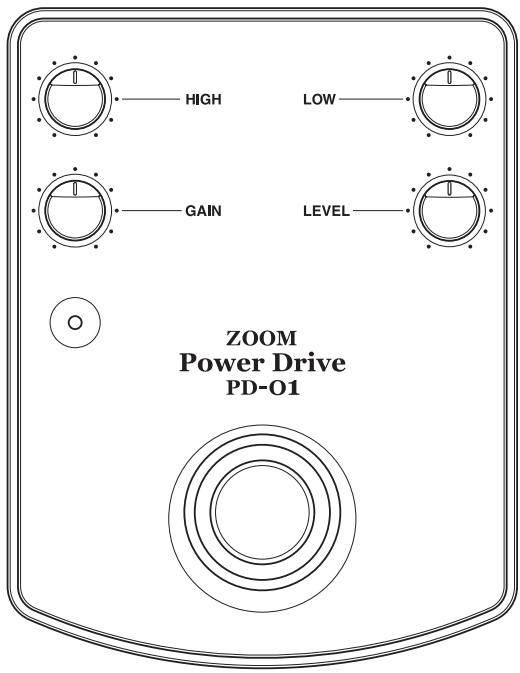
ZOOM Power Drive PD-01
Operation Manual
INDEX
Features 2
Parts and Functions 4
Connections 6
Sound Samples 8
PD-01 and Compact Effects 10
PD-01 and Multi-Effects 11
Troubleshooting 12
Specifications 14
Usage Precautions 15
Safety Precautions 16
Features
The Zoom Power Drive PD-01 is a dedicated overdrive unit with the following features.
- Unprecedented warm and full overdrive
A specially developed analog circuit provides totally unmuffled, natural-sounding distortion without any trace of stickiness or hollowness. This results in natural-sounding distortion which fully brings out picking nuances. Inherent noise is also kept very low.
Use as full-fledged booster
With the GAIN control set to zero, the PD-01 gives superb clean sound. The output stage can deliver up to 20 Vp-p, which drive the amplifier to overdrive with fat, full-bodied sound.
- Mechanical switch for on/off and true bypass
On/off switching is performed using a mechanical foot switch. In the bypass position, the guitar signal is passed through without any alteration.
- HIGH/LOW equalizer provides versatility
The PD-01 features separate HIGH and LOW controls. This gives you more flexibility in creating your own sound with options, ranging from a mild drive tone to a sharp, bright distortions.
Sturdy metal chassis
The rock-solid case made of aluminum not only looks good, it also can withstand the rigors of use on stage. It's low profile provides excellent stability.
Parts and Functions
This section explains the various parts of the PD-01.
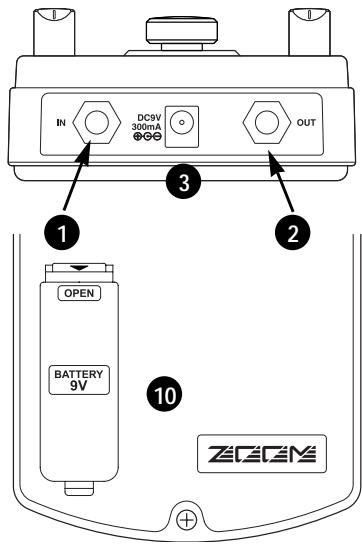
1 IN jack
The input of the unit acts as a power switch. When you connect the plug of the cable from the guitar here, the unit is turned on.
OUT jack
This is the output of the unit. Connect the plug of the cable going to the guitar amplifier or other effect device here.
3 ACadapterjack
When powering the unit from the AC adapter, insert the plug from the adapter into this jack. Be sure to use only an AC adapter rated for 9 V DC, center negative, 300mA (Zoom AD-0006). When the AC adapter is connected, the PD-01 will always be ON, regardless of whether a cable is plugged into the IN jack.
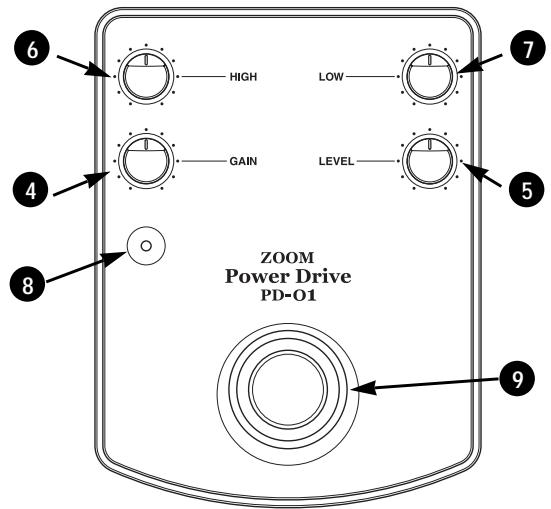
4 GAIN control
Turning this control clockwise increases the drive effect. In the zero position, there is no distortion.
LEVEL control
This control adjusts the output signal level. Turning the control clockwise increases the level.
6 HIGH control
This control adjusts the high frequency range.
LOW control
This control adjusts the low frequency range.
8 Indicator
Illuminates when the PD-01 is active.
9 Foot switch
Switches the PD-01 effect on and off.
10 Battery compartment
A 9V battery (6F22) can be inserted here.
Connections
- How to connect the PD-01.
1. Open cover of battery compartment and insert battery
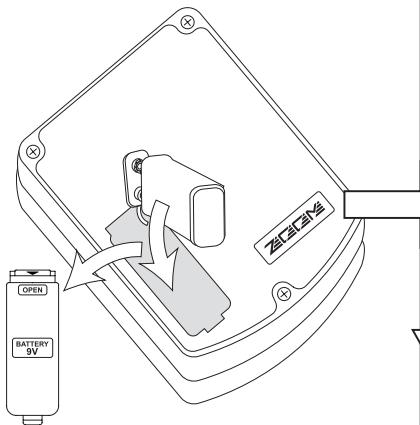
Take care to snap the battery to the connector with correct polarity.
2. Turn amplifier off and connect cable to guitar
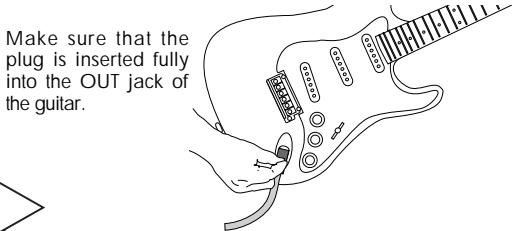
3. Plug cable from guitar into IN jack of PD-01
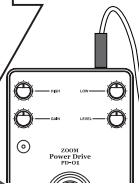
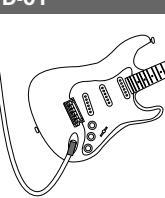
Insert the cable from the guitar into the IN jack of the PD01. This turns the PD01 on.
4. Connect cable to OUT jack of PD-01
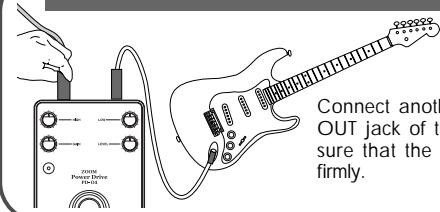
Connect another cable to the OUT jack of the PD-01. Make sure that the plug is inserted firmly.
6. Raise volume
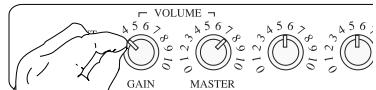
Turn power to the amplifier on, and raise the LEVEL control on the guitar and PD01.
5. Connect output cable to amplifier
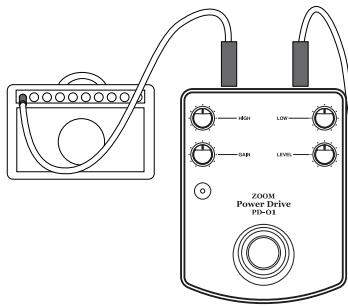
Plug the cable from the OUT jack of the PD01 to the IN jack of the amplifier.

Always follow the above sequence.
If steps are performed in reverse order, there is a danger of damage to the amplifier or speakers.
Sound Samples
- This section shows some actual setting examples and gives information on amplifier settings.
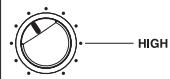
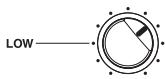
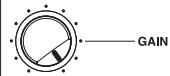
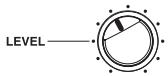
Standard overdrive sound
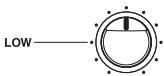
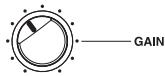
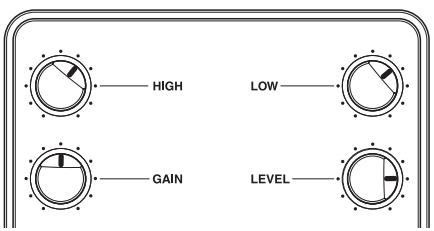
Set the amplifier to clean sound without distortion. This will allow you to easily switch between clean sound and overdrive. In this example, the GAIN is set fairly high and the LOW range is given a boost, resulting in a mild, warm sound. This is suitable for applications ranging from light rock backing to solo play.
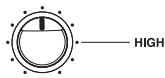

Boost sound emphasizing amp distortion
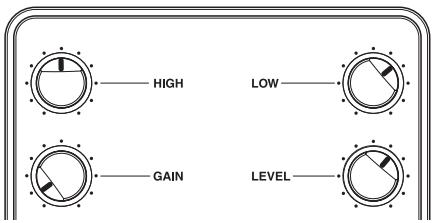
These settings emphasize the amplifier distortion. The key is the 10 o'clock position of the GAIN control. The HIGH and LOW controls may be left in the center. LEVEL can be adjusted to fit the amplifier distortion. The sound of this widely applicable setup will differ considerably, depending on the volume level setting at the guitar.
★Clean sound with a fat character
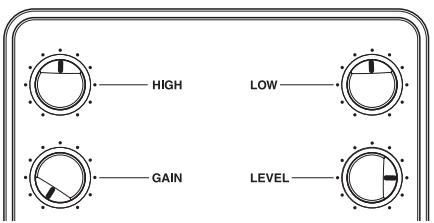
When the clean tone of the amplifier lacks a bit of body, the PD-01 can provide improvement with very moderate settings. The GAIN setting is the key. When set to a point where distortion is barely noticeable, the sound will have more body and punch. Unlike with conventional overdrive effects, you can create a sharp, fat sound.
Booster sample 1: clean & crunch
This is a special way to use the PD-01. Set GAIN to zero and raise the level to get great booster performance. Set the amplifier to clean tone for backing, and then set the PD-01 to ON to obtain a natural crunch sound produced by the amplifier in conjunction with the PD-01.
Booster sample 2: drive & distortion
Set up the amplifier to create a drive sound for backing, and activate the PD-01 for playing solos. The PD-01 is great for this technique, which is often used with large stack amps in the British style. Thanks to the booster function, you'll get incredibly distinct distortion sound.
PD-01 and Compact Effects
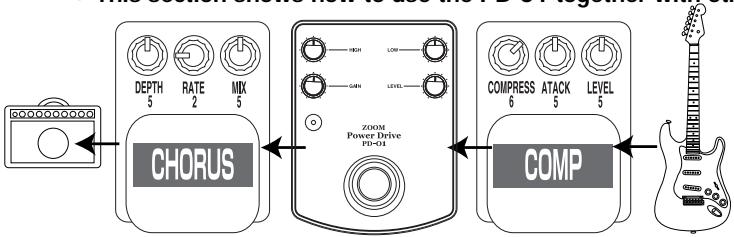
This section shows how to use the PD-01 together with other compact effect devices.
PD-01 SETTING : GAIN 5 HIGH 5 LOW 5
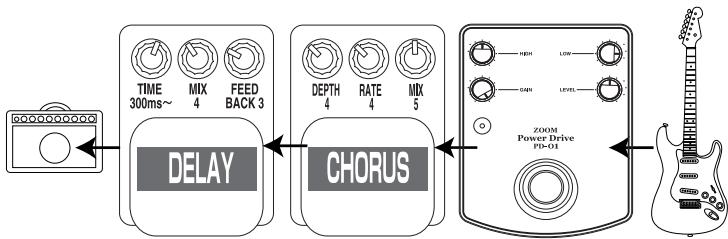
PD-01 SETTING : GAIN 10 HIGH 5 LOW 8
★With compressor & chorus
In this example, a compressor is inserted before the PD-01 for level-equalized overdrive sound. Activating the chorus yields a sound that is optimally matched to light chord work.
★With chorus & delay
In this setup, the PD-01 GAIN control is turned up fully. Connect the chorus and delay after the PD-01, for extended solos. Chorus can be set as desired, but the delay should be matched to the tempo of the song. By choosing a fairly long delay time, you can create a wide, expansive sound.
PD-01 and Multi-Effects
This section shows how to use the PD-01 together with multi-effect devices such as the GFX-4.
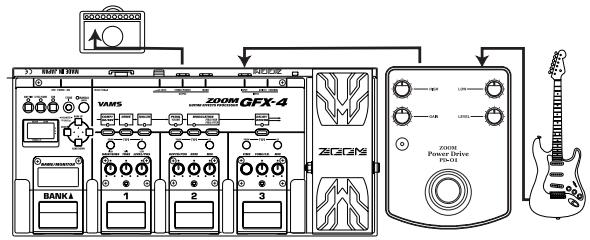
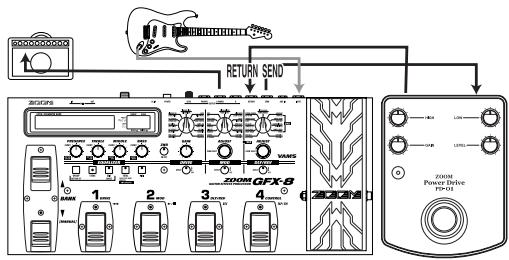
Creating drive sound with PD-01 only
When using a multi-effect device with the PD-01, the PD-01 should be connected before the other device. For distortion sound, create the distortion with the PD-01 only.
Using send/return loop of multi-effect
When using a multi-effect device such as the GFX-8 with send/return jacks, the PD-01 can be used as if it were a part of the other device. You can switch the PD-01 on and off using patch programs of the multi-effect.
Troubleshooting
- If there seems to be a problem with the unit, check the following points first.
No sound.
Are connections to the IN and OUT jacks reversed? Check the connections.
Is a battery inserted? If there is no battery in the unit and the AC adapter is not used, there will be no sound. Insert a fresh battery, or connect the AC adapter.
Is the guitar or amplifier volume or the LEVEL control of the PD-01 turned down? Raise the volume.
Are there any problems with other effect devices or with cables? Use a known good cable and connect the PD-01 directly to the amplifier.
Sound level is low, and sound is distorted also in bypass mode.
Is the battery exhausted? Insert a fresh battery.
Noise is heard.
Are several distortion effects used in series? Excessive compressor settings can also result in noise. Turn only the currently used devices on.
Is the cable of good quality? Low-quality cables can cause noise.
Is the unit used in the vicinity of a computer monitor, refrigerator, fluorescent lamp, motor, or similar device? The guitar or cable can pick up noise from such devices. In case of problems, increase the distance to such devices.
★ Battery gets used up very quickly.
Power to the PD-01 gets turned on when a plug is inserted in the IN jack. In this condition, current is drawn from the battery regardless of whether the effect is switched on or off. When not using the unit, be sure to disconnect the plug from the IN jack. Also, the use of alkaline battery rather than manganese is recommended. Connecting the AC adapter (ZOOM AD-0006) allows extended use without having to worry about the battery. When using several effect devices, powering them from AC adapters is recommended.*The initially supplied battery is for checking only and may have a short service life.
Distortion is not strong enough. Sound is not clear.
Turn up the position of the GAIN control and of the HIGH/LOW controls. Also don't forget to fully turn up the level and tone controls of the guitar.
When using an effect device between the PD-01 and the guitar, check the battery, volume, and cable of that device.
Cannot produce the desired sound.
The audible result of using the PD-01 depends on various different factors. Hardware such as effect devices, guitar, and amplifier of course must be considered, but play technique aspects such as picking and fingering are also important. When creating your sound, do not set controls initially to the 0 or 10 position. Start with all controls set to center and perform fine adjustment from there.
Specifications
Controls
Foot switch
GAIN control
LEVEL control
HIGH control
LOW control
- Input
Standard monaural phone jack
Rated input impedance: 470 kilohms
Rated input level: -20 dBm
Output
Standard monaural phone jack
Rated output impedance: 10 kilohms or more
Rated output level: +19 dBm
Power requirements
Battery (6F22, 9V) or AC adapter AD-0006 (9 V DC, 300 mA, center minus)
Battery life
Continuous operation: approx. 15hours (alkaline) or 5hours (manganese)
External Dimensions
98 (W) x 127 (D) x 48 (H) mm
Weight
710 g (including battery)
- Supplied accessories
Instruction manual
Battery (6F22, 9V)
^*0 dBm = 0.775 Vrms
*Design and specifications subject to change without notice.
Usage Precautions
- Electrical interference
The PD-01 has been designed to minimize emission of electromagnetic radiation from inside the device, and to minimize susceptibility to external interference.
However, equipment that is very susceptible to interference or that emits powerful electromagnetic radiation should not be placed near the PD-01, as the possibility of interference cannot be ruled out entirely.
If such problems occur, move the PD-01 further away from the affected equipment.
- Cleaning
Use a soft, dry cloth to clean the PD-01. If necessary, slightly moisten the cloth. Do not use abrasive cleanser, wax, or solvents (such as paint thinner or cleaning alcohol), since these may dull the finish or damage the surface.
Please keep this manual at hand for future reference.
Safety Precautions
In this manual, important information that is intended to prevent the danger of injury to persons and property damage to equipment is marked with special symbols. The meaning of these symbols is explained below.

Warning

Caution
Disregarding instructions printed here incurs the risk of death or severe injury to persons.
Disregarding instructions printed here incurs the risk of injury to persons and/or damage to peripheral equipment.
Please observe the following safety tips and precautions to ensure hazard-free use of the PD-01.
About power

Warning
Using an AC adapter to power this unit is recommended. When powering the unit from a battery, an alkaline battery should be used.
AC adapter operation
- Use only an AC adapter rated for 9VDC 300mA center minus (Zoom AD-0006). Using the unit with a different adapter poses a risk of fire and electric shock.
- Connect the AC adapter only to an AC outlet that supplies the rated voltage required by the adapter.
- When disconnecting the AC adapter from the AC outlet, always grasp the adapter itself.
- Disconnect the AC adapter when not using the unit for an extended time.
Battery operation
- Use a generic 9V dry battery (6F22) (alkaline or manganese).
The PD-01 is not designed to charge batteries. Observe the precautions on the battery. - Remove the battery when not using the unit for an extended time.
- If battery leakage has occurred, wipe the battery compartment and the battery terminals carefully to remove all remnants of battery fluid.
- While using the unit, the battery compartment cover should be closed.
Usage environment

Caution
Avoid using the PD-01 in environments where it will be exposed to:
- Temperature extremes
High humidity or moisture - Excessive dust or sand
- Excessive vibration or shock
Handling

Caution
-
The PD-01 is a precision instrument. Except for the foot switch, do not push other parts with your feet or subject them to strong force.
-
Take care that no foreign objects (coins or pins etc.) or liquids can enter the unit.
-
Be sure to turn the power to all equipment off before making connections.
-
Before moving the unit, turn the power off, disconnect all cables and the AC adapter.
Alterations

Caution
- Never open the case of the PD01 or attempt to modify the product in any way since this can result in damage.
- ZOOM does not accept responsibility for any damage caused by alteration of the unit.
ZEEM
CATCH US IF YOU CAN
ZOOM CORPORATION
NOAH Bldg., 2-10-2, Miyanishi-cho, Fuchu-shi, Tokyo 183-0022, Japan
PHONE: +81-42-369-7116 FAX: +81-42-369-7115
Web Site: http://wwwzoomo.co.jp
Printed in Japan PD-01-5000-2
- ZEEM
- ZOOM Power Drive PD-01
- INDEX
- Features
- - HIGH/LOW equalizer provides versatility
- Sturdy metal chassis
- Parts and Functions
- Connections
- Open cover of battery compartment and insert battery
- Turn amplifier off and connect cable to guitar
- Plug cable from guitar into IN jack of PD-01
- Connect cable to OUT jack of PD-01
- Raise volume
- Connect output cable to amplifier
- Always follow the above sequence.
- Sound Samples
- Standard overdrive sound
- Boost sound emphasizing amp distortion
- ★Clean sound with a fat character
- Booster sample 1: clean & crunch
- Booster sample 2: drive & distortion
- PD-01 and Compact Effects
- ★With compressor & chorus
- ★With chorus & delay
- PD-01 and Multi-Effects
- Creating drive sound with PD-01 only
- Using send/return loop of multi-effect
- Troubleshooting
- ★ Battery gets used up very quickly.
- Distortion is not strong enough. Sound is not clear.
- Cannot produce the desired sound.
- Specifications
- Usage Precautions
- - Electrical interference
- - Cleaning
- Safety Precautions
- About power
- AC adapter operation
- Battery operation
- Usage environment
- Handling
- Alterations
Marque : ZOOM
Modèle : PD-01
Catégorie : Pédalier