DC34 ANMAL - Aspirateur sans fil DYSON - Notice d'utilisation et mode d'emploi gratuit
Retrouvez gratuitement la notice de l'appareil DC34 ANMAL DYSON au format PDF.


| Type de produit | Aspirateur sans fil balai |
| Marque | Dyson |
| Modèle | DC34 Animal |
| Alimentation | Batterie rechargeable lithium-ion |
| Chargeur | Chargeur Dyson spécifique, 100-240 V |
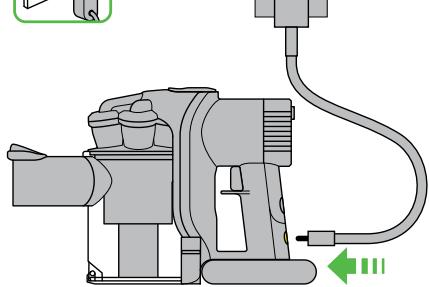
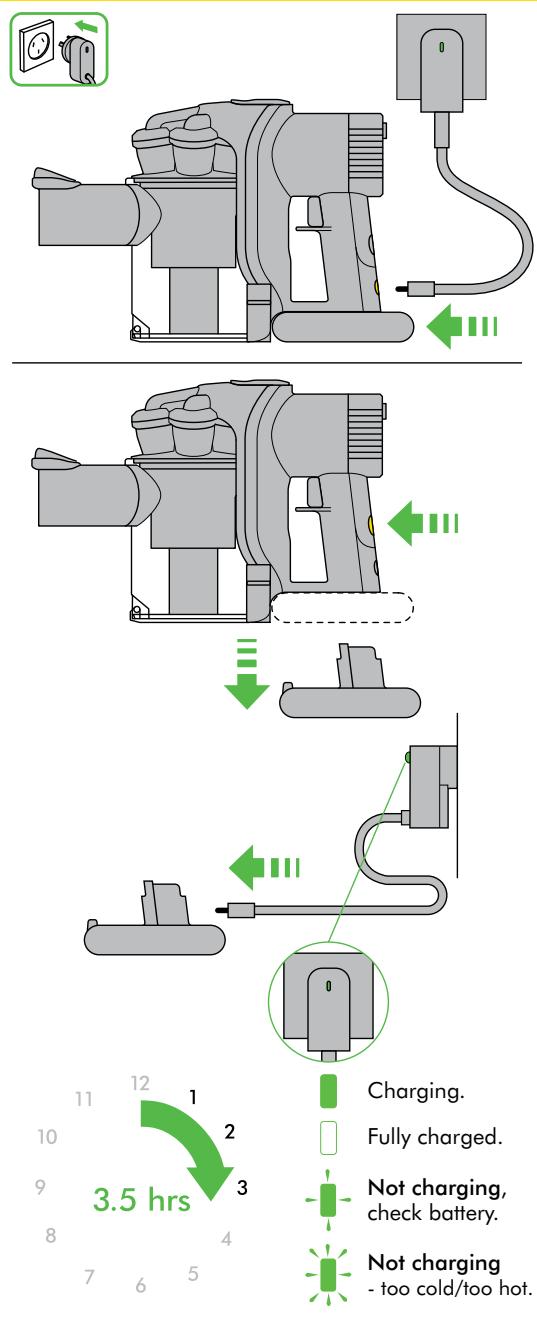
| Temps de charge | Environ 3,5 heures (charge complète) |
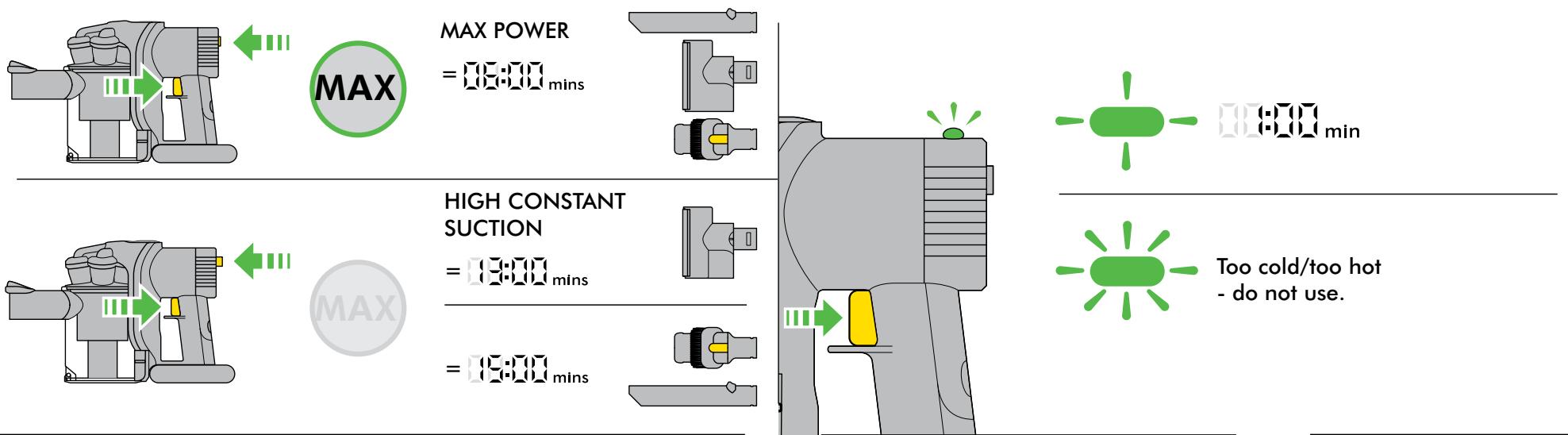
| Autonomie | Jusqu'à 6 minutes en mode puissance maximale ; 15 minutes en mode aspiration constante élevée |
| Capacité du bac transparent | 0,35 L (environ) |
| Filtration | Filtre lavable à l'eau froide |
| Accessoires inclus | Brosse motorisée, outil combiné |
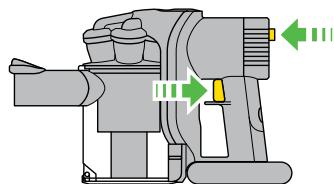
| Modes de puissance | Mode aspiration constante élevée (HIGH CONSTANT SUCTION) et mode puissance maximale (MAX POWER) |
| Indicateur de charge | Voyant lumineux : clignotant (moins d'une minute), fixe (charge complète), clignotement rapide (trop froid/chaud) |
| Arrêt automatique | Oui, en cas de surchauffe ou de blocage |
| Utilisation prévue | Domestique intérieur et voiture |
| Entretien du filtre | Laver à l'eau froide régulièrement ; laisser sécher 12 heures complètement |
| Nettoyage du bac | Laver à l'eau froide uniquement ; ne pas mettre au lave-vaisselle |
| Démontage de la brosse | Oui, avec une pièce de monnaie pour déverrouiller le loquet |
| Garantie | 2 ans pièces et main-d'œuvre (conditions) |
| Pays de fabrication | Malaisie |
| Poids | Environ 1,5 kg |
FOIRE AUX QUESTIONS - DC34 ANMAL DYSON
Questions des utilisateurs sur DC34 ANMAL DYSON
0 question sur cet appareil. Repondez a celles que vous connaissez ou posez la votre.
Poser une nouvelle question sur cet appareil
Téléchargez la notice de votre Aspirateur sans fil au format PDF gratuitement ! Retrouvez votre notice DC34 ANMAL - DYSON et reprennez votre appareil électronique en main. Sur cette page sont publiés tous les documents nécessaires à l'utilisation de votre appareil DC34 ANMAL de la marque DYSON.
MODE D'EMPLOI DC34 ANMAL DYSON
OPERATING MANUAL
DC 34
DC34 ANIMAL
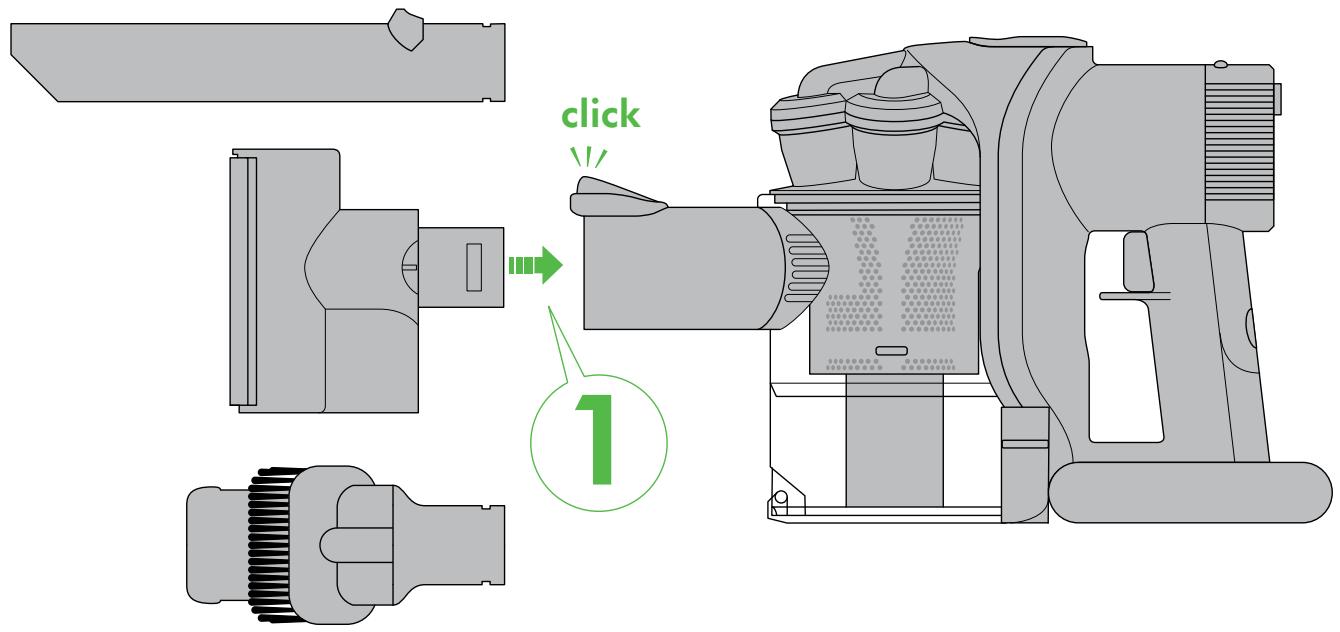
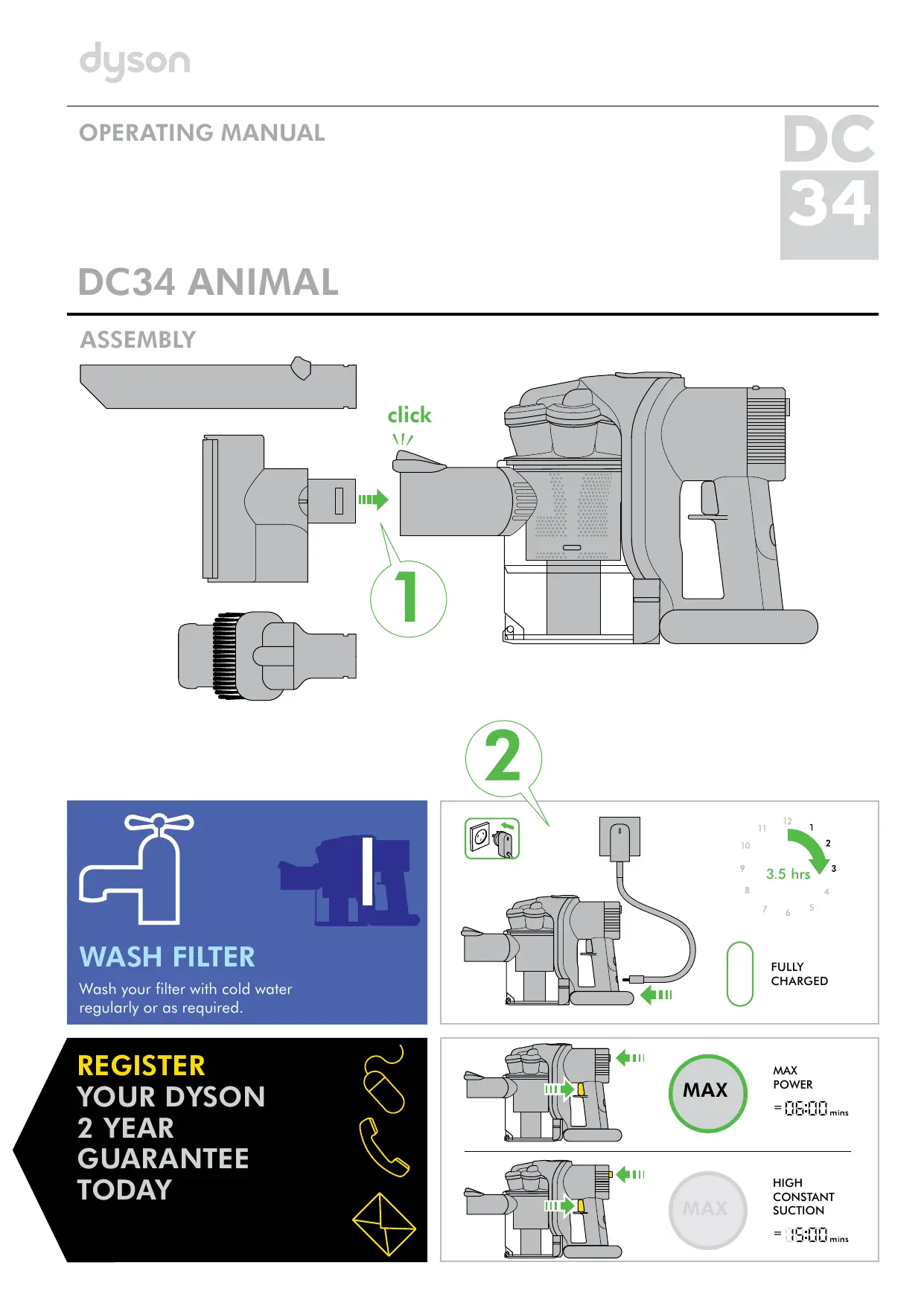
ASSEMBLY
WASH FILTER
Wash your filter with cold water regularly or as required.

REGISTER
YOUR DYSON
2 YEAR
GUARANTEE
TODAY

2
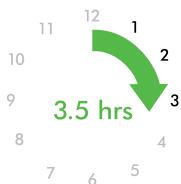

FULLY
CHARGED
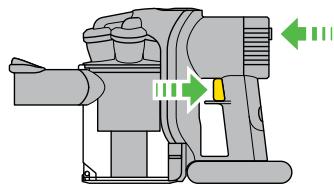


MAX
POWER
=1;1;1;1;1;mlns
HIGH
CONSTANT
SUCTION
=1{1:1}1mins
Your Dyson appliance will be covered for parts and labour for 2 years from the date of purchase, as detailed in the terms of the Dyson guarantee on page 9 of this Dyson Operating Manual.
If you have a query about your Dyson appliance, call the Dyson Customer Care Helpline with your serial number and details of where and when you bought the appliance. Your serial number can be found on the main body of the appliance behind the filter.
Most queries can be solved over the phone by one of our Dyson Customer Care Helpline staff (details below).
Visit our website to register your Dyson full parts and labour guarantee online (Australia and New Zealand only).
AU: www.dyson.com.au/register NZ: www.dyson.co.nz/register
Note your serial number for future reference
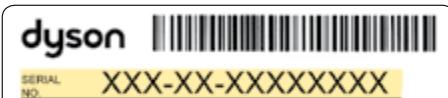
MADE IN MALAYSIA BY OYSON LIMITED MALMESBURY SN16 SRP UK
This illustration is for example purposes only.
3 EASY WAYS TO REGISTER YOUR DYSON 2 YEAR GUARANTEE
REGISTER ONLINE
Visit our website to register your Dyson full parts and labour guarantee online (Australia and New Zealand only).
AU: www.dyson.com.au/register NZ: www.dyson.co.nz/register
REGISTER BY PHONE
Call our dedicated Helpline.
AU 1800239766
NZ 0800 397 667
SG 70004357546
ID 02170739766
REGISTER BY MAIL
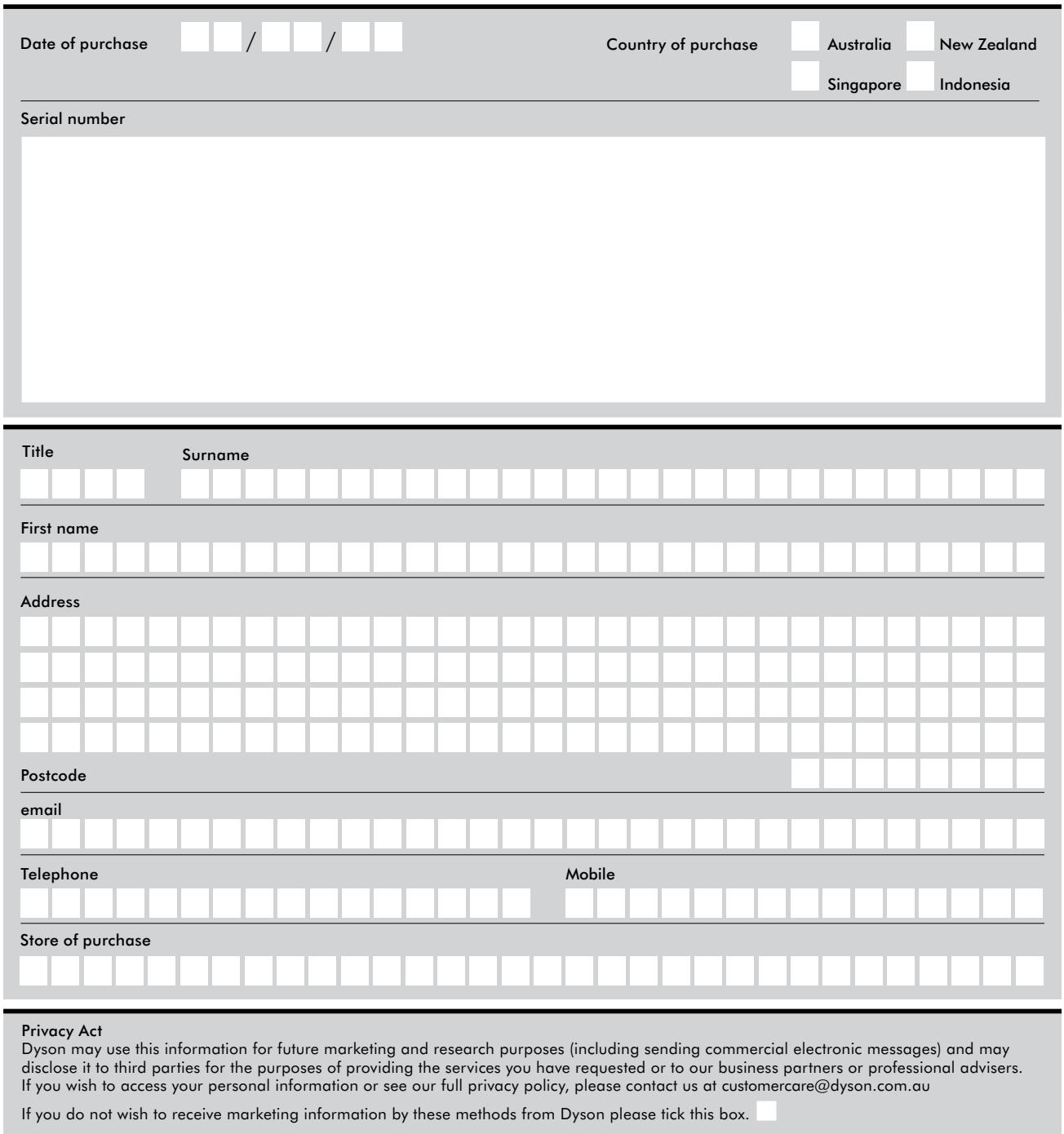
Complete and return the form to Dyson in the envelope supplied.

IMPORTANT SAFETY INSTRUCTIONS
BEFORE CHARGING THE BATTERY OR USING THIS APPLIANCE, READ ALL INSTRUCTIONS AND CAUTIONARY MARKINGS IN THIS MANUAL, ON THE CHARGER, ON THE BATTERY AND ON THE DYSON APPLIANCE.
When using an electrical appliance, basic precautions should always be followed, including the following:
WARNING
TO REDUCE THE RISK OF FIRE, ELECTRIC SHOCK, OR INJURY:
- This Dyson appliance and charger are not intended for use by young children or infirm persons with reduced physical, sensory or reasoning capabilities, or lack of experience and knowledge, unless they have been given supervision or instruction by a responsible person concerning use of the Dyson appliance or charger to ensure that they can charge and use the Dyson appliance safely.
- Do not allow to be used as a toy. Close attention is necessary when used by or near children. Children should be supervised to ensure that they do not play with the Dyson appliance or charger.
- Do not install, charge or use the Dyson appliance outdoors, in a bathroom or within 3.1m of a pool. Do not use the Dyson appliance or charger on wet surfaces and do not expose to moisture, rain or snow. Do not use to pick up water.
- Do not use or charge with damaged cable. If the Dyson appliance or charger is not working as it should, has received a sharp blow, has been dropped, damaged, left outdoors, or dropped into water, do not use and contact the Dyson Customer Care Helpline.
- Do not unplug the charger by pulling on the cable. To unplug, grasp the charger, not the cable.
- Unplug the charger from the outlet when not in use for extended periods. Make sure the charger cable is located so that it will not be stepped on, tripped over, or otherwise subjected to damage or stress.
- Do not stretch the charger cable or place the cable under strain. Keep the cable away from heated surfaces.
- Do not handle the charger, including the charger terminals or Dyson appliance with wet hands.
- Do not put any object into openings. Do not use with any opening blocked; keep free of dust, lint, hair, and anything that may reduce airflow.
- Keep hair, loose clothing, fingers, and all parts of body away from openings and moving parts, such as the brush bar.
- Use extra care when cleaning on stairs.
- Do not use to pick up flammable or combustible liquids, such as petrol, or use in areas where they may be present.
- Do not pick anything that is burning or smoking, such as cigarettes, matches, or hot ashes.
- Do not use without the clear bin and filter in place.
- Use only as described in this manual. Use only Dyson recommended accessories and replacement parts. Do not carry out any maintenance other than that shown in this manual, or advised by the Dyson Customer Care Helpline.
- Contact the Dyson Customer Care Helpline when service or repair is required. Do not disassemble the Dyson appliance as incorrect reassembly may result in an electric shock or fire.
- Use only Dyson chargers for charging this appliance. Use only Dyson batteries, other types of batteries may burst causing injury to persons and damage.
- Unplug the charger from outlet before cleaning or maintenance.
- The use of an extension cable is not recommended.
- Do not incinerate this Dyson appliance even if it is severely damaged. The batteries may explode in a fire.
- Do not press the battery release button during normal operation.
- Always turn off the Dyson appliance before connecting or disconnecting the motorised brush bar.
SAVE THESE INSTRUCTIONS
THIS DYSON APPLIANCE IS INTENDED FOR DOMESTIC HOUSEHOLD AND CAR USE ONLY.
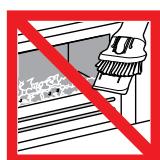
Do not use near naked flame.
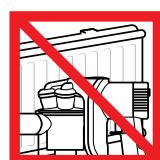
Do not store near heat source.
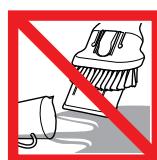
Do not pick up water or liquids.

Do not pick up burning objects.
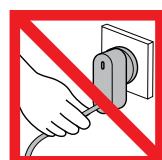
Do not pull on the cable.
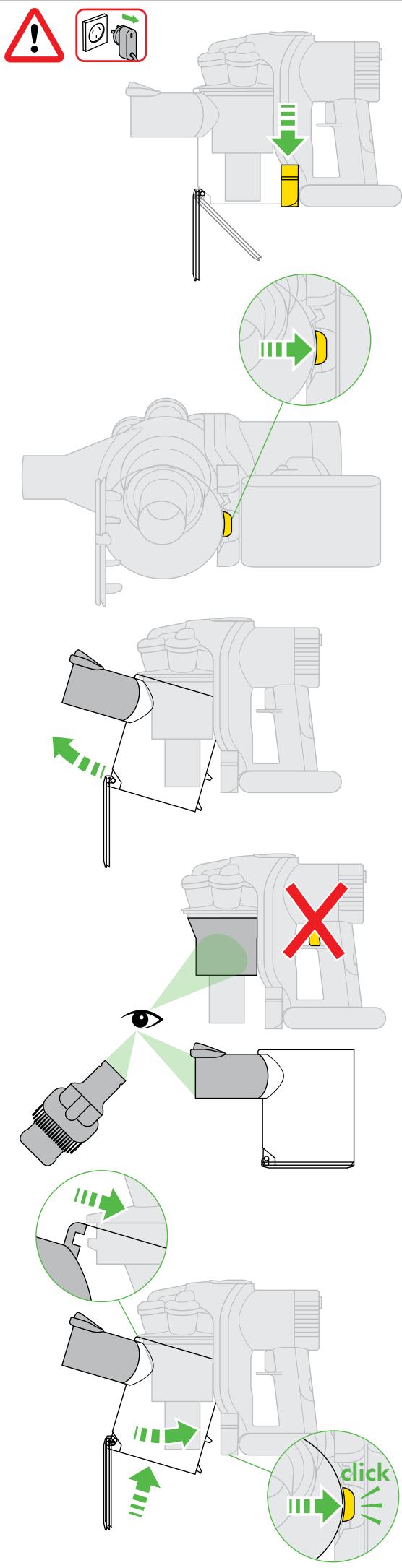
Looking for blockages
Power
2
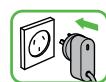
Charging
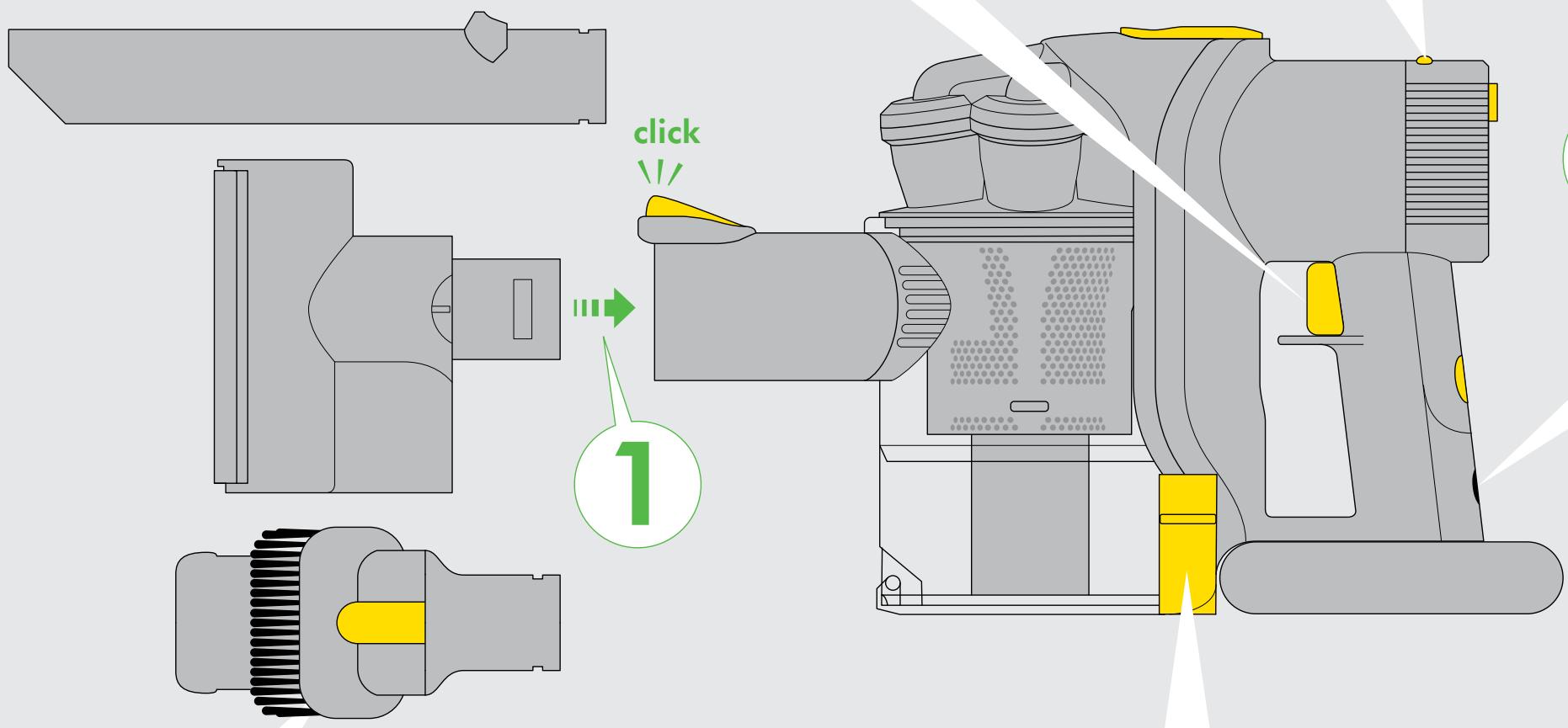
Combination accessory tool
1
2
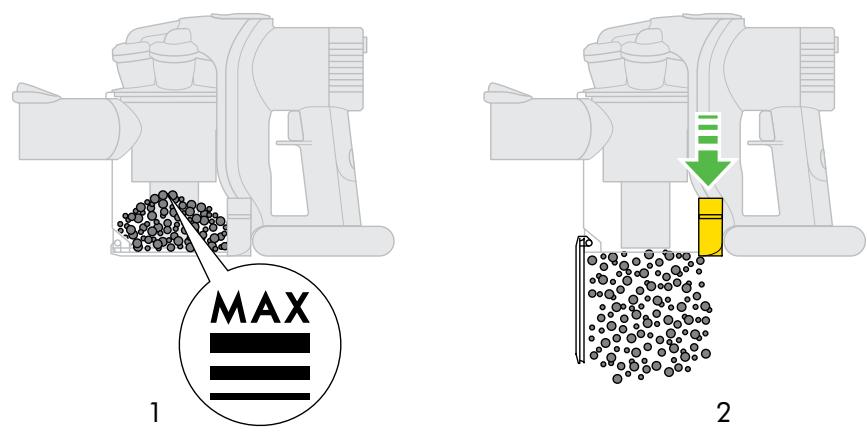
Emptying the clear bin
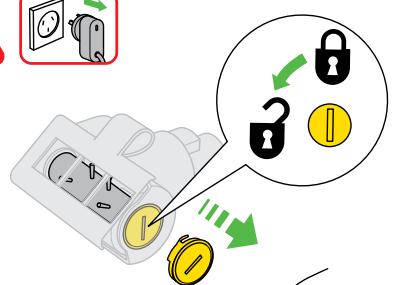
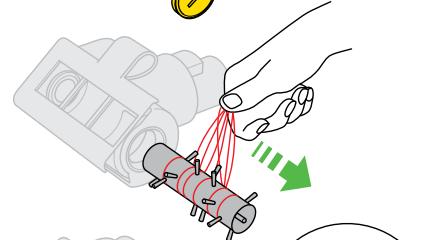
Motorised brush bar
2
3
IMPORTANT!
WASH FILTER

Wash your filter with cold water regularly or as required.
Register for a filter wash reminder by email (Australia only):
customercare@dyson.com.au
USING YOUR DYSON APPLIANCE
CAUTIO
- Do not allow the appliance to be used by anyone who may not be able to operate it safely.
Take care not to engage the silver battery release button during normal operation. - Dirt and debris may be released from the appliance if it is turned upside down. Ensure the appliance remains upright in use.
- Do not operate the appliance while checking for blockages.
- Do not use outdoors or on wet surfaces or to vacuum water or other liquids - electric shock could occur.
- Do not lubricate any parts, or carry out any maintenance or repair work other than that shown in this Dyson Operating Manual, or advised by the Dyson Customer Care Helpline.
PLEASE NOTE:
This appliance is designed for domestic indoor and car use only. Do not use it whilst the car is in motion or while driving.
- Do not use the appliance to pick up sharp hard objects, small toys, pins, paper clips, etc. They may damage the appliance.
- Do not press down on the nozzle with excessive force when using the appliance as this may cause damage.
If the motor overheats, the appliance will cut out automatically. Leave it to cool for at least an hour and check for blockages before restarting.
- Fine dirt such as flour or plaster dust should only be vacuumed in very small amounts.
Before vacuoming highly polished floors, first check that the underside of the floor tool and its bristles are free from foreign objects that could cause marking
- Consult your flooring manufacturer's recommended instructions before vacuuming and caring for your flooring, rugs, and carpet. The brush bar on the appliance can damage certain carpet types and floors. Some carpets will fuzz if a rotating brush bar is used when vacuuming. If this happens, we recommend vacuuming without the motorhead and consulting with your flooring manufacturer.
- Do not use any lubricants, cleaning agents, polishes or air fresheners on any part of the appliance or charger.
This appliance is fitted with a thermal cut-out. If any part of the appliance becomes blocked the machine may overheat and automatically shut 'OFF'. If this happens, switch 'OFF' the appliance and allow to cool before attempting to check the filter or for blockages.
Clear any blockages before restarting (see pages 4 and 8).
- Store the appliance indoors. Do not use or store this appliance below 3^ . Ensure that the appliance is at room temperature before operating.
TROUBLESHOOTING - DYSON APPLIANCE

Flashing light - less than one minute of charge remaining/ fully discharged.
Rapidly flashing light - too cold/too hot. Do not use.
EMPTYING THE CLEAR BIN
CAUTION:
- Switch 'OFF' the appliance and disconnect from charger before emptying the clear bin.
Empty as soon as the dirt reaches the level of the MAX mark - do not overfill.
To release the dirt, push the red button at the side of the clear bin as shown on page 5. - To minimise dust/allergen contact when emptying, encase the clear bin tightly in a plastic bag and empty. Remove the clear bin carefully and seal bag tightly, dispose as normal.
PLEASE NOTE:
- Do not use the appliance without the clear bin in place.
CLEANING THE CLEAR BIN
CAUTION
To remove the clear bin, push the red button at the side of the clear bin as you would when emptying the clear bin. Then press the red release button on the underside of the appliance as shown on page 4.
Clean the clear bin with cold water only.
Ensure the clear bin is completely dry before replacing. PLEASE NOTE:
- Do not use detergents, polishes or air fresheners to clean the clear bin.
- Do not put the clear bin in a dishwasher.
Clean the shroud with a cloth or dry brush to remove lint and dirt.
WASHING YOUR FILTER
CAUTION
- Switch 'OFF' and disconnect from charger before removing the filter.
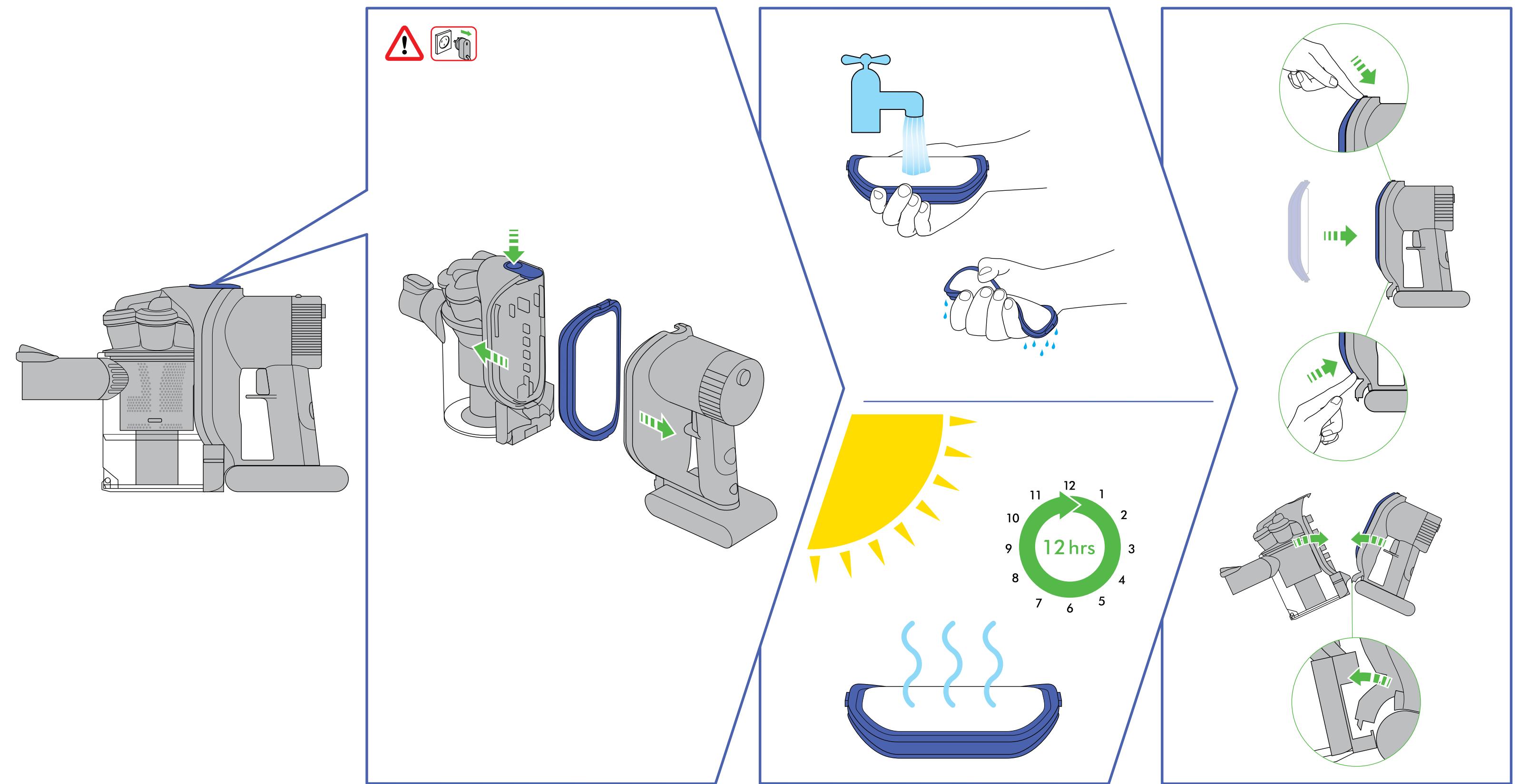
- Wash the filter with cold water only.
PLEASE NOTE:
This appliance has one filter, located as shown. It is important to check your filter and wash with cold water regularly or as required to maintain performance. The filter may require more frequent washing if vacuuming fine dust or if used mainly in 'HIGH CONSTANT SUCTION' power mode.
After washing please leave for 12 hours to dry completely.
Ensure filter is completely dry before refitting to the appliance.
- Do not use detergents to clean the filter.
- Do not put the filter in a dishwasher, washing machine, tumble dryer, oven, microwave or near an open flame.
LOOKING FOR BLOCKAGES
CAUTION:
- Switch 'OFF' the appliance and disconnect from charger before looking for blockages. Failure to do so could result in personal injury.
- Beware of sharp objects when clearing blockages.
Refit all parts of the appliance securely before using PLEASE NOTE: - Clearing blockages is not covered by the appliance's limited guarantee.
- If any part of the appliance becomes blocked, it may overheat and then automatically shut 'OFF'. Make sure the appliance is switched 'OFF' and disconnect from charger. Clear blockage before restarting.
CLEARING BRUSH BAR OBSTRUCTIONS
CAUTION:
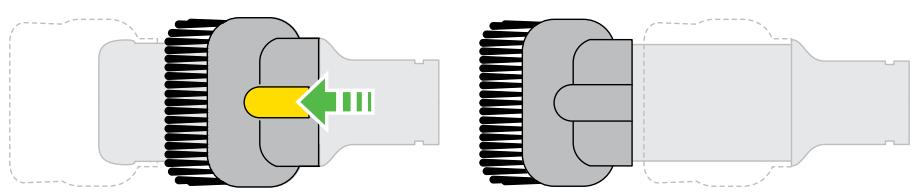
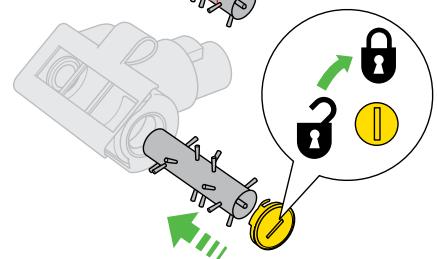
- Switch 'OFF' the appliance and disconnect from charger before clearing brush bar obstructions. Failure to do so could result in personal injury. If your brush bar is obstructed, it may shut 'OFF'. If this happens you will need to remove the brush bar as shown and clear any obstructing debris.
- Remove the brush bar by using a coin to unlock the fastener marked with a padlock. Remove the obstruction. Replace the brush bar and secure it by locking the fastener.
- Beware of sharp objects when clearing blockages.
Refit all parts of the appliance securely before using PLEASE NOTE: - Clearing brush bar obstructions is not covered by your appliance's limited guarantee.
CHARGING AND STORING THE DYSON APPLIANCE
- Your appliance will turn 'OFF' if the battery temperature is below 3^ . This is designed to protect the motor and battery of your product. Do not charge the appliance and then move it to an area with a temperature below 3^ for storage purposes.
- To help prolong battery life, avoid recharging immediately after a full discharge. Allow to cool for a few minutes.
- Avoid using the appliance with the battery flush to a surface. This will help it run cooler and prolong battery run time and life.
TROUBLESHOOTING - CHARGER

Charging

Fully charged.

Not charging - check battery.

Not charging - too cold/too hot.
BATTERY SAFETY INSTRUCTIONS
The appliance must be disconnected from the mains supply when removing the battery.
Use only Dyson batteries and charging unit for this appliance.
- The battery is a sealed unit and under normal circumstances poses no safety concerns. In the unlikely event that liquid leaks from the battery do not touch the liquid and observe the following precautions:
Skin contact - can cause irritation. Wash with soap and water.
Inhalation - can cause respiratory irritation. Expose to fresh air and seek medical advice.
Eye contact - can cause irritation. Immediately flush eyes thoroughly with water for at least 15 minutes. Seek medical attention.
- Disposal - wear gloves to handle the battery and dispose of immediately following local ordinances or regulations.
CAUTION:
The battery used in this device may present a risk of fire or chemical burn if mistreated. Do not disassemble, short contacts, heat above 60^ , or incinerate. Replace battery with a Dyson battery only, use of any other battery may present a risk of fire or explosion. Dispose of used battery promptly. Keep away from children. Do not disassemble and do not dispose of in fire.
The battery must be removed from the appliance before it is scrapped.
The battery is to be disposed of safely.
- The appliance must be disconnected from the supply mains when removing the battery.
Battery can be charged on or off the appliance. Take care when removing the battery.
AUSTRALIAN CONSUMER LAW
The details of the Dyson guarantee are set out below. In addition to your rights under the Dyson guarantee, we also provide the following statement as required by the Australian Consumer Law: In Australia, your Dyson appliance comes with statutory guarantees that cannot be excluded under the Australian Consumer Law. You are entitled to a replacement or refund for a major failure and for compensation for any other reasonably foreseeable loss or damage. You are also entitled to have your Dyson appliance repaired or replaced if it fails to be of acceptable quality and the failure does not amount to a major failure.
DYSON 2 YEAR GUARANTEE TERMS AND CONDITIONS
Terms and conditions of your Dyson 2 year guarantee.
The Dyson guarantee becomes effective from the date of purchase.
All work will be carried out by Dyson Appliances (Aust) Pty Ltd., Avery Robinson Ltd. (NZ), Singapore's authorised agent - Service @Home Pte Ltd., Indonesia's authorised agent - PT Higienis Indonesia.
Any parts replaced will become the property of Dyson Appliances (Aust) Pty Ltd., Avery Robinson Ltd. (NZ), Dyson Singapore Pte Ltd. or PT Higienis Indonesia.
- The repair and replacement of your appliance under Dyson guarantee will not extend the Dyson guarantee period.
- The Dyson guarantee provides benefits which are additional to, and do not affect, your statutory rights and remedies as a consumer.
- You must provide proof of (both the original and any subsequent) delivery/purchase before any work can be carried out on your appliance. Without this proof, any work carried out pursuant to the Dyson guarantee and any associated delivery charges (both to and from us) will be at your cost, subject to your statutory rights and remedies as a consumer. Please keep your receipt or delivery note.
WHAT IS COVERED
Your Dyson guarantee covers:
- The repair or replacement of your appliance if your appliance is found to be defective due to faulty materials, workmanship or function within 2 years of purchase or delivery (if any part is no longer available or out of manufacture Dyson will replace it with a functional replacement part).
Use of the appliance in the country of purchase.
WHAT IS NOT COVERED
Under your Dyson guarantee, Dyson shall not be liable for costs of repair or replacement of a product incurred as a result of:
Normal wear and tear (e.g. fuse, belt, brush bar, batteries etc).
- Industrial use of the appliance such as vacuuming gyprock dust or builders dust. This may void your Dyson guarantee.
- Accidental damage, faults caused by negligent use or care, neglect, careless operation or handling of the vacuum cleaner which is not in accordance with this Dyson Operating Manual.
- Blockages - please refer to this Dyson Operating Manual for details of how to unlock your appliance.
Use of the appliance for anything other than normal domestic household purposes in the country of purchase.
Use of parts not assembled or installed in accordance with the instructions of Dyson.
Use of parts and accessories other than those produced or recommended by Dyson.
- Damage from external sources such as transit, weather, electrical outages or power surges.
- Failures caused by circumstances outside Dyson's control.
- Repairs or alterations carried out by parties other than Dyson or its authorised agents.
If your Dyson guarantee does not apply, you may have statutory rights and remedies available to you as a consumer.
If you are in any doubt as to what is covered by your Dyson guarantee, please call the Dyson Customer Care Helpline on:
Australia 1800 239 766
New Zealand 0800 397 667
Singapore 7000 435 7546
Indonesia 021 707 39766
Remember: Always disconnect plug from mains before inspecting for problems.
- Sucking up certain items such as stockings, clippings of cloth, sizeable pieces of paper etc may block the hose or ducts. Should a blockage occur, first switch the appliance 'OFF' and refer to the 'Looking for blockages' section in this Dyson Operating Manual (see pages 4 and 8).
- Never pick up hot cinders or lit cigarette ends.
- Do not attempt to pick up water with your appliance, it has not been designed as a wet pick-up cleaner
REGISTERING YOUR GUARANTEE
To help us ensure you receive prompt and efficient service, please register as a Dyson appliance owner. There are three ways to do this:
Online (Australia and New Zealand only).
AU: www.dyson.com.au/register
NZ: www.dyson.co.nz/register
- By calling the Dyson Customer Care Helpline.
By completing and returning the enclosed form to us by mail.
This will confirm ownership of your Dyson vacuum cleaner in the event of an insurance loss, and enable us to contact you if necessary.
DYSON CUSTOMER CARE
THANK YOU FOR CHOOSING TO BUY A DYSON APPLIANCE
If you have a query about your Dyson appliance, call the Dyson Customer Care Helpline and quote your serial number, or contact us via the website. Your serial number can be found on the main body of the appliance behind the filter. Most queries can be solved over the phone by one of our Dyson Customer Care Helpline staff.
If your appliance needs a service, call the Dyson Customer Care Helpline so we can discuss the available options. To enable us to carry out work on your appliance, please contact the Dyson Customer Care Helpline to obtain a reply paid address in your state (available in Australia only).
If your appliance is under Dyson guarantee and the repair or replacement is covered, it will be repaired or replaced at no cost. If the repair or replacement is found not to be covered under the Dyson guarantee, the repair or replacement of the appliance and any associated delivery charges (both to and from us) will be at your cost, subject to your statutory rights and remedies as a consumer.
DYSON CUSTOMER CARE DETAILS
If there are any queries, please call the Dyson Customer Care Helpline. AU: 1800 239 766
(Mon-Fri 8:00am to 6:00pm EST, Sat-Sun 8:30am to 4:00pm EST)
www.dyson.com.au
NZ: 0800 397 667 (Mon-Fri 8:30am to 5:00pm)
www.dyson.co.nz
SG: 7000 435 7546 (Mon-Fri 9:00am to 6:00pm, Sat: 9:00am to 12.30pm) www.dyson.com.sg
ID: 021 707 39766 (Mon-Fri 9:00am to 5:00pm)
www.dyson.co.id
ABOUT YOUR PRIVACY
Dyson may use your information provided for future marketing and research purposes (including sending commercial electronic messages) and may disclose it to third parties for the purposes of providing the services you have requested, or to our business partners or professional advisers. If you wish to access your personal information or see our full privacy policy, please contact us at customercare@dyson.cam.au
DISPOSAL INFORMATION
Dyson products are made from high grade recyclable materials. Please dispose of this product responsibly and recycle where possible.
The battery should be removed from the product before it is disposed of.
Dispose of, or recycle the battery in accordance with local ordinances or regulations.
When your Dyson appliance reaches the end of its life, we are responsible for its safe disposal. You can send your old Dyson appliance back to us (at our cost) and we will organise for it to be recycled.*
- Please note that not all parts are recyclable. Recycling of parts is subject to the capabilities of 3rd party suppliers. Available in Australia only.
Simply:
- Box up your old Dyson appliance
- Take the package to your local post office and send to the address below:
Dyson We Recycle
Reply Paid 83215
Dyson Service Centre
8-10 Mangrove Lane
Taren Point, NSW 2229.
PRODUCT INFORMATION
Please note: Small details may vary from those shown.
IMPORTANT!
WASH FILTER

Wash your filter with cold water regularly or as required.
Register for a filter wash reminder by email (Australia only):
customercare@dyson.com.au
dyson
Dyson Customer Care
If you have a query about your Dyson appliance, call the Dyson
Customer Care Helpline with your serial number and details of
where and when you bought the Dyson appliance, or contact us
via the Dyson website. Your serial number can be found on the
main body of the Dyson appliance, behind the filter.
AU Dyson Customer Care
customercare@dyson.com.au
1800239766
Dyson Appliances (Aust) Pty Ltd.,
PO Box 2835,
Taren Point, NSW 2229,
Australia
www.dyson.com.au
NZ Dyson Customer Care
dyson@averyrobinson.co.nz
0800397667
Avery Robinson Ltd.,
Unit F, 151D Marua Road,
Ellerslie,Auckland 1051
New Zealand
www.dyson.co.nz
SG Dyson Customer Care
singapore@dyson.com
70004357546
Service @ Home Pte Limited,
2 Leng Kee Road,
04-09A Thye Hong Centre,
Singapore 159086
www.dyson.com.sg
ID Dyson Customer Care
service@higienis.com
021 707 39766
PT. Higienis Indonesia
Permata Plaza Top Floor TF-04,
JI, M. H. Thamrin Kav. 57
Jakarta 10350
Indonesia
www.dyson.co.id
Please take a few moments to answer our questions.
They will help us develop new products for the future.
1 This handheld vacuum is...
My first handheld vacuum (please go to question 3)
A replacement handheld vacuum
An additional handheld vacuum
2 Which brand of handheld vacuum are you replacing or
adding to?
Dyson
Kambrook
Electrolux
Breville
Black and Decker
Other, please specify
7 What is your average household income?
Less than $45,000
Between 45,000 - 74,000
Between 75,000 -100,000
Over $100,000
8 Do you have any household pets?
Dog
Cat
No
Other, please specify
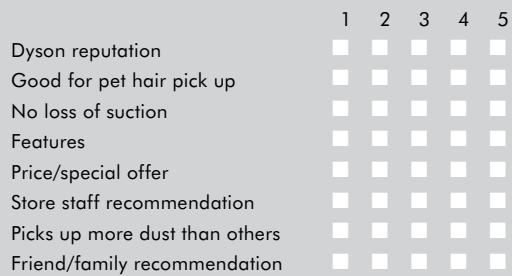
3 Why did you choose to buy a Dyson handheld vacuum?
Please rate each statement on a scale of 1 to 5,
1 being the least important and 5 the most important).
9 Does anyone in your household suffer from any of the following?
Asthma
Allergies
No
10 To which age group do you belong?
16-24
35-44
55-64
25-34
45-54
65+
11 Would you recommend a Dyson handheld vacuum to your family?
Yes
No
12 Do you have children?
Pre-school
Aged 5 - 17 years
Aged 17+ years
Children no longer at home
Pregnant
No children
13 Which best describes your home?
Up to 2 beds
3-4beds
More than 4 beds
14 What type of flooring do you have in your home?
Hard floors only
Mix of Carpet and Hard floors
Carpet in all areas except the bathroom/s and kitchen
Other (please specify)
4 Where did you first hear about Dyson handheld vacuums?
From friends and family
From the TV or a magazine
Saw it in a store catalogue
Saw it in a store
Recommended by salesperson
5 Where did you look for additional information?
Dyson website
Online reviews and forums
Retail staff
Retail catalogue
No additional research was done
6 Do you own other Dyson products?
Vacuum cleaner
Handheld
Handstick
Fan
No
3 EASY WAYS TO REGISTER YOUR DYSON 2 YEAR GUARANTEE