
THE BRIDGE II - Station d'accueil audio HARMAN KARDON - Notice d'utilisation et mode d'emploi gratuit
Retrouvez gratuitement la notice de l'appareil THE BRIDGE II HARMAN KARDON au format PDF.


| Type de produit | Station d'accueil audio pour iPod |
| Marque | Harman Kardon |
| Modèle | The Bridge II |
| Dimensions (H x L x P) | 30 mm x 114 mm x 114 mm |
| Poids | 0,17 kg |
| Alimentation | Via le produit Harman Kardon compatible (câble fourni) |
| Fonctions principales | Connexion unique, lecture audio, contrôle par télécommande Harman Kardon, chargement de l'iPod, navigation à l'écran |
| Compatibilité iPod | iPod avec connecteur dock, 4G ou ultérieur (modèles photo et vidéo pour affichage externe) |
| Compatibilité récepteurs | Produits Harman Kardon prêts pour The Bridge ou The Bridge II (ex: AVR 140, 240, 340, etc.) |
| Contenu de la boîte | Station d'accueil, 5 adaptateurs transparents (NANO, 5G VIDEO 60GB, 5G VIDEO 30GB, 13, 12/14), insert noir universel, adaptateur pour produits The Bridge |
| Entretien | Essuyer avec un chiffon doux et sec. Ne pas utiliser de produits abrasifs. |
| Sécurité | Ne pas exposer à l'humidité, utiliser uniquement avec des produits compatibles, ne pas insérer d'iPod sans adaptateur et insert |
| Réparabilité | Contacter le service client Harman Kardon pour toute réparation. Les dommages causés par une utilisation incorrecte ne sont pas couverts. |
| Pièces détachées | Adaptateurs de dock disponibles auprès d'Apple Inc. si nécessaire |
| Informations générales | Fabriqué pour iPod. Certifié Apple. Marque déposée Harman International. |
FOIRE AUX QUESTIONS - THE BRIDGE II HARMAN KARDON
Questions des utilisateurs sur THE BRIDGE II HARMAN KARDON
0 question sur cet appareil. Repondez a celles que vous connaissez ou posez la votre.
Poser une nouvelle question sur cet appareil
Téléchargez la notice de votre Station d'accueil audio au format PDF gratuitement ! Retrouvez votre notice THE BRIDGE II - HARMAN KARDON et reprennez votre appareil électronique en main. Sur cette page sont publiés tous les documents nécessaires à l'utilisation de votre appareil THE BRIDGE II de la marque HARMAN KARDON.
MODE D'EMPLOI THE BRIDGE II HARMAN KARDON
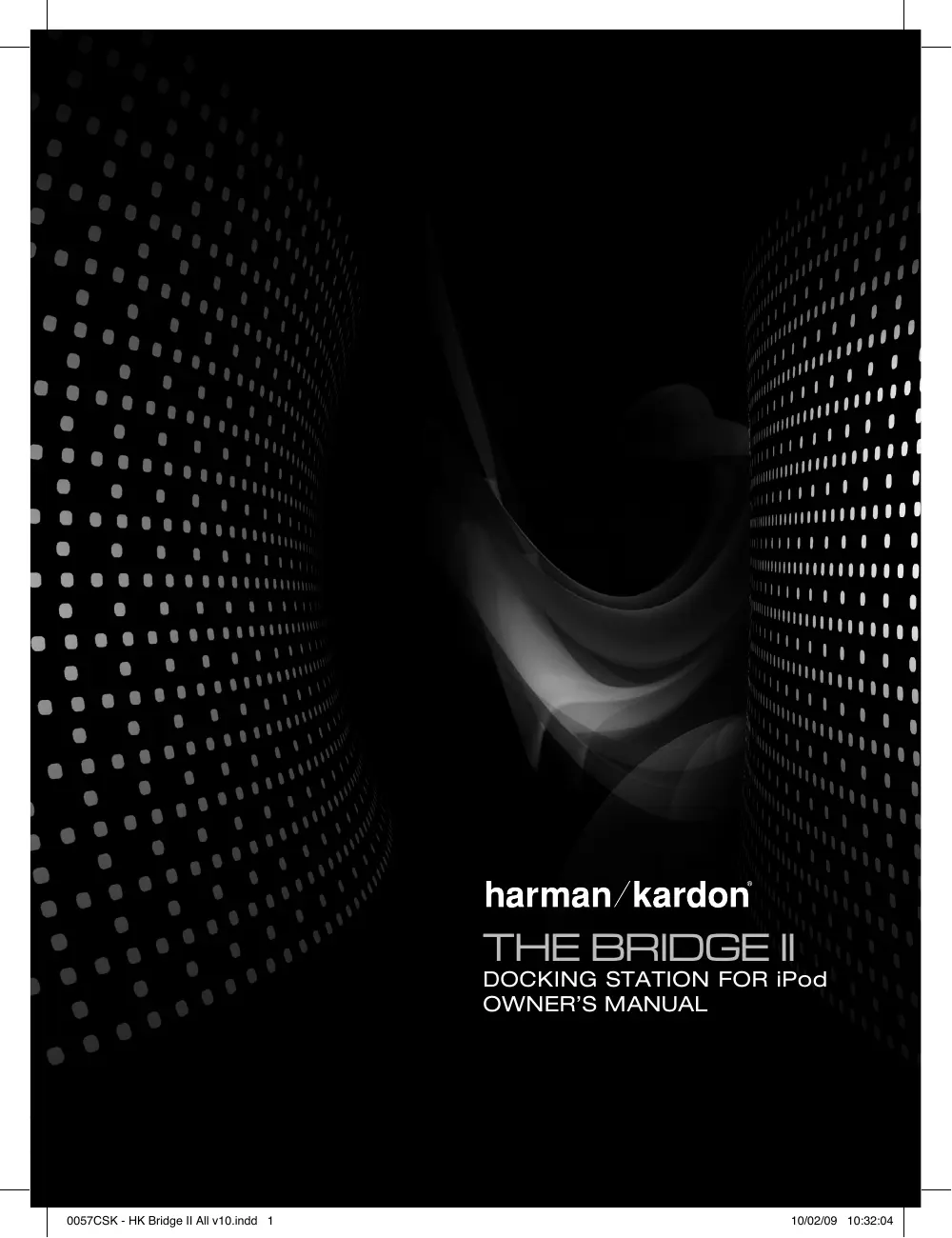
harman/kardon
THE BRIDGE II
DOCKING STATION FOR iPod
OWNER'S MANUAL
Congratulations! With The Bridge II, you are entering the new world of entertainment made possible by combining the incredible storage capacity and playback flexibility of an iPod with the sonic power of your Harman Kardon® system.
With a single cable, your iPod is connected, and all you need is your remote control to get started!
Features
- Single connection to any The Bridge-ready Harman Kardon product
- Plays content from a compatible iPod through your Harman Kardon system
Controls your iPod, using the Harman Kardon remote - Easy track selection with on-screen navigation
Charges the iPod
Included
The Bridge II docking station
- Five clear dock adapters, marked "NANO," "5G (VIDEO 60GB)," "5G (VIDEO 30GB)," "13" and "12, 14"
- Black insert marked "UNIVERSAL" to accept appropriate dock adapter
- Adapter for use with The Bridge-ready products
Compatibility
The Bridge II is compatible with all The Bridge- and The Bridge II-ready Harman Kardon receivers, and the Harman Kardon DMC 1000 digital media center. As of the printing of this manual, these models include:
- Audio playback only: AVR 140, AVR 240, AVR 340, AVR 145, AVR 245, AVR 445, AVR 645, AVR 745, HK 3490 and DMC 1000 (still-image playback available on DMC 1000)
- Audio, video and still-image playback: AVR 146, AVR 147, AVR 247, AVR 347, AVR 350, AVR 355 (230V), AVR 660 (230V), AVR 760 (230V), AVR 354 (120V), AVR 3550HD (120V) and AVR 7550HD (120V)
The Bridge II is compatible with most iPod models equipped with dock connectors, 4G or later. Video and still-image playback is only possible with photo- and video-capable iPod models that support video browsing: the iPod 5G, iPod classic and iPod nano (3rd generation).
The Bridge™ II
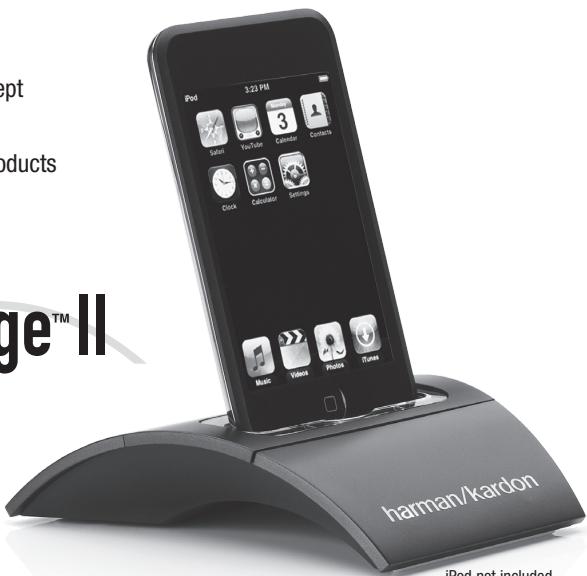
iPod not included
INSTALLING The Bridge II
With only a single cable connection, The Bridge II is easy to connect to your Harman Kardon product.
Step One: Turn off the Harman Kardon The Bridge-or The Bridge II-ready product, using its master power switch.
Step Two:
The Bridge II -Ready Products - Holding the cable with the wider part of the connector at the bottom, gently squeeze the tabs on each side as you insert it into the connector on the rear panel of the Harman Kardon product. See Figure 1.
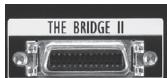
Figure 1 - The Bridge II connector on The Bridge II-ready Harman Kardon products
The Bridge -Ready Products - A different connector was used on The Bridge-ready Harman Kardon products and the HK3490, as shown in Figure 2. Do not plug The Bridge II directly into the DMP/The Bridge connector on the rear panel of these products. First, connect the included adapter to The Bridge II cable, then plug the adapter into the product.
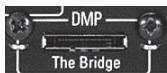
Figure 2 - The DMP/The Bridge connector on The Bridge-ready Harman Kardon products
Step Three: Place the black insert in The Bridge II, making sure to push it all the way down. See Figure 3.
NOTE: Do not place an iPod in The Bridge II unless both the black insert and a dock adapter are installed. Otherwise, the iPod will not connect properly, and both it and the Bridge II may sustain damage that is not covered by the warranty.
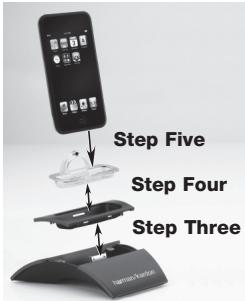
Figure 3 - Docking an iPod in The Bridge II
Step Four: Locate the dock adapter that was included with your iPod, or select one of the included clear dock adapters by referring to Table 1. If your iPod is an older model that does not appear in Table 1 and that did not include an adapter, contact Apple Inc. to purchase one.
Place the adapter in The Bridge II insert, as shown in Figure 3.
Step Five: Remove the iPod from any case, and dock it in The Bridge II, as shown in Figure 3.
Table 1 - Select the Correct The Bridge II Insert
| The Bridge II Insert | iPod Model |
| NANO | iPod nano, 1st and 2nd generation |
| 5G (VIDEO 60GB) | iPod, 5th generation (60GB, 80GB) and iPod classic (160GB) |
| 5G (VIDEO 30GB) | iPod, 5th generation (30GB) and iPod classic (80GB) |
| 13 | iPod nano, 3rd generation |
| 12, 14 | iPod touch – install large bumper |
USING The Bridge II
Once The Bridge II is connected, use either the front-panel controls or The Bridge-ready product's remote control to select tracks for playback. Press the DMP/ The Bridge Button on the remote, or use the Source Selector on the front panel to change sources. When an iPod is docked, a message will appear in the front-panel and on-screen displays, indicating that The Bridge II is connected. The displays will switch to the navigation menus, and the menu screen on the iPod itself will be replaced by a Harman Kardon logo graphic and a message reading "OK to Disconnect."
When you see the "OK to Disconnect" message displayed, the iPod is in Extended Mode and may be operated using the Harman Kardon product's front-panel or remote controls. The controls for most The Bridge- and The Bridge II-ready products are described in Table 2. The blank boxes indicate that the function is not available using those controls. Because the specifics of operation vary by product, please review the owner's manual for detailed information.
While a selection is playing, the song title, artist and album name (if available) will scroll across the upper line in the front-panel Message Display. The lower line will display the elapsed time of the track on the left, the play mode icon, and the time remaining on the right.
If a video display is connected to the Harman Kardon product, the available track information will appear there as well, along with the time and play mode displays.
Some Harman Kardon The Bridge- and The Bridge II-ready products include a settings menu that allows you to select Repeat or Random playback or Resume mode. Refer to the product's manual for more information.
Playback of photos, when available, is different from audio playback. Press the Menu Button and select the photo option to switch to Manual Mode. In Manual Mode, the iPod may be operated using its own controls or the receiver's remote, and its menus will appear in place of the Harman Kardon logo and "OK to Disconnect" message. The menus generated by the receiver while using The Bridge II do not appear in Manual Mode.
Photos may be viewed on an external monitor only for iPod models that support video browsing (see note below). Select the desired photo, then press the play button on the iPod, or press the OK or Enter Button on the remote three times.
To view videos, when available on an iPod that supports video browsing, press the Menu Button and select the "Videos" option. For The Bridge II-ready products, the iPod will remain in Extended Mode. Use the AVR remote and the on-screen menus to select video content. For The Bridge-ready products, the iPod may switch to Manual Mode. Use the Harman Kardon remote or the controls on the iPod with the screen on the iPod to view videos.
To return to Extended Mode from Manual Mode, press and hold the Menu Button on the receiver's remote control.
NOTES ON VIDEO PLAYBACK:
- As of this writing, video browsing is only supported on the iPod 5G, iPod classic and iPod nano (3rd generation). For other iPod models (except the iPod 4G), it is not possible to view photos or videos on an external monitor with The Bridge II. However, you may purchase an A/V cable from Apple Inc. that has conventional audio and video plugs that may be connected to any available analog inputs on the AVR.
- Before attempting to play videos stored on your iPod, check that the TV Out setting on the iPod is set to On. Adjust any other settings on the iPod as appropriate for your system. If your selection was playing and paused at the time you changed the TV Out setting, the iPod may require you to navigate its menu system and reselect the video. Resuming play from the "Now Playing" function may not reflect the change to the TV Out setting.
- In Manual Mode, the menus for the iPod will only be visible on its screen. You may operate the iPod using the receiver's remote, as long as it is in The Bridge device mode.
Charging the iPod
You may leave your iPod in The Bridge II even when you are not using it as a playback source. Whenever the iPod is docked and your receiver is turned on, The Bridge II will charge the battery in the iPod.
Some Harman Kardon receivers allow you to charge the battery in the iPod when the receiver is turned off (i.e., in the "Standby" mode). Consult your receiver's owner's manual for more information.
Undocking the iPod
We recommend that you pause playback before physically removing the iPod from The Bridge II.
IMPORTANT NOTE: When using The Bridge II with the DMC 1000, do not remove the iPod from The Bridge II without first selecting the "Undock iPod" option in the on-screen menu.
Table 2 - Controlling the iPod
| The Bridge -Ready Products | The Bridge-II -Ready Products | ||
| Function on iPod | Remote Control Key | Front-Panel Button | Remote Control Key |
| Play | Play (▶) | Tuner Mode | Play (▶) |
| Pause | Pause (II) | Tuner Mode | Pause (II) |
| Menu | Menu (Spkr) | Tuner Band (AM/FM) | Menu |
| Select | Set | Set | OK |
| Scroll Reverse | Left Arrow (▲) | Preset Down | Left Arrow (▲) |
| Scroll Forward | Right Arrow (▶) | Preset Up | Right Arrow (▶) |
| Forward Search/Next Track | Forward/Next (▶■) | Tuning Up | Forward/Next (▶■) |
| Reverse Search/Previous Track | Reverse/Previous (I▲) | Tuning Down | Reverse/Previous (I▲) |
| Page Up/Down | Channel/Page Up/Down | ||
TROUBLESHOOTING GUIDE
SYMPTOM
SOLUTION
| The iPod does not play or respond to commands from the receiver's remote. | ·Make sure that The Bridge II is properly connected to a compatible Harman Kardon receiver. ·Make sure that DMP or The Bridge is selected as the input on the receiver. |
| The LED under The Bridge II goes out when the receiver is in the Standby mode. | ·Check the menu setting on your receiver to make sure that the option to charge iPod while in Standby mode is turned on, if available. ·Make certain that the receiver is in the Standby mode by looking for the amber standby light. The iPod will not charge when the Master Power Switch is off. |
| The display and controls on the iPod do not operate in iPod mode. | ·This is normal and does not indicate a problem with the iPod, The Bridge II or your receiver. |
SPECIFICATIONS:
Dimensions (H x W x D): 1-3/16" x 4-1/2" x 4-1/2" (30mm x 114mm 114mm)
Weight: 0.37 lb (0.17kg)

Made for
iPod
© 2008 Harman International Industries, Incorporated. All rights reserved.
Harman Kardon is a trademark of Harman International Industries, Incorporated, registered in the United States
and/or other countries. Designed to Entertain, The Bridge logo and The Bridge II logo are trademarks of Harman International Industries, Incorporated.
iPod is a trademark of Apple Inc., registered in the U.S. and other countries. iPod not included. "Made for iPod" means that an electronic accessory has been designed to connect specifically to iPod and has been certified by the developer to meet Apple performance standards. Apple is not responsible for the operation of this device or its compliance with safety and regulatory standards.
Features, specifications and appearance are subject to change without notice.
harman/kardon
Designed to Entertain.
A Harman International Company
250 Crossways Park Drive, Woodbury, New York 11797
www.harmankardon.com
© 2008 Harman International Industries, Incorporated.
All rights reserved.
Part No. 950-0236-001