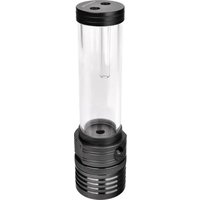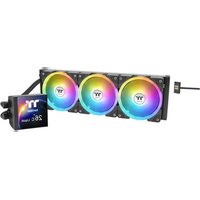
THERMALTAKE MAGFloe 360 Ultra ARGB - Système de refroidissement

MAGFloe 360 Ultra ARGB - Système de refroidissement THERMALTAKE - Notice d'utilisation et mode d'emploi gratuit

Retrouvez gratuitement la notice de l'appareil MAGFloe 360 Ultra ARGB THERMALTAKE au format PDF.

📄 2 pages Français FR Télécharger 💬 Question IA 10 questions ⚙️ Specs
Notice THERMALTAKE MAGFloe 360 Ultra ARGB - page 1
Choisissez votre langue et indiquez votre email : nous vous enverrons une version traduite specifiquement.
Type de produit Refroidisseur liquide tout-en-un (AIO) 360 mm
Marque Thermaltake
Modèle MAGFloe 360 Ultra ARGB
Compatibilité socket Intel LGA 1700/1200/115x, AMD AM5/AM4
Dimensions du radiateur 393 x 120 x 27 mm
Dimensions des ventilateurs 120 x 120 x 25 mm (x3)
Poids total Environ 1,6 kg
Matériau du radiateur Aluminium
Matériau de la base de la pompe Cuivre
Longueur des tubes 400 mm
Type de pompe Pompe à roue à palettes (roulement céramique)
Tension d'alimentation 12V (ventilateurs), 5V (ARGB)
Consommation de la pompe 6 W
Niveau sonore de la pompe < 20 dBA
Débit d'air maximal 72 CFM
Pression statique 2,5 mmH2O
Niveau sonore des ventilateurs 27 dBA maximum
Éclairage RGB ARGB adressable, compatible ASUS Aura, Gigabyte RGB Fusion, MSI Mystic Light
Entretien et nettoyage Dépoussiérer le radiateur et les ventilateurs régulièrement à l'air comprimé. Ne pas utiliser de solvants.
Sécurité Ne pas utiliser l'appareil s'il est endommagé. Éviter de plier les tubes. Débrancher avant entretien.
Pièces détachées et réparabilité Ventilateurs de remplacement disponibles. Kit de montage séparé. Pompe non réparable.
Garantie 2 ans
Contenu de l'emballage Radiateur, 3 ventilateurs, pompe avec bloc d'eau, supports, pâte thermique, manuel

FOIRE AUX QUESTIONS - MAGFloe 360 Ultra ARGB THERMALTAKE

Comment installer le MAGFloe 360 Ultra ARGB ?
Suivez le manuel fourni. Fixez le radiateur dans le boîtier, montez la pompe sur le processeur avec le bracket approprié, connectez les ventilateurs et l'éclairage ARGB aux connecteurs de la carte mère.
Quels sockets sont compatibles ?
Compatibles Intel LGA 1700, 1200, 115x et AMD AM5, AM4. Le kit de montage inclus supporte ces sockets.
Comment contrôler l'éclairage ARGB ?
Connectez le câble ARGB 5V à un header compatible sur la carte mère (ASUS Aura, Gigabyte RGB Fusion, MSI Mystic Light). Utilisez le logiciel de la marque pour personnaliser les effets.
La pompe fait du bruit, est-ce normal ?
Un léger bruit de pompe est normal au démarrage. S'il persiste, vérifiez que la pompe est correctement alimentée et qu'il n'y a pas de bulles d'air. Purgez le circuit en inclinant le boîtier.
Puis-je ajouter plus de ventilateurs ?
Le radiateur est conçu pour 3 ventilateurs 120 mm. Vous pouvez les remplacer par d'autres modèles compatibles, mais suivez les spécifications de débit d'air et de pression.
Comment nettoyer le radiateur ?
Utilisez de l'air comprimé pour enlever la poussière. Évitez l'eau et les solvants. Nettoyez les ventilateurs avec un chiffon doux.
Que faire si la pâte thermique est insuffisante ?
La pâte thermique est pré-appliquée sur la base de la pompe. Si vous en avez besoin, utilisez une pâte de qualité standard. Une quantité de la taille d'un petit pois suffit.
Le radiateur ne tient pas dans mon boîtier, que faire ?
Vérifiez les dimensions du boîtier. Le radiateur mesure 393 x 120 x 27 mm. Assurez-vous d'avoir un espace suffisant en haut ou à l'avant.
Comment vérifier le niveau de liquide ?
Le circuit est scellé, le niveau de liquide n'est pas vérifiable. Une baisse de performance peut indiquer une fuite. Arrêtez l'utilisation et contactez le service après-vente.
La garantie est-elle transférable ?
La garantie de 2 ans est généralement valable pour l'acheteur initial. Conservez la facture. Pour les détails, contactez Thermaltake.

Questions des utilisateurs sur MAGFloe 360 Ultra ARGB THERMALTAKE

0 question sur cet appareil. Repondez a celles que vous connaissez ou posez la votre.

Poser une nouvelle question sur cet appareil

L'email reste privé : il sert seulement à vous prévenir si quelqu'un répond à votre question.

Aucune question pour l'instant. Soyez le premier à en poser une.

Téléchargez la notice de votre Système de refroidissement au format PDF gratuitement ! Retrouvez votre notice MAGFloe 360 Ultra ARGB - THERMALTAKE et reprennez votre appareil électronique en main. Sur cette page sont publiés tous les documents nécessaires à l'utilisation de votre appareil MAGFloe 360 Ultra ARGB de la marque THERMALTAKE.

MODE D'EMPLOI MAGFloe 360 Ultra ARGB THERMALTAKE

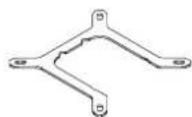
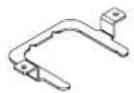
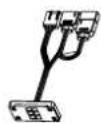
Parts List
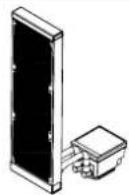
THERMALTAKE MAGFloe 360 Ultra ARGB - Parts List - 1
A x 1

THERMALTAKE MAGFloe 360 Ultra ARGB - Parts List - 2
B x 1

THERMALTAKE MAGFloe 360 Ultra ARGB - Parts List - 3
© x 1

THERMALTAKE MAGFloe 360 Ultra ARGB - Parts List - 4
D x 1

THERMALTAKE MAGFloe 360 Ultra ARGB - Parts List - 5
E x 4

THERMALTAKE MAGFloe 360 Ultra ARGB - Parts List - 6
LGA 1851/1700/1200/115X

THERMALTAKE MAGFloe 360 Ultra ARGB - Parts List - 7
LGA2066/2011
F x 4

THERMALTAKE MAGFloe 360 Ultra ARGB - Parts List - 8
H x 1

THERMALTAKE MAGFloe 360 Ultra ARGB - Parts List - 9
① x 2

THERMALTAKE MAGFloe 360 Ultra ARGB - Parts List - 10
J x 12

THERMALTAKE MAGFloe 360 Ultra ARGB - Parts List - 11
K x 12

THERMALTAKE MAGFloe 360 Ultra ARGB - Parts List - 12
L x 1

THERMALTAKE MAGFloe 360 Ultra ARGB - Parts List - 13
M x 3

THERMALTAKE MAGFloe 360 Ultra ARGB - Parts List - 14
N x 1

THERMALTAKE MAGFloe 360 Ultra ARGB - Parts List - 15
① x 1

THERMALTAKE MAGFloe 360 Ultra ARGB - Parts List - 16
P x 3

THERMALTAKE MAGFloe 360 Ultra ARGB - Parts List - 17
/
Qx1

Intel Installation Guide

1
1851/1700
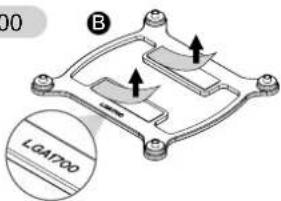
00 B LGAP00

1200/115X
5X C 115x

5
1851/1700/1200/115X
Technical diagram of an electronic component assembly with labeled parts E and L

2
1851/1700/1200/115X
F Black B or C

2066/2011-3/2011

THERMALTAKE MAGFloe 360 Ultra ARGB - Intel Installation Guide - 5

Isometric diagram of a mechanical assembly with labeled components (no text or symbols present)

3
Technical diagram of a mechanical assembly with an upward arrow indicating motion (no text or symbols present)

4
Technical line drawing of a mechanical component with no visible text or symbols

6
Isometric technical diagram of an electronic component with a downward arrow indicating assembly or disassembly (no text or symbols present)

AMD Installation Guide

1
Screw the screw
in position temporarily
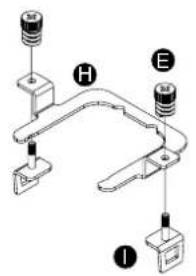
Diagram of a mechanical or electrical component with labeled parts H, E, and I

2
Technical line drawing of a mechanical assembly with no visible text or symbols

3

Technical line drawing of a mechanical or electrical component with no visible text or symbols

4
Tighten screw E
Technical diagram of a computer motherboard with labeled components E and L, showing internal circuit connections and assembly steps.

5

Isometric diagram of a computer motherboard with an open lid and a downward arrow indicating assembly or operation (no text or symbols present)

1 Choose your fan blade type

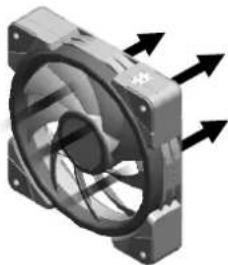
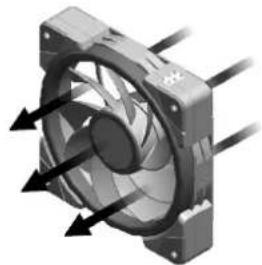
Standard Fan Blade (Pre installed on the fan M)

Airflow Direction:

Air Exhaust

Line drawing of a turbine impeller with no text or symbols

Close-up of a mechanical fan component with directional arrows indicating motion (no text or symbols)

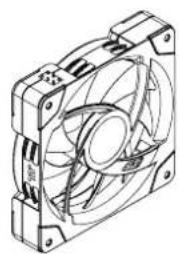
Reverse Fan Blade

Airflow Direction:

Air Intake

Reverse 77th S anniversary

3D rendering of a CPU fan with visible cooling fins and heat exchangers (no text or symbols)

② Replace fan blades

Diagram of a computer fan with cooling fins and ventilation slots (no text or labels)

Technical line drawing of a mechanical fan with blades and mounting brackets (no text or symbols)

Technical line drawing of a CPU fan with directional arrows indicating motion (no text or symbols)

Technical line drawing of a mechanical fan or compressor unit (no text or symbols)

③ A M J K

Technical line drawing of a multi-chamber electric fan assembly with a compass needle and north arrow (no text or symbols)

⑤ N N

CAUTION

Please power off the PC and check the Positive and Negative ends on the connector before connecting the cable to mainboard. Connecting the wrong end can damage the fans.

6 A

CAUTION

To control the LCD display by TT RGB PLUS Software, Please connect the water block and motherboard with cable O.

7 Intel or AMD

Oil Setup Guide
Mechanical assembly diagram showing a valve inserted into a housing with a magnified inset highlighting the internal components (no text or labels present)

After replacing the fan blades several times, add the oil into the bearing (about 0.1ml)
Assistant notice
Powered by Anthropic
En attente de votre message
Informations produit

Marque : THERMALTAKE

Modèle : MAGFloe 360 Ultra ARGB

Catégorie : Système de refroidissement