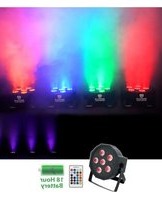
Battery PAR 61 - Éclairage Rockville - Notice d'utilisation et mode d'emploi gratuit
Retrouvez gratuitement la notice de l'appareil Battery PAR 61 Rockville au format PDF.


| Type de produit | Projecteur LED PAR avec batterie rechargeable |
| Marque | Rockville |
| Modèle | Battery PAR 61 |
| Source lumineuse | 61 LEDs RGB (rouge, vert, bleu) |
| Puissance équivalente | ~50W (LED) |
| Angle de faisceau | 25° |
| Mode de contrôle | DMX512, autonome, maître/esclave, IR (télécommande incluse) |
| Nombre de canaux DMX | 3 ou 7 canaux |
| Batterie | Lithium-ion rechargeable intégrée |
| Autonomie | Jusqu'à 8 heures en utilisation continue |
| Temps de charge | Environ 4 heures |
| Alimentation | AC 100-240V 50/60Hz ou batterie interne |
| Dimensions (L x H x P) | 280 x 280 x 250 mm |
| Poids | 3,5 kg |
| Matériau | Aluminium et plastique ABS |
| Refroidissement | Ventilateur silencieux intégré |
| Montage | Support de sol orientable ou bride de serrage pour truss |
| Indice de protection | IP20 (usage intérieur) |
| Température de fonctionnement | 0°C à 40°C |
| Accessoires inclus | Télécommande IR, câble d'alimentation, support de sol, manuel d'utilisation |
| Entretien et nettoyage | Essuyer avec un chiffon doux et sec. Ne pas utiliser de solvants. Nettoyer les lentilles avec un produit spécial optique. |
| Sécurité | Ne pas exposer à l'humidité. Débrancher avant entretien. Ne pas ouvrir le boîtier. |
| Réparabilité | Pièces détachées disponibles (LEDs, batterie, ventilateur). Réparation par un technicien qualifié. |
FOIRE AUX QUESTIONS - Battery PAR 61 Rockville
Questions des utilisateurs sur Battery PAR 61 Rockville
0 question sur cet appareil. Repondez a celles que vous connaissez ou posez la votre.
Poser une nouvelle question sur cet appareil
Téléchargez la notice de votre Éclairage au format PDF gratuitement ! Retrouvez votre notice Battery PAR 61 - Rockville et reprennez votre appareil électronique en main. Sur cette page sont publiés tous les documents nécessaires à l'utilisation de votre appareil Battery PAR 61 de la marque Rockville.
MODE D'EMPLOI Battery PAR 61 Rockville
BATTERY PAR 61 Operating Instructions

Should you need assistance, please call our technical help line at 1-646-758-0144, 24 hours a day/7 days a week. For how-to videos and other helpful information, visit rockvillesupport.com/battery-par-61 or scan the QR code.
Settings
Use the MODE button to enter the settings menu. Use the UP and DOWN buttons to select the desired setting and set their values. Press and hold the UP and DOWN buttons to scroll quickly through the menu options. Press the ENTER button to save your selection. If you power off your unit, upon being powered on, it will remember your previous settings. Press MODE to exit.
| Display Mode | Value | Description |
| A001 | A001 – A512 | Set DMX address |
| Chnd | 6.ch/10.ch | Set DMX channel mode (6 channel or 10 channel) |
| CL01 | CL01 – CL32 | Single color mode |
| CC99 | CC01 – CC99 | Automatically cycle through colors |
| EE99 | EE01 – EE99 | Color pulse mode |
| FF99 | FF01 – FF99 | Color fade mode |
| ST99 | ST01 – ST99 | Set strobe speed/set strobe color.Press the ENTER button to toggle between ST (strobe speed) or Co (strobe color), then use the UP or DOWN buttons to make adjustments as necessary. |
| Co01 | Co01 – Co32 | |
| SoU1 | SoU1 – SoU4 | Select sound control mode |
| IRCL | ON/OFF | Turn remote control function on or off. Factory default is off. |
| r255 | r000 – r255 | Red dimmer |
| g255 | g000 – g255 | Green dimmer |
| b255 | b000 – b255 | Blue dimmer |
| u255 | u000 – u255 | White dimmer |
| y255 | y000 – y255 | Yellow (amber) dimmer |
| P255 | P000 – P255 | Ultraviolet (UV) dimmer |
| SoU1: Color cycle sound mode |
| SoU2: Color fade sound mode |
| SoU3: Color strobe sound mode |
| SoU4: SoU1, SoU2, and SoU3 combined |
DMX Controller Functions
When using a DMX controller, use the charts below to reference each channel's function.
6-Channel Mode
| Channel | Function | Value | Description |
| 1 | Red | 0 – 255 | Adjust individual color brightness |
| 2 | Green | 0 – 255 | |
| 3 | Blue | 0 – 255 | |
| 4 | White | 0 – 255 | |
| 5 | Yellow (amber) | 0 – 255 | |
| 6 | Ultraviolet (UV) | 0 – 255 |
10-Channel Mode
| Channel | Function | Value | Description |
| 1 | Master dimmer | 0 – 255 | Adjust overall brightness |
| 2 | Red | 0 – 255 | Adjust individual color brightness |
| 3 | Green | 0 – 255 | |
| 4 | Blue | 0 – 255 | |
| 5 | White | 0 – 255 | |
| 6 | Yellow (amber) | 0 – 255 | |
| 7 | Ultraviolet (UV) | 0 – 255 | |
| 8 | Strobe | 0 – 10 | Strobe off |
| 11 – 255 | Set strobe speed | ||
| 9 | Manual dimming (CH1 – CH8 valid) | 0 – 9 | Adjust function settings |
| Stationary colors(use CH10 fader to change colors) | 10 – 50 | ||
| Color change mode | 51 – 100 | ||
| Color fade mode | 101 – 150 | ||
| Color pulse mode | 151 – 200 | ||
| Sound mode: fade | 201 – 220 | ||
| Sound mode: strobe | 221 – 240 | ||
| Sound mode: pulse | 240 – 255 | ||
| 10 | Color speed | 0 – 255 | Adjust color change speed for CH9 modes |
Remote Control Functions
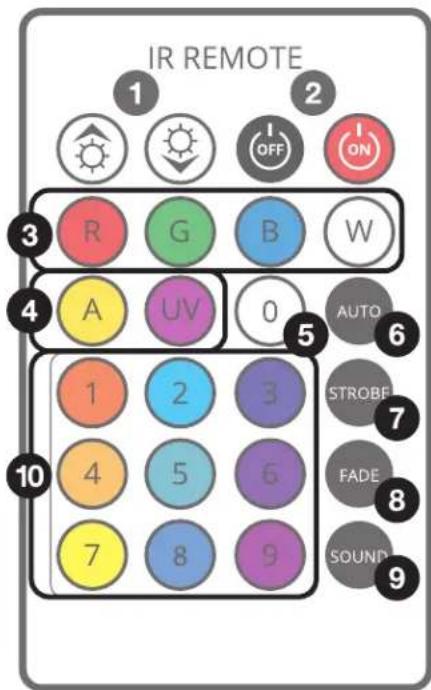
- Dimming/Speed: Adjusts the brightness of the fixture when manually adjusting colors (custom color dimming mode). In all other modes, they are used to adjust speed.
- ON/OFF buttons. Please note, these buttons will turn off the bulbs, but the unit will remain on.
- Red, Green, Blue, and White LED buttons
- (a) Amber and (b) UV buttons
- Press this button then use the Dimming/Speed buttons to cycle through the color presets.
- AUTO (Color Cycle Mode): Cycles through colors. Use the Dimming/Speed buttons to set the speed at which the unit will cycle through colors.
- Strobe: Select your color from the buttons then press this button to activate strobe mode.
- Fade (Color Fade Mode): The unit will fade from one color to next. Use the Dimming/Speed buttons to set the speed at which the unit will fade between colors.
- Sound: Activate/deactivate sound mode. Use the Dimming/Speed buttons to adjust each of the 4 sound modes. Mic sensitivity is adjusted via the unit's settings menu.
- Color select: use these buttons to select a specific pre-mixed color.
Marque : Rockville
Modèle : Battery PAR 61
Catégorie : Éclairage