ROCK SABER 4X - Éclairage Rockville - Notice d'utilisation et mode d'emploi gratuit
Retrouvez gratuitement la notice de l'appareil ROCK SABER 4X Rockville au format PDF.


| Type de produit | Projecteur LED mobile à tête mobile |
| Marque | Rockville |
| Modèle | ROCK SABER 4X |
| Nombre de LEDs | 4 x 10W RGBW |
| Angle du faisceau | 4° à 60° motorisé |
| Modes de contrôle | DMX512, maître/esclave, autonome, son |
| Nombre de canaux DMX | 14 canaux (14CH) |
| Mouvement panoramique | 540° |
| Mouvement d'inclinaison | 270° |
| Alimentation | AC 100-240V, 50/60Hz |
| Consommation | 200W max |
| Dimensions | 300 x 250 x 450 mm (L x l x H) |
| Poids | 12 kg |
| Matériau du boîtier | Plastique ABS résistant |
| Refroidissement | Ventilateur silencieux |
| Température de fonctionnement | -10°C à 40°C |
| Entretien | Nettoyer les lentilles avec un chiffon doux et sec. Éviter les solvants. |
| Sécurité | Utiliser un câble de sécurité. Ne pas regarder directement le faisceau lumineux. |
| Pièces détachées et réparabilité | Contactez le support technique Rockville pour les pièces de rechange. |
FOIRE AUX QUESTIONS - ROCK SABER 4X Rockville
Questions des utilisateurs sur ROCK SABER 4X Rockville
0 question sur cet appareil. Repondez a celles que vous connaissez ou posez la votre.
Poser une nouvelle question sur cet appareil
Téléchargez la notice de votre Éclairage au format PDF gratuitement ! Retrouvez votre notice ROCK SABER 4X - Rockville et reprennez votre appareil électronique en main. Sur cette page sont publiés tous les documents nécessaires à l'utilisation de votre appareil ROCK SABER 4X de la marque Rockville.
MODE D'EMPLOI ROCK SABER 4X Rockville
ROCK SABER DMX GUIDE
Thank you for purchasing this Rockville ROCK SABER. Please read this DMX guide carefully. Should you need assistance, please call our technical help line at 1-646-758-0144, 24 hours a day/7 days a week. For how-to videos, this DMX guide, download links to the app (found under the DOWNLOADS tab), and other helpful information, visit the URLs or scan the QR codes.

rockvillesupport.com/rock-saber-black

rockvillesupport.com/rock-saber-white
Settings
Use the MENU button to cycle through different menu options. Press ENTER to select the desired menu option, then use the UP/DOWN arrow buttons to make adjustments. Press and hold the UP/DOWN arrow buttons within the current setting to scroll quickly through the options or numerical values for that setting. Press the ENTER button to save your selection. If you press the ENTER button on any setting, the saved mode/settings/values will remain in place even after powering off the unit and will be the default when you power the unit back on. Please note, If you pressed ENTER and are in a sub section, pressing the MENU button returns to the main menu.
| Display Mode | Value | Description | Submenu Function | |||
| Address | A001-A512 | Set wireless DMX address | Use the UP/DOWN buttons to set address, 001-512. | |||
| Channel | 3CH/5CH//7CH/12CH/40CH/80CH/160CH | Set DMX channel mode | Use the UP/DOWN buttons to toggle between the DMX channel modes: 3, 5, 7, 12, 40, 80, or 160. | |||
| DMX Fail | Blackout/Hold | Console data blackout/hold | This setting determines how the light will behave when it loses communication with the DMX console. If the unit is set to Hold, it will maintain the last current setting. If the unit is set to blackout, it will go into Blackout mode. The lights will be off and no modes will be shown. | |||
| Custom(manual mode) | Red | 000-255 | Red dimmer | Press the ENTER button to toggle between the colors. Once you've found the color you want to adjust, use the UP/DOWN buttons to change the values. | ||
| Green | 000-255 | Green dimmer | ||||
| Blue | 000-255 | Blue dimmer | ||||
| White | 000-255 | Cool white dimmer | ||||
| Yellow | 000-255 | Warm white dimmer | ||||
| Strobe | 0-9 | Strobe speed, slow to fast | ||||
| Program | Lee Color | DIM | 0-255 | Lee color dimmer | Press the MENU button until you see Program. Use the UP/DOWN buttons to navigate Program mode options. Stop at the desired option and press ENTER to access the option's submenu. Use the UP/DOWN buttons to navigate the submenu options. Once you arrive at the desired option, press ENTER then use the UP/DOWN buttons to adjust that option's values. Press ENTER again to return to the submenu. Press MENU to return to the main menu. | |
| Lee color value | L101/L102/L105/L106/L107/L110/L111/L115/L116/L118/L119/L121/L124/L126/L127/L128/L132/L135/L139/L147/L151/L152/L158/L164/L174/L179/L180/L201/L203/L204 | Set Lee color filter value | ||||
| Strobe | 0-9 | Strobe speed, slow to fast | ||||
| Color | DIM | 0-255 | Color Dimmer | |||
| Color | 1-27 | Preset static color | ||||
| Strobe | 0-9 | Strobe speed, slow to fast | ||||
| WiFi | ROCKVILLE - 0000 (each unit will have a unique 4-digit alphanumeric identifier). | For use with the app. | ||||
| Sound | Sound mode | 1-31 | Set Sound modeMode 1:Cycles through random sound modes, some integrate different colors while others are based on the color selection from the 3rd menu option below.Mode 2:Solid color cycle.Mode 3-31:Spectrum analyzers based on the color selection from the color menu option below. | |||
| Sens | 1-9 | Set Sound mode sensitivity, 9 being the highest. | ||||
| Color | 1-27 | Rainbow(1-27 is static color) | ||||
| Auto | Auto mode | 0-68 | Set Auto modeModes 0, 1, 2, 5, 6, 7, 8, 9, 10, 11, 12, and 62-67 willNOTchange color based on your chosen selection of color, they will auto change colors to their own auto style. | |||
| Speed | 1-9 | Set Auto mode speed, slow to fast | ||||
| Color | 1-27 | Rainbow(1-27 is static color) | ||||
| Program | HSI | DIM | 0-255 | HSI (Hue Saturation Intensity) dimmer | Press the MENU button until you see Program. Use the UP/DOWN buttons to navigate Program mode options. Stop at the desired option and press ENTER to access the option's submenu. Use the UP/DOWN buttons to navigate the submenu options. Once you arrive at the desired option, press ENTER then use the UP/DOWN buttons to adjust that option's values. Press ENTER again to return to the submenu. Press MENU to return to the main menu. | |
| HUE | 0-360 | Adjust HSI (Hue Saturation Intensity) hue | ||||
| Saturation | 0-100 | Adjust HSI (Hue Saturation Intensity) saturation | ||||
| CCT | DIM | 0-255 | CCT (Correlated Color Tempture) dimmer | |||
| CCT | 3000/3900/4800/57 00/6600/7500/8400 /9300/10200/11100/ 12000 | Set CCT (Correlated Color Tempture) value | ||||
| Strobe | 0-9 | Strobe speed, slow to fast | ||||
| Master | ON/OFF | Master mode on or off. When Master mode is turned on, the particular unit will control any units that are within the same wireless frequency group. This means that all slave units will respond to any commands sent from the master unit. | N/A | |||
| Wireless DMX | OFF/ID1/ID2/ID3/ ID4/ID5/ID6/ID7 | Set wireless group ID: when using master/slave mode, the app, or a wireless DMX console, all fixtures must be set to the same group ID | ||||
| Brightness | 4h/5h/6h/8h/ 10h/12h/16h/23h | The Brightness mode setting will determine the brightness of the bulbs and how much battery life you will get at the selected brightness setting. For example, if you set the light to 4h (four hours) the lights will be at their brightest setting. Whereas, if you set the light to 23h (twenty three hours), the lights will be at their dimmest. | ||||
| IR | ON/OFF | Remote control on or off. When set to "off" the unit will not respond to commands by the remote. | ||||
| Menu Lock | ON/OFF | Within a few seconds of turning on the Menu Lock function, the MENU, ENTER, UP, and DOWN buttons are locked. If they are pressed, a lock icon will appear on the screen. To exit Menu Lock mode, press and hold the MENU button. | ||||
| Backlight | Always on/10s/20s/30s | Set backlight duration | ||||
| Factory Reset | YES/NO | Return to factory settings | ||||
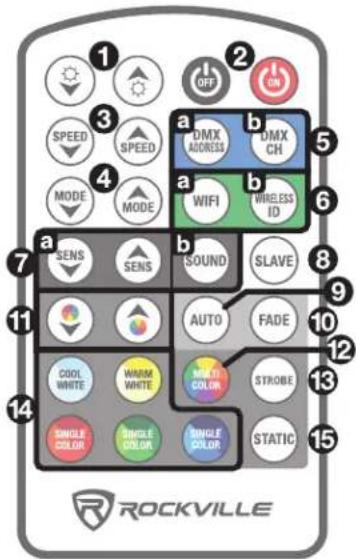
Remote Control
-
⚙/▽: Use to adjust the brightness of the selected mode.
-
ON/OFF: Turns the LEDs on or off. Please note, this button is strictly for the LEDs. The unit will remain on and continue to use battery power. To turn it off, use the power switch on the unit.
-
SPEED: Use to adjust the speed of the selected mode.
-
MODE: Use to cycle through the available modes. Can also change the DMX address, DMX channel, and wireless Id when those are selected.
5 a. DMX ADDRESS: Changes the DMX address. Use the up/down MODE buttons to change the address.
b. DMX CHANNEL: Changes DMX channel. Use the up/down MODE buttons to change the channel.
6 a. WIFI: Press to set the unit to WiFi mode which will allow control of the unit via the app.
b. WIRELESS ID: Press the this button to set the group ID when using master/slave mode, the app, or a wireless DMX console. Use the up/down MODE buttons to cycle up or down through the 8 available options which are oFF (disables wireless grouping) and wireless groups 1 – 7.
7 a. SENS: When in sound control mode use these buttons to adjust the sensitivity of the internal microphone.
b. SOUND MODES: Press the button enter sound mode. Use the MODE UP/DOWN buttons to cycle through the 31 sound modes.
-
SLAVE: This button is used when setting lights in master/slave and the phone app.
-
AUTO: Press to go into preset auto modes. Use the up/down SPEED buttons to adjust the speed. Use the up/down MODE buttons to adjust the auto type and the up/down BRIGHTNESS buttons to adjust brightness. Use the COLOR UP/DOWN buttons to adjust auto mode colors.
-
FADE: Press to enter fade mode. Use the up/down SPEED buttons to adjust the speed. Use the up/down BRIGHTNESS buttons to adjust brightness. Use the COLOR UP/DOWN buttons to adjust auto mode colors.
-
COLOR UP/DOWN: Use to adjust color of AUTO mode or static light type.
-
COLOR WHEEL: Press to enter the 27 color bank. Use the COLOR UP/DOWN buttons to adjust the color, up/down BRIGHTNESS buttons to adjust brightness, the STROBE button to apply strobe mode, and the up/down SPEED buttons to adjust the strobe speed.
-
STROBE: Sets the unit to strobe mode when set to a single or static color. Use the up/down SPEED buttons to adjust the strobe speed.
-
COLORS: Directly select red, green, blue, cool white, or warm white LED color group. Once you've selected the desired color, repeatedly press the button to cycle through available shades of that color. While strobing, use the up/down SPEED buttons to adjust the strobe speed and the up/down BRIGHTNESS buttons to adjust brightness.
-
STATIC: Press to enter the 27 colorbank. Use the COLOR UP/DOWN buttons to adjust the color, up/down BRIGHTNESS buttons to adjust brightness, the STROBE button to apply strobe mode, and the up/down SPEED buttons to adjust the strobe speed.
Wireless DMX Controller Functions
When using a DMX controller, use the charts below to reference each channel's function.
3-Channel Mode
| Channel | Function | Value | Description |
| 1 | Master dimmer | 0 – 2 | Off |
| 3 – 255 | Adjust overall brightness | ||
| 2 | Strobe | 0 – 25 | Strobe off |
| 26 – 255 | Set strobe speed slow to fast | ||
| 3 | No Color | 0 – 12 | Set color combinations |
| Red (R) | 13 – 21 | ||
| Green (G) | 22 – 30 | ||
| Blue (B) | 31 – 39 | ||
| Cool white | 40 – 48 | ||
| Warm white | 49 – 57 | ||
| Amber | 58 – 66 | ||
| Light blue | 67 – 75 | ||
| Purple | 76 – 84 | ||
| Yellow | 85 – 93 | ||
| Light blue 2 | 94 – 102 | ||
| Light orange | 103 – 111 | ||
| Yellow 2 | 112 – 120 | ||
| Light green | 121 – 129 | ||
| Pink | 130 – 138 | ||
| Light purple | 139 – 147 | ||
| White 2 | 148 – 156 | ||
| Light blue 3 | 157 – 165 | ||
| Light green 2 | 166 – 174 | ||
| Light purple 2 | 175 – 183 | ||
| Light red | 184 – 192 | ||
| Light blue 4 | 193 – 201 | ||
| Light green 2 | 202 – 210 | ||
| Light purple 3 | 211 – 219 | ||
| White 3 | 220 – 228 | ||
| White 4 | 229 – 237 | ||
| Bright white | 238 – 246 | ||
| Bright white 2 | 247 – 255 |
Wireless DMX Controller Functions 5-Channel Mode
| Channel | Function | Value | Description |
| 1 | Red Dimmer | 0 – 2 | Off |
| 3 – 255 | Adjust overall brightness | ||
| 2 | Green dimmer | 0 – 2 | Off |
| 3 – 255 | Adjust overall brightness | ||
| 3 | Blue dimmer | 0 – 2 | Off |
| 3 – 255 | Adjust overall brightness | ||
| 4 | Cool white dimmer | 0 – 2 | Off |
| 3 – 255 | Adjust overall brightness | ||
| 5 | Warm white dimmer | 0 – 2 | Off |
| 3 – 255 | Adjust overall brightness |
7-Channel Mode
| Channel | Function | Value | Description |
| 1 | Master dimmer | 0 - 2 | Off |
| 3 - 255 | Adjust overall brightness | ||
| 2 | Strobe | 0 - 25 | Strobe off |
| 26 - 255 | Set strobe speed slow to fast | ||
| 3 | Red Dimmer | 0 - 2 | Off |
| 3 - 255 | Adjust overall brightness | ||
| 4 | Green dimmer | 0 - 2 | Off |
| 3 - 255 | Adjust overall brightness | ||
| 5 | Blue dimmer | 0 - 2 | Off |
| 3 - 255 | Adjust overall brightness | ||
| 6 | Cool white dimmer | 0 - 2 | Off |
| 3 - 255 | Adjust overall brightness | ||
| 7 | Warm white dimmer | 0 - 2 | Off |
| 3 - 255 | Adjust overall brightness |
12-Channel Mode
| Channel | Function | Value | Description | |
| 1 | Master dimmer | 0-5 | Off | When using CH1-CH7, Channel 11 must be between 0-2. |
| 6-255 | Adjust overall brightness | |||
| 2 | Strobe | 0-25 | Strobe off | |
| 26-255 | Set strobe speed slow to fast | |||
| 3 | Red Dimmer | 0-2 | Off | |
| 3-255 | Adjust overall brightness | |||
| 4 | Green dimmer | 0-2 | Off | |
| 3-255 | Adjust overall brightness | |||
| 5 | Blue dimmer | 0-2 | Off | |
| 3-255 | Adjust overall brightness | |||
| 6 | Cool white dimmer | 0-2 | Off | |
| 3-255 | Adjust overall brightness | |||
| 7 | Warm white dimmer | 0-2 | Off | |
| 3-255 | Adjust overall brightness | |||
| 8 | Color cycle | 0-8 | Rainbow | |
| Red (R) | 9-17 | Set color combinations | ||
| Green (G) | 18-26 | |||
| Blue (B) | 27-35 | |||
| Cool white | 36-44 | |||
| Warm white | 45-53 | |||
| Amber | 54-62 | |||
| Light blue | 63-71 | |||
| Light purple | 72-80 | |||
| Yellow | 81-89 | |||
| Light blue 2 | 90-98 | |||
| Yellow 1 | 99-107 | |||
WIRELESS DMX Controller Functions
When using a DMX controller, use the charts below to reference each channel's function.
12-Channel Mode (continued)
| Channel | Function | Value | Description | ||
| 8 | Yellow 2 | 108 – 116 | Set color combination | ||
| Teal | 117 – 125 | ||||
| Pink | 126 – 134 | ||||
| Light purple | 135 – 143 | ||||
| White 2 | 144 – 152 | ||||
| Yellow 3 | 153 – 161 | ||||
| Light blue 3 | 162 – 170 | ||||
| Light purple | 171 – 179 | ||||
| Light pink | 180 – 188 | ||||
| Light blue 4 | 189 – 197 | ||||
| Teal 2 | 198 – 206 | ||||
| White 3 | 207 – 215 | ||||
| White 4 | 216 – 224 | ||||
| White 5 | 225 – 233 | ||||
| White 6 | 234 – 242 | ||||
| Bright white | 243 – 255 | ||||
| 9 | No color | 0 – 15 | Set background color | ||
| Red | 16 – 31 | ||||
| Green | 32 – 47 | ||||
| Blue | 48 – 63 | ||||
| Cool white | 64 – 79 | ||||
| Warm white | 80 – 95 | ||||
| Amber | 96 – 111 | ||||
| Purple | 112 – 127 | ||||
| Pink | 128 – 143 | ||||
| Peach | 144 – 159 | ||||
| Light blue | 160 – 175 | ||||
| Teal | 176 – 191 | ||||
| Yellow 1 | 192 – 223 | ||||
| Light blue 2 | 224 – 239 | ||||
| Light pink | 240 – 255 | ||||
| 10 | Background color dimmer | 0 – 4 | Off | ||
| 5 – 255 | Adjust overall background color brightness | ||||
| 11 | Manual mode | 0 – 2 | Manual dimming (ch1 – ch7 valid) | ||
| Auto | 1 | 3 – 5 | ch1 and ch12 valid | Set Auto mode Modes 0, 1, 2, 5, 6, 7, 8, 9, 10, 11, 12, and 62 – 67 will NOT change color based on your chosen selection of color, they will auto change colors (ch8) to their own auto style. | |
| 2 | 6 – 8 | ch1 and ch12 valid | |||
| 3 | 9 – 11 | ch1, ch8, and ch12 valid | |||
| 4 | 12 – 14 | ch1, ch8, and ch12 valid | |||
| 5 | 15 – 17 | ch1 and ch12 valid | |||
| 6 | 18 – 20 | ch1, ch9, ch10, and ch12 valid | |||
| 7 | 21 – 23 | ch1, ch9, ch10, and ch12 valid | |||
| 8 | 24 – 26 | ch1 and ch12 valid | |||
| 9 | 27 – 29 | ch1 and ch12 valid | |||
| 10 | 30 – 32 | ch1 and ch12 valid | |||
| 11 | 33 – 35 | ch1 and ch12 valid | |||
| 12 | 36 – 38 | ch1 and ch12 valid | |||
| 13 | 39 – 41 | ch1, ch8, ch9, ch10, and ch12 valid | |||
| 14 | 42 – 44 | ch1, ch8, ch9, ch10, and ch12 valid | |||
| 15 | 45 – 47 | ch1, ch8, ch9, ch10, and ch12 valid | |||
| 16 | 48 – 50 | ch1, ch8, ch9, ch10, and ch12 valid | |||
| 17 | 51 – 53 | ch1, ch8, ch9, ch10, and ch12 valid | |||
| 18 | 54 – 56 | ch1, ch8, ch9, ch10, and ch12 valid | |||
| 19 | 57 – 59 | ch1, ch8, ch9, ch10, and ch12 valid | |||
| 20 | 60 – 62 | ch1, ch8, ch9, ch10, and ch12 valid | |||
| 21 | 63 – 65 | ch1, ch8, ch9, ch10, and ch12 valid | |||
| 11 | Auto | 22 | 66 – 68 | ch1, ch8, ch9, ch10, and ch12 valid | |
| 23 | 69 – 71 | ch1, ch8, ch9, ch10, and ch12 valid | |||
| 24 | 72 – 74 | ch1, ch8, ch9, ch10, and ch12 valid | |||
| 25 | 75 – 77 | ch1, ch8, ch9, ch10, and ch12 valid | |||
| 26 | 78 – 80 | ch1, ch8, ch9, ch10, and ch12 valid | |||
| 27 | 81 – 83 | ch1, ch8, ch9, ch10, and ch12 valid | |||
| 28 | 84 – 86 | ch1, ch8, ch9, ch10, and ch12 valid | |||
| 29 | 87 – 89 | ch1, ch8, ch9, ch10, and ch12 valid | |||
| 30 | 90 – 92 | ch1, ch8, ch9, ch10, and ch12 valid | |||
| 31 | 93 – 95 | ch1, ch8, ch9, ch10, and ch12 valid | |||
| 32 | 96 – 98 | ch1, ch8, ch9, ch10, and ch12 valid | |||
| 33 | 99 – 101 | ch1, ch8, ch9, ch10, and ch12 valid | |||
| 34 | 102 – 104 | ch1, ch8, ch9, ch10, and ch12 valid | |||
| 35 | 105 – 107 | ch1, ch8, ch9, ch10, and ch12 valid | |||
| 36 | 108 – 110 | ch1, ch8, ch9, ch10, and ch12 valid | |||
| 37 | 111 – 113 | ch1, ch8, ch9, ch10, and ch12 valid | |||
| 38 | 114 – 116 | ch1, ch8, ch9, ch10, and ch12 valid | |||
| 39 | 117 – 119 | ch1, ch8, ch9, ch10, and ch12 valid | |||
| 40 | 120 – 122 | ch1, ch8, ch9, ch10, and ch12 valid | |||
| 41 | 123 – 125 | ch1, ch8, ch9, ch10, and ch12 valid | |||
| 42 | 126 – 128 | ch1, ch8, ch9, ch10, and ch12 valid | |||
| 43 | 129 – 131 | ch1, ch8, ch9, ch10, and ch12 valid | |||
| 44 | 132 – 134 | ch1, ch8, ch9, ch10, and ch12 valid | |||
| 45 | 135 – 137 | ch1, ch8, ch9, ch10, and ch12 valid | |||
| 46 | 138 – 140 | ch1, ch8, ch9, ch10, and ch12 valid | |||
| 47 | 141 – 143 | ch1, ch8, ch9, ch10, and ch12 valid | |||
| 48 | 144 – 146 | ch1, ch8, ch9, ch10, and ch12 valid | |||
| 49 | 147 – 149 | ch1, ch8, ch9, ch10, and ch12 valid | |||
| 50 | 150 – 152 | ch1, ch8, ch9, ch10, and ch12 valid | |||
| 51 | 153 – 155 | ch1, ch8, ch9, ch10, and ch12 valid | |||
| 52 | 156 – 158 | ch1, ch8, ch9, ch10, and ch12 valid | |||
| 53 | 159 – 161 | ch1, ch8, ch9, ch10, and ch12 valid | |||
| 54 | 162 – 164 | ch1, ch8, ch9, ch10, and ch12 valid | |||
| 55 | 165 – 167 | ch1, ch8, ch9, ch10, and ch12 valid | |||
| 56 | 168 – 170 | ch1, ch8, ch9, ch10, and ch12 valid | |||
| 57 | 171 – 173 | ch1, ch8, ch9, ch10, and ch12 valid | |||
| 58 | 174 – 176 | ch1, ch8, ch9, ch10, and ch12 valid | |||
| 59 | 177 – 179 | ch1, ch8, and ch12 valid | |||
| 60 | 180 – 182 | ch1, ch8, and ch12 valid | |||
| 61 | 183 – 185 | ch1, ch8, and ch12 valid | |||
| 62 | 186 – 188 | ch1 and ch12 valid | |||
| 63 | 189 – 191 | ch1 and ch12 valid | |||
| 64 | 192 – 194 | ch1 and ch12 valid | |||
| 65 | 195 – 197 | ch1 and ch12 valid | |||
| 66 | 198 – 200 | ch1 and ch12 valid | |||
| 67 | 201 – 203 | ch1 and ch12 valid | |||
| 68 | 204 – 206 | ch1, ch8, ch9, ch10, and ch12 valid | |||
| 0 | 207 – 219 | Cycles through all auto modes | |||
| Sound | Mode 1: Cycles through random sound modes. | 220 – 229 | ch1, ch8, ch9, and ch10 valid | ||
| Mode 2: Solid color cycle. | 230 – 239 | ch1 valid | |||
| Mode 3: Spectrum analyzer based on your color selection. | 240 – 249 | ch1 and ch8 valid | |||
| Mode 4: Same as mode 3, but in reverse. | 250 – 255 | ||||
| 12 | Effect speed | 0 – 255 | Adjust effect speed slow to fast | ||
Wireless DMX Controller Functions 40-Channel Mode
| Channel | Function | Value | Description |
| 1 | R - 1 | 0 - 2 | Off |
| 3 - 255 | Adjust overall brightness | ||
| 2 | G - 1 | 0 - 2 | Off |
| 3 - 255 | Adjust overall brightness | ||
| 3 | B - 1 | 0 - 2 | Off |
| 3 - 255 | Adjust overall brightness | ||
| 4 | W - 1 | 0 - 2 | Off |
| 3 - 255 | Adjust overall brightness | ||
| 5 | Y - 1 | 0 - 2 | Off |
| 3 - 255 | Adjust overall brightness | ||
| 6 | R - 2 | 0 - 2 | Off |
| 3 - 255 | Adjust overall brightness | ||
| 7 | G - 2 | 0 - 2 | Off |
| 3 - 255 | Adjust overall brightness | ||
| 8 | B - 2 | 0 - 2 | Off |
| 3 - 255 | Adjust overall brightness | ||
| 9 | W - 2 | 0 - 2 | Off |
| 3 - 255 | Adjust overall brightness | ||
| 10 | Y - 2 | 0 - 2 | Off |
| 3 - 255 | Adjust overall brightness | ||
| 11 | R - 3 | 0 - 2 | Off |
| 3 - 255 | Adjust overall brightness | ||
| 12 | G - 3 | 0 - 2 | Off |
| 3 - 255 | Adjust overall brightness | ||
| 13 | B - 3 | 0 - 2 | Off |
| 3 - 255 | Adjust overall brightness | ||
| 14 | W - 3 | 0 - 2 | Off |
| 3 - 255 | Adjust overall brightness | ||
| 15 | Y - 3 | 0 - 2 | Off |
| 3 - 255 | Adjust overall brightness | ||
| 16 | R - 4 | 0 - 2 | Off |
| 3 - 255 | Adjust overall brightness | ||
| 17 | G - 4 | 0 - 2 | Off |
| 3 - 255 | Adjust overall brightness | ||
| 18 | B - 4 | 0 - 2 | Off |
| 3 - 255 | Adjust overall brightness | ||
| 19 | W - 4 | 0 - 2 | Off |
| 3 - 255 | Adjust overall brightness | ||
| 20 | Y - 4 | 0 - 2 | Off |
| 3 - 255 | Adjust overall brightness | ||
| 21 | R - 5 | 0 - 2 | Off |
| 3 - 255 | Adjust overall brightness | ||
| 22 | G - 5 | 0 - 2 | Off |
| 3 - 255 | Adjust overall brightness | ||
| 23 | B - 5 | 0 - 2 | Off |
| 3 - 255 | Adjust overall brightness | ||
| 24 | W - 5 | 0 - 2 | Off |
| 3 - 255 | Adjust overall brightness | ||
| 25 | Y - 5 | 0 - 2 | Off |
| 3 - 255 | Adjust overall brightness | ||
| 26 | R - 6 | 0 - 2 | Off |
| 3 - 255 | Adjust overall brightness | ||
| 27 | G - 6 | 0 - 2 | Off |
| 3 - 255 | Adjust overall brightness | ||
| 28 | B - 6 | 0 - 2 | Off |
| 3 - 255 | Adjust overall brightness | ||
| 29 | W - 6 | 0 - 2 | Off |
| 3 - 255 | Adjust overall brightness | ||
| 30 | Y - 6 | 0 - 2 | Off |
| 3 - 255 | Adjust overall brightness | ||
| 31 | R - 7 | 0 - 2 | Off |
| 3 - 255 | Adjust overall brightness | ||
| 32 | G - 7 | 0 - 2 | Off |
| 3 - 255 | Adjust overall brightness | ||
| 33 | B - 7 | 0 - 2 | Off |
| 3 - 255 | Adjust overall brightness | ||
| 34 | W - 7 | 0 - 2 | Off |
| 3 - 255 | Adjust overall brightness | ||
| 35 | Y - 7 | 0 - 2 | Off |
| 3 - 255 | Ad t overall brightness | ||
| 36 | R - 8 | 0 - 2 | Off |
| 3 - 255 | Adjust overall brightness | ||
| 37 | G - 8 | 0 - 2 | Off |
| 3 - 255 | Adjust overall brightness | ||
| 38 | B - 8 | 0 - 2 | Off |
| 3 - 255 | Adjust overall brightness | ||
| 39 | W - 8 | 0 - 2 | Off |
| 3 - 255 | Adjust overall brightness | ||
| 40 | Y - 8 | 0 - 2 | Off |
| 3 - 255 | Adjust overall brightness |
80-Channel Mode
| Channel | Function | Value | Description |
| 1 | R - 1 | 0 - 2 | Off |
| 3 - 255 | Adjust overall brightness | ||
| 2 | G - 1 | 0 - 2 | Off |
| 3 - 255 | Adjust overall brightness | ||
| 3 | B - 1 | 0 - 2 | Off |
| 3 - 255 | Adjust overall brightness | ||
| 4 | W - 1 | 0 - 2 | Off |
| 3 - 255 | Adjust overall brightness | ||
| 5 | Y - 1 | 0 - 2 | Off |
| 3 - 255 | Adjust overall brightness | ||
| 6 | R - 2 | 0 - 2 | Off |
| 3 - 255 | Adjust overall brightness | ||
| 7 | G - 2 | 0 - 2 | Off |
| 3 - 255 | Adjust overall brightness | ||
| 8 | B - 2 | 0 - 2 | Off |
| 3 - 255 | Adjust overall brightness | ||
| 9 | W - 2 | 0 - 2 | Off |
| 3 - 255 | Adjust overall brightness | ||
| 10 | Y - 2 | 0 - 2 | Off |
| 3 - 255 | Adjust overall brightness | ||
| 11 | R - 3 | 0 - 2 | Off |
| 3 - 255 | Adjust overall brightness | ||
| 12 | G - 3 | 0 - 2 | Off |
| 3 - 255 | Adjust overall brightness | ||
| 13 | B - 3 | 0 - 2 | Off |
| 3 - 255 | Adjust overall brightness | ||
| 14 | W - 3 | 0 - 2 | Off |
| 3 - 255 | Adjust overall brightness | ||
| 15 | Y - 3 | 0 - 2 | Off |
| 3 - 255 | Adjust overall brightness | ||
| 16 | R - 4 | 0 - 2 | Off |
| 3 - 255 | Adjust overall brightness | ||
| 17 | G - 4 | 0 - 2 | Off |
| 3 - 255 | Adjust overall brightness | ||
| 18 | B - 4 | 0 - 2 | Off |
| 3 - 255 | Adjust overall brightness | ||
| 19 | W - 4 | 0 - 2 | Off |
| 3 - 255 | Adjust overall brightness | ||
| 20 | Y - 4 | 0 - 2 | Off |
| 3 - 255 | Adjust overall brightness | ||
| 21 | R - 5 | 0 - 2 | Off |
| 3 - 255 | Adjust overall brightness | ||
| 22 | G - 5 | 0 - 2 | Off |
| 3 - 255 | Adjust overall brightness | ||
| 23 | B - 5 | 0 - 2 | Off |
| 3 - 255 | Adjust overall brightness | ||
| 24 | W - 5 | 0 - 2 | Off |
| 3 - 255 | Adjust overall brightness | ||
| 25 | Y - 5 | 0 - 2 | Off |
| 3 - 255 | Adjust overall brightness | ||
| 26 | R - 6 | 0 - 2 | Off |
| 3 - 255 | Adjust overall brightness | ||
| 27 | G - 6 | 0 - 2 | Off |
| 3 - 255 | Adjust overall brightness | ||
| 28 | B - 6 | 0 - 2 | Off |
| 3 - 255 | Adjust overall brightness | ||
| 29 | W - 6 | 0 - 2 | Off |
| 3 - 255 | Adjust overall brightness | ||
| 30 | Y - 6 | 0 - 2 | Off |
| 3 - 255 | Adjust overall brightness | ||
| 31 | R - 7 | 0 - 2 | Off |
| 3 - 255 | Adjust overall brightness | ||
| 32 | G - 7 | 0 - 2 | Off |
| 3 - 255 | Adjust overall brightness | ||
| 33 | B - 7 | 0 - 2 | Off |
| 3 - 255 | Adjust overall brightness | ||
| 34 | W - 7 | 0 - 2 | Off |
| 3 - 255 | Adjust overall brightness | ||
| 35 | Y - 7 | 0 - 2 | Off |
| 3 - 255 | Adjust overall brightness | ||
| 36 | R - 8 | 0 - 2 | Off |
| 3 - 255 | Adjust overall brightness | ||
| 37 | G - 8 | 0 - 2 | Off |
| 3 - 255 | Adjust overall brightness | ||
| 38 | B - 8 | 0 - 2 | Off |
| 3 - 255 | Adjust overall brightness | ||
| 39 | W - 8 | 0 - 2 | Off |
| 3 - 255 | Adjust overall brightness | ||
| 40 | Y - 8 | 0 - 2 | Off |
| 3 - 255 | Adjust overall brightness | ||
| 41 | R - 9 | 0 - 2 | Off |
| 3 - 255 | Adjust overall brightness | ||
| 42 | G - 9 | 0 - 2 | Off |
| 3 - 255 | Adjust overall brightness | ||
| 43 | B - 9 | 0 - 2 | Off |
| 3 - 255 | Adjust overall brightness | ||
| 44 | W - 9 | 0 - 2 | Off |
| 3 - 255 | Adjust overall brightness | ||
| 45 | Y - 9 | 0 - 2 | Off |
| 3 - 255 | Adjust overall brightness | ||
| 46 | R - 10 | 0 - 2 | Off |
| 3 - 255 | Adjust overall brightness | ||
| 47 | G - 10 | 0 - 2 | Off |
| 3 - 255 | Adjust overall brightness | ||
| 48 | B - 10 | 0 - 2 | Off |
| 3 - 255 | Adjust overall brightness | ||
| 49 | W - 10 | 0 - 2 | Off |
| 3 - 255 | Adjust overall brightness | ||
| 50 | Y - 10 | 0 - 2 | Off |
| 3 - 255 | Adjust overall brightness | ||
| 51 | R - 12 | 0 - 2 | Off |
| 3 - 255 | Adjust overall brightness | ||
| 52 | G - 12 | 0 - 2 | Off |
| 3 - 255 | Adjust overall brightness | ||
| 53 | B - 12 | 0 - 2 | Off |
| 3 - 255 | Adjust overall brightness | ||
| 54 | W - 12 | 0 - 2 | Off |
| 3 - 255 | Adjust overall brightness | ||
| 55 | Y - 12 | 0 - 2 | Off |
| 3 - 255 | Adjust overall brightness | ||
| 56 | R - 13 | 0 - 2 | Off |
| 3 - 255 | Adjust overall brightness | ||
| 57 | G - 13 | 0 - 2 | Off |
| 3 - 255 | Adjust overall brightness | ||
| 58 | B - 13 | 0 - 2 | Off |
| 3 - 255 | Adjust overall brightness | ||
| 59 | W - 13 | 0 - 2 | Off |
| 3 - 255 | Adjust overall brightness | ||
| 60 | Y - 13 | 0 - 2 | Off |
| 3 - 255 | Adjust overall brightness | ||
| 61 | R - 14 | 0 - 2 | Off |
| 3 - 255 | Adjust overall brightness | ||
| 62 | G - 14 | 0 - 2 | Off |
| 3 - 255 | Adjust overall brightness | ||
| 63 | B - 14 | 0 - 2 | Off |
| 3 - 255 | Adjust overall brightness | ||
| 64 | W - 14 | 0 - 2 | Off |
| 3 - 255 | Adjust overall brightness | ||
| 65 | Y - 14 | 0 - 2 | Off |
| 3 - 255 | Adjust overall brightness | ||
| 66 | R - 15 | 0 - 2 | Off |
| 3 - 255 | Adjust overall brightness | ||
| 67 | G - 15 | 0 - 2 | Off |
| 3 - 255 | Adjust overall brightness | ||
| 68 | B - 15 | 0 - 2 | Off |
| 3 - 255 | Adjust overall brightness | ||
| 69 | W - 15 | 0 - 2 | Off |
| 3 - 255 | Adjust overall brightness | ||
| 70 | Y - 15 | 0 - 2 | Off |
| 3 - 255 | Adjust overall brightness | ||
| 71 | R - 16 | 0 - 2 | Off |
| 3 - 255 | Adjust overall brightness | ||
| 72 | G - 16 | 0 - 2 | Off |
| 3 - 255 | Adjust overall brightness | ||
| 73 | B - 16 | 0 - 2 | Off |
| 3 - 255 | Adjust overall brightness | ||
| 74 | W - 16 | 0 - 2 | Off |
| 3 - 255 | Adjust overall brightness | ||
| 75 | Y - 16 | 0 - 2 | Off |
| 3 - 255 | Adjust overall brightness | ||
| 76 | R - 17 | 0 - 2 | Off |
| 3 - 255 | Adjust overall brightness | ||
| 77 | G - 17 | 0 - 2 | Off |
| 3 - 255 | Adjust overall brightness | ||
| 78 | B - 17 | 0 - 2 | Off |
| 3 - 255 | Adjust overall brightness | ||
| 79 | W - 17 | 0 - 2 | Off |
| 3 - 255 | Adjust overall brightness | ||
| 80 | Y - 17 | 0 - 2 | Off |
| 3 - 255 | Adjust overall brightness |
160-Channel Mode
| Channel | Function | Value | Description |
| 1 | R - 1 | 0 - 2 | Off |
| 3 - 255 | Adjust overall brightness | ||
| 2 | G - 1 | 0 - 2 | Off |
| 3 - 255 | Adjust overall brightness | ||
| 3 | B - 1 | 0 - 2 | Off |
| 3 - 255 | Adjust overall brightness | ||
| 4 | W - 1 | 0 - 2 | Off |
| 3 - 255 | Adjust overall brightness | ||
| 5 | Y - 1 | 0 - 2 | Off |
| 3 - 255 | Adjust overall brightness | ||
| 6 | R - 2 | 0 - 2 | Off |
| 3 - 255 | Adjust overall brightness | ||
| 7 | G - 2 | 0 - 2 | Off |
| 3 - 255 | Adjust overall brightness | ||
| 8 | B - 2 | 0 - 2 | Off |
| 3 - 255 | Adjust overall brightness | ||
| 9 | W - 2 | 0 - 2 | Off |
| 3 - 255 | Adjust overall brightness | ||
| 10 | Y - 2 | 0 - 2 | Off |
| 3 - 255 | Adjust overall brightness | ||
| 11 | R - 3 | 0 - 2 | Off |
| 3 - 255 | Adjust overall brightness | ||
| 12 | G - 3 | 0 - 2 | Off |
| 3 - 255 | Adjust overall brightness | ||
| 13 | B - 3 | 0 - 2 | Off |
| 3 - 255 | Adjust overall brightness | ||
| 14 | W - 3 | 0 - 2 | Off |
| 3 - 255 | Adjust overall brightness | ||
| 15 | Y - 3 | 0 - 2 | Off |
| 3 - 255 | Adjust overall brightness | ||
| 16 | R - 4 | 0 - 2 | Off |
| 3 - 255 | Adjust overall brightness | ||
| 17 | G - 4 | 0 - 2 | Off |
| 3 - 255 | Adjust overall brightness | ||
| 18 | B - 4 | 0 - 2 | Off |
| 3 - 255 | Adjust overall brightness | ||
| 19 | W - 4 | 0 - 2 | Off |
| 3 - 255 | Adjust overall brightness | ||
| 20 | Y - 4 | 0 - 2 | Off |
| 3 - 255 | Adjust overall brightness | ||
| 21 | R - 5 | 0 - 2 | Off |
| 3 - 255 | Adjust overall brightness | ||
| 22 | G - 5 | 0 - 2 | Off |
| 3 - 255 | Adjust overall brightness | ||
| 23 | B - 5 | 0 - 2 | Off |
| 3 - 255 | Adjust overall brightness | ||
| 24 | W - 5 | 0 - 2 | Off |
| 3 - 255 | Adjust overall brightness | ||
| 25 | Y - 5 | 0 - 2 | Off |
| 3 - 255 | Adjust overall brightness | ||
| 26 | R - 6 | 0 - 2 | Off |
| 3 - 255 | Adjust overall brightness | ||
| 27 | G - 6 | 0 - 2 | Off |
| 3 - 255 | Adjust overall brightness | ||
| 28 | B - 6 | 0 - 2 | Off |
| 3 - 255 | Adjust overall brightness | ||
| 29 | W - 6 | 0 - 2 | Off |
| 3 - 255 | Adjust overall brightness | ||
| 30 | Y - 6 | 0 - 2 | Off |
| 3 - 255 | Adjust overall brightness | ||
| 31 | R - 7 | 0 - 2 | Off |
| 3 - 255 | Adjust overall brightness | ||
| 32 | G - 7 | 0 - 2 | Off |
| 3 - 255 | Adjust overall brightness | ||
| 33 | B - 7 | 0 - 2 | Off |
| 3 - 255 | Adjust overall brightness | ||
| 34 | W - 7 | 0 - 2 | Off |
| 3 - 255 | Adjust overall brightness | ||
| 35 | Y - 7 | 0 - 2 | Off |
| 3 - 255 | Adjust overall brightness | ||
| 36 | R - 8 | 0 - 2 | Off |
| 3 - 255 | Adjust overall brightness | ||
| 37 | G - 8 | 0 - 2 | Off |
| 3 - 255 | Adjust overall brightness | ||
| 38 | B - 8 | 0 - 2 | Off |
| 3 - 255 | Adjust overall brightness | ||
| 39 | W - 8 | 0 - 2 | Off |
| 3 - 255 | Adjust overall brightness | ||
| 40 | Y - 8 | 0 - 2 | Off |
| 3 - 255 | Adjust overall brightness | ||
| 41 | R - 9 | 0 - 2 | Off |
| 3 - 255 | Adjust overall brightness | ||
| 42 | G - 9 | 0 - 2 | Off |
| 3 - 255 | Adjust overall brightness | ||
| 43 | B - 9 | 0 - 2 | Off |
| 3 - 255 | Adjust overall brightness | ||
| 44 | W - 9 | 0 - 2 | Off |
| 3 - 255 | Adjust overall brightness | ||
| 45 | Y - 9 | 0 - 2 | Off |
| 3 - 255 | Adjust overall brightness | ||
| 46 | R - 10 | 0 - 2 | Off |
| 3 - 255 | Adjust overall brightness | ||
| 47 | G - 10 | 0 - 2 | Off |
| 3 - 255 | Adjust overall brightness | ||
| 48 | B - 10 | 0 - 2 | Off |
| 3 - 255 | Adjust overall brightness | ||
| 49 | W - 10 | 0 - 2 | Off |
| 3 - 255 | Adjust overall brightness | ||
| 50 | Y - 10 | 0 - 2 | Off |
| 3 - 255 | Adjust overall brightness | ||
| 51 | R - 11 | 0 - 2 | Off |
| 3 - 255 | Adjust overall brightness | ||
| 52 | G - 11 | 0 - 2 | Off |
| 3 - 255 | Adjust overall brightness | ||
| 53 | B - 11 | 0 - 2 | Off |
| 3 - 255 | Adjust overall brightness | ||
| 54 | W - 11 | 0 - 2 | Off |
| 3 - 255 | Adjust overall brightness | ||
| 55 | Y - 11 | 0 - 2 | Off |
| 3 - 255 | Adjust overall brightness | ||
| 56 | R - 12 | 0 - 2 | Off |
| 3 - 255 | Adjust overall brightness | ||
| 57 | G - 12 | 0 - 2 | Off |
| 3 - 255 | Adjust overall brightness | ||
| 58 | B - 12 | 0 - 2 | Off |
| 3 - 255 | Adjust overall brightness | ||
| 59 | W - 12 | 0 - 2 | Off |
| 3 - 255 | Adjust overall brightness | ||
| 60 | Y - 12 | 0 - 2 | Off |
| 3 - 255 | Adjust overall brightness | ||
| 61 | R - 13 | 0 - 2 | Off |
| 3 - 255 | Adjust overall brightness | ||
| 62 | G - 13 | 0 - 2 | Off |
| 3 - 255 | Adjust overall brightness | ||
| 63 | B - 13 | 0 - 2 | Off |
| 3 - 255 | Adjust overall brightness | ||
| 64 | W - 13 | 0 - 2 | Off |
| 3 - 255 | Adjust overall brightness | ||
| 65 | Y - 13 | 0 - 2 | Off |
| 3 - 255 | Adjust overall brightness | ||
| 66 | R - 14 | 0 - 2 | Off |
| 3 - 255 | Adjust overall brightness | ||
| 67 | G - 14 | 0 - 2 | Off |
| 3 - 255 | Adjust overall brightness | ||
| 68 | B - 14 | 0 - 2 | Off |
| 3 - 255 | Adjust overall brightness | ||
| 69 | W - 14 | 0 - 2 | Off |
| 3 - 255 | Adjust overall brightness | ||
| 70 | Y - 14 | 0 - 2 | Off |
| 3 - 255 | Adjust overall brightness | ||
| 71 | R - 15 | 0 - 2 | Off |
| 3 - 255 | Adjust overall brightness | ||
| 72 | G - 15 | 0 - 2 | Off |
| 3 - 255 | Adjust overall brightness | ||
| 73 | B - 15 | 0 - 2 | Off |
| 3 - 255 | Adjust overall brightness | ||
| 74 | W - 15 | 0 - 2 | Off |
| 3 - 255 | Adjust overall brightness | ||
| 75 | Y - 15 | 0 - 2 | Off |
| 3 - 255 | Adjust overall brightness | ||
| 76 | R - 16 | 0 - 2 | Off |
| 3 - 255 | Adjust overall brightness | ||
| 77 | G - 16 | 0 - 2 | Off |
| 3 - 255 | Adjust overall brightness | ||
| 78 | B - 16 | 0 - 2 | Off |
| 3 - 255 | Adjust overall brightness | ||
| 79 | W - 16 | 0 - 2 | Off |
| 3 - 255 | Adjust overall brightness | ||
| 80 | Y - 16 | 0 - 2 | Off |
| 3 - 255 | Adjust overall brightness | ||
| 81 | R - 17 | 0 - 2 | Off |
| 3 - 255 | Adjust overall brightness | ||
| 82 | G - 17 | 0 - 2 | Off |
| 3 - 255 | Adjust overall brightness | ||
| 83 | B - 17 | 0 - 2 | Off |
| 3 - 255 | Adjust overall brightness | ||
| 84 | W - 17 | 0 - 2 | Off |
| 3 - 255 | Adjust overall brightness | ||
| 85 | Y - 17 | 0 - 2 | Off |
| 3 - 255 | Adjust overall brightness | ||
| 86 | R - 18 | 0 - 2 | Off |
| 3 - 255 | Adjust overall brightness | ||
| 87 | G - 18 | 0 - 2 | Off |
| 3 - 255 | Adjust overall brightness | ||
| 88 | B - 18 | 0 - 2 | Off |
| 3 - 255 | Adjust overall brightness | ||
| 89 | W - 18 | 0 - 2 | Off |
| 3 - 255 | Adjust overall brightness | ||
| 90 | Y - 18 | 0 - 2 | Off |
| 3 - 255 | Adjust overall brightness | ||
| 91 | R - 19 | 0 - 2 | Off |
| 3 - 255 | Adjust overall brightness | ||
| 92 | G - 19 | 0 - 2 | Off |
| 3 - 255 | Adjust overall brightness | ||
| 93 | B - 19 | 0 - 2 | Off |
| 3 - 255 | Adjust overall brightness | ||
| 94 | W - 19 | 0 - 2 | Off |
| 3 - 255 | Adjust overall brightness | ||
| 95 | Y - 19 | 0 - 2 | Off |
| 3 - 255 | Adjust overall brightness | ||
| 96 | R - 20 | 0 - 2 | Off |
| 3 - 255 | Adjust overall brightness | ||
| 97 | G - 20 | 0 - 2 | Off |
| 3 - 255 | Adjust overall brightness | ||
| 98 | B - 20 | 0 - 2 | Off |
| 3 - 255 | Adjust overall brightness | ||
| 99 | W - 20 | 0 - 2 | Off |
| 3 - 255 | Adjust overall brightness | ||
| 100 | Y - 20 | 0 - 2 | Off |
| 3 - 255 | Adjust overall brightness | ||
| 101 | R - 21 | 0 - 2 | Off |
| 3 - 255 | Adjust overall brightness | ||
| 102 | G - 21 | 0 - 2 | Off |
| 3 - 255 | Adjust overall brightness | ||
| 103 | B - 21 | 0 - 2 | Off |
| 3 - 255 | Adjust overall brightness | ||
| 104 | W - 21 | 0 - 2 | Off |
| 3 - 255 | Adjust overall brightness | ||
| 105 | Y - 21 | 0 - 2 | Off |
| 3 - 255 | Adjust overall brightness | ||
| 106 | R - 22 | 0 - 2 | Off |
| 3 - 255 | Adjust overall brightness | ||
| 107 | G - 22 | 0 - 2 | Off |
| 3 - 255 | Adjust overall brightness | ||
| 108 | B - 22 | 0 - 2 | Off |
| 3 - 255 | Adjust overall brightness | ||
| 109 | W - 22 | 0 - 2 | Off |
| 3 - 255 | Adjust overall brightness | ||
| 110 | Y - 22 | 0 - 2 | Off |
| 3 - 255 | Adjust overall brightness | ||
| 111 | R - 23 | 0 - 2 | Off |
| 3 - 255 | Adjust overall brightness | ||
| 112 | G - 23 | 0 - 2 | Off |
| 3 - 255 | Adjust overall brightness | ||
| 113 | B - 23 | 0 - 2 | Off |
| 3 - 255 | Adjust overall brightness | ||
| 114 | W - 23 | 0 - 2 | Off |
| 3 - 255 | Adjust overall brightness | ||
| 115 | Y - 23 | 0 - 2 | Off |
| 3 - 255 | Adjust overall brightness | ||
| 116 | R - 24 | 0 - 2 | Off |
| 3 - 255 | Adjust overall brightness | ||
| 117 | G - 24 | 0 - 2 | Off |
| 3 - 255 | Adjust overall brightness | ||
| 118 | B - 24 | 0 - 2 | Off |
| 3 - 255 | Adjust overall brightness | ||
| 119 | W - 24 | 0 - 2 | Off |
| 3 - 255 | Adjust overall brightness | ||
| 120 | Y - 24 | 0 - 2 | Off |
| 3 - 255 | Adjust overall brightness | ||
| 121 | R - 25 | 0 - 2 | Off |
| 3 - 255 | Adjust overall brightness | ||
| 122 | G - 25 | 0 - 2 | Off |
| 3 - 255 | Adjust overall brightness | ||
| 123 | B - 25 | 0 - 2 | Off |
| 3 - 255 | Adjust overall brightness | ||
| 124 | W - 25 | 0 - 2 | Off |
| 3 - 255 | Adjust overall brightness | ||
| 125 | Y - 25 | 0 - 2 | Off |
| 3 - 255 | Adjust overall brightness | ||
| 126 | R - 26 | 0 - 2 | Off |
| 3 - 255 | Adjust overall brightness | ||
| 127 | G - 26 | 0 - 2 | Off |
| 3 - 255 | Adjust overall brightness | ||
| 128 | B - 26 | 0 - 2 | Off |
| 3 - 255 | Adjust overall brightness | ||
| 129 | W - 26 | 0 - 2 | Off |
| 3 - 255 | Adjust overall brightness | ||
| 130 | Y - 26 | 0 - 2 | Off |
| 3 - 255 | Adjust overall brightness | ||
| 131 | R - 27 | 0 - 2 | Off |
| 3 - 255 | Adjust overall brightness | ||
| 132 | G - 27 | 0 - 2 | Off |
| 3 - 255 | Adjust overall brightness | ||
| 133 | B - 27 | 0 - 2 | Off |
| 3 - 255 | Adjust overall brightness | ||
| 134 | W - 27 | 0 - 2 | Off |
| 3 - 255 | Adjust overall brightness | ||
| 135 | Y - 27 | 0 - 2 | Off |
| 3 - 255 | Adjust overall brightness | ||
| 136 | R - 28 | 0 - 2 | Off |
| 3 - 255 | Adjust overall brightness | ||
| 137 | G - 28 | 0 - 2 | Off |
| 3 - 255 | Adjust overall brightness | ||
| 138 | B - 28 | 0 - 2 | Off |
| 3 - 255 | Adjust overall brightness | ||
| 139 | W - 28 | 0 - 2 | Off |
| 3 - 255 | Adjust overall brightness | ||
| 140 | Y - 28 | 0 - 2 | Off |
| 3 - 255 | Adjust overall brightness | ||
| 141 | R - 29 | 0 - 2 | Off |
| 3 - 255 | Adjust overall brightness | ||
| 142 | G - 29 | 0 - 2 | Off |
| 3 - 255 | Adjust overall brightness | ||
| 143 | B - 29 | 0 - 2 | Off |
| 3 - 255 | Adjust overall brightness | ||
| 144 | W - 29 | 0 - 2 | Off |
| 3 - 255 | Adjust overall brightness | ||
| 145 | Y - 29 | 0 - 2 | Off |
| 3 - 255 | Adjust overall brightness | ||
| 146 | R - 30 | 0 - 2 | Off |
| 3 - 255 | Adjust overall brightness | ||
| 147 | G - 30 | 0 - 2 | Off |
| 3 - 255 | Adjust overall brightness | ||
| 148 | B - 30 | 0 - 2 | Off |
| 3 - 255 | Adjust overall brightness | ||
| 149 | W - 30 | 0 - 2 | Off |
| 3 - 255 | Adjust overall brightness | ||
| 150 | Y - 30 | 0 - 2 | Off |
| 3 - 255 | Adjust overall brightness | ||
| 151 | R - 31 | 0 - 2 | Off |
| 3 - 255 | Adjust overall brightness | ||
| 152 | G - 31 | 0 - 2 | Off |
| 3 - 255 | Adjust overall brightness | ||
| 153 | B - 31 | 0 - 2 | Off |
| 3 - 255 | Adjust overall brightness | ||
| 154 | W - 32 | 0 - 2 | Off |
| 3 - 255 | Adjust overall brightness | ||
| 155 | Y - 32 | 0 - 2 | Off |
| 3 - 255 | Adjust overall brightness | ||
| 156 | R - 33 | 0 - 2 | Off |
| 3 - 255 | Adjust overall brightness | ||
| 157 | G - 33 | 0 - 2 | Off |
| 3 - 255 | Adjust overall brightness | ||
| 158 | B - 33 | 0 - 2 | Off |
| 3 - 255 | Adjust overall brightness | ||
| 159 | W - 33 | 0 - 2 | Off |
| 3 - 255 | Adjust overall brightness | ||
| 160 | Y - 33 | 0 - 2 | Off |
| 3 - 255 | Adjust overall brightness |
Marque : Rockville
Modèle : ROCK SABER 4X
Catégorie : Éclairage