KH 4404 - Destructeur de documents LERVIA - Notice d'utilisation et mode d'emploi gratuit
Retrouvez gratuitement la notice de l'appareil KH 4404 LERVIA au format PDF.


| Type de produit | Destructeur de documents |
| Marque | LERVIA |
| Modèle | KH 4404 |
| Type de coupe | Coupe croisée (crosscut) |
| Taille des particules | 4 x 23 mm |
| Capacité papier (80 g/m²) | 5 feuilles par passage |
| Capacité carte de crédit | 1 carte par passage |
| Capacité CD | 1 CD par passage |
| Largeur de travail | 225 mm |
| Volume du collecteur | 17 litres |
| Temps de fonctionnement continu | 3 minutes (max.) |
| Tension d'alimentation | 220-240 V ~ 50 Hz |
| Courant nominal | 1,45 A |
| Classe de protection | II |
| Fonctions | Marche/Arrêt automatique, marche arrière pour débourrage |
| Sécurité | Arrêt automatique en cas de surchauffe, couteaux protégés |
| Nettoyage et entretien | Débrancher avant nettoyage ; utiliser un chiffon humide avec détergent doux |
| Service après-vente | Kompernaß GmbH, Burgstrasse 21, D-44867 Bochum, www.kompernass.com |
| Garantie | Voir le bon de garantie fourni |
FOIRE AUX QUESTIONS - KH 4404 LERVIA
Questions des utilisateurs sur KH 4404 LERVIA
0 question sur cet appareil. Repondez a celles que vous connaissez ou posez la votre.
Poser une nouvelle question sur cet appareil
Téléchargez la notice de votre Destructeur de documents au format PDF gratuitement ! Retrouvez votre notice KH 4404 - LERVIA et reprennez votre appareil électronique en main. Sur cette page sont publiés tous les documents nécessaires à l'utilisation de votre appareil KH 4404 de la marque LERVIA.
MODE D'EMPLOI KH 4404 LERVIA
UK
Kompernaß GmbH dot Burgstrasse 21 dot D-44867 Bochum
www.kompernass.com
ID No.: KH4404-04/06-V3
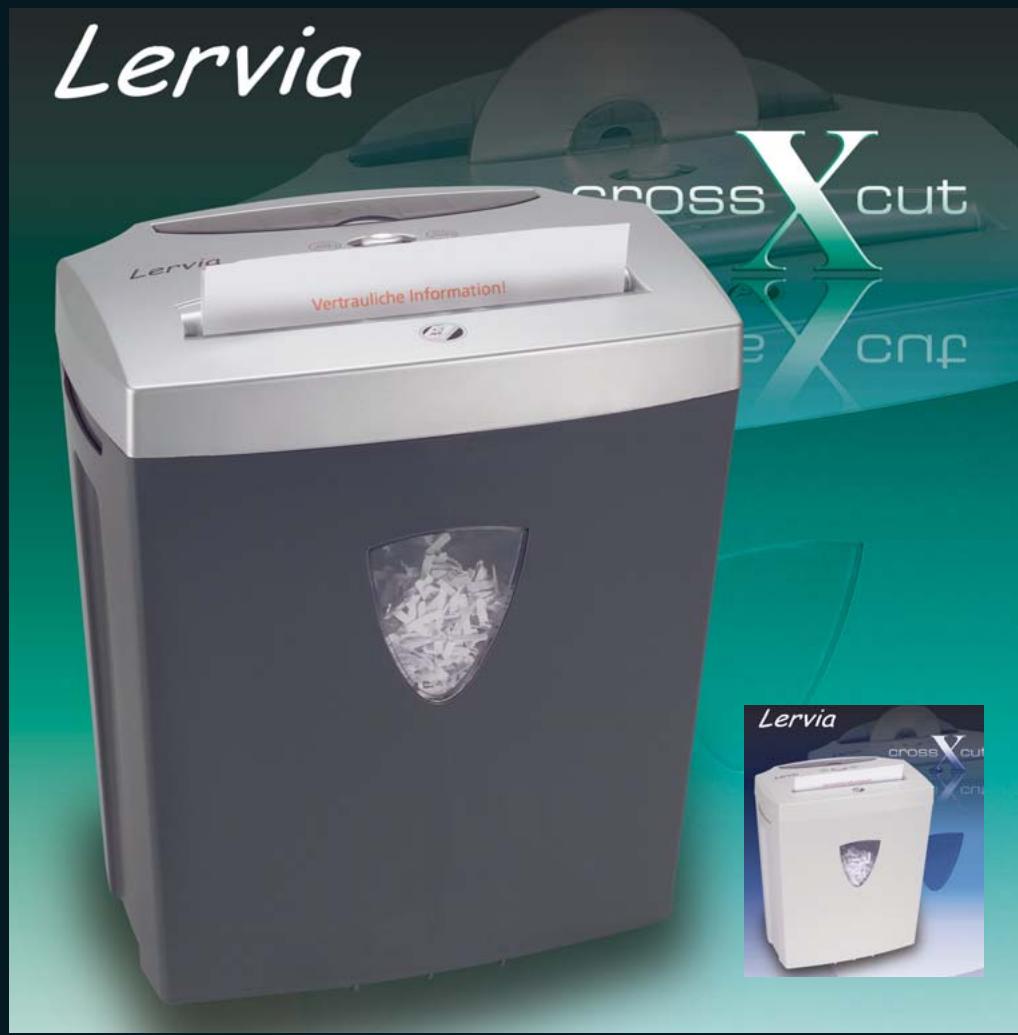
Paper and CD Shredder KH 4404
Operating Manual
KH4404_IB_UK.qxd 01.08.2006 13:37 Uhr Seite 3
Lervia KH 4404
Paper and CD Shredder KH 4404
Proper Use
The Shredder is suitable exclusively for the shredding of paper, credit cards and CD's. Any other usage or changes count as misuse and could lead to serious accidents.
Important safety instructions
The following safety instructions must always be adhered to when using electrical appliances:
These notes will help you avoid severe injuries and/or serious damage, and enable you to achieve better results and/or output.
Please read carefully the following information regarding safety measures and appropriate use. Open the page with the illustrations before you begin reading and make yourself familiar with all functions of the appliance. Carefully preserve these instructions and, if occasion arises, pass them on to thirdparties. Do not place machine on or near to any heat and water source. Do not use the appliance in a dusty environment or in explosive atmosphere (inflammable gases, vapors, vapors from organic solvents). Head of the unit should be removed from the waste collector before moving the unit.
To avoid life-threatening electric shocks:
- Never operate the Shredder with a damaged power cable or plug.
- Should the appliance not operate correctly or become damaged arrange for it to be examined and repaired by customer service as soon as possible.
- Do not expose the appliance to the rain and never use it in a humid or wet environment.
- Ensure that the electric cable never becomes wet or moist during operation.
To avoid injuries:
- The Shredder should be used by only one person at a time.
- Never leave the appliance unattended whilst in use.
- Keep loose clothing, long hair, jewellery, etc well away from the cutter opening.
- Never place your fingers into the cutter opening.
- Never place a finger into the central hole of a CD when you are feeding it into the appliance.
- Keep children away from the appliance. Children frequently underestimate the dangers of electrical appliances.
- The packaging material can be a danger for children. Dispose of the material immediately after unpacking or keep it in a safe place not accessible to children.
- Do not place the power cord on the walking road to avoid possible danger.
Lervia KH 4404
A safe approach:
- Place the appliance in the immediate vicinity of an electrical power socket. Ensure that the appliance and the power plug are easily accessible, particularly in an emergency.
- Never overburden the appliance. The Shredder is designed for short period of operation. Continuous operation: maximum 3 minutes.
- In cases of danger, immediately remove the electrical plug from the socket.
- Never use the shredder for tasks for which it was not designed.
Always be attentive! Always pay attention to what you are doing and act rationally. Never use the appliance when you are distracted or don't feel well.
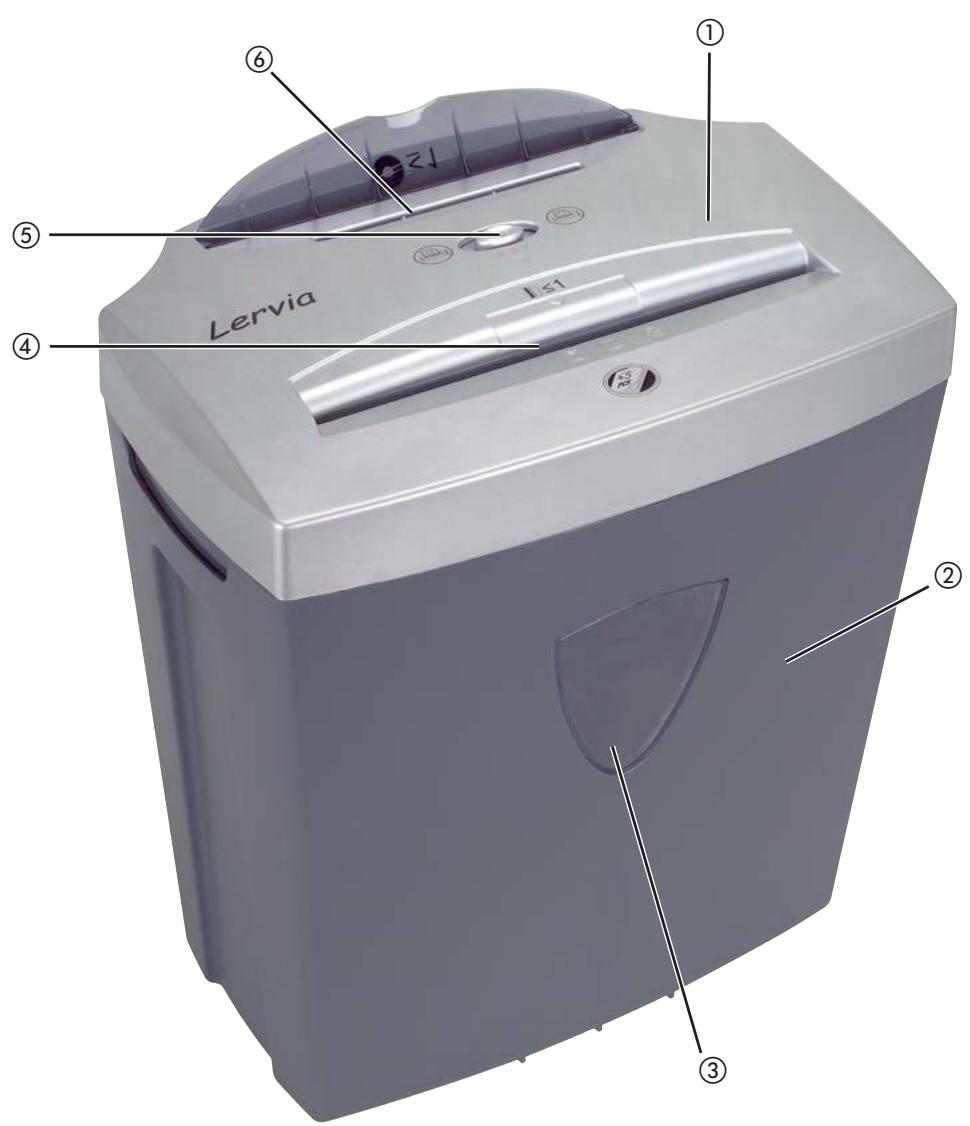
Description of the appliance
① Cutter head
② Waste collector
③ Viewing window
(4) Cutter opening (Paper & Credit cards)
⑤ Switch
(6) Cutter opening (CD)
Initial operation
- Place the cutter head ① on the waste collector ② so that the power cable is located at the rear of the appliance.
- Connect the paper shredder to a wall socket.
Operation
Switching the appliance on:
- Place the switch ⑤ in the position (ON/AUTO) for shredding.
Inserting paper:
- Feed paper into the cutter opening ④ in panel format from above.
The motor starts automatically and also switches off automatically if no further paper is inserted. You can shred up to 5 sheets (80g / m2 paper) at the same time.
Inserting credit cards:
- Insert the credit card into the middle of the cutter opening ④ from above. You can only shred one credit card at a time.
Inserting a CD:
- Insert the CD into the cutter opening (CD) ⑥ from above. You can only shred one CD at a time.
Clearing a material blockage:
- Push the switch (5) into the position (REVERSE) should the material become jammed.
Reverse running is now engaged and the item to be shredded will be ejected.
Switching the appliance off:
- To switch off the machine, push the switch ⑤ into the middle position (OFF).
Emptying the waste collector
The waste collector ② has a capacity of 17 Liters.
- Remove the plug from the wall socket.
- Empty the waste collector ② at regular intervals. At the latest when the viewing window ③ of the waste collector ② is blocked by shredded material.
- Remove paper waste from the waste collector ② before you start to shred CD's or credit cards.
- Dispose of the waste material in an environmentally responsible manner.
Notice regarding overheating of the appliance:
The appliance will switch off automatically if it overheats.
- In these cases, remove the power plug from the socket.
- Empty the waste collector if the shredded material accumulated to block the viewing window
- Permit the appliance to cool down.
- Replace the power plug into the socket.
- Switch the appliance on, in that you push the switch ⑤ into the position (ON/AUTO).
Technical Data
Mains voltage: 220-240V 50Hz
Rated current: 1,45 A
Protection class: II
Continuous
operating time: 3 Minutes
Shredding method: Crosscut,
4x23mm particles
Working width: 225 mm
Collection bin: 17 Litres
Depth of slot complies with DIN EN 294
Cleaning
Danger! Always remove the power plug before cleaning the appliance.
- Empty the waste collector ② regularly. At the latest when the viewing window ③ of the waste collector ② is blocked by shredded material.
- Clean the cutting head ① and the waste collector ② with a lightly moistened cloth and, if appropriate, with a mild detergent.
- Remove any residual materials in the cutter openings ④ + 6 with a suitable object. Always make sure that the appliance is unplugged prior to cleaning!
Warning! The cutters in the appliance are very sharp!
Disposal

Do not dispose of the appliance in your normal domestic waste.
Dispose of the appliance through a registered specialist disposal firm or through your community waste disposal department. Observe the currently applicable regulations. In case of doubt, contact your local waste disposal facility.
Warranty and Service
The warranty conditions and the service address can be found on the warranty slip.
Komperna GmbH
Burgstrasse 21
D-44867 Bochum
www.kompernass.com
Lervia KH 4404
Troubleshooting
If the material to be shredded jams:
This means you have inserted too much material into the appliance (max. 5 sheets 80g / m2 -paper, max. 1 credit card, max 1 CD separately).
- Push the switch ⑤ into the position ↑ (REVERSE).
Reverse running is now engaged and the item to be shredded will be ejected.
If the appliance suddenly ceases operation:
This means that the appliance is overheated and that the automatic safety cut-out has activated itself.
- Remove the plug from the wall socket.
- Allow the appliance to cool down.
- Replace the power plug into the socket.
- Switch the appliance on, in that you push the switch ⑤ into the position (ON/AUTO).
If the appliance doesn't allow itself to be switched on:
- Check that the plug is correctly connected to a wall socket.
- Try out a different wall socket.
- The appliance is probably defective. Have the appliance checked by qualified specialists.
- Paper and CD Shredder KH 4404
- Proper Use
- Important safety instructions
- To avoid injuries:
- A safe approach:
- Description of the appliance
- Initial operation
- Operation
- Switching the appliance on:
- Inserting paper:
- Inserting credit cards:
- Inserting a CD:
- Clearing a material blockage:
- Switching the appliance off:
- Emptying the waste collector
- Notice regarding overheating of the appliance:
- Technical Data
- Cleaning
- Danger! Always remove the power plug before cleaning the appliance.
- Disposal
- Warranty and Service
- Troubleshooting
- If the material to be shredded jams:
- If the appliance suddenly ceases operation:
- If the appliance doesn't allow itself to be switched on:
Marque : LERVIA
Modèle : KH 4404
Catégorie : Destructeur de documents