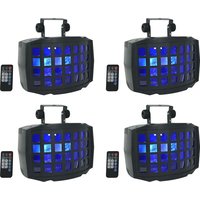
BD20 - Éclairage Rockville - Notice d'utilisation et mode d'emploi gratuit
Retrouvez gratuitement la notice de l'appareil BD20 Rockville au format PDF.


| Type de produit | Éclairage LED |
| Marque | Rockville |
| Modèle | BD20 |
| Puissance | 20 W |
| Flux lumineux | 2000 lumens |
| Température de couleur | 4000 K (blanc neutre) |
| Angle de faisceau | 120° |
| Tension d'alimentation | 220-240 V AC |
| Fréquence | 50/60 Hz |
| Indice de protection | IP20 (usage intérieur) |
| Dimensions (L x l x H) | 250 x 80 x 80 mm |
| Poids | 0.3 kg |
| Matériau | Aluminium et polycarbonate |
| Durée de vie estimée | 25 000 heures |
| Fonctions principales | Éclairage général, design compact, fixation murale ou au plafond |
| Entretien et nettoyage | Nettoyer avec un chiffon sec et doux. Ne pas utiliser de solvants. |
| Sécurité | Débrancher avant tout entretien. Ne pas couvrir l'appareil. |
| Pièces détachées et réparabilité | LED non remplaçable. L'appareil doit être remplacé en fin de vie. |
| Garantie | 2 ans |
| Informations générales | Certifié CE et RoHS. |
FOIRE AUX QUESTIONS - BD20 Rockville
Questions des utilisateurs sur BD20 Rockville
0 question sur cet appareil. Repondez a celles que vous connaissez ou posez la votre.
Poser une nouvelle question sur cet appareil
Téléchargez la notice de votre Éclairage au format PDF gratuitement ! Retrouvez votre notice BD20 - Rockville et reprennez votre appareil électronique en main. Sur cette page sont publiés tous les documents nécessaires à l'utilisation de votre appareil BD20 de la marque Rockville.
MODE D'EMPLOI BD20 Rockville
BD20 Operating Instructions

Thank you for purchasing this Rockville BD20. Please read this owner's manual carefully. Should you need assistance, please call our technical help line at 1-646-758-0144, 24 hours a day/7 days a week. For how-to videos and other helpful information, visit rockvillesupport.com/bd20 or scan the QR code.
| Display Mode | Value | Description | Submenu Function | |
| d001 | d001 – d512 | Set DMX address | ||
| Aut1 | Aut1 – Aut3 | Select one of three built-in modes | ||
| Soud(sound mode) | VoL1 – VoL9 | Sound mode | Press the ENTER button to adjust mic sensitivity. The screen will read VoL1. Press the UP and DOWN buttons to adjust the parameter. Press ENTER or MODE to save and exit. | |
| NANU(manual mode) | diNN | 0 – 255 | Master dimmer | From NANU screen, press the ENTER button to cycle through submenus. To adjust a submenu item, press the ENTER button, then press the UP and DOWN buttons to adjust the parameters. Press ENTER or MODE to save and exit. |
| StrO | 0 – 255 | Adjust strobe speed, slow to fast | ||
| rEd | 0 – 255 | Red dimmer | ||
| GrEn | 0 – 255 | Green dimmer | ||
| bLuE | 0 – 255 | Blue dimmer | ||
| UHIt | 0 – 255 | White dimmer | ||
| NOtO | 0 – 255 | Motor rotation speed, slow to fast | ||
| Iron/IroF | Iron – Irof | Toggle IR on or off | When on, the unit will be controlled by the remote. When off, the unit will not respond to the remote. | |
Remote Control
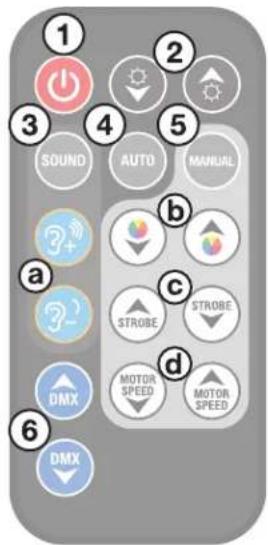
Functions
- ON/OFF: Turns the LEDs on or off. Please note, this button is strictly for the LEDs. The unit will remain on and continue to use battery power. To turn it off, use the power switch on the unit.
- ⬆/∅ (BRIGHTNESS): Adjust overall brightness in manual mode only.
- SOUND: Sets the unit to sound control mode. Use the blue buttons (a) to adjust the mode's sensitivity.
- AUTO: Sets the unit to auto mode. Press repeatedly to cycle through the 3 available modes.
- MANUAL: Allows you to cycle through different colors (b), adjust strobe speed (c), and adjust the motor speed (d).
- DMX: Press these buttons to cycle through DMX addresses.
10-Channel Mode
| Channel | Function | Value | Description |
| 1 | Master dimmer | 1 – 255 | Adjust overall brightness |
| 2 | Strobe | 0 – 1 | No strobe |
| 2 – 255 | Set strobe speed (slow to fast) | ||
| 3 | Red | 1 – 255 | Adjust individual color brightness |
| 4 | Green | 1 – 255 | |
| 5 | Blue | 1 – 255 | |
| 6 | White | 1 – 255 | |
| 7 | Motor movement | 1 – 127 | LED motor position |
| 128 – 255 | LED motor forward and reverse (slow to fast) | ||
| 8 | Manual dimming (CH1 – CH7 valid) | 1 – 5 | Adjust function settings |
| Green, Blue, White, Red Color Cycle + Movement | 6 – 55 | ||
| Green, Blue, White, Red Color Cycle + Movement + Strobe | 56 – 105 | ||
| Green, Blue, White, Red Color Cycle + Multi Color + Movement | 106 – 155 | ||
| Green, Blue, White, Red Color Cycle + Multi Color + Movement+ Strobe | 156 – 205 | ||
| Sound mode | 206 – 255 | ||
| 9 | Ch8 speed options | 1 – 255 | Ch8 function movement speed |
Marque : Rockville
Modèle : BD20
Catégorie : Éclairage