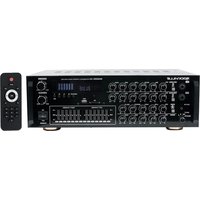
SINGMIX 45 - Amplificateur audio Rockville - Notice d'utilisation et mode d'emploi gratuit
Retrouvez gratuitement la notice de l'appareil SINGMIX 45 Rockville au format PDF.


| Type de produit | Table de mixage audio portable |
| Marque | Rockville |
| Modèle | SINGMIX 45 |
| Dimensions (L x P x H) | 30 cm x 20 cm x 5 cm |
| Poids | 1,5 kg |
| Alimentation | Adaptateur secteur 12V / 1A (inclus) |
| Nombre de canaux | 2 canaux avec entrées micro/ligne |
| Fonctions principales | Mélangeur audio, égaliseur 3 bandes, effets numériques (réverbération, echo), sortie casque et ligne |
| Connectique | Entrées XLR et Jack 6,35 mm, sortie Jack 6,35 mm, sortie RCA, USB pour enregistrement |
| Entretien et nettoyage | Débrancher avant nettoyage ; utiliser un chiffon doux et sec ; éviter les solvants |
| Sécurité | Ne pas exposer à l'humidité ou aux liquides ; utiliser uniquement l'adaptateur fourni |
| Pièces détachées et réparabilité | Contacter le service après-vente Rockville pour les pièces ; réparation par un technicien agréé recommandée |
| Informations générales | Idéal pour chanteurs, musiciens, conférences ; livret d'utilisation inclus |
FOIRE AUX QUESTIONS - SINGMIX 45 Rockville
Questions des utilisateurs sur SINGMIX 45 Rockville
0 question sur cet appareil. Repondez a celles que vous connaissez ou posez la votre.
Poser une nouvelle question sur cet appareil
Téléchargez la notice de votre Amplificateur audio au format PDF gratuitement ! Retrouvez votre notice SINGMIX 45 - Rockville et reprennez votre appareil électronique en main. Sur cette page sont publiés tous les documents nécessaires à l'utilisation de votre appareil SINGMIX 45 de la marque Rockville.
MODE D'EMPLOI SINGMIX 45 Rockville

ROCKVILLE
SINGMIX 45
1000W POWERED KARAOKE MIXER AMPLIFIER
OWNER'S MANUAL
ATTENTION:
VISIT THE ROCKVILLE SUPPORT SITE FIRST!

Who reads manuals?
Scan the QR code or go to rockvillesupport.com/singmix-45 to access how-to video(s), the owner's manual, and other important information you may need to get the most out of your item.
If you prefer written instructions, please read ahead!
With Rockville you get many options.
Missing items? If you ordered a bundle that includes more than one product and you are missing part of your bundle, then it just means your order shipped from two different warehouses. You will receive the remaining items very soon. If you have any concerns or inquiries, feel free to call our customer support center at 1-646-758-0144, 24 hours a day/7 days a week.
ROCKVILLE
Thank you for purchasing this Rockville SINGMIX 45. Please read this guide carefully for proper use of your SINGMIX 45. Should you need assistance, please call our technical help line at 1-646-758-0144, 24 hours a day/7 days a week.
INCLUDED
• SINGMIX receiver
- Remote control
- Manual
- Warranty card
IMPORTANT SAFETY INSTRUCTIONS
- To reduce risk of shock, never open the unit. There are no user-serviceable parts. For service, return the unit to Rockville or take it to an authorized service center.
- Do not expose this unit to any kind of moisture.
- Do not place this unit near heat sources or expose to direct sunlight.
- Do not place anything on top of the unit. Doing so will block vents and cause the unit to overheat.
- Please ensure that the unit is situated in a properly ventilated area.
INPUTS/OUTPUTS
- Front: two 1/4 " line inputs
- Front: 3.5mm AUX input
- Front: USB/SD Inputs, built-in Bluetooth
- Rear: two XLR mic inputs
- Rear: two pairs of RCA line inputs
- Rear: two pairs of RCA outputs (line and record—can connect a powered sub or another amp and recording device)
- Four pairs of Speaker outputs (banana and bare wire)
FUNCTIONS
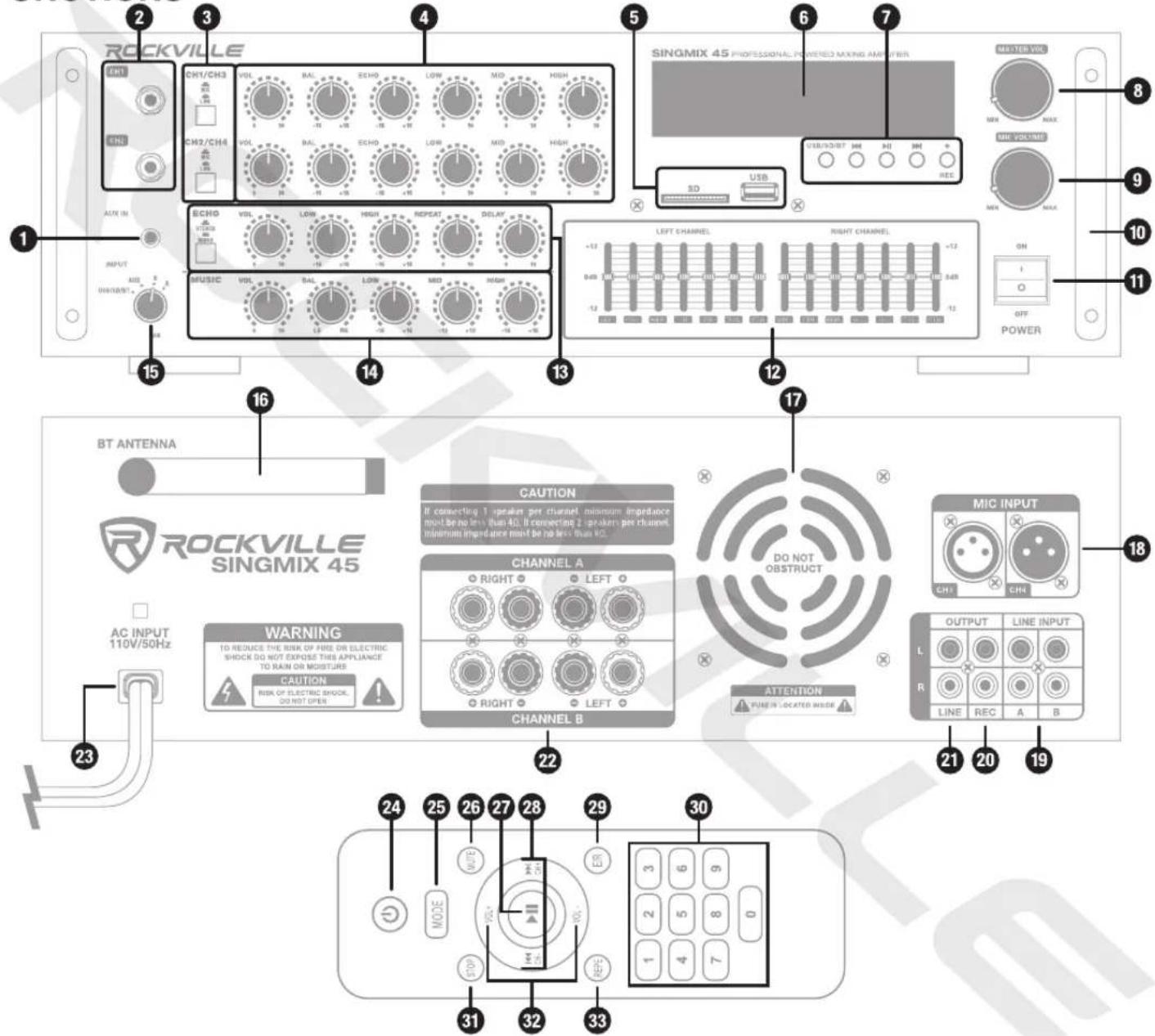
- 3.5mm AUX input
- CH1 and CH2 1/4 " line inputs
- Mic/line selector buttons
- Mic/line controls
- SD, USB inputs
- LCD display
- USB/SD/BT: Press to select MP3 input source.
Play/Pause: Press once to play current track, press again to pause.
Previous/Next controls: Press to return to the previous track or proceed to the next track.
Record: Press to record input to a connected USB drive. Press again to stop recording.
- Master volume control
- Master mic volume control
- Carrying handles
- Power switch
- Left/right channel EQs
- Master echo effect controls
- MP3 input controls
- Input source selector
-
BT antenna
-
Cooling fan
- CH3 and CH4 XLR mic inputs
- A and B RCA line inputs
- RCA record output
- RCA line output
- Binding post/banana speaker outputs
- 110V/50Hz AC power input
- Power
- MODE: select input mode
- MUTE
- Play/Pause
- Previous/Next
- E/R: select pre-programmed EQ curves
- Number pad: Use to directly select tracks in USB and SD mode.
- STOP: Press to stop audio playback.
- VOL+/VOL-
- REPE: Press once to repeat single track, press twice to repat all tracks, press again to exit repeat mode. Repeat is only available in USB/SD mode.
BLUETOOTH
Pairing
- Turn on the Bluetooth feature on your device and ensure that it is in discoverable mode.
- Press the Mode key until the display screen reads "BLUE". The word will flash indicating the unit is in pairing mode.
- Once in Bluetooth mode, look for "SINGMIX 45" on your device and select it.
- If pairing is successful, you will hear a tone and the word "BLUE" will stop flashing.
Please note that the unit will remember the last paired device.
Playback
- Play/Pause: Press once to play current track, press again to pause.
Previous/Next controls: Press to return to previous track or proceed to the next track. - Playback may also be controlled from your Bluetooth device.
USB/SD
- Insert a USB drive or SD card into the corresponding port on the front panel.
- The unit will automatically begin to play music stored on the external device.
Playback
Play/Pause: Press once to play current track, press again to pause.
Previous/Next controls: Press to return to previous track or proceed to the next track.
The SINGMIX 45 will accept the following file formats: MP3, WMA, FLAC, and APE.
SETUP
![graph TD A["Tablet/Cell Phone"] --> B["TV"] B --> C["DVD Player"] C --> D["Cable/Satellite TV Input"] D --> E["Blue-ray Disc Player"] E --> F["Warning"] F --> G["AC INPUT 110V/50Hz"] F --> H["CAUTION"] H --> I["CHANNEL A"] I --> J["CHANNEL B"] J --> K["Attention"] K --> L["MIC INPUT"] L --> M["OUTPU…](/content/2026/07/1476172/images/0a0762db2ee90a763251efc93d46aad0553a33101757eec95ea61acdd518c5b3.jpg)

CHOOSING COMPATIBLE SPEAKERS
Speaker Types
Full-Range Speakers: These are speakers that can produce a full range of sound. They usually come in a 2-way configuration (woofer and tweeter) or a 3-way configuration (woofer, tweeter, and mid-range driver). They can vary in size from 6.5" to 15". The quantity and type will be determined by the size of the room and the specific requirements of your karaoke setup. We recommend our KPS or SPGN series of speakers, which can be found at RockvilleAudio.com.
Matching Impedance: It's important that you match the impedance of your speakers to your amplifier. The SINGMIX 45 has a minimum speaker impedance of 4 ohms, hence the total impedance of your speakers must not be less than 4 ohms.
Speaker Configurations
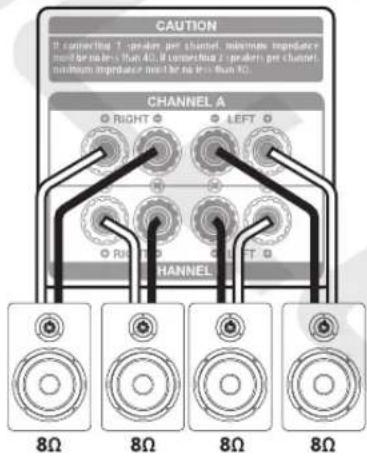
The SINGMIX 45's speaker outputs are divided into two zones, Zone A (CHANNEL A) and Zone B (CHANNEL B). The RIGHT outputs of Zone A and Zone B are wired in parallel, and the LEFT outputs of Zone A and Zone B are wired in parallel. Below are the two most common speaker configurations.
- Two 4-ohm or two 8-ohm speakers attached to Zone A (CHANNEL A) or you can attach them to Zone B (CHANNEL B).

- Two 8-ohm speakers attached to Zone A (CHANNEL A) & two 8-ohm speakers attached to Zone B (CHANNEL B).
MIC CONNECTIONS, MIC/LINE CONTROLS, ECHO CONTROLS, MP3 CONTROLS, and EQ

- Connect wired mics (not included) to either one of the 1/4 jacks located at the front of the unit. Alternatively, you can connect mics to either one of the XLR jacks at the rear of the unit (see page 6).
- Mic/Line controls: Dedicated independent controls allow you to set the output levels of the XLR and 1/4 jacks.
a. Mic/Line input selector: This button sets the input impedance for the corresponding channels.
b. Volume: sets the sound level of the corresponding channels
c. Balance: The balance control equalizes the output levels at your listening position even when its not centered between the two main channels.
d. Echo: controls the amount of echo effect applied to the corresponding channels
e. EQ: The EQ section allows you to independently control the low (bass), mid, and high (treble) levels of all mic/line input.
- Echo: The echo effect adds a series of repeated, decaying echoes to a sound. Equalizing the delays will change a room's sound characteristics from one that has reflective surfaces (brighter sounding echoes) to one that is totally absorptive (darker sounding echoes).
a. Stereo/Mono: Allows you to select between stereo or mono echo effect. Choose stereo to transmit the echo effect back and forth between the left and right channels. This setting is best used in a live environment where listeners will be able to hear both speakers equally. Select mono to transmit the echo effect equally to channels. This setting is best used in situations where your speakers are in separate rooms or spread so far apart listeners will only hear one of the speakers.
b. Volume: sets the sound level of the echo effect
c. EQ: These controls allow you to independently set the low (bass) and high (treble) levels of output affected by the effect.
d. Repeat: determines how often the echo will be repeated
Delay: Specifies the number of milliseconds, beats, or samples between each echo. For example, a setting of 100 milliseconds would result in a 1/10 of a second delay between successive echoes.
- MP3 input controls: Dedicated independent controls allow you to set the output levels of MP3 input via SD, USB, and BT.
a. Volume: sets the sound level of the corresponding channels
b. Balance: allows you to set the amount of output signal sent to the left or right channels
c. EQ: The EQ section allows you to independently control the low (bass), mid, and high (treble) levels of all mic/line input.
- Equalizer: Dual 7-band left- and right-channel graphic equalizers allow the user to make adjustments to frequencies from 60Hz to 15kHz, which will affect overall sound output.
- Master Mic Volume: Master mic volume control sets overall sound level of all mic output.
- Master Volume: Master volume control sets overall sound level of all output.
USING YOUR BLUETOOTH ENABLED DEVICE FOR KARAOKE
- Decide which device you would like to use as your karaoke viewing screen (iPad, iPhone, Android, tablet, or laptop). We recommend using the Rockville IPS20 Tablet/SmartPhone/iPhone/iPad Tripod Stand. It can be found at RockvilleAudio.com.
- Turn on your device and the SINGMIX 45 unit. Pair the two using the Bluetooth feature (follow the paring procedures on page 4).
- Next go to www.youtube.com on your device and type the name of the song you would like to sing and the word "karaoke" into the YouTube search field.
- Adjust the volume of the SINGMIX 45 and microphones as you see fit. Now you're ready to sing!
FEATURES
• Rockville SingMix 45 1000w Professional-Powered Mixing Amplifier
- 500 x 2 Peak @ 4 Ohm/150 x 2 RMS @ 4 Ohm/100 x 2 RMS @ 8 Ohm
- A and B parallel speaker outputs support (4) 8-ohm speakers or (2) 8-ohm speakers or (2) 4-ohm speakers (terminals are banana or bare wire)
• Built-in Bluetooth with 35ft range
- USB input will play music files from a thumb drive or hard drive (32Gb max)
- SD card playback will play music files stored on a memory card (32Gb max)
- Mic/line input mixer: volume, balance, echo, and 3-band EQ
• Music input mixer: volume, balance, and 3-band EQ
• Full controls over echo effects: volume, 2-band echo EQ, repeat, and delay parameters
- Selectable mono/stereo echo effect
• Dual 7-band master EQ (left/right)
- Master volume control
• Master mic volume control
• Full function remote control for USB/SD and Bluetooth playback
• Built-in pre-amplifier
• Built-in quiet cooling fan
- Digital VFD display
• Perfect for karaoke, DJ, KJ, home, and commercial applications
• Rugged metal housing
- Precision tuning with high-quality professional potentiometers and knobs
- 110V/50Hz
• Unit weight: 14lbs (6.35kg)
- Unit dimensions: 1 × 13 × 5
- 4 Mic/line inputs – (2) 1/4 " Front and (2) XLR Rear
- Front: USB/SD inputs, built-in Bluetooth
• (2) pairs RCA inputs (rear)
• (2) pairs RCA outputs (1 master line out and 1 rec out)
- Speaker outputs support 4-speaker or 2-speaker setups (banana or bare wire)
- Front 3.5mm AUX input
SPECIFICATIONS
• THD: less than 0.5%
• Input sensitivity: 200mv/47K ohm
• Frequency response: (20Hz - 20kHz): ±2dB
• Signal to noise ratio: >78db
• Tone characteristic (80Hz – 15kHz) ±12dB
TROUBLESHOOTING
| No power | Make sure the unit is properly plugged in. |
| Bluetooth pairing fails | Make sure both devices are turned on and that your BT device is discoverable.Make sure you've selected the proper source.Make sure the BT device is within 5ft of the unit.Move both devices away from other BT devices, microwaves, wireless routers, and other electronics.Make sure the unit is not paired to another device. |
| No sound | Make sure the correct input source is selected.Check the master volume control as well as the volume settings of the input source.Check all input connections as well as all output connections. |
| Microphone feedback | Make sure the speakers are not pointed toward or are too close to the speakers.Adjust the treble settings on the mic EQ panel. |
| No sound from microphones | Make sure the microphones are turned on.Check all mic connections.Check individual microphone volume settings as well as master microphone volume.Make sure the microphones are in proper working order. |
FEDERAL COMMUNICATIONS COMMISSION COMPLIANCE INFORMATION
Responsible party name: Rockville
Address: 600 Bayview Ave, Entrance A, Inwood, NY 11096
Hereby declares that the product Rockville SINGMIX 45 Professional-powered Mixing Amplifier complies with FCC rules as mentioned in the following paragraph:
This device complies with Part 15 of the FCC rules. Operation is subject to the following two conditions: (1) this device may not cause harmful interference, and (2) this device must accept any interference received, including interference that may cause undesired operation.
Note: This equipment has been tested and found to comply with the limits for a Class B digital device, pursuant to Part 15 of the FCC rules. These limits are designed to provide reasonable protection against harmful interference in a residential installation. This equipment generates, uses and can radiate radio frequency energy and, if not installed and used in accordance with the instructions, may cause harmful interference to radio communications. However, there is no guarantee that interference will not occur in a particular installation. If this equipment does cause harmful interference to radio or television reception, which can be determined by turning the equipment off and on, the user is encouraged to try to correct the interference by one or more of the following measures:
- Reorient or relocate the receiving antenna.
- Increase the separation between the equipment and receiver.
- Connect the equipment to an outlet on a circuit different from that to which the receiver is connected
- Consult the dealer or an experienced radio/TV technician for help.
2024

ROCKVILLE


- ROCKVILLE
- SINGMIX 45
- 1000W POWERED KARAOKE MIXER AMPLIFIER
- OWNER'S MANUAL
- ATTENTION
- VISIT THE ROCKVILLE SUPPORT SITE FIRST
- WHO READS MANUALS
- IF YOU PREFER WRITTEN INSTRUCTIONS, PLEASE READ AHEAD
- INCLUDED
- IMPORTANT SAFETY INSTRUCTIONS
- INPUTS/OUTPUTS
- BLUETOOTH
- PAIRING
- PLAYBACK
- USB/SD
- SETUP
- CHOOSING COMPATIBLE SPEAKERS
- SPEAKER TYPES
- SPEAKER CONFIGURATIONS
- USING YOUR BLUETOOTH ENABLED DEVICE FOR KARAOKE
- FEATURES
- SPECIFICATIONS
- FEDERAL COMMUNICATIONS COMMISSION COMPLIANCE INFORMATION
Marque : Rockville
Modèle : SINGMIX 45
Catégorie : Amplificateur audio