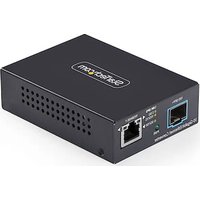
MCM10G6SSFP - Convertisseur réseau StarTech.com - Notice d'utilisation et mode d'emploi gratuit
Retrouvez gratuitement la notice de l'appareil MCM10G6SSFP StarTech.com au format PDF.


| Type de produit | Transceiver SFP+ 10 Gigabit Ethernet |
| Modèle | MCM10G6SSFP |
| Marque | StarTech.com |
| Connecteur | LC duplex |
| Type de fibre | Multimode (OM1, OM2, OM3, OM4) |
| Distance maximale | 300 m sur fibre OM3 |
| Débit de données | 10 Gbps |
| Longueur d'onde | 850 nm |
| Dimensions (L x l x H) | 56 x 14 x 9 mm |
| Poids | 18 g |
| Tension d'alimentation | 3,3 V |
| Consommation électrique | 1,5 W |
| Température de fonctionnement | 0 °C à 70 °C |
| Humidité de fonctionnement | 10 % à 85 % (sans condensation) |
| Normes conformes | IEEE 802.3ae, SFF-8431, MSA SFP+ |
| DDM (Diagnostic numérique) | Oui (monitoring de température, tension, puissance) |
| Entretien et nettoyage | Nettoyer les connecteurs avec un kit de nettoyage fibre optique. Éviter la poussière. |
| Sécurité | Ne pas regarder directement le faisceau laser. Classe 1 selon IEC 60825-1. |
| Pieces detachées et réparabilité | Non réparable par l'utilisateur. Remplacer par un module identique. |
| Informations générales | Garantie 2 ans. Compatible avec tout équipement SFP+ conforme. |
FOIRE AUX QUESTIONS - MCM10G6SSFP StarTech.com
Questions des utilisateurs sur MCM10G6SSFP StarTech.com
0 question sur cet appareil. Repondez a celles que vous connaissez ou posez la votre.
Poser une nouvelle question sur cet appareil
Téléchargez la notice de votre Convertisseur réseau au format PDF gratuitement ! Retrouvez votre notice MCM10G6SSFP - StarTech.com et reprennez votre appareil électronique en main. Sur cette page sont publiés tous les documents nécessaires à l'utilisation de votre appareil MCM10G6SSFP de la marque StarTech.com.
MODE D'EMPLOI MCM10G6SSFP StarTech.com
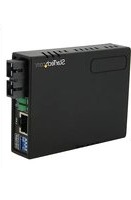
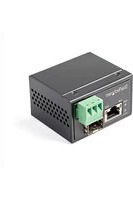
10GbE Fiber Media Converter - Open SFP+ Slot - Multigigabit Support
Product ID
MCM10G6SSFP

| Feature Function | |
| 1 | SFP+ SlotInsert an SFP+ Module into the Media Converter |
| 2 PWR | Solid GreenPower is activeOffPower is inactive |
| 3 LEDs | Solid GreenTo indicate that the port is operating at 2.5GbpsSolid OrangeTo indicate that the port is operating at 10/1GbpsGreen - OffTo indicate that the port is operating at 5Gbps/100Mbps |
| 4 | RJ45 PortConnect an Ethernet Cable to the Media Converter |
| 5 | 5V DC Port(Not Shown)Connect the Universal Power Adapter to power the Media Converter |
Package Contents
• Media Converter x 1
• Universal Power Supply x 1
- Quick-Start Guide x 1
Requirements
For the latest manuals, product information, technical specifications, and declarations of conformance, please visit:
www.StarTech.com/MCM10G6SSFP
Installing the Media Converter
Connecting the Media Converter
Note: The distance capabilities of the Media Converter are variable and depend on the SFP+ Module and the Fiber-Optic Cable used.
-
Turn off the Networking Equipment that will be connected to the Media Converter.
-
Remove the Dust Cover from the SFP+ Slot.
- Insert a 10G SFP+ Module (sold separately) into the SFP+ Slot on the Media Converter.
- Remove the Dust Cover from the SFP+ Module.
- Connect a Fiber Cable (sold separately) to the Fiber Ports on the SFP+ Module.
- Connect the other end of the Fiber Cable to the Fiber-Network Device.
Note: For Duplex Fiber Cables, the TX and RX connectors must be paired at both ends of the connection. For example TX to RX, and RX to TX.
-
Connect a Cat6/6a Cable (sold separately) to the RJ45 Port on the Media Converter.
-
Connect the other end of the Cat6/6a Cable to the Ethernet Network Device.
Powering the Media Converter
Note: Skip these steps if the Media Converter is installed in the Media Chassis.
- Connect the Universal Power Adapter to the 5V DC Port on the Media Converter.
- Connect the other end of the Universal Power Adapter to an AC Electrical Outlet. The PWR LED (power) should light up solid green.
- Turn on the connected Networking Equipment that was turned off in previous steps.
Note: Check the link budget of your SFP+ modules, as well as the module's intended wiring distance. SFP+ modules are designed to transmit signals over large distances. If the physical wiring distance is too short, the transmitting optical signal (laser) may be too strong and damage the receiving SFP+ module. An in-line optical attenuator may be required to protect it from damage.
Warning: There may be a delay (up to 10 seconds) establishing a network connection when connecting the Media Converter to a Network Device.
Duplex Mode Support
The Media Converter's RJ45 Port supports up to 10G and will automatically negotiate the connection type. By default, it will automatically detect the link speed and the duplex mode of your connected equipment.
The Media Converter's Fiber-Optic Port (10GBase-LR/SR/BX) allows 10G full duplex auto-negotiation. Check to ensure the duplex setting of the connected fiber equipment matches the duplex setting of the Media Converter.
(Optional) Wall-Mounting the Media Converter
Note: Before mounting the media converter to a wall, please check for the location of a nearby electric outlet.
- Determine the desired location to wall-mount the Media Converter.
- Using appropriate screws (not included), install two screws on the wall, spaced 49mm apart. (See Figure 1.)
- Using the holes on the bottom, hang the Media Converter on the screws
Figure 1 (Not to scale)


HQ Contact:
StarTech.com Ltd. 45 Artisans Crescent, London, ON N5V 5E9, Canada
US Contact:
StarTech.com USA LLP 4490 South Hamilton Rd, Groveport, OH 43125, United States
UK Contact:
StarTech.com Ltd. 15 Gowerton Rd, Northampton, NN4 7BW, United Kingdom
EU Contact:
StarTech.com Ltd. Siriusdreef 17-27 2132 WT Hoofddorp The Netherlands
JP Contact:
StarTech.com K.K. Atelier Yours Ogawamachi 7F 1-10-2 Kanda Ogawamachi Chiyoda-ku, Tokyo 101-0052 Japan
FR: startech.com/fr
DE: startech.com/de ES: startech.com/es NL: startech.com/nl IT: startech.com/it JP: startech.com/jp
- 10GBE FIBER MEDIA CONVERTER - OPEN SFP+ SLOT - MULTIGIGABIT SUPPORT
- PRODUCT ID
- PACKAGE CONTENTS
- REQUIREMENTS
- INSTALLING THE MEDIA CONVERTER
- CONNECTING THE MEDIA CONVERTER
- POWERING THE MEDIA CONVERTER
- DUPLEX MODE SUPPORT
- (OPTIONAL) WALL-MOUNTING THE MEDIA CONVERTER
- HQ CONTACT
- US CONTACT
- UK CONTACT
- EU CONTACT
- JP CONTACT
- FR: STARTECH.COM/FR
Marque : StarTech.com
Modèle : MCM10G6SSFP
Catégorie : Convertisseur réseau