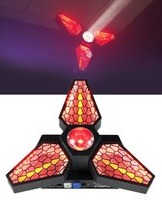
Leaf Spinner - Éclairage Rockville - Notice d'utilisation et mode d'emploi gratuit
Retrouvez gratuitement la notice de l'appareil Leaf Spinner Rockville au format PDF.


| Type de produit | Luminaire décoratif LED |
| Marque | Rockville |
| Modèle | Leaf Spinner |
| Dimensions (L x l x h) | 30 x 30 x 15 cm |
| Poids | 0,5 kg |
| Alimentation | 220-240 V, 50 Hz |
| Puissance maximale | 12 W |
| Type d'ampoule | LED intégrée |
| Flux lumineux | 800 lumens |
| Température de couleur | 3000 K (blanc chaud) |
| Fonctions principales | Éclairage LED, rotation décorative à 360° |
| Matériau | Aluminium et verre dépoli |
| Indice de protection | IP20 (intérieur uniquement) |
| Classe d'isolation | Classe II |
| Entretien et nettoyage | Débrancher avant nettoyage. Essuyer avec un chiffon doux et sec. Ne pas utiliser de produits abrasifs. |
| Sécurité | Ne pas immerger dans l'eau. Tenir hors de portée des enfants. |
| Pièces détachées et réparabilité | Ampoule LED non remplaçable. Pièces détachées disponibles via service après-vente. |
| Accessoires inclus | Kit de fixation, notice d'utilisation |
| Garantie | 2 ans |
FOIRE AUX QUESTIONS - Leaf Spinner Rockville
Questions des utilisateurs sur Leaf Spinner Rockville
0 question sur cet appareil. Repondez a celles que vous connaissez ou posez la votre.
Poser une nouvelle question sur cet appareil
Téléchargez la notice de votre Éclairage au format PDF gratuitement ! Retrouvez votre notice Leaf Spinner - Rockville et reprennez votre appareil électronique en main. Sur cette page sont publiés tous les documents nécessaires à l'utilisation de votre appareil Leaf Spinner de la marque Rockville.
MODE D'EMPLOI Leaf Spinner Rockville
LEAF SPINNER Operating Instructions

Thank you for purchasing this Rockville LEAF SPINNER. Please read this DMX guide carefully. Should you need assistance, please call our technical help line at 1-646-758-0144, 24 hours a day/7 days a week. You can also scan the QR code or go to rockvillesupport.com/leaf-spinner for essential information, guides (video and/or written), and tips to make the most out of your purchase.
Functions
-
Moving head
-
Fuse
-
LCD screen
-
Powercon power in/out jacks
-
Control panel (see Settings section below)
-
DMX in/out jacks


Settings
Press the MENU button repeatedly to cycle through settings or, if you are within a submenu, press MENU to return to the previous menu. In addition to the MENU button, you can use the UP and DOWN buttons to scroll through settings. Once a setting option has been selected, use the UP and DOWN buttons to scroll through the options or numerical values for that setting. Press the ENTER button to access setting's menus and values or to save your selection. If you press the ENTER button on any setting, the saved mode/settings/values will remain in place even after powering off the unit and will be the default when you power the unit back on. Please note, when no DMX cable is connected, the first character on the left of the menu flashes constantly. This function is especially useful when you have multiple units wired together and an issue occurs. The flashing character makes it easy to identify which unit(s) is having issues. If the LCD setting is set to off, a dash will flash on the right side when no DMX cable is connected.
| Display Mode | Value | Description | Submenu Function | |
| ADDR | 001 – 512 | Set DMX address | N/A | |
| STAT | 01 – 06 | Set static effects | Red | 0 – 255 |
| Green (Gree) | ||||
| Blue | ||||
| White (UhIt) | ||||
| Amber (UhI1) | ||||
| Light rotation static position (PSet) | ||||
| Master strobe (StrO) | ||||
| AUTO | 01 – 10 | Set auto effects operation mode | Auto modes (At) | 1 – 10 |
| Auto mode color cycle speed (SP) | 1 – 50 | |||
| CHND | 15/20/26 | Set DMX channel mode (15-channel, 20-channel, or 26-channel). | ||
| LCD | ON/OFF | Turn display backlight on or off | ||
| DISP | YES/NO | Changes the LCD screen's orientation | ||
| VER | V001 | Software version number | ||
DMX Controls
When using a DMX controller, use the charts below to reference each channel's function.
15-Channel Mode
| Channel | Function | Value | Description | |
| 1 | Rotation | 0 – 255 | 0° - 360° rotation | |
| 2 | Rotation speed controls | 0 – 49 | Rotation speed, fast to slow | |
| 50 – 152 | Clockwise infinite rotation, fast to slow | |||
| 153 – 255 | Counterclockwise infinite rotation, slow to fast | |||
| 3 | Amber light dimmer | 0 – 255 | Adjust overall Amber light brightness | |
| 4 | Amber light strobe | 0 – 255 | Adjust strobe speed, slow to fast (1Hz – 25Hz) | |
| 5 | Amber light effect | 0 – 4 | Off | Channel 12 slider must be set to 0 – 4. |
| 5 – 40 | Amber light 1 | |||
| 41 – 76 | Amber light 2 | |||
| 77 – 112 | Amber light 3 | |||
| 113 – 148 | Amber light 1 + Amber light 2 | |||
| 5 | Amber light effect | 149 – 184 | Amber light 2 + Amber light 3 | Channel 12 slider must be set to 0 – 4. |
| 185 – 220 | Amber light 3 + Amber light 1 | |||
| 221 – 255 | Amber light 1 + Amber light 2 + Amber light 3 | |||
| 6 | Leaf/beam color light dimmer | 0 – 255 | Adjust overall leaf and beam brightness | |
| 7 | Leaf/beam color strobe | 0 – 10 | Off | |
| 11 – 255 | Adjust strobe speed, slow to fast (1Hz – 25Hz) | |||
| 8 | Leaf light 1 color/effect | 0 – 4 | Off | |
| 5 – 40 | Red | When Ch 13 is null (0 – 4), channel 8 controls Leaf light 1.When Ch 13 is set anywhere between 5 and 215, Channel 8 is used to set the pattern effect color. | ||
| 41 – 76 | Green | |||
| 77 – 112 | Blue | |||
| 113 – 148 | Yellow | |||
| 149 – 184 | Purple | |||
| 185 – 220 | Light blue | |||
| 221 – 255 | Simulated white (RGB) | |||
| 9 | Leaf light 2 color/ background color | 0 – 4 | Off | |
| 5 – 40 | Red | When Ch 13 is null (0 – 4), channel 9 controls Leaf light 2. When Ch 13 is set anywhere between 5 and 215, Channel 9 is used to blend a background color into the channel 8 pattern effect color selection. Each color's background brightness can be adjusted, within it's DMX range, from dark to bright. | ||
| 41 – 76 | Green | |||
| 77 – 112 | Blue | |||
| 113 – 148 | Yellow | |||
| 149 – 184 | Purple | |||
| 185 – 220 | Light blue | |||
| 221 – 255 | Simulated white (RGB) | |||
| 10 | Leaf light 3 color | 0 – 4 | Off | |
| 5 – 40 | Red | When Ch 13 is null (0 – 4), channel 10 controls Leaf light 3. | ||
| 41 – 76 | Green | |||
| 77 – 112 | Blue | |||
| 113 – 148 | Yellow | |||
| 149 – 184 | Purple | |||
| 185 – 220 | Light blue | |||
| 221 – 255 | Simulated white (RGB) | |||
| 11 | Beam light color | 0 – 4 | Off | |
| 5 – 36 | Red | |||
| 37 – 68 | Green | |||
| 69 – 100 | Blue | |||
| 101 – 132 | White | |||
| 133 – 164 | Yellow | |||
| 165 – 196 | Purple | |||
| 197 – 228 | Light blue | |||
| 229 – 255 | White | |||
| 12 | Amber light macro function | 0 – 4 | Off (Ch 3 – 5 valid/active) | |
| 5 – 85 | Built-in effect 1 speed (clockwise cycle), slow to fast | Channel 3 slider must be active. If it is set to 0, there is no effect. | ||
| 86 – 170 | Built-in effect 2 speed (fade in), slow to fast | |||
| 171 – 255 | Built-in effect 3 speed (sharp pulse), slow to fast | |||
| 13 | Leaf light macro function | 0 – 4 | Off (Ch 6 –10 valid/active) | |
| 5 – 47 | Built-in effect 1 speed (clockwise cycle), slow to fast | Channel 6, 8, and 9 sliders must be active. If they are set to 0, there is no effect. | ||
| 48 – 89 | Built-in effect 2 speed (alternating cycle), slow to fast | |||
| 90 – 131 | Built-in effect 3 speed (fade in), slow to fast | |||
| 132 – 173 | Built-in effect 4 speed (slow pulse), slow to fast | |||
| 174 – 215 | Built-in effect 5 speed (sharp pulse), slow to fast | |||
| 216 – 255 | Built-in effect 6 speed (color fade), slow to fast | |||
| 14 | Beam light macro function | 0 – 4 | Off (Ch 6 and 11 valid/active) | |
| 5 – 85 | Built-in effect 1 speed (color pulse), slow to fast | Channel 6 slider must be active. If it is set to 0, there is no effect. | ||
| 86 – 170 | Built-in effect 2 speed (color fade), slow to fast | |||
| 171 – 255 | Built-in effect 3 speed (color cycle), slow to fast | |||
| 15 | Reset | 0 – 199 | Off | |
| 200 – 209 | Resets after 5 seconds | |||
| 210 – 255 | Off | |||
20-Channel Mode
| Channel | Function | Value | Description | ||
| 1 | Rotation | 0-255 | 0°-360° rotation | ||
| 2 | Rotation speed controls | 0-49 | Rotation speed, fast to slow | ||
| 50-152 | Clockwise infinite rotation, fast to slow | ||||
| 153-255 | Counterclockwise infinite rotation, slow to fast | ||||
| 3 | Amber light dimmer | 0-255 | Adjust overall Amber light brightness | ||
| 4 | Amber light strobe | 0-255 | Adjust strobe speed, slow to fast (1Hz-25Hz) | ||
| 5 | Amber light 1 | 0-255 | Adjust individual Amber light brightness | ||
| 6 | Amber light 2 | 0-255 | |||
| 7 | Amber light 3 | 0-255 | |||
| 8 | Leaf/beam color light dimmer | 0-255 | Adjust overall leaf and beam light brightness | ||
| 9 | Leaf/beam color strobe | 0-10 | Off | ||
| 11-255 | Adjust strobe speed, slow to fast (1Hz-25Hz) | ||||
| 10 | Leaf light | Red | 0-255 | Adjusts the leaf light's red color brightness when Ch18 is null (0-4) | |
| 0-4 | Off | When Ch 18 is null (0-4), channel 10 controls the individual Leaf lights' red color brightness. When Ch 18 is set anywhere between 5 and 215, Channel 10 is used to set the pattern effect color. | |||
| 5-40 | Red | ||||
| 41-76 | Green | ||||
| 77-112 | Blue | ||||
| 113-148 | Yellow | ||||
| 149-184 | Purple | ||||
| 185-220 | Light blue | ||||
| 221-255 | Simulated white (RGB) | ||||
| 11 | Green | 0-255 | Adjusts the leaf light's green color brightness when Ch18 is null (0-4) | ||
| 0-4 | Off | When Ch 18 is null (0-4), channel 11 controls the Leaf light's green color brightness. When Ch 18 is set anywhere between 5 and 215, Channel 11 is used to blend a background color into the channel 10 pattern effect color selection. Each color's background brightness can be adjusted, within it's DMX range, from dark to bright. | |||
| 5-40 | Red | ||||
| 41-76 | Green | ||||
| 77-112 | Blue | ||||
| 113-148 | Yellow | ||||
| 149-184 | Purple | ||||
| 185-220 | Light blue | ||||
| 21-255 | Simulated white (RGB) | ||||
| 12 | Blue | 0-255 | When Ch 18 is null (0-4), channel 12 controls the Leaf light's blue color brightness. When Ch 18 is set anywhere between 5 and 215, channel 12 is null. | ||
| 13 | Beam light | Red | 0-255 | Adjust beam light color brightness | |
| 14 | Green | 0-255 | |||
| 15 | Blue | 0-255 | |||
| 16 | White | 0-255 | |||
| 17 | Amber light macro function | 0-4 | Off (Ch 3-7 valid/active) | ||
| 5-85 | Built-in effect 1 speed (clockwise cycle), slow to fast | Channel 3 slider must be active. If it is set to 0, there is no effect. | |||
| 86-170 | Built-in effect 2 speed (fade in), slow to fast | ||||
| 171-255 | Built-in effect 3 speed (sharp pulse), slow to fast | ||||
| 18 | Leaf light macro function | 0-4 | Off (Ch 8-12 valid/active) | ||
| 5-47 | Built-in effect 1 speed (clockwise cycle), slow to fast | Channel 8, 10, and 11 sliders must be active. If they are set to 0, there is no effect. | |||
| 48-89 | Built-in effect 2 speed (alternating cycle), slow to fast | ||||
| 90-131 | Built-in effect 3 speed (fade in), slow to fast | ||||
| 132-173 | Built-in effect 4 speed (slow pulse), slow to fast | ||||
| 174-215 | Built-in effect 5 speed (sharp pulse), slow to fast | ||||
| 216-255 | Built-in effect 6 speed (color fade), slow to fast | ||||
| 19 | Beam light macro function | 0-4 | Off (Ch 8, 9 and 13-16 valid/active) | ||
| 5-85 | Built-in effect 1 speed (color pulse), slow to fast | Channel 8 slider must be active. If it is set to 0, there is no effect. | |||
| 86-170 | Built-in effect 2 speed (color fade), slow to fast | ||||
| 171-255 | Built-in effect 3 speed (color cycle), slow to fast | ||||
| 20 | Reset | 0-199 | Off | ||
| 200-209 | Resets after 5 seconds | ||||
| 210-255 | Off | ||||
| 3 | Amber light dimmer | 0-255 | Adjust overall Amber light brightness | ||
| 4 | Amber light strobe | 0-255 | Adjust srobe speed, slow to fast (1Hz - 25Hz) | ||
| 5 | Amber light 1 | 0-255 | Adjust individual Amber light brightness | ||
| 6 | Amber light 2 | 0-255 | |||
| 7 | Amber light 3 | 0-255 | |||
| 8 | Leaf/beam color light dimmer | 0-255 | Adjust overall leaf and beam light brightness | ||
| 9 | Leaf/beam color strobe | 0-10 | Off | ||
| 11-255 | Adjust strobe speed, slow to fast (1Hz - 25Hz) | ||||
| 10 | Leaf light 1 | Red | 0-255 | Adjusts the 1st leaf light's red color brightness when Ch24 is null (0-4) | |
| 0-4 | Off | When Ch 24 is null (0-4), channel 10 controls the 1st leaf light's red color brightness. When Ch 24 is set anywhere between 5 and 215, Channel 10 is used to set the pattern effect color. | |||
| 5-40 | Red | ||||
| 41-76 | Green | ||||
| 77-112 | Blue | ||||
| 113-148 | Yellow | ||||
| 149-184 | Purple | ||||
| 185-220 | Light blue | ||||
| 221-255 | Simulated white (RGB) | ||||
| 11 | Green | 0-255 | Adjusts the 1st leaf lights green color brightness when Ch24 is null (0-4) | ||
| 0-4 | Off | When Ch 24 is null (0-4), channel 11 controls the 1st leaf light's green color brightness. When Ch 24 is set anywhere between 5 and 215, Channel 11 is used to blend a background color into the channel 10 pattern effect color selection. Each color's background brightness can be adjusted, within it's DMX range, from dark to bright. | |||
| 5-40 | Red | ||||
| 41-76 | Green | ||||
| 77-112 | Blue | ||||
| 113-148 | Yellow | ||||
| 149-184 | Purple | ||||
| 185-220 | Light blue | ||||
| 21-255 | Simulated white (RGB) | ||||
| 12 | Blue | 0-255 | When Ch 24 is null (0-4), channel 12 controls the 1st leaf light's blue color brightness. When Ch 24 is set anywhere between 5 and 215, channel 12 is null. | ||
| 13 | Leaf light 2 | Red | 0-255 | When Ch 24 is null (0-4), channels 13-15 control the 2nd leaf light's red (ch13), green (ch14), and blue (ch15) color brightness. When Ch 24 is set anywhere between 5 and 215, channels 13-15 are null. | |
| 14 | Green | 0-255 | |||
| 15 | Blue | 0-255 | |||
| 16 | Leaf light 3 | Red | 0-255 | When Ch 24 is null (0-4), channels 16-18 control the 3rd leaf light's red (ch16), green (ch17), and blue (ch18) color brightness. When Ch 24 is set anywhere between 5 and 215, channels 16-18 are null. | |
| 17 | Green | 0-255 | |||
| 18 | Blue | 0-255 | |||
| 19 | Beam light | Red | 0-255 | Adjust beam color brightness | |
| 20 | Green | 0-255 | |||
| 21 | Blue | 0-255 | |||
| 22 | White | 0-255 | |||
| 23 | Amber light macro function | 0-4 | Off (Ch 3-7 valid/active) | ||
| 5-85 | Built-in effect 1 speed (clockwise cycle), slow to fast | Channel 3 slider must be active. If it is set to 0, there is no effect. | |||
| 86-170 | Built-in effect 2 speed (fade in), slow to fast | ||||
| 171-255 | Built-in effect 3 speed (sharp pulse), slow to fast | ||||
| 24 | Leaf color light macro function | 0-4 | Off (Ch 8-18 valid/active) | ||
| 5-47 | Built-in effect 1 speed (clockwise cycle), slow to fast | Channel 8, 10, and 11 sliders must be active. If they are set to 0, there is no effect. | |||
| 48-89 | Built-in effect 2 speed (alternating cycle), slow to fast | ||||
| 90-131 | Built-in effect 3 speed (fade in), slow to fast | ||||
| 132-173 | Built-in effect 4 speed (slow pulse), slow to fast | ||||
| 174-215 | Built-in effect 5 speed (sharp pulse), slow to fast | ||||
| 216-255 | Built-in effect 6 speed (color fade), slow to fast | ||||
26-Channel Mode
| Channel | Function | Value | Description | |
| 25 | Beam light macro function | 0 – 4 | Off (Ch 8 and 19 – 22 valid/active) | |
| 5 – 85 | Built-in effect 1 speed (color pulse), slow to fast | Channel 8 slider must be active. If it is set to 0, there is no effect. | ||
| 86 – 170 | Built-in effect 2 speed (color fade), slow to fast | |||
| 171 – 255 | Built-in effect 3 speed (color cycle), slow to fast | |||
| 26 | Reset | 0 – 199 | Off | |
| 200 – 209 | Resets after 5 seconds | |||
| 210 – 255 | Off | |||
Marque : Rockville
Modèle : Leaf Spinner
Catégorie : Éclairage