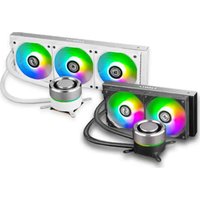
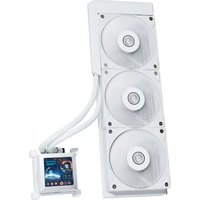
Galahad AIO 240 - Refroidissement informatique Lian Li - Notice d'utilisation et mode d'emploi gratuit
Retrouvez gratuitement la notice de l'appareil Galahad AIO 240 Lian Li au format PDF.


| Type de produit | Refroidisseur liquide tout-en-un (AIO) |
| Dimensions du radiateur | 273 x 120 x 27 mm |
| Dimensions du ventilateur | 120 x 120 x 25 mm (2 unités) |
| Poids | Environ 1,2 kg |
| Alimentation | 12 V CC via connecteur PWM 4 broches |
| Compatibilité socket | Intel LGA 1200/115x/1366/2011/2066 ; AMD AM4/AM5/TR4 |
| Pompe | Pompe céramique à vitesse contrôlée PWM |
| Matériau du radiateur | Aluminium |
| Matériau du bloc de refroidissement | Cuivre |
| Débit d'air maximum | 120 CFM par ventilateur |
| Niveau sonore | 18 à 30 dBA |
| Fonctions principales | Refroidissement CPU haute performance, éclairage RGB adressable, contrôle PWM |
| Entretien et nettoyage | Nettoyer les ventilateurs et le radiateur avec un chiffon doux ; vérifier l'absence de fuites régulièrement |
| Sécurité | Ne pas plier les tubes, éviter les chocs, utiliser une pâte thermique de qualité |
| Pièces détachées et réparabilité | Ventilateurs, câbles et supports de montage disponibles via le service après-vente |
| Garantie | 2 ans (selon le distributeur) |
FOIRE AUX QUESTIONS - Galahad AIO 240 Lian Li
Questions des utilisateurs sur Galahad AIO 240 Lian Li
0 question sur cet appareil. Repondez a celles que vous connaissez ou posez la votre.
Poser une nouvelle question sur cet appareil
Téléchargez la notice de votre Refroidissement informatique au format PDF gratuitement ! Retrouvez votre notice Galahad AIO 240 - Lian Li et reprennez votre appareil électronique en main. Sur cette page sont publiés tous les documents nécessaires à l'utilisation de votre appareil Galahad AIO 240 de la marque Lian Li.
MODE D'EMPLOI Galahad AIO 240 Lian Li

LIAN LI
Feel the difference
Galahad AIO 240 / 360
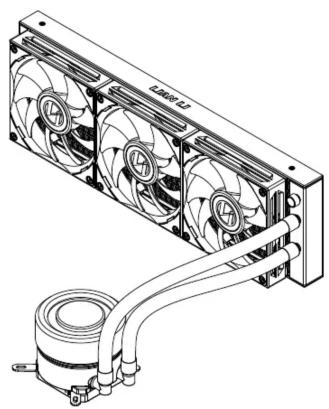
INSTALLATION GUIDE
安裝指南
Galahad AIO 240 / 360
Hardware List
零件盒部品一覽表
A B C X1 X1 | D E F 240X8360X12 240X8360X12 | ○ 240X8360X12 240X8360X12 | ○ X4 X4 | ○ X4 X4 | ○ X4 X4 |
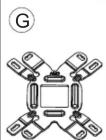 X1 X1 | (  X4 X4 | ( K X4 X4 | (  X2 X2 |  X1 X1 | (  X1 X1 |
 240X1 240X1 | (  360X1 360X1 | (  X1 X1 | ( 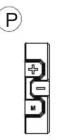 X1 X1 |  X1 X1 | (  X1 X1 |
 X1 X1 | (  X1 X1 |
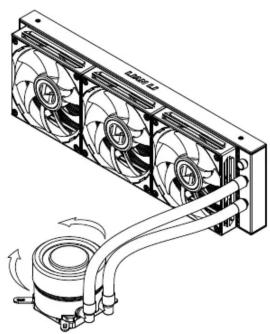
Cover installation
蓋子安裝

Rotating water cooling head
可轉動水冷頭


-6-
Cable Connection Guide
接線指南
![graph TD A["Connect to Control by 3 button or Sync with MB"] --> B["R1 R2 S1 S2"] B --> C["Sync with MB"] B --> D["S"] D --> E["M"] E --> F["Control by 3 button"] F --> G["O"] G --> H["SATA connector of the power supply cable"] H --> I["4 Pin PWM"] I --> J["AIO_PUMP"] J --> K["Q"] J --> L["L"] L -->…](/content/2026/07/1448080/images/89fd049b3f1174cc4fc934634e3a493f57371a7bffa304b378dd557210be4d02.jpg)
-7-
Intel / AMD
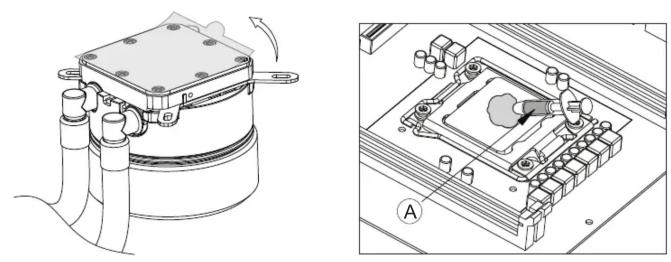
Intel 2011 / 2066

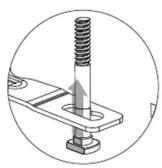
Intel LGA115X / 1366 / 775 / 1200

inner (LGA775)
middle (LGA115X / 1200)
outer (LGA1366)

-2-
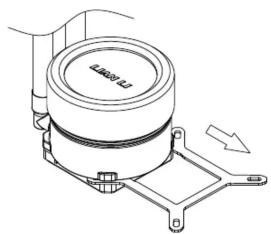
AMD AM4

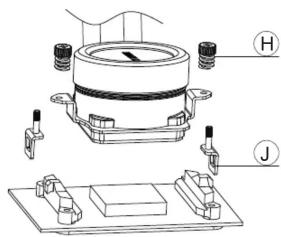
Note!
Install the AMD clips on both sides of the AMD bracket then place the screws on, make sure to keep the screws slightly loose before placing the waterblock on to the CPU. When the waterblock is in place, tighten the screws.
注意!先將AMD側扣分別穿過AMD支架兩側的安裝孔並分別擰上彈簧螺母,擰兩至三圈,不要鎖緊;再將AMD側扣扣在平台的卡扣上,鎖緊彈簧螺母。
-3-
Intel / AMD Galahad AIO 240 Installation
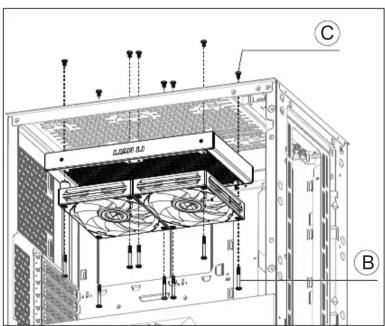
Intel / AMD Galahad AIO 360 Installation

Button Function 按鍵功能

Lighting Mode:
| 1 | rainbow | 10 | blue overlapping |
| 2 | rainbow + breath | 11 | red |
| 3 | rainbow + twinkle | 12 | orange |
| 4 | overlapping | 13 | yellow |
| 5 | rainbow wave | 14 | green |
| 6 | 256 color (press + for 5 secs to set up the 3s colors; press + for 5 secs to cancel the setting) | 15 | blue |
| 7 | rainbow radar | 16 | purple |
| 8 | red overlapping | 17 | white |
| 9 | green overlapping |
Button:
Press M to adjust the LED indicator to further control lighting mode, speed,
or brightness.
- If the LED indicator is green, press + and/or - to adjust lighting effects.
- If the LED indicator is red, press + and/or - to adjust speed.
- If the LED indicator is blue, press + and/or - to adjust brightness.
- If the LED indicator is yellow, the lighting effect is on auto-mode, thus + and - are unfunctional.

燈效模式定義:
| 1 | 炫彩全亮跑馬 | 10 | 藍色疊加 |
| 2 | 炫彩全亮呼吸 | 11 | LED恆亮紅光 |
| 3 | 炫彩全亮閃爍 | 12 | LED恆亮橙光 |
| 4 | 底色疊加(白、青、紫、黃、藍、紅、綠、橙) | 13 | LED恆亮黃光 |
| 5 | 炫彩飄動 | 14 | LED恆亮綠光 |
| 6 | 256變色(長按 "+"3S定色,再長按 "+"3S解除定色) | 15 | LED恆亮藍光 |
| 7 | 炫彩雷達 | 16 | LED恆亮紫光 |
| 8 | 紅色疊加 | 17 | LED恆亮白光 |
| 9 | 綠色疊加 |
按鍵操作:
- 按"模式切換"鍵,如指示燈亮綠燈,此時按"切換加鍵"按照如上表格順序1-10-1依次
運行;此時按"切換減鍵"按照如上表格順序10-1-10依次運行 - 按 "模式切換" 鍵,如指示燈亮紅燈,此時按 "切換加鍵" 增快燈速,此時按 "切換減鍵" 減慢燈速,不支持循環。
- 按 "模式切換" 鍵,如指示燈亮藍燈,此時按 "切換加鍵" 增加亮度,此時按 "切換減鍵" 減小亮度,不支持循環。
- 按 "模式切換" 鍵,如指示燈亮黃燈,此時從當下的模式開始依照表格順序依次循環運行,此模式下切換鍵不具備功能。
Marque : Lian Li
Modèle : Galahad AIO 240
Catégorie : Refroidissement informatique