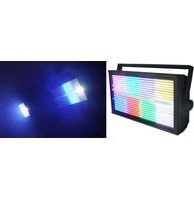
STAGE PANEL 864 - Éclairage Rockville - Notice d'utilisation et mode d'emploi gratuit
Retrouvez gratuitement la notice de l'appareil STAGE PANEL 864 Rockville au format PDF.


| Type de produit | Panneau LED DMX |
| Marque | Rockville |
| Modèle | STAGE PANEL 864 |
| Catégorie | Éclairage scénique |
| Dimensions (L x l x H) | 30 x 20 x 10 cm |
| Poids | 2,5 kg |
| Alimentation | AC 110-240 V, 50/60 Hz |
| Consommation électrique | 100 W |
| Nombre de LED | 864 (estimation) |
| Température de couleur | 3200 K à 5600 K (réglable) |
| Angle de faisceau | 120° |
| Protocole DMX | Oui, canaux multiples |
| Modes de contrôle | DMX, autonome, maître/esclave |
| Fonctions intégrées | RVB, stroboscope, gradation, programmes automatiques |
| Connectique | Entrée/sortie DMX (XLR 3 broches), prise IEC |
| Matériau du boîtier | Métal et plastique |
| Montage | Support de montage orientable inclus |
| Entretien | Nettoyer avec un chiffon sec et non abrasif |
| Sécurité | Utilisation en intérieur uniquement, éviter l'humidité |
| Pièces détachées disponibles | Câble d'alimentation, fusible de rechange |
| Réparabilité | Confier à un technicien qualifié |
| Accessoires inclus | Câble d'alimentation, manuel d'utilisation |
FOIRE AUX QUESTIONS - STAGE PANEL 864 Rockville
Questions des utilisateurs sur STAGE PANEL 864 Rockville
0 question sur cet appareil. Repondez a celles que vous connaissez ou posez la votre.
Poser une nouvelle question sur cet appareil
Téléchargez la notice de votre Éclairage au format PDF gratuitement ! Retrouvez votre notice STAGE PANEL 864 - Rockville et reprennez votre appareil électronique en main. Sur cette page sont publiés tous les documents nécessaires à l'utilisation de votre appareil STAGE PANEL 864 de la marque Rockville.
MODE D'EMPLOI STAGE PANEL 864 Rockville
STAGE PANEL 864 Operating Instructions
Thank you for purchasing this Rockville STAGE PANEL 864 pro stage wash light. Please read this DMX guide carefully. If you need assistance, please call our technical help line at 1-646-758-0144, 24 hours a day/7 days a week. Scan the QR code or visit the URL on the right to access how-to video(s), the owner's manual, and other important information.

rockvillesupport.com/stage-panel-864
Settings
Press the MENU button repeatedly to cycle through modes. Use the UP and DOWN buttons to scroll through the options or numerical values for that setting. Press the ENTER button to save your selection. If you press the ENTER button on any setting, the saved mode/settings/values will remain in place even after powering off the unit and will be the default when you power the unit back on.
| Display Mode | Value | Description |
| A001 | A001 – A512 | Set DMX address |
| CH04 | CH04 – CH39 | Set DMX channel mode (4-channel, 11-channel, 32-channel, or 39-channel). |
| N000 | N000 – N083 | Activate built-in effects of LED panels |
| E000 | E000 – E255 | Adjust the operating speed of the LED panels built-in effects |
| n000 | n000 – n040 | Adjust built-in effects of the strobe bar |
| C000 | C000 – C255 | Adjust the operating speed of the strobe bar's built-in effects |
| Soud | Soud | Sound control mode |
| r255 | r000 – r255 | Red dimmer |
| G255 | G000 – G255 | Green dimmer |
| b255 | b000 – b255 | Blue dimmer |
| W255 | W000 – W255 | Strobe bar dimmer |
| T000 | Display temperature |
DMX Controls
When using a DMX controller, use the charts below to reference each channel's function.
4-Channel Mode
| Channel | Function | Value | Description |
| 1 | Red | 0 – 255 | Adjust individual color brightness |
| 2 | Green | 0 – 255 | |
| 3 | Blue | 0 – 255 | |
| 4 | Strobe bar | 0 – 255 |
11-Channel Mode
| Channel | Function | Value | Description |
| 1 | Master dimmer | 0 – 255 | Adjust overall brightness |
| 2 | LED Strobe panel | 0 – 255 | Set strobe speed |
| 3 | 3-in-1 mode | 0 – 255 | Select 3-in-1 mode (see Mode Effects section) |
| 4 | 3-in-1 mode speed | 0 – 255 | Set 3-in-1 mode speed |
| 5 | Red | 0 – 255 | Adjust individual background color brightness |
| 6 | Green | 0 – 255 | |
| 7 | Blue | 0 – 255 | |
| 8 | Strobe bar strobe speed | 0 – 255 | Set Strobe bar light strobe speed |
| 9 | Strobe bar mode | 0 – 255 | Select Strobe bar light mode (see Strobe Bar Effects section) |
| 10 | Strobe bar mode speed | 0 – 255 | Set Strobe bar light mode speed |
| 11 | Strobe bar | 0 – 255 | Adjust strobe bar backgroung brightness |
32-Channel Mode
| Channel | Function | Value | Description |
| 1 | 1st 3-in-1 red bulb | 0 - 255 | Adjust 1st 3-in-1 bulb brightnessAdjust 2nd 3-in-1 bulb brightness |
| 2 | 1st 3-in-1 green bulb | 0 - 255 | |
| 3 | 1st 3-in-1 blue bulb | 0 - 255 | |
| 4 | 2nd 3-in-1 red bulb | 0 - 255 | |
| 5 | 2nd 3-in-1 green bulb | 0 - 255 | |
| 6 | 2nd 3-in-1 blue bulb | 0 - 255 | |
| ↓······↓ | ↓······↓ | ↓······↓ | Use the sliders between Ch7 and Ch21 to adjust the brightness of the 3-in-1 bulbs assigned to those channels. |
| 22 | 8th 3-in-1 red bulb | 0 - 255 | Adjust 8th 3-in-1 bulb brightness |
| 23 | 8th 3-in-1 green bulb | 0 - 255 | |
| 24 | 8th 3-in-1 blue bulb | 0 - 255 | |
| 25 | 1st stage Strobe bar bulb | 0 - 255 | Adjust Strobe bar bulb brightness |
| 26 | 2nd stage Strobe bar bulb | 0 - 255 | |
| 27 | 3rd stage Strobe bar bulb | 0 - 255 | |
| 28 | 4th stage Strobe bar bulb | 0 – 255 | Adjust Strobe bar bulb brightness |
| 29 | 5th stage Strobe bar bulb | 0 – 255 | |
| 30 | 6th stage Strobe bar bulb | 0 – 255 | |
| 31 | 7th stage Strobe bar bulb | 0 – 255 | |
| 32 | 8th stage Strobe bar bulb | 0 – 255 |
39-Channel Mode
| Channel | Function | Value | Description |
| 1 | Master dimmer | 0 – 255 | Adjust overall brightness |
| 2 | 3-in-1 strobe | 0 – 255 | Set 3-in-1 strobe speed |
| 3 | 3-in-1 mode | 0 – 255 | Select 3-in-1 mode (see Mode Effects section). When this channel is on, Ch8 – Ch28 become null. Channels 5 (r), 6 (g), and 7 (b) become panel background LEDs. |
| 4 | 3-in-1 mode speed | 0 – 255 | Set 3-in-1 mode speed |
| 5 | 1st 3-in-1 red bulb | 0 – 255 | Adjust 1st 3-in-1 bulb brightness |
| 6 | 1st 3-in-1 green bulb | 0 – 255 | |
| 7 | 1st 3-in-1 blue bulb | 0 – 255 | |
| ↓ ······ ↓ | ↓ ······ ↓ | ↓ ······ ↓ | Use the sliders between Ch8 and Ch25 to adjust the brightness of the 3-in-1 bulbs ( 2nd segment – 7th segment) assigned to those channels. |
| 26 | 8th 3-in-1 red bulb | 0 – 255 | Adjust 8th 3-in-1 bulb brightness |
| 27 | 8th 3-in-1 green bulb | 0 – 255 | |
| 28 | 8th 3-in-1 blue bulb | 0 – 255 | |
| 29 | Strobe bar strobe | 0 – 255 | Set Strobe bar strobe speed |
| 30 | Strobe bar mode | 0 – 255 | Select Strobe bar mode (see Strobe Bar effects section). When this channel is on, Ch33 – Ch39 become null. Ch32 now controls the strobe bar's background brightness. |
| 31 | Strobe bar mode speed | 0 – 255 | Set Strobe bar mode speed |
| 32 | 1st stage Strobe bar bulb | 0 – 255 | Adjust Strobe bar bulb brightness |
| 33 | 2nd stage Strobe bar bulb | 0 – 255 | |
| 34 | 3rd stage Strobe bar bulb | 0 – 255 | |
| 35 | 4th stage Strobe bar bulb | 0 – 255 | |
| 36 | 5th stage Strobe bar bulb | 0 – 255 | |
| 37 | 6th stage Strobe bar bulb | 0 – 255 | |
| 38 | 7th stage Strobe bar bulb | 0 – 255 | |
| 39 | 8th stage Strobe bar bulb | 0 – 255 |
Mode Effects (3-in-1 LED Panels)
| ID | Function | Value | Description |
| 0 | No effect | 0 – 2 | n/a |
| 1 | Red bulbs | 3 – 5 | Turn on all red bulbs |
| 2 | Green bulbs | 6 – 8 | Turn on all green bulbs |
| 3 | Blue bulbs | 9 – 11 | Turn on all blue bulbs |
| 4 | Yellow bulbs | 12 – 14 | Turn on all yellow bulbs |
| 5 | Pink bulbs | 15 – 17 | Turn on all pink bulbs |
| 6 | light blue bulbs | 18 – 20 | Turn on all light blue bulbs |
| 7 | White bulbs | 21 – 23 | Turn on all white bulbs |
| 8 | Color cycle change | 24 – 26 | Cycle through static colors (1 – 7) |
| 9 | Color fade mode | 27 – 29 | Fade through static colors (1 – 7) |
| 10 | Color pulse mode | 30 – 32 | Pulse through static colors (1 – 7) |
| 11 | Red bulb racing | 33 – 35 | A section of red bulbs racing |
| 12 | Green bulb racing | 36 – 38 | A section of green bulbs racing |
| 13 | Blue bulb racing | 39 – 41 | A section of blue bulbs racing |
| 14 | Yellow lights racing | 42 – 44 | A section of Yellow lights racing |
| 15 | Pink bulbs racing | 45 – 47 | A section of Pink bulbs racing |
| 16 | Light Blue bulbs racing | 48 – 50 | A section of light blue bulbs racing |
| 17 | White bulbs racing | 51 – 53 | A section of White bulbs racing |
| 18 | Race cycle change | 54 – 56 | Cycle through single sections racing (11 – 17) |
| 19 | Red bulbs racing | 57 – 59 | Two sections of red bulbs racing |
| 20 | Green bulbs racing | 60 – 62 | Two sections of green bulbs racing |
| 21 | Blue bulbs racing | 63 – 65 | Two sections of blue bulbs racing |
| 22 | Yellow lights racing | 66 – 68 | Two sections of Yellow lights racing |
Mode Effects (3-in-1 LED Panels, continued)
| ID | Function | Value | Description |
| 23 | Pink lights racing | 69 – 71 | Two sections of Pink bulbs racing |
| 24 | Light Blue lights racing | 72 – 74 | Two sections of light blue bulbs racing |
| 25 | White bulbs racing | 75 – 77 | Two sections of White bulbs racing |
| 26 | Race cycle change | 78 – 80 | Cycle through two sections racing (19 – 25) |
| 27 | Red bulbs refresh | 81 – 83 | A section of red bulbs refreshes |
| 28 | Green bulbs refresh | 84 – 86 | A section of green bulbs refreshes |
| 29 | Blue bulbs refresh | 87 – 89 | A section of blue bulbs refreshes |
| 30 | Yellow bulbs refresh | 90 – 92 | A section of Yellow bulbs refreshes |
| 31 | Pink bulbs refresh | 93 – 95 | A section of Pink bulbs refreshes |
| 32 | Light Blue bulbs refresh | 96 – 98 | A section of light blue bulbs refreshes |
| 33 | White bulbs refresh | 99 – 101 | A section of White bulbs refreshes |
| 34 | Refresh cycle change | 102 – 104 | Cycle through single sections refreshing (27 – 33) |
| 35 | Red bulbs refresh | 105 – 107 | A section of red bulbs at the beginning and end refresh back and forth |
| 36 | Green bulbs refresh | 108 – 110 | A section of green bulbs at the beginning and end refresh back and forth |
| 37 | Blue bulbs refresh | 111 – 113 | A section of blue bulbs at the beginning and end refresh back and forth |
| 38 | Yellow bulbs refresh | 114 – 116 | A section of Yellow bulbs at the beginning and end refresh back and forth |
| 39 | Pink bulbs refresh | 117 – 119 | A section of Pink bulbs at the beginning and end refresh back and forth |
| 40 | Light Blue bulbs refresh | 120 – 122 | A section of light blue bulbs at the beginning and end refresh back and forth |
| 41 | White bulbs refresh | 123 – 125 | A section of White bulbs at the beginning and end refresh back and forth |
| 42 | Refresh back and forth cycle change | 126 – 128 | Cycle through single sections refreshing back and forth (35 – 41) |
| 43 | Red bulbs racing | 129 – 131 | Two sections of red bulbs race back and forth |
| 44 | Green bulbs racing | 132 – 134 | Two sections of green bulbs race back and forth |
| 45 | Blue bulbs racing | 135 – 137 | Two sections of blue bulbs race back and forth |
| 46 | Yellow lights racing | 138 – 140 | Two sections of Yellow lights race back and forth |
| 47 | Pink bulbs racing | 141 – 143 | Two sections of Pink bulbs race back and forth |
| 48 | Light Blue bulbs racing | 144 – 146 | Two sections of light blue bulbs race back and forth |
| 49 | White bulbs racing | 147 – 149 | Two sections of White bulbs race back and forth |
| 50 | Race back and forth cycle change | 150 – 152 | Cycle through two sections racing back and forth (43 – 49) |
| 51 | Red and green bulbs loop | 153 – 155 | A section of red and a section of green bulbs race in a loop |
| 52 | Green and blue bulbs loop | 156 – 158 | A section of green and a section of blue bulbs race in a loop |
| 53 | Yellow and blue bulbs reverse | 159 – 161 | A section of blue bulbs and a section of Yellow bulbs loop in reverse |
| 54 | Yellow and Pink bulbs reverse | 162 – 164 | A section of Yellow bulbs and a section of Pink bulbs loop in reverse |
| 55 | Pink and light blue bulbs reverse | 165 – 167 | A section of Pink bulbs and a section of light blue bulbs loop in reverse |
| 56 | Light Blue and White bulbs loop | 168 – 170 | A section of light blue bulbs and a section of White bulbs race race in a loop |
| 57 | White and red bulbs loop | 171 – 173 | A section of White bulbs and a section of red bulbs race in a loop |
| 58 | Loop cycle change | 174 – 176 | Cycle through single sections looping (51 – 57) |
| 59 | Red bulbs racing | 177 – 179 | Two sections of red bulbs race in a square shape |
| 60 | Green bulbs racing | 180 – 182 | Two sections of green bulbs race in a square shape |
| 61 | Blue bulbs racing | 183 – 185 | Two sections of blue bulbs race in a square shape |
| 62 | Yellow lights racing | 186 – 188 | Two sections of Yellow lights race in a square shape |
| 63 | Pink bulbs racing | 189 – 191 | Two sections of Pink bulbs race in a square shape |
| 64 | Light Blue bulbs racing | 192 – 194 | Two sections of light blue bulbs race in a square shape |
| 65 | White bulbs racing | 195 – 197 | Two sections of White bulbs race in a square shape |
| 66 | Race cycle change | 198 – 200 | Cycle through two sections racing in a square (59 – 65) |
| 67 | Red bulbs fading | 201 – 203 | A section of red bulbs racing while fading |
| 68 | Green bulbs fading | 204 – 206 | A section of green bulbs racing while fading |
| 69 | Blue bulbs fading | 207 – 209 | A section of blue bulbs racing while fading |
| 70 | Yellow lights fading | 210 – 212 | A section of Yellow lights racing while fading |
| 71 | Pink bulbs fading | 213 – 215 | A section of Pink bulbs racing while fading |
| 72 | Light Blue bulbs fading | 216 – 218 | A section of light blue bulbs racing while fading |
| 73 | White bulbs fading | 219 – 221 | A section of White bulbs racing while fading |
| 74 | Fade cycle mode | 222 – 224 | Cycle through single sections fading (67 – 73) |
| 75 | Red bulbs stacked | 225 – 227 | A section of red bulbs stacks up |
Mode Effects (3-in-1 LED Panels, continued)
| ID | Function | Value | Description |
| 76 | Green bulbs stacked | 228 – 230 | A section of green bulbs stacks up |
| 77 | Blue bulbs stacked | 231 – 233 | A section of blue bulbs stacks up |
| 78 | Yellow lights stacked | 234 – 236 | A section of Yellow lights stacks up |
| 79 | Pink bulbs stacked | 237 – 239 | A section of Pink bulbs stacks up |
| 80 | Light Blue bulbs stacked | 240 – 242 | A section of light blue bulbs stacks up |
| 81 | White bulbs stacked | 243 – 245 | A section of White bulbs stacks up |
| 82 | Stack cycle change | 246 – 248 | Cycle through single sections stacking (75 – 81) |
| 87 | Colorful piled up | 249 – 251 | Color blocks flow left to right, then pile up |
| 88 | Colorful flow | 252 – 254 | Blocks of color flow right to left |
| 89 | Cycle all (11 – 81) | 255 | Cycle all previous modes (11 – 81) |
Strobe Bar Effects (Strobe bar)
| ID | Function | Value | Description |
| 1 | No effect | 0 – 5 | n/a |
| 2 | Strobe bar light segments | 6 – 11 | First segment |
| 3 | 12 – 17 | Second segment | |
| 4 | 18 – 23 | Third segment | |
| 5 | 24 – 29 | Fourth segment | |
| 6 | 30 – 35 | Fifth segment | |
| 7 | 36 – 41 | Sixth segment | |
| 8 | 42 – 47 | Seventh segment | |
| 9 | 48 – 53 | Eighth segment | |
| 19 | Strobe bar light racing | 54 – 59 | A section races from left to right |
| 20 | 60 – 65 | A section races from right to left | |
| 23 | 66 – 71 | Two segments race from left to right | |
| 24 | 72 – 77 | Two segments race from right to left | |
| 27 | 78 – 83 | Three segments race from left to right | |
| 28 | 84 – 89 | Three segments race from right to left | |
| 30 | 90 – 95 | A section races back and forth | |
| 33 | 96 – 101 | Two sections races back and forth | |
| 34 | 102 – 107 | Three sections races back and forth | |
| 37 | Strobe bar light tail | 108 – 113 | Collides from left to right |
| 39 | 114 – 119 | Collides from right to left | |
| 40 | 120 – 125 | Falls from left to right | |
| 43 | 126 – 131 | Falls from right to left | |
| 45 | 132 – 137 | Races back and forth | |
| 47 | Strobe bar light refresh | 138 – 143 | A segment refreshes from left to right |
| 49 | 144 – 149 | A segment refreshes from right to left | |
| 51 | 150 – 155 | A section at each end refreshes in the middle | |
| 53 | 156 – 161 | A section in the middle refreshes at each end | |
| 55 | Strobe bar light racing | 162 – 167 | A section at each end races back and forth |
| 57 | Strobe bar light stacked | 168 – 173 | A segment stacks up from left to right |
| 59 | 174 – 179 | A segment stacks up from right to left | |
| 61 | Strobe bar light waves | 180 – 185 | Waves go from left to right |
| 63 | 186 – 191 | Waves go from right to left | |
| 65 | 192 – 197 | Waves at each end merge in the middle | |
| 67 | 198 – 203 | Separate sections of waves from the middle to each end | |
| 69 | Strobe bar light racing | 204 – 209 | A light races back and forth at four intervals |
| 71 | 210 – 215 | Four-stage connection light races back and forth | |
| 73 | Strobe bar light squirms | 216 – 221 | A piece squirms from left to right |
| 75 | 222 – 227 | A piece squirms from right to left | |
| 77 | Strobe bar light shining | 228 – 233 | A gradual light moves from left to right, shines, then returns. |
| 79 | Strobe bar light pendulum | 234 – 239 | Two pendulums swing from side to side |
| 81 | Strobe bar light disappears | 240 – 245 | Lights accumulate over time then disappear one by one |
| 87 | Strobe bar light grows | 246 – 251 | Lights collide at both ends and become bigger |
| 88 | Cycle all (19 – 87) | 252 – 255 | Cycles all previous modes (19 – 87) |
Marque : Rockville
Modèle : STAGE PANEL 864
Catégorie : Éclairage