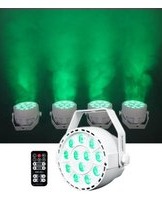
ROCKPAR TRI - Éclairage Rockville - Notice d'utilisation et mode d'emploi gratuit
Retrouvez gratuitement la notice de l'appareil ROCKPAR TRI Rockville au format PDF.


| Type de produit | Projecteur LED PAR Tri (RGB) |
| Marque | Rockville |
| Modèle | ROCKPAR TRI |
| Dimensions (L x l x H) | 22 x 22 x 30 cm |
| Poids | 1,5 kg |
| Alimentation | AC 100-240 V, 50/60 Hz |
| Consommation électrique | 30 W |
| Source lumineuse | 3 LEDs (rouge, vert, bleu) |
| Fonctions principales | Mélange de couleurs RGB, modes DMX, automatique, maître/esclave, commande par son |
| Connectivité | DMX 3 broches (XLR), prise secteur IEC |
| Indice de protection | IP20 (usage intérieur) |
| Température de fonctionnement | -10 °C à 40 °C |
| Matériau du boîtier | Aluminium moulé sous pression |
| Angle de faisceau | 45° |
| Refroidissement | Passif (dissipateur thermique) |
| Entretien et nettoyage | Débrancher avant nettoyage. Utiliser un chiffon doux et sec. Ne pas utiliser de produits abrasifs. |
| Sécurité | Ne pas exposer à l'eau ou à l'humidité. Utiliser sur une surface stable. Éviter les températures extrêmes. |
| Pièces détachées et réparabilité | Contactez le service après-vente Rockville pour toute réparation ou pièce de rechange. |
| Contenu de l'emballage | 1 projecteur ROCKPAR TRI, 1 câble d'alimentation, 1 manuel d'utilisation |
| Garantie | 2 ans |
| Certifications | CE, RoHS |
FOIRE AUX QUESTIONS - ROCKPAR TRI Rockville
Questions des utilisateurs sur ROCKPAR TRI Rockville
0 question sur cet appareil. Repondez a celles que vous connaissez ou posez la votre.
Poser une nouvelle question sur cet appareil
Téléchargez la notice de votre Éclairage au format PDF gratuitement ! Retrouvez votre notice ROCKPAR TRI - Rockville et reprennez votre appareil électronique en main. Sur cette page sont publiés tous les documents nécessaires à l'utilisation de votre appareil ROCKPAR TRI de la marque Rockville.
MODE D'EMPLOI ROCKPAR TRI Rockville
ROCKPAR TRI Operating Instructions
Should you need assistance, please call our technical help line at 1-646-758-0144, 24 hours a day/7 days a week. For how-to videos and other helpful information, visit the URLs or scan the QR codes on the right.

rockvillesupport.com/rockpar-tri-white

rockvillesupport.com/rockpar-tri-black
Settings
Use the MENU button to enter the settings menu. Press and hold the UP and DOWN buttons to quickly scroll through the menu items. Press ENTER to make a selection and use the UP and DOWN buttons to scroll through the options or numerical values for that setting. Press the ENTER button to save your selection. If you press the ENTER button on any setting, the saved mode/settings/values will remain in place even after powering off the unit and will be the default when you power the unit back on.
| Display Mode | 1st Menu Value | 2nd Menu Value | Description |
| d.001 | d001 – d512 | Set DMX address code | |
| IP.01 | IP01 – IP64 | DMX group address: IP01=d001, IP02=d008, IP03=d015 ... | |
| A1.01 | A1.01 – A1.11 | Color selection: Use the up/down buttons to select color. | |
| A2.01 | A2.01 – A2.32 | Color cycle change: Use the up/down buttons to adjust speed. | |
| A3.01 | A3.01 – A3.11 | Gradual change. Use the up/down buttons to select preset modes. | |
| A3.01 – A3.32 (flashing) | After selecting mode, press ENTER to access submenu. This menu will flash on screen. Use the up/down buttons to adjust speed. | ||
| A4.01 | A4.01 – A4.04 | Select sound mode sensitivity. 1 being the lest sensitive, 4 being the most. | |
| A5.01 | A5.01 – A5.07 | Strobe color selection. | |
| A5.01 – A5.32 (flashing) | After selecting mode, press ENTER to access submenu. This menu will flash on screen. Use the up/down buttons to adjust speed. | ||
| r255 | r000 – r255 | Red dimmer | |
| G255 | G000 – G255 | Green dimmer | |
| b255 | b000 – b255 | Blue dimmer |
DMX Controls
When using a DMX controller, use the charts below to reference each channel's function.
7-Channel Mode
| Channel | Function | Value | Description |
| 1 | Mode | 0 – 10 | Manual dimming, Ch4 – Ch7 only. |
| 10 – 50 | A1: Color selection | ||
| 51 – 100 | A2: Color cycle change | ||
| 101 – 150 | A3: Gradual change | ||
| 151 – 200 | A4: Sound mode | ||
| 201 – 255 | A5: Strobe | ||
| 2 | Color | 0 – 255 | Changes the color for the Mode (Ch1) function being used. |
| 3 | Speed | 0 – 255 | Changes the speed for the Mode (Ch1) function being used. |
| 4 | Master dimmer | 0 – 255 | Adjust overall brightness of Ch5 - Ch7. |
| 5 | Red | 0 – 255 | Adjust individual color brightness(Ch1 must be set to Manual dimming mode to engage these channels) |
| 6 | Green | 0 – 255 | |
| 7 | Blue | 0 – 255 |
Remote Control
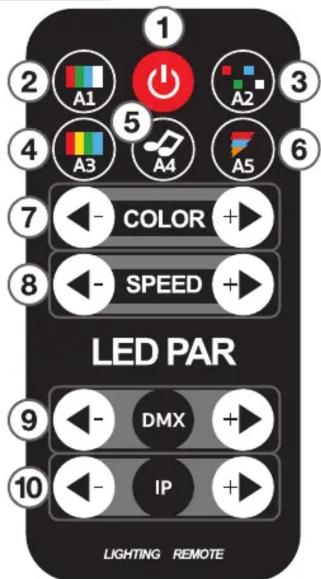
Functions
- Powers the LED bulbs ON or OFF.
- A1: Press this button to enter Color Selection mode. Use the COLOR +/- buttons to select colors. Use the SPEED +/- buttons to adjust brightness.
- A2: Press this button to enter Color Cycle mode. Use the SPEED +/- buttons to adjust speed.
- A3: Press this button to enter Gradual Change mode. Use the COLOR +/- buttons to cycle through available gradual change modes. Use the SPEED +/- to adjust the speed of the selected mode.
- A4: Press this button to enter Sound mode. Use the SPEED +/- buttons to adjust sensitivity.
- A5: Press this button to enter Strobe mode. Use the COLOR +/- buttons to select strobe colors. Use the SPEED +/- buttons to adjust speed.
- COLOR +/-: Select colors or mode functions.
- SPEED +/-: Adjust speed or select mode functions.
- DMX +/-: Use these buttons to adjust DMX values.
- IP: Use these buttons to adjust the DMX group address.
RockvilleAudio.com
Marque : Rockville
Modèle : ROCKPAR TRI
Catégorie : Éclairage